phone HONDA CIVIC COUPE 2014 9.G Navigation Manual
[x] Cancel search | Manufacturer: HONDA, Model Year: 2014, Model line: CIVIC COUPE, Model: HONDA CIVIC COUPE 2014 9.GPages: 441
Page 284 of 441
Continued283
uuBluetooth ® HandsFreeLink ®u HFL Menus
Features
HFL can display newly received text messages and e-mails as well as 20 of the most
recently received messages on a linked cell phone. Each received message can be
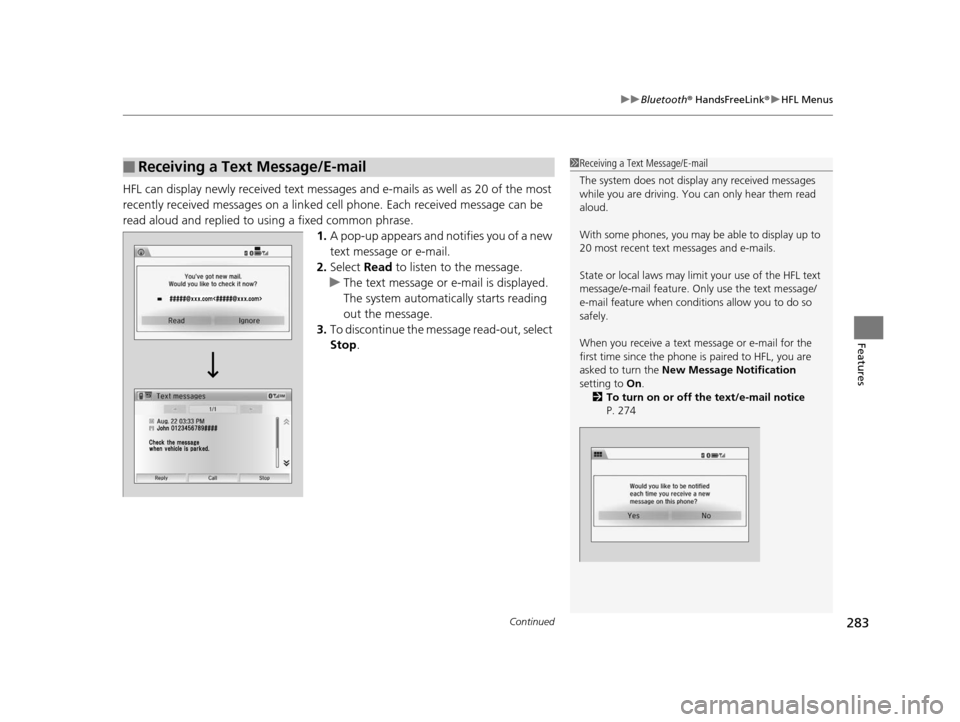
read aloud and replied to using a fixed common phrase. 1.A pop-up appears and notifies you of a new
text message or e-mail.
2. Select Read to listen to the message.
u The text message or e-mail is displayed.
The system automatica lly starts reading
out the message.
3. To discontinue the mess age read-out, select
Stop .
■Receiving a Text Message/E-mail1Receiving a Text Message/E-mail
The system does not display any received messages
while you are driving. You can only hear them read
aloud.
With some phones, you may be able to display up to
20 most recent text messages and e-mails.
State or local laws may limit your use of the HFL text
message/e-mail feature. Only use the text message/
e-mail feature when condi tions allow you to do so
safely.
When you receive a text message or e-mail for the
first time since the phone is paired to HFL, you are
asked to turn the New Message Notification
setting to On .
2 To turn on or off the text/e-mail notice
P. 274
14 CIVIC 2D_SI-31TS86210.book 283 ページ 2014年1月29日 水曜日 午後8時9分
Page 285 of 441
uuBluetooth ® HandsFreeLink ®u HFL Menus
284
Features
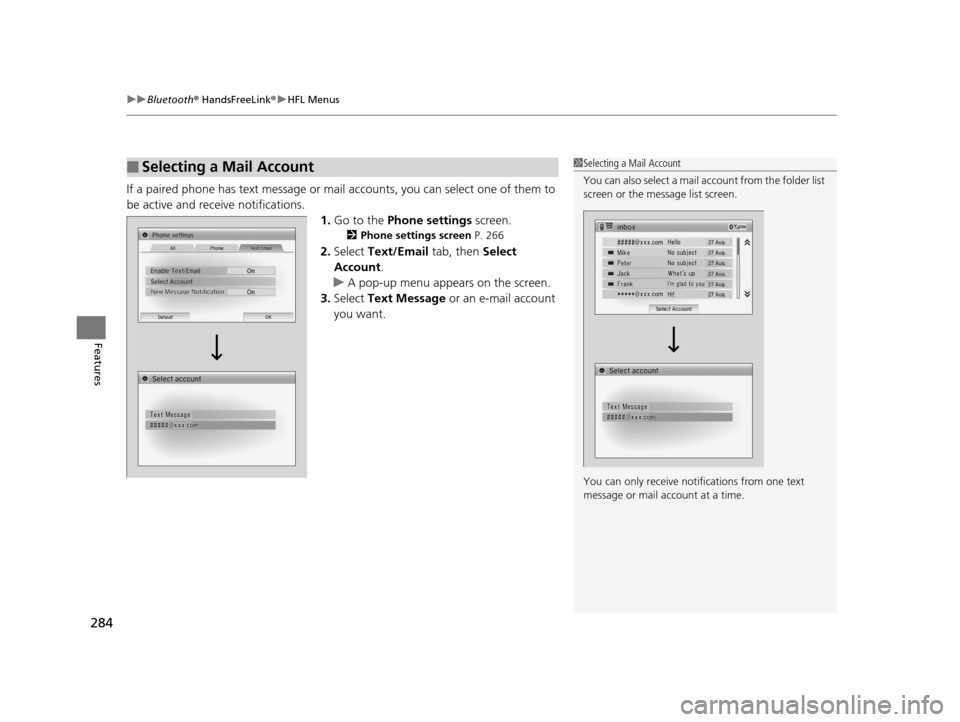
If a paired phone has text message or mail accounts, you can select one of them to
be active and receive notifications. 1.Go to the Phone settings screen.
2Phone settings screen P. 266
2.Select Text/Email tab, then Select
Account .
u A pop-up menu appears on the screen.
3. Select Text Message or an e-mail account
you want.
■Selecting a Mail Account1 Selecting a Mail Account
You can also select a mail account from the folder list
screen or the message list screen.
You can only receive notif ications from one text
message or mail a ccount at a time.
14 CIVIC 2D_SI-31TS86210.book 284 ページ 2014年1月29日 水曜日 午後8時9分
Page 286 of 441
Continued285
uuBluetooth ® HandsFreeLink ®u HFL Menus
Features
■Displaying text messages
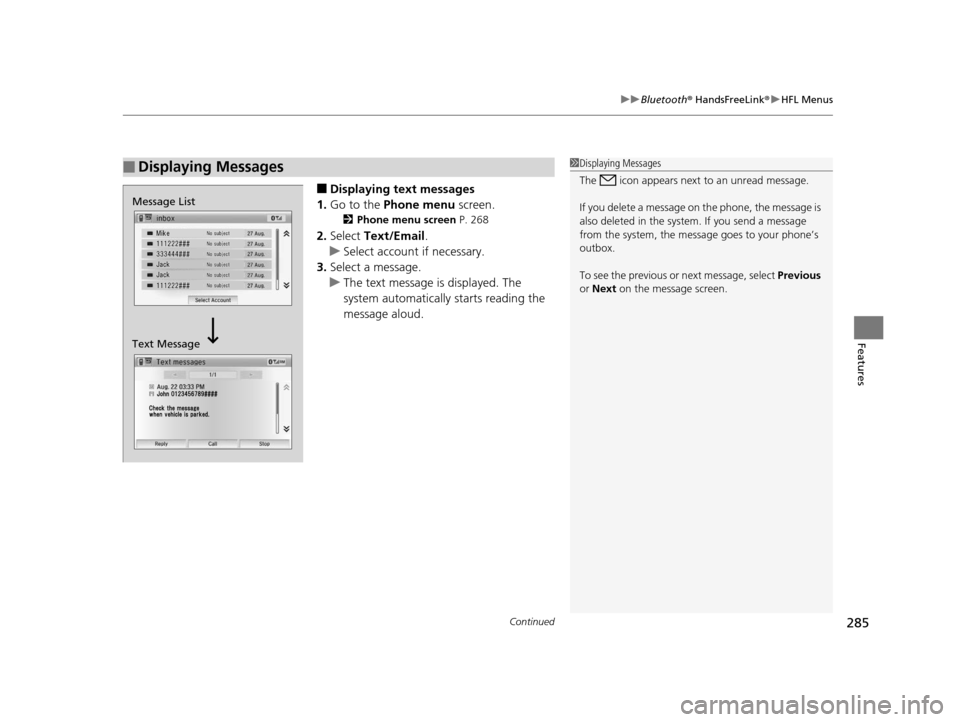
1. Go to the Phone menu screen.
2Phone menu screen P. 268
2.Select Text/Email .
u Select account if necessary.
3. Select a message.
u The text message is displayed. The
system automatically starts reading the
message aloud.
■Displaying Messages1Displaying Messages
The icon appears next to an unread message.
If you delete a message on the phone, the message is
also deleted in the system. If you send a message
from the system, the message goes to your phone’s
outbox.
To see the previous or next message, select Previous
or Next on the message screen.
Message List
Text Message
14 CIVIC 2D_SI-31TS86210.book 285 ページ 2014年1月29日 水曜日 午後8時9分
Page 287 of 441
286
uuBluetooth ® HandsFreeLink ®u HFL Menus
Features
■Displaying e-mails
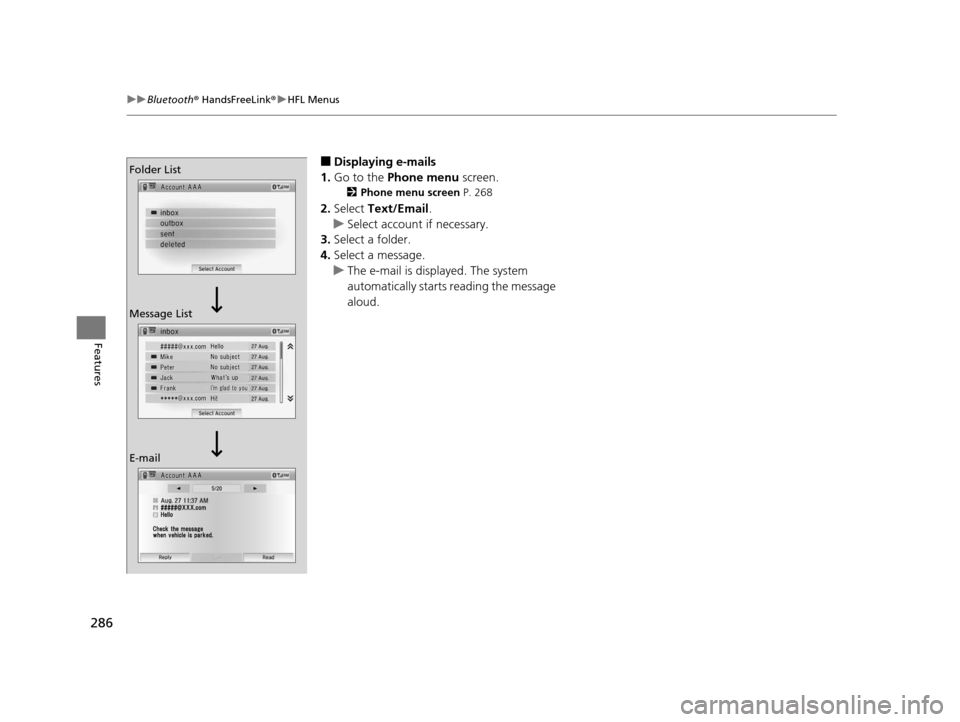
1. Go to the Phone menu screen.
2Phone menu screen P. 268
2.Select Text/Email .
u Select account if necessary.
3. Select a folder.
4. Select a message.
u The e-mail is displayed. The system
automatically starts reading the message
aloud.
Folder List
Message List
E-mail
14 CIVIC 2D_SI-31TS86210.book 286 ページ 2014年1月29日 水曜日 午後8時9分
Page 290 of 441
289
uuBluetooth ® HandsFreeLink ®u HFL Menus
Features
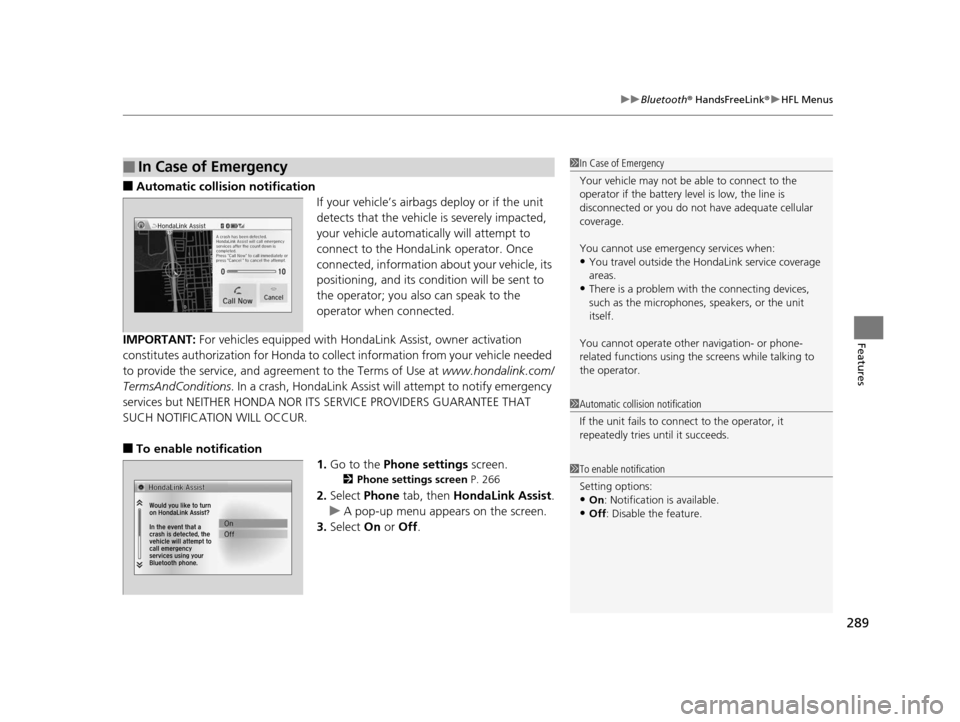
■Automatic collis ion notification
If your vehicle’s airbags deploy or if the unit
detects that the vehicle is severely impacted,
your vehicle automatically will attempt to
connect to the HondaLink operator. Once
connected, information about your vehicle, its
positioning, and its condition will be sent to
the operator; you also can speak to the
operator when connected.
IMPORTANT: For vehicles equipped with HondaLink Assist, owner activation
constitutes authorization for Honda to collect information from your vehicle needed
to provide the service, and agreement to the Terms of Use at www.hondalink.com/
TermsAndConditions . In a crash, HondaLink Assist will attempt to notify emergency
services but NEITHER HONDA NOR I TS SERVICE PROVIDERS GUARANTEE THAT
SUCH NOTIFICATION WILL OCCUR.
■To enable notification
1.Go to the Phone settings screen.
2Phone settings screen P. 266
2.Select Phone tab, then HondaLink Assist.
u A pop-up menu appears on the screen.
3. Select On or Off .
■In Case of Emergency1In Case of Emergency
Your vehicle may not be able to connect to the
operator if the battery level is low, the line is
disconnected or you do not have adequate cellular
coverage.
You cannot use emergency services when:
•You travel outside the HondaLink service coverage
areas.
•There is a problem with the connecting devices,
such as the microphones, speakers, or the unit
itself.
You cannot operate othe r navigation- or phone-
related functions using the screens while talking to
the operator.
1 Automatic collision notification
If the unit fails to connect to the operator, it
repeatedly tries until it succeeds.
1To enable notification
Setting options:
•On : Notification is available.
•Off : Disable the feature.
14 CIVIC 2D_SI-31TS86210.book 289 ページ 2014年1月29日 水曜日 午後8時9分
Page 430 of 441
429
Information
Authorized Manuals
■Service Express
For electronic copies of service publications, you can purchase a subscription to
Service Express. Visit www.techinfo.honda.com for pricing and options.
■For U.S. Owners:
Manuals can be purchased from Helm Incorporated. You can order a manual by
phone at (800) 782-4356 (credit card orders only), or online at www.helminc.com.
1Authorized Manuals
For Canadian Owners:
Please contact a dealer to order any manuals that you
may require.
14 CIVIC 2D_SI-31TS86210.book 429 ページ 2014年1月29日 水曜日 午後8時9分
Page 431 of 441
430
Information
Customer Service Information
Honda dealership personnel are trained professionals.
They should be able to answer all your questions. If you encounter a problem that
your dealership does not solve to your satisfaction, please discuss it with the
dealership's service manager or general manager. If you are dissatisfied with the
decision made by the dealership's management, contact Honda Customer Services.
U.S. Owners:
American Honda Motor Co., Inc.
Honda Automobile Customer Services
Mail Stop 500-2N-7A
1919 Torrance Blvd.
Torrance, CA 90501-2746
Tel: (800) 999-1009 Canadian Owners:
Honda Canada Inc.
Customer Relations
180 Honda Boulevard
Markham, ON
L6C 0H9
Tel: 1-888-9-HONDA-9
Fax: 1-877-939-0909
E-mail: [email protected]
In Puerto Rico and the U.S. Virgin
Islands:
Bella International
P.O. Box 190816
San Juan, PR 00919-0816
Tel: (787) 620-75461 Customer Service Information
When you call or write, please give us the following
information:
•Vehicle Identification Number
2Vehicle Identification Number (VIN)
P. 422
•Date of purchase
•Odometer reading of your vehicle•Your name, address, and telephone number
•A detailed description of the problem
•Name of the dealer who sold the vehicle to you
14 CIVIC 2D_SI-31TS86210.book 430 ページ 2014年1月29日 水曜日 午後8時9分
Page 435 of 441
434
Index
Fuel Fill Door....................................... 17, 333
Fuses .......................................................... 413
Inspecting and Changing ......................... 415
Locations ......................................... 413, 414
G
Gasoline (Fuel) Economy ................................................. 335
Gauge ....................................................... 81
Information ............................................. 332
Instant Fuel Economy ........................... 81, 86
Low Fuel Indicator ..................................... 69
Refueling ................................................. 332
Gauges ......................................................... 81
Gear Shift Lever Positions
Automatic Transmission (CVT) ......... 305, 307
Manual Transmission ............................... 312
Glass (care) ................................................ 388
Glove Box .................................................. 147
H
Halogen Bulbs ........................................... 364
Handling the Unexpected ........................ 391
HandsFreeLink® (HFL)....................... 233, 264
Automatic Import of Ce llular Phonebook and
Call History .................................... 249, 276
Automatic Transferring ............................ 247
Caller’s ID Information ............................. 247
Displaying Messages ........................ 260, 285 HFL Buttons..................................... 233, 264
HFL Menus ...................................... 235, 266
HFL Status Display ........................... 234, 265
Limitations for Manual Operation ............ 234
Making a Call .................................. 253, 279
Options During a Call ...................... 258, 282
Phone Setup.................................... 240, 270
Receiving a Call ............................... 257, 282
Receiving a Text Message/E-mail...... 259, 283
Ring Tone................................................ 275
Selecting a Mail Account ......................... 284
Speed Dial ....................................... 250, 277
Text Message .................. 245, 259, 274, 283
To Clear the System ................................ 248
To Create a Security PIN .......................... 246
To Set Up a Text Message/E-mail
Options ......................................... 245, 274
Hazard Warning Button .............................. 2
Head Restraints ........................................ 139
Headlights ................................................. 127
Aiming .................................................... 360
Automatic Operation............................... 128
Dimming ......................................... 127, 130
Operating................................................ 127
Heaters (Seat) ........................................... 151
Heating and Cooling System ................... 152
Cooling ................................................... 154
Defrosting the Windshield and
Windows ............................................... 154
Dust and Pollen Filter............................... 384
Heating ................................................... 153 HFL (HandsFreeLink
®) ...................... 233, 264
High Beam Indicator .................................. 73
Hill Start Assist System ..................... 299, 302
I
Identification Numbers ............................ 422
Engine and Transmission ......................... 422
Vehicle Identification............................... 422
Ignition Switch ......................................... 122
Illumination Control ................................ 132
Knob ...................................................... 132
i-MID ........................................................... 83
Immobilizer System .................................. 116
Indicator ................................................... 74
Indicators .................................................... 66
Anti-lock Brake System (ABS) .................... 69
Brake System (Amber) ............................... 66
Charging System............................... 67, 409
CRUISE CONTROL ............................. 75, 316
CRUISE MAIN.................................... 75, 315
Door Open.......................................... 29, 71
ECON Mode ..................................... 75, 314
Electric Power Steering (EPS) System ............................................ 72, 411
Fog Light .................................................. 73
High Beam ................................................ 73
High Temperature ..................................... 70
Immobilizer System ................................... 74
i-VTEC ................................................ 75, 82
Lights On .................................................. 73
14 CIVIC 2D_SI-31TS86210.book 434 ページ 2014年1月29日 水曜日 午後8時9分