key HONDA CIVIC COUPE 2015 9.G Owners Manual
[x] Cancel search | Manufacturer: HONDA, Model Year: 2015, Model line: CIVIC COUPE, Model: HONDA CIVIC COUPE 2015 9.GPages: 441, PDF Size: 18.4 MB
Page 23 of 441
22Quick Reference Guide
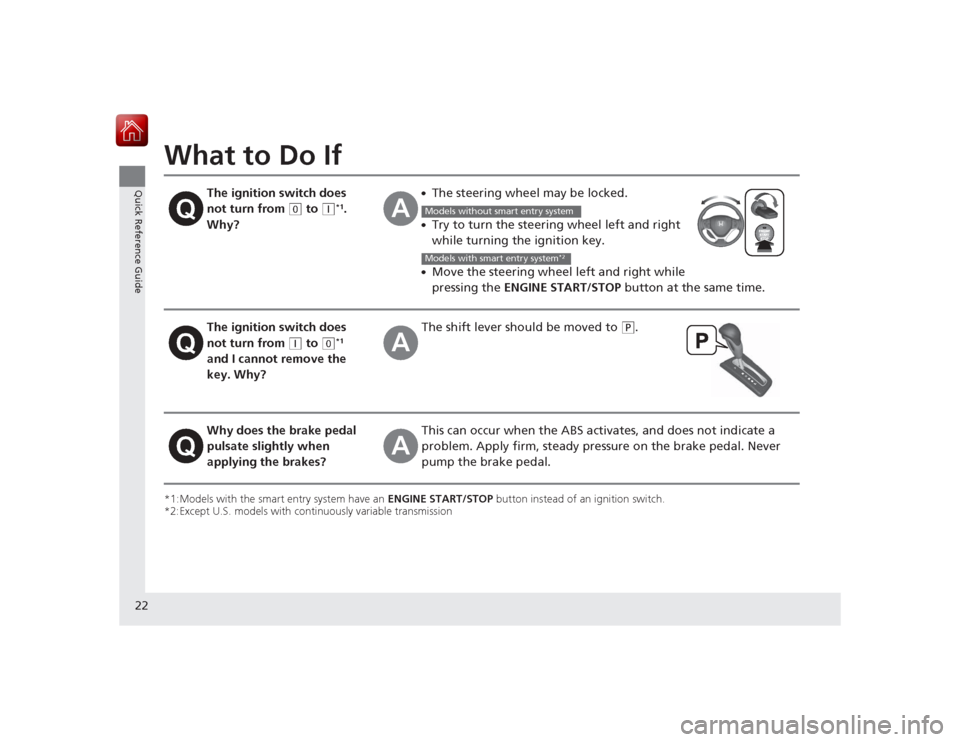
What to Do If*1:Models with the smart entry system have an ENGINE START/STOP button instead of an ignition switch.
*2:Except U.S. models with continuously variable transmission
The ignition switch does
not turn from
(0
to
(q
*1.
Why?
●The steering wheel may be locked.●Try to turn the steering wheel left and right
while turning the ignition key.●Move the steering wheel left and right while
pressing the ENGINE START/STOP button at the same time.
The ignition switch does
not turn from
(q
to
(0
*1
and I cannot remove the
key. Why?
The shift lever s hould be moved to
(P
.
Why does the brake pedal
pulsate slightly when
applying the brakes?
This can occur when the ABS act ivates, and does not indicate a
problem. Apply firm, steady pressure on the brake pedal. Never
pump the brake pedal.Models without smart entry systemModels with smart entry system
*2
Page 24 of 441
23Quick Reference Guide
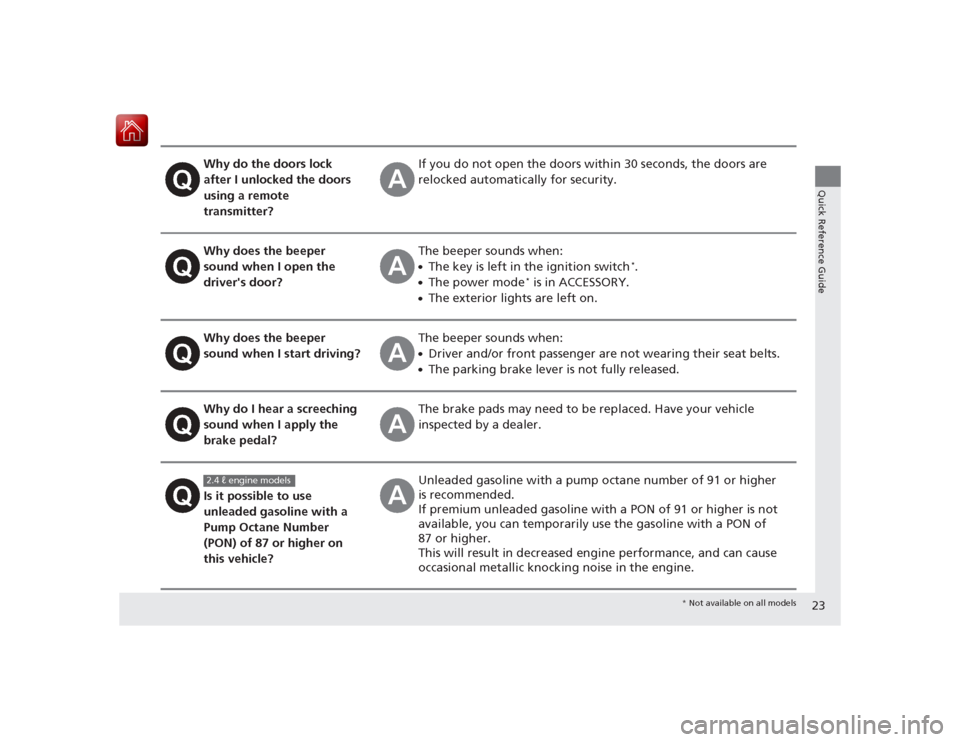
Why do the doors lock
after I unlocked the doors
using a remote
transmitter?
If you do not open the doors within 30 seconds, the doors are
relocked automatically for security.
Why does the beeper
sound when I open the
driver's door?
The beeper sounds when:●The key is left in the ignition switch
*.
●The power mode
* is in ACCESSORY.
●The exterior lights are left on.
Why does the beeper
sound when I start driving?
The beeper sounds when:●Driver and/or front passenger are not wearing their seat belts.●The parking brake lever is not fully released.
Why do I hear a screeching
sound when I apply the
brake pedal?
The brake pads may need to be replaced. Have your vehicle
inspected by a dealer.
Is it possible to use
unleaded gasoline with a
Pump Octane Number
(PON) of 87 or higher on
this vehicle?
Unleaded gasoline with a pump octane number of 91 or higher
is recommended.
If premium unleaded gasoline with a PON of 91 or higher is not
available, you can temporarily use the gasoline with a PON of
87 or higher.
This will result in decreased engine performance, and can cause
occasional metallic knocking noise in the engine.
2.4 ℓ engine models
* Not available on all models
Page 55 of 441
uuChild Safety uSafety of Infants and Small Children
54Safe Driving
Most child seats are LATCH-compatible (Lower Anchors and Tethers for CHildren).
Some have a rigid-type connector, while others have a flexible-type connector. Both
are equally easy to use. Some existing and previously owned child seats can only be
installed using the seat belt. Whichever ty pe you choose, follow the child seat
manufacturer's use and care instructions as well as the instructions in this manual.
Proper installation is key to maximizing your child's safety.
In seating positions and vehicl es not equipped with LATCH, a LATCH compatible
child seat can be installed using the seat bel t and a top tether for added security.
This is because all child seats are required to be designed so that they can be secured
with a lap belt or the lap part of a lap/sho ulder belt. In addition, the child seat
manufacturer may advise that a seat belt be used to attach a LATCH-compatible seat
once a child reaches a specified weight. Please read the child seat owner’s manual
for proper installation instructions.■Important consideration when sele cting a child seat
Make sure the child seat meets the following three requirements:
• The child seat is the correct type and size for the child.
• The child seat is the correct type for the seating position.
• The child seat is compliant with Federal Motor Vehicle Safety Standard 213 or
Canadian Motor Vehicle Safety Standard 213.■
Selecting a Child Seat
1Selecting a Child Seat
Installation of a LATCH-compatible child seat is
simple.
LATCH-compatible child seats have been developed
to simplify the installation process and reduce the
likelihood of injuries caused by incorrect installation.
Page 74 of 441
73
uuIndicators u
Continued
Instrument Panel
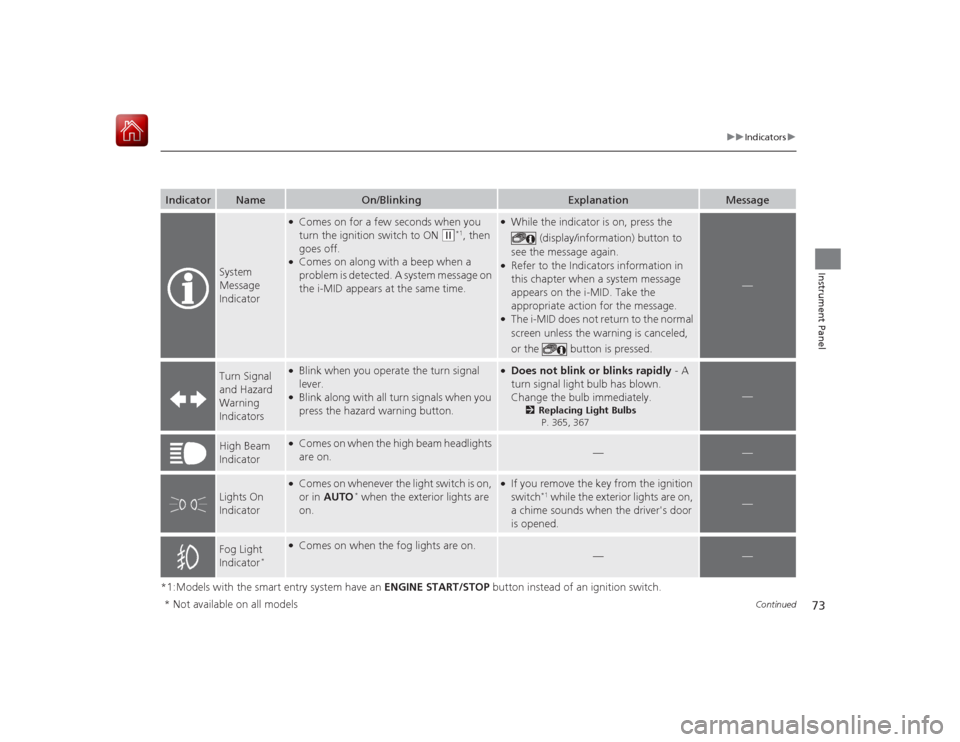
*1:Models with the smart entry system have an ENGINE START/STOP button instead of an ignition switch.Indicator
Name
On/Blinking
Explanation
Message
System
Message
Indicator
●Comes on for a few seconds when you
turn the ignition switch to ON
(w
*1, then
goes off.
●Comes on along with a beep when a
problem is detected. A system message on
the i-MID appears at the same time.
●While the indicator is on, press the
(display/information) button to
see the message again.●Refer to the Indicators information in
this chapter when a system message
appears on the i-MID. Take the
appropriate action for the message.●The i-MID does not return to the normal
screen unless the warning is canceled,
or the button is pressed.
—
Turn Signal
and Hazard
Warning
Indicators
●Blink when you operate the turn signal
lever.●Blink along with all turn signals when you
press the hazard warning button.
●Does not blink or blinks rapidly - A
turn signal light bulb has blown.
Change the bulb immediately.
2 Replacing Light Bulbs
P. 365, 367
—
High Beam
Indicator
●Comes on when the high beam headlights
are on.
—
—
Lights On
Indicator
●Comes on whenever the light switch is on,
or in AUTO
* when the exterior lights are
on.
●If you remove the key from the ignition
switch
*1 while the exterior lights are on,
a chime sounds when the driver's door
is opened.
—
Fog Light
Indicator
*
●Comes on when the fog lights are on.
—
—
* Not available on all models
Page 75 of 441
74
uuIndicators u
Instrument Panel
*1:Models with the smart entry system have an ENGINE START/STOP button instead of an ignition switch.Indicator
Name
On/Blinking
Explanation
Message
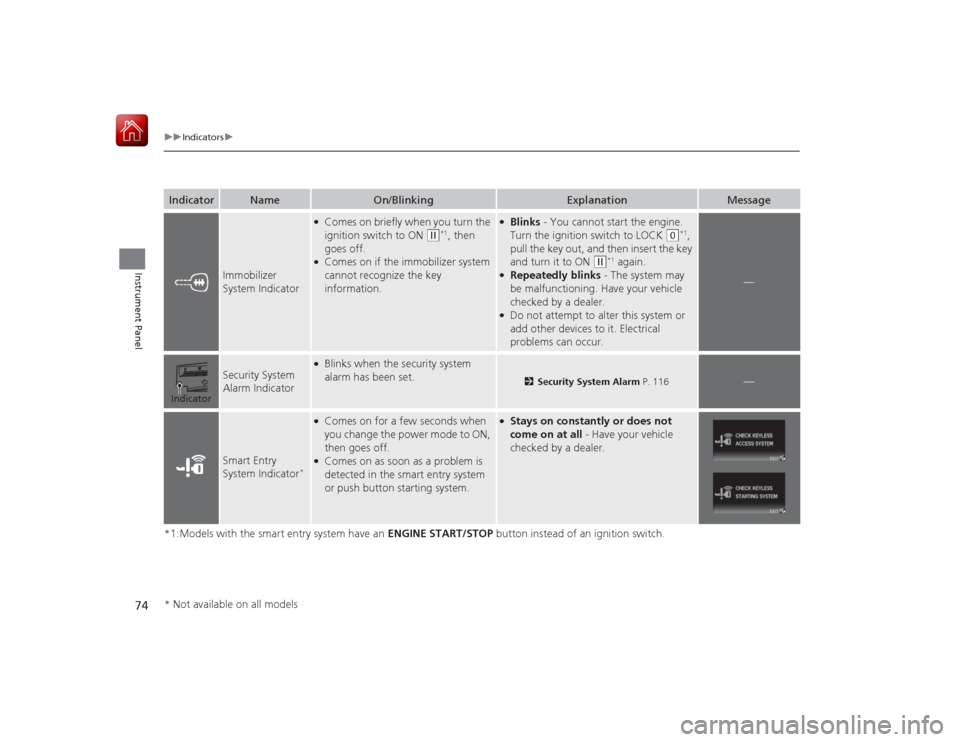
Immobilizer
System Indicator
●Comes on briefly when you turn the
ignition switch to ON
(w
*1, then
goes off.
●Comes on if the immobilizer system
cannot recognize the key
information.
●Blinks - You cannot start the engine.
Turn the ignition switch to LOCK
(0
*1,
pull the key out, and then insert the key
and turn it to ON
(w
*1 again.
●Repeatedly blinks - The system may
be malfunctioning. Have your vehicle
checked by a dealer.●Do not attempt to alter this system or
add other devices to it. Electrical
problems can occur.
—
Security System
Alarm Indicator
●Blinks when the security system
alarm has been set.
2 Security System Alarm P. 116
—
Smart Entry
System Indicator
*
●Comes on for a few seconds when
you change the power mode to ON,
then goes off.●Comes on as soon as a problem is
detected in the smart entry system
or push button starting system.
●Stays on constantly or does not
come on at all - Have your vehicle
checked by a dealer.
Indicator* Not available on all models
Page 78 of 441
77
uuIndicators uintelligent Multi-Informati on Display (i-MID) Warning and Information Messages
Continued
Instrument Panel
Message
Condition
Explanation
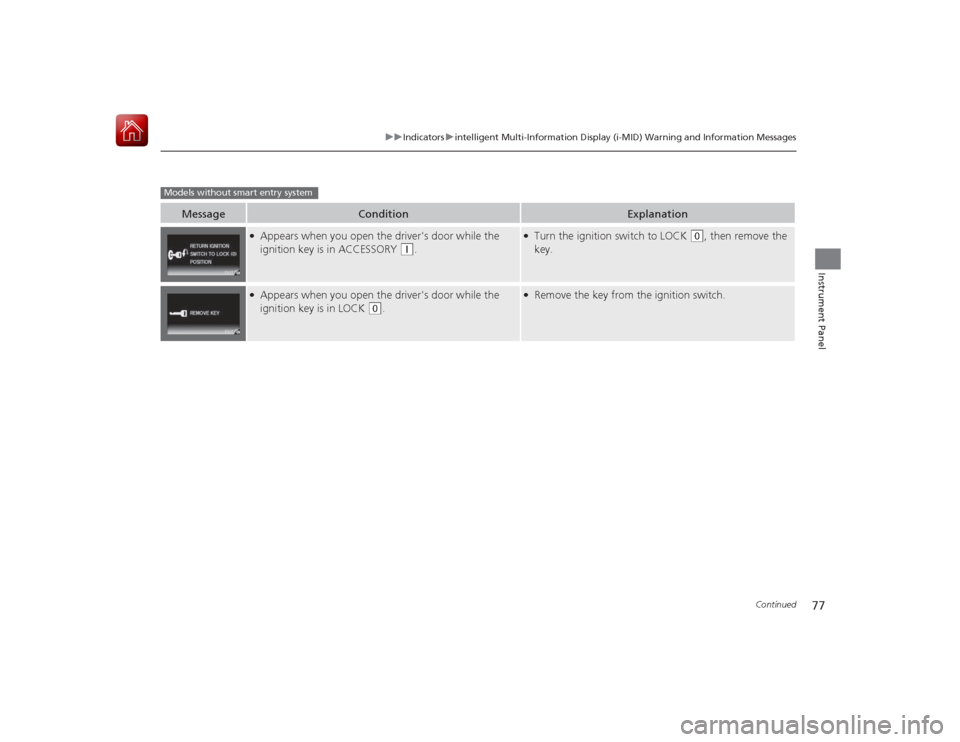
●Appears when you open the driver's door while the
ignition key is in ACCESSORY
(q
.
●Turn the ignition switch to LOCK
(0
, then remove the
key.
●Appears when you open the driver's door while the
ignition key is in LOCK
(0
.
●Remove the key from the ignition switch.
Models without smart entry system
Page 81 of 441
80
uuIndicators uintelligent Multi-Information Display (i -MID) Warning and Information Messages
Instrument Panel
Message
Condition
Explanation
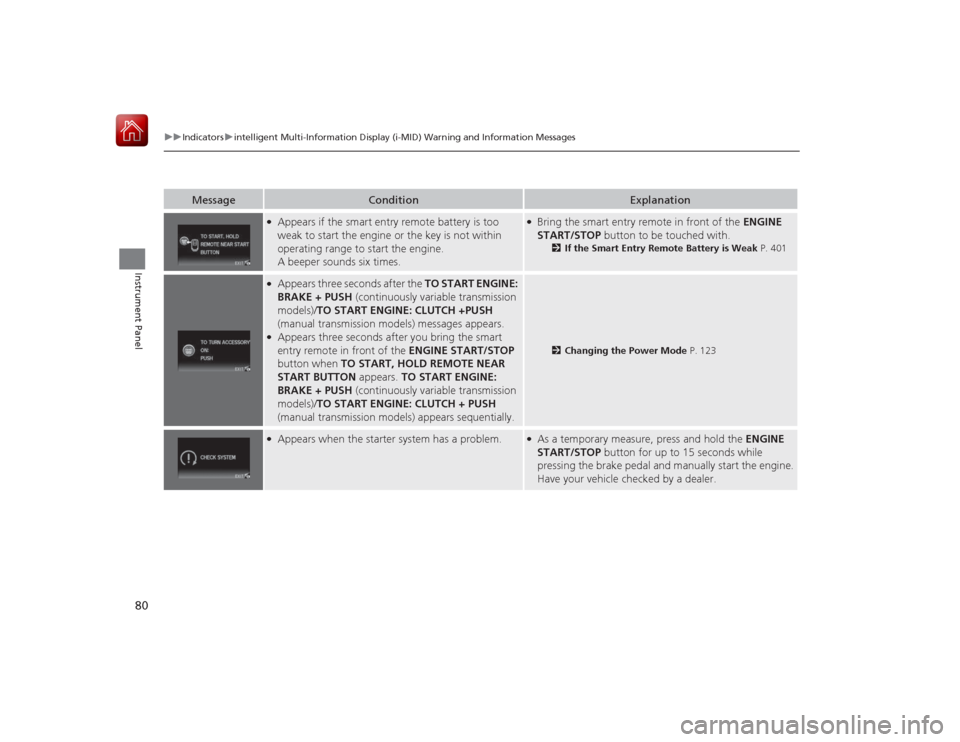
●Appears if the smart entry remote battery is too
weak to start the engine or the key is not within
operating range to start the engine.
A beeper sounds six times.
●Bring the smart entry remote in front of the ENGINE
START/STOP button to be touched with.
2If the Smart Entry Remote Battery is Weak P. 401
●Appears three seconds after the TO START ENGINE:
BRAKE + PUSH (continuously variable transmission
models)/ TO START ENGINE: CLUTCH +PUSH
(manual transmission models) messages appears.●Appears three seconds after you bring the smart
entry remote in front of the ENGINE START/STOP
button when TO START, HOLD REMOTE NEAR
START BUTTON appears. TO START ENGINE:
BRAKE + PUSH (continuously variable transmission
models)/ TO START ENGINE: CLUTCH + PUSH
(manual transmission models) appears sequentially.
2 Changing the Power Mode P. 123
●Appears when the starter system has a problem.
●As a temporary measure, press and hold the ENGINE
START/STOP button for up to 15 seconds while
pressing the brake pedal and manually start the engine.
Have your vehicle checked by a dealer.
Page 90 of 441
89
uuGauges and Multi-Information Display uintelligent Multi-Information Display (i-MID)
Continued
Instrument Panel
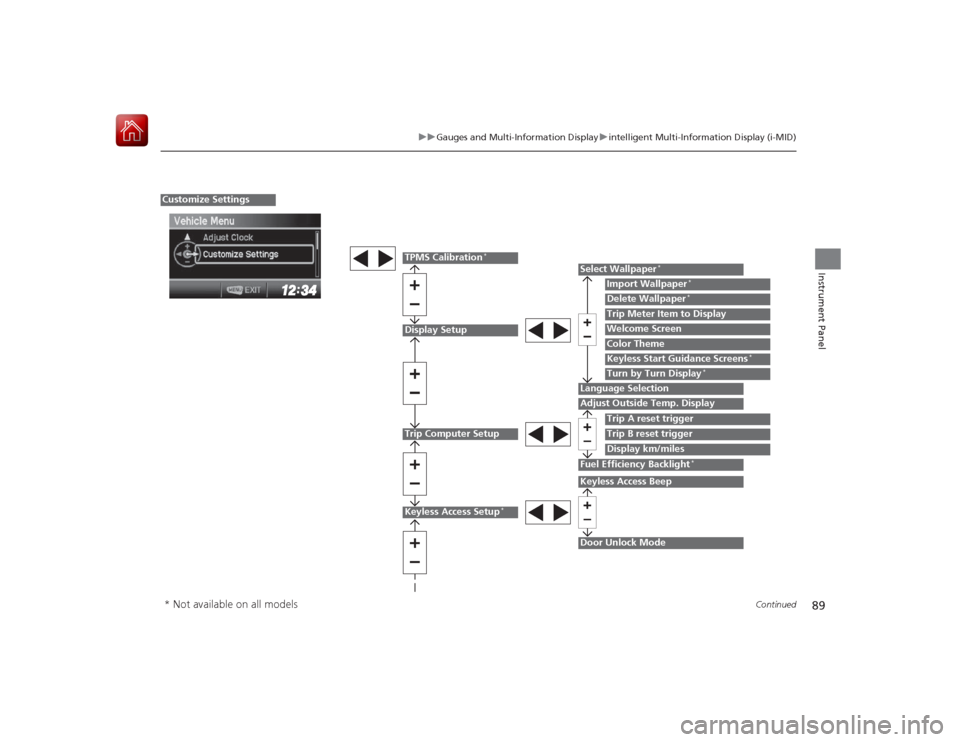
Display SetupTrip Computer Setup
Select Wallpaper
*
Import Wallpaper
*
Delete Wallpaper
*
Language SelectionAdjust Outside Temp. Display
Trip A reset triggerDisplay km/milesTrip Meter Item to DisplayWelcome ScreenColor Theme
Fuel Efficiency Backlight
*
Customize Settings
Turn by Turn Display
*
Trip B reset trigger
TPMS Calibration
*
Keyless Start Guidance Screens
*
Keyless Access Setup
*
Door Unlock ModeKeyless Access Beep
* Not available on all models
Page 91 of 441
90
uuGauges and Multi- Information Display uintelligent Multi-Information Display (i-MID)
Instrument Panel
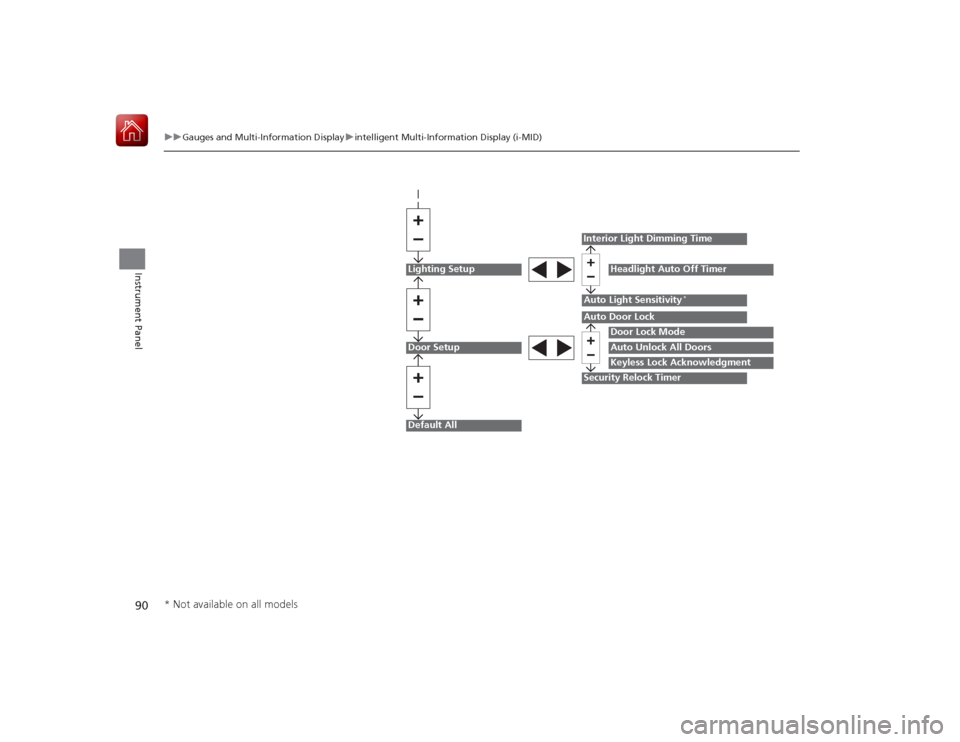
Lighting SetupDoor SetupDefault All
Auto Light Sensitivity
*
Door Lock ModeAuto Unlock All DoorsKeyless Lock Acknowledgment
Auto Door LockSecurity Relock TimerInterior Light Dimming Time
Headlight Auto Off Timer
* Not available on all models
Page 93 of 441
92
uuGauges and Multi- Information Display uintelligent Multi-Information Display (i-MID)
Instrument Panel
*1: Models with the smart entry system have an ENGINE START/STOP button instead of an ignition switch.
*2: Default Setting
*3: Default Setting for 1.8 ℓ engine models
*4: Default Setting for 2.4 ℓ engine models
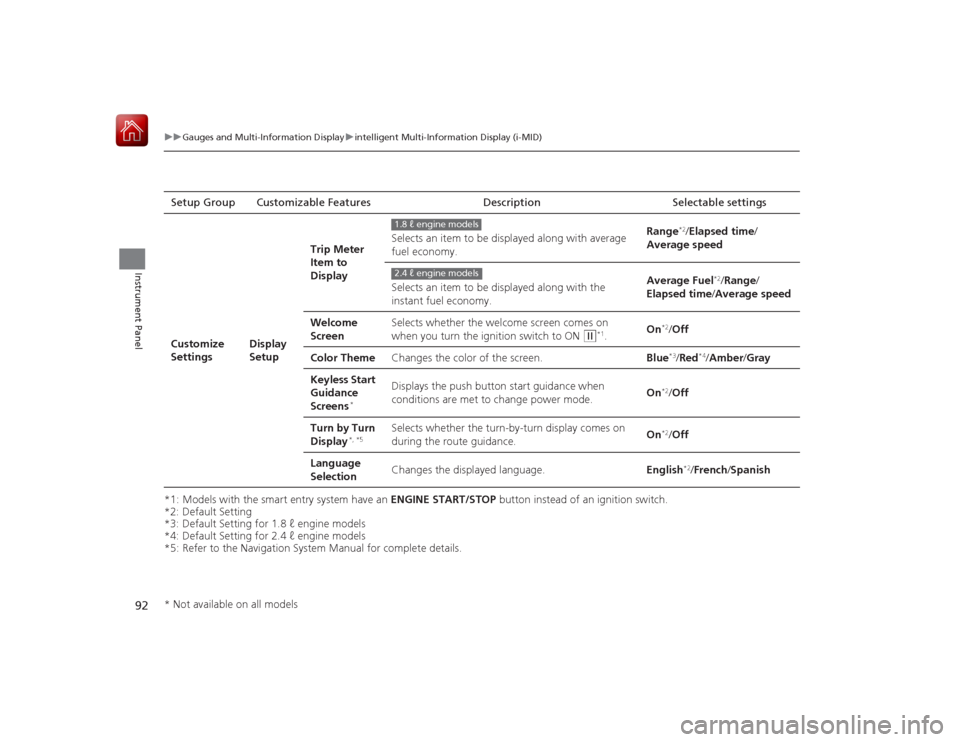
*5: Refer to the Navigation System Manual for complete details. Setup Group Customizable
FeaturesDescription Selectable settingsCustomize
Settings
Display
SetupTrip Meter
Item to
Display
Selects an item to be displayed along with average
fuel economy.
Range
*2/
Elapsed time /
Average speed
Selects an item to be displayed along with the
instant fuel economy. Average Fuel
*2/
Range /
Elapsed time /Average speed
Welcome
Screen Selects whether the welcome screen comes on
when you turn the ignition switch to ON
(w
*1.
On
*2/
Off
Color Theme Changes the color of the screen. Blue*3/Red
*4/Amber /Gray
Keyless Start
Guidance
Screens
*
Displays the push button start guidance when
conditions are met to change power mode. On
*2/
Off
Turn by Turn
Display
*, *5
Selects whether the turn-by-turn display comes on
during the route guidance. On
*2/
Off
Language
Selection Changes the displayed language.
English
*2/French /Spanish
1.8 ℓ engine models2.4 ℓ engine models
* Not available on all models