reset HONDA CIVIC COUPE 2015 9.G Owners Manual
[x] Cancel search | Manufacturer: HONDA, Model Year: 2015, Model line: CIVIC COUPE, Model: HONDA CIVIC COUPE 2015 9.GPages: 441, PDF Size: 18.4 MB
Page 6 of 441
5Quick Reference Guide
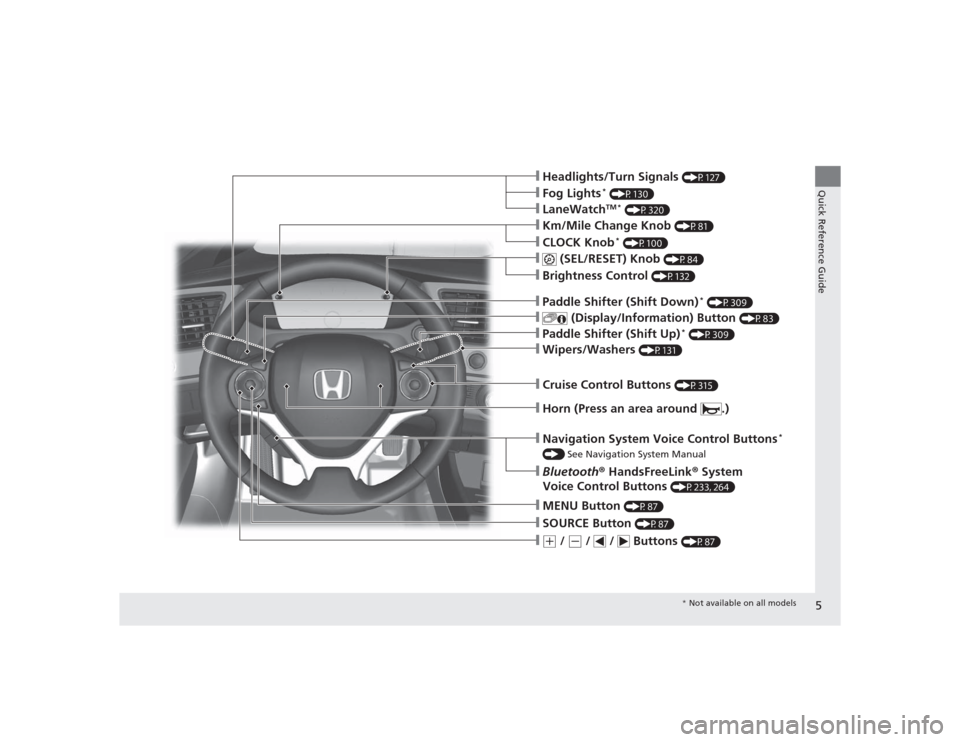
❙Headlights/Turn Signals
(P127)
❙Wipers/Washers
(P131)
❙Km/Mile Change Knob
(P81)
❙CLOCK Knob
* (P100)
❙MENU Button
(P87)
❙(+
/
(-
/ / Buttons
(P87)
❙Navigation System Voice Control Buttons
*
() See Navigation System Manual❙Bluetooth® HandsFreeLink ® System
Voice Control Buttons
(P233, 264)
❙
(SEL/RESET) Knob
(P84)
❙SOURCE Button
(P87)
❙
(Display/Information) Button
(P83)
❙Brightness Control
(P132)
❙LaneWatch
TM *
(P320)
❙Fog Lights
* (P130)
❙Paddle Shifter (Shift Down)
* (P309)
❙Paddle Shifter (Shift Up)
* (P309)
❙Cruise Control Buttons
(P315)
❙Horn (Press an area around .)
* Not available on all models
Page 17 of 441
16Quick Reference Guide
Features
(P159)
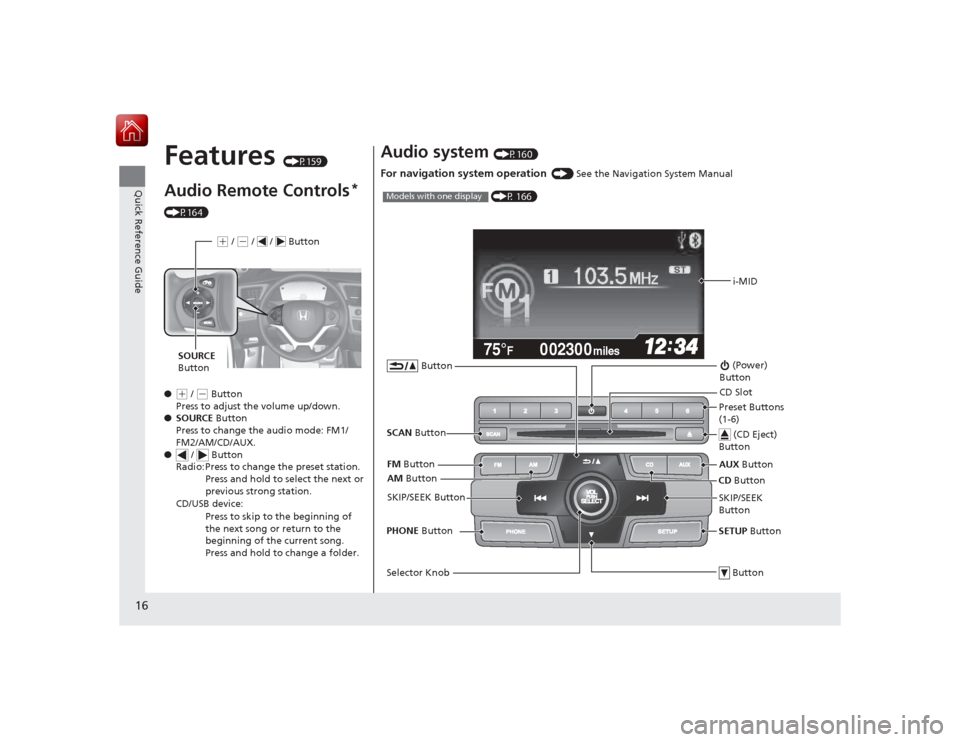
Audio Remote Controls
*
(P164)
●
(+ / ( - Button
Press to adjust the volume up/down.
● SOURCE Button
Press to change the audio mode: FM1/
FM2/AM/CD/AUX.
● / Button
Radio: Press to change the preset station.
Press and hold to select the next or
previous strong station.
CD/USB device: Press to skip to the beginning of
the next song or return to the
beginning of the current song.
Press and hold to change a folder.(+ / (- / / Button
SOURCE
Button
Audio system
(P160)
For navigation system operation
() See the Navigation System Manual002300
75°
F miles
i-MID
AM Button
FM
Button
SCAN Button
SKIP/SEEK Button
Selector Knob Button (Power)
ButtonCD Button
AUX
Button
CD Slot
(CD Eject)
ButtonPreset Buttons
(1-6)
ButtonSETUP Button
SKIP/SEEK
Button
PHONE
Button
(P 166)
Models with one display
Page 85 of 441

uuGauges and Multi- Information Display uintelligent Multi-Information Display (i-MID)
84Instrument Panel
■Trip computer
Press the ( SEL/RESET) knob to change the display.
Shows the total number of miles or kilometers that your vehicle has accumulated.
Shows the total number of miles or kilometers driven since the last reset. Meters A
and B can be used to measure two separate trips.■Resetting a trip meter
To reset a trip meter, display it, then press and hold the knob. The trip meter is
reset to 0.0 .■
Odometer
■
Trip Meter
123.4A
12.3B123456
123456
123456
B24.030
40
40Odometer
Outside temperature Trip A
Trip B
SEL
/RESET
Knob
1 Trip Meter
Switch between trip meter A and trip meter B by
pressing the knob, or by using the customized
features on the i-MID.
2 Customized Features P. 87
Page 86 of 441
Continued
85
uuGauges and Multi-Information Display uintelligent Multi-Information Display (i-MID)
Instrument Panel
Shows the estimated average fuel economy of each trip meter in mpg or l/100 km.
The display is updated at set intervals. When a trip meter is reset, the average fuel
economy is also reset.
Shows the estimated distance you can travel on the remaining fuel. This distance is
estimated from the fuel economy of your previous trips.
Shows the time elapsed since Trip A or Trip B was reset.
Shows the average speed in mph or km/h since Trip A or Trip B was reset.
Shows the remaining oil life and Maintenance Minder
TM.
2 Maintenance Minder
TM P. 341
■
Average Fuel Economy
■
Range
■
Elapsed Time
■
Average Speed
■
Engine Oil Life
1Average Fuel Economy
You can change when to reset the average fuel
economy.
2 Customized Features P. 87
You can choose an item to be displayed in the fuel
consumption screen. Average fuel economy, range,
elapsed time, or average speed can be selected. 2 Customized Features P. 87
2 Switching the Display P. 832.4 ℓ engine models1Range
You can choose an item to be displayed in the fuel
consumption screen. Range, elapsed time, or average
speed can be selected.
2 Customized Features P. 87
2 Switching the Display P. 831.8 ℓ engine models
Page 89 of 441
88
uuGauges and Multi- Information Display uintelligent Multi-Information Display (i-MID)
Instrument Panel
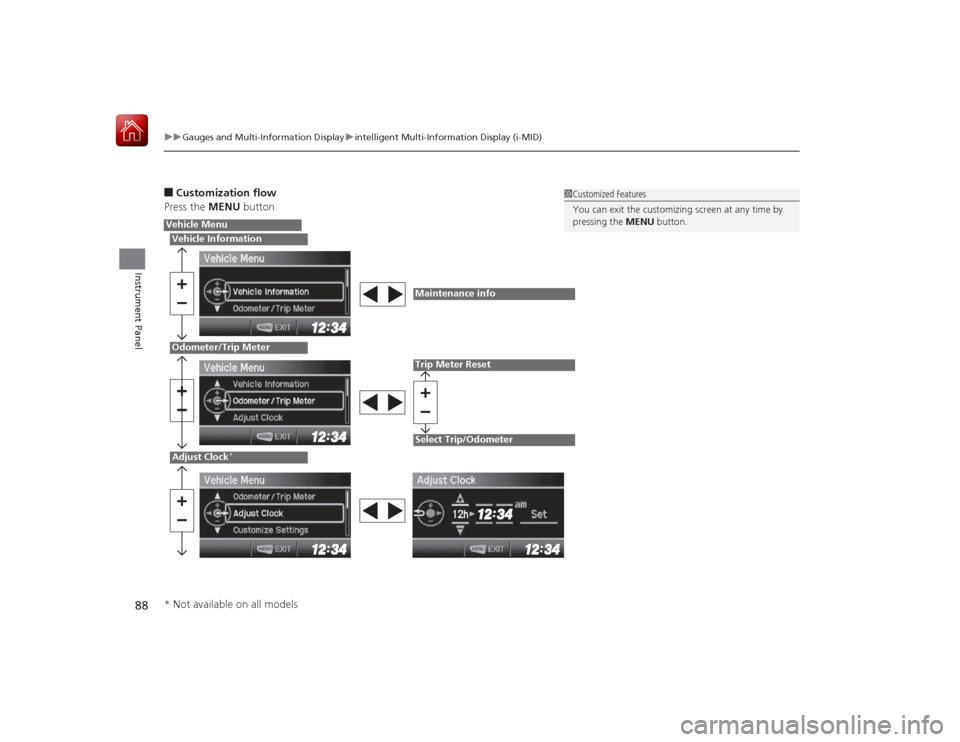
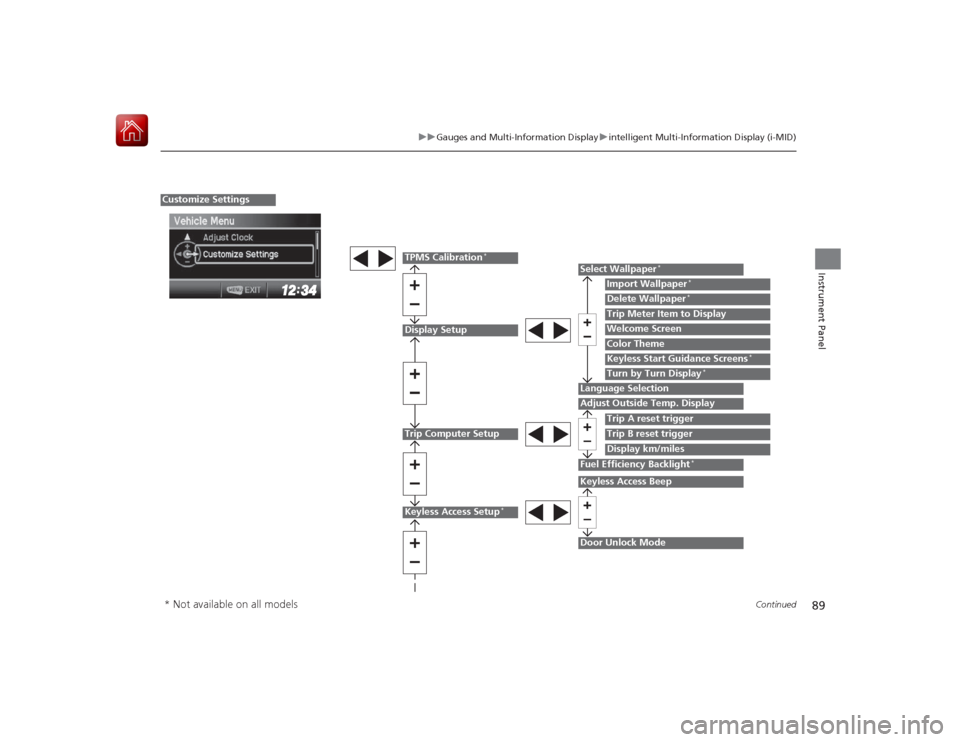
■Customization flow
Press the MENU button.
1Customized Features
You can exit the customizing screen at any time by
pressing the MENU button.
Vehicle MenuVehicle InformationOdometer/Trip MeterAdjust Clock
*
Maintenance infoTrip Meter ResetSelect Trip/Odometer
* Not available on all models
Page 90 of 441
89
uuGauges and Multi-Information Display uintelligent Multi-Information Display (i-MID)
Continued
Instrument Panel
Display SetupTrip Computer Setup
Select Wallpaper
*
Import Wallpaper
*
Delete Wallpaper
*
Language SelectionAdjust Outside Temp. Display
Trip A reset triggerDisplay km/milesTrip Meter Item to DisplayWelcome ScreenColor Theme
Fuel Efficiency Backlight
*
Customize Settings
Turn by Turn Display
*
Trip B reset trigger
TPMS Calibration
*
Keyless Start Guidance Screens
*
Keyless Access Setup
*
Door Unlock ModeKeyless Access Beep
* Not available on all models
Page 92 of 441
91
uuGauges and Multi-Information Display uintelligent Multi-Information Display (i-MID)
Continued
Instrument Panel
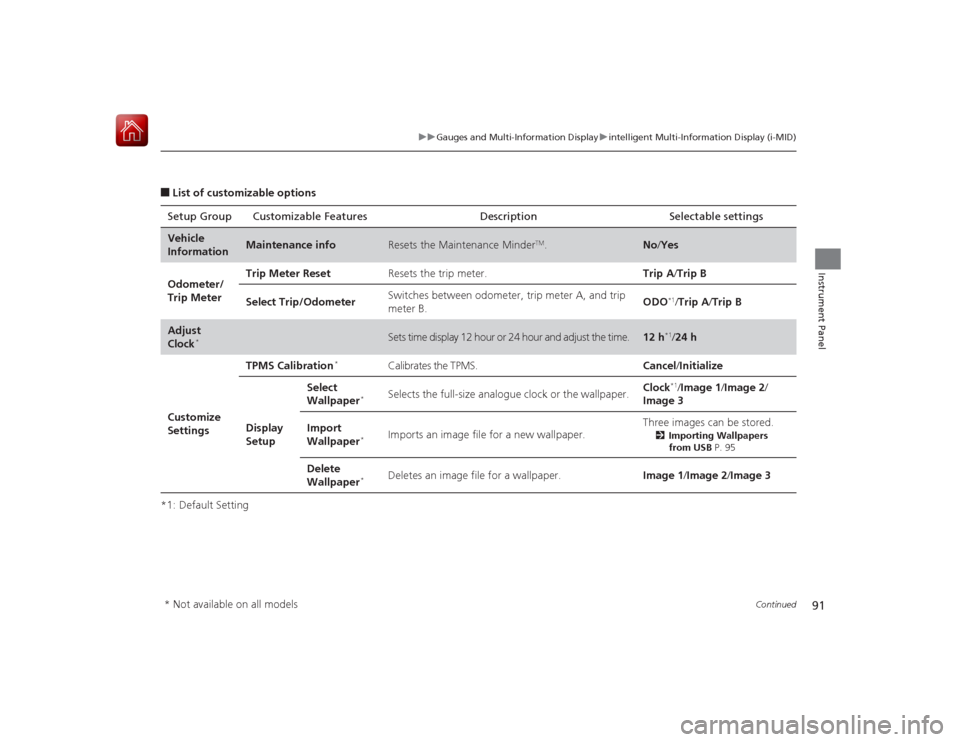
■List of customizable options
*1: Default Setting Setup Group Customizable Features Description Selectable settingsVehicle
Information
Maintenance info
Resets the Maintenance Minder
TM.
No
/Yes
Odometer/
Trip Meter Trip Meter Reset
Resets the trip meter. Trip A/Trip B
Select Trip/Odometer Switches between odometer, trip meter A, and trip
meter B. ODO
*1/
Trip A /Trip B
Adjust
Clock
*
Sets time display 12 hour or 24 hour and adjust the time.
12 h
*1/24 h
Customize
Settings TPMS Calibration
*
Calibrates the TPMS.
Cancel/Initialize
Display
Setup Select
Wallpaper
*
Selects the full-size analogue clock or the wallpaper.
Clock
*1/
Image 1/ Image 2/
Image 3
Import
Wallpaper
*
Imports an image file for a new wallpaper. Three images can be stored.
2
Importing Wallpapers
from USB P. 95
Delete
Wallpaper
*
Deletes an image file for a wallpaper. Image 1/Image 2/Image 3
* Not available on all models
Page 94 of 441
93
uuGauges and Multi-Information Display uintelligent Multi-Information Display (i-MID)
Continued
Instrument Panel
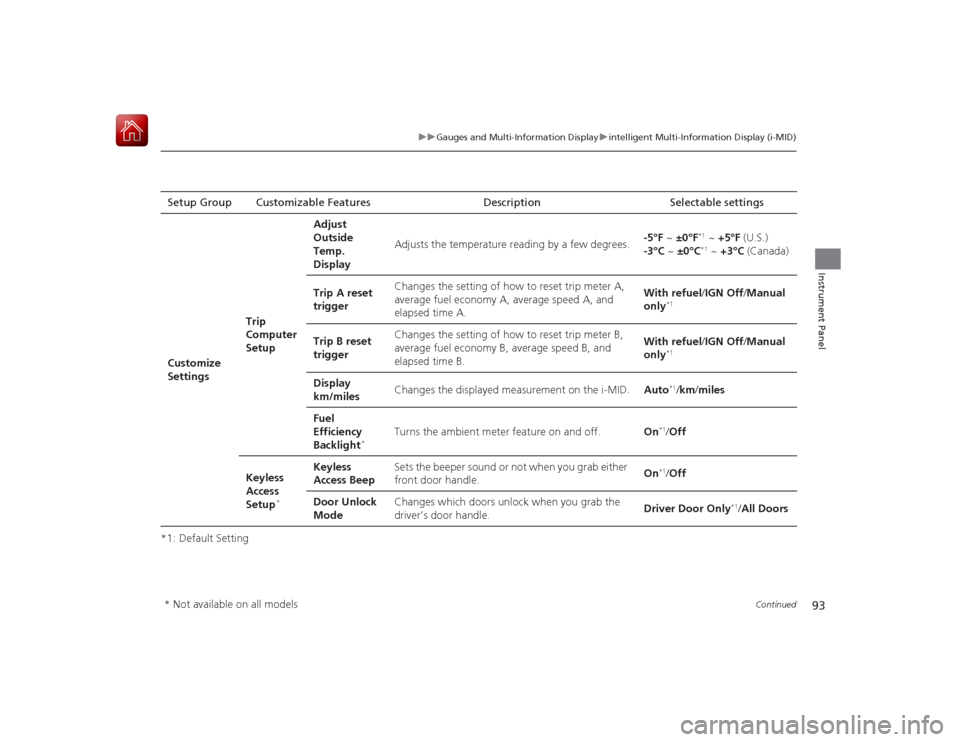
*1: Default SettingSetup Group Customizable Features D
escription Selectable settings
Customize
Settings Trip
Computer
SetupAdjust
Outside
Temp.
Display
Adjusts the temperature reading by a few degrees.
-5°F
~ ±0°F
*1 ~ +5°F (U.S.)
-3°C ~ ±0°C*1 ~ +3°C (Canada)
Trip A reset
trigger Changes the setting of how to reset trip meter A,
average fuel economy A, average speed A, and
elapsed time A. With refuel
/IGN Off/ Manual
only
*1
Trip B reset
trigger Changes the setting of how to reset trip meter B,
average fuel economy B, average speed B, and
elapsed time B. With refuel
/IGN Off/ Manual
only
*1
Display
km/miles Changes the displayed measurement on the i-MID.
Auto
*1/km /miles
Fuel
Efficiency
Backlight
*
Turns the ambient meter feature on and off. On
*1/Off
Keyless
Access
Setup
*
Keyless
Access Beep Sets the beeper sound or not when you grab either
front door handle.
On
*1/
Off
Door Unlock
Mode Changes which doors unlock when you grab the
driver’s door handle.
Driver Door Only
*1/
All Doors
* Not available on all models
Page 95 of 441
94
uuGauges and Multi- Information Display uintelligent Multi-Information Display (i-MID)
Instrument Panel
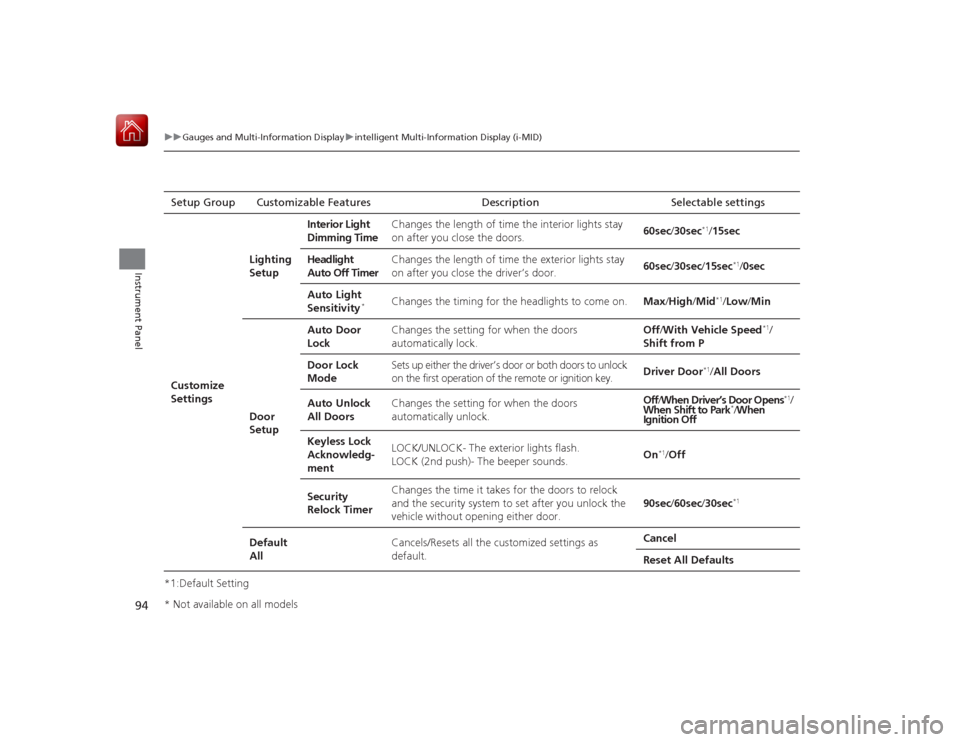
*1:Default SettingSetup Group Customizable
Features Description Selectable settingsCustomize
SettingsLighting
Setup
Interior Light
Dimming Time
Changes the length of time the interior lights stay
on after you close the doors.
60sec/
30sec
*1/15sec
Headlight
Auto Off Timer Changes the length of time the exterior lights stay
on after you close the driver’s door.
60sec/
30sec/ 15sec
*1/0sec
Auto Light
Sensitivity
*
Changes the timing for the headlights to come on. Max/High /Mid
*1/Low/ Min
Door
Setup Auto Door
Lock
Changes the setting for when the doors
automatically lock. Off
/With Vehicle Speed
*1/
Shift from P
Door Lock
Mode Sets up either the driver’s door or both doors to unlock
on the first operation of the remote or ignition key.
Driver Door
*1/
All Doors
Auto Unlock
All Doors Changes the setting for when the doors
automatically unlock. Off
/When Driver’s Door Opens
*1/
When Shift to Park
*/ When
Ignition Off
Keyless Lock
Acknowledg-
ment LOCK/UNLOCK- The exterior lights flash.
LOCK (2nd push)- The beeper sounds.
On
*1/
Off
Security
Relock Timer Changes the time it takes for the doors to relock
and the security system to set after you unlock the
vehicle without opening either door.
90sec/
60sec/ 30sec
*1
Default
All Cancels/Resets all the customized settings as
default. Cancel
Reset All Defaults
* Not available on all models
Page 133 of 441
132
uuOperating the Switches Around the Steering Wheel uBrightness Control
Controls
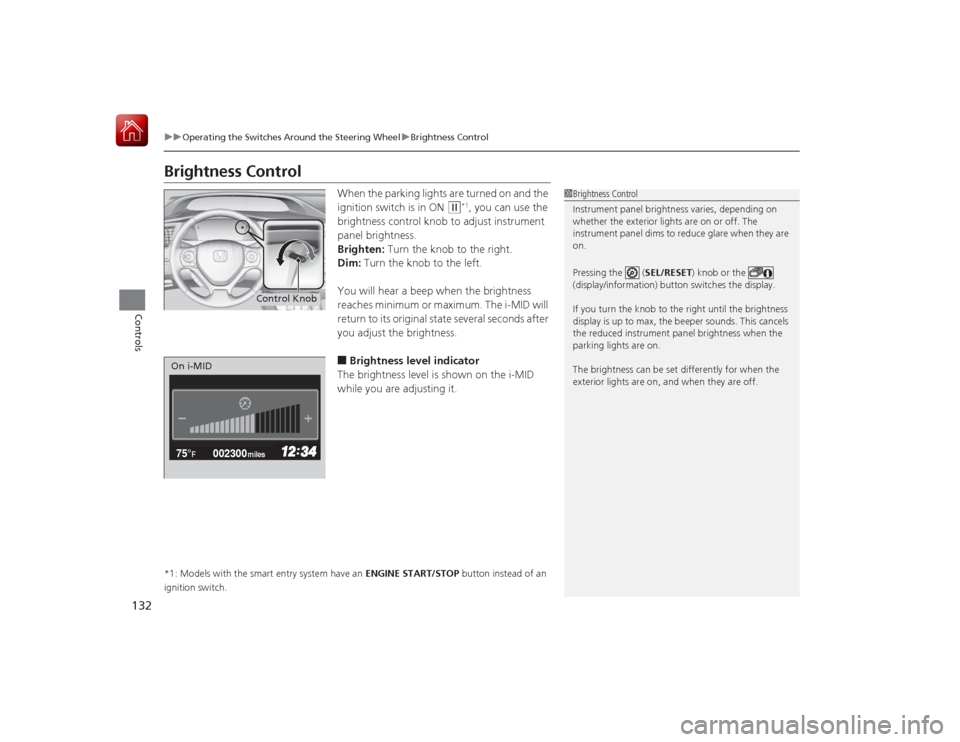
Brightness Control
When the parking lights are turned on and the
ignition switch is in ON
(w
*1, you can use the
brightness control knob to adjust instrument
panel brightness.
Brighten: Turn the knob to the right.
Dim: Turn the knob to the left.
You will hear a beep when the brightness
reaches minimum or maximum. The i-MID will
return to its original state several seconds after
you adjust the brightness.
■Brightness level indicator
The brightness level is shown on the i-MID
while you are adjusting it.
*1: Models with the smart entry system have an ENGINE START/STOP button instead of an
ignition switch.
1 Brightness Control
Instrument panel brightness varies, depending on
whether the exterior lights are on or off. The
instrument panel dims to reduce glare when they are
on.
Pressing the ( SEL/RESET) knob or the
(display/information) button switches the display.
If you turn the knob to the right until the brightness
display is up to max, the beeper sounds. This cancels
the reduced instrument panel brightness when the
parking lights are on.
The brightness can be set differently for when the
exterior lights are on, and when they are off.
Control Knob
002300
75°
F miles
On i-MID