audio HONDA CIVIC COUPE 2016 10.G Owner's Manual
[x] Cancel search | Manufacturer: HONDA, Model Year: 2016, Model line: CIVIC COUPE, Model: HONDA CIVIC COUPE 2016 10.GPages: 585, PDF Size: 17.41 MB
Page 128 of 585
Continued127
uuLocking and Unlocking the DoorsuLocking/Unlocking the Doors from the Inside
Controls
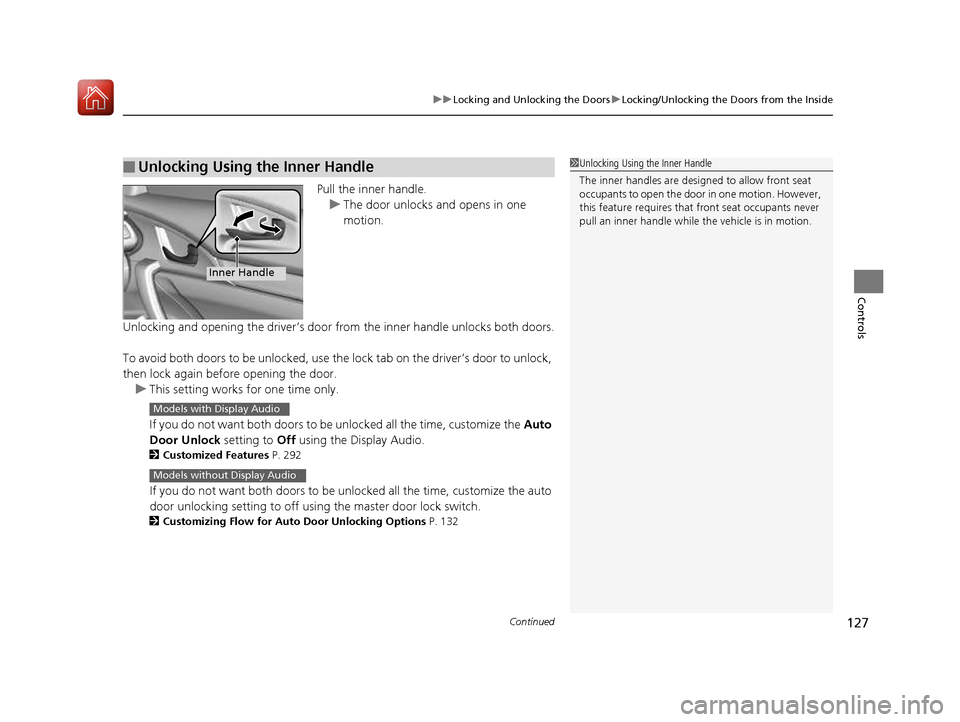
Pull the inner handle.
uThe door unlocks and opens in one motion.
Unlocking and opening the driver’s door from the inner handle unlocks both doors.
To avoid both doors to be unlocked, use the lock tab on the driver’s door to unlock,
then lock again before opening the door.
uThis setting works for one time only.
If you do not want both doors to be unlocked all the time, customize the Auto
Door Unlock setting to Off using the Display Audio.
2 Customized Features P. 292
If you do not want both doors to be unlocked all the time, customize the auto
door unlocking setting to off using the master door lock switch.
2 Customizing Flow for Auto Door Unlocking Options P. 132
■Unlocking Using the Inner Handle1Unlocking Using the Inner Handle
The inner handles are designed to allow front seat
occupants to open the door in one motion. However,
this feature requires that front seat occupants never
pull an inner handle while the vehicle is in motion.
Inner Handle
Models with Display Audio
Models without Display Audio
16 CIVIC 2D HC2 (0A 01 0C)-31TBG6000.book 127 ページ >0>.>/6年>0月>/>0日 金曜日 午後4時>/6分
Page 130 of 585

129
uuLocking and Unlocking the DoorsuAuto Door Locking/Unlocking
Controls
Auto Door Locking/Unlocking
Your vehicle locks and unlocks both doors automatically when a certain condition is
met. ■ Drive lock mode
Both doors lock when the vehicle’s speed reaches about 10 mph (15 km/h). ■ Driver’s door open mode
Both doors unlock when the driver’s door is opened.
■Auto Door Locking
■Auto Door Unlocking
1Auto Door Locking/Unlocking
You can turn off or cha nge to another auto door
locking/unlocking setting us ing the master door lock
switch. 2 Customizing the Auto Door Locking/
Unlocking Setting P. 130
You can turn off or cha nge to another auto door
locking/unlocking sett ing using the audio/
information screen.
2 Customized Features P. 292
Models without Display Audio
Models with Display Audio
16 CIVIC 2D HC2 (0A 01 0C)-31TBG6000.book 129 ページ >0>.>/6年>0月>/>0日 金曜日 午後4時>/6分
Page 137 of 585
136
Controls
Security System
Immobilizer System
The immobilizer system prevents a key that has not been pre-registered from
starting the engine. Each key contains el ectronic transmitters that use electronic
signals to verify the key.
Pay attention to the following when inserti ng the key into the ignition switch or
pressing the ENGINE START/STOP button:
• Do not allow objects that emit strong radio waves near the ignition switch or the
ENGINE START/STOP button.
• Make sure the key is not covered by or touching a metal object.
• Do not bring a key from anot her vehicle’s immobilizer system near the ignition
switch or the ENGINE START/STOP button.
• Do not put the key near magnetic items. Electronic devices, such as a television
set and audio system are strongly magneti c, or a key chain can become magnetic,
too.
Security System Alarm
The security system alarm activates wh en the trunk, hood or doors are forcibly
opened. The alarm does not go off if the trunk or doors are opened with the key,
remote transmitter or smart entry system.
However, the alarm goes off when a door is opened with the key, then the shift
lever is moved out of
(P (continuously variable transmission models) or the hood is
opened before the ignition switch is turned to ON (w*1
.
■ When the security sy stem alarm activates
The horn sounds intermittently and all the exterior lights flash. ■ To deactivate the security system alarm
Unlock the vehicle using the remote transmi tter, or smart entry system. The system,
along with the horn and flashing lights, is deactivated.
*1: Models with the smart entry system have an ENGINE START/STOP button instead of an
ignition switch.
1Security System
Do not alter the system or add other devices to it.
Doing so may damage the system and make your
vehicle inoperable.
1Immobilizer System
NOTICE
Leaving the key in the vehicl e can result in theft or
accidental movement of the vehicle.
Always take the key with you whenever you leave the
vehicle unattended.
Canadian models only: Apply and hold the brake
pedal before turning the vehicle on the first time after
the battery has been disconnected.
1Security System Alarm
The security alarm continues for a maximum of two
minutes until the security system deactivates.
16 CIVIC 2D HC2 (0A 01 0C)-31TBG6000.book 136 ページ >0>.>/6年>0月>/>0日 金曜日 午後4時>/6分
Page 144 of 585
143
Controls
Operating the Switches Around the Steering Wheel
Ignition Switch*
1Ignition Switch
*
You cannot take the key out unless the shift lever is
in
(P .
If you open the driver’s door when the key is in LOCK
(0 or ACCESSORY (q, a warning buzzer will sound
to remind you to take the key out.
When this happens, the fo llowing messages appear
on the driver information interface:
• In LOCK
(0 : Remove Key From Ignition .
• In ACCESSORY (q : Return Ignition Switch To
Lock (0) Position . The buzzer will stop when you
take the key out.
If the key won’t turn from LOCK
(0 to ACCESSORY (q , turn the key while moving the steering wheel left
and right. The steering wh eel will unlock, allowing
the key to turn.
3WARNING
Removing the key from the ignition switch
while driving locks the steering. This can
cause you to lose control of the vehicle.
Remove the key from the ignition switch
only when parked.
Manual transmission models
Continuously variable transmission models
All models
Models with driver information interface
All models
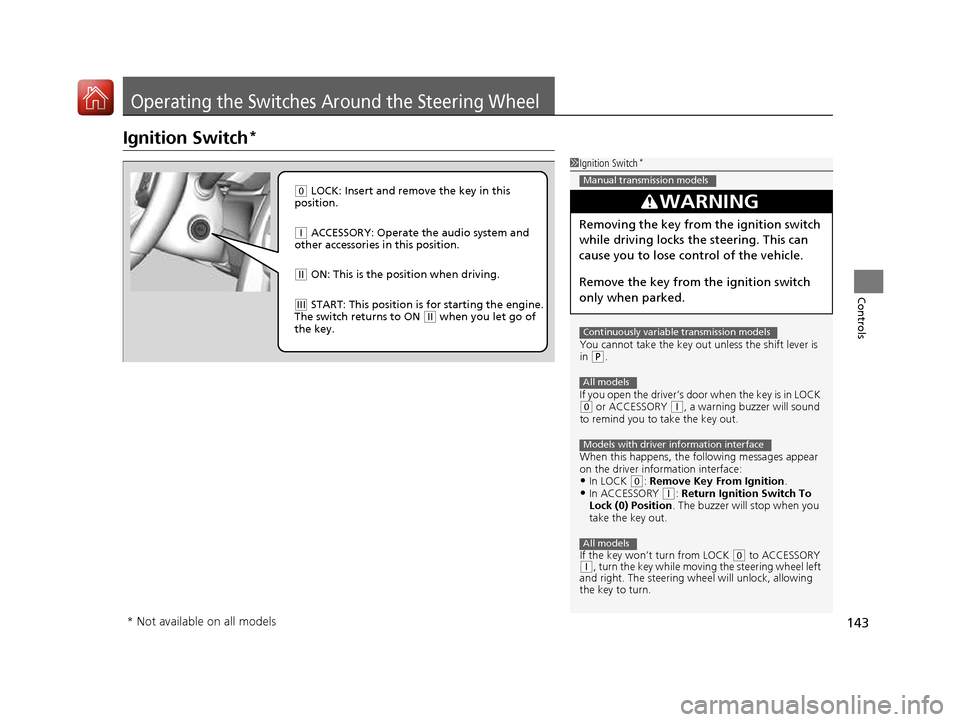
(0 LOCK: Insert and remove the key in this
position.
(q ACCESSORY: Operate the audio system and
other accessories in this position.
(w ON: This is the position when driving.
(e START: This position is for starting the engine.
The switch returns to ON (w when you let go of
the key.
* Not available on all models
16 CIVIC 2D HC2 (0A 01 0C)-31TBG6000.book 143 ページ >0>.>/6年>0月>/>0日 金曜日 午後4時>/6分
Page 145 of 585
144
uuOperating the Switches Around the Steering WheeluENGINE START/STOP Button*
Controls
ENGINE START/STOP Button *
*1: Except U.S. models *2: U.S. models
■Changing the Power Mode1ENGINE START/STOP Button *
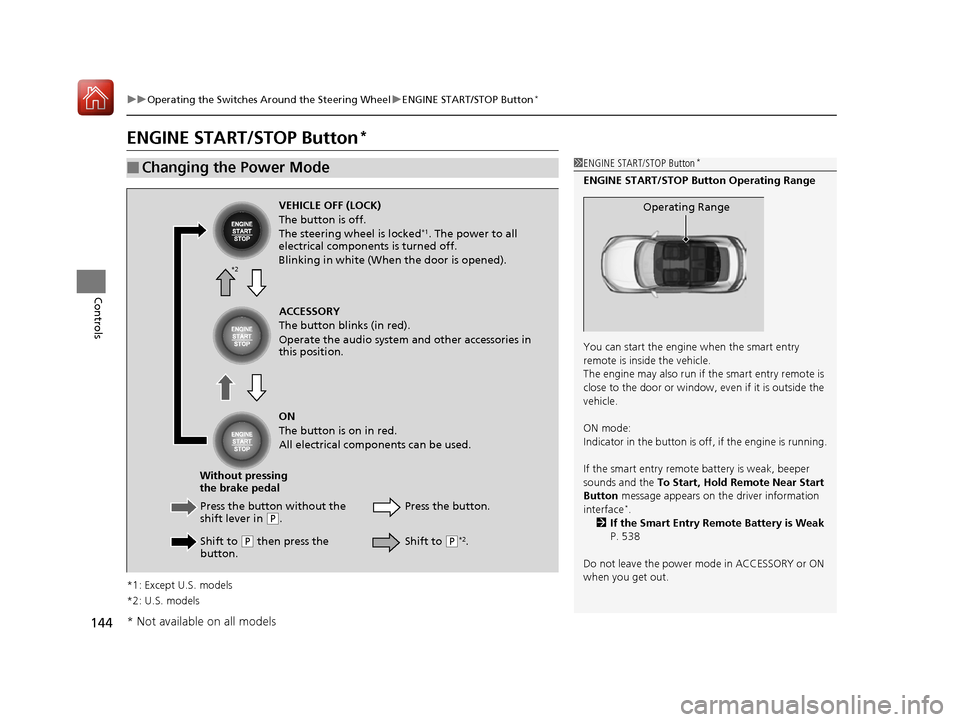
ENGINE START/STOP Button Operating Range
You can start the engine when the smart entry
remote is inside the vehicle.
The engine may also run if the smart entry remote is
close to the door or window, ev en if it is outside the
vehicle. ON mode:
Indicator in the button is of f, if the engine is running.
If the smart entry remote battery is weak, beeper sounds and the To Start, Hold Remote Near Start
Button message appears on th e driver information
interface *
.
2 If the Smart Entry Remote Battery is Weak
P. 538
Do not leave the power mode in ACCESSORY or ON
when you get out.
Operating RangeVEHICLE OFF (LOCK) The button is off.
The steering wheel is locked *1
. The power to all
electrical components is turned off.
Blinking in white (When the door is opened).
Press the butto n without the
shift lever in
(P .
Shift to
(P then press the
button. Press the button.
Without pressing
the brake pedal ACCESSORY
The button blinks (in red).
Operate the audio system and other accessories in this position. ON
The button is on in red.
All electrical components can be used.
Shift to (P*2
.
*2
* Not available on all models
16 CIVIC 2D HC2 (0A 01 0C)-31TBG6000.book 144 ページ >0>.>/6年>0月>/>0日
金曜日 午後4時>/6分
Page 148 of 585
147
uuOperating the Switches Around the Steering WheeluIgnition Switch and Power Mode Comparison
Controls
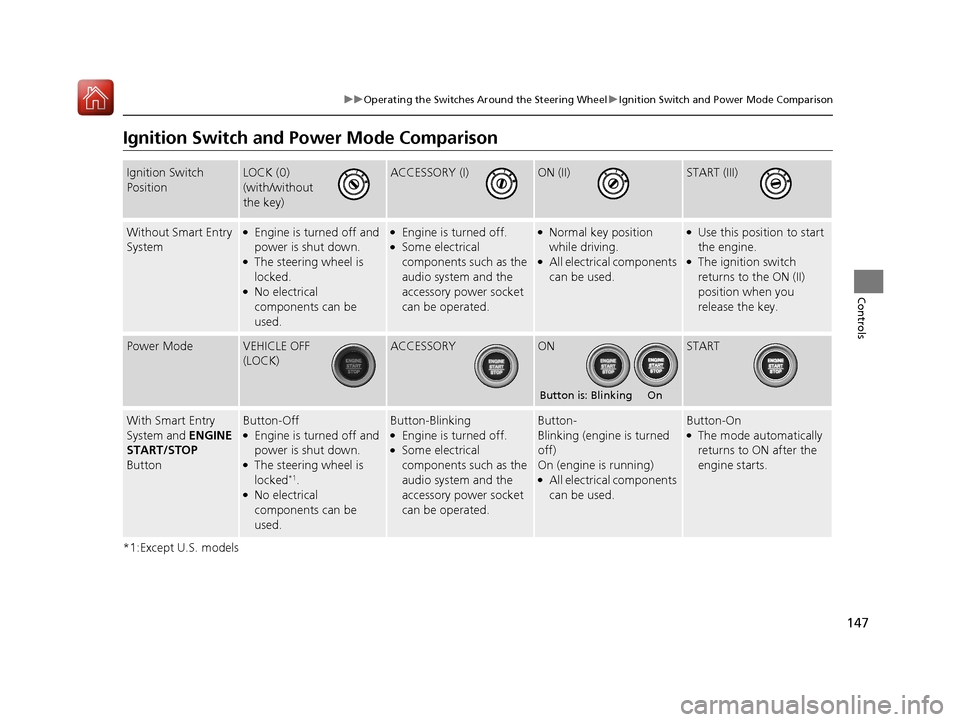
Ignition Switch and Power Mode Comparison
*1:Except U.S. models
Ignition Switch PositionLOCK (0)
(with/without
the key)ACCESSORY (I)ON (II)START (III)
Without Smart Entry
System● Engine is turned off and
power is shut down.
● The steering wheel is locked.
● No electrical
components can be used.●
Engine is turned off.
● Some electrical
components such as the
audio system and the
accessory power socket
can be operated.●
Normal key position
while driving.
● All electrical components
can be used.●
Use this position to start
the engine.
● The ignition switch
returns to the ON (II)
position when you
release the key.
Power ModeVEHICLE OFF
(LOCK)ACCESSORYONSTART
With Smart Entry
System and ENGINE
START/STOP
ButtonButton-Off ● Engine is turned off and
power is shut down.
● The steering wheel is locked *1
.
● No electrical
components can be used.Button-Blinking ●
Engine is turned off.
● Some electrical
components such as the
audio system and the
accessory power socket
can be operated.Button-
Blinking (engine is turned off)
On (engine is running) ●
All electrical components
can be used.Button-On ●The mode automatically
returns to ON after the
engine starts.
Button is: Blinking On
16 CIVIC 2D HC2 (0A 01 0C)-31TBG6000.book 147 ページ >0>.>/6年>0月>/>0日 金曜日 午後4時>/6分
Page 150 of 585
Continued149
uuOperating the Switches Around the Steering WheeluLight Switches
Controls
Automatic lighting control can be used when
the ignition switch is in ON
(w*1
.
When you turn the light switch to AUTO, the
headlights and other exterior lights will switch
on and off automatically depending on the
ambient brightness.
uYou can change the auto light sensitivity
setting.
2 Customized Features P. 292
*1: Models with the smart entry system have an ENGINE START/STOP button instead of an
ignition switch.
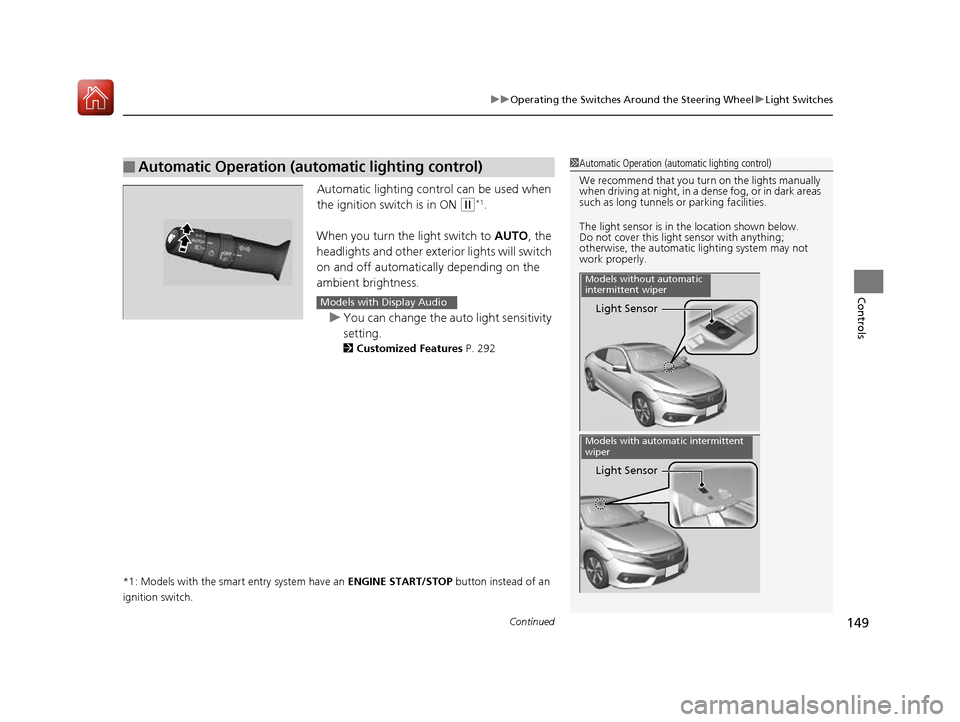
■Automatic Operation (automatic lighting control)1Automatic Operation (aut omatic lighting control)
We recommend that you tu rn on the lights manually
when driving at night, in a dense fog, or in dark areas
such as long tunnels or parking facilities.
The light sensor is in the location shown below.
Do not cover this light sensor with anything;
otherwise, the automatic lighting system may not
work properly.
Light Sensor
Models without automatic
intermittent wiper
Light Sensor
Models with automatic intermittent
wiper
Models with Display Audio
16 CIVIC 2D HC2 (0A 01 0C)-31TBG6000.book 149 ページ >0>.>/6年>0月>/>0日 金曜日 午後4時>/6分
Page 151 of 585
uuOperating the Switches Around the Steering WheeluLight Switches
150
Controls
The headlights automatically co me on when the wipers are used several times within
a certain number of intervals wi th the headlight switch in AUTO.
The headlights automatically go off a few minutes later if the wipers are stopped.
The headlights, all other exterior lights, an d the instrument panel lights turn off 15
seconds after you remove the key or set the power mode to VEHICLE OFF (LOCK),
take the remote with you, and close the driver’s door.
uYou can change the headlight auto off timer setting.
2 Customized Features P. 292
If you turn the igniti on switch to LOCK
(0*1
with the headlight switch on, but do
not open the door, the lights turn off after 10 minutes (3 minutes, if the switch is in
the AUTO position).
The lights turn on again when you unlock or open the driver’s door. If you unlock
the door, but do not open it within 15 seconds, the lights go off. If you open the
driver’s door, you will hear a lights on reminder chime.
*1: Models with the smart entry system have an ENGINE START/STOP button instead of an
ignition switch.
■Headlight Integration with Wipers *
■Automatic Lighting Off Feature
1Automatic Operation (aut
omatic lighting control)
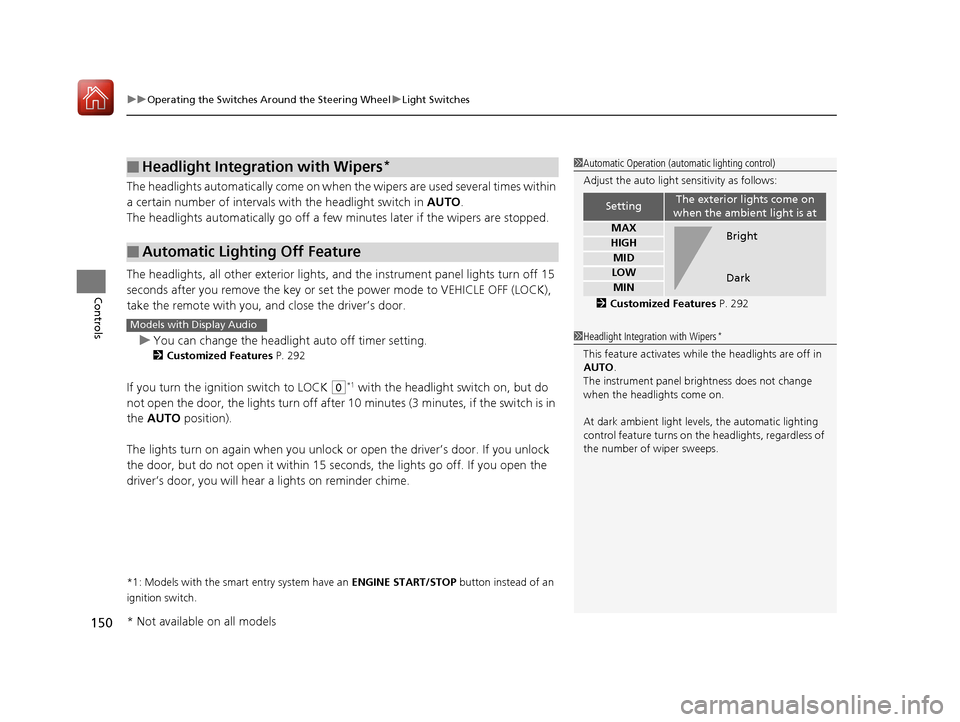
Adjust the auto light sensitivity as follows:
2 Customized Features P. 292
SettingThe exterior lights come on
when the ambient light is at
MAX
HIGH
MID
LOW
MIN
Bright Dark
1Headlight Integration with Wipers *
This feature activates while the headlights are off in AUTO .
The instrument panel br ightness does not change
when the headlights come on.
At dark ambient light leve ls, the automatic lighting
control feature turns on the headlights, regardless of
the number of wiper sweeps.Models with Display Audio
* Not available on all models
16 CIVIC 2D HC2 (0A 01 0C)-31TBG6000.book 150 ページ >0>.>/6年>0月>/>0日 金曜日 午後4時>/6分
Page 156 of 585
155
uuOperating the Switches Around the Steering WheeluRear Defogger/Heated Door Mirror*
Button
Controls
Rear Defogger/Heated Door Mirror *
Button
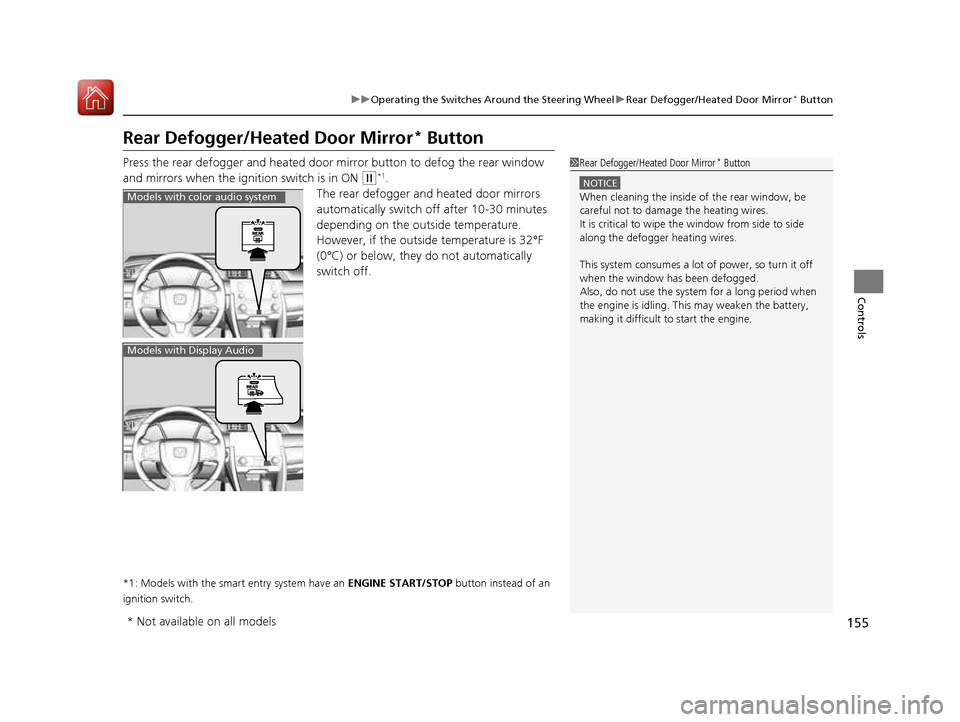
Press the rear defogger and heated door mirror button to defog the rear window
and mirrors when the ignition switch is in ON
(w *1
.
The rear defogger and heated door mirrors
automatically switch of f after 10-30 minutes
depending on the outside temperature.
However, if the outsid e temperature is 32°F
(0°C) or below, they do not automatically switch off.
*1: Models with the smart entry system have an ENGINE START/STOP button instead of an
ignition switch.
1Rear Defogger/Heated Door Mirror *
Button
NOTICE
When cleaning the inside of the rear window, be
careful not to damage the heating wires.
It is critical to wipe th e window from side to side
along the defogger heating wires.
This system consumes a lot of power, so turn it off
when the window has been defogged.
Also, do not use the system for a long period when
the engine is idling. This may weaken the battery, making it difficult to start the engine.Models with color audio system
Models with Display Audio
* Not available on all models
16 CIVIC 2D HC2 (0A 01 0C)-31TBG6000.book 155 ページ >0>.>/6年>0月>/>0日 金曜日 午後4時>/6分
Page 169 of 585
168
Controls
Interior Lights/Interior Convenience Items
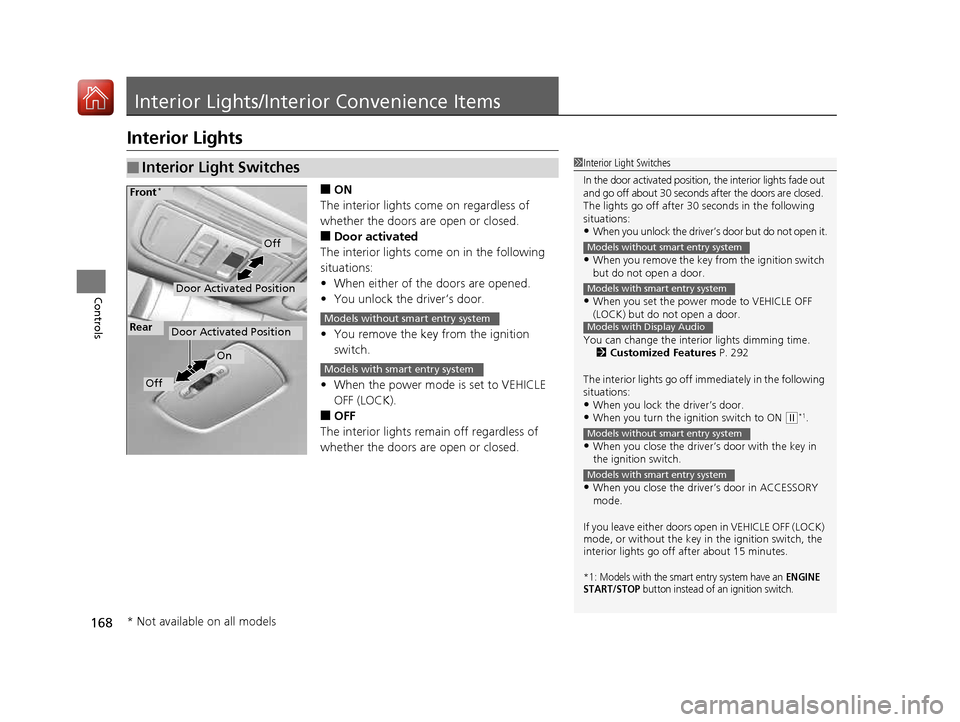
Interior Lights
■ON
The interior lights come on regardless of
whether the doors are open or closed. ■ Door activated
The interior lights come on in the following
situations: • When either of the doors are opened.
• You unlock the driver’s door.
• You remove the key from the ignition switch.
• When the power mode is set to VEHICLE OFF (LOCK).
■ OFF
The interior lights remain off regardless of
whether the doors are open or closed.
■Interior Light Switches1Interior Light Switches
In the door activated position, the interior lights fade out
and go off about 30 seconds after the doors are closed.
The lights go off after 30 seconds in the following
situations:
• When you unlock the driver’s door but do not open it.
• When you remove the key from the ignition switch
but do not open a door.
• When you set the power mode to VEHICLE OFF
(LOCK) but do not open a door.
You can change the interi or lights dimming time.
2 Customized Features P. 292
The interior lights go off i mmediately in the following
situations:
• When you lock the driver’s door.
• When you turn the ignition switch to ON
(w *1
.
• When you close the driver’s door with the key in
the ignition switch.
• When you close the driver’s door in ACCESSORY mode.
If you leave either doors open in VEHICLE OFF (LOCK) mode, or without the key in the ignition switch, the
interior lights go off after about 15 minutes.
*1: Models with the smart entry system have an ENGINE
START/STOP button instead of an ignition switch.
Models without smart entry system
Models with smart entry system
Models with Display Audio
Models without smart entry system
Models with smart entry system
Door Activated Position
Off
Front *
Door Activated Position
On
Off
RearModels without smart entry system
Models with smart entry system
* Not available on all models
16 CIVIC 2D HC2 (0A 01 0C)-31TBG6000.book 168 ページ >0>.>/6年>0月>/>0日
金曜日 午後4時>/6分