sensor HONDA CIVIC COUPE 2016 10.G Owner's Manual
[x] Cancel search | Manufacturer: HONDA, Model Year: 2016, Model line: CIVIC COUPE, Model: HONDA CIVIC COUPE 2016 10.GPages: 585, PDF Size: 17.41 MB
Page 150 of 585
Continued149
uuOperating the Switches Around the Steering WheeluLight Switches
Controls
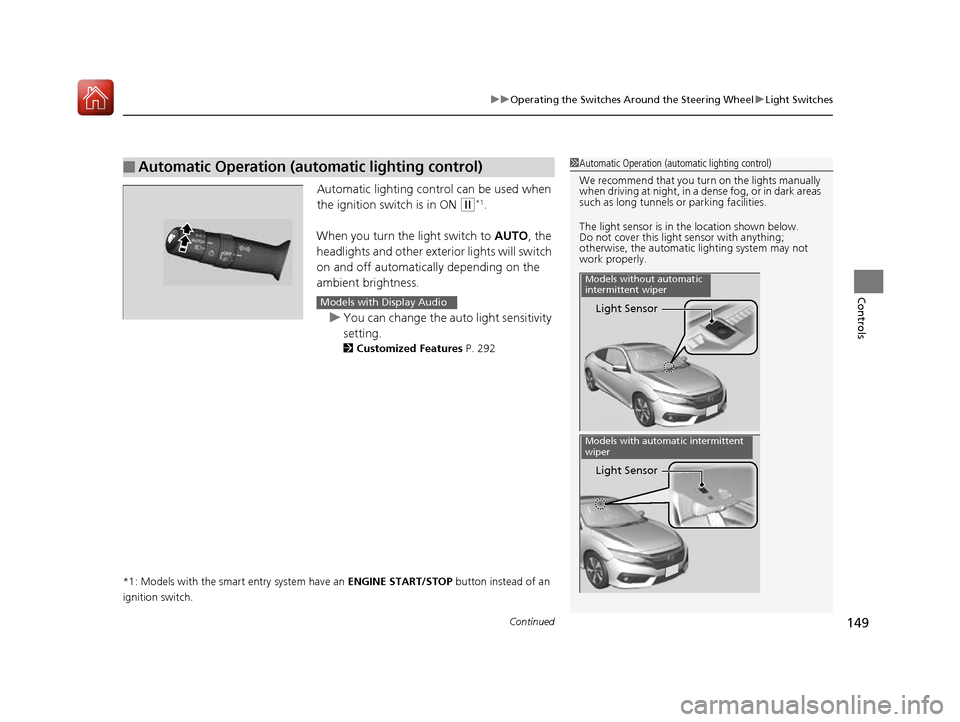
Automatic lighting control can be used when
the ignition switch is in ON
(w*1
.
When you turn the light switch to AUTO, the
headlights and other exterior lights will switch
on and off automatically depending on the
ambient brightness.
uYou can change the auto light sensitivity
setting.
2 Customized Features P. 292
*1: Models with the smart entry system have an ENGINE START/STOP button instead of an
ignition switch.
■Automatic Operation (automatic lighting control)1Automatic Operation (aut omatic lighting control)
We recommend that you tu rn on the lights manually
when driving at night, in a dense fog, or in dark areas
such as long tunnels or parking facilities.
The light sensor is in the location shown below.
Do not cover this light sensor with anything;
otherwise, the automatic lighting system may not
work properly.
Light Sensor
Models without automatic
intermittent wiper
Light Sensor
Models with automatic intermittent
wiper
Models with Display Audio
16 CIVIC 2D HC2 (0A 01 0C)-31TBG6000.book 149 ページ >0>.>/6年>0月>/>0日 金曜日 午後4時>/6分
Page 154 of 585
153
uuOperating the Switches Around the Steering WheeluWipers and Washers
Controls
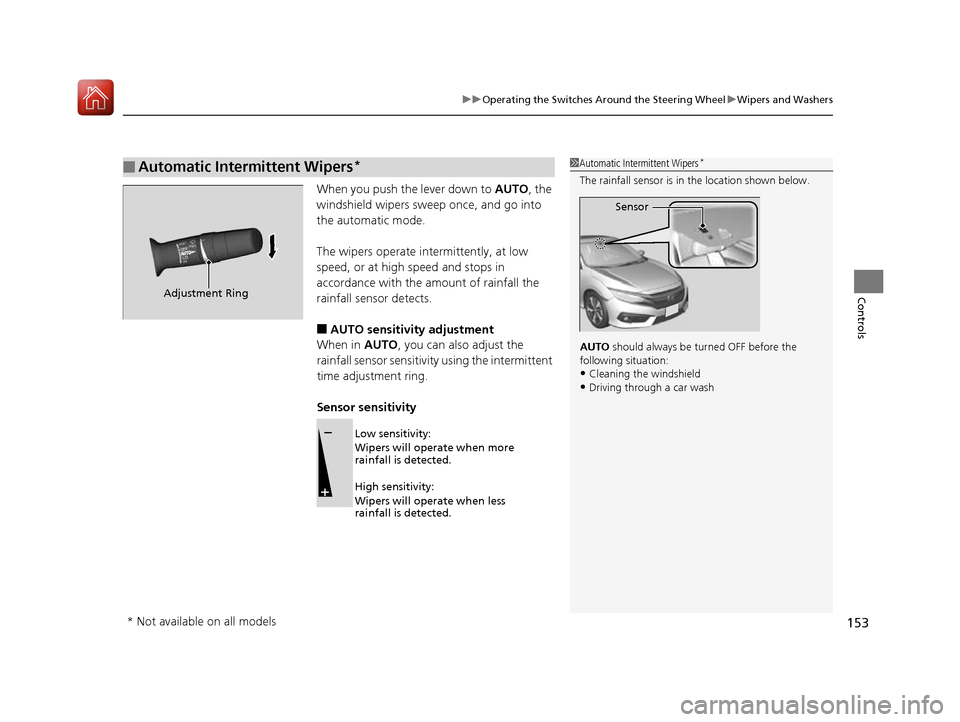
When you push the lever down to AUTO, the
windshield wipers sweep once, and go into
the automatic mode.
The wipers operate intermittently, at low
speed, or at high speed and stops in
accordance with the amount of rainfall the
rainfall sensor detects.
■ AUTO sensitivity adjustment
When in AUTO, you can also adjust the
rainfall sensor sensitivity using the intermittent
time adjustment ring.
Sensor sensitivity
■Automatic Intermittent Wipers *1Automatic Intermittent Wipers
*
The rainfall sensor is in the location shown below.
AUTO should always be turned OFF before the
following situation: • Cleaning the windshield
• Driving through a car wash
Sensor
Adjustment Ring
Low sensitivity:
Wipers will operate when more
rainfall is detected.
High sensitivity:
Wipers will operate when less
rainfall is detected.
* Not available on all models
16 CIVIC 2D HC2 (0A 01 0C)-31TBG6000.book 153 ページ >0>.>/6年>0月>/>0日 金曜日 午後4時>/6分
Page 158 of 585
157
Controls
Adjusting the Mirrors
Interior Rearview Mirror
Adjust the angle of the rearview mirror when you are sitting in the correct driving
position.
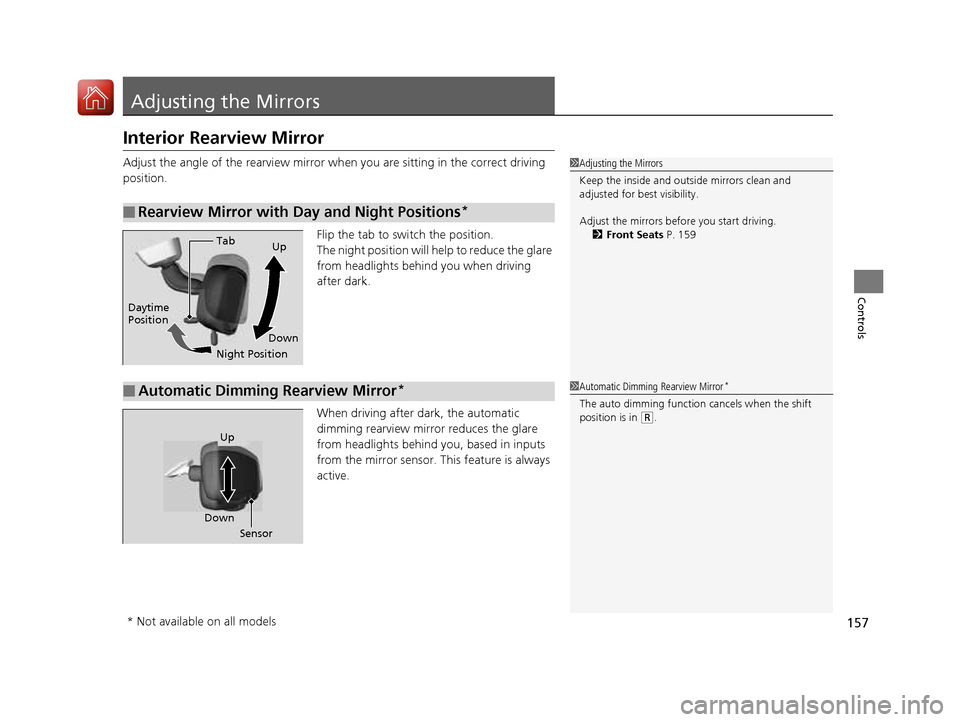
Flip the tab to switch the position.
The night position will help to reduce the glare
from headlights behind you when driving
after dark.
When driving after dark, the automatic
dimming rearview mirror reduces the glare
from headlights behind you, based in inputs
from the mirror sensor. This feature is always active.
■Rearview Mirror with Day and Night Positions *
1Adjusting the Mirrors
Keep the inside and out
side mirrors clean and
adjusted for best visibility.
Adjust the mirrors before you start driving. 2 Front Seats P. 159
Tab
Daytime Position
Night PositionUp
Down
■Automatic Dimming Rearview Mirror *1Automatic Dimming Rearview Mirror
*
The auto dimming function cancels when the shift
position is in
(R .
Sensor
Down
Up
* Not available on all models
16 CIVIC 2D HC2 (0A 01 0C)-31TBG6000.book 157 ページ >0>.>/6年>0月>/>0日
金曜日 午後4時>/6分
Page 167 of 585
166
uuAdjusting the SeatsuRear Seats
Controls
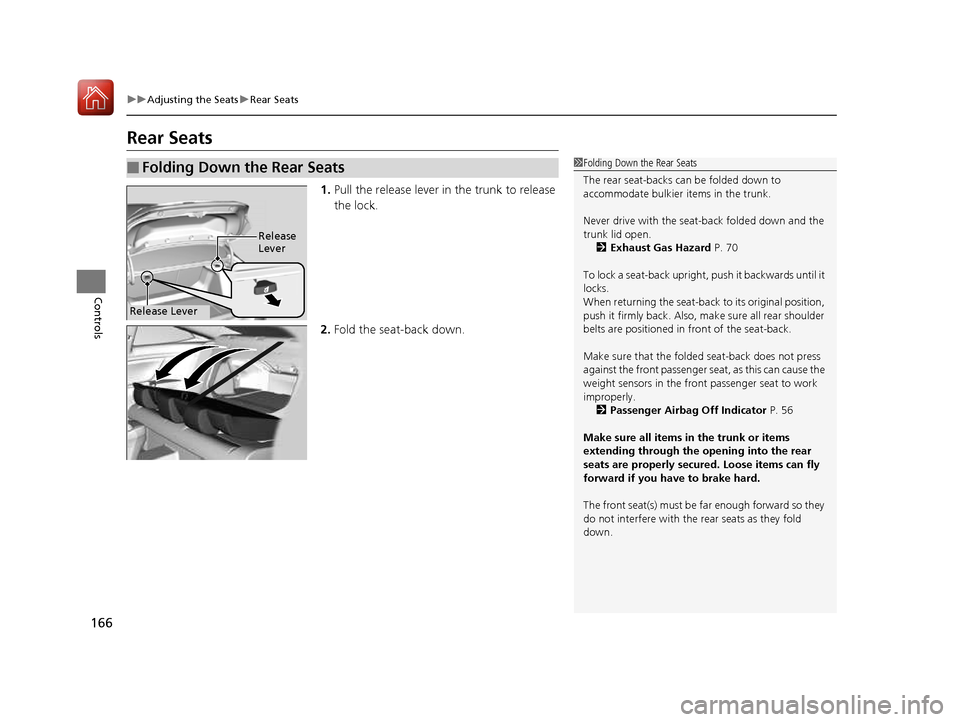
Rear Seats1.Pull the release lever in the trunk to release
the lock.
2. Fold the seat-back down.
■Folding Down the Rear Seats1Folding Down the Rear Seats
The rear seat-backs can be folded down to
accommodate bulkier items in the trunk.
Never drive with the seat-back folded down and the trunk lid open.
2 Exhaust Gas Hazard P. 70
To lock a seat-back upright, push it backwards until it
locks.
When returning the seat-back to its original position,
push it firmly back. Also, m ake sure all rear shoulder
belts are positioned in front of the seat-back.
Make sure that the folded seat-back does not press
against the front passenger se at, as this can cause the
weight sensors in the front passenger seat to work
improperly. 2 Passenger Airbag Off Indicator P. 56
Make sure all items in the trunk or items
extending through the opening into the rear
seats are properly secured. Loose items can fly
forward if you have to brake hard.
The front seat(s) must be far enough forward so they
do not interfere with the rear seats as they fold down.
Release Lever
Release Lever
16 CIVIC 2D HC2 (0A 01 0C)-31TBG6000.book 166 ページ >0>.>/6年>0月>/>0日 金曜日 午後4時>/6分
Page 186 of 585
185
uuClimate Control SystemuAutomatic Climate Control Sensors
Controls
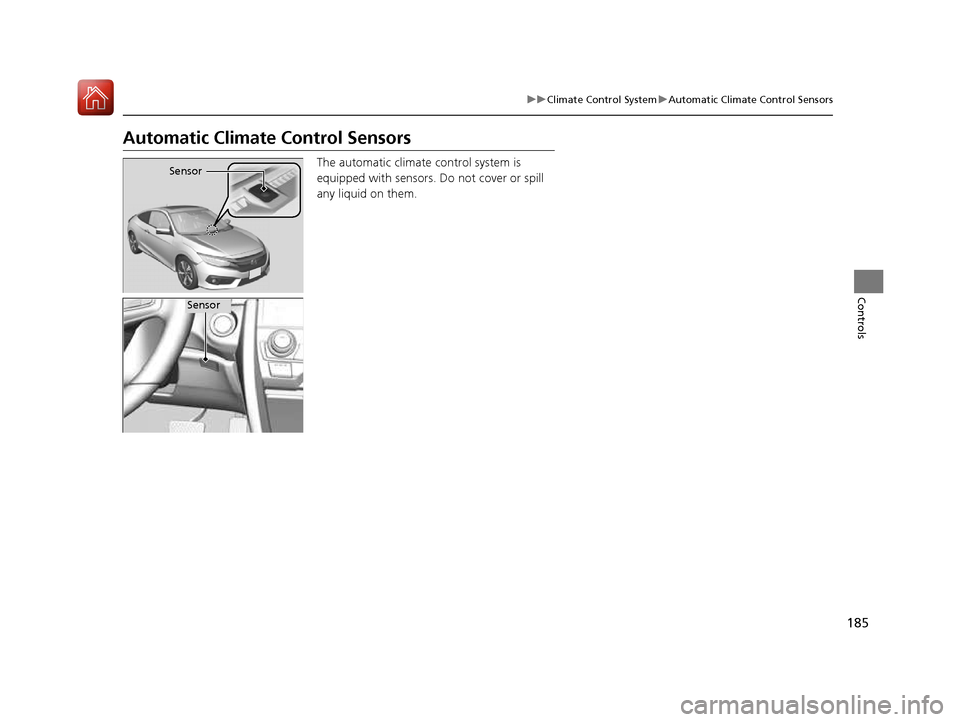
Automatic Climate Control SensorsThe automatic climate control system is
equipped with sensors. Do not cover or spill
any liquid on them.
Sensor
Sensor
16 CIVIC 2D HC2 (0A 01 0C)-31TBG6000.book 185 ページ >0>.>/6年>0月>/>0日 金曜日 午後4時>/6分
Page 380 of 585
379
Driving
This chapter discusses driving, refueling, and information on items such as accessories.
Before Driving
Driving Preparation .......................... 380
Maximum Load Limit........................ 383
Towing a Trailer ................................ 385
When Driving Starting the Engine .................. 386, 388
Precautions While Driving................. 393
Continuously Variable Transmission*... 394
Shifting ............................ 395, 397, 401
ECON Button ................................... 404
Cruise Control ................................. 405Front Sensor Camera *
...................... 408 Adaptive Cruise Control (ACC) with Low
Speed Follow (LSF) *
....................... 410
Road Departure Mitigation (RDM) System*...... 424Lane Keeping Assist System (LKAS)*.... 428
Vehicle Stabilit y Assist (VSA®), aka Electronic
Stability Control (ESC), System........... 435
Agile Handling Assist System............ 437
LaneWatch TM
*
.................................. 438
Tire Pressure Monitoring System (TPMS) ...... 440Tire Pressure Monitoring System (TPMS) -
Required Federal Explanation ......... 443
Braking
Brake System ................................... 445 Anti-lock Brake System (ABS) ........... 451
Brake Assist System ......................... 452
Collision Mitigation Braking System
TM
(CMBS TM
)*
..................................... 453
Parking Your Vehicle When Stopped ................................ 461
Multi-View Rear Camera .................. 462
Refueling
Fuel Information .............................. 464
How to Refuel ................................. 465
Fuel Economy
Improving Fuel Economy .................. 467
Accessories and Modifications ........ 468
* Not available on all models
16 CIVIC 2D HC2 (0A 01 0C)-31TBG6000.book 379 ページ >0>.>/6年>0月>/>0日 金曜日 午後4時>/6分
Page 383 of 585
382
uuBefore DrivinguDriving Preparation
Driving
•Be sure items placed on the floor behind the front seats cannot roll under the
seats.
uThey can interfere with the driver's ability to operate the pedals, the operation
of the seats, or the operation of the sensors under the seats.
• Everyone in the vehicle must fasten their seat belt.
2 Fastening a Seat Belt P. 40
• Make sure that the indicators in the ins trument panel come on when you start the
vehicle, and go off soon after.
uAlways have a dealer check the ve hicle if a problem is indicated.
2 Indicators P. 74
16 CIVIC 2D HC2 (0A 01 0C)-31TBG6000.book 382 ページ >0>.>/6年>0月>/>0日 金曜日 午後4時>/6分
Page 409 of 585
408
uuWhen DrivinguFront Sensor Camera*
Driving
Front Sensor Camera *
The camera, used in systems such as LKAS, RDM, ACC with LSF, and CMBS TM
, is
designed to detect an object that triggers any of the systems to operate its
functions.
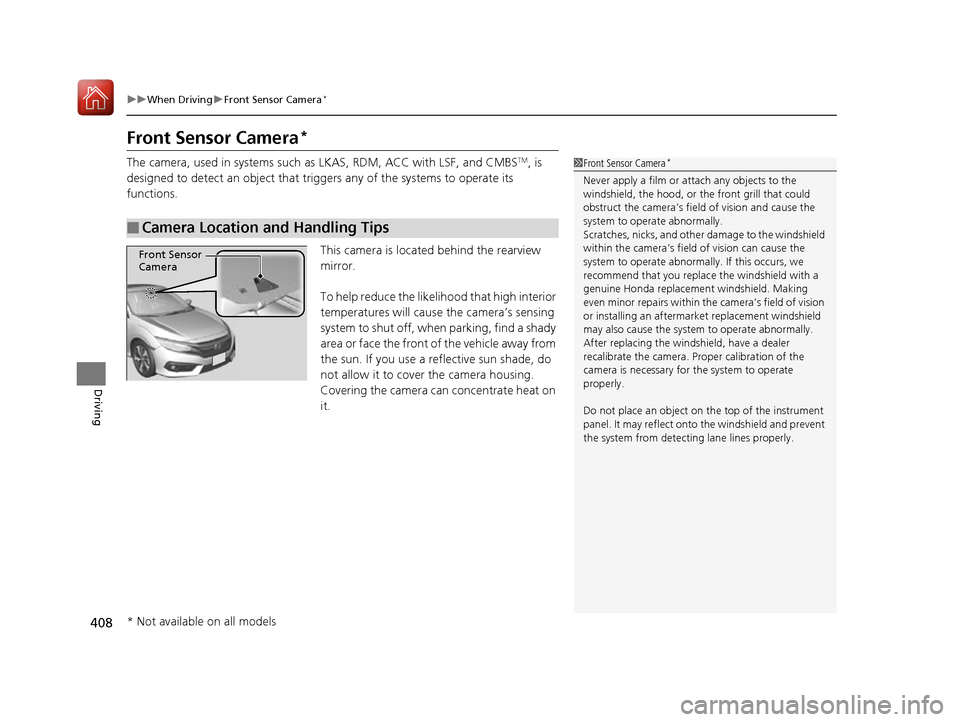
This camera is located behind the rearview mirror.
To help reduce the likelihood that high interior
temperatures will cause the camera’s sensing
system to shut off, when parking, find a shady
area or face the front of the vehicle away from
the sun. If you use a reflective sun shade, do
not allow it to cover the camera housing.
Covering the camera can concentrate heat on it.
■Camera Location and Handling Tips
1Front Sensor Camera *
Never apply a film or attach any objects to the
windshield, the hood, or the front grill that could
obstruct the camera’s fiel d of vision and cause the
system to operate abnormally.
Scratches, nicks, and othe r damage to the windshield
within the camera’s fiel d of vision can cause the
system to operate abnormall y. If this occurs, we
recommend that you replac e the windshield with a
genuine Honda replacem ent windshield. Making
even minor repairs within th e camera’s field of vision
or installing an aftermarket replacement windshield
may also cause the system to operate abnormally.After replacing the winds hield, have a dealer
recalibrate the camera. Pr oper calibration of the
camera is necessary for the system to operate
properly.
Do not place an object on the top of the instrument
panel. It may reflect onto the windshield and prevent
the system from detect ing lane lines properly.
Front Sensor
Camera
* Not available on all models
16 CIVIC 2D HC2 (0A 01 0C)-31TBG6000.book 408 ページ >0>.>/6年>0月>/>0日 金曜日 午後4時>/6分
Page 410 of 585
409
uuWhen DrivinguFront Sensor Camera*
Driving
1Front Sensor Camera*
If the Some Driver Assist Systems Cannot
Operate: Camera Temperature Too High message
appears: • Use the climate control system to cool down the
interior and, if necessary, also use defroster mode
with the airflow directed towards the camera.
• Start driving the vehicle to lower the windshield temperature, which cool s down the area around
the camera.
If the Some Driver Assist Systems Cannot
Operate: Clean Front Windshield message
appears:
• Park your vehicle in a sa fe place, and clean the
windshield. If the message does not disappear after
you have cleaned the winds hield and driven for a
while, have your vehicle checked by a dealer.
* Not available on all models
16 CIVIC 2D HC2 (0A 01 0C)-31TBG6000.book 409 ページ >0>.>/6年>0月>/>0日 金曜日 午後4時>/6分
Page 411 of 585
410
uuWhen DrivinguAdaptive Cruise Control (ACC) with Low Speed Follow (LSF)*
Driving
Adaptive Cruise Control (ACC) with Low Speed Follow (LSF)*
Helps maintain a constant vehicle speed an
d a set following interval behind a vehicle
detected ahead of yours and, if the detect ed vehicle comes to a stop, can decelerate
and stop your vehicle, without you having to keep your foot on the brake or the accelerator.When ACC with LSF slows your vehicle by applying the brakes, your vehicle’s brake
lights will illuminate.1Adaptive Cruise Control (ACC) with Low Speed Follow (LSF)*
Important Reminder
As with any system, there are limits to ACC with LSF.
Use the brake pedal whenever necessary, and always
keep a safe distance betw een your vehicle and other
vehicles.
3WARNING
Improper use of ACC with LSF can lead
to a crash.
Use ACC with LSF only when driving on
expressways or freeways and in good
weather conditions.
3WARNING
ACC with LSF has limited braking
capability and may not stop your vehicle
in time to avoid a co llision with a vehicle
that quickly stops in front of you.
Always be prepared to apply the brake
pedal if the cond itions require.
When to use
■Vehicle speed for ACC with LSF: A vehicle is detected ahead within ACC with
LSF range – ACC with LSF operates at speeds up to 90 mph (145 km/h).
No vehicle is detected within ACC with LSF range – ACC with LSF operates at
the speed of 25 mph (40km/h) or above.
■ Shift position for ACC with LSF: In
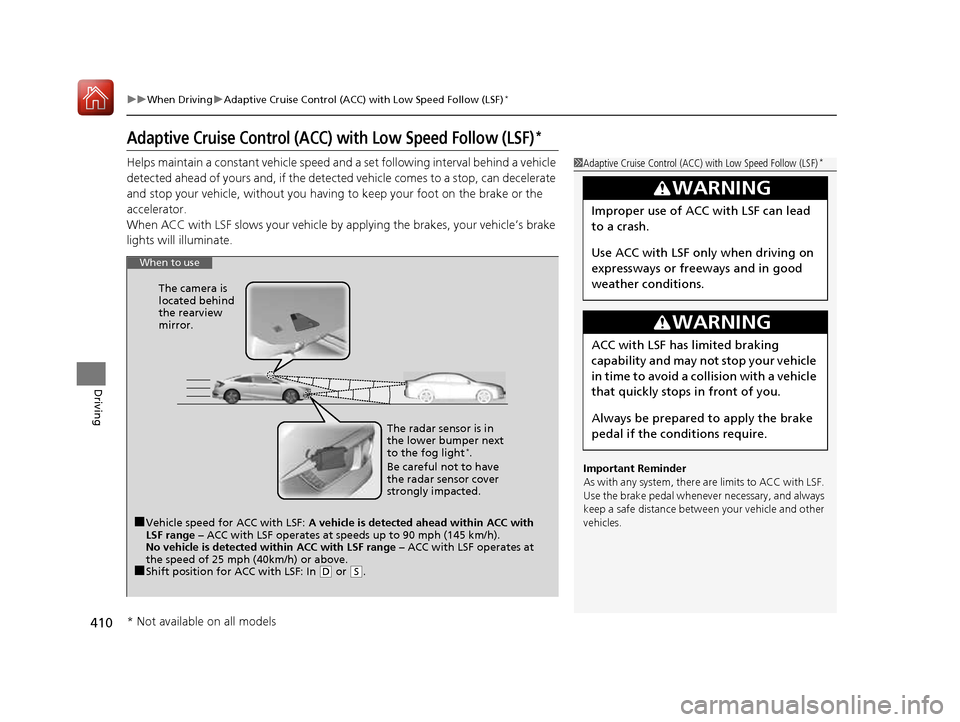
(D or (S. The radar sensor is in
the lower bumper next to the fog light
*
.
Be careful not to have
the radar sensor cover
strongly impacted.
The camera is
located behind
the rearview mirror.
* Not available on all models
16 CIVIC 2D HC2 (0A 01 0C)-31TBG6000.book 410 ページ >0>.>/6年>0月>/>0日
金曜日 午後4時>/6分