light HONDA CIVIC COUPE 2016 10.G Repair Manual
[x] Cancel search | Manufacturer: HONDA, Model Year: 2016, Model line: CIVIC COUPE, Model: HONDA CIVIC COUPE 2016 10.GPages: 585, PDF Size: 17.41 MB
Page 391 of 585
uuWhen DrivinguStarting the Engine
390
Driving
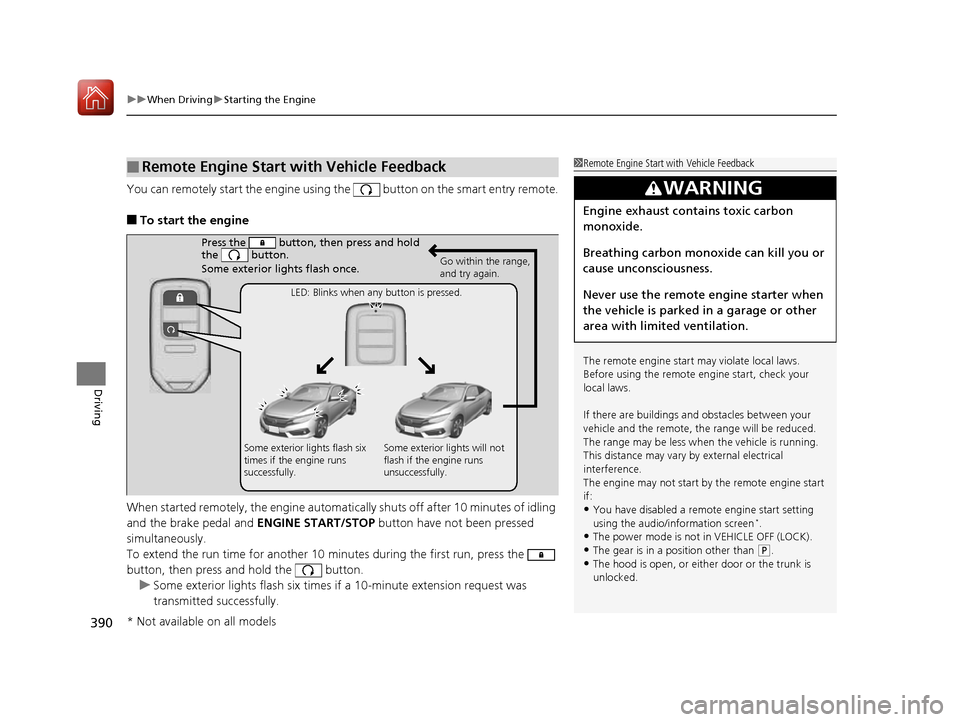
You can remotely start the engine using the button on the smart entry remote.
■ To start the engine
When started remotely, the engine automati cally shuts off after 10 minutes of idling
and the brake pedal and ENGINE START/STOP button have not been pressed
simultaneously.
To extend the run time for another 10 mi nutes during the first run, press the
button, then press and hold the button.
uSome exterior lights flash six times if a 10-minute extension request was
transmitted successfully.
■Remote Engine Start with Vehicle Feedback1Remote Engine Start with Vehicle Feedback
The remote engine start may violate local laws.
Before using the remote e ngine start, check your
local laws.
If there are buildings an d obstacles between your
vehicle and the remote, th e range will be reduced.
The range may be less when the vehicle is running.
This distance may vary by external electrical
interference.
The engine may not start by the remote engine start
if: • You have disabled a remo te engine start setting
using the audio/information screen *
.
• The power mode is not in VEHICLE OFF (LOCK).
• The gear is in a position other than
(P .
• The hood is open, or eith er door or the trunk is
unlocked.
3WARNING
Engine exhaust contains toxic carbon
monoxide.
Breathing carbon monoxide can kill you or
cause unconsciousness.
Never use the remote engine starter when
the vehicle is parked in a garage or other
area with limited ventilation.
Press the button, then press and hold
the button.
Some exterior lights flash once.
Go within the range,
and try again.
LED: Blinks when any button is pressed.
Some exterior lights flash six
times if the engine runs
successfully. Some exterior lights will not
flash if the engine runs
unsuccessfully.
* Not available on all models
16 CIVIC 2D HC2 (0A 01 0C)-31TBG6000.book 390 ページ >0>.>/6年>0月>/>0日
金曜日 午後4時>/6分
Page 392 of 585
Continued391
uuWhen DrivinguStarting the Engine
Driving
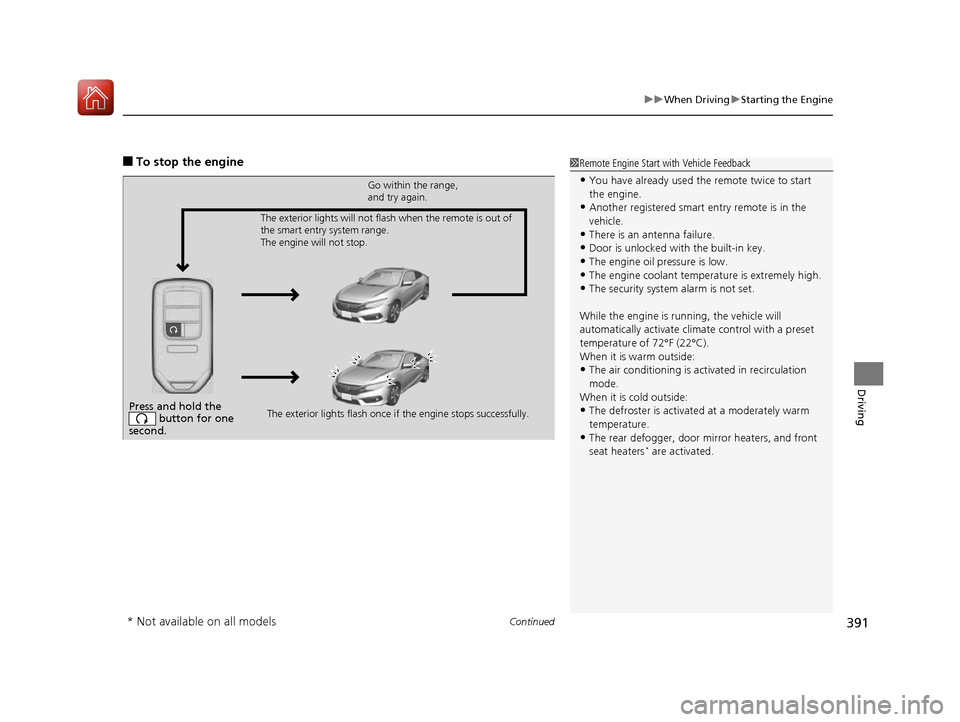
■To stop the engine1Remote Engine Start with Vehicle Feedback
• You have already used the remote twice to start the engine.
• Another registered smart entry remote is in the
vehicle.
• There is an antenna failure.
• Door is unlocked with the built-in key.
• The engine oil pressure is low.
• The engine coolant temper ature is extremely high.
• The security system alarm is not set.
While the engine is running, the vehicle will
automatically activate climate control with a preset
temperature of 72°F (22°C).
When it is warm outside:
• The air conditioning is acti vated in recirculation
mode.
When it is cold outside:
• The defroster is activated at a moderately warm
temperature.
• The rear defogger, door mi rror heaters, and front
seat heaters *
are activated.
Press and hold the
button for one
second.
Go within the range,
and try again.
The exterior lights flash once if the engine stops successfully.
The exterior lights will not flash when the remote is out of
the smart entry system range.
The engine will not stop.
* Not available on all models
16 CIVIC 2D HC2 (0A 01 0C)-31TBG6000.book 391 ページ >0>.>/6年>0月>/>0日
金曜日 午後4時>/6分
Page 396 of 585
395
uuWhen DrivinguShifting
Continued
Driving
Shifting
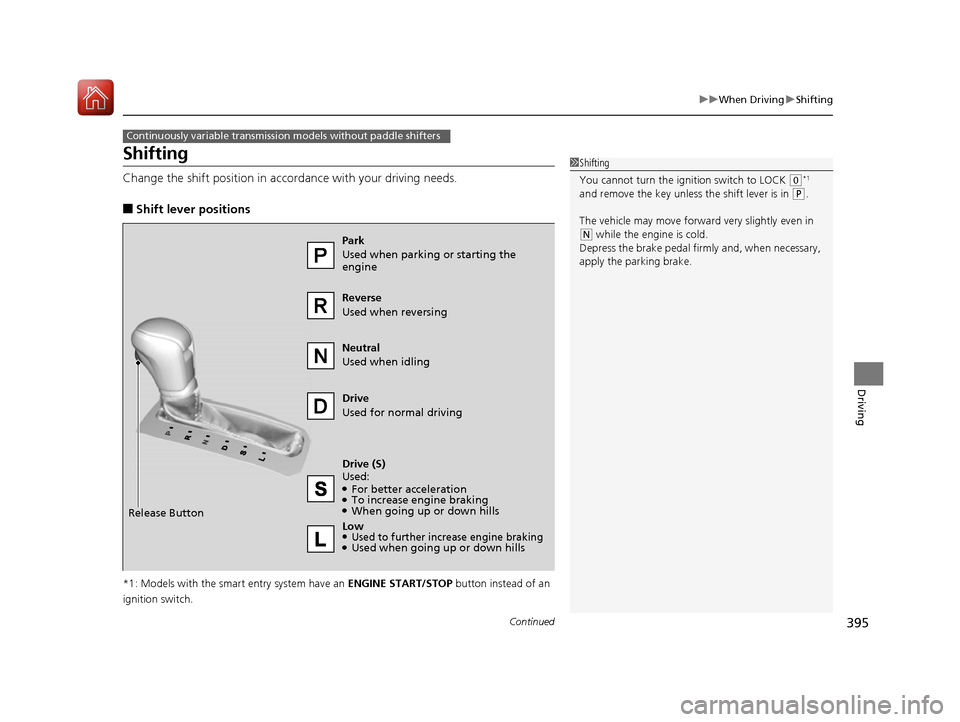
Change the shift position in accordance with your driving needs. ■Shift lever positions
*1: Models with the smart entry system have an ENGINE START/STOP button instead of an
ignition switch.
Continuously variable transmission models without paddle shifters
1Shifting
You cannot turn the ignition switch to LOCK
(0 *1
and remove the key unless the shift lever is in
(P .
The vehicle may move forward very slightly even in
(N while the engine is cold.
Depress the brake pe dal firmly and, when necessary,
apply the parking brake.
Reverse Used when reversing Drive
Used for normal driving
Park
Used when parking or starting the
engine Neutral
Used when idling
Release Button Drive (S) Used: ●
For better acceleration
● To increase engine braking
● When going up or down hills
Low
●Used to further increase engine braking● Used when going up or down hills
16 CIVIC 2D HC2 (0A 01 0C)-31TBG6000.book 395 ページ >0>.>/6年>0月>/>0日 金曜日 午後4時>/6分
Page 397 of 585
uuWhen DrivinguShifting
396
Driving
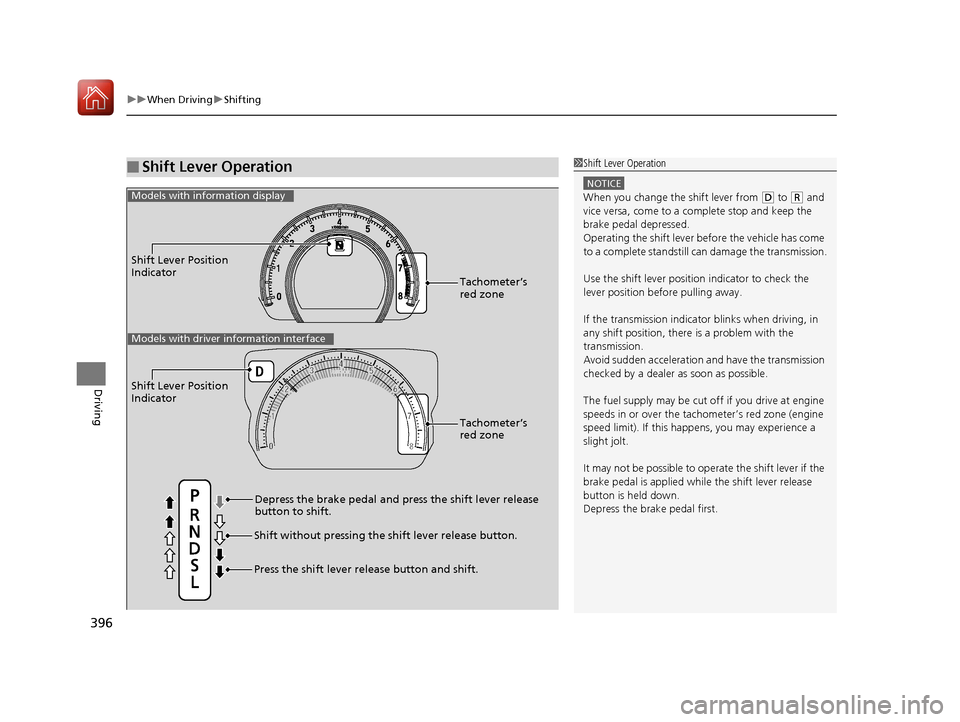
■Shift Lever Operation1Shift Lever Operation
NOTICE
When you change the shift lever from (D to (R and
vice versa, come to a complete stop and keep the brake pedal depressed.
Operating the shift lever be fore the vehicle has come
to a complete standstill can damage the transmission.
Use the shift lever position indicator to check the
lever position befo re pulling away.
If the transmission indicator blinks when driving, in
any shift position, there is a problem with the
transmission.
Avoid sudden acceleration and have the transmission
checked by a dealer as soon as possible.
The fuel supply may be cut of f if you drive at engine
speeds in or over the tac hometer’s red zone (engine
speed limit). If this happe ns, you may experience a
slight jolt.
It may not be possible to operate the shift lever if the
brake pedal is applied while the shift lever release
button is held down. Depress the brake pedal first.
Shift Lever Position
Indicator
Depress the brake pedal and press the shift lever release button to shift.
Shift without pressing the shift lever release button.
Press the shift lever re lease button and shift.Tachometer’s red zone
Models with info
rmation display
Shift Lever Position
Indicator
Tachometer’s red zone
Models with driver information interface
16 CIVIC 2D HC2 (0A 01 0C)-31TBG6000.book 396 ページ >0>.>/6年>0月>/>0日 金曜日 午後4時>/6分
Page 398 of 585
397
uuWhen DrivinguShifting
Continued
Driving
Shifting
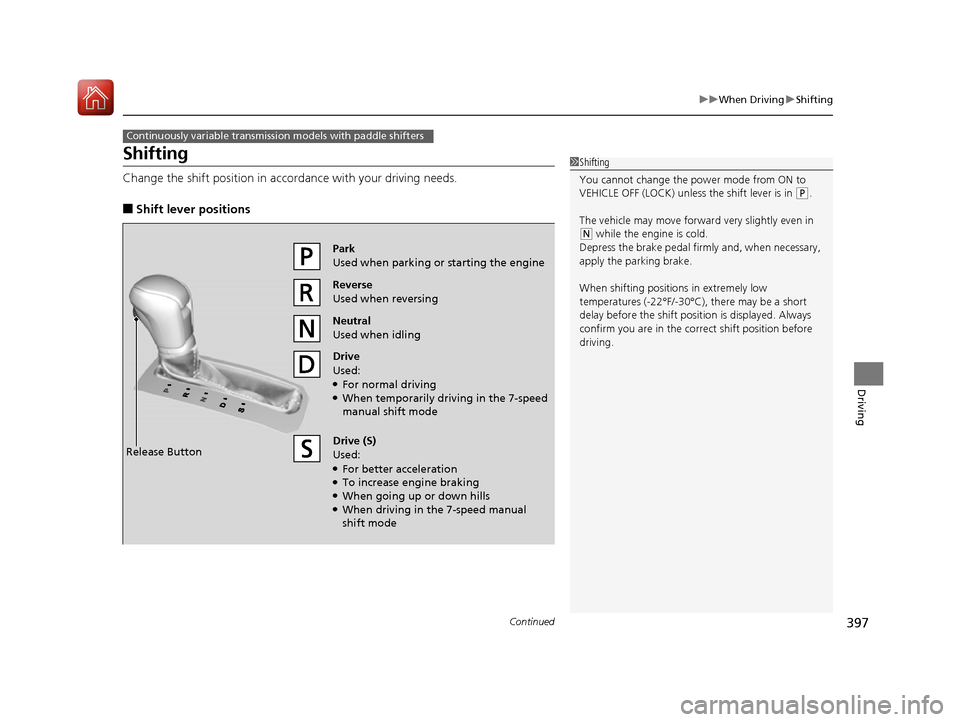
Change the shift position in accordance with your driving needs. ■Shift lever positions
Continuously variable transmission models with paddle shifters
1Shifting
You cannot change the pow er mode from ON to
VEHICLE OFF (LOCK) unless the shift lever is in
(P .
The vehicle may move forwar d very slightly even in
(N while the engine is cold.
Depress the brake pedal firm ly and, when necessary,
apply the parking brake.
When shifting positions in extremely low
temperatures (-22°F/-30°C), there may be a short delay before the shift posit ion is displayed. Always
confirm you are in the corr ect shift position before
driving.
Reverse
Used when reversing
Drive
Used: ● For normal driving
● When temporarily driving in the 7-speed manual shift mode
Park
Used when parking or starting the engine
Neutral
Used when idling
Release Button Drive (S)
Used: ●
For better acceleration
● To increase engine braking
● When going up or down hills
● When driving in the 7-speed manual
shift mode
16 CIVIC 2D HC2 (0A 01 0C)-31TBG6000.book 397 ページ >0>.>/6年>0月>/>0日 金曜日 午後4時>/6分
Page 399 of 585
uuWhen DrivinguShifting
398
Driving
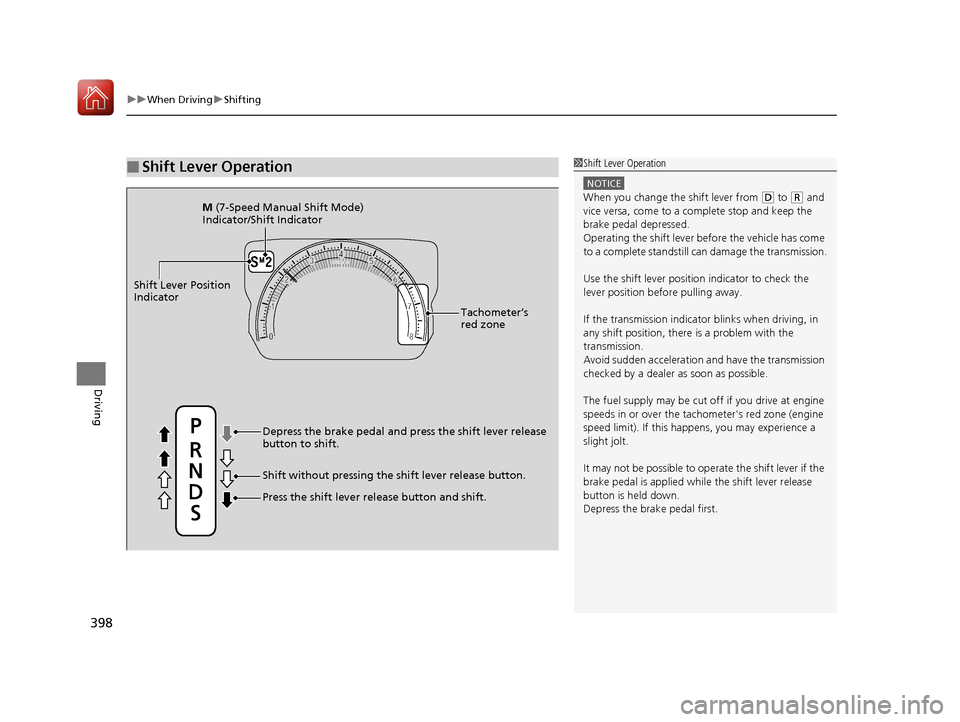
■Shift Lever Operation1Shift Lever Operation
NOTICE
When you change the shift lever from (D to (R and
vice versa, come to a complete stop and keep the brake pedal depressed.
Operating the shift lever be fore the vehicle has come
to a complete standstill can damage the transmission.
Use the shift lever position indicator to check the
lever position befo re pulling away.
If the transmission indicator blinks when driving, in
any shift position, there is a problem with the
transmission.
Avoid sudden acceleration and have the transmission
checked by a dealer as soon as possible. The fuel supply may be cut of f if you drive at engine
speeds in or over the tachometer's red zone (engine
speed limit). If this happe ns, you may experience a
slight jolt.
It may not be possible to operate the shift lever if the
brake pedal is applied while the shift lever release
button is held down.
Depress the brake pedal first.
Shift Lever Position
Indicator
Tachometer’s
red zone
Press the shift lever release button and shift.
Depress the brake pedal and press the shift lever release
button to shift.
Shift without pressing the shift lever release button.
M
(7-Speed Manual Shift Mode)
Indicator/Shift Indicator
16 CIVIC 2D HC2 (0A 01 0C)-31TBG6000.book 398 ページ >0>.>/6年>0月>/>0日 金曜日 午後4時>/6分
Page 401 of 585
uuWhen DrivinguShifting
400
Driving
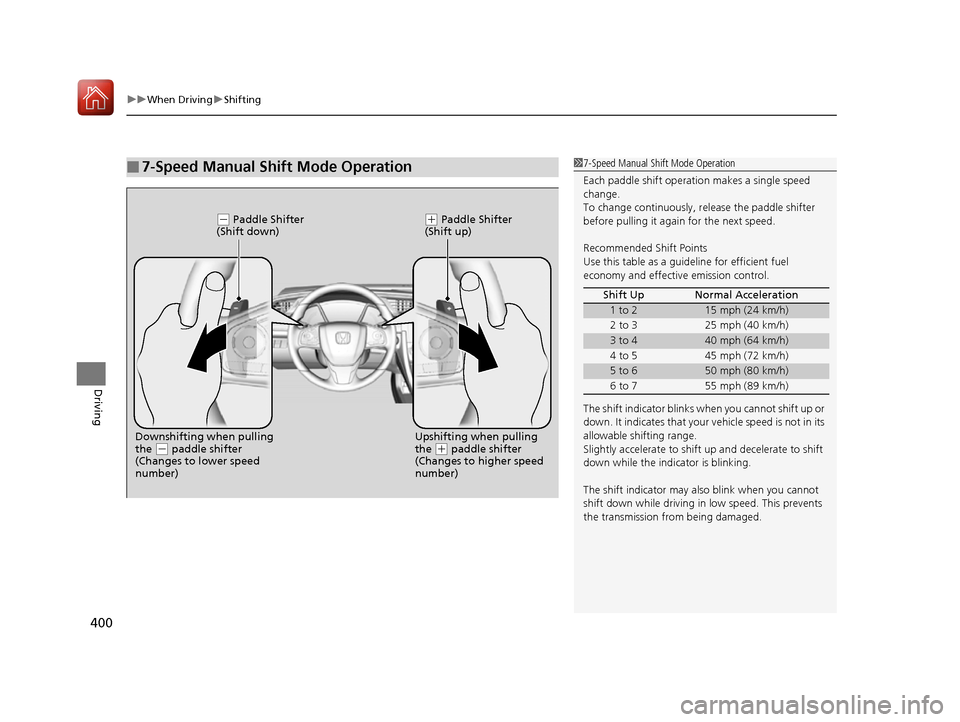
■7-Speed Manual Shift Mode Operation17-Speed Manual Shift Mode Operation
Each paddle shift operati on makes a single speed
change.
To change continuously, re lease the paddle shifter
before pulling it agai n for the next speed.
Recommended Shift Points
Use this table as a guideline for efficient fuel economy and effective emission control.
The shift indicator blinks when you cannot shift up or
down. It indicates that your vehicle speed is not in its
allowable shifting range.
Slightly accelerate to shift up and decelerate to shift
down while the indi cator is blinking.
The shift indicator may also blink when you cannot
shift down while driving in low speed. This prevents
the transmission from being damaged. Shift Up Normal Acceleration
1 to 215 mph (24 km/h)
2 to 3 25 mph (40 km/h)
3 to 440 mph (64 km/h)
4 to 5 45 mph (72 km/h)
5 to 650 mph (80 km/h)
6 to 7 55 mph (89 km/h)
(- Paddle Shifter
(Shift down)(+ Paddle Shifter
(Shift up)
Downshifting when pulling the
(- paddle shifter
(Changes to lower speed
number) Upshifting when pulling the (+
paddle shifter
(Changes to higher speed
number)
16 CIVIC 2D HC2 (0A 01 0C)-31TBG6000.book 400 ページ >0>.>/6年>0月>/>0日 金曜日 午後4時>/6分
Page 403 of 585
uuWhen DrivinguShifting
402
Driving
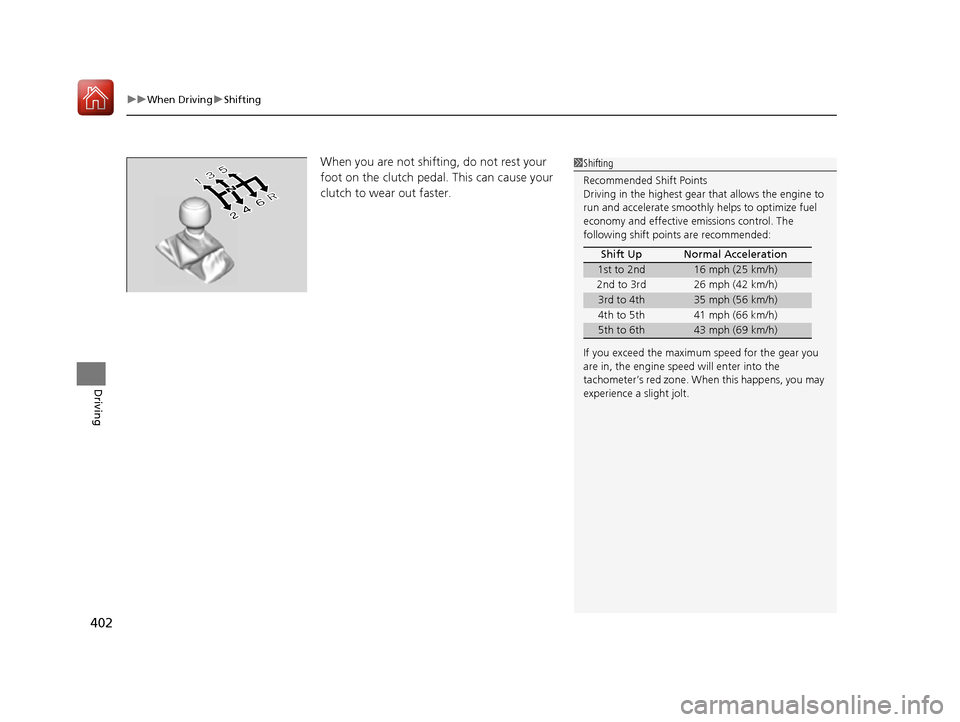
When you are not shifting, do not rest your
foot on the clutch pedal. This can cause your
clutch to wear out faster.1Shifting Recommended Shift Points
Driving in the highest gear that allows the engine to run and accelerate smoothly helps to optimize fuel
economy and effective em issions control. The
following shift points are recommended:
If you exceed the maximum speed for the gear you
are in, the engine speed will enter into the
tachometer’s red zone. When this happens, you may
experience a slight jolt. Shift Up Normal Acceleration
1st to 2nd16 mph (25 km/h)
2nd to 3rd 26 mph (42 km/h)
3rd to 4th35 mph (56 km/h)
4th to 5th 41 mph (66 km/h)
5th to 6th43 mph (69 km/h)
16 CIVIC 2D HC2 (0A 01 0C)-31TBG6000.book 402 ページ >0>.>/6年>0月>/>0日 金曜日 午後4時>/6分
Page 411 of 585
410
uuWhen DrivinguAdaptive Cruise Control (ACC) with Low Speed Follow (LSF)*
Driving
Adaptive Cruise Control (ACC) with Low Speed Follow (LSF)*
Helps maintain a constant vehicle speed an
d a set following interval behind a vehicle
detected ahead of yours and, if the detect ed vehicle comes to a stop, can decelerate
and stop your vehicle, without you having to keep your foot on the brake or the accelerator.When ACC with LSF slows your vehicle by applying the brakes, your vehicle’s brake
lights will illuminate.1Adaptive Cruise Control (ACC) with Low Speed Follow (LSF)*
Important Reminder
As with any system, there are limits to ACC with LSF.
Use the brake pedal whenever necessary, and always
keep a safe distance betw een your vehicle and other
vehicles.
3WARNING
Improper use of ACC with LSF can lead
to a crash.
Use ACC with LSF only when driving on
expressways or freeways and in good
weather conditions.
3WARNING
ACC with LSF has limited braking
capability and may not stop your vehicle
in time to avoid a co llision with a vehicle
that quickly stops in front of you.
Always be prepared to apply the brake
pedal if the cond itions require.
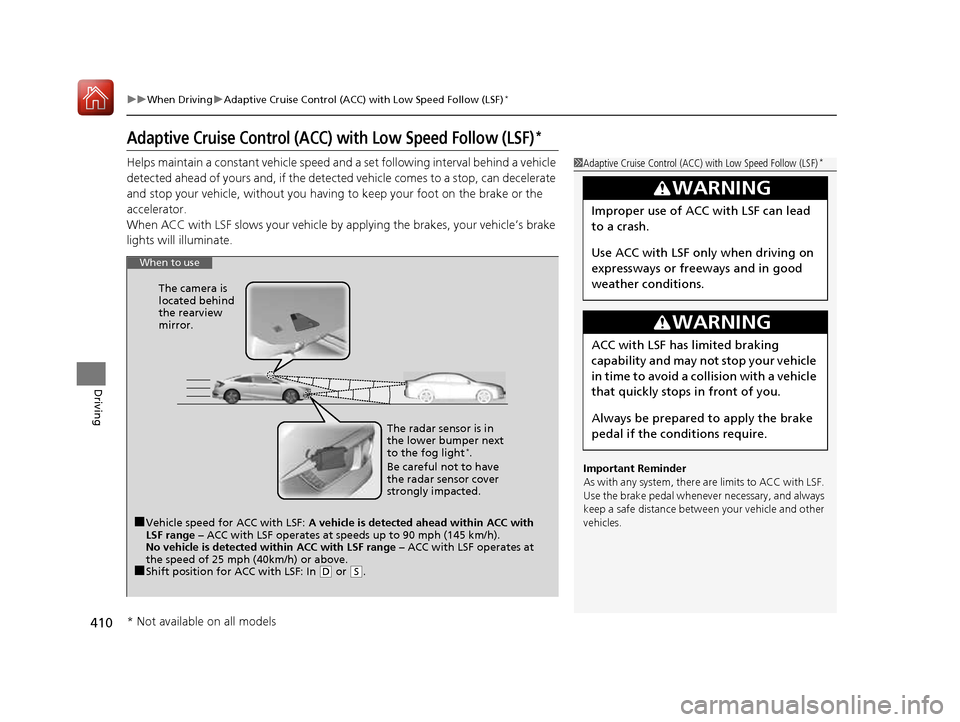
When to use
■Vehicle speed for ACC with LSF: A vehicle is detected ahead within ACC with
LSF range – ACC with LSF operates at speeds up to 90 mph (145 km/h).
No vehicle is detected within ACC with LSF range – ACC with LSF operates at
the speed of 25 mph (40km/h) or above.
■ Shift position for ACC with LSF: In
(D or (S. The radar sensor is in
the lower bumper next to the fog light
*
.
Be careful not to have
the radar sensor cover
strongly impacted.
The camera is
located behind
the rearview mirror.
* Not available on all models
16 CIVIC 2D HC2 (0A 01 0C)-31TBG6000.book 410 ページ >0>.>/6年>0月>/>0日
金曜日 午後4時>/6分
Page 416 of 585
Continued415
uuWhen DrivinguAdaptive Cruise Control (ACC) with Low Speed Follow (LSF)*
Driving
The system may automatically shut off and the
ACC indicator will come on under
certain conditions. Some exam ples of these conditions are listed below. Other
conditions may reduce some of the ACC functions. 2 Front Sensor Camera *
P. 408
■ Environmental conditions
• Driving in bad weather (rain, fog, snow, etc.).
■ Roadway conditions
• Driving on a snowy or wet roadway (obs cured lane marking, vehicle tracks,
reflected lights, road spray, high contrast).
■ Vehicle conditions
• The outside of the windshield is blocked by dirt, mud, leaves, wet snow, etc.
• An abnormal tire or wheel condition (Wrong size, varied size or construction,
improperly inflated, co mpact spare tire, etc.).
• The camera temperature gets too high.
• The parking brake is applied.
• When the lower bumper next to the fog light *
is dirty.
• When the front of the vehicle tilts up due to heavy cargo in the trunk or rear seats.
• When tire chains are installed.
■ACC with LSF Conditions and Limitations1ACC with LSF Conditions and Limitations
The radar sensor for ACC with LSF is shared with the
collision mitigation braking system TM
(CMBS TM
).
2 Collision Mitigation Braking System TM
(CMBS TM
)*
P. 453
You can read about handling information for the
camera equipped with this system. 2 Front Sensor Camera *
P. 408
Do not put a sticker on the radar sensor cover or
replace the radar sensor cover.
Have your vehicle checked by a dealer if you find any unusual behavior of the sy stem (e.g., the warning
message appears too frequently). If the front of the vehicle is impacted in any of the
following situations, the ra dar sensor may not work
properly. Have your vehi cle checked by a dealer:
• The vehicle mounted onto a bump, curb, chock, embankment, etc.
• You drive the vehicle where the water is deep.
• Your vehicle has a frontal collision.
* Not available on all models
16 CIVIC 2D HC2 (0A 01 0C)-31TBG6000.book 415 ページ >0>.>/6年>0月>/>0日 金曜日 午後4時>/6分