warning HONDA CIVIC COUPE 2016 10.G Quick Guide
[x] Cancel search | Manufacturer: HONDA, Model Year: 2016, Model line: CIVIC COUPE, Model: HONDA CIVIC COUPE 2016 10.GPages: 82, PDF Size: 5.2 MB
Page 22 of 82
36 || 37
VEHICLE CONTROLS
VEHICLE CONTROLS
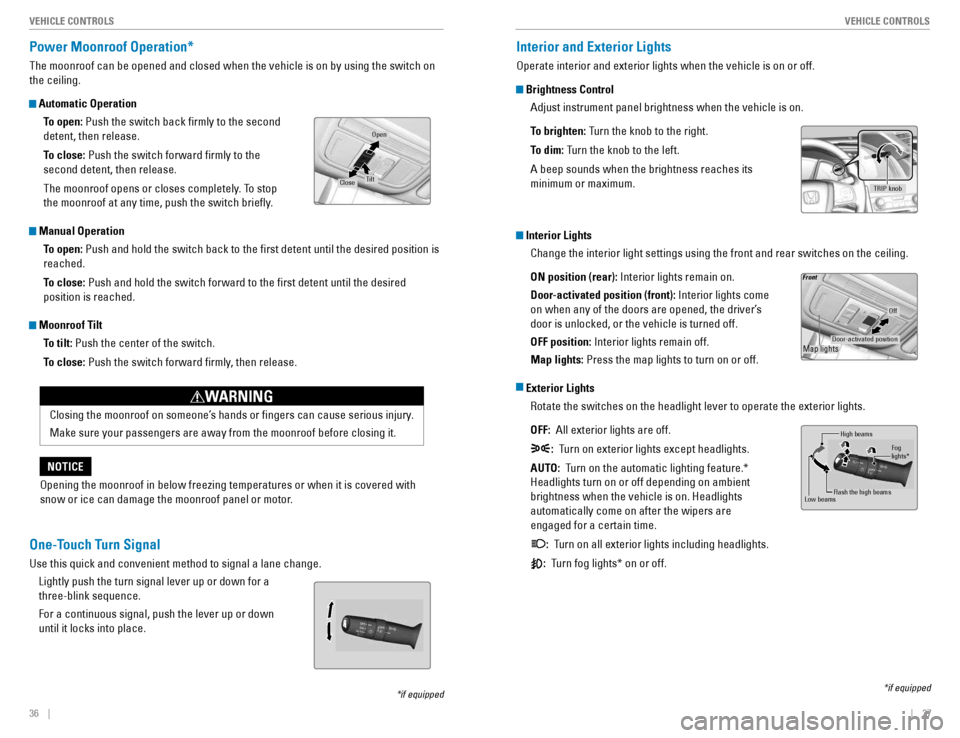
Power Moonroof Operation*
The moonroof can be opened and closed when the vehicle is on by using the switch on the ceiling.
Automatic Operation
To open: Push the switch back rmly to the second
detent, then release.
To close: Push the switch forward rmly to the
second detent, then release.
The moonroof opens or closes completely. To stop
the moonroof at any time, push the switch briey.
Manual Operation
To open: Push and hold the switch back to the rst detent until the desired position is
reached.
To close: Push and hold the switch forward to the rst detent until the desired
position is reached.
Moonroof Tilt
To tilt: Push the center of the switch.
To close: Push the switch forward rmly, then release.
*if equipped
Open
CloseTilt
Opening the moonroof in below freezing temperatures or when it is covered with
snow or ice can damage the moonroof panel or motor.
NOTICE
Closing the moonroof on someone’s hands or ngers can cause serious injury. Make sure your passengers are away from the moonroof before closing it.
WARNING
Interior and Exterior Lights
Operate interior and exterior lights when the vehicle is on or off.
Brightness Control
Adjust instrument panel brightness when the vehicle is on.
To brighten: Turn the knob to the right.
To dim: Turn the knob to the left.
A beep sounds when the brightness reaches its minimum or maximum.
Interior Lights
Change the interior light settings using the front and rear switches on the ceiling. ON position (rear): Interior lights remain on.
Door-activated position (front): Interior lights come
on when any of the doors are opened, the driver’s door is unlocked, or the vehicle is turned off. OFF position: Interior lights remain off.
Map lights: Press the map lights to turn on or off.
Exterior Lights
Rotate the switches on the headlight lever to operate the exterior lights. OFF: All exterior lights are off.
: Turn on exterior lights except headlights.
AUTO: Turn on the automatic lighting feature.*
Headlights turn on or off depending on ambient brightness when the vehicle is on. Headlights automatically come on after the wipers are engaged for a certain time. : Turn on all exterior lights including headlights.
: Turn fog lights* on or off.
*if equipped
TRIP knob
Door-activated position
Off
Fron t
Map lights
High beams
Flash the high beams
Low beams
Fog lights*
One-Touch Turn Signal
Use this quick and convenient method to signal a lane change.
Lightly push the turn signal lever up or down for a three-blink sequence. For a continuous signal, push the lever up or down until it locks into place.
Page 24 of 82
40 || 41
VEHICLE CONTROLS
VEHICLE CONTROLS
Adjusting the Seats
Make seat adjustments before driving to ensure the best comfort and safety.
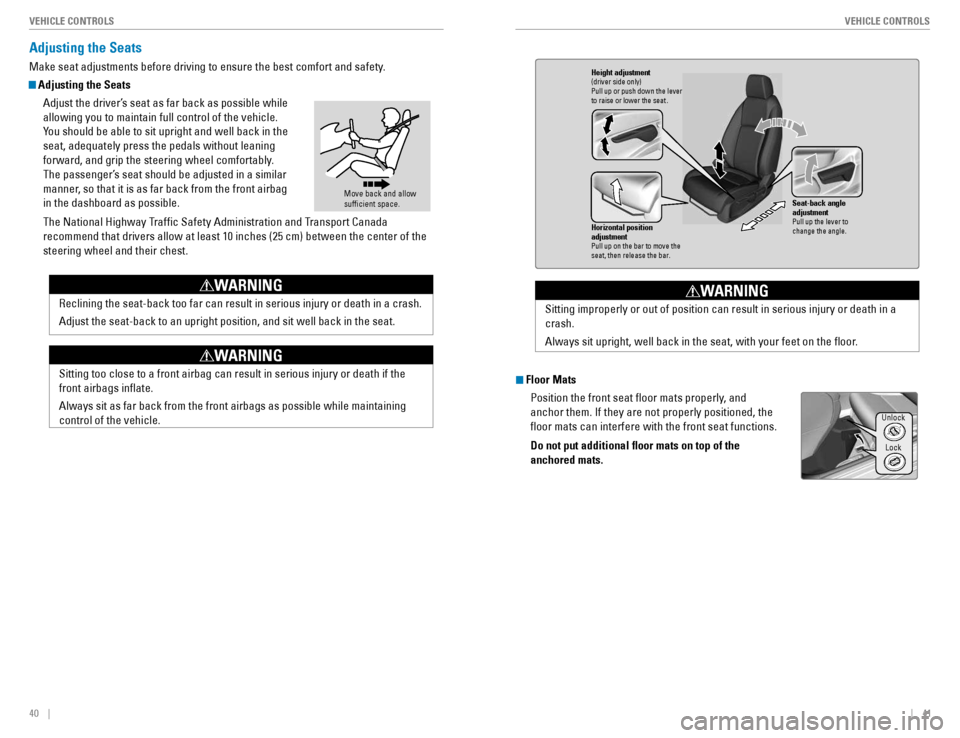
Adjusting the Seats
Adjust the driver’s seat as far back as possible while allowing you to maintain full control of the vehicle.
You should be able to sit upright and well back in the seat, adequately press the pedals without leaning
forward, and grip the steering wheel comfortably.
The passenger’s seat should be adjusted in a similar
manner, so that it is as far back from the front airbag in the dashboard as possible.
The National Highway Trafc Safety Administration and Transport Canada
recommend that drivers allow at least 10 inches (25 cm) between the center of the steering wheel and their chest.
Move back and allow sufcient space.
Reclining the seat-back too far can result in serious injury or death in a crash. Adjust the seat-back to an upright position, and sit well back in the seat.
WARNING
Sitting too close to a front airbag can result in serious injury or death if the front airbags inate. Always sit as far back from the front airbags as possible while maintaining control of the vehicle.
WARNING
Floor Mats
Position the front seat oor mats properly, and anchor them. If they are not properly positioned, the oor mats can interfere with the front seat functions. Do not put additional oor mats on top of the anchored mats.
Horizontal position adjustment
Pull up on the bar to move the seat, then release the bar.
Height adjustment(driver side only )
Pull up or push down the lever to raise or lower the seat .
Seat-back angle adjustment
Pull up the lever to
change the angle.
Sitting improperly or out of position can result in serious injury or death in a crash.
Always sit upright, well back in the seat, with your feet on the oor.
WARNING
Unlock
Lock
Page 25 of 82
42 || 43
VEHICLE CONTROLS
VEHICLE CONTROLS
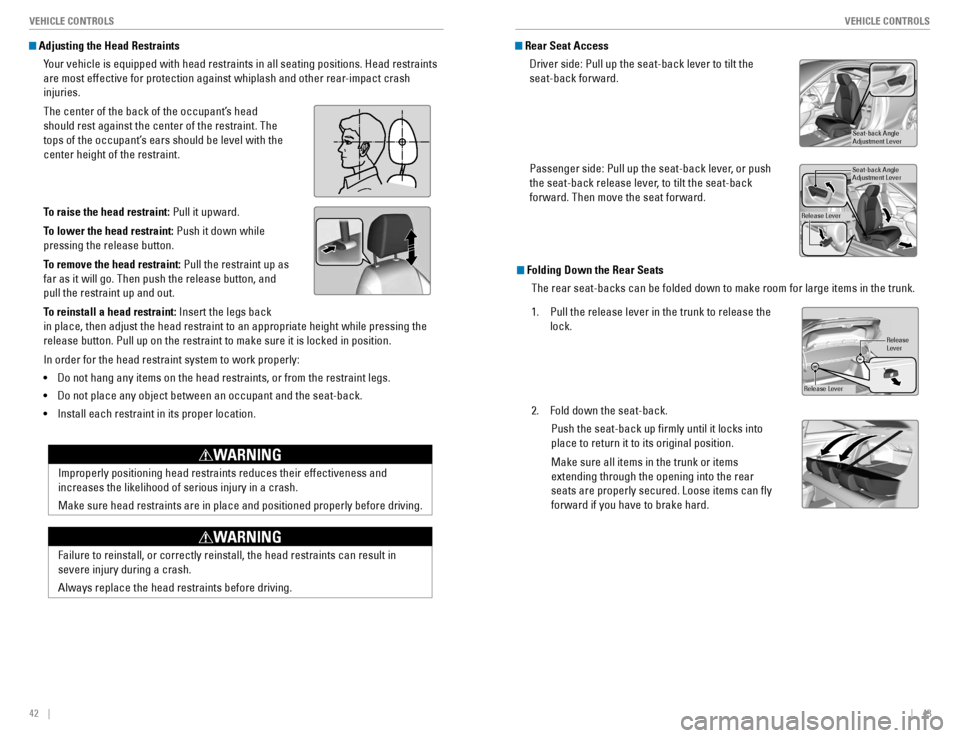
Adjusting the Head Restraints
Your vehicle is equipped with head restraints in all seating positions. Head restraints
are most effective for protection against whiplash and other rear-impact crash injuries.
The center of the back of the occupant’s head should rest against the center of the restraint. The
tops of the occupant’s ears should be level with the center height of the restraint.
To raise the head restraint: Pull it upward.
To lower the head restraint: Push it down while
pressing the release button.
To remove the head restraint: Pull the restraint up as
far as it will go. Then push the release button, and pull the restraint up and out.
To reinstall a head restraint: Insert the legs back
in place, then adjust the head restraint to an appropriate height while pressing the
release button. Pull up on the restraint to make sure it is locked in position. In order for the head restraint system to work properly: • Do not hang any items on the head restraints, or from the restraint legs.
• Do not place any object between an occupant and the seat-back.
• Install each restraint in its proper location.
Position head in the
Improperly positioning head restraints reduces their effectiveness and increases the likelihood of serious injury in a crash. Make sure head restraints are in place and positioned properly before driving.
WARNING
Failure to reinstall, or correctly reinstall, the head restraints can result in severe injury during a crash. Always replace the head restraints before driving.
WARNING
Folding Down the Rear Seats
The rear seat-backs can be folded down to make room for large items in the trunk.
1. Pull the release lever in the trunk to release the
lock.
2. Fold down the seat-back. Push the seat-back up rmly until it locks into place to return it to its original position. Make sure all items in the trunk or items extending through the opening into the rear seats are properly secured. Loose items can y forward if you have to brake hard.
LeverRelease
Release Lever
Rear Seat Access
Driver side: Pull up the seat-back lever to tilt the seat-back forward.
Passenger side: Pull up the seat-back lever, or push
the seat-back release lever, to tilt the seat-back forward. Then move the seat forward.
Seat-back Angle Adjustment Lever
Seat-back Angle Adjustment Leve r
Release Lever
Page 26 of 82
44 || 45
VEHICLE CONTROLS
VEHICLE CONTROLS
Adjusting the Mirrors
Adjust the angle of the mirrors for the best visibility when you are sitting in the correct driving position.
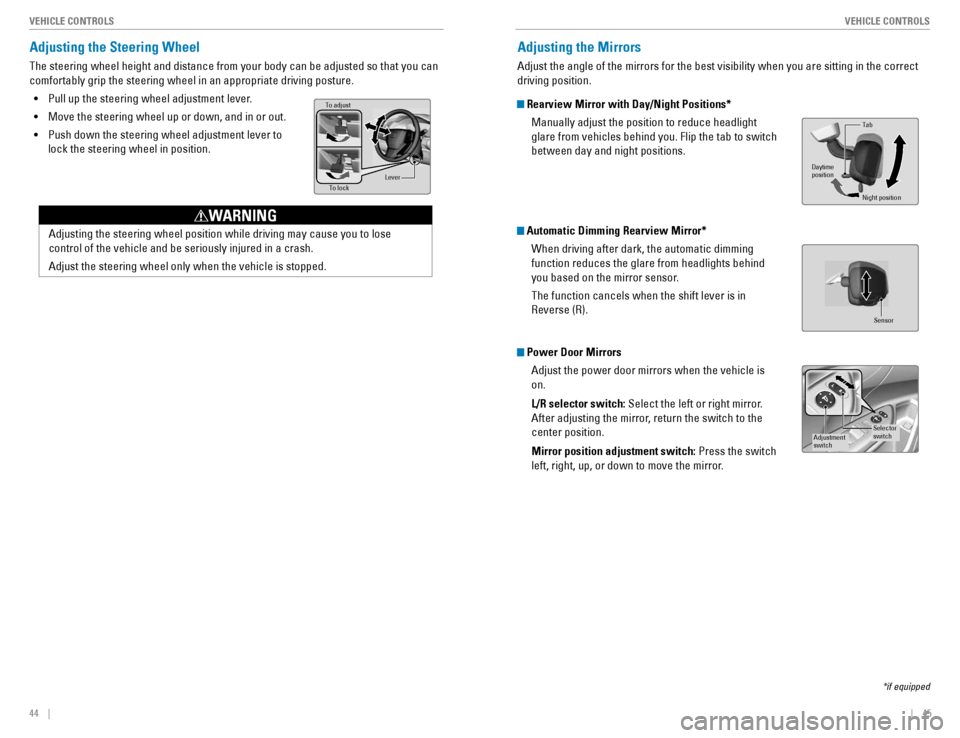
Rearview Mirror with Day/Night Positions*
Manually adjust the position to reduce headlight glare from vehicles behind you. Flip the tab to switch between day and night positions.
Automatic Dimming Rearview Mirror*
When driving after dark, the automatic dimming function reduces the glare from headlights behind
you based on the mirror sensor. The function cancels when the shift lever is in Reverse (R).
Power Door Mirrors
Adjust the power door mirrors when the vehicle is on. L/R selector switch: Select the left or right mirror.
After adjusting the mirror, return the switch to the center position. Mirror position adjustment switch: Press the switch
left, right, up, or down to move the mirror.
Tab
Daytime position
Night position
*if equipped
Selector
switchAdjustment
switch
Sensor
Adjusting the Steering Wheel
The steering wheel height and distance from your body can be adjusted so that you can comfortably grip the steering wheel in an appropriate driving posture.
• Pull up the steering wheel adjustment lever.
• Move the steering wheel up or down, and in or out.
• Push down the steering wheel adjustment lever to
lock the steering wheel in position.
Adjusting the steering wheel position while driving may cause you to lose control of the vehicle and be seriously injured in a crash. Adjust the steering wheel only when the vehicle is stopped.
WARNING
To adjust To lock Lever
Page 28 of 82
48 || 49
VEHICLE CONTROLS
VEHICLE CONTROLS
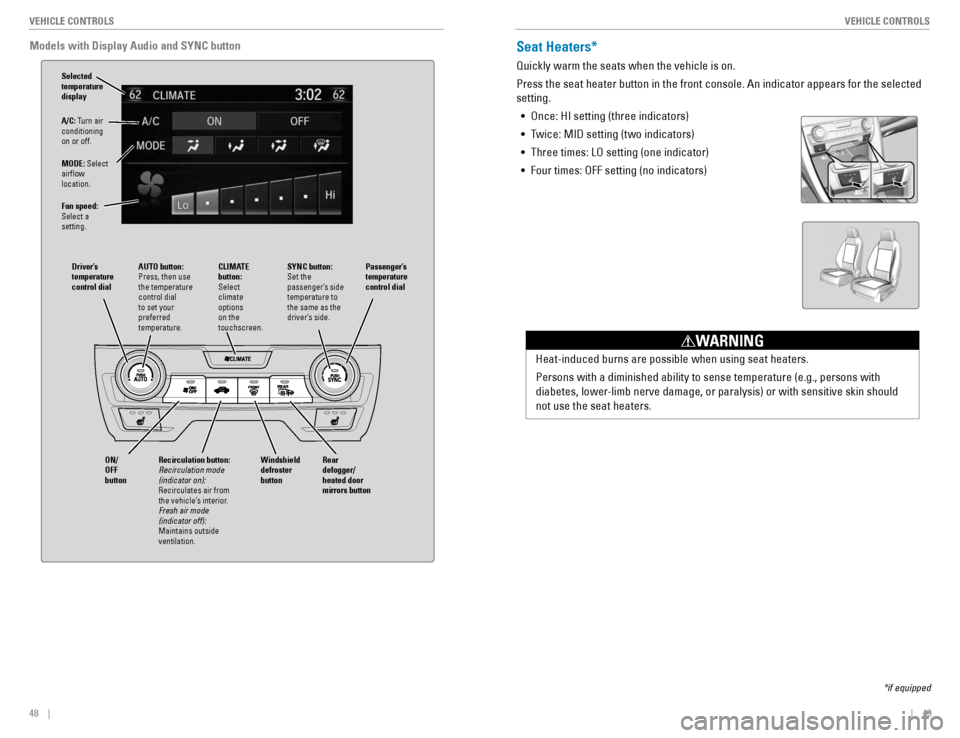
Models with Display Audio and SYNC button
A/C: Turn air
conditioning on or off.
MODE: Select
airow location.
Fan speed: Select a setting.
AUTO button: Press, then use the temperature control dial to set your preferred temperature. Driver’s temperature control dialPassenger’s temperature control dial
ON/ OFF button
CLIMATE button: Select climate options on the touchscreen.
Selected temperature display
Rear defogger/heated door mirrors buttonWindshield defroster button Recirculation button:
Recirculation mode (indicator on):
Recirculates air from
the vehicle’s interior. Fresh air mode (indicator off):
Maintains outside ventilation.
SYNC button: Set the
passenger’s side temperature to the same as the
driver’s side.
Seat Heaters*
Quickly warm the seats when the vehicle is on. Press the seat heater button in the front console. An indicator appears for the selected setting.
• Once: HI setting (three indicators)
• Twice: MID setting (two indicators)
• Three times: LO setting (one indicator)
• Four times: OFF setting (no indicators)
Heat-induced burns are possible when using seat heaters.
Persons with a diminished ability to sense temperature (e.g., persons with
diabetes, lower-limb nerve damage, or paralysis) or with sensitive skin should not use the seat heaters.
WARNING
*if equipped
Page 48 of 82
88 || 89
NAVIGATION
NAVIGATION
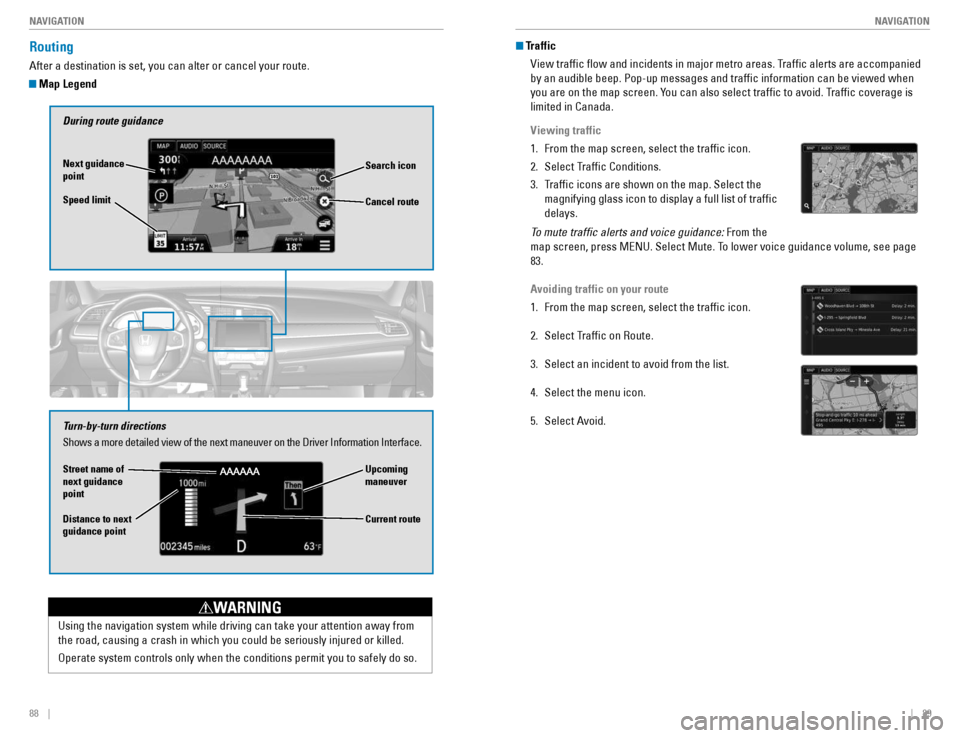
Routing
After a destination is set, you can alter or cancel your route.
Map Legend
During route guidance
Next guidance point Speed limit Search icon
Turn-by-turn directions Shows a more detailed view of the next maneuver on the Driver Information Interface.
Upcoming maneuver
Distance to next guidance point Current route
Cancel route
Using the navigation system while driving can take your attention away from
the road, causing a crash in which you could be seriously injured or killed.
Operate system controls only when the conditions permit you to safely do so.
WARNING
Street name of next guidance point
Traffic
View trafc ow and incidents in major metro areas. Trafc alerts are accompanied by an audible beep. Pop-up messages and trafc information can be viewed when
you are on the map screen. You can also select trafc to avoid. Trafc coverage is limited in Canada.
Viewing traffic
1. From the map screen, select the trafc icon.
2. Select Trafc Conditions.
3. Trafc icons are shown on the map. Select the magnifying glass icon to display a full list of trafc delays.
To mute trafic alerts and voice guidance: From the
map screen, press MENU. Select Mute. To lower voice guidance volume, see page 83.
Avoiding traffic on your route
1. From the map screen, select the trafc icon.
2. Select Trafc on Route.
3. Select an incident to avoid from the list.
4. Select the menu icon.
5. Select Avoid.
Page 49 of 82
90 || 91
DRIVING
DRIVING
DRIVING
Learn about preparation for driving, as well as other features.
Before Driving
Check the following items before you begin driving.
Exterior Checks
• Make sure there are no obstructions on the windows, door mirrors, exterior lights,
or other parts of the vehicle.
• Remove any frost, snow, or ice.
• Make sure the hood is securely closed.
• Heat from the engine and exhaust can ignite ammable materials left under the
hood, causing a re. If you’ve parked your vehicle for an extended period, inspect and remove any debris that may have collected, such as dried grass and leaves
that have fallen or have been carried in for use as a nest by a small animal. Also
check under the hood for leftover ammable materials after you or someone else has performed maintenance on your vehicle.
• Make sure the tires are in good condition.
• Make sure there are no people or objects behind or around the vehicle.
If the doors are frozen shut, use warm water around the door edges to melt any ice. Do not try to force them open, as this can damage the rubber trim around the doors. When done, wipe dry to avoid further freezing.
NOTICE
In addition: • During the rst 600 miles (1,000 km) of operation, avoid sudden acceleration or full
throttle operation so as not to damage the engine or powertrain.
• Avoid hard braking for the rst 200 miles (300 km). You should also follow this when
the brake pads are replaced.
Improper accessories or modications can affect your vehicle’s handling,
stability, and performance, and cause a crash in which you can be seriously hurt or killed.
Follow all instructions in the vehicle owner’s manual regarding accessories and modications.
WARNING
Interior Checks
• Store or secure all items on board properly.
• Do not place anything in the front-seat footwells. Make sure to secure the oor
mats.
• If you have any animals on board, do not let them move freely around in the
vehicle.
• Securely close and lock all doors and the trunk.
• Adjust your seating position, mirrors, and steering wheel properly.
• Make sure items placed on the oor behind the front seats cannot roll under the
seats.
• Everyone in the vehicle must fasten their seat belt.
• Make sure that the indicators in the instrument panel come on when you start the
vehicle, and go off soon after.
Page 50 of 82
92 || 93
DRIVING
DRIVING
Maximum Load Limit
Carrying too much cargo or improperly storing it can affect your vehicle’s
handling, stability, stopping distance, and tires, and make it unsafe.
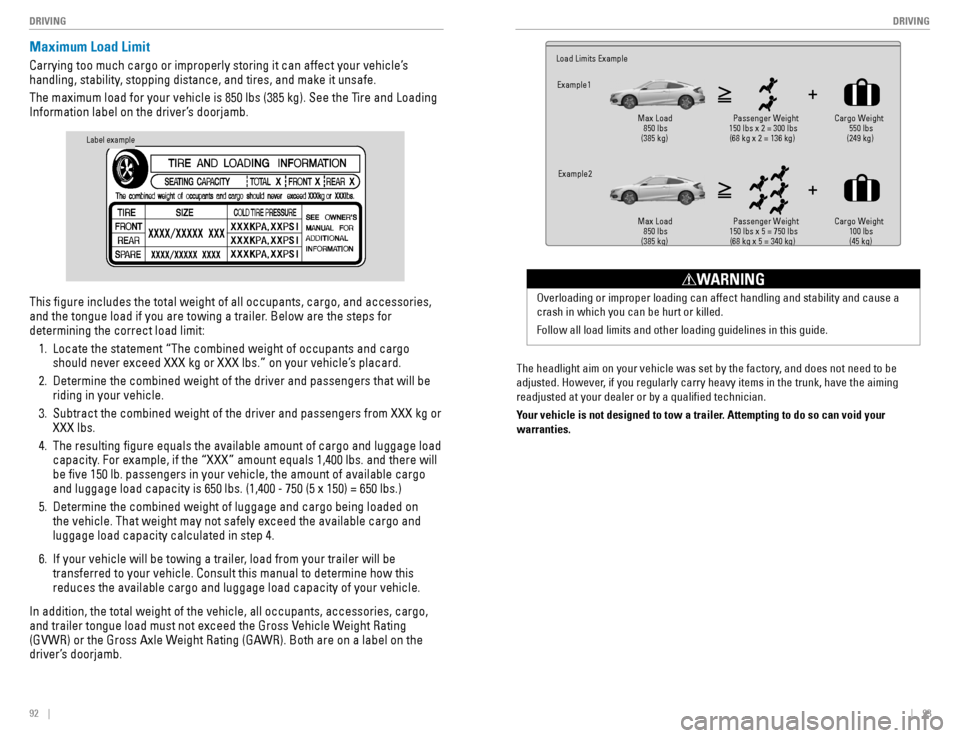
The maximum load for your vehicle is 850 lbs (385 kg). See the Tire and Loading
Information label on the driver’s doorjamb. This gure includes the total weight of all occupants, cargo, and accessories,
and the tongue load if you are towing a trailer. Below are the steps for determining the correct load limit:
1. Locate the statement “The combined weight of occupants and cargo should never exceed XXX kg or XXX lbs.” on your vehicle’s placard.
2. Determine the combined weight of the driver and passengers that will be riding in your vehicle.
3. Subtract the combined weight of the driver and passengers from XXX kg or XXX lbs.
4. The resulting gure equals the available amount of cargo and luggage load capacity. For example, if the “XXX” amount equals 1,400 lbs. and there will be ve 150 lb. passengers in your vehicle, the amount of available cargo and luggage load capacity is 650 lbs. (1,400 - 750 (5 x 150) = 650 lbs.)
5. Determine the combined weight of luggage and cargo being loaded on the vehicle. That weight may not safely exceed the available cargo and luggage load capacity calculated in step 4.
6. If your vehicle will be towing a trailer, load from your trailer will be transferred to your vehicle. Consult this manual to determine how this reduces the available cargo and luggage load capacity of your vehicle.
In addition, the total weight of the vehicle, all occupants, accessories, cargo,
and trailer tongue load must not exceed the Gross Vehicle Weight Rating
(GVWR) or the Gross Axle Weight Rating (GAWR). Both are on a label on the
driver’s doorjamb.
Label example
The headlight aim on your vehicle was set by the factory, and does not need to be
adjusted. However, if you regularly carry heavy items in the trunk, have the aiming readjusted at your dealer or by a qualied technician.
Your vehicle is not designed to tow a trailer. Attempting to do so can void your warranties.
Load Limits ExampleExample1
Max Load
850 lbs
(385 kg) 550 lbs
(249 kg)
Passenger Weight
150 lbs x 2 = 300 lbs (68 kg x 2 = 136 kg) Cargo Weight
Example2 Max Load
850 lbs
(385 kg) 100 lbs
Passenger Weight
150 lbs x 5 = 750 lbs (68 kg x 5 = 340 kg) (45 kg) Cargo Weight
Overloading or improper loading can affect handling and stability and cause a crash in which you can be hurt or killed. Follow all load limits and other loading guidelines in this guide.
WARNING
Page 51 of 82
94 || 95
DRIVING
DRIVING
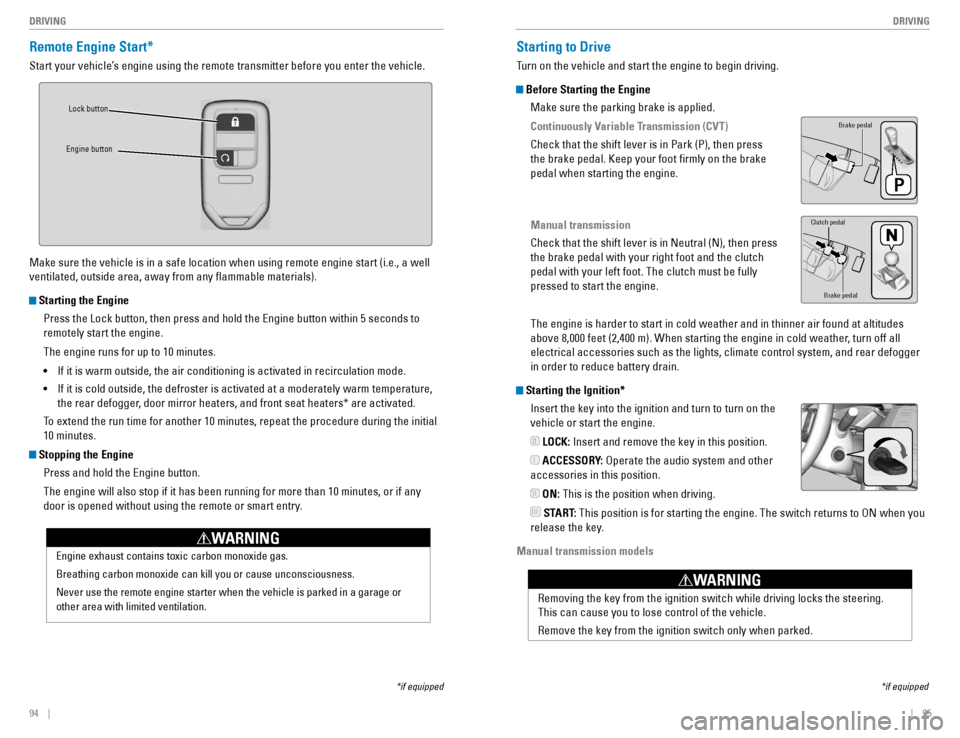
Remote Engine Start*
Start your vehicle’s engine using the remote transmitter before you enter the vehicle.
Make sure the vehicle is in a safe location when using remote engine start (i.e., a well ventilated, outside area, away from any ammable materials).
Starting the Engine
Press the Lock button, then press and hold the Engine button within 5 seconds to remotely start the engine. The engine runs for up to 10 minutes.• If it is warm outside, the air conditioning is activated in recirculation mode.
• If it is cold outside, the defroster is activated at a moderately warm temperature,
the rear defogger, door mirror heaters, and front seat heaters* are activated.
To extend the run time for another 10 minutes, repeat the procedure during the initial 10 minutes.
Stopping the Engine
Press and hold the Engine button.
The engine will also stop if it has been running for more than 10 minutes, or if any
door is opened without using the remote or smart entry.
Engine exhaust contains toxic carbon monoxide gas. Breathing carbon monoxide can kill you or cause unconsciousness.Never use the remote engine starter when the vehicle is parked in a garage or other area with limited ventilation.
WARNING
Lock button
Engine button
Starting to Drive
Turn on the vehicle and start the engine to begin driving.
Before Starting the Engine
Make sure the parking brake is applied.
Continuously Variable Transmission (CVT)
Check that the shift lever is in Park (P), then press the brake pedal. Keep your foot rmly on the brake pedal when starting the engine.
Manual transmission
Check that the shift lever is in Neutral (N), then press the brake pedal with your right foot and the clutch pedal with your left foot. The clutch must be fully pressed to start the engine. The engine is harder to start in cold weather and in thinner air found at altitudes
above 8,000 feet (2,400 m). When starting the engine in cold weather, turn off all
electrical accessories such as the lights, climate control system, and rear defogger in order to reduce battery drain.
Starting the Ignition*
Insert the key into the ignition and turn to turn on the vehicle or start the engine.
LOCK: Insert and remove the key in this position.
ACCESSORY: Operate the audio system and other
accessories in this position.
ON: This is the position when driving.
START: This position is for starting the engine. The switch returns to ON when you
release the key.
Manual transmission models
*if equipped
Brake pedal
Brake pedal
Clutch pedal
Removing the key from the ignition switch while driving locks the steering. This can cause you to lose control of the vehicle. Remove the key from the ignition switch only when parked.
WARNING
*if equipped 0 I II III
Page 53 of 82
98 || 99
DRIVING
DRIVING
Braking
Slow down or stop your vehicle, and keep it from moving when parked.
Foot Brake
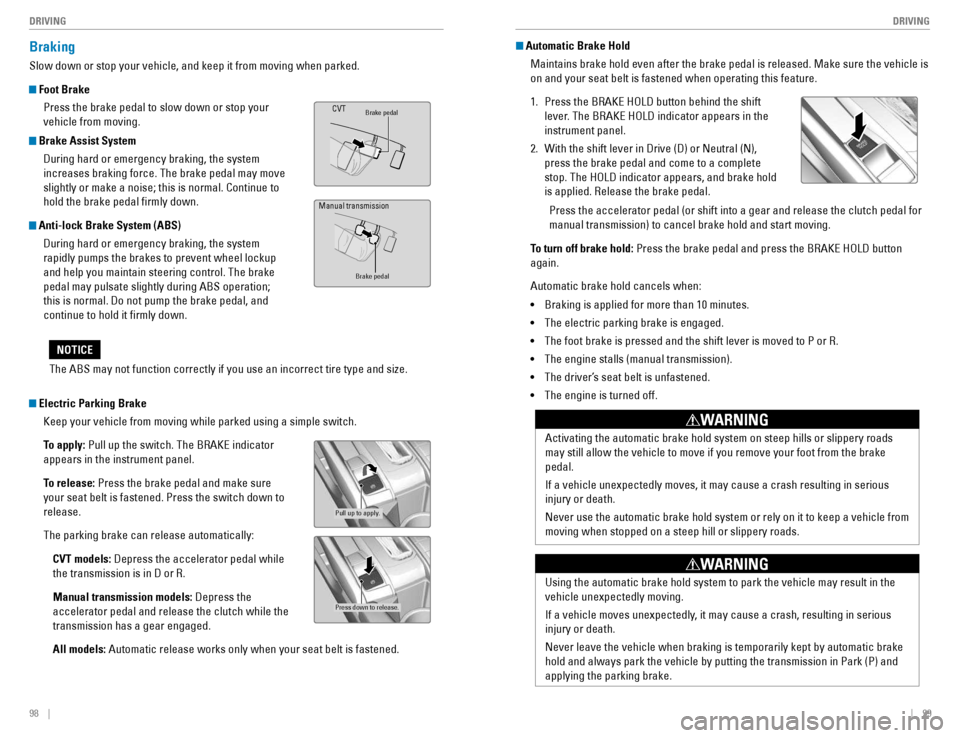
Press the brake pedal to slow down or stop your vehicle from moving.
Brake Assist System
During hard or emergency braking, the system increases braking force. The brake pedal may move slightly or make a noise; this is normal. Continue to hold the brake pedal rmly down.
Anti-lock Brake System (ABS)
During hard or emergency braking, the system rapidly pumps the brakes to prevent wheel lockup and help you maintain steering control. The brake pedal may pulsate slightly during ABS operation; this is normal. Do not pump the brake pedal, and continue to hold it rmly down.
Brake pedalCVT
Brake pedal
The ABS may not function correctly if you use an incorrect tire type and size.
NOTICE
Electric Parking Brake
Keep your vehicle from moving while parked using a simple switch.
To apply: Pull up the switch. The BRAKE indicator
appears in the instrument panel.
To release: Press the brake pedal and make sure
your seat belt is fastened. Press the switch down to release. The parking brake can release automatically:
CVT models: Depress the accelerator pedal while
the transmission is in D or R.Manual transmission models: Depress the
accelerator pedal and release the clutch while the transmission has a gear engaged. All models: Automatic release works only when your seat belt is fastened.
Pull up to apply.
Press down to release.
Manual transmission
Automatic Brake Hold
Maintains brake hold even after the brake pedal is released. Make sure the vehicle is on and your seat belt is fastened when operating this feature.
1. Press the BRAKE HOLD button behind the shift
lever. The BRAKE HOLD indicator appears in the instrument panel.
2. With the shift lever in Drive (D) or Neutral (N), press the brake pedal and come to a complete stop. The HOLD indicator appears, and brake hold is applied. Release the brake pedal.
Press the accelerator pedal (or shift into a gear and release the clutch pedal for manual transmission) to cancel brake hold and start moving.
To turn off brake hold: Press the brake pedal and press the BRAKE HOLD button
again.
Automatic brake hold cancels when: • Braking is applied for more than 10 minutes.
• The electric parking brake is engaged.
• The foot brake is pressed and the shift lever is moved to P or R.
• The engine stalls (manual transmission).
• The driver’s seat belt is unfastened.
• The engine is turned off.
Activating the automatic brake hold system on steep hills or slippery roads may still allow the vehicle to move if you remove your foot from the brake pedal.
If a vehicle unexpectedly moves, it may cause a crash resulting in serious injury or death.
Never use the automatic brake hold system or rely on it to keep a vehicle from moving when stopped on a steep hill or slippery roads.
WARNING
Using the automatic brake hold system to park the vehicle may result in the vehicle unexpectedly moving.
If a vehicle moves unexpectedly, it may cause a crash, resulting in serious injury or death.
Never leave the vehicle when braking is temporarily kept by automatic brake
hold and always park the vehicle by putting the transmission in Park (P) and applying the parking brake.
WARNING