warning HONDA CIVIC COUPE 2016 10.G Quick Guide
[x] Cancel search | Manufacturer: HONDA, Model Year: 2016, Model line: CIVIC COUPE, Model: HONDA CIVIC COUPE 2016 10.GPages: 82, PDF Size: 5.2 MB
Page 67 of 82
126 || 127
MAINTENANCE
HANDLING THE UNEXPECTED
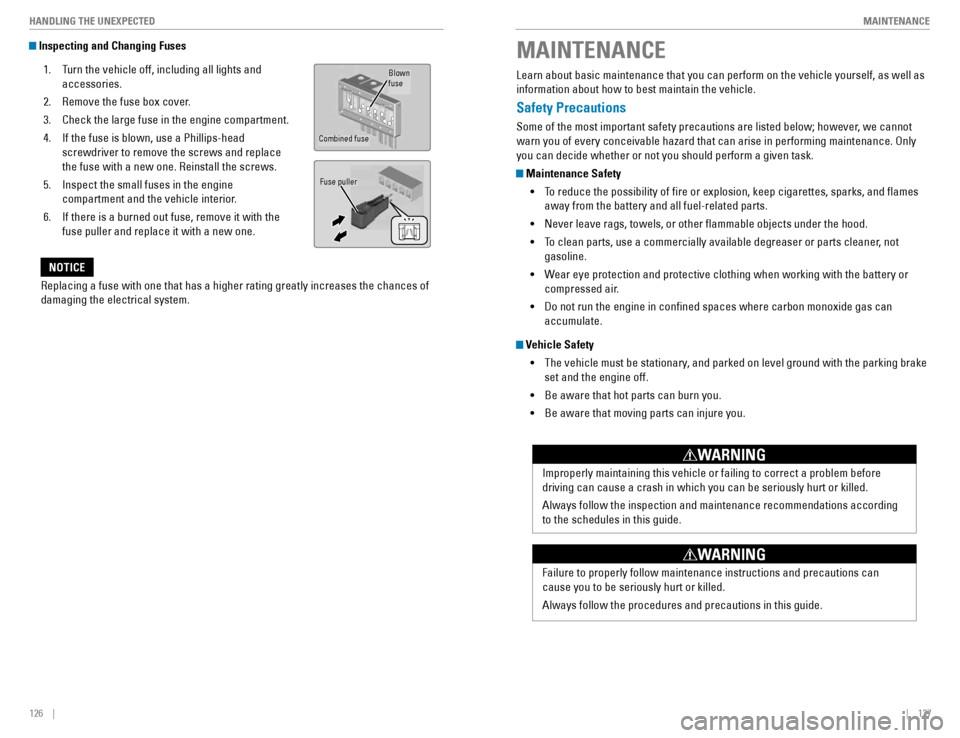
Inspecting and Changing Fuses
1. Turn the vehicle off, including all lights and
accessories.
2. Remove the fuse box cover.
3. Check the large fuse in the engine compartment.
4. If the fuse is blown, use a Phillips-head screwdriver to remove the screws and replace the fuse with a new one. Reinstall the screws.
5. Inspect the small fuses in the engine compartment and the vehicle interior.
6. If there is a burned out fuse, remove it with the fuse puller and replace it with a new one.Blown fuse
Combined fuse
Fuse puller
Replacing a fuse with one that has a higher rating greatly increases the chances of damaging the electrical system.
NOTICE
MAINTENANCE
Learn about basic maintenance that you can perform on the vehicle yourself, as well as information about how to best maintain the vehicle.
Safety Precautions
Some of the most important safety precautions are listed below; however, we cannot warn you of every conceivable hazard that can arise in performing maintenance. Only you can decide whether or not you should perform a given task.
Maintenance Safety
• To reduce the possibility of re or explosion, keep cigarettes, sparks, and ames
away from the battery and all fuel-related parts.
• Never leave rags, towels, or other ammable objects under the hood.
• To clean parts, use a commercially available degreaser or parts cleaner, not
gasoline.
• Wear eye protection and protective clothing when working with the battery or
compressed air.
• Do not run the engine in conned spaces where carbon monoxide gas can
accumulate.
Vehicle Safety
• The vehicle must be stationary, and parked on level ground with the parking brake
set and the engine off.
• Be aware that hot parts can burn you.
• Be aware that moving parts can injure you.
Improperly maintaining this vehicle or failing to correct a problem before driving can cause a crash in which you can be seriously hurt or killed. Always follow the inspection and maintenance recommendations according to the schedules in this guide.
WARNING
Failure to properly follow maintenance instructions and precautions can cause you to be seriously hurt or killed. Always follow the procedures and precautions in this guide.
WARNING
Page 72 of 82
136 || 137
MAINTENANCE
MAINTENANCE
Engine Coolant
Park the vehicle on level ground. Check the reserve tank and the coolant level in the
radiator. We recommend Honda Long Life Antifreeze/Coolant Type 2.
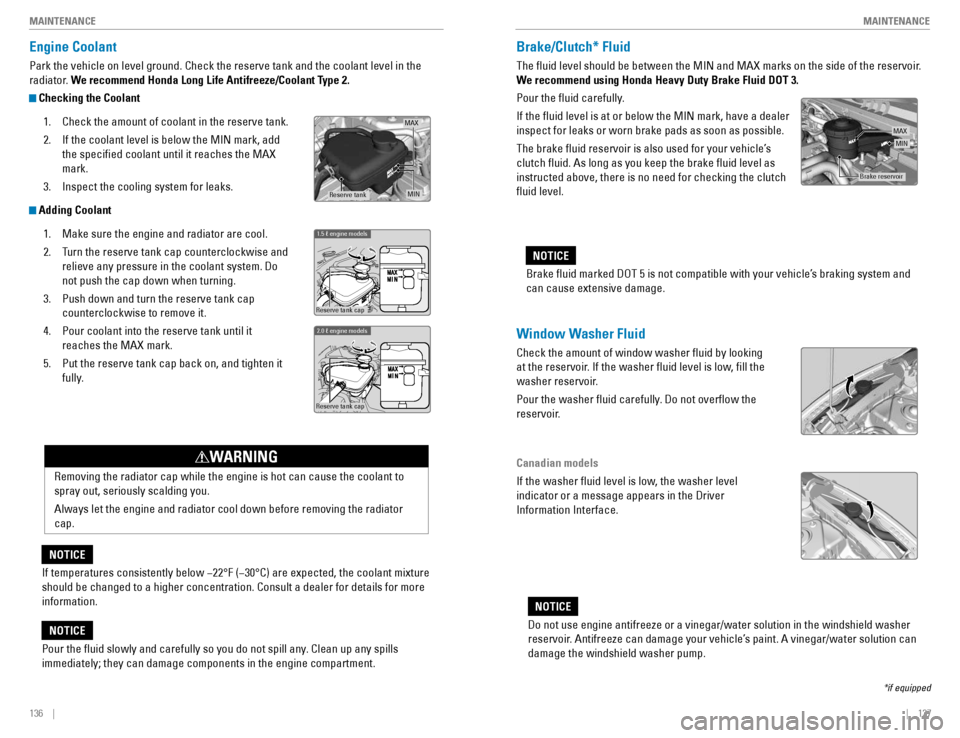
Checking the Coolant
1. Check the amount of coolant in the reserve tank.
2. If the coolant level is below the MIN mark, add
the specied coolant until it reaches the MAX mark.
3. Inspect the cooling system for leaks.
Adding Coolant
1. Make sure the engine and radiator are cool.
2. Turn the reserve tank cap counterclockwise and relieve any pressure in the coolant system. Do not push the cap down when turning.
3. Push down and turn the reserve tank cap counterclockwise to remove it.
4. Pour coolant into the reserve tank until it reaches the MAX mark.
5. Put the reserve tank cap back on, and tighten it fully.
If temperatures consistently below 22°F (30°C) are expected, the coolant mixture should be changed to a higher concentration. Consult a dealer for details for more information.
NOTICE
Reserve tank cap
1.5 ℓ engine models
Reserve tank cap
2.0 ℓ engine models
Removing the radiator cap while the engine is hot can cause the coolant to spray out, seriously scalding you. Always let the engine and radiator cool down before removing the radiator cap.
WARNING
Pour the uid slowly and carefully so you do not spill any. Clean up any spills immediately; they can damage components in the engine compartment.
NOTICE
MA X
MINReserve tan k
Window Washer Fluid
Check the amount of window washer uid by looking
at the reservoir. If the washer uid level is low, ll the
washer reservoir.
Pour the washer uid carefully. Do not overow the
reservoir.
Canadian models
If the washer uid level is low, the washer level indicator or a message appears in the Driver Information Interface.
Do not use engine antifreeze or a vinegar/water solution in the windshield washer
reservoir. Antifreeze can damage your vehicle’s paint. A vinegar/water solution can damage the windshield washer pump.
NOTICE
Brake/Clutch* Fluid
The uid level should be between the MIN and MAX marks on the side of the reservoir.
We recommend using Honda Heavy Duty Brake Fluid DOT 3.
Pour the uid carefully.If the uid level is at or below the MIN mark, have a dealer inspect for leaks or worn brake pads as soon as possible.
The brake uid reservoir is also used for your vehicle’s clutch uid. As long as you keep the brake uid level as instructed above, there is no need for checking the clutch uid level.Brake uid marked DOT 5 is not compatible with your vehicle’s braking system and can cause extensive damage.
NOTICE
Brake reservoir
MINMAX
*if equipped
Page 73 of 82
138 || 139
MAINTENANCE
MAINTENANCE
Checking the Battery
Check the battery terminals for corrosion monthly. For jump starting, see page 114.
The battery gives off explosive hydrogen gas during normal operation. A spark or ame can cause the battery to explode with enough force to kill or seriously hurt you. When conducting any battery maintenance, wear protective clothing and a face shield, or have a skilled technician do it. Battery posts, terminals, and related accessories contain lead and lead
compounds. Wash your hands after handling.
WARNING
Changing Wiper Blades
If the wiper blades leave streaks across the windshield, try cleaning them rst with a paper towel or soft cloth and wiper uid. If the wiper blade rubber has deteriorated, you should change the wiper blades.
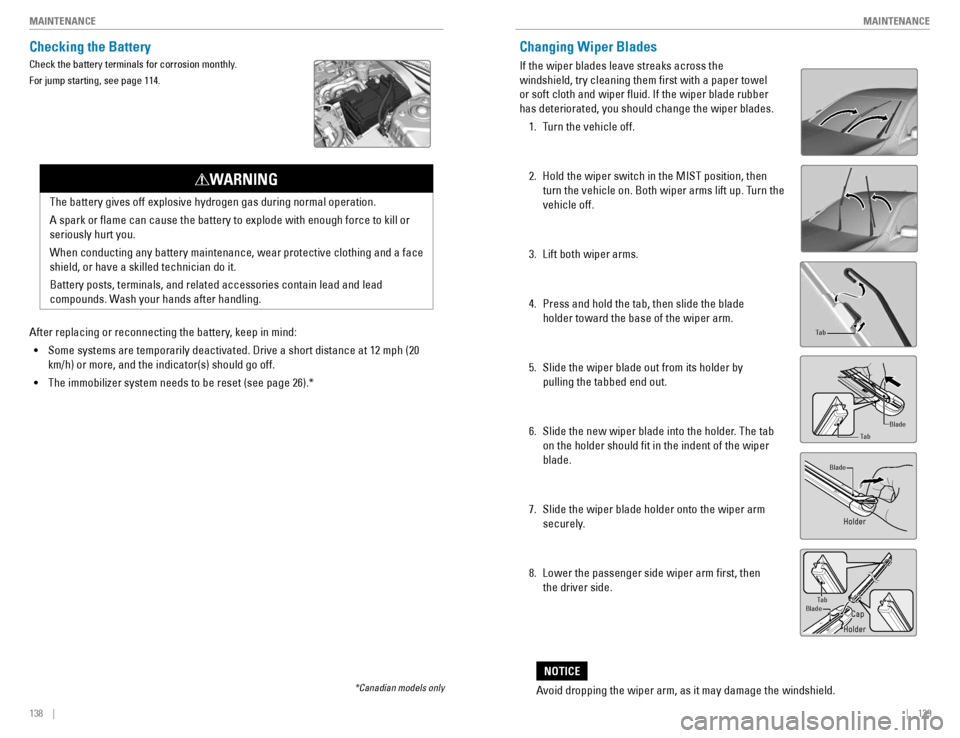
1. Turn the vehicle off.
2. Hold the wiper switch in the MIST position, then turn the vehicle on. Both wiper arms lift up. Turn the vehicle off.
3. Lift both wiper arms.
4. Press and hold the tab, then slide the blade holder toward the base of the wiper arm.
5. Slide the wiper blade out from its holder by pulling the tabbed end out.
6. Slide the new wiper blade into the holder. The tab on the holder should t in the indent of the wiper blade.
7. Slide the wiper blade holder onto the wiper arm securely.
8. Lower the passenger side wiper arm rst, then the driver side.
Tab
Blade
Tab
Blade
TabBlade
Avoid dropping the wiper arm, as it may damage the windshield.
NOTICE
After replacing or reconnecting the battery, keep in mind:
• Some systems are temporarily deactivated. Drive a short distance at 12 mph (20
km/h) or more, and the indicator(s) should go off.
• The immobilizer system needs to be reset (see page 26).*
*Canadian models only
Holder
Holder
Cap
Page 74 of 82
140 || 141
MAINTENANCE
MAINTENANCE
Tire Information
To safely operate your vehicle, your tires must be of the proper type and size, in good condition with adequate tread, and properly inated.
Inflation Guidelines
• Properly inated tires provide the best combination of handling, tread life, and
comfort. Refer to the driver’s doorjamb label or the specications (see page 147) for the specied pressure.
• Underinated tires wear unevenly, adversely affect handling and fuel economy,
and are more likely to fail from overheating.
• Overinated tires make your vehicle ride harshly, are more prone to road hazards,
and wear unevenly.
• Every day before you drive, look at each of the tires. If one looks lower than the
others, check the pressure with a tire gauge.
• Measure the air pressure when tires are cold. This means the vehicle has been
parked for at least 3 hours, or driven less than 1 mile (1.6 km). If necessary, add or release air until the specied pressure is reached, and then calibrate the system
(see page 118). If checked when hot, tire pressure can be as much as 4–6 psi (30–40 kPa, 0.3–0.5 kgf/cm 2
) higher than checked when cold.
• At least once a month or before long trips, use a gauge to measure the pressure in
all tires, including the spare. Even tires in good condition can lose 1–2 psi (10–20 kPa, 0.1–0.2 kgf/cm 2
) per month.
Inspection Guidelines
Every time you inate the tires, check for the following: • Any damage to tires, including bumps, bulges, cuts, splits, or cracks in the side or
tread. Remove any foreign objects and inspect for air leaks. Replace tires if you see fabric or cord.
• Uneven or excessive tread wear. Have a dealer check the wheel alignment.
• Cracks or other damage around the valve stems.
Wear Indicators
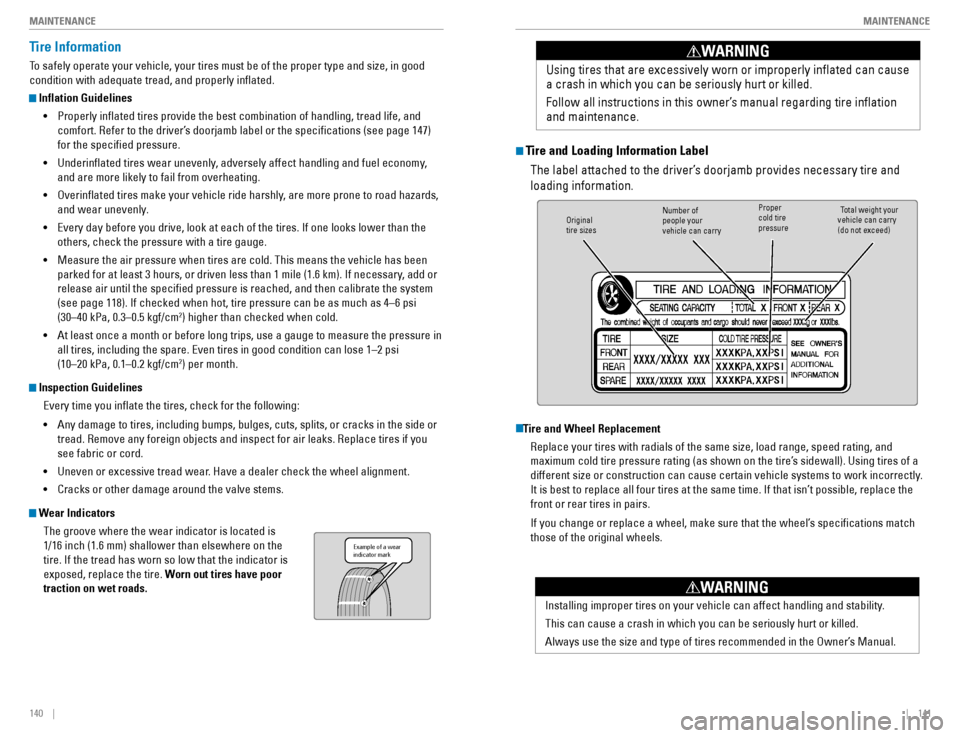
The groove where the wear indicator is located is 1/16 inch (1.6 mm) shallower than elsewhere on the tire. If the tread has worn so low that the indicator is exposed, replace the tire. Worn out tires have poor
traction on wet roads.
Example of a wear indicator mark
Tire and Loading Information Label
The label attached to the driver’s doorjamb provides necessary tire and loading information.
Tire and Wheel Replacement
Replace your tires with radials of the same size, load range, speed rating, and
maximum cold tire pressure rating (as shown on the tire’s sidewall). Using tires of a
different size or construction can cause certain vehicle systems to work incorrectly.
It is best to replace all four tires at the same time. If that isn’t possible, replace the front or rear tires in pairs.
If you change or replace a wheel, make sure that the wheel’s specications match those of the original wheels. Using tires that are excessively worn or improperly inated can cause a crash in which you can be seriously hurt or killed.
Follow all instructions in this owner’s manual regarding tire ination and maintenance
.
WARNING
Original tire sizesNumber of people your vehicle can carryProper cold tire pressureTotal weight your
vehicle can carry (do not exceed)
Installing improper tires on your vehicle can affect handling and stability. This can cause a crash in which you can be seriously hurt or killed.
Always use the size and type of tires recommended in the Owner’s Manual.
WARNING
Page 75 of 82
142 || 143
MAINTENANCE
MAINTENANCE
Tire Service Life
The life of your tires is dependent on many factors, including driving habits, road
conditions, vehicle loading, ination pressure, maintenance history, speed, and environmental conditions (even when the tires are not in use). In addition to regular inspections and ination pressure maintenance, it is recommended that you have annual inspections performed once the tires reach ve years old. All tires, including the spare, should be removed from service after 10 years
from the date of manufacture, regardless of their condition or state of wear.
Winter Tires
If driving on snowy or frozen roads, mount all season tires marked “M+S”, snow tires,
or tire chains; reduce speed; and maintain sufcient distance between vehicles when
driving. For winter tires, select the size and load ranges that are the same as the original tires, and mount them to all four wheels.
Tire Chains
Because your vehicle has limited tire clearance, we strongly recommend using the following chains: For 215/55R16 tires:
Cable-type: Autotrac 0154505 For 215/50R17 tires:
Cable-type: Autotrac 0154005
Install tire chains on the front tires only. Mount chains as tightly as you can, and make sure that they do not touch the brake lines or suspension.
Using the wrong chains, or not properly installing chains, can damage the brake lines and cause a crash in which you can be seriously injured or killed.
Follow all instructions in this guide regarding the selection and use of tire chains.
WARNING
Traction devices that are the wrong size or improperly installed can damage your
vehicle’s brake lines, suspension, body, and wheels. Stop driving if they are hitting any part of the vehicle.
NOTICE
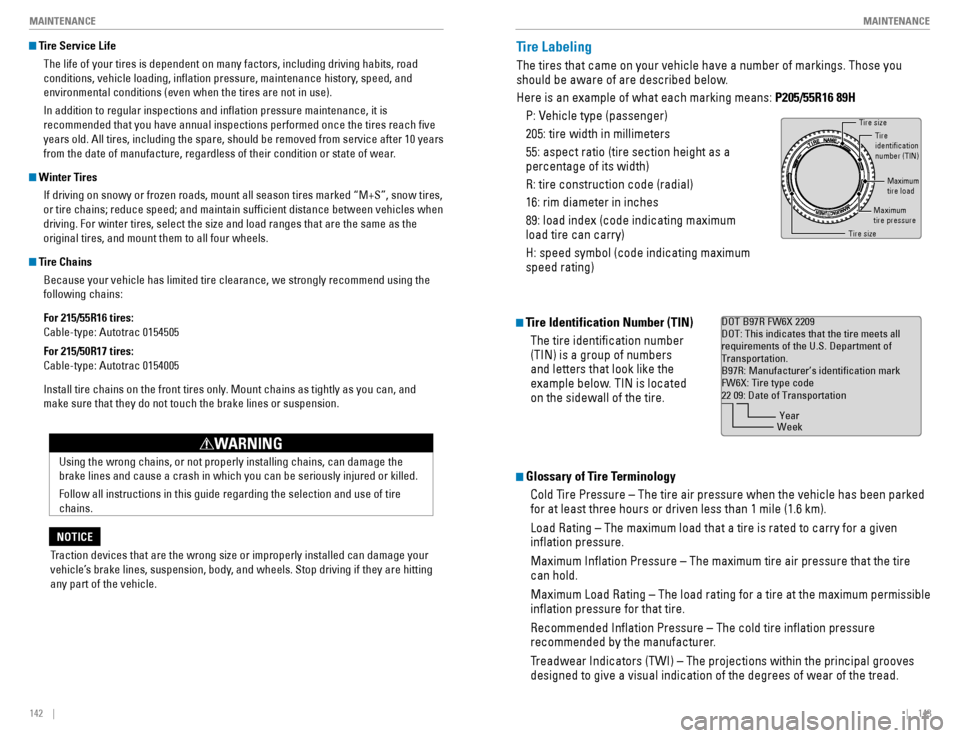
Tire Labeling
The tires that came on your vehicle have a number of markings. Those you
should be aware of are described below. Here is an example of what each marking means: P205/55R16 89H
P: Vehicle type (passenger)205: tire width in millimeters55: aspect ratio (tire section height as a percentage of its width) R: tire construction code (radial)16: rim diameter in inches89: load index (code indicating maximum load tire can carry) H: speed symbol (code indicating maximum speed rating)
Tire Identification Number (TIN)
The tire identication number (TIN) is a group of numbers and letters that look like the
example below. TIN is located on the sidewall of the tire.
Glossary of Tire Terminology
Cold Tire Pressure – The tire air pressure when the vehicle has been parked for at least three hours or driven less than 1 mile (1.6 km). Load Rating – The maximum load that a tire is rated to carry for a given ination pressure. Maximum Ination Pressure – The maximum tire air pressure that the tire can hold.
Maximum Load Rating – The load rating for a tire at the maximum permissible ination pressure for that tire. Recommended Ination Pressure – The cold tire ination pressure
recommended by the manufacturer.
Treadwear Indicators (TWI) – The projections within the principal grooves designed to give a visual indication of the degrees of wear of the tread.
Tire size
Tire identication number (TIN)
Maximum tire load
Maximu m
tire pressure
Tire siz e
DOT B97R FW6X 2209 DOT: This indicates that the tire meets allrequirements of the U.S. Department ofTransportation .
B97R: Manufacturer’s identication markFW6X: Tire type code22 09: Date of Transportation
Year
Week
Page 76 of 82
144 || 145
MAINTENANCE
MAINTENANCE
DOT Tire Quality Grading
The tires on your vehicle meet all U.S. Federal Safety Requirements. All tires are also
graded for treadwear, traction, and temperature performance according to Department
of Transportation (DOT) standards. The following explains these gradings.
Uniform Tire Quality Grading
Quality grades can be found where applicable on the tire sidewall between tread shoulder and maximum section width.
For example:
Treadwear 200
Traction AA
Temperature A
All passenger car tires must conform to Federal Safety Requirements in addition to these grades.
Treadwear
The treadwear grade is a comparative rating based on the wear rate of the tire when tested under controlled conditions on a specied government test course. For
example, a tire graded 150 would wear one and one-half (1 1/2) times as well on the government course as a tire graded 100. The relative performance of tires depends
upon the actual conditions of their use, however, and may depart signicantly from
the norm due to variations in driving habits, service practices, and differences in road characteristics and climate.
Traction
The traction grades, from highest to lowest, are AA, A, B, and C. Those grades
represent the tire’s ability to stop on wet pavement as measured under controlled conditions on specied government test surfaces of asphalt and concrete. A tire marked C may have poor traction performance.
WARNING: The traction grade assigned to this tire is based on straight-ahead
braking traction tests, and does not include acceleration, cornering, hydroplaning, or peak traction characteristics.
Temperature
The temperature grades are A (the highest), B, and C, representing the tire’s resistance to the generation of heat and its ability to dissipate heat when tested under controlled conditions on a specied indoor laboratory test wheel. Sustained high temperature can cause the material of the tire to degenerate and reduce tire life, and excessive temperature can lead to sudden tire failure. The grade C corresponds
to a level of performance which all passenger car tires must meet under the Federal
Motor Vehicle Safety Standard No. 109. Grades B and A represent higher levels of
performance on the laboratory test wheel than the minimum required by law.
WARNING: The temperature grade for this tire is established for a tire that is properly
inated and not overloaded. Excessive speed, underination, or excessive loading, either separately or in combination, can cause heat buildup and possible tire failure.
Air Conditioning
To ensure proper and safe operation, the Society of Automotive Engineers (SAE J2845) recommends that the refrigerant system only be serviced by trained and certied technicians. Never repair or replace the air conditioning evaporator (cooling coil) with one removed from a used or salvaged vehicle. New replacement mobile air conditioning evaporators must be certied (and labeled) as meeting SAE Standard J2842.
Vented refrigerant is harmful to the environment. To avoid refrigerant from venting, never replace the evaporator with one removed from a used or salvaged vehicle.
NOTICE