display HONDA CIVIC COUPE 2016 10.G Quick Guide
[x] Cancel search | Manufacturer: HONDA, Model Year: 2016, Model line: CIVIC COUPE, Model: HONDA CIVIC COUPE 2016 10.GPages: 82, PDF Size: 5.2 MB
Page 42 of 82
76 || 77
BLUETOOTH ®
HANDSFREELINK ®
BLUETOOTH ®
HANDSFREELINK ®
Models with Display Audio
Basic HFL Operation
Make and receive phone calls using the vehicle’s audio system, without handling your phone. Visit
handsfreelink.com (U.S.) or handsfreelink.ca (Canada) to check phone
compatibility.
To reduce the potential for driver distraction, certain manual functions may be inoperable or grayed out while the vehicle is moving. Stop or pull over to perform the
function. Voice commands are also available.
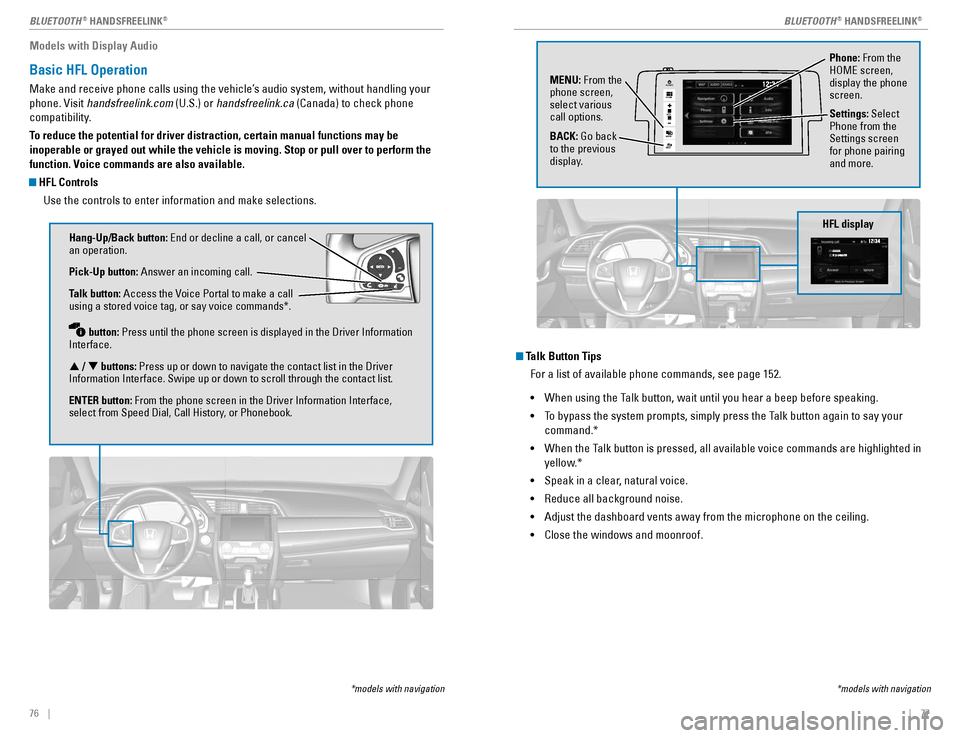
HFL Controls
Use the controls to enter information and make selections.
Hang-Up/Back button: End or decline a call, or cancel
an operation. Pick-Up button: Answer an incoming call.
Talk button: Access the Voice Portal to make a call
using a stored voice tag, or say voice commands*. button: Press until the phone screen is displayed in the Driver Information
Interface. p / q buttons: Press up or down to navigate the contact list in the Driver
Information Interface. Swipe up or down to scroll through the contact list.ENTER button: From the phone screen in the Driver Information Interface,
select from Speed Dial, Call History, or Phonebook.
*models with navigation
Talk Button Tips
For a list of available phone commands, see page 152. • When using the Talk button, wait until you hear a beep before speaking.
• To bypass the system prompts, simply press the Talk button again to say your
command.*
• When the Talk button is pressed, all available voice commands are highlighted in
yellow.*
• Speak in a clear, natural voice.
• Reduce all background noise.
• Adjust the dashboard vents away from the microphone on the ceiling.
• Close the windows and moonroof.
Phone: From the
HOME screen, display the phone screen.
MENU:
From the
phone screen, select various call options. BACK: Go back
to the previous
display. Settings:
Select
Phone from the Settings screen for phone pairing and more.
*models with navigation
HFL display
VO L
HOME
MENU
BA CK
AUDIO
Page 43 of 82
78 || 79
BLUETOOTH ®
HANDSFREELINK ®
BLUETOOTH ®
HANDSFREELINK ®
Models with Display Audio
Pairing a Phone
To use hands-free phone and streaming audio functions, you must rst pair your phone
to the system. This can only be done when the vehicle is stopped. Use the touchscreen to make and enter selections.
If there is an active connection to Apple CarPlay (see page 65) or Android Auto (see page 66), pairing of additional
Bluetooth-compatible devices is unavailable and Add
Bluetooth Device is grayed out from the Bluetooth Device List screen.
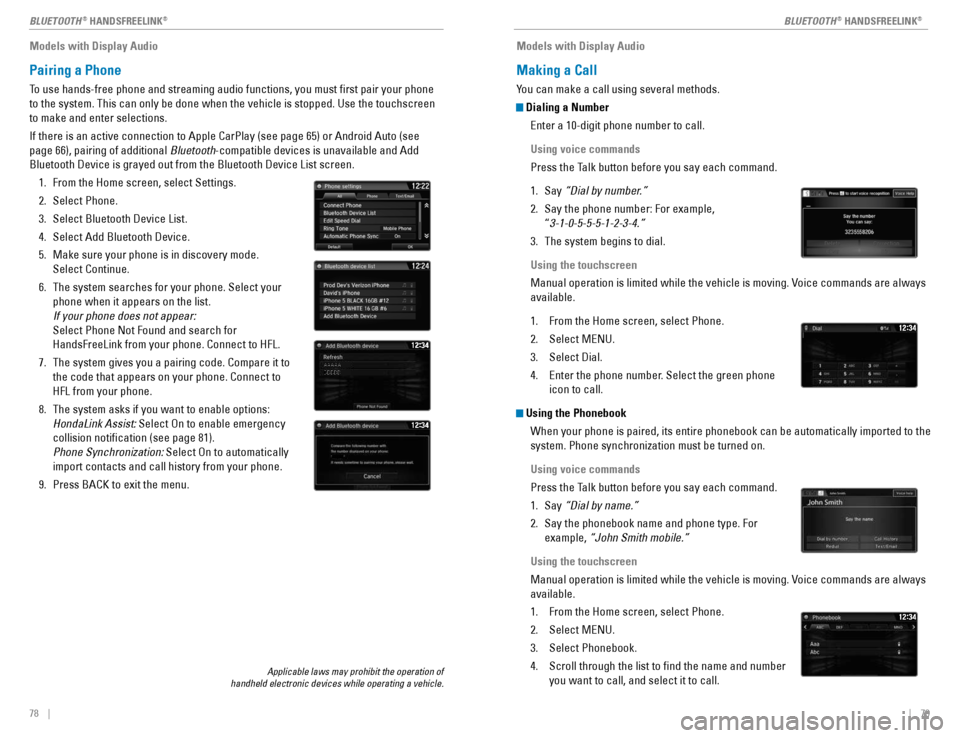
1. From the Home screen, select Settings.
2. Select Phone.
3. Select Bluetooth Device List.
4. Select Add Bluetooth Device.
5. Make sure your phone is in discovery mode. Select Continue.
6. The system searches for your phone. Select your phone when it appears on the list. If your phone does not appear: Select Phone Not Found and search for HandsFreeLink from your phone. Connect to HFL.
7. The system gives you a pairing code. Compare it to the code that appears on your phone. Connect to HFL from your phone.
8. The system asks if you want to enable options: HondaLink Assist: Select On to enable emergency
collision notication (see page 81). Phone Synchronization: Select On to automatically
import contacts and call history from your phone.
9. Press BACK to exit the menu.
Models with Display Audio
Making a Call
You can make a call using several methods.
Dialing a Number
Enter a 10-digit phone number to call.
Using voice commands
Press the Talk button before you say each command.
1. Say “Dial by number.”
2. Say the phone number: For example, “3-1-0-5-5-5-1-2-3-4.”
3. The system begins to dial.
Using the touchscreen
Manual operation is limited while the vehicle is moving. Voice commands are always available.
1. From the Home screen, select Phone.
2. Select MENU.
3. Select Dial.
4. Enter the phone number. Select the green phone icon to call.
Using the Phonebook
When your phone is paired, its entire phonebook can be automatically imported to the system. Phone synchronization must be turned on.
Using voice commands
Press the Talk button before you say each command.
1. Say “Dial by name.”
2. Say the phonebook name and phone type. For example, “John Smith mobile.”
Using the touchscreen
Manual operation is limited while the vehicle is moving. Voice commands are always available.
1. From the Home screen, select Phone.
2. Select MENU.
3. Select Phonebook.
4. Scroll through the list to nd the name and number
you want to call, and select it to call.
Applicable laws may prohibit the operation of
handheld electronic devices while operating a vehicle.
Page 44 of 82
80 || 81
BLUETOOTH ®
HANDSFREELINK ®
BLUETOOTH ®
HANDSFREELINK ®
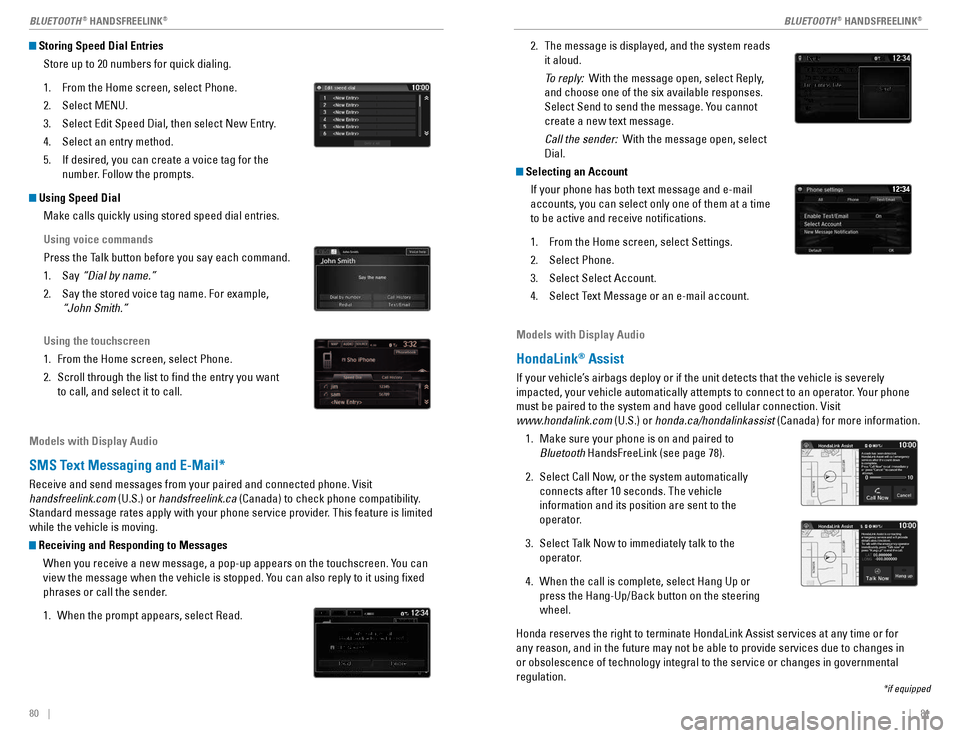
2. The message is displayed, and the system reads
it aloud.
To reply: With the message open, select Reply,
and choose one of the six available responses.
Select Send to send the message. You cannot create a new text message.
Call the sender: With the message open, select
Dial.
Selecting an Account
If your phone has both text message and e-mail accounts, you can select only one of them at a time to be active and receive notications.
1. From the Home screen, select Settings.
2. Select Phone.
3. Select Select Account.
4. Select Text Message or an e-mail account.
Storing Speed Dial Entries
Store up to 20 numbers for quick dialing.
1. From the Home screen, select Phone.
2. Select MENU.
3. Select Edit Speed Dial, then select New Entry.
4. Select an entry method.
5. If desired, you can create a voice tag for the number. Follow the prompts.
Using Speed Dial
Make calls quickly using stored speed dial entries.
Using voice commands
Press the Talk button before you say each command.
1. Say “Dial by name.”
2. Say the stored voice tag name. For example, “John Smith.”
Using the touchscreen
1. From the Home screen, select Phone.
2. Scroll through the list to nd the entry you want
to call, and select it to call.
Models with Display Audio
HondaLink ®
Assist
If your vehicle’s airbags deploy or if the unit detects that the vehicle is severely
impacted, your vehicle automatically attempts to connect to an operator. Your phone must be paired to the system and have good cellular connection. Visit
www.hondalink.com (U.S.) or honda.ca/hondalinkassist (Canada) for more information.
1. Make sure your phone is on and paired to Bluetooth HandsFreeLink (see page 78).
2. Select Call Now, or the system automatically connects after 10 seconds. The vehicle information and its position are sent to the
operator.
3. Select Talk Now to immediately talk to the operator.
4. When the call is complete, select Hang Up or press the Hang-Up/Back button on the steering wheel.
Honda reserves the right to terminate HondaLink Assist services at any time or for any reason, and in the future may not be able to provide services due to changes in or obsolescence of technology integral to the service or changes in governmental regulation.
Models with Display Audio
SMS Text Messaging and E-Mail*
Receive and send messages from your paired and connected phone. Visit handsfreelink.com (U.S.) or handsfreelink.ca (Canada) to check phone compatibility.
Standard message rates apply with your phone service provider. This feature is limited while the vehicle is moving.
Receiving and Responding to Messages
When you receive a new message, a pop-up appears on the touchscreen. You can
view the message when the vehicle is stopped. You can also reply to it using xed
phrases or call the sender.
1. When the prompt appears, select Read.
*if equipped
Page 45 of 82
| 83
NAVIGATION82 |
BLUETOOTH
®
HANDSFREELINK ®
Models with Display Audio
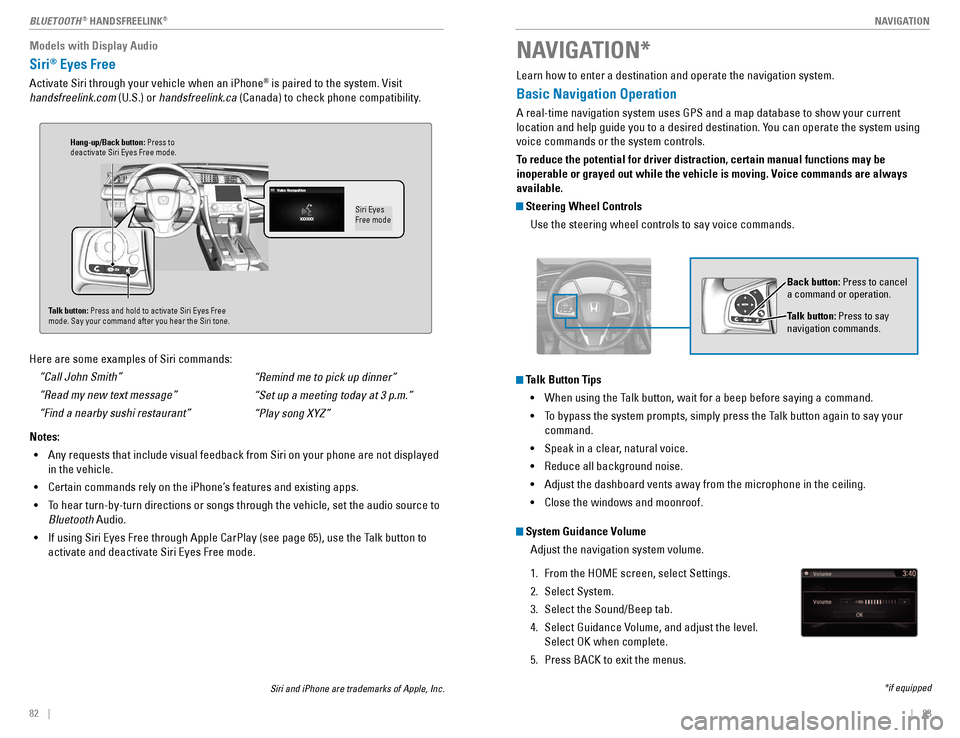
Siri®
Eyes Free
Activate Siri through your vehicle when an iPhone ®
is paired to the system. Visit
handsfreelink.com (U.S.) or handsfreelink.ca (Canada) to check phone compatibility.
Here are some examples of Siri commands: “Call John Smith” “Read my new text message”“Find a nearby sushi restaurant”
Notes: • Any requests that include visual feedback from Siri on your phone are not displayed
in the vehicle.
• Certain commands rely on the iPhone’s features and existing apps.
• To hear turn-by-turn directions or songs through the vehicle, set the audio source to
Bluetooth Audio.
• If using Siri Eyes Free through Apple CarPlay (see page 65), use the Talk button to
activate and deactivate Siri Eyes Free mode. “Remind me to pick up dinner”“Set up a meeting today at 3 p.m.”“Play song XYZ”
Siri Eyes Free mode
Talk button:
Press and hold to activate Siri Eyes Free
mode. Say your command after you hear the Siri tone.
Siri and iPhone are trademarks of Apple, Inc.
Hang-up/Back button: Press to
deactivate Siri Eyes Free mode. Learn how to enter a destination and operate the navigation system.
Basic Navigation Operation
A real-time navigation system uses GPS and a map database to show your current
location and help guide you to a desired destination. You can operate the system using voice commands or the system controls.
To reduce the potential for driver distraction, certain manual functions may be
inoperable or grayed out while the vehicle is moving. Voice commands are always available.
Steering Wheel Controls
Use the steering wheel controls to say voice commands.
Talk Button Tips
•
When using the Talk button, wait for a beep before saying a command.
• To bypass the system prompts, simply press the Talk button again to say your
command.
• Speak in a clear, natural voice.
• Reduce all background noise.
• Adjust the dashboard vents away from the microphone in the ceiling.
• Close the windows and moonroof.
Back button: Press to cancel
a command or operation.
Talk button: Press to say
navigation commands.
NAVIGATION*
*if equipped
System Guidance Volume
Adjust the navigation system volume.
1. From the HOME screen, select Settings.
2. Select System.
3. Select the Sound/Beep tab.
4. Select Guidance Volume, and adjust the level.
Select OK when complete.
5. Press BACK to exit the menus.
Page 46 of 82
84 || 85
NAVIGATION
NAVIGATION
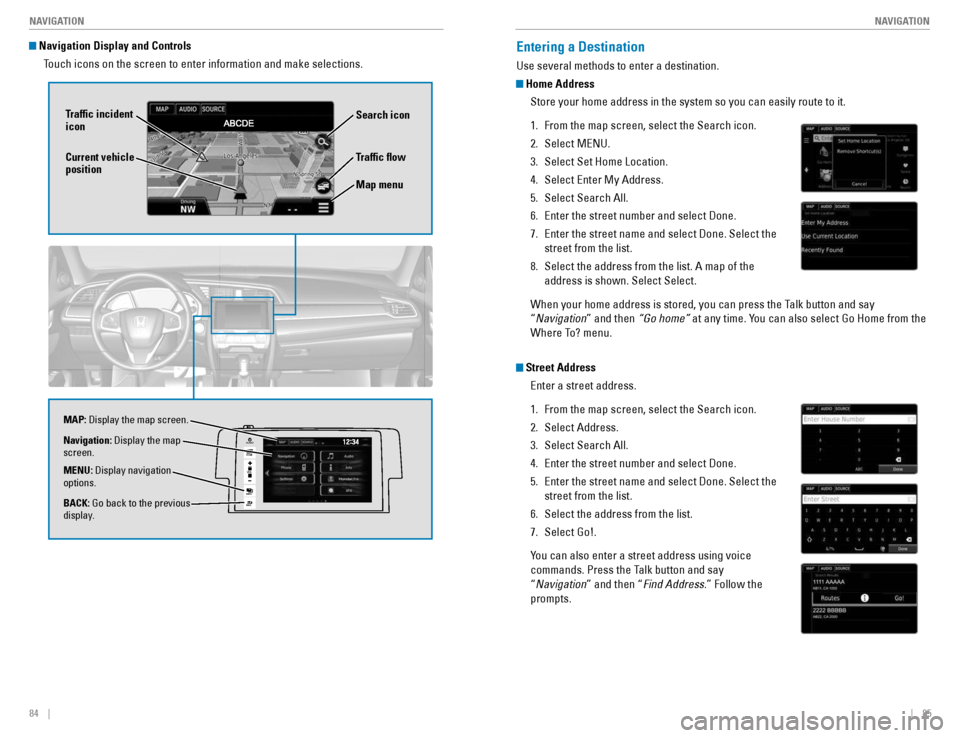
Navigation Display and Controls
Touch icons on the screen to enter information and make selections.
VO L
HOME
MENU
BA CK
AUDIO
Trafc ow
Current vehicle position
Trafc incident icon
Search icon Map menu
Navigation:
Display the map
screen. BACK: Go back to the previous
display.
MENU:
Display navigation
options.
MAP:
Display the map screen.
Entering a Destination
Use several methods to enter a destination.
Home Address
Store your home address in the system so you can easily route to it.
1. From the map screen, select the Search icon.
2. Select MENU.
3. Select Set Home Location.
4. Select Enter My Address.
5. Select Search All.
6. Enter the street number and select Done.
7. Enter the street name and select Done. Select the
street from the list.
8. Select the address from the list. A map of the address is shown. Select Select.
When your home address is stored, you can press the Talk button and say “ Navigation ” and then “Go home” at any time. You can also select Go Home from the
Where To? menu.
Street Address
Enter a street address.
1. From the map screen, select the Search icon.
2. Select Address.
3. Select Search All.
4. Enter the street number and select Done.
5. Enter the street name and select Done. Select the street from the list.
6. Select the address from the list.
7. Select Go!.
You can also enter a street address using voice
commands. Press the Talk button and say “ Navigation ” and then “ Find Address .” Follow the
prompts.
Page 48 of 82
88 || 89
NAVIGATION
NAVIGATION
Routing
After a destination is set, you can alter or cancel your route.
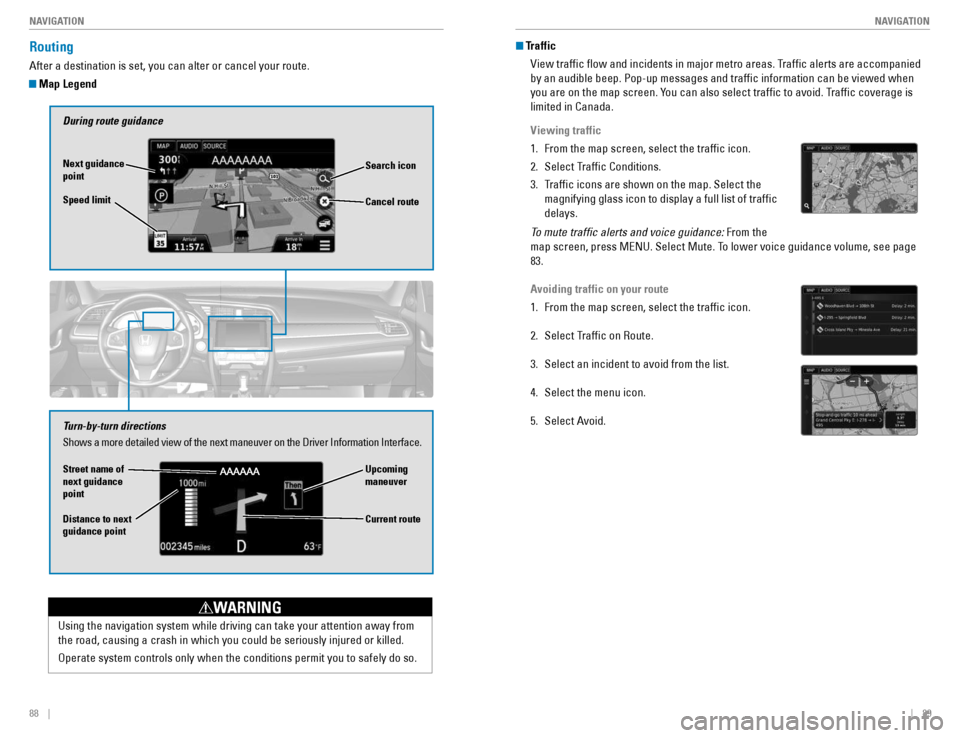
Map Legend
During route guidance
Next guidance point Speed limit Search icon
Turn-by-turn directions Shows a more detailed view of the next maneuver on the Driver Information Interface.
Upcoming maneuver
Distance to next guidance point Current route
Cancel route
Using the navigation system while driving can take your attention away from
the road, causing a crash in which you could be seriously injured or killed.
Operate system controls only when the conditions permit you to safely do so.
WARNING
Street name of next guidance point
Traffic
View trafc ow and incidents in major metro areas. Trafc alerts are accompanied by an audible beep. Pop-up messages and trafc information can be viewed when
you are on the map screen. You can also select trafc to avoid. Trafc coverage is limited in Canada.
Viewing traffic
1. From the map screen, select the trafc icon.
2. Select Trafc Conditions.
3. Trafc icons are shown on the map. Select the magnifying glass icon to display a full list of trafc delays.
To mute trafic alerts and voice guidance: From the
map screen, press MENU. Select Mute. To lower voice guidance volume, see page 83.
Avoiding traffic on your route
1. From the map screen, select the trafc icon.
2. Select Trafc on Route.
3. Select an incident to avoid from the list.
4. Select the menu icon.
5. Select Avoid.
Page 58 of 82
108 || 109
DRIVING
DRIVING
LaneWatch™*
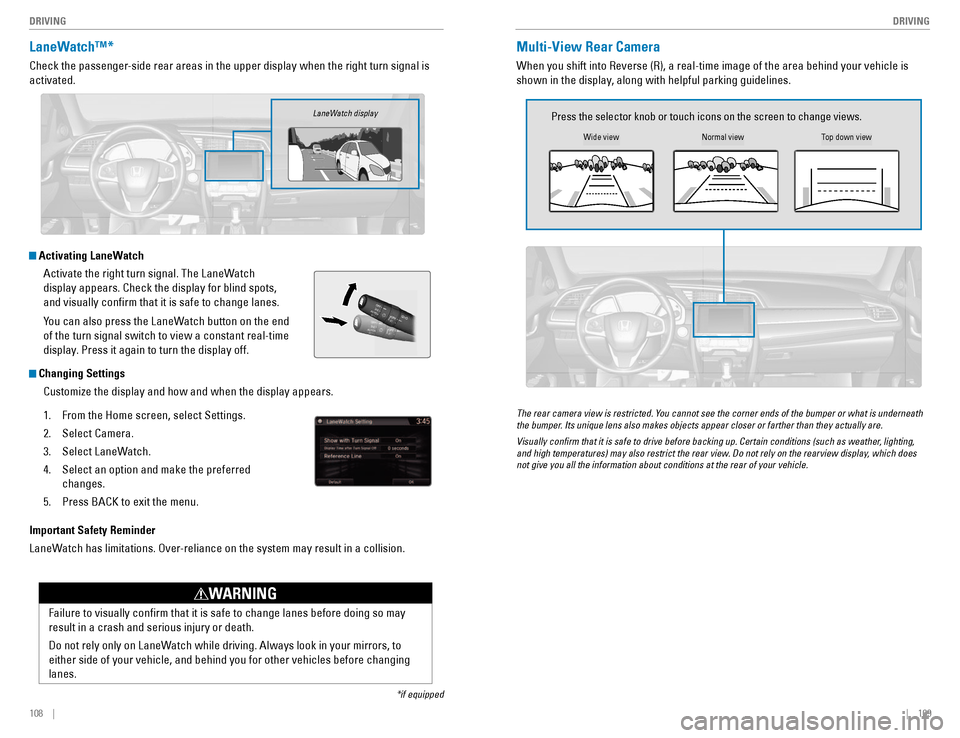
Check the passenger-side rear areas in the upper display when the right turn signal is activated.
Activating LaneWatch
Activate the right turn signal. The LaneWatch display appears. Check the display for blind spots, and visually conrm that it is safe to change lanes.
You can also press the LaneWatch button on the end of the turn signal switch to view a constant real-time
display. Press it again to turn the display off.
Changing Settings
Customize the display and how and when the display appears.
1. From the Home screen, select Settings.
2. Select Camera.
3. Select LaneWatch.
4. Select an option and make the preferred
changes.
5. Press BACK to exit the menu.
Important Safety Reminder
LaneWatch has limitations. Over-reliance on the system may result in a collision.
*if equipped
Failure to visually conrm that it is safe to change lanes before doing so may result in a crash and serious injury or death.
Do not rely only on LaneWatch while driving. Always look in your mirrors, to either side of your vehicle, and behind you for other vehicles before changing lanes.
WARNING
LaneWatch display
Multi-View Rear Camera
When you shift into Reverse (R), a real-time image of the area behind your vehicle is
shown in the display, along with helpful parking guidelines.
Wide view
Press the selector knob or touch icons on the screen to change views.
Normal viewTop down view
The rear camera view is restricted. You cannot see the corner ends of the bumper or what is underneath
the bumper. Its unique lens also makes objects appear closer or farther than they actually are.
Visually conirm that it is safe to drive before backing up. Certain conditions (such as weather, lighting,
and high temperatures) may also restrict the rear view. Do not rely on the rearview display, which does not give you all the information about conditions at the rear of your vehicle.
Page 59 of 82
110 || 111
DRIVING
DRIVING
Models with Display Audio
1. From the Home screen, select Settings.
2. Select Camera.
3. Select Rear Camera.
4. Select an option:
Fixed Guideline: Guidelines appear when you shift into Reverse.
Dynamic Guideline: Guidelines move as you turn the steering wheel.
5. Select On or Off.
6. Press BACK to exit the menu.
Changing Camera Settings
Turn the guidelines on or off.
Models with color audio system
1. Press the MENU/CLOCK button.
2. Select Settings.
3. Select Rear Camera.
4. Select Camera Guideline.
5. Select On or Off.
6. Press the Back button to exit the menu.
Refueling
Use the proper fuel and refueling procedure to ensure the best performance and safety of your vehicle.
Fuel Information
Use of unleaded gasoline of 87 octane or higher is recommended. • Honda recommends TOP TIER detergent gasoline where available.
• Do NOT use gasoline containing more than 15% ethanol.
• Do NOT use gasoline containing methanol.
• Do NOT use gasoline containing MMT.
We recommend quality gasoline containing detergent additives that help prevent
fuel system and engine deposits. In addition, in order to maintain good performance,
fuel economy, and emissions control, we strongly recommend the use of gasoline
that does NOT contain harmful manganese-based fuel additives such as MMT, if such gasoline is available.
NOTICE
Gasoline is highly ammable and explosive. You can be burned or seriously injured when handling fuel.
• Stop the engine, and keep heat, sparks, and ame away.
• Handle fuel only outdoors.
• Wipe up spills immediately.
WARNING
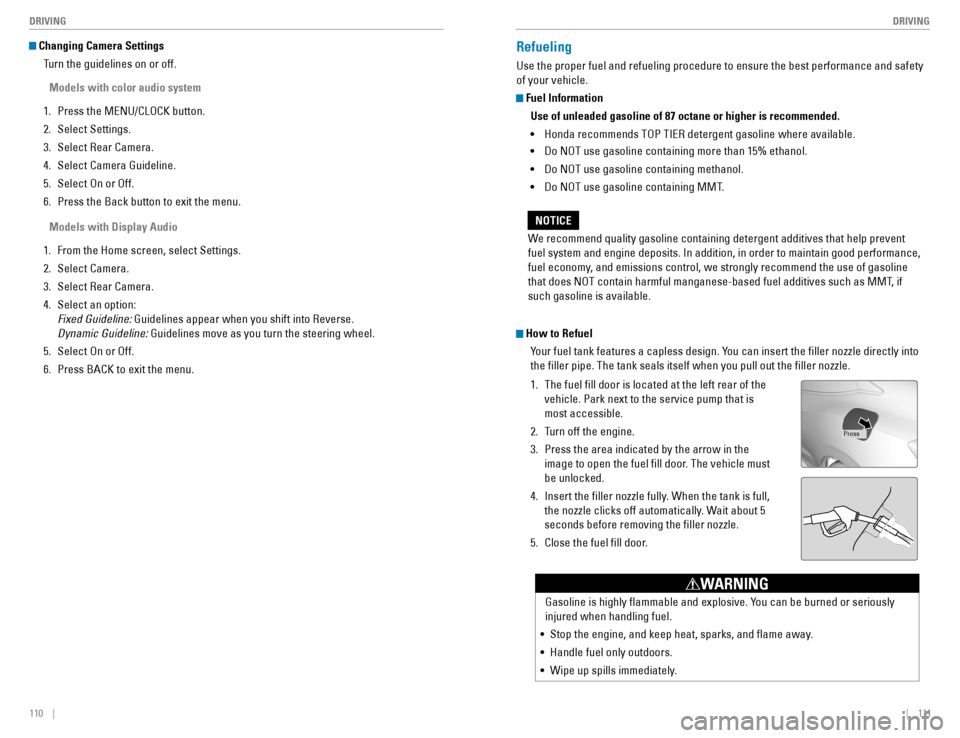
How to Refuel
Your fuel tank features a capless design. You can insert the ller nozzle directly into the ller pipe. The tank seals itself when you pull out the ller nozzle.
1. The fuel ll door is located at the left rear of the
vehicle. Park next to the service pump that is most accessible.
2. Turn off the engine.
3. Press the area indicated by the arrow in the image to open the fuel ll door. The vehicle must be unlocked.
4. Insert the ller nozzle fully. When the tank is full, the nozzle clicks off automatically. Wait about 5 seconds before removing the ller nozzle.
5. Close the fuel ll door.
Press
Page 60 of 82
112 || 113
HANDLING THE UNEXPECTED
DRIVING
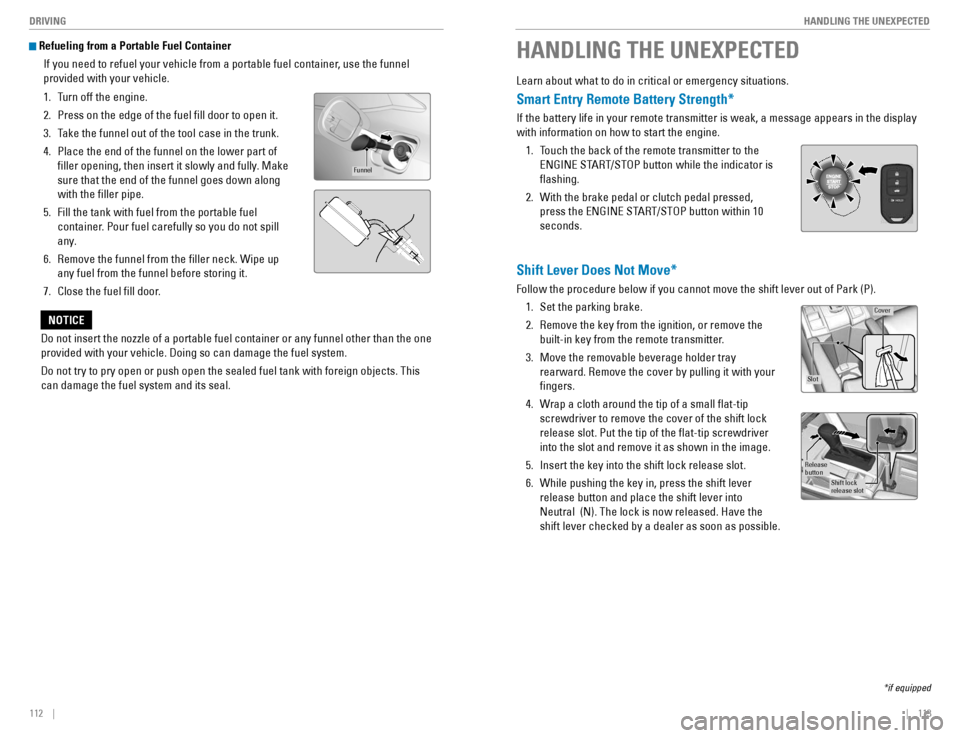
Refueling from a Portable Fuel Container
If you need to refuel your vehicle from a portable fuel container, use the funnel provided with your vehicle.
1. Turn off the engine.
2. Press on the edge of the fuel ll door to open it.
3. Take the funnel out of the tool case in the trunk.
4. Place the end of the funnel on the lower part of
ller opening, then insert it slowly and fully. Make sure that the end of the funnel goes down along with the ller pipe.
5. Fill the tank with fuel from the portable fuel container. Pour fuel carefully so you do not spill
any.
6. Remove the funnel from the ller neck. Wipe up any fuel from the funnel before storing it.
7. Close the fuel ll door.
Funnel
Do not insert the nozzle of a portable fuel container or any funnel other than the one provided with your vehicle. Doing so can damage the fuel system. Do not try to pry open or push open the sealed fuel tank with foreign objects. This can damage the fuel system and its seal.
NOTICE
HANDLING THE UNEXPECTED
Learn about what to do in critical or emergency situations.
Smart Entry Remote Battery Strength*
If the battery life in your remote transmitter is weak, a message appears in the display with information on how to start the engine. 1. Touch the back of the remote transmitter to the ENGINE START/STOP button while the indicator is ashing.
2. With the brake pedal or clutch pedal pressed, press the ENGINE START/STOP button within 10 seconds.
Shift Lever Does Not Move*
Follow the procedure below if you cannot move the shift lever out of Park (P).
1. Set the parking brake.
2. Remove the key from the ignition, or remove the built-in key from the remote transmitter.
3. Move the removable beverage holder tray rearward. Remove the cover by pulling it with your ngers.
4. Wrap a cloth around the tip of a small at-tip screwdriver to remove the cover of the shift lock release slot. Put the tip of the at-tip screwdriver into the slot and remove it as shown in the image.
5. Insert the key into the shift lock release slot.
6. While pushing the key in, press the shift lever release button and place the shift lever into Neutral (N). The lock is now released. Have the shift lever checked by a dealer as soon as possible.
*if equipped
Slot
Cove r
Release butto n
Shift lock release slot
Page 63 of 82
118 || 119
HANDLING THE UNEXPECTED
HANDLING THE UNEXPECTED
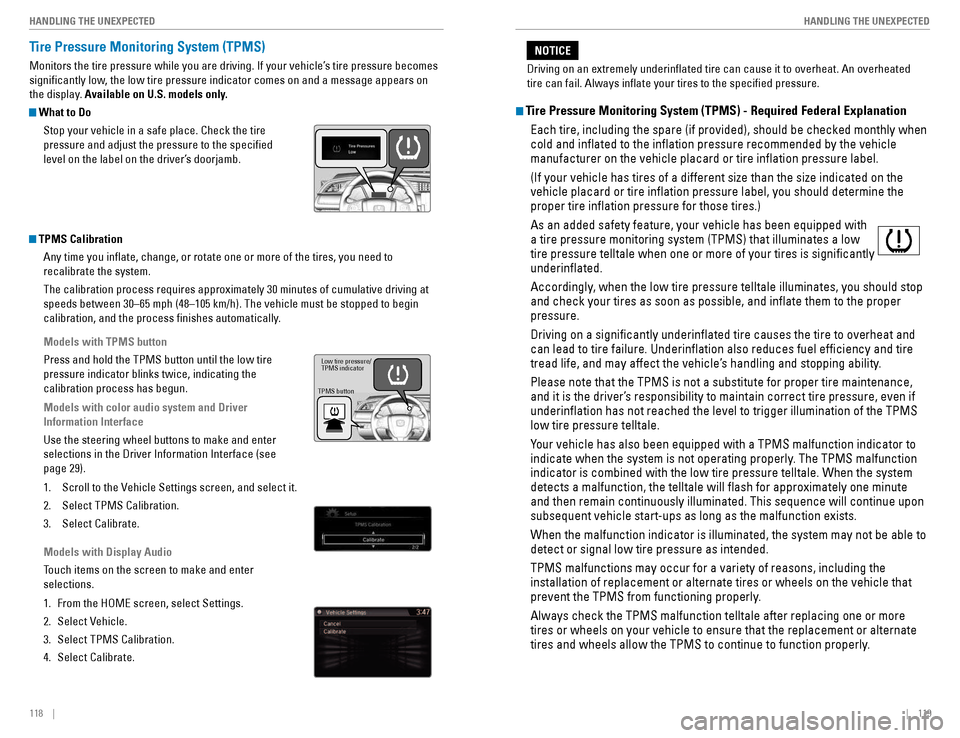
Tire Pressure Monitoring System (TPMS)
Monitors the tire pressure while you are driving. If your vehicle’s tire pressure becomes
signicantly low, the low tire pressure indicator comes on and a message appears on
the display. Available on U.S. models only.
What to Do
Stop your vehicle in a safe place. Check the tire pressure and adjust the pressure to the specied
level on the label on the driver’s doorjamb.
TPMS Calibration
Any time you inate, change, or rotate one or more of the tires, you need to recalibrate the system.
The calibration process requires approximately 30 minutes of cumulative driving at
speeds between 30–65 mph (48–105 km/h). The vehicle must be stopped to begin
calibration, and the process nishes automatically.
Models with TPMS button
Press and hold the TPMS button until the low tire pressure indicator blinks twice, indicating the calibration process has begun.
Models with color audio system and Driver Information Interface
Use the steering wheel buttons to make and enter selections in the Driver Information Interface (see page 29).
1. Scroll to the Vehicle Settings screen, and select it.
2. Select TPMS Calibration.
3. Select Calibrate.
Models with Display Audio
Touch items on the screen to make and enter selections.
1. From the HOME screen, select Settings.
2. Select Vehicle.
3. Select TPMS Calibration.
4. Select Calibrate.
TPMS button
Low tire pressure/ TPMS indicator
Tire Pressure Monitoring System (TPMS) - Required Federal Explanation
Each tire, including the spare (if provided), should be checked monthly when cold and inated to the ination pressure recommended by the vehicle manufacturer on the vehicle placard or tire ination pressure label. (If your vehicle has tires of a different size than the size indicated on the vehicle placard or tire ination pressure label, you should determine the proper tire ination pressure for those tires.) As an added safety feature, your vehicle has been equipped with a tire pressure monitoring system (TPMS) that illuminates a low tire pressure telltale when one or more of your tires is signicantly underinated.
Accordingly, when the low tire pressure telltale illuminates, you should stop and check your tires as soon as possible, and inate them to the proper pressure. Driving on a signicantly underinated tire causes the tire to overheat and can lead to tire failure. Underination also reduces fuel efciency and tire
tread life, and may affect the vehicle’s handling and stopping ability. Please note that the TPMS is not a substitute for proper tire maintenance,
and it is the driver’s responsibility to maintain correct tire pressure, even if underination has not reached the level to trigger illumination of the TPMS low tire pressure telltale.
Your vehicle has also been equipped with a TPMS malfunction indicator to
indicate when the system is not operating properly. The TPMS malfunction indicator is combined with the low tire pressure telltale. When the system detects a malfunction, the telltale will ash for approximately one minute and then remain continuously illuminated. This sequence will continue upon subsequent vehicle start-ups as long as the malfunction exists. When the malfunction indicator is illuminated, the system may not be able to detect or signal low tire pressure as intended. TPMS malfunctions may occur for a variety of reasons, including the installation of replacement or alternate tires or wheels on the vehicle that
prevent the TPMS from functioning properly. Always check the TPMS malfunction telltale after replacing one or more tires or wheels on your vehicle to ensure that the replacement or alternate
tires and wheels allow the TPMS to continue to function properly.
Driving on an extremely underinated tire can cause it to overheat. An overheated tire can fail. Always inate your tires to the specied pressure.
NOTICE