climate control HONDA CIVIC COUPE 2017 10.G Owner's Manual
[x] Cancel search | Manufacturer: HONDA, Model Year: 2017, Model line: CIVIC COUPE, Model: HONDA CIVIC COUPE 2017 10.GPages: 595
Page 246 of 595
245
uuAudio System Basic Operation uVoice Control Operation
Continued
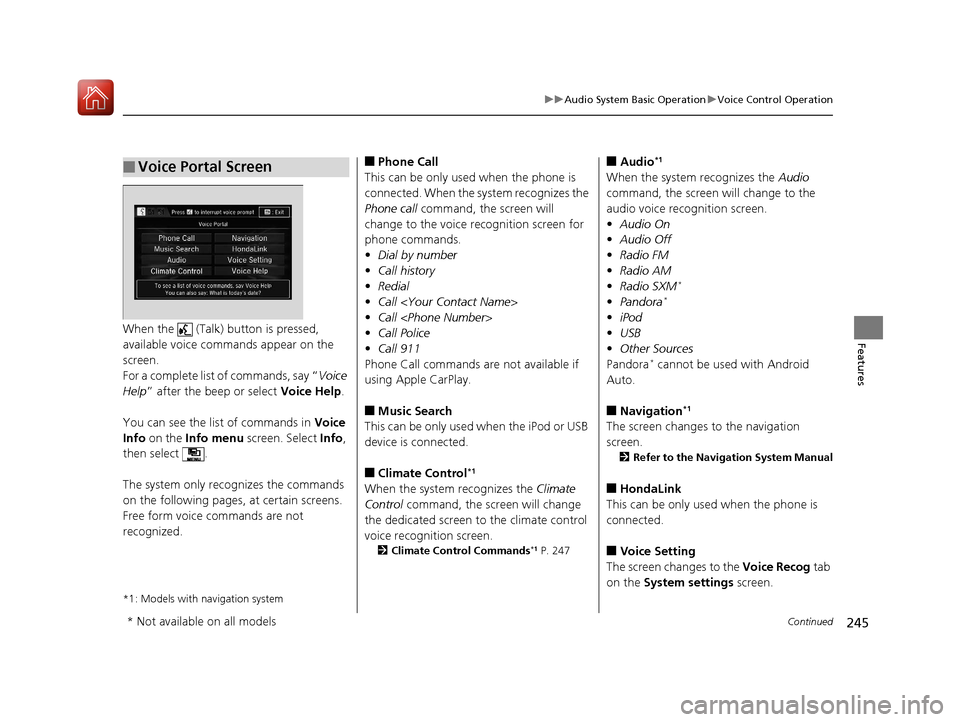
FeaturesWhen the (Talk) button is pressed,
available voice comma nds appear on the
screen.
For a complete list of commands, say “ Voice
Help ” after the beep or select Voice Help.
You can see the list of commands in Voice
Info on the Info menu screen. Select Info,
then select .
The system only recognizes the commands
on the following pages, at certain screens.
Free form voice commands are not
recognized.
*1: Models with navigation system
■Voice Portal Screen■Phone Call
This can be only used when the phone is
connected. When the sy stem recognizes the
Phone call command, the screen will
change to the voice re cognition screen for
phone commands.
• Dial by number
• Call history
• Redial
• Call
• Call
• Call Police
• Call 911
Phone Call commands are not available if
using Apple CarPlay.
■Music Search
This can be only used when the iPod or USB
device is connected.
■Climate Control*1
When the system recognizes the Climate
Control command, the screen will change
the dedicated screen to the climate control
voice recognition screen.
2 Climate Control Commands*1 P. 247
■Audio*1
When the system recognizes the Audio
command, the screen will change to the
audio voice recognition screen.
• Audio On
• Audio Off
• Radio FM
• Radio AM
• Radio SXM
*
•Pandora*
•iPod
• USB
• Other Sources
Pandora
* cannot be used with Android
Auto.
■Navigation*1
The screen changes to the navigation
screen.
2 Refer to the Navigation System Manual
■HondaLink
This can be only used when the phone is
connected.
■Voice Setting
The screen changes to the Voice Recog tab
on the System settings screen.
* Not available on all models
17 CIVIC 2D HCM (KA KC KL)-31TBG6100.book 245 ページ 2016年8月31日 水曜日 午後5時43分
Page 247 of 595
246
uuAudio System Basic Operation uVoice Control Operation
Features
■Voice Help
You can see a list of the available
commands on the screen.
• Useful Commands
• Phone Commands
• Audio Commands
*1
•On Screen Commands
• Music Search Commands
• General Commands
• Climate Control Commands
*1
The system accepts these commands on the
voice portal top screen.
•Call
• Call
• What time is it?
• What is today’s date?
*1: Models with navigation system
■Useful Commands
The system accepts these commands on the
dedicated screen for the voice recognition
of the phone.
• Call by Number
• Call by Name
• Call
• Call
The system accepts these commands on the
dedicated screen for the voice recognition
of the audio.
■Radio FM Commands
• Radio tune to <87.7-107.9> FM
• Radio tune to <87.7 -107.9> HD <1-8>
FM
• Radio FM preset <1-12>
■Radio AM Commands
• Radio tune to <530-1710> AM
• Radio AM preset <1-6>
■Radio SXM Commands*
•SXM channel <1-255>
■Phone Commands
■Audio Commands*1
•SXM channel
sports team name>
• Radio SXM preset <1-12>
■Pandora Commands*
•Pandora play
■iPod Commands
• iPod play
• iPod play track <1-30>
• Music Search
• What album is this?
• What am I listening to?
■USB Commands
• USB play
• USB play track <1-30>
• Music Search
• What album is this?
• What am I listening to?
■Bluetooth ® Audio Commands
• Bluetooth ® Audio play
NOTE:
Bluetooth ® Audio commands may not work
on some phones or Bluetooth ® Audio
devices.
* Not available on all models
17 CIVIC 2D HCM (KA KC KL)-31TBG6100.book 246 ページ 2016年8月31日 水曜日 午後5時43分
Page 248 of 595
247
uuAudio System Basic Operation uVoice Control Operation
Features
When On Screen Commands is selected,
the explanation scr een is displayed.
The system accepts these commands on the
Music Search screen.
■Using Song By Voice
Song By VoiceTM is a feature that allows you
to select music from your iPod or USB device
using Voice Commands. To activate this
mode, you must push the talk switch and
say: “ Music search ”.
■Song By Voice Commands
• What am I listening to?
• Who am I listening to?
• Who is this?
• What’s playing?
• Who’s playing?
• What album is this?
*1: Models with navigation system
■On Screen Commands
■Music Search Commands
■Play Commands
• Play artist
• Play track/song
• Play album
• Play genre/category
• Play playlist
• Play composer
■List Commands
• List artist
• List album
• List genre/category
• List playlist
• List composer
• What time is it?
• What is today’s date?
■General Commands
•Climate Control on
• Climate Control off
• Fan Speed <1-7>
• Temperature max heat
• Temperature max cool
• Temperature <57-87> degrees
• Defrost on
• Defrost off
• Air conditioner on
• Air conditioner off
• More
• Climate control automatic
• Vent
• Dash and floor
• Fan speed up
• Fan speed down
• Floor vents
• Floor and defrost
• Temperature up
• Temperature down
■Climate Control Commands*1
17 CIVIC 2D HCM (KA KC KL)-31TBG6100.book 247 ページ 2016年8月31日 水曜日 午後5時43分
Page 325 of 595
324
uuCustomized Features u
Features
*1:Default SettingSetup
Group Customizable Features Desc
ription Selectable Settings
System Others Climate screen timeout
Changes the length of time the climate control
display stays on when you press the
CLIMATE
button. Never/
5 Seconds /10
Seconds
*1/ 20
Seconds
Detail Information Displays the details of the head unit and
operating system information.
Default Cancels/Resets all customized items in the
System
group as default. Yes
/No
Vehicle
TPMS Calibration*Cancels/Calibrates the TPMS.Cancel /Calibrate
Driver
Assist
System
Setup
*
Forward Collision Warning
DistanceChanges CMBSTM alert distance.Long /Normal*1/Short
ACC Forward Vehicle
Detect BeepCauses the system to beep when the system
detects a vehicle, or when the vehicle goes out of
the ACC range.
On /Off*1
Lane Keeping Assist
Suspend BeepCauses the system to beep when LKAS is
suspended.On /Off*1
Road Departure Mitigation
SettingChanges the setting for the road departure
mitigation system.Normal*1/Wide /
Warning Only
* Not available on all models
17 CIVIC 2D HCM (KA KC KL)-31TBG6100.book 324 ページ 2016年8月31日 水曜日 午後5時43分
Page 393 of 595
392
Driving
When Driving
Starting the Engine
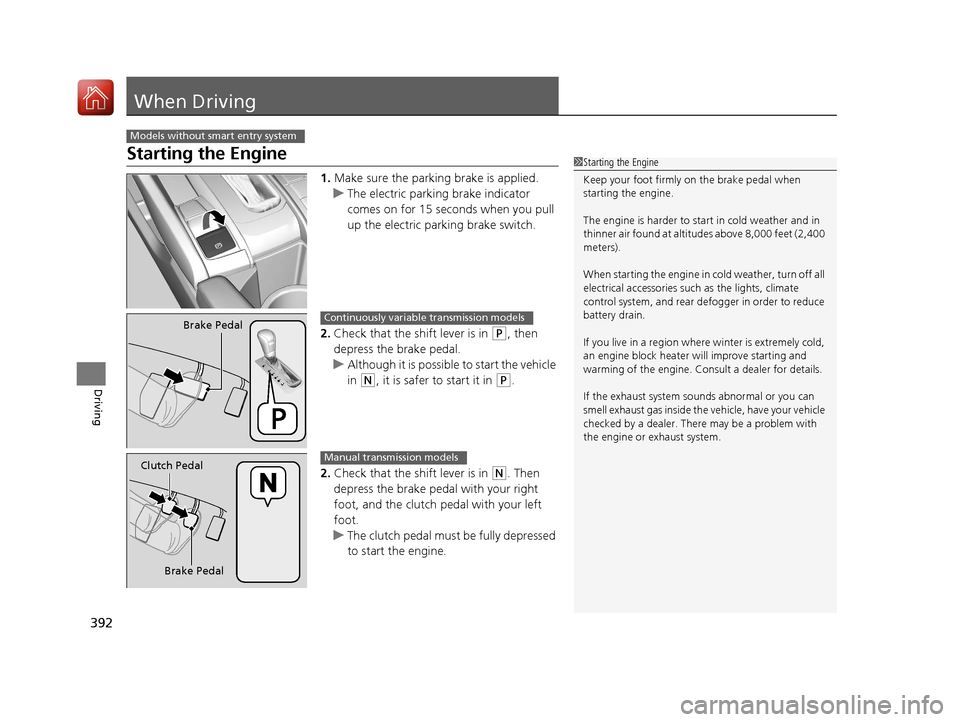
1.Make sure the parking brake is applied.
u The electric parking brake indicator
comes on for 15 seconds when you pull
up the electric parking brake switch.
2. Check that the shift lever is in
(P, then
depress the brake pedal.
u Although it is possible to start the vehicle
in
(N, it is safer to start it in (P.
2. Check that the shift lever is in
(N. Then
depress the brake pedal with your right
foot, and the clutch pedal with your left
foot.
u The clutch pedal must be fully depressed
to start the engine.
Models without smart entry system
1Starting the Engine
Keep your foot firmly on the brake pedal when
starting the engine.
The engine is harder to st art in cold weather and in
thinner air found at altitudes above 8,000 feet (2,400
meters).
When starting the engine in cold weather, turn off all
electrical accessories such as the lights, climate
control system, and rear de fogger in order to reduce
battery drain.
If you live in a region where winter is extremely cold,
an engine block heater will improve starting and
warming of the engine. Cons ult a dealer for details.
If the exhaust system sounds abnormal or you can
smell exhaust gas inside the vehicle, have your vehicle
checked by a dealer. There may be a problem with
the engine or exhaust system.
Brake PedalContinuously variable transmission models
Brake Pedal
Clutch Pedal
Manual transmission models
17 CIVIC 2D HCM (KA KC KL)-31TBG6100.book 392 ページ 2016年8月31日 水曜日 午後5時43分
Page 395 of 595
394
uuWhen Driving uStarting the Engine
Driving
Starting the Engine
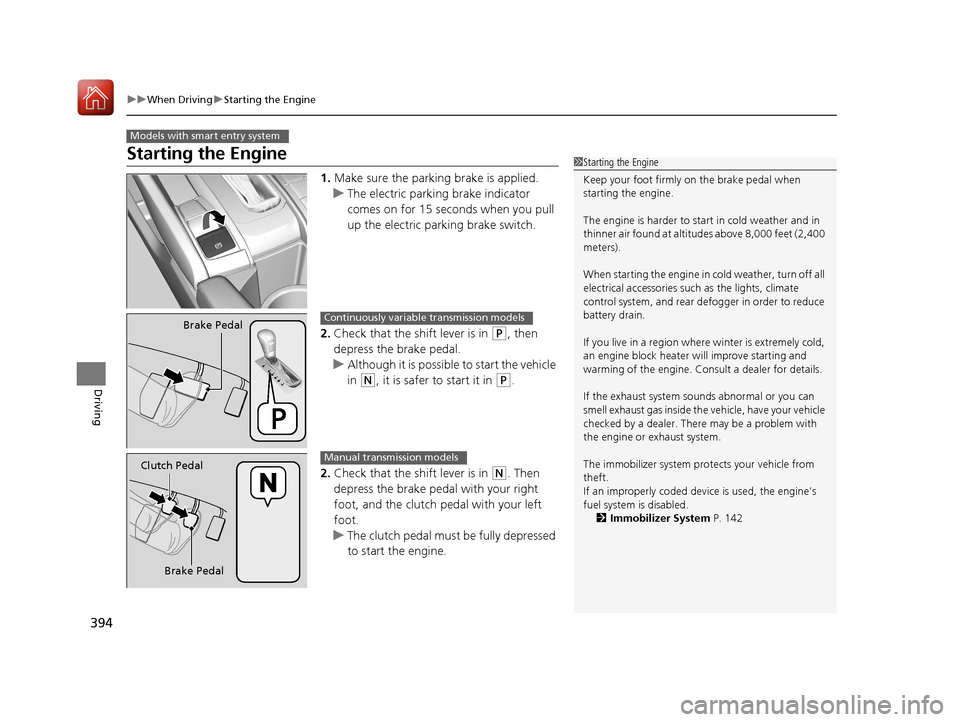
1. Make sure the parking brake is applied.
u The electric parking brake indicator
comes on for 15 seconds when you pull
up the electric parking brake switch.
2. Check that the shift lever is in
(P, then
depress the brake pedal.
u Although it is possible to start the vehicle
in
(N, it is safer to start it in (P.
2. Check that the shift lever is in
(N. Then
depress the brake pedal with your right
foot, and the clutch pedal with your left
foot.
u The clutch pedal must be fully depressed
to start the engine.
Models with smart entry system
1Starting the Engine
Keep your foot firmly on the brake pedal when
starting the engine.
The engine is harder to st art in cold weather and in
thinner air found at altitudes above 8,000 feet (2,400
meters).
When starting the engine in cold weather, turn off all
electrical accessories such as the lights, climate
control system, and rear de fogger in order to reduce
battery drain.
If you live in a region where winter is extremely cold,
an engine block heater will improve starting and
warming of the engine. Cons ult a dealer for details.
If the exhaust system sounds abnormal or you can
smell exhaust gas inside the vehicle, have your vehicle
checked by a dealer. There may be a problem with
the engine or exhaust system.
The immobilizer system pr otects your vehicle from
theft.
If an improperly c oded device is used, the engine’s
fuel system is disabled. 2 Immobilizer System P. 142
Brake PedalContinuously variable transmission models
Brake Pedal
Clutch Pedal
Manual transmission models
17 CIVIC 2D HCM (KA KC KL)-31TBG6100.book 394 ページ 2016年8月31日 水曜日 午後5時43分
Page 398 of 595
Continued397
uuWhen Driving uStarting the Engine
Driving
■To stop the engine1Remote Engine Start with Vehicle Feedback*
•You have already used the remote twice to start
the engine.
•Another registered smart entry remote is in the
vehicle.
•There is an antenna failure.
•Door is unlocked with the built-in key.
•The engine oil pressure is low.•The engine coolant temper ature is extremely high.
•The security system alarm is not set.
While the engine is running, the vehicle will
automatically activate climate control with a preset
temperature of 72°F (22°C).
When it is warm outside:
•The air conditioning is acti vated in recirculation
mode.
When it is cold outside:
•The defroster is activated at a moderately warm
temperature.
•The rear defogger, door mirror heaters, and front
seat heaters* are activated.
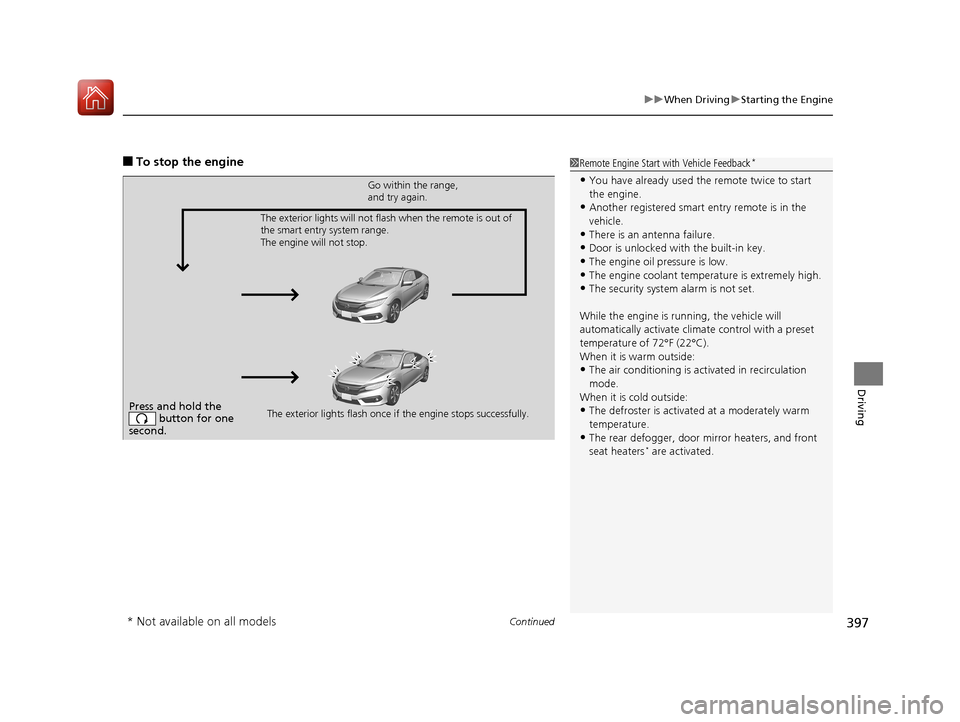
Press and hold the button for one
second.
Go within the range,
and try again.
The exterior lights flash once if the engine stops successfully.
The exterior lights will not flash when the remote is out of
the smart entry system range.
The engine will not stop.
* Not available on all models
17 CIVIC 2D HCM (KA KC KL)-31TBG6100.book 397 ページ 2016年8月31日 水曜日 午後5時43分
Page 411 of 595
410
uuWhen Driving uECON Button
Driving
ECON Button
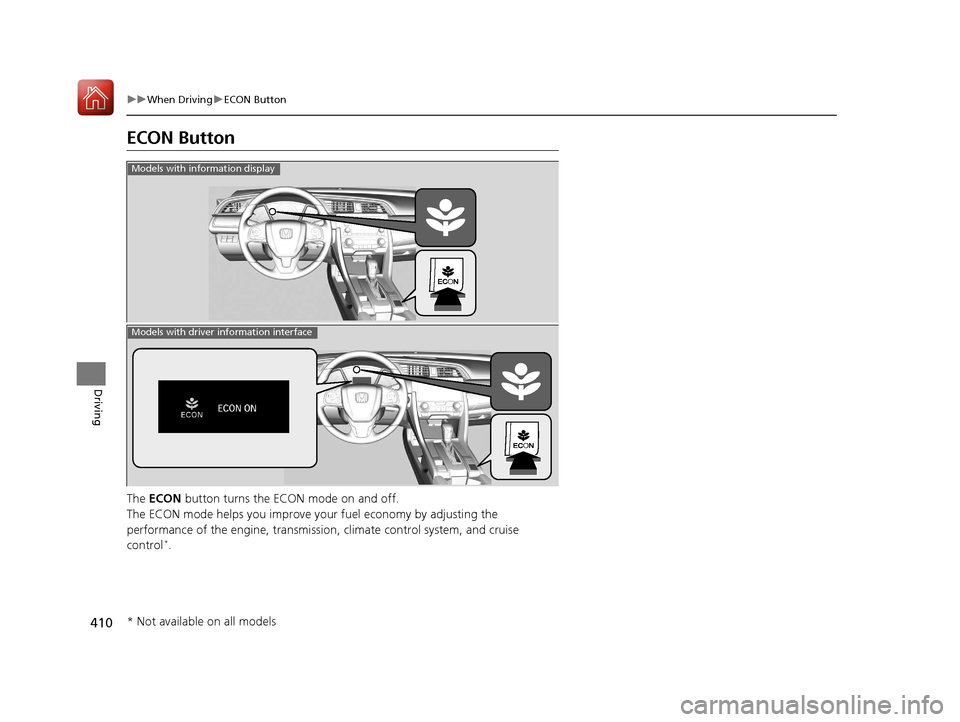
The ECON button turns the ECON mode on and off.
The ECON mode helps you improve your fuel economy by adjusting the
performance of the engine, transmission, climate control system, and cruise
control
*.
Models with information display
Models with driver information interface
* Not available on all models
17 CIVIC 2D HCM (KA KC KL)-31TBG6100.book 410 ページ 2016年8月31日 水曜日 午後5時43分
Page 416 of 595
415
uuWhen Driving uFront Sensor Camera*
Driving
1Front Sensor Camera*
If the Some Driver Assist Systems Cannot
Operate: Camera Temperature Too High message
appears:
•Use the climate control system to cool down the
interior and, if necessary, also use defroster mode
with the airflow directed towards the camera.
•Start driving the vehicle to lower the windshield
temperature, which cool s down the area around
the camera.
If the Some Driver Assist Systems Cannot
Operate: Clean Front Windshield message
appears:
•Park your vehicle in a sa fe place, and clean the
windshield. If the message does not disappear after
you have cleaned the windshield and driven for a
while, have your vehicle checked by a dealer.
* Not available on all models
17 CIVIC 2D HCM (KA KC KL)-31TBG6100.book 415 ページ 2016年8月31日 水曜日 午後5時43分
Page 476 of 595
475
Maintenance
This chapter discusses basic maintenance.
Before Performing MaintenanceInspection and Maintenance ............ 476
Safety When Performing Maintenance .... 477Parts and Fluids Used in Maintenance Service ........................................... 478
Maintenance Minder
TM..................... 479
Maintenance Under the Hood
Maintenance Items Un der the Hood .... 489Opening the Hood ........................... 491
Recommended Engine Oil ................ 492
Oil Check ......................................... 493
Adding Engine Oil ............................ 495
Changing the Engine Oil and Oil Filter..... 496
Engine Coolant ................................ 499
Transmission Fluid ............................ 501
Brake/Clutch
* Fluid .......................... 502
Refilling Window Wa sher Fluid......... 503
Replacing Light Bulbs ....................... 504
Checking and Maintaining Wiper Blades.... 513Checking and Maintaining Tires
Checking Tires ................................. 516
Tire and Loading Information Label ..... 517Tire Labeling .................................... 517DOT Tire Quality Grading (U.S. Vehicles) ...... 519Wear Indicators................................ 521
Tire Service Life ................................ 521 Tire and Wheel Replacement ........... 522
Tire Rotation .................................... 523
Winter Tires ..................................... 524
Battery ............................................... 525
Remote Transmitter Care Replacing the Button Battery ........... 527
Climate Control System Maintenance.... 529CleaningInterior Care .................................... 530
Exterior Care.................................... 532
Accessories and Modifications Accessories ...................................... 535
Modifications................................... 535
* Not available on all models
17 CIVIC 2D HCM (KA KC KL)-31TBG6100.book 475 ページ 2016年8月31日 水曜日 午後5時43分