headlights HONDA CIVIC HATCHBACK 2017 10.G User Guide
[x] Cancel search | Manufacturer: HONDA, Model Year: 2017, Model line: CIVIC HATCHBACK, Model: HONDA CIVIC HATCHBACK 2017 10.GPages: 641
Page 175 of 641
174
uuOperating the Switches Around the Steering Wheel uAuto High-Beam*
Controls
Auto High-Beam*
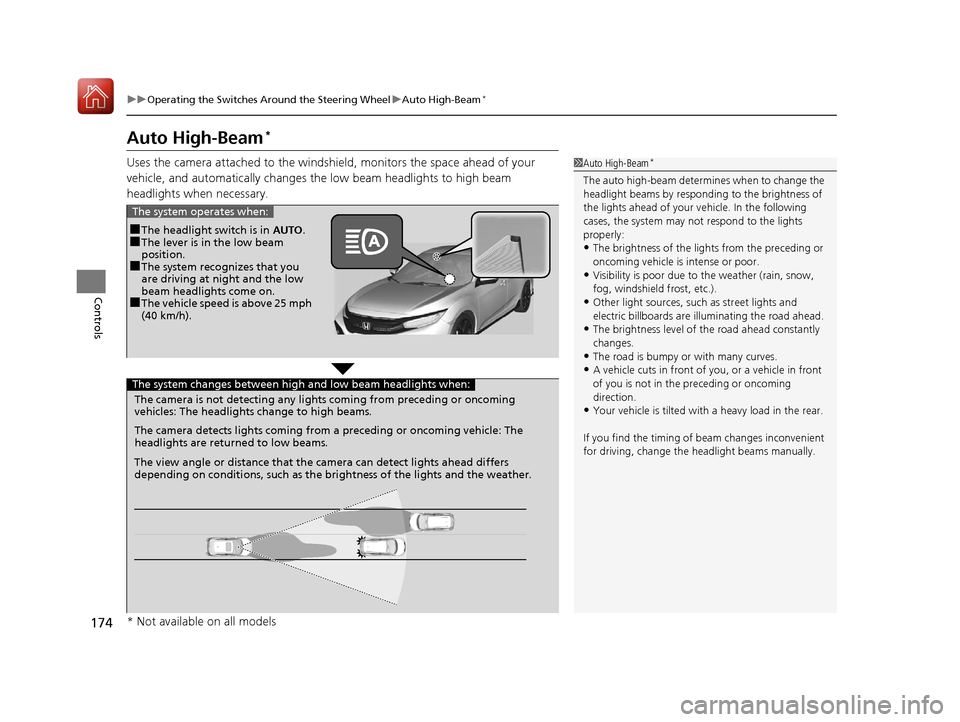
Uses the camera attached to the windsh ield, monitors the space ahead of your
vehicle, and automatically changes th e low beam headlights to high beam
headlights when necessary.1 Auto High-Beam*
The auto high-beam determines when to change the
headlight beams by responding to the brightness of
the lights ahead of your vehicle. In the following
cases, the system may not respond to the lights
properly:
•The brightness of the lights from the preceding or
oncoming vehicle is intense or poor.
•Visibility is poor due to the weather (rain, snow,
fog, windshield frost, etc.).
•Other light sources, such as street lights and
electric billboards are illuminating the road ahead.
•The brightness level of th e road ahead constantly
changes.
•The road is bumpy or with many curves.
•A vehicle cuts in front of you, or a vehicle in front
of you is not in the preceding or oncoming
direction.
•Your vehicle is tilted with a heavy load in the rear.
If you find the timing of beam changes inconvenient
for driving, change the headlight beams manually.
■The headlight switch is in AUTO.■The lever is in the low beam
position.
■The system recognizes that you
are driving at night and the low
beam headlights come on.
■The vehicle speed is above 25 mph
(40 km/h).
The system operates when:
The camera is not detecting any lights coming from preceding or oncoming
vehicles: The headlights change to high beams.
The camera detects lights coming from a preceding or oncoming vehicle: The
headlights are return ed to low beams.
The system changes between high and low beam headlights when:
The view angle or distance that the camera can detect lights ahead differs
depending on conditions, such as the brightness of the lights and the weather.
* Not available on all models
17 CIVIC 5D (KA KC KL)-31TGG6000.book 174 ページ 2016年6月8日 水曜日 午 後2時8分
Page 177 of 641
uuOperating the Switches Around the Steering Wheel uAuto High-Beam*
176
Controls
■To manually cancel the system temporarily
You can cancel the operation when you manually change the headlights to high
beams. Push the lever forward until you hear a click, or lightly pull the lever towards
you to flash high beams. The auto high-beam indicator goes off.
If you want the auto high-beam operation to resume at once, pull the lever towards
you.
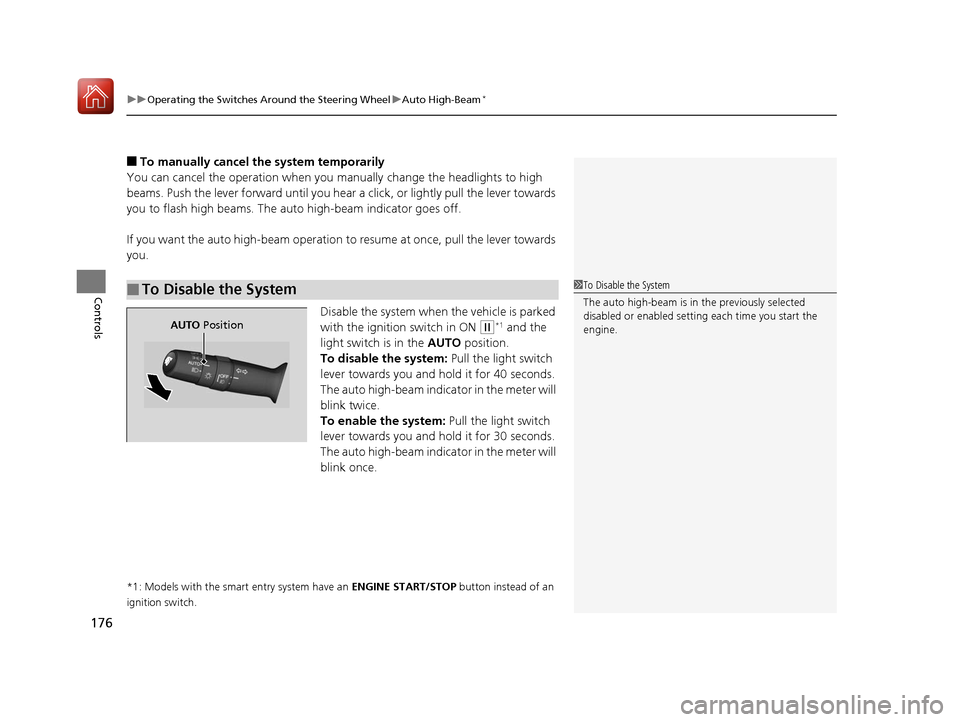
Disable the system when the vehicle is parked
with the ignition switch in ON
(w*1 and the
light switch is in the AUTO position.
To disable the system: Pull the light switch
lever towards you and hold it for 40 seconds.
The auto high-beam indica tor in the meter will
blink twice.
To enable the system: Pull the light switch
lever towards you and hold it for 30 seconds.
The auto high-beam indica tor in the meter will
blink once.
*1: Models with the smart entry system have an ENGINE START/STOP button instead of an
ignition switch.
■To Disable the System1 To Disable the System
The auto high-beam is in the previously selected
disabled or enabled setti ng each time you start the
engine.
AUTO Position
17 CIVIC 5D (KA KC KL)-31TGG6000.book 176 ページ 2016年6月8日 水曜日 午 後2時8分
Page 184 of 641
183
Controls
Adjusting the Mirrors
Interior Rearview Mirror
Adjust the angle of the rearview mirror when you are sitting in the correct driving
position.
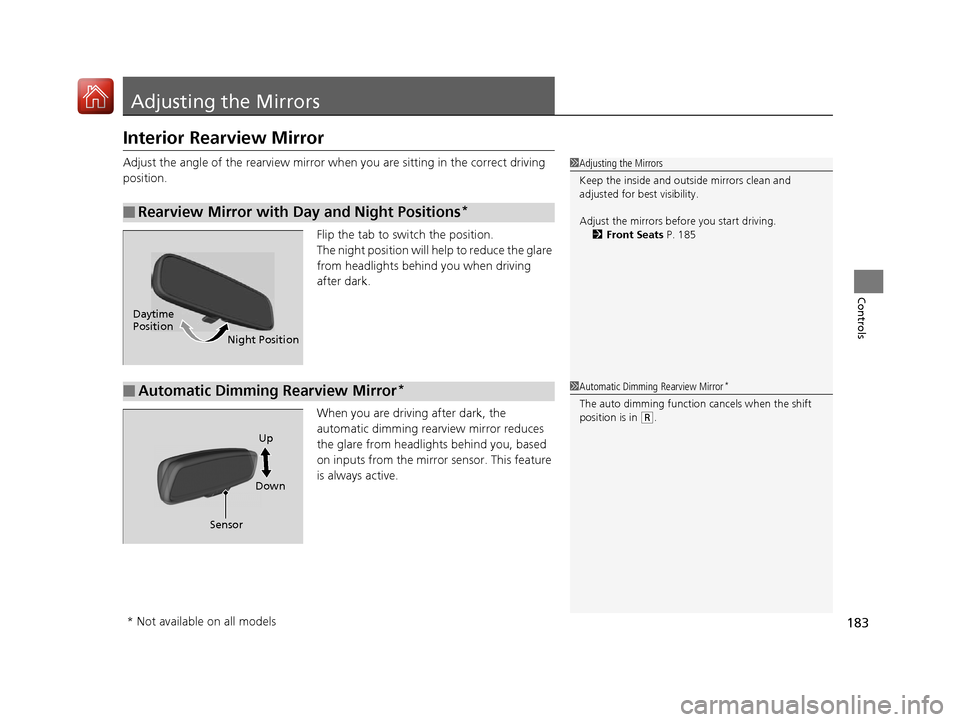
Flip the tab to switch the position.
The night position will help to reduce the glare
from headlights behind you when driving
after dark.
When you are driving after dark, the
automatic dimming rearview mirror reduces
the glare from headlights behind you, based
on inputs from the mirror sensor. This feature
is always active.
■Rearview Mirror with Day and Night Positions*
1 Adjusting the Mirrors
Keep the inside and out side mirrors clean and
adjusted for best visibility.
Adjust the mirrors befo re you start driving.
2 Front Seats P. 185
Daytime
Position
Night Position
■Automatic Dimming Rearview Mirror*1Automatic Dimming Rearview Mirror*
The auto dimming function cancels when the shift
position is in
(R.
Sensor DownUp
* Not available on all models
17 CIVIC 5D (KA KC KL)-31TGG6000.book 183 ページ 2016年6月8日 水曜日 午
後2時8分
Page 354 of 641
353
uuCustomized Features u
Continued
Features
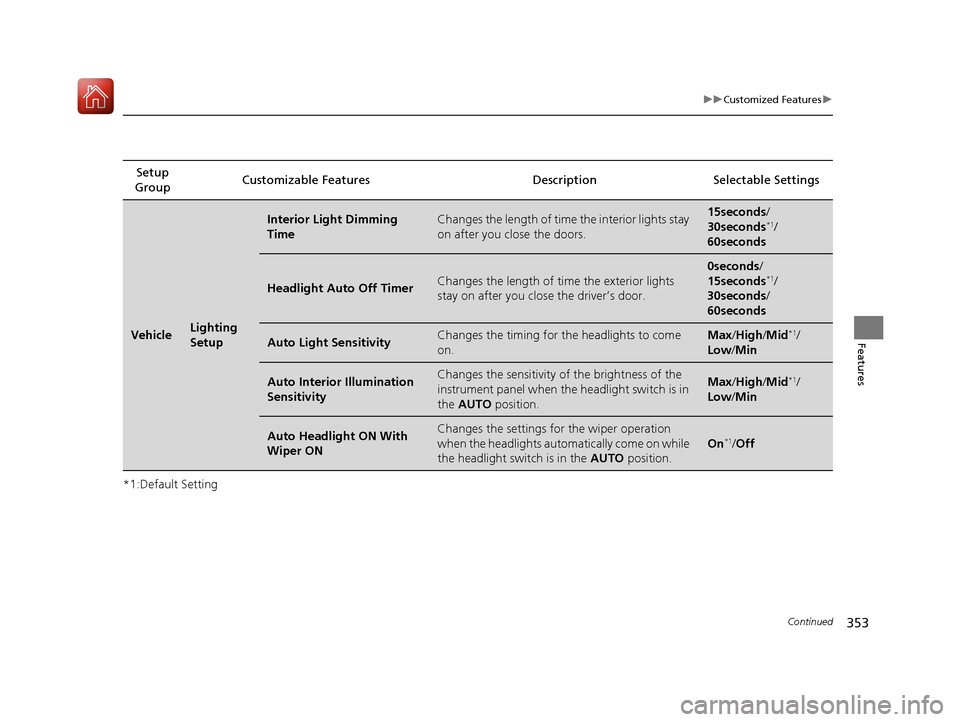
*1:Default SettingSetup
Group Customizable Features Desc
ription Selectable Settings
VehicleLighting
Setup
Interior Light Dimming
TimeChanges the length of time the interior lights stay
on after you close the doors.15seconds/
30seconds*1/
60seconds
Headlight Auto Off TimerChanges the length of time the exterior lights
stay on after you clos e the driver’s door.
0seconds/
15seconds*1/
30seconds /
60seconds
Auto Light SensitivityChanges the timing for th e headlights to come
on.Max /High /Mid*1/
Low/ Min
Auto Interior Illumination
SensitivityChanges the sensitivity of the brightness of the
instrument panel when the headlight switch is in
the AUTO position.Max/High /Mid*1/
Low/ Min
Auto Headlight ON With
Wiper ONChanges the settings for the wiper operation
when the headlights automa tically come on while
the headlight switch is in the AUTO position.
On*1/Off
17 CIVIC 5D (KA KC KL)-31TGG6000.book 353 ページ 2016年6月8日 水曜日 午 後2時8分
Page 487 of 641
486
uuWhen Driving uLane Keeping Assist System (LKAS)*
Driving
■Roadway conditions
• Driving on a snowy or wet roadway (obscured lane marking, vehicle tracks,
reflected lights, road spray, high contrast).
• Driving on a road with temporary lane markings.
• Faint, multiple, or varied lane markings are visible on the roadway due to road
repairs or old lane markings.
• The roadway has merging, split, or crossing lines (e.g., such as at an intersection
or crosswalk).
• The lane markings are extremely narrow, wide, or changing.
• The vehicle in front of you is driving near the lane lines.
• The road is hilly or the vehicle is approaching the crest of a hill.
• Driving on rough or unpaved roads, or over bumpy surfaces.
• When objects on the road (c urb, guard rail, pylons, etc.) are recognized as white
lines (or yellow lines).
• When driving on roads with double lines.
■Vehicle conditions
• Headlight lenses are dirty or the headlights are not properly adjusted.
• The outside of the windshield is streake d or blocked by dirt, mud, leaves, wet
snow, etc.
• The inside of the windshield is fogged.
• The camera temperature gets too high.
• An abnormal tire or wheel condition (wrong size, varied size or construction,
improperly inflated, comp act spare tire, etc.).
• The vehicle is tilted due to a heav y load or suspension modifications.
17 CIVIC 5D (KA KC KL)-31TGG6000.book 486 ページ 2016年6月8日 水曜日 午 後2時8分
Page 549 of 641
548
Maintenance
Replacing Light Bulbs
Headlight Bulbs
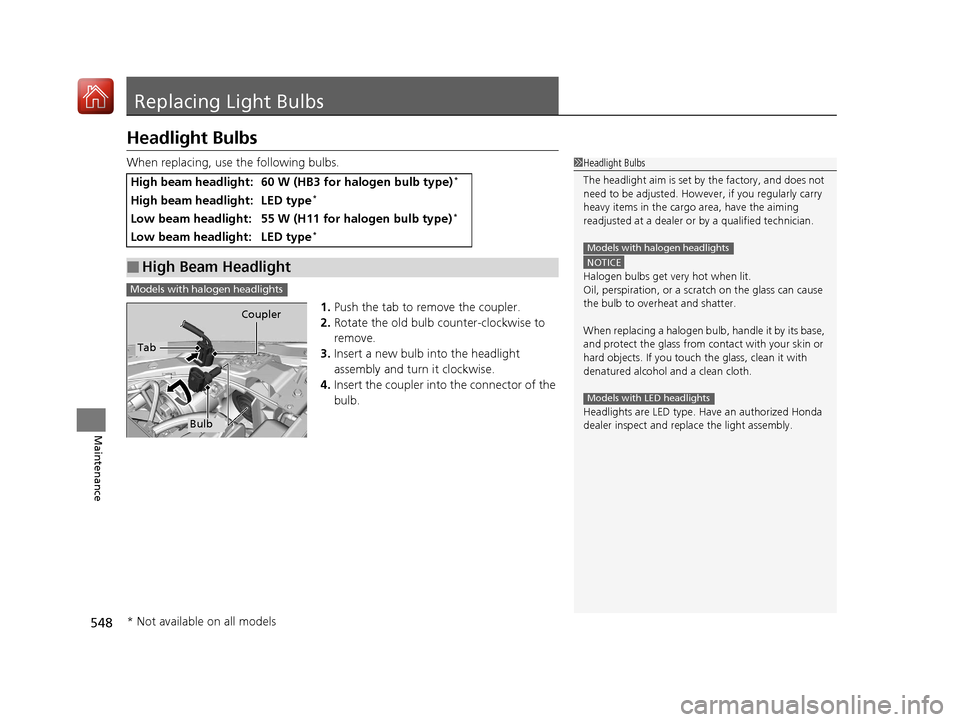
When replacing, use the following bulbs.1.Push the tab to remove the coupler.
2. Rotate the old bulb counter-clockwise to
remove.
3. Insert a new bulb into the headlight
assembly and turn it clockwise.
4. Insert the coupler into the connector of the
bulb.
High beam headlight:60 W (HB3 for halogen bulb type)*
High beam headlight:LED type*
Low beam headlight:55 W (H11 for halogen bulb type)*
Low beam headlight:LED type*
■High Beam Headlight
1Headlight Bulbs
The headlight aim is set by the factory, and does not
need to be adjusted. Howeve r, if you regularly carry
heavy items in the cargo area, have the aiming
readjusted at a dealer or by a qualified technician.
NOTICE
Halogen bulbs get very hot when lit.
Oil, perspiration, or a scratch on the glass can cause
the bulb to overhe at and shatter.
When replacing a halogen bu lb, handle it by its base,
and protect the glass from c ontact with your skin or
hard objects. If you touch the glass, clean it with
denatured alcohol and a clean cloth.
Headlights are LED type. Ha ve an authorized Honda
dealer inspect and replace the light assembly.
Models with halogen headlights
Models with LED headlights
Models with halogen headlights
Tab Coupler
Bulb
* Not available on all models
17 CIVIC 5D (KA KC KL)-31TGG6000.book 548 ページ 2016年6月8日 水曜日 午
後2時8分
Page 550 of 641
549
uuReplacing Light Bulbs uHeadlight Bulbs
Maintenance
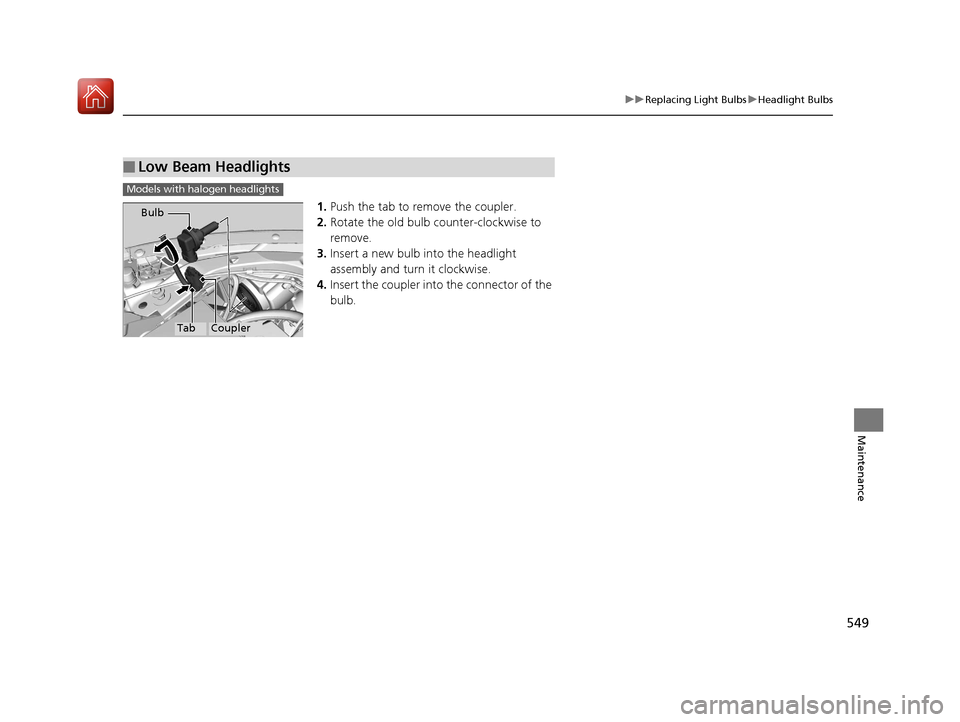
1. Push the tab to remove the coupler.
2. Rotate the old bulb counter-clockwise to
remove.
3. Insert a new bulb into the headlight
assembly and turn it clockwise.
4. Insert the coupler into the connector of the
bulb.
■Low Beam Headlights
Models with halogen headlights
TabCoupler
Bulb
17 CIVIC 5D (KA KC KL)-31TGG6000.book 549 ページ 2016年6月8日 水曜日 午
後2時8分
Page 552 of 641
551
uuReplacing Light Bulbs uFront Turn Signal Light Bulbs
Maintenance
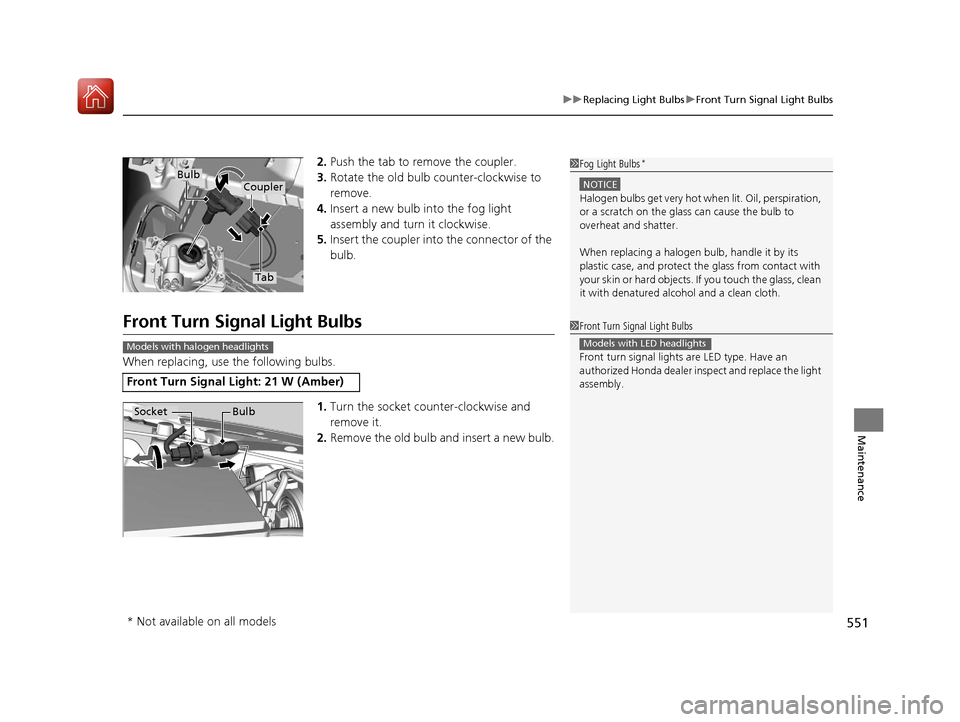
2. Push the tab to remove the coupler.
3. Rotate the old bulb counter-clockwise to
remove.
4. Insert a new bulb into the fog light
assembly and turn it clockwise.
5. Insert the coupler into the connector of the
bulb.
Front Turn Signal Light Bulbs
When replacing, use the following bulbs.
1.Turn the socket counter-clockwise and
remove it.
2. Remove the old bulb and insert a new bulb.
1Fog Light Bulbs*
NOTICE
Halogen bulbs get very hot wh en lit. Oil, perspiration,
or a scratch on the glass can cause the bulb to
overheat and shatter.
When replacing a halogen bulb, handle it by its
plastic case, and protect th e glass from contact with
your skin or hard objects. If you touch the glass, clean
it with denatured alc ohol and a clean cloth.
Tab
CouplerBulb
Front Turn Signal Light: 21 W (Amber)
1Front Turn Signal Light Bulbs
Front turn signal lights are LED type. Have an
authorized Honda dealer in spect and replace the light
assembly.
Models with LED headlightsModels with halogen headlights
Socket Bulb
* Not available on all models
17 CIVIC 5D (KA KC KL)-31TGG6000.book 551 ページ 2016年6月8日 水曜日 午 後2時8分
Page 582 of 641
581
uuCleaning uExterior Care
Maintenance
The inside lenses of exterior lights (headlights, brake light s, etc.) may fog temporarily
if you have driven in the rain, or after the vehicle has been run through a car wash.
Dew condensation also may build up inside the lenses when there is a significant
enough difference between the ambient and inside-lens temperatures (similar to
vehicle windows fogging up in rainy conditions). These conditions are natural
processes, not structural design problems in the exterior lights.
Lens design characteristics ma y result in moisture developing on the light lens frame
surfaces. This also is not a malfunction. Ho wever, if you see large amounts of water
accumulation, or large water drops building up inside the lenses, have your vehicle
inspected by a dealer.
■Fogged Exterior Light Lenses
17 CIVIC 5D (KA KC KL)-31TGG6000.book 581 ページ 2016年6月8日 水曜日 午 後2時8分
Page 612 of 641
611
uuFusesuInspecting and Changing Fuses
Handling the Unexpected
Inspecting and Changing Fuses
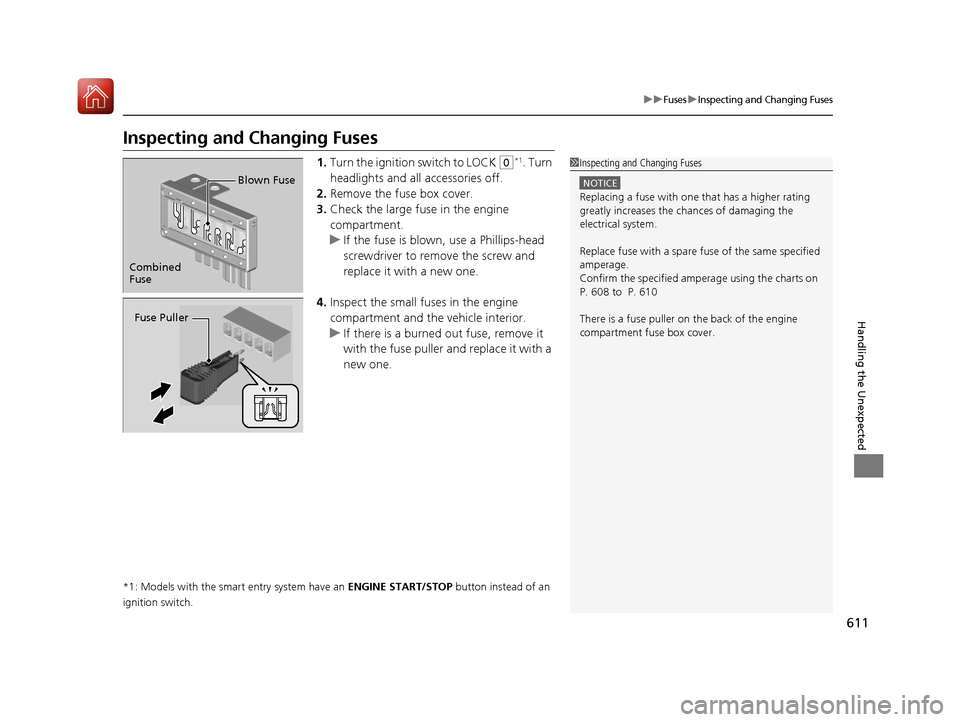
1.Turn the ignition switch to LOCK (0*1. Turn
headlights and all accessories off.
2. Remove the fuse box cover.
3. Check the large fuse in the engine
compartment.
u If the fuse is blown, use a Phillips-head
screwdriver to remove the screw and
replace it with a new one.
4. Inspect the small fu ses in the engine
compartment and the vehicle interior.
u If there is a burned out fuse, remove it
with the fuse puller and replace it with a
new one.
*1: Models with the smart entry system have an ENGINE START/STOP button instead of an
ignition switch.
1 Inspecting and Changing Fuses
NOTICE
Replacing a fuse with on e that has a higher rating
greatly increases the chances of damaging the
electrical system.
Replace fuse with a spare fuse of the same specified
amperage.
Confirm the specified amperage using the charts on
P. 608 to P. 610
There is a fuse puller on the back of the engine
compartment fuse box cover.
Combined
Fuse Blown Fuse
Fuse Puller
17 CIVIC 5D (KA KC KL)-31TGG6000.book 611 ページ 2016年6月8日 水曜日 午
後2時8分