transmission HONDA CIVIC HATCHBACK 2017 10.G Repair Manual
[x] Cancel search | Manufacturer: HONDA, Model Year: 2017, Model line: CIVIC HATCHBACK, Model: HONDA CIVIC HATCHBACK 2017 10.GPages: 641
Page 586 of 641
585Continued
Handling the Unexpected
If a Tire Goes Flat
Changing a Flat Tire
If a tire goes flat while driving, grasp the steering wheel firmly, and brake gradually
to reduce speed. Then, stop in a safe plac e. Replace the flat tire with a compact
spare tire. Go to a dealer as soon as possib le to have the full-size tire repaired or
replaced.
1. Park the vehicle on firm, level, and non- slippery surface, and apply the parking
brake.
2. Move the shift lever to
(P.
2. Move the shift lever to
(R.
3. Turn on the hazard warning lights an d turn the ignition switch to LOCK
(0*1.
*1: Models with the smart entry system have an ENGINE START/STOP button instead of an
ignition switch.
1 Changing a Flat Tire
Follow compact spare precautions:
Periodically check the tire pressure of the compact
spare. It should be set to the specified pressure.
Specified Pressure: 60 psi (420 kPa, 4.2 kgf/cm
2)
When driving with the compact spare tire, keep the
vehicle speed under 50 mph (80 km/h). Replace with
a full-size tire as soon as possible.
The compact spare tire and wheel in your vehicle are
specifically for this model. Do not use them with
another vehicle. Do not us e another type of compact
spare tire or wheel with your vehicle.
Do not mount tire chains on a compact spare tire.
If a chain-mounted front tire goes flat, remove one of
the full-size rear tires and replace it with the compact
spare tire. Remove the flat front tire and replace it
with the full-size tire that was removed from the rear.
Mount the tire chains on the front tire.
NOTICE
Do not use the jack if it doesn’t work properly. Call
your dealer or a prof essional towing service.
The subwoofer
* is located on the rear right side. Do
not store anything in th is area. Doing so may
compromise vehicle audio performance.
Continuously variable transmission models
Manual transmission models
All models
* Not available on all models
17 CIVIC 5D (KA KC KL)-31TGG6000.book 585 ページ 2016年6月8日 水曜日 午 後2時8分
Page 595 of 641
594
uuEngine Does Not Start uIf the Smart Entry Remote Battery is Weak
Handling the Unexpected
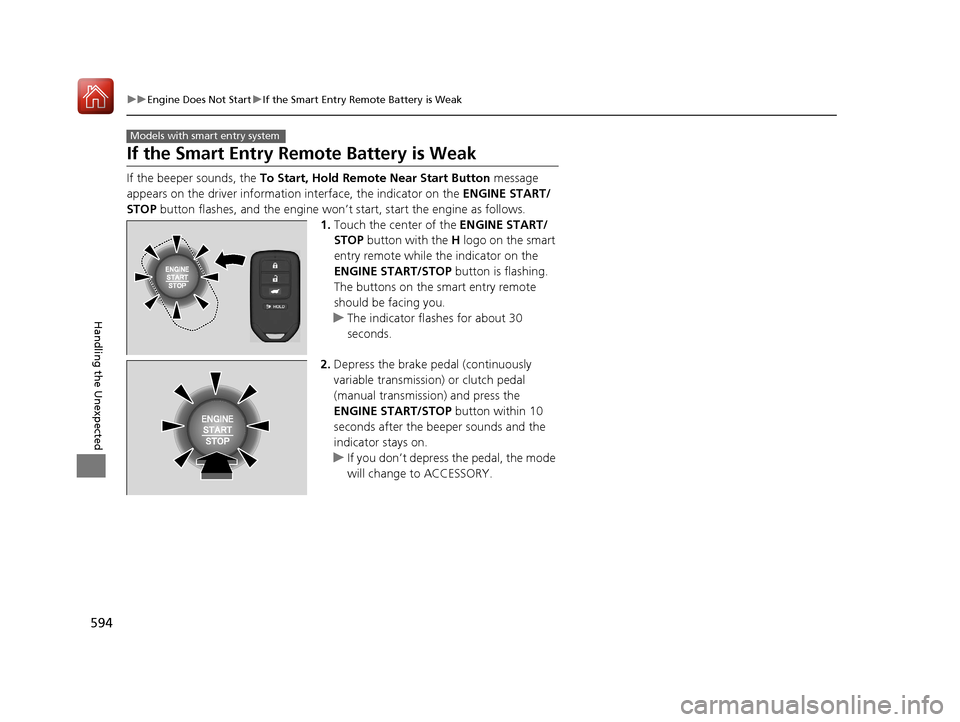
If the Smart Entry Remote Battery is Weak
If the beeper sounds, the To Start, Hold Remote Near Start Button message
appears on the driver informati on interface, the indicator on the ENGINE START/
STOP button flashes, and the engine won’t start, start the engine as follows.
1.Touch the center of the ENGINE START/
STOP button with the H logo on the smart
entry remote while the indicator on the
ENGINE START/STOP button is flashing.
The buttons on the smart entry remote
should be facing you.
u The indicator flashes for about 30
seconds.
2. Depress the brake pedal (continuously
variable transmission) or clutch pedal
(manual transmission) and press the
ENGINE START/STOP button within 10
seconds after the beeper sounds and the
indicator stays on.
u If you don’t depress the pedal, the mode
will change to ACCESSORY.
Models with smart entry system
17 CIVIC 5D (KA KC KL)-31TGG6000.book 594 ページ 2016年6月8日 水曜日 午 後2時8分
Page 596 of 641
595
uuEngine Does Not StartuEmergency Engine Stop
Handling the Unexpected
Emergency Engine Stop
The ENGINE START/STOP button may be used to stop the engine due to an
emergency situation even while driving. If you must stop the engine, do either of the
following operations:
• Press and hold the ENGINE START/STOP button for about two seconds.
• Firmly press the ENGINE START/STOP button three times.
The steering wheel will not lock. However, because turning off the engine disables
the power assist the engine provides to the steering and braking systems, it will
require significantly more physical effort an d time to steer and slow the vehicle. Use
both feet on the brake pedal to slow down the vehicle and stop immediately in a
safe place. With manual transmission models you can also downshift the
transmission to utilize engine braking.
The power mode is in ACCESSORY when the engine is stopped.
To change the mode to VEHICLE OFF, move the shift lever to
(P after the vehicle
comes to a complete stop.
Then press the ENGINE START/STOP button twice without depressing the brake
pedal.
The power mode changes to VEHICLE OFF.
Models with smart entry system
1 Emergency Engine Stop
Do not press the button while driving unless it is
absolutely necessary for th e engine to be switched
off.
Continuously variable transmission models
Canadian continuously variable transmission models
Manual transmission models
17 CIVIC 5D (KA KC KL)-31TGG6000.book 595 ページ 2016年6月8日 水曜日 午 後2時8分
Page 600 of 641
599
Handling the Unexpected
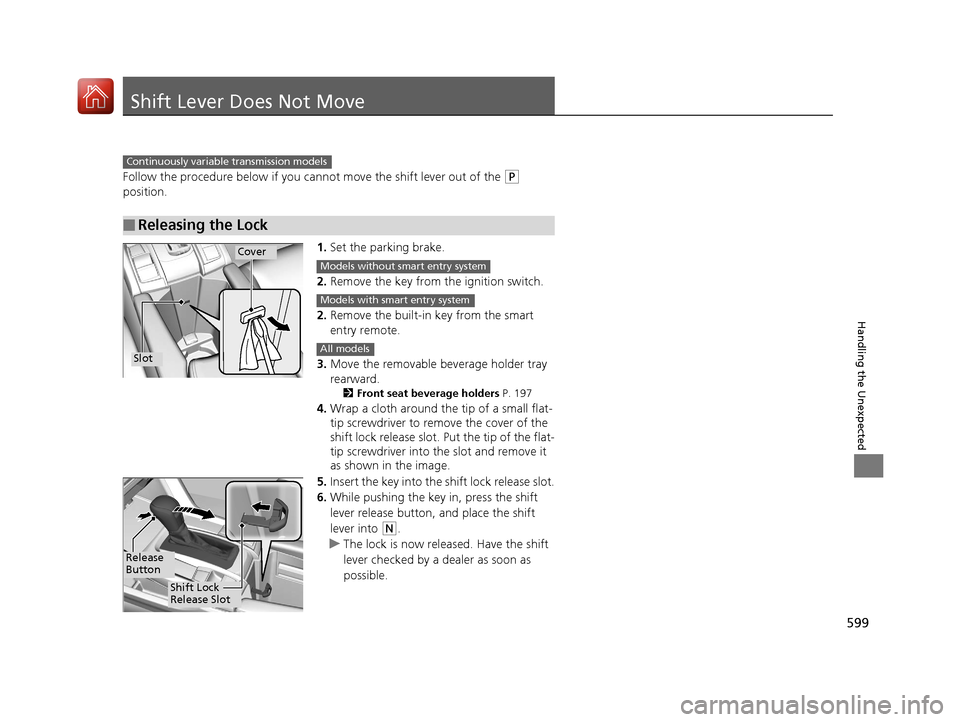
Shift Lever Does Not Move
Follow the procedure below if you cannot move the shift lever out of the (P
position.
1.Set the parking brake.
2. Remove the key from th e ignition switch.
2. Remove the built-in key from the smart
entry remote.
3. Move the removable beverage holder tray
rearward.
2 Front seat beverage holders P. 197
4.Wrap a cloth around the tip of a small flat-
tip screwdriver to remo ve the cover of the
shift lock release slot. Put the tip of the flat-
tip screwdriver into the slot and remove it
as shown in the image.
5. Insert the key into the shift lock release slot.
6. While pushing the key in, press the shift
lever release button, and place the shift
lever into
(N.
u The lock is now released. Have the shift
lever checked by a de aler as soon as
possible.
■Releasing the Lock
Continuously variable transmission models
Slot
Cover
Models without smart entry system
Models with smart entry system
All models
Release
Button
Shift Lock
Release Slot
17 CIVIC 5D (KA KC KL)-31TGG6000.book 599 ページ 2016年6月8日 水曜日 午 後2時8分
Page 605 of 641
604
uuIndicator, Coming On/Blinking uIf the Brake System Indicator (Red) Comes On or Blinks
Handling the Unexpected
If the Brake System Indicator (Red) Comes On or
Blinks
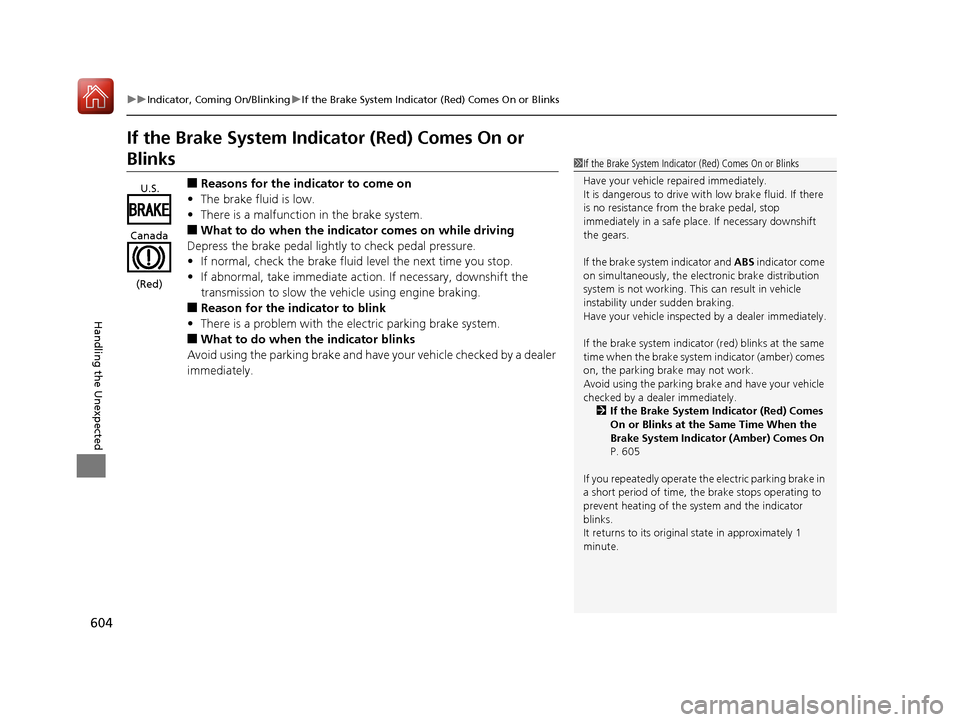
■Reasons for the indicator to come on
• The brake fluid is low.
• There is a malfunction in the brake system.
■What to do when the indicator comes on while driving
Depress the brake pedal lightly to check pedal pressure.
• If normal, check the brake fluid level the next time you stop.
• If abnormal, take immediate action . If necessary, downshift the
transmission to slow the vehicle using engine braking.
■Reason for the indicator to blink
• There is a problem with the electric parking brake system.
■What to do when the indicator blinks
Avoid using the parking brake and have your vehicle checked by a dealer
immediately.
1 If the Brake System Indicator (Red) Comes On or Blinks
Have your vehicle re paired immediately.
It is dangerous to drive with low brake fluid. If there
is no resistance from the brake pedal, stop
immediately in a safe plac e. If necessary downshift
the gears.
If the brake system indicator and ABS indicator come
on simultaneously, the elec tronic brake distribution
system is not working. Th is can result in vehicle
instability under sudden braking.
Have your vehicle inspecte d by a dealer immediately.
If the brake system indicator (red) blinks at the same
time when the brake system indicator (amber) comes
on, the parking br ake may not work.
Avoid using the parking brak e and have your vehicle
checked by a dealer immediately. 2 If the Brake System Indicator (Red) Comes
On or Blinks at the Same Time When the
Brake System Indicator (Amber) Comes On
P. 605
If you repeatedly operate th e electric parking brake in
a short period of time, the brake stops operating to
prevent heating of the system and the indicator
blinks.
It returns to its original state in approximately 1
minute.
U.S.
Canada
(Red)
17 CIVIC 5D (KA KC KL)-31TGG6000.book 604 ページ 2016年6月8日 水曜日 午 後2時8分
Page 606 of 641
605
uuIndicator, Coming On/BlinkinguIf the Brake System Indicator (Red) Comes On or Blinks at the Same Time When the Brake System Indicator (Amber) Comes On
Handling the Unexpected
If the Brake System Indicator (Red) Comes On or
Blinks at the Same Time When the Brake System
Indicator (Amber) Comes On
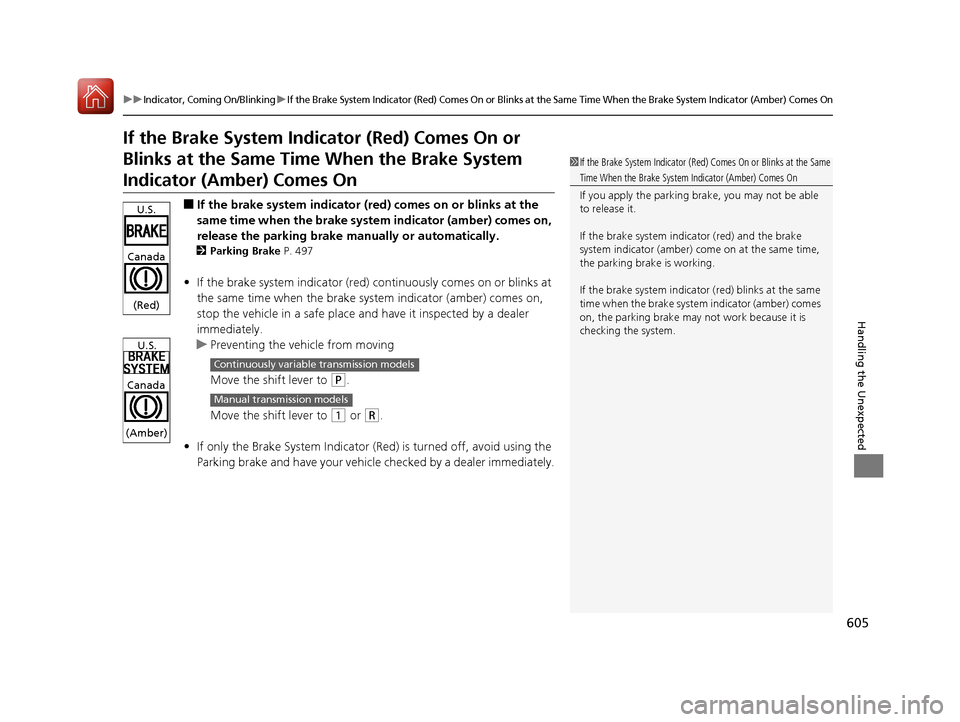
■If the brake system indicator (red) comes on or blinks at the
same time when the brake system indicator (amber) comes on,
release the parking brake ma nually or automatically.
2Parking Brake P. 497
•If the brake system indicator (red) co ntinuously comes on or blinks at
the same time when the brake system indicator (amber) comes on,
stop the vehicle in a safe place an d have it inspected by a dealer
immediately.
u Preventing the ve hicle from moving
Move the shift lever to
(P.
Move the shift lever to
(1 or (R.
• If only the Brake System Indicator (R ed) is turned off, avoid using the
Parking brake and have your vehicle checked by a dealer immediately.
1If the Brake System Indicator (Red) Comes On or Blinks at the Same
Time When the Brake System Indicator (Amber) Comes On
If you apply the parking br ake, you may not be able
to release it.
If the brake system indicator (red) and the brake
system indicator (amber) come on at the same time,
the parking brake is working.
If the brake system indicator (red) blinks at the same
time when the brake system indicator (amber) comes
on, the parking brake may not work because it is
checking the system.
U.S.
Canada
(Red)
U.S.
Canada
(Amber)
Continuously variable transmission models
Manual transmission models
17 CIVIC 5D (KA KC KL)-31TGG6000.book 605 ページ 2016年6月8日 水曜日 午 後2時8分
Page 609 of 641
608
Handling the Unexpected
Fuses
Fuse Locations
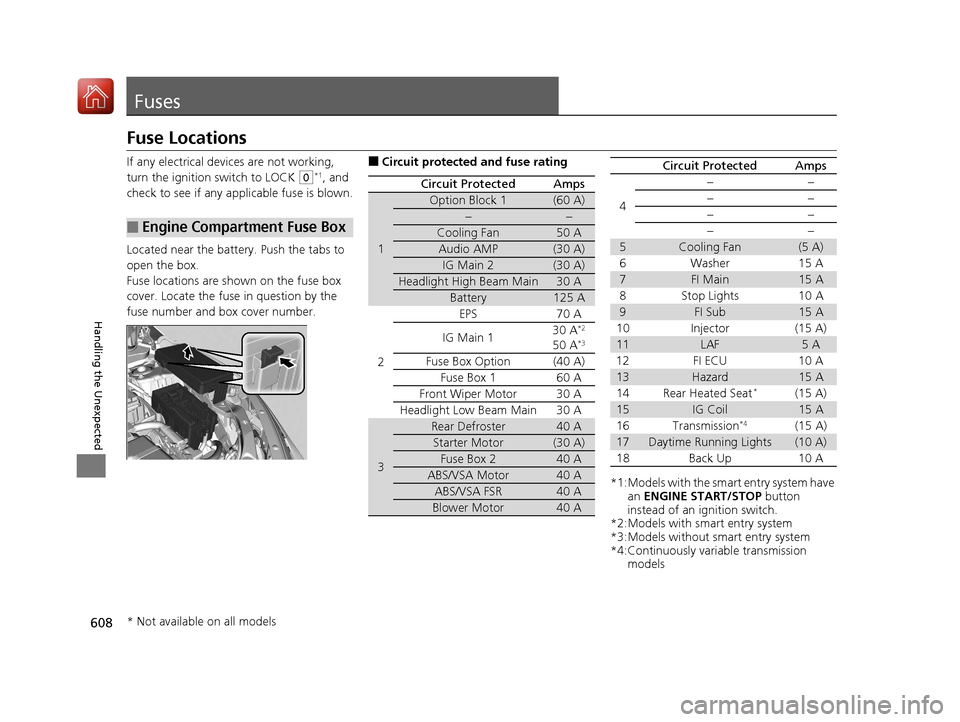
If any electrical devices are not working,
turn the ignition switch to LOCK
(0*1, and
check to see if any appl icable fuse is blown.
Located near the battery. Push the tabs to
open the box.
Fuse locations are shown on the fuse box
cover. Locate the fuse in question by the
fuse number and box cover number.
■Engine Compartment Fuse Box
■Circuit protected and fuse rating
Circuit ProtectedAmps
1
Option Block 1(60 A)
−−
Cooling Fan50 A
Audio AMP(30 A)
IG Main 2(30 A)
Headlight High Beam Main30 A
Battery125 A
2
EPS70 A
IG Main 1 30 A*2
50 A*3
Fuse Box Option(40 A)
Fuse Box 1 60 A
Front Wiper Motor30 A
Headlight Low Beam Main 30 A
3
Rear Defroster40 A
Starter Motor(30 A)
Fuse Box 240 A
ABS/VSA Motor40 A
ABS/VSA FSR40 A
Blower Motor40 A
*1:Models with the sma rt entry system have
an ENGINE START/STOP button
instead of an ignition switch.
*2:Models with smart entry system
*3:Models without smart entry system
*4:Continuously variable transmission models
4
−−
−−
−−
−−
5Cooling Fan(5 A)
6Washer 15A
7FI Main15 A
8 Stop Lights 10 A
9FI Sub15 A
10 Injector (15 A)
11LAF5A
12 FI ECU 10 A
13Hazard15 A
14 Rear Heated Seat*(15 A)
15IG Coil15 A
16 Transmission*4(15 A)
17Daytime Running Lights(10 A)
18 Back Up 10 A
Circuit ProtectedAmps
* Not available on all models
17 CIVIC 5D (KA KC KL)-31TGG6000.book 608 ページ 2016年6月8日 水曜日 午 後2時8分
Page 610 of 641
609
uuFuses uFuse Locations
Continued
Handling the Unexpected
Circuit ProtectedAmps
19Audio(15 A)
20 Parking Lights 10 A
21Interior Lights10 A
22 Front Fog Lights*(15 A)
23A/C Compressor10 A
24 Horn 10 A
25−−
26 Left Headlight Low Beam 10 A
27Right Headlight Low Beam10 A
28 − −
29Left Headlight High Beam10 A
30 Right Headlight High Beam 10 A
31Passenger’s Power Seat Sliding*(20 A)
32 Passenger’s Power Seat
Reclining
*(20 A)*
33VB ACT(5 A)
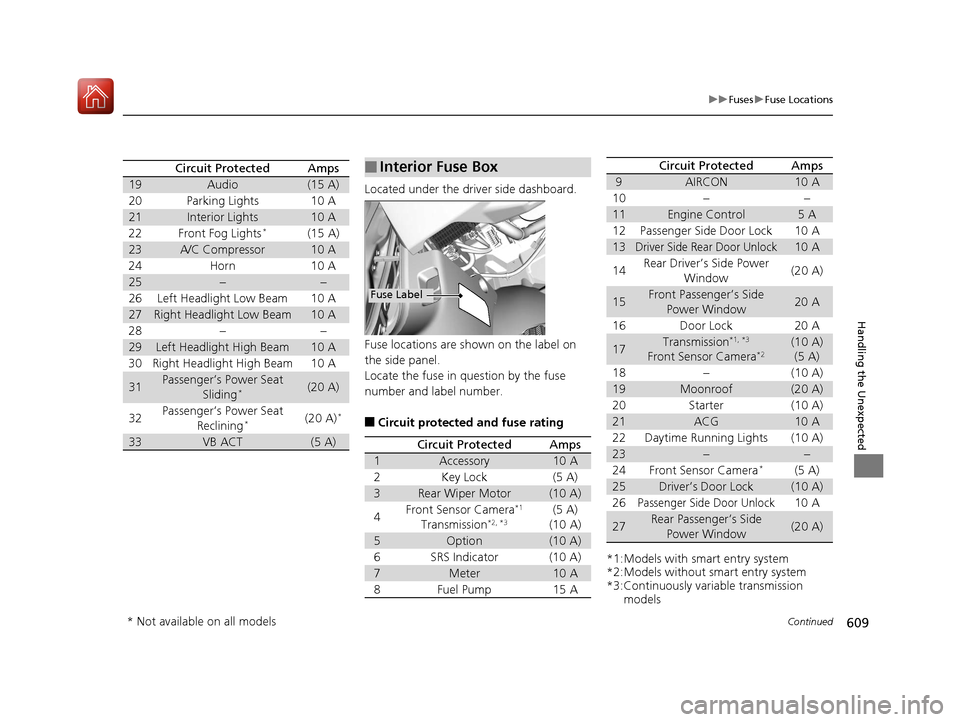
Located under the driver side dashboard.
Fuse locations are shown on the label on
the side panel.
Locate the fuse in question by the fuse
number and label number.
■Circuit protected and fuse rating
■Interior Fuse Box
Fuse Label
Circuit ProtectedAmps
1Accessory10 A
2Key Lock(5 A)
3Rear Wiper Motor(10 A)
4Front Sensor Camera*1
Transmission*2, *3(5 A)
(10 A)
5Option(10 A)
6SRS Indicator(10 A)
7Meter10 A
8Fuel Pump15 A
*1:Models with smart entry system
*2:Models without smart entry system
*3:Continuously variable transmission models
9AIRCON10 A
10−−
11Engine Control5A
12Passenger Side Door Lock10 A
13Driver Side Rear Door Unlock10 A
14Rear Driver’s Side Power
Window(20 A)
15Front Passenger’s Side Power Window20 A
16Door Lock20 A
17Transmission*1, *3
Front Sensor Camera*2(10 A)(5 A)
18−(10 A)
19Moonroof(20 A)
20Starter(10 A)
21ACG10 A
22Daytime Running Lights(10 A)
23−−
24Front Sensor Camera*(5 A)
25Driver’s Door Lock(10 A)
26Passenger Side Door Unlock10 A
27Rear Passenger’s Side
Power Window(20 A)
Circuit ProtectedAmps
* Not available on all models
17 CIVIC 5D (KA KC KL)-31TGG6000.book 609 ページ 2016年6月8日 水曜日 午 後2時8分
Page 613 of 641
612
Handling the Unexpected
Emergency Towing
Call a professional towing service if you need to tow your vehicle.
■Flat bed equipment
The operator loads your vehicle on the back of a truck.
This is the best way to transport your vehicle.
■Wheel lift equipment
The tow truck uses two pivoti ng arms that go under the front tires and lift them off
the ground. The rear tires remain on the ground. This is an acceptable way to
tow your vehicle.
1 Emergency Towing
NOTICE
Trying to lift or tow your vehicle by the bumpers will
cause serious damage to the vehicle. The bumpers
are not designed to suppor t the vehicle's weight.
NOTICE
Improper towing such as towing behind a
motorhome or other motor vehicle can damage the
transmission.
Never tow your vehicle with just a rope or chain.
It is very dangerous, since ropes or chains may shift
from side to side or break.
Make sure the parking brake is released. If you
cannot release the parking brake, your vehicle must
be transported with flat bed equipment.
2 Parking Brake P. 497
17 CIVIC 5D (KA KC KL)-31TGG6000.book 612 ページ 2016年6月8日 水曜日 午 後2時8分
Page 618 of 641
617
Information
This chapter includes your vehicle's specifications, locations of identification numbers, and other
information required by regulation.
Specifications.................................... 618
Identification Numbers Vehicle Identification Number (VIN), Engine Number, and Transmission
Number ......................................... 620
Devices that Emit Radio Waves ....... 621
Reporting Safety Defects ................. 622Emissions Testing
Testing of Readiness Codes.............. 623
Warranty Coverages ........................ 625
Authorized Manuals ......................... 627
Customer Service Information ......... 628
17 CIVIC 5D (KA KC KL)-31TGG6000.book 617 ページ 2016年6月8日 水曜日 午 後2時8分