flat tire HONDA CIVIC HATCHBACK 2019 Owner's Manual (in English)
[x] Cancel search | Manufacturer: HONDA, Model Year: 2019, Model line: CIVIC HATCHBACK, Model: HONDA CIVIC HATCHBACK 2019Pages: 699, PDF Size: 35.16 MB
Page 4 of 699
Contents
This owner’s manual should be considered a permanent part of the
vehicle and should remain with the vehicle when it is sold.
This owner’s manual covers all models of your vehicle. You may find
descriptions of equipment and features that are not on your
particular model.
Images throughout this owner’s manual (including the front cover)
represent features and equipment that are available on some, but
not all, models. Your particular mo del may not have some of these
features.
This owner’s manual is for vehicles sold in the United States and
Canada.
The information and specifications in cluded in this publication were
in effect at the time of approval for printing. Honda Motor Co., Ltd.
reserves the right, however, to discontinue or change specifications
or design at any time without notice and without incurring any
obligation.2 Safe Driving P. 33
For Safe Driving P. 34 Seat Belts P. 38 Airbags P. 46
2Instrument Panel P. 77
Indicators P. 78 Gauges and Driver Information Interface P. 117
2Controls P. 141
Clock P. 142 Locking and Unlocking the Doors P. 143
Moonroof* P. 168
Adjusting the Seats P. 189
2 Features P. 221
Audio System P. 222 Audio System Basic Operation P. 229, 247
Customized Features P. 340 Bluetooth® HandsFreeLink ®* P. 376, 403
2Driving P. 437
Before Driving P. 438 Towing a Trailer P. 444
Multi-View Rear Camera P. 548 Refueling P. 550
2Maintenance P. 557
Before Performing Maintenance P. 558 Maintenance MinderTM P. 561
Checking and Maintaining Wiper Blades P. 592
Climate Control System Maintenance P. 612
2Handling the Unexpected P. 621
Tools P. 622 If a Tire Goes Flat P. 623
Shift Lever Does Not Move P. 652 Overheating P. 653
When You Cannot Unlock the Fuel Fill Door P. 667
2 Information P. 671
Specifications P. 672 Identification Numbers P. 674
Emissions Testing P. 677 Warranty Coverages P. 680
19 CIVIC 5D HUM (KA KC KL)-31TGG6201.book 2 ページ 2018年10月25日 木曜日 午後4時12分
Page 29 of 699
Quick Reference Guide
27
Handling the Unexpected (P 621)
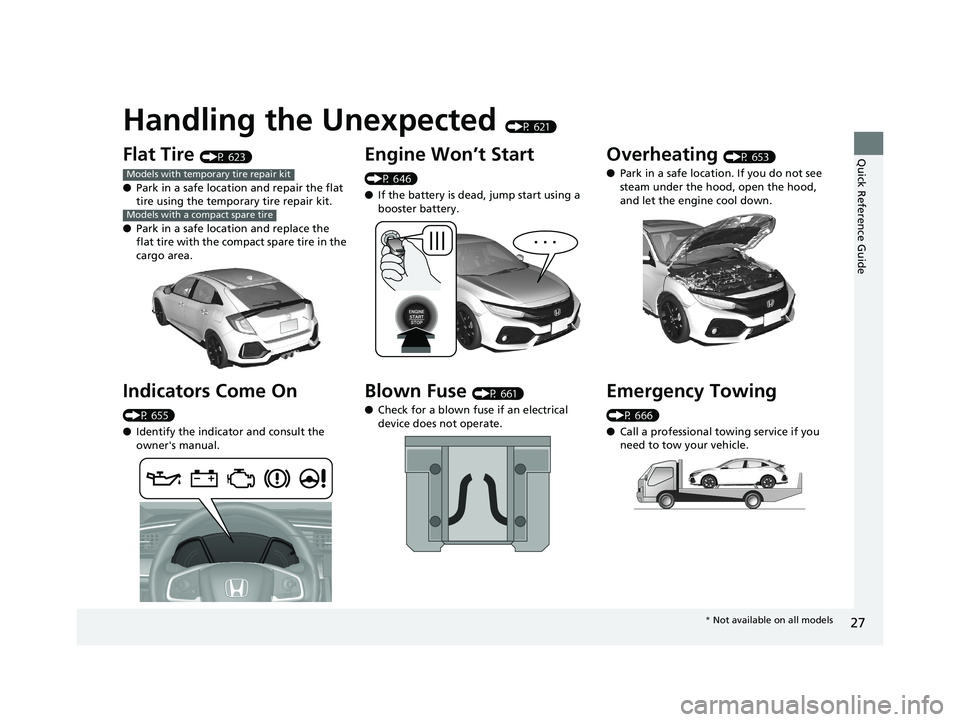
Flat Tire (P 623)
● Park in a safe location and repair the flat
tire using the temporary tire repair kit.
● Park in a safe location and replace the
flat tire with the comp act spare tire in the
cargo area.
Indicators Come On
(P 655)
● Identify the indica tor and consult the
owner's manual.
Models with temporary tire repair kit
Models with a compact spare tire
Engine Won’t Start
(P 646)
● If the battery is dead, jump start using a
booster battery.
Blown Fuse (P 661)
● Check for a blown fuse if an electrical
device does not operate.
Overheating (P 653)
● Park in a safe location. If you do not see
steam under the hood, open the hood,
and let the engine cool down.
Emergency Towing
(P 666)
●Call a professional towing service if you
need to tow your vehicle.
* Not available on all models
19 CIVIC 5D HUM (KA KC KL)-31TGG6201.book 27 ページ 2018年10月25日 木曜日 午後4時12分
Page 32 of 699
30
Quick Reference Guide
Why does the beeper
sound when I start driving?The beeper sounds when the driver and/or front passenger are
not wearing their seat belts.
Pressing the electric
parking brake switch does
not release the parking
brake. Why?Press the electric parking brake switch with the brake pedal
depressed.
Depressing the accelerator
pedal does not release the
parking brake
automatically. Why?●Fasten the driver’s seat belt.
●Check if the transmission is in (P* or (N. If so, select any other
position.
Why do I hear a screeching
sound when I apply the
brake pedal?The brake pads may need to be replaced. Have your vehicle
inspected by a dealer.
I’m seeing an amber
indicator of a tire with an
exclamation point. What is
that?The Tire Pressure M onitoring System (TPMS)* needs attention. If
you recently inflated or changed a tire, you have to recalibrate
the system.
2 Tire Pressure Monitoring System (TPMS)* (P523)
19 CIVIC 5D HUM (KA KC KL)-31TGG6201.book 30 ページ 2018年10月25日 木曜日 午後4時12分
Page 90 of 699
88
uuIndicators u
Instrument Panel
*1:Models with the smart entry system have an ENGINE START/STOP button instead of an ignition switch.
IndicatorNameOn/BlinkingExplanationMessage
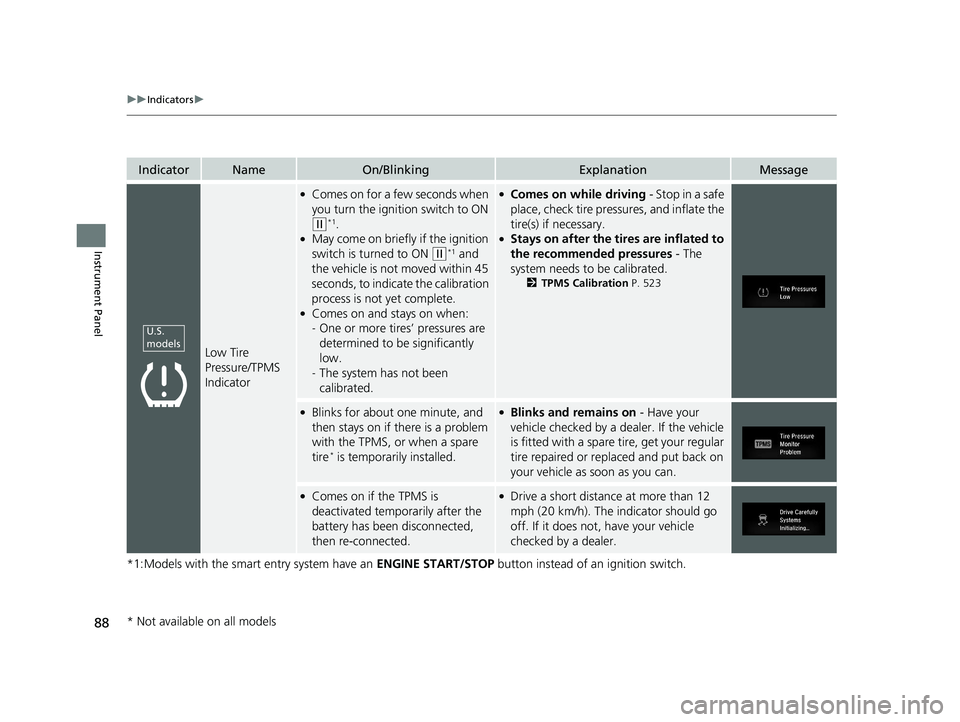
Low Tire
Pressure/TPMS
Indicator
●Comes on for a few seconds when
you turn the ignition switch to ON
(w*1.●May come on briefly if the ignition
switch is turned to ON
(w*1 and
the vehicle is not moved within 45
seconds, to indicate the calibration
process is not yet complete.
●Comes on and stays on when:
- One or more tires’ pressures are
determined to be significantly
low.
- The system has not been
calibrated.
●Comes on while driving - Stop in a safe
place, check tire pressures, and inflate the
tire(s) if necessary.
●Stays on after the tires are inflated to
the recommended pressures - The
system needs to be calibrated.
2 TPMS Calibration P. 523
●Blinks for about one minute, and
then stays on if there is a problem
with the TPMS, or when a spare
tire
* is temporarily installed.
●Blinks and remains on - Have your
vehicle checked by a dealer. If the vehicle
is fitted with a spare tire, get your regular
tire repaired or replaced and put back on
your vehicle as soon as you can.
●Comes on if the TPMS is
deactivated temporarily after the
battery has been disconnected,
then re-connected.●Drive a short distance at more than 12
mph (20 km/h). The indicator should go
off. If it does not, have your vehicle
checked by a dealer.
U.S.
models
* Not available on all models
19 CIVIC 5D HUM (KA KC KL)-31TGG6201.book 88 ページ 2018年10月25日 木曜日 午後4時12分
Page 483 of 699
Continued481
uuWhen Driving uAdaptive Cruise Control (ACC) with Low Speed Follow (LSF)*
Driving
The system may automatically shut off and the ACC indicator will come on under
certain conditions. Some examples of these conditions are listed below. Other
conditions may reduce some of the ACC functions.
2 Front Sensor Camera* P. 472
■Environmental conditions
Driving in bad weather (r ain, fog, snow, etc.).
■Roadway conditions
Driving on a snowy or wet roadway (obscure d lane marking, vehicle tracks, reflected
lights, road spra y, high contrast).
■Vehicle conditions
• The outside of the windshield is blocked by dirt, mud, leaves, wet snow, etc.
• An abnormal tire or wheel condition (Wrong sized, varied size or construction,
improperly inflated, co mpact spare tire, etc.).
• The camera temperature gets too high.
• The parking brake is applied.
• When the lower bumper next to the fog light
* is dirty.
• The vehicle is tilted due to a heavy load or suspension modifications.
• When tire chains are installed.
■ACC with LSF Conditions and Limitations1ACC with LSF Conditions and Limitations
The radar sensor for ACC with LSF is shared with the
collision mitigation braking system
TM (CMBSTM).
2 Collision Mitigation Braking SystemTM
(CMBSTM)* P. 537
You can read about handling information for the
camera equipped with this system. 2 Front Sensor Camera
* P. 472
Always keep the radar sensor cover clean.
Never use chemical solvents or polishing powder for
cleaning the sensor cover. Clean it with water or a
mild detergent.
Do not put a sticker on the radar sensor cover or
replace the radar sensor cover.
If you need the radar sensor to be repaired, or
removed, or the radar se nsor cover is strongly
impacted, turn off the system by pressing the MAIN
button and take your vehicle to a dealer.
Have your vehicle checked by a dealer if you find any
unusual behavior of the system (e.g., the warning
message appears too frequently).
* Not available on all models
19 CIVIC 5D HUM (KA KC KL)-31TGG6201.book 481 ページ 2018年10月25日 木曜日 午後4時12分
Page 497 of 699
Continued495
uuWhen Driving uAdaptive Cruise Control (ACC)*
Driving
The system may automatically shut off and the ACC indicator will come on under
certain conditions. Some examples of these conditions are listed below. Other
conditions may reduce some of the ACC functions.
2 Front Sensor Camera* P. 472
■Environmental conditions
Driving in bad weather (r ain, fog, snow, etc.).
■Roadway conditions
Driving on a snowy or wet roadway (obscure d lane marking, vehicle tracks, reflected
lights, road spra y, high contrast).
■Vehicle conditions
• The outside of the windshield is blocked by dirt, mud, leaves, wet snow, etc.
• An abnormal tire or wheel condition (Wrong sized, varied size or construction,
improperly inflated, co mpact spare tire, etc.).
• The camera temperature gets too high.
• The parking brake is applied.
• When the lower bumper next to the fog light is dirty.
• The vehicle is tilted due to a heavy load or suspension modifications.
• When tire chains are installed.
■ACC Conditions and Limitations1ACC Conditions and Limitations
The radar sensor for ACC is shared with the collision
mitigation braking system
TM (CMBSTM).
2 Collision Mitigation Braking SystemTM
(CMBSTM)* P. 537
You can read about handling information for the
camera equipped with this system. 2 Front Sensor Camera
* P. 472
Always keep the radar sensor cover clean.
Never use chemical solvents or polishing powder for
cleaning the sensor cover. Clean it with water or a
mild detergent.
Do not put a sticker on the radar sensor cover or
replace the radar sensor cover.
If you need the radar sensor to be repaired, or
removed, or the radar se nsor cover is strongly
impacted, turn off the system by pressing the MAIN
button and take your vehicle to a dealer.
Have your vehicle checked by a dealer if you find any
unusual behavior of the system (e.g., the warning
message appears too frequently).
* Not available on all models
19 CIVIC 5D HUM (KA KC KL)-31TGG6201.book 495 ページ 2018年10月25日 木曜日 午後4時12分
Page 510 of 699
508
uuWhen Driving uRoad Departure Mitigation (RDM) System*
Driving
■Roadway conditions
• Driving on a snowy or wet roadway (obs cured lane marking, vehicle tracks,
reflected lights, road spray, high contrast).
• Driving on a road with temporary lane markings.
• Faint, multiple, or varied lane markings are visible on the roadway due to road
repairs or old lane markings.
• The roadway has merging, split, or crossing lines (e.g., such as at an intersection
or crosswalk).
• The lane markings are extremely narrow, wide, or changing.
• The vehicle in front of you is driving near the lane lines.
• The road is hilly or the vehicle is approaching the crest of a hill.
• Driving on rough or unpaved roads, or over bumpy surfaces.
• When objects on the road (curb, guard rail, pylons, etc.) are recognized as white
lines (or yellow lines).
• Driving on roads with double lines.
■Vehicle conditions
• Headlight lenses are dirty or the headlights are not properly adjusted.
• The outside of the windshield is streake d or blocked by dirt, mud, leaves, wet
snow, etc.
• The inside of the windshield is fogged.
• The camera temperature gets too high.
• An abnormal tire or wheel condition (wrong sized, varied size or construction,
improperly inflated, comp act spare tire, etc.).
• The vehicle is tilted due to a heav y load or suspension modifications.
• When tire chains are installed.
19 CIVIC 5D HUM (KA KC KL)-31TGG6201.book 508 ページ 2018年10月25日 木曜日 午後4時12分
Page 517 of 699
515
uuWhen Driving uLane Keeping Assist System (LKAS)*
Driving
■Roadway conditions
• Driving on a snowy or wet roadway (obs cured lane marking, vehicle tracks,
reflected lights, road spray, high contrast).
• Driving on a road with temporary lane markings.
• Faint, multiple, or varied lane markings are visible on the roadway due to road
repairs or old lane markings.
• The roadway has merging, split, or crossing lines (e.g., such as at an intersection
or crosswalk).
• The lane markings are extremely narrow, wide, or changing.
• The vehicle in front of you is driving near the lane lines.
• The road is hilly or the vehicle is approaching the crest of a hill.
• Driving on rough or unpaved roads, or over bumpy surfaces.
• When objects on the road (curb, guard rail, pylons, etc.) are recognized as white
lines (or yellow lines).
• Driving on roads with double lines.
■Vehicle conditions
• Headlight lenses are dirty or the h eadlights are not properly adjusted.
• The outside of the windshield is streaked or blocked by dirt, mud, leaves, wet
snow, etc.
• The inside of the windshield is fogged.
• The camera temperature gets too high.
• An abnormal tire or wheel condition (wrong sized, varied size or construction,
improperly inflated, co mpact spare tire, etc.).
• The vehicle is tilted due to a heavy load or suspension modifications.
19 CIVIC 5D HUM (KA KC KL)-31TGG6201.book 515 ページ 2018年10月25日 木曜日 午後4時12分
Page 523 of 699
521
uuWhen Driving uLaneWatchTM*
Continued
Driving
LaneWatchTM*
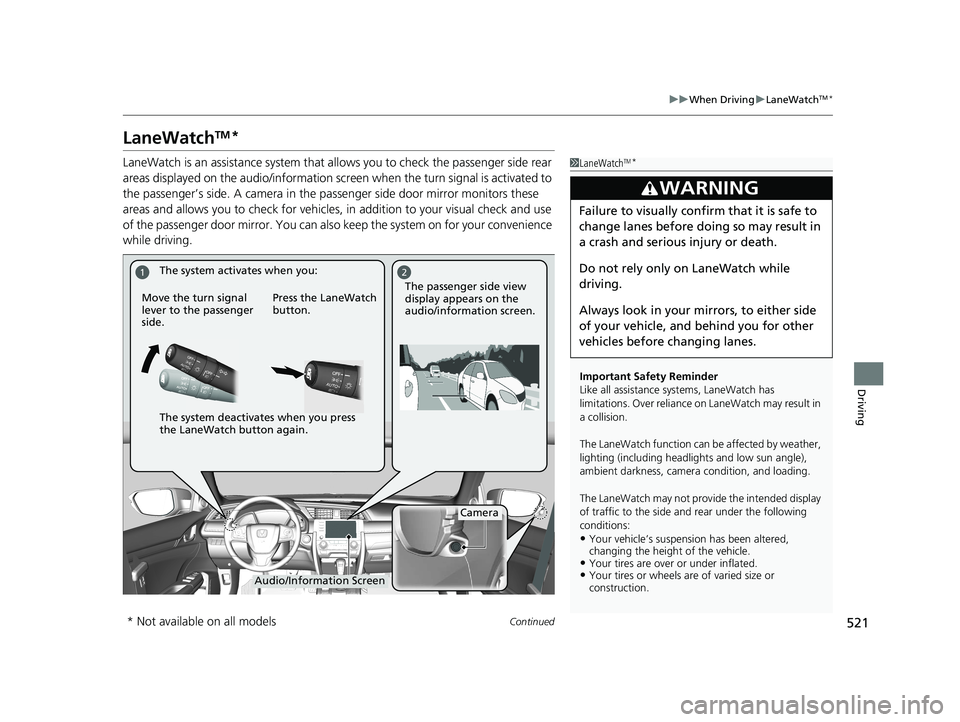
LaneWatch is an assistance system that al lows you to check the passenger side rear
areas displayed on the audio/information screen when the turn signal is activated to
the passenger’s side. A camera in the pa ssenger side door mirror monitors these
areas and allows you to check for vehicles, in addition to your visual check and use
of the passenger door mirror. You can also keep the system on for your convenience
while driving.1 LaneWatchTM*
Important Safety Reminder
Like all assistance systems, LaneWatch has
limitations. Over reliance on LaneWatch may result in
a collision.
The LaneWatch function can be affected by weather,
lighting (including headli ghts and low sun angle),
ambient darkness, camera condition, and loading.
The LaneWatch may not prov ide the intended display
of traffic to the side and rear under the following
conditions:
•Your vehicle’s suspensi on has been altered,
changing the height of the vehicle.
•Your tires are over or under inflated.•Your tires or wheels are of varied size or
construction.
3WARNING
Failure to visually confirm that it is safe to
change lanes before doing so may result in
a crash and serious injury or death.
Do not rely only on LaneWatch while
driving.
Always look in your mi rrors, to either side
of your vehicle, and behind you for other
vehicles before changing lanes.
12
Camera
Audio/Information Screen
Move the turn signal
lever to the passenger
side.
Press the LaneWatch
button.
The passenger side view
display appears on the
audio/information screen.
The system activates when you:
The system deactivates when you press
the LaneWatch button again.
* Not available on all models
19 CIVIC 5D HUM (KA KC KL)-31TGG6201.book 521 ページ 2018年10月25日 木曜日 午後4時12分
Page 525 of 699
523
uuWhen Driving uTire Pressure Monitoring System (TPMS)*
Continued
Driving
Tire Pressure Monitoring System (TPMS)*
Instead of directly measuring the pressure in each tire, the TPMS on this vehicle
monitors and compares the rolling radius and rotational characteristics of each
wheel and tire while you are driving to determine if one or more tires are
significantly under-inflated. This will caus e the low tire pressure/TPMS indicator to
come on and a message to appear on the driver information interface
*.
You must start TPMS calibration every time you:
• Adjust the pressure in one or more tires.
• Rotate the tires.
• Replace one or more tires.
Before calibrating the TPMS:
• Set the cold tire pressure in all four tires.
2 Checking Tires P. 597
Make sure:
•The vehicle is at a complete stop.
• The shift lever is in
(N.
• The shift lever is in
(P.
• The ignition switch is in ON
(w*1.
*1: Models with the smart entry system have an ENGINE START/STOP button instead of an
ignition switch.
■TPMS Calibration
1 Tire Pressure Monitoring System (TPMS)*
The system does not monitor the tires when driving
at low speed.
Conditions such as low ambient temperature and
altitude change directly a ffect tire pressure and can
trigger the low tire pressure/TPMS indicator to come on.
Tire pressure checked and inflated in:
•Warm weather can beco me under-inflated in
colder weather.
•Cold weather can become over-inflated in warmer
weather.
The low tire pressure/TPMS indicator will not come
on as a result of over inflation.
The TPMS may not function pr operly if tire type and
size are mixed. Make sure to use the same size and
type of tire. 2 Checking and Maintaining Tires P. 597
The low tire pressure/TPMS indicator may come on
with a delay or may not come on at all when:
•You rapidly accelerate, decelerate, or turn the
steering wheel.
•You drive on snowy or slippery roads.•Tire chains* are used.
The low tire pressure/TPMS indicator may come on
under the following conditions:
•A compact spare tire* is used.•There is a heavier and une ven load on the tires,
such as when towing a trailer, than the condition at
calibration.
•Tire chains* are used.
Manual transmission models
Continuously variable transmission models
All models
* Not available on all models
19 CIVIC 5D HUM (KA KC KL)-31TGG6201.book 523 ページ 2018年10月25日 木曜日 午後4時12分