sensor HONDA CIVIC HATCHBACK 2021 (in English) Workshop Manual
[x] Cancel search | Manufacturer: HONDA, Model Year: 2021, Model line: CIVIC HATCHBACK, Model: HONDA CIVIC HATCHBACK 2021Pages: 711, PDF Size: 37.1 MB
Page 543 of 711
541
uuHonda Sensing ®u Road Departure Mitigation (RDM) System
Continued
Driving
Road Departure Mitigation (RDM) System
Alerts and helps to assist you when the system detects a possibility of your vehicle
unintentionally crossing over detected lane markings and/or leaving the roadway
altogether.
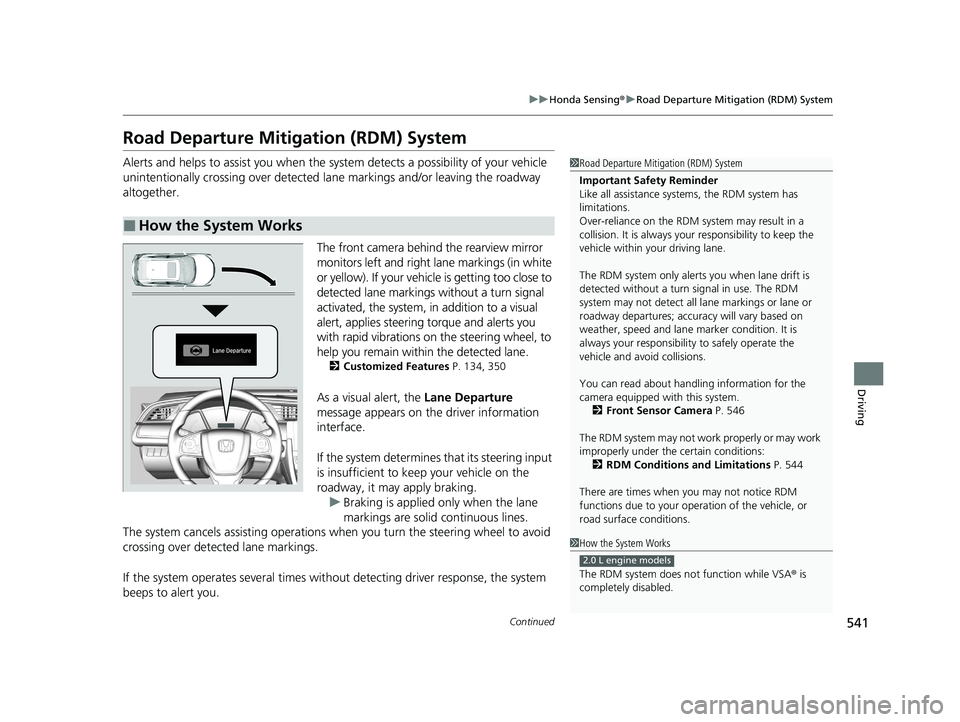
The front camera behind the rearview mirror
monitors left and right lane markings (in white
or yellow). If your vehicl e is getting too close to
detected lane markings without a turn signal
activated, the system, in addition to a visual
alert, applies steering torque and alerts you
with rapid vibrations on the steering wheel, to
help you remain within the detected lane.
2 Customized Features P. 134, 350
As a visual alert, the Lane Departure
message appears on the driver information
interface.
If the system determines that its steering input
is insufficient to keep your vehicle on the
roadway, it may apply braking. u Braking is applied only when the lane
markings are solid continuous lines.
The system cancels assisting operations wh en you turn the steering wheel to avoid
crossing over detected lane markings.
If the system operates several times with out detecting driver response, the system
beeps to alert you.
■How the System Works
1 Road Departure Mitigation (RDM) System
Important Safety Reminder
Like all assistance systems, the RDM system has
limitations.
Over-reliance on the RDM system may result in a
collision. It is always your responsibility to keep the
vehicle within your driving lane.
The RDM system only alerts you when lane drift is
detected without a turn signal in use. The RDM
system may not detect all la ne markings or lane or
roadway departures; accu racy will vary based on
weather, speed and lane marker condition. It is
always your responsibilit y to safely operate the
vehicle and avoid collisions.
You can read about handling information for the
camera equipped with this system.
2 Front Sensor Camera P. 546
The RDM system may not wo rk properly or may work
improperly under the certain conditions: 2 RDM Conditions and Limitations P. 544
There are times when you may not notice RDM
functions due to your opera tion of the vehicle, or
road surface conditions.
1 How the System Works
The RDM system does not function while VSA ® is
completely disabled.
2.0 L engine models
21 CIVIC 5D HUM-31TGG6400_01.book 541 ページ 2020年8月28日 金曜日 午後1時 48分
Page 548 of 711
546
uuHonda Sensing ®u Front Sensor Camera
Driving
Front Sensor Camera
The camera, used in system s such as LKAS, RDM, ACC*, ACC with Low Speed
Follow*, CMBSTM and auto high-beam, is designed to detect an object that triggers
any of the systems to operate its functions.
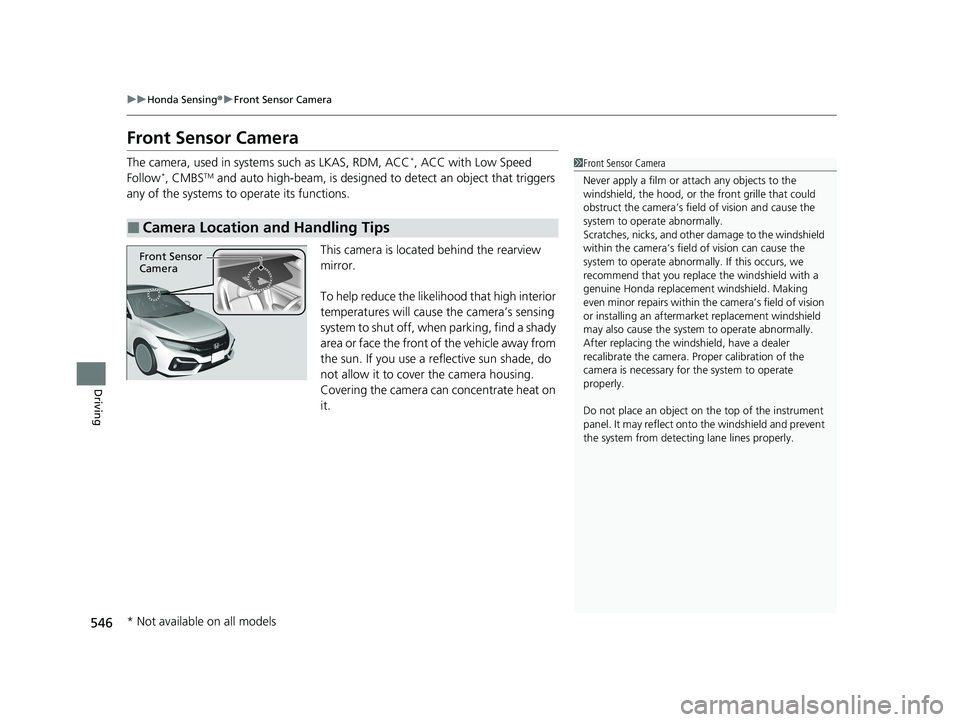
This camera is located behind the rearview
mirror.
To help reduce the likelihood that high interior
temperatures will cause the camera’s sensing
system to shut off, when parking, find a shady
area or face the front of the vehicle away from
the sun. If you use a reflective sun shade, do
not allow it to cover the camera housing.
Covering the camera can concentrate heat on
it.
■Camera Location and Handling Tips
1 Front Sensor Camera
Never apply a film or attach any objects to the
windshield, the hood, or th e front grille that could
obstruct the camera’s fiel d of vision and cause the
system to operate abnormally.
Scratches, nicks, and othe r damage to the windshield
within the camera’s fiel d of vision can cause the
system to operate abnormall y. If this occurs, we
recommend that you replac e the windshield with a
genuine Honda replacem ent windshield. Making
even minor repairs within th e camera’s field of vision
or installing an aftermarket replacement windshield
may also cause the system to operate abnormally.
After replacing the winds hield, have a dealer
recalibrate the camera. Pr oper calibration of the
camera is necessary for the system to operate
properly.
Do not place an object on the top of the instrument
panel. It may reflect onto the windshield and prevent
the system from detecting lane lines properly.
Front Sensor
Camera
* Not available on all models
21 CIVIC 5D HUM-31TGG6400_01.book 546 ページ 2020年8月28日 金曜日 午後1時 48分
Page 549 of 711
547
uuHonda Sensing ®u Front Sensor Camera
Driving
1Front Sensor Camera
If the Some Driver Assist Systems Cannot
Operate: Camera Temperature Too High message
appears:
•Use the climate control system to cool down the
interior and, if necessary, also use defroster mode
with the airflow directed towards the camera.
•Start driving the vehicle to lower the windshield
temperature, which cool s down the area around
the camera.
If the Some Driver Assist Systems Cannot
Operate: Clean Front Windshield message
appears:
•Park your vehicle in a sa fe place, and clean the
windshield. If the message does not disappear after
you have cleaned the winds hield and driven for a
while, have your vehicle checked by a dealer.
21 CIVIC 5D HUM-31TGG6400_01.book 547 ページ 2020年8月28日 金曜日 午後1時 48分
Page 550 of 711
548
uuHonda Sensing ®u Radar Sensor
Driving
Radar Sensor
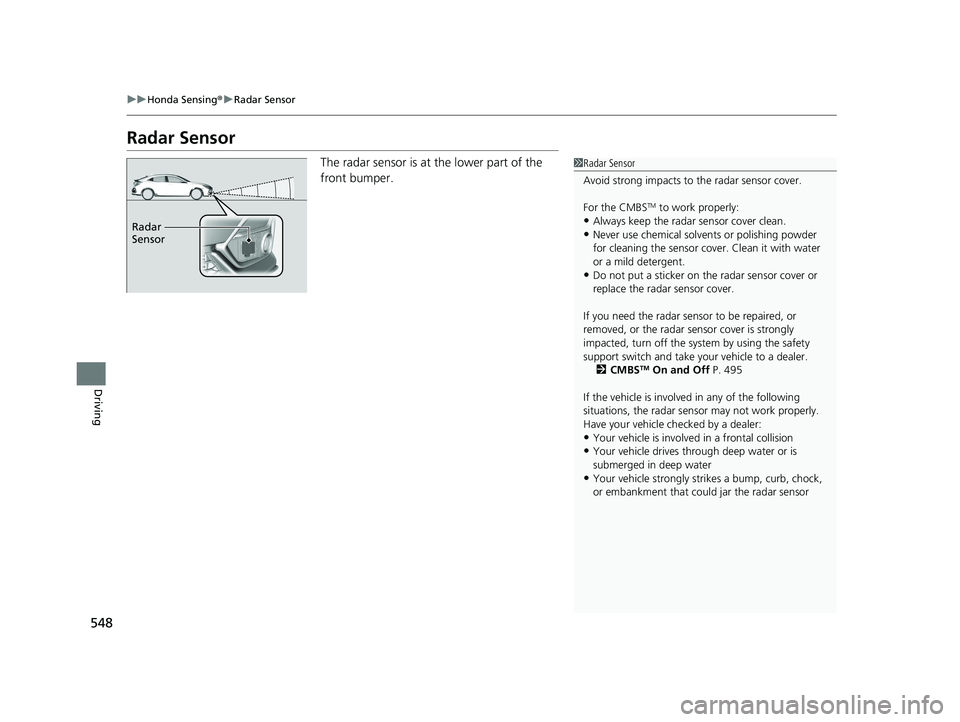
The radar sensor is at the lower part of the
front bumper.1Radar Sensor
Avoid strong impacts to the radar sensor cover.
For the CMBS
TM to work properly:
•Always keep the radar sensor cover clean.•Never use chemical solvents or polishing powder
for cleaning the sensor cove r. Clean it with water
or a mild detergent.
•Do not put a sticker on th e radar sensor cover or
replace the radar sensor cover.
If you need the radar sensor to be repaired, or
removed, or the radar se nsor cover is strongly
impacted, turn off the syst em by using the safety
support switch and take y our vehicle to a dealer.
2 CMBS
TM On and Off P. 495
If the vehicle is involved in any of the following
situations, the radar sensor may not work properly.
Have your vehicle checked by a dealer:
•Your vehicle is involved in a frontal collision•Your vehicle drives th rough deep water or is
submerged in deep water
•Your vehicle strongly strikes a bump, curb, chock,
or embankment that co uld jar the radar sensor
Radar
Sensor
21 CIVIC 5D HUM-31TGG6400_01.book 548 ページ 2020年8月28日 金曜日 午後1時 48分
Page 622 of 711
620
Maintenance
Battery
Checking the Battery
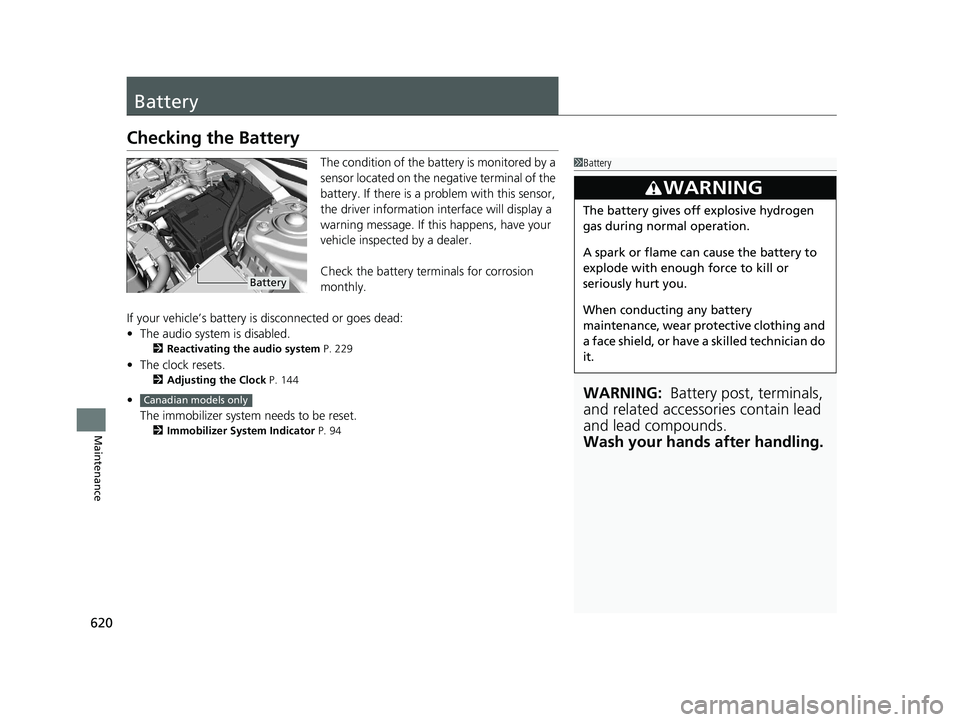
The condition of the battery is monitored by a
sensor located on the negative terminal of the
battery. If there is a problem with this sensor,
the driver information in terface will display a
warning message. If this happens, have your
vehicle inspected by a dealer.
Check the battery terminals for corrosion
monthly.
If your vehicle’s battery is disconnected or goes dead:
• The audio system is disabled.
2 Reactivating the audio system P. 229
•The clock resets.
2 Adjusting the Clock P. 144
•
The immobilizer system needs to be reset.
2 Immobilizer System Indicator P. 94
1Battery
WARNING: Battery post, terminals,
and related accessories contain lead
and lead compounds.
Wash your hands after handling.
3WARNING
The battery gives off explosive hydrogen
gas during normal operation.
A spark or flame can cause the battery to
explode with enough force to kill or
seriously hurt you.
When conducting any battery
maintenance, wear prot ective clothing and
a face shield, or have a skilled technician do
it.
Battery
Canadian models only
21 CIVIC 5D HUM-31TGG6400_01.book 620 ページ 2020年8月28日 金曜日 午後1時 48分
Page 628 of 711
uuCleaning uInterior Care
626
Maintenance
Wipe using a glass cleaner.
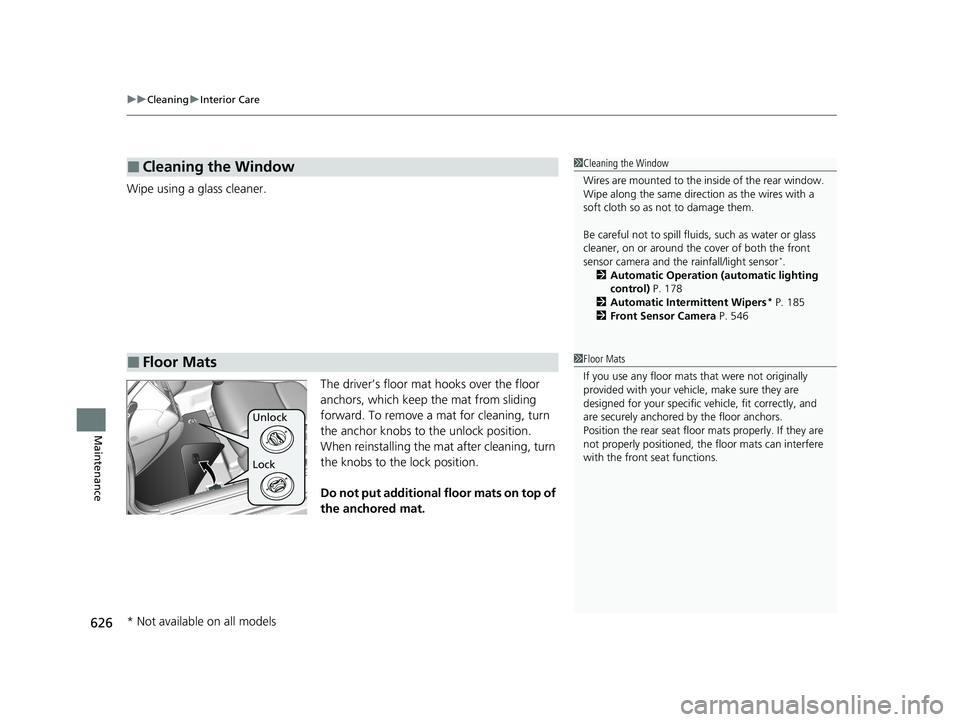
The driver’s floor mat hooks over the floor
anchors, which keep the mat from sliding
forward. To remove a mat for cleaning, turn
the anchor knobs to the unlock position.
When reinstalling the mat after cleaning, turn
the knobs to the lock position.
Do not put additional floor mats on top of
the anchored mat.
■Cleaning the Window
■Floor Mats
1 Cleaning the Window
Wires are mounted to the in side of the rear window.
Wipe along the same direct ion as the wires with a
soft cloth so as not to damage them.
Be careful not to spill flui ds, such as water or glass
cleaner, on or around the co ver of both the front
sensor camera and the rainfall/light sensor
*.
2 Automatic Operation (automatic lighting
control) P. 178
2 Automatic Intermittent Wipers
* P. 185
2 Front Sensor Camera P. 546
1Floor Mats
If you use any floor mats that were not originally
provided with your vehicle, make sure they are
designed for your specific ve hicle, fit correctly, and
are securely anchored by the floor anchors.
Position the rear seat floor mats properly. If they are
not properly positioned, the floor mats can interfere
with the front seat functions.
Lock Unlock
* Not available on all models
21 CIVIC 5D HUM-31TGG6400_01.book 626 ページ 2020年8月28日 金曜日 午後1時 48分
Page 637 of 711
635Continued
Handling the Unexpected
If a Tire Goes Flat
Temporarily Repairing a Flat Tire
If the tire has a large cut or is otherwise severely damaged, you will need to have the
vehicle towed. If the tire only has a small puncture, from a nail for instance, you can
use the temporary tire repair kit so that you can drive to the nearest service station
for a more permanent repair.
If a tire goes flat while driving, grasp the steering wheel firmly, and brake gradually
to reduce speed. Then stop in a safe place.
1. Park the vehicle on a firm, level, and n on-slippery surface, and apply the parking
brake.
2. Put the transmission into
(R.
3. Turn on the hazard warning lights an d set the power mode to VEHICLE OFF
(LOCK).
Models with temporary tire repair kit
1 Temporarily Repairing a Flat Tire
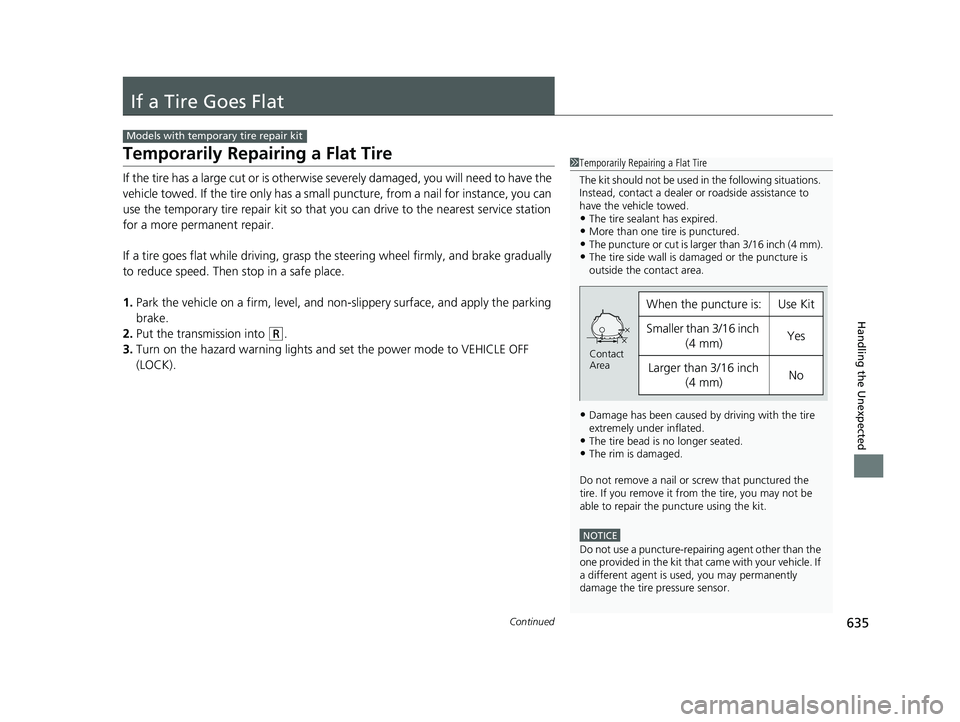
The kit should not be used in the following situations.
Instead, contact a dealer or roadside assistance to
have the vehicle towed.
•The tire sealant has expired.•More than one tire is punctured.•The puncture or cut is larger than 3/16 inch (4 mm).•The tire side wall is da maged or the puncture is
outside the contact area.
•Damage has been caused by driving with the tire
extremely under inflated.
•The tire bead is no longer seated.•The rim is damaged.
Do not remove a nail or screw that punctured the
tire. If you remove it from the tire, you may not be
able to repair the puncture using the kit.
NOTICE
Do not use a puncture-repairing agent other than the
one provided in the kit that came with your vehicle. If
a different agent is used, you may permanently
damage the tire pressure sensor.
When the puncture is:Use Kit
Smaller than 3/16 inch
(4 mm)Yes
Larger than 3/16 inch (4 mm)No
Contact
Area
21 CIVIC 5D HUM-31TGG6400_01.book 635 ページ 2020年8月28日 金曜日 午後1時 48分
Page 679 of 711
677
uuFuses uFuse Locations
Handling the Unexpected
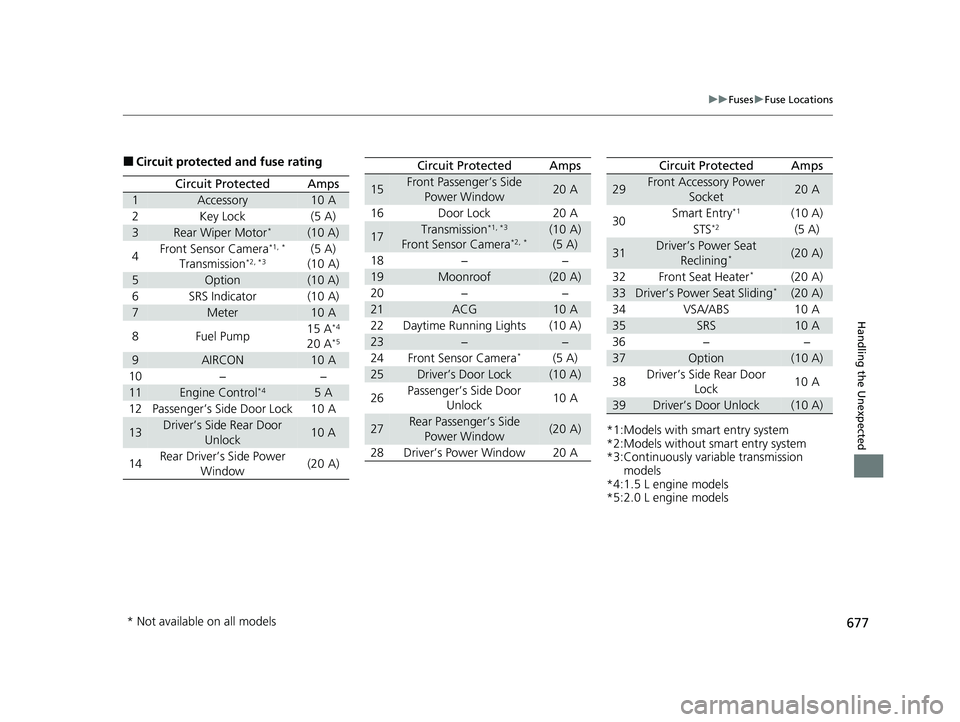
■Circuit protected and fuse rating
Circuit ProtectedAmps
1Accessory10 A
2Key Lock(5 A)
3Rear Wiper Motor*(10 A)
4Front Sensor Camera*1, *
Transmission*2, *3(5 A)
(10 A)
5Option(10 A)
6SRS Indicator(10 A)
7Meter10 A
8Fuel Pump15 A*4
20 A*5
9AIRCON10 A
10−−
11Engine Control*45A
12Passenger’s Side Door Lock10 A
13Driver’s Side Rear Door Unlock10 A
14Rear Driver’s Side Power
Window(20 A)
15Front Passenger’s Side Power Window20 A
16Door Lock20 A
17Transmission*1, *3
Front Sensor Camera*2, *(10 A)(5 A)
18−−
19Moonroof(20 A)
20−−
21ACG10 A
22Daytime Running Lights(10 A)
23−−
24Front Sensor Camera*(5 A)
25Driver’s Door Lock(10 A)
26Passenger’s Side Door Unlock10 A
27Rear Passenger’s Side
Power Window(20 A)
28Driver’s Power Window20 A
Circuit ProtectedAmps
*1:Models with smart entry system
*2:Models without smart entry system
*3:Continuously variable transmission models
*4:1.5 L engine models
*5:2.0 L engine models
29Front Accessory Power
Socket20 A
30 Smart Entry
*1(10 A)
STS*2(5 A)
31Driver’s Power Seat Reclining*(20 A)
32 Front Seat Heater
*(20 A)
33Driver’s Power Seat Sliding*(20 A)
34 VSA/ABS 10 A
35SRS10 A
36 − −
37Option(10 A)
38 Driver’s Side Rear Door
Lock 10 A
39Driver’s Door Unlock(10 A)
Circuit ProtectedAmps
* Not available on all models
21 CIVIC 5D HUM-31TGG6400_01.book 677 ページ 2020年8月28日 金曜日 午後1時
48分
Page 700 of 711
Index
698
Index
Index
Numbers
7-Speed Manual Shift Mode.................... 465
A
ABS (Anti-lock Brake System) ................... 556
Accelerator Position Meter ...................... 131
Accessories and Modifications ................. 631
Accessory Power Socket ........................... 208
Adaptive Cruise Control (ACC) ........... 99, 518
Adaptive Cruise Control (ACC) with Low Speed Follow ............................. 99, 501
Adding the Coolant .................................. 590
Additives Coolant ................................................... 589
Engine Oil ................................................ 582
Washer .................................................... 593
Additives, Engine Oil ................................ 582
Adjusting Armrest ................................................... 200
Clock ....................................................... 144
Front Head Restraints............................... 196
Front Seats .............................................. 193
Mirrors .................................................... 190
Rear Seats................................................ 199
Steering Wheel ........................................ 189
Temperature ............................................ 129
Adjusting the Clock .................................. 144
Adjusting the Sound ................................. 238
Agile Handling Assist ................................ 478 Air Conditioning System (Climate Control
System) .................................................... 217
Changing the Mode ................................ 220
Defrosting the Windshield and Windows ............................................... 221
Dust and Pollen Filter............................... 624
Recirculation/Fresh Air Mode ................... 220
Sensor ..................................................... 224
Using Automatic Climate Control ............ 217
Air Pressure ....................................... 610, 685
Airbags ........................................................ 48
Advanced Airbags ..................................... 54
After a Collision ........................................ 51
Airbag Care............................................... 63
Event Data Recorder .................................... 0
Front Airbags (SRS) .................................... 51
Indicator.............................................. 60, 89
Passenger Front Airbag Off Indicator ......... 61
Sensors ..................................................... 48
Side Airbags .............................................. 56
Side Curtain Airbags.................................. 58
AM/FM Radio ............................................ 280
Android Auto ........................................... 316
Anti-lock Brake System (ABS) .................. 556
Indicator.................................................... 89
Apple CarPlay ........................................... 313
Armrest ..................................................... 200
Audio Remote Controls ........................... 230
Audio System .................................... 226, 251
Adjusting the Sound........................ 238, 273
Android Auto .......................................... 316 Apple CarPlay ......................................... 313
Audio/Information Screen ....................... 252
Bluetooth
® Audio ........................... 248, 303
Changing the Home Screen Icon Layout.. 256
Changing the Screen Interface ................ 270
Closing Apps .......................................... 272
Customizing the Meter ........................... 256
Display Setup .......................................... 274
Error Messages ....................................... 320
General Information................................ 324
Home Screen .......................................... 262
HondaLink ®........................................... 305
iPod ................................................ 242, 291
Limitations for Manual Operation ............ 275
Menu Customize .................................... 271
MP3/WMA/AAC ............................. 245, 300
Pandora ®.............................................. 298
Reactivating ............................................ 229
Recommended Devices ........................... 326
Remote Controls ..................................... 230
Security Code ......................................... 229
Selecting an Audio Source ...................... 275
Siri Eyes Free ........................................... 312
SiriusXM ® Radio ...................................... 283
Song By Voice
TM (SBV) ............................. 294
Status Area ............................................. 269
Theft Protection ...................................... 229
USB Flash Drives...................... 245, 300, 326
USB Port(s) .............................................. 227
Voice Control Operation ......................... 276
Wallpaper Setup ..................................... 260
21 CIVIC 5D HUM-31TGG6400_01.book 698 ページ 2020年8月28日 金曜日 午後1時 48分
Page 701 of 711
699
Index
Wi-Fi Connection .................................... 310
Audio/Information Screen ............... 234, 252
Authorized Manuals ................................ 695
Auto Door Locking/Unlocking ................ 159
Customize .............................................. 140
Auto High-Beam ...................................... 181
Automatic Brake Hold ............................. 553
Indicator ........................................... 84, 553
Automatic Brake Hold System Indicator ........................................... 84, 553
Automatic Lighting .................................. 178
Average Fuel Economy ............................ 128
Average Speed ......................................... 128
B
Battery...................................................... 620
Charging System Indicator ................ 85, 668
If the Battery Is Dead............................... 662
Maintenance (Checking the Battery) ....... 620
Maintenance (Replacing) ......................... 622
Belts (Seat) .................................................. 40
Beverage Holders ..................................... 205
Bluetooth ® Audio ..................................... 303
Bluetooth ® HandsFreeLink ®........... 383, 410
Booster Seats (For Children) ...................... 78
Brake System ............................................ 549
Anti-lock Brake System (ABS) .................. 556
Automatic Brake Hold ............................. 553
Brake Assist System................................. 557
Fluid ....................................................... 592 Foot Brake ............................................... 552
Indicator (Red) ........................... 82, 670, 671
Parking Brake .......................................... 549
Braking Pressure Meter ............................ 131
Brightness Control (Instrument Panel) .... 187
Bulb Replacement .................................... 594
Brake Light, Rear Tu rn Signal Light and
Back-Up Light ........................................ 602
Fog Lights ................................................ 596
Front Side Marker Lights .......................... 599
Front Turn Signal Lights ........................... 598
Headlights ............................................... 594
High-Mount Brake Light .......................... 603
Parking/Daytime Running Lights .............. 601
Rear License Plate Light ........................... 603
Side Turn Signal/Em ergency Indicator
Lights .................................................... 601
Taillights .................................................. 603
Taillights/Rear Side Marker Lights ............. 603
Bulb Specifications ................................... 684
C
Carbon Monoxide Gas ................................ 79
Cargo Area Cover ..................................... 213
Cargo Hook ............................................... 212
Carrying Cargo .................................. 445, 447
Certification Label .................................... 686
Changing Bulbs ......................................... 594
Charging System Indicator ................. 85, 668Child Safety
................................................. 64
Childproof Door Locks............................. 158
Child Seat .................................................... 64
Booster Seats ............................................ 78
Child Seat for Infants................................. 66
Child Seat for Small Children ..................... 67
Installing a Child Seat with a Lap/Shoulder
Seat Belt .................................................. 72
Larger Children ......................................... 77
Rear-facing Child Seat ............................... 66
Selecting a Child Seat ................................ 68
Using a Tether ........................................... 74
Childproof Door Locks ............................. 158
Cleaning the Exterior ............................... 628
Cleaning the Interior ................................ 625
Climate Control System ............................ 217
Changing the Mode ................................ 217
Defrosting the Windshield and Windows ............................................... 221
Dust and Pollen Filter............................... 624
Recirculation/Fresh Air Mode ................... 220
Sensors ................................................... 224
Using Automatic Climate Control ............ 217
CMBSTM (Collision Mitigation Braking
SystemTM) ................................................. 491
Coat Hooks ............................................... 211
Collision Mitigation Braking System
TM
(CMBSTM) ................................................. 491
Compact Spare Tire .......................... 648, 685
Console Compartment ............................. 204
21 CIVIC 5D HUM-31TGG6400_01.book 699 ページ 2020年8月28日 金曜日 午後1時 48分