sensor HONDA CIVIC HATCHBACK 2021 (in English) Owner's Guide
[x] Cancel search | Manufacturer: HONDA, Model Year: 2021, Model line: CIVIC HATCHBACK, Model: HONDA CIVIC HATCHBACK 2021Pages: 711, PDF Size: 37.1 MB
Page 131 of 711
Continued129
uuGauges and Driver Information Interface uDriver Information Interface
Instrument Panel
Shows the outside temperature in Fahr enheit (U.S.) or Celsius (Canada).
■Adjusting the outside temperature display
Adjust the temperature reading up to ±5 °F or ±3°C if the temperature reading
seems incorrect.
Use the driver information interface’s customized features to correct the
temperature.
2 Customized Features P. 134, 350
Shows the instant fuel economy as a bar graph in mpg or l/100 km.
When the turbo is producing boost, this meter indicates boost pressure is building.
■Outside Temperature
■Instant Fuel Economy
■Turbo Meter
1 Outside Temperature
The temperature sensor is in the front bumper.
Road heat and exhaust fr om another vehicle can
affect the temperature reading when your vehicle
speed is less than 19 mph (30 km/h).
It may take several minutes for the display to be
updated after the temperature reading has stabilized.
21 CIVIC 5D HUM-31TGG6400_01.book 129 ページ 2020年8月28日 金曜日 午後1時 48分
Page 145 of 711
143
Controls
This chapter explains how to operate the various controls necessary for driving.
Clock.................................................. 144
Locking and Unlocking the Doors
Key Types and Functions .................. 145
Low Smart Entry Remote Signal Strength*.. 146Locking/Unlocking the Doors from the Outside .......................................... 147
Locking/Unlocking the Doors from the Inside ............................................. 156
Childproof Door Locks ..................... 158
Auto Door Locking/Unlocking .......... 159
Hatch ................................................. 160
Security System Immobilizer System .......................... 163
Security System Alarm ...................... 164 Opening and Closing the Windows
... 167
Moonroof
*........................................ 170
Operating the Switches Around the Steering Wheel Ignition Switch
*............................... 171
ENGINE START/STOP Button*........... 172
Ignition Switch and Power Mode Comparison ................................... 175
Turn Signals ..................................... 176
Light Switches.................................. 177
Fog Lights
*...................................... 180
Daytime Running Lights ................... 180
Auto High-Beam .............................. 181
Wipers and Washers ........................ 184 Brightness Control ........................... 187
Rear Defogger/Heated Door Mirror
*
Button ........................................... 188
Adjusting the Steering Wheel .......... 189
Adjusting the Mirrors
Interior Rearview Mirror ................... 190
Power Door Mirrors ......................... 192
Adjusting the Seats .......................... 193
Interior Lights/Interior Convenience Items ................................................ 201
Climate Control System
Using Automatic Climate Control .... 217
Automatic Climate Control Sensors......224
* Not available on all models
21 CIVIC 5D HUM-31TGG6400_01.book 143 ページ 2020年8月28日 金曜日 午後1時 48分
Page 150 of 711
uuLocking and Unlocking the Doors uLocking/Unlocking the Doors from the Outside
148
Controls
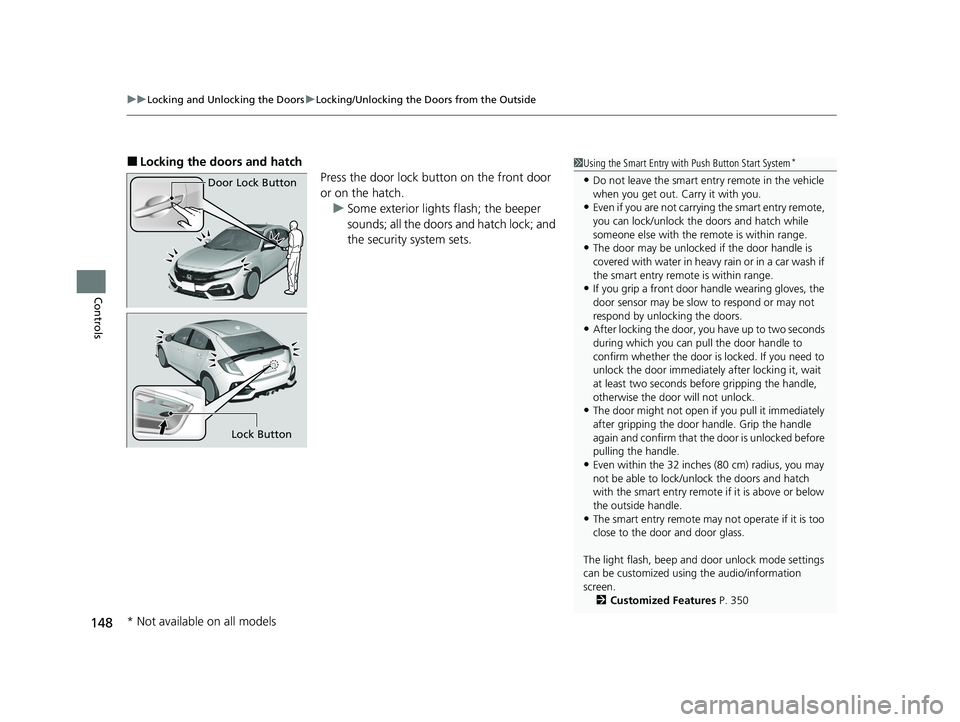
■Locking the doors and hatch
Press the door lock button on the front door
or on the hatch.u Some exterior lights flash; the beeper
sounds; all the doors and hatch lock; and
the security system sets.1Using the Smart Entry with Push Button Start System*
•Do not leave the smart entry remote in the vehicle
when you get out. Carry it with you.
•Even if you are not carrying the smart entry remote,
you can lock/unlock the doors and hatch while
someone else with the remote is within range.
•The door may be unlocked if the door handle is
covered with water in heavy rain or in a car wash if
the smart entry remote is within range.
•If you grip a front door handle wearing gloves, the
door sensor may be slow to respond or may not
respond by unlocking the doors.
•After locking the door, yo u have up to two seconds
during which you can pull the door handle to
confirm whether the door is locked. If you need to
unlock the door immediately after locking it, wait
at least two seconds befo re gripping the handle,
otherwise the door will not unlock.
•The door might not open if you pull it immediately
after gripping the door handle. Grip the handle
again and confirm that th e door is unlocked before
pulling the handle.
•Even within the 32 inches (80 cm) radius, you may
not be able to lock/unlock the doors and hatch
with the smart entry remote if it is above or below
the outside handle.
•The smart entry remote may not operate if it is too
close to the door and door glass.
The light flash, beep and door unlock mode settings
can be customized using the audio/information
screen.
2 Customized Features P. 350
Door Lock Button
Lock Button
* Not available on all models
21 CIVIC 5D HUM-31TGG6400_01.book 148 ページ 2020年8月28日 金曜日 午後1時 48分
Page 180 of 711
uuOperating the Switches Around the Steering Wheel uLight Switches
178
Controls
Automatic lighting control can be used when
the ignition switch is in ON
(w*1.
When you turn the light switch to AUTO, the
headlights and other exterior lights will switch
on and off automatica lly depending on the
ambient brightness.
The headlights come on when you unlock a
door in dark areas with the headlight switch in
AUTO .
u Once you lock the door, the headlights
will go off.
*1: Models with the smart entry system have an ENGINE START/STOP button instead of an
ignition switch.
■Automatic Operation (automatic lighting control)1 Automatic Operation (aut omatic lighting control)
We recommend that you tu rn on the lights manually
when driving at night, in a de nse fog, or in dark areas
such as long tunnels or parking facilities.
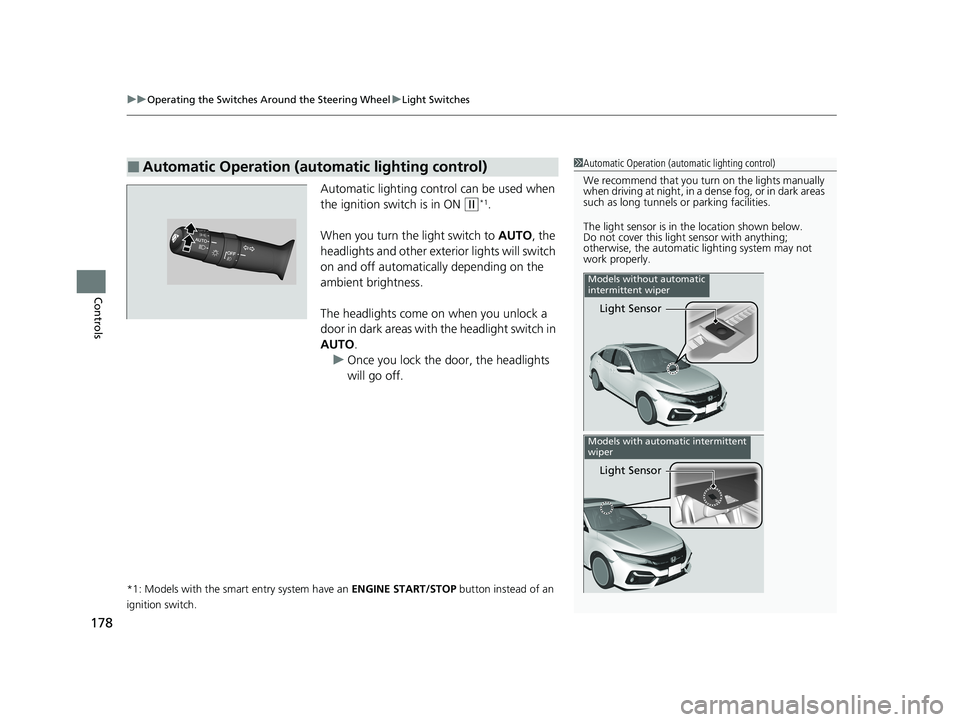
The light sensor is in the location shown below.
Do not cover this light sensor with anything;
otherwise, the automatic lighting system may not
work properly.
Light Sensor
Models without automatic
intermittent wiper
Light Sensor
Models with automatic intermittent
wiper
21 CIVIC 5D HUM-31TGG6400_01.book 178 ページ 2020年8月28日 金曜日 午後1時 48分
Page 183 of 711
181
uuOperating the Switches Around the Steering Wheel uAuto High-Beam
Continued
Controls
Auto High-Beam
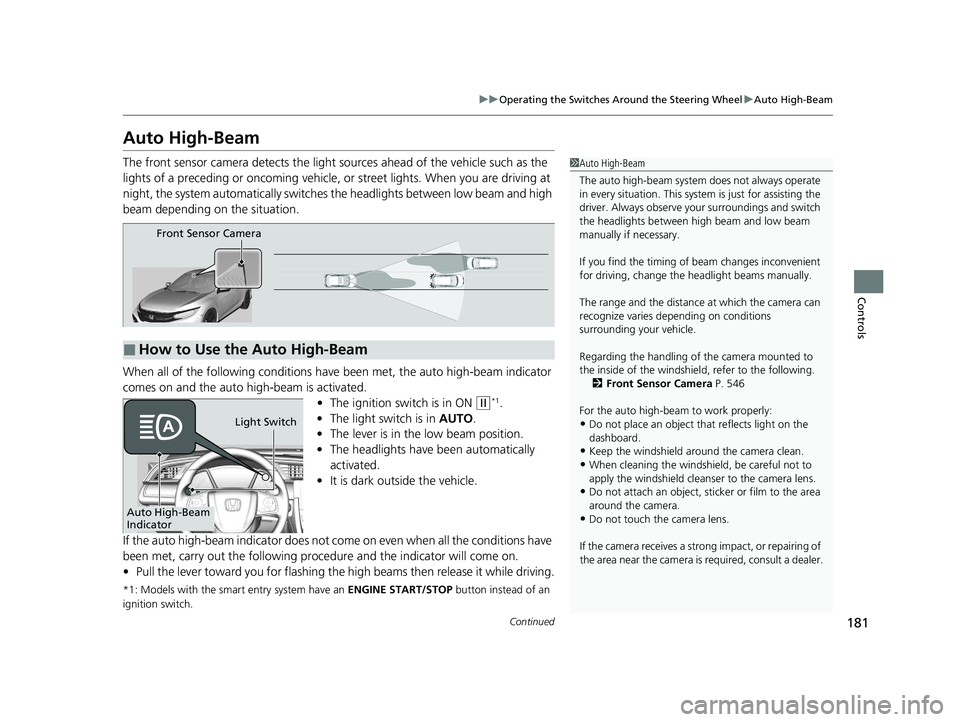
The front sensor camera detects the light sources ahead of the vehicle such as the
lights of a preceding or oncoming vehicle, or street lights. When you are driving at
night, the system automatically switches the headlights between low beam and high
beam depending on the situation.
When all of the following conditions have been met, the auto high-beam indicator
comes on and the auto high-beam is activated.
•The ignition switch is in ON
(w*1.
• The light switch is in AUTO.
• The lever is in the low beam position.
• The headlights have been automatically
activated.
• It is dark outside the vehicle.
If the auto high-beam indica tor does not come on even when all the conditions have
been met, carry out the following procedure and the indicator will come on.
• Pull the lever toward you for flashing the high beams then release it while driving.
*1: Models with the smart entry system have an ENGINE START/STOP button instead of an
ignition switch.
1 Auto High-Beam
The auto high-beam system does not always operate
in every situation. This syst em is just for assisting the
driver. Always observe your surroundings and switch
the headlights between high beam and low beam
manually if necessary.
If you find the timing of beam changes inconvenient
for driving, change the headlight beams manually.
The range and the distance at which the camera can
recognize varies de pending on conditions
surrounding your vehicle.
Regarding the handling of the camera mounted to
the inside of the windshiel d, refer to the following.
2 Front Sensor Camera P. 546
For the auto high-beam to work properly:
•Do not place an object that reflects light on the
dashboard.
•Keep the windshield around the camera clean.
•When cleaning the windshield, be careful not to
apply the windshield cleans er to the camera lens.
•Do not attach an object, sticker or film to the area
around the camera.
•Do not touch the camera lens.
If the camera receives a st rong impact, or repairing of
the area near the camera is required, consult a dealer.
■How to Use the Auto High-Beam
Front Sensor Camera
Auto High-Beam
IndicatorLight Switch
21 CIVIC 5D HUM-31TGG6400_01.book 181 ページ 2020年8月28日 金曜日 午後1時
48分
Page 187 of 711
Continued185
uuOperating the Switches Around the Steering Wheel uWipers and Washers
Controls
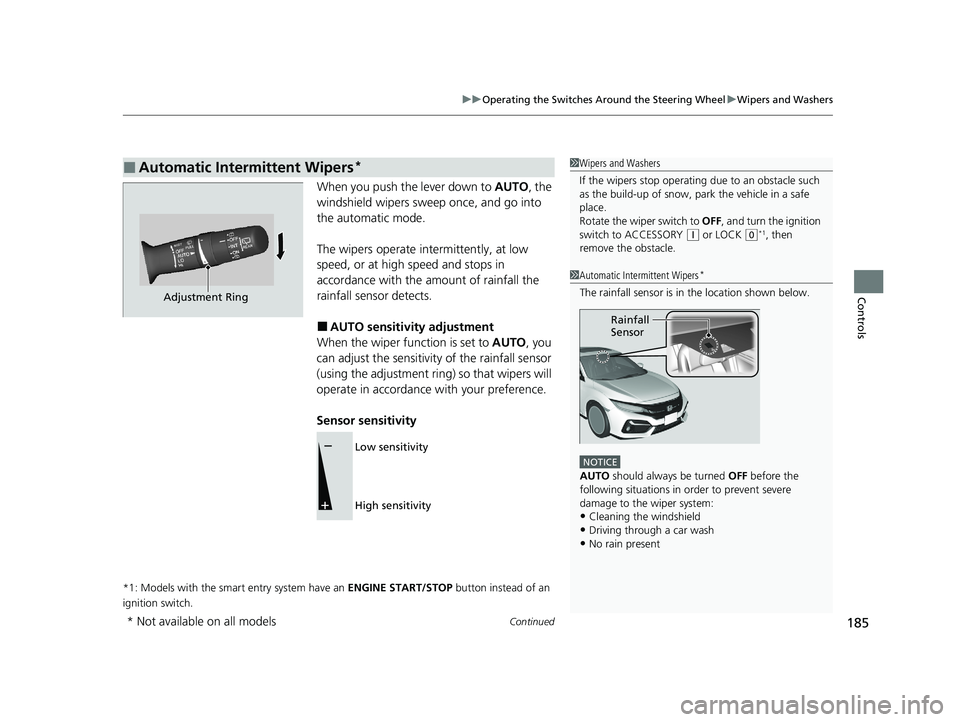
When you push the lever down to AUTO, the
windshield wipers sweep once, and go into
the automatic mode.
The wipers operate intermittently, at low
speed, or at high speed and stops in
accordance with the amount of rainfall the
rainfall sensor detects.
■AUTO sensitivity adjustment
When the wiper function is set to AUTO, you
can adjust the sensitivity of the rainfall sensor
(using the adjustment ring) so that wipers will
operate in accordance with your preference.
Sensor sensitivity
*1: Models with the smart entry system have an ENGINE START/STOP button instead of an
ignition switch.
■Automatic Intermittent Wipers*1 Wipers and Washers
If the wipers st op operating due to an obstacle such
as the build-up of snow, pa rk the vehicle in a safe
place.
Rotate the wiper switch to OFF, and turn the ignition
switch to ACCESSORY
( q or LOCK (0*1, then
remove the obstacle.
1 Automatic Intermittent Wipers*
The rainfall sensor is in the location shown below.
NOTICE
AUTO should always be turned OFF before the
following situations in order to prevent severe
damage to the wiper system:
•Cleaning the windshield
•Driving through a car wash
•No rain present
Rainfall
Sensor
Adjustment Ring
Low sensitivity
High sensitivity
* Not available on all models
21 CIVIC 5D HUM-31TGG6400_01.book 185 ページ 2020年8月28日 金曜日 午後1時 48分
Page 192 of 711
190
Controls
Adjusting the Mirrors
Interior Rearview Mirror
Adjust the angle of the rearview mirror when you are sitting in the correct driving
position.
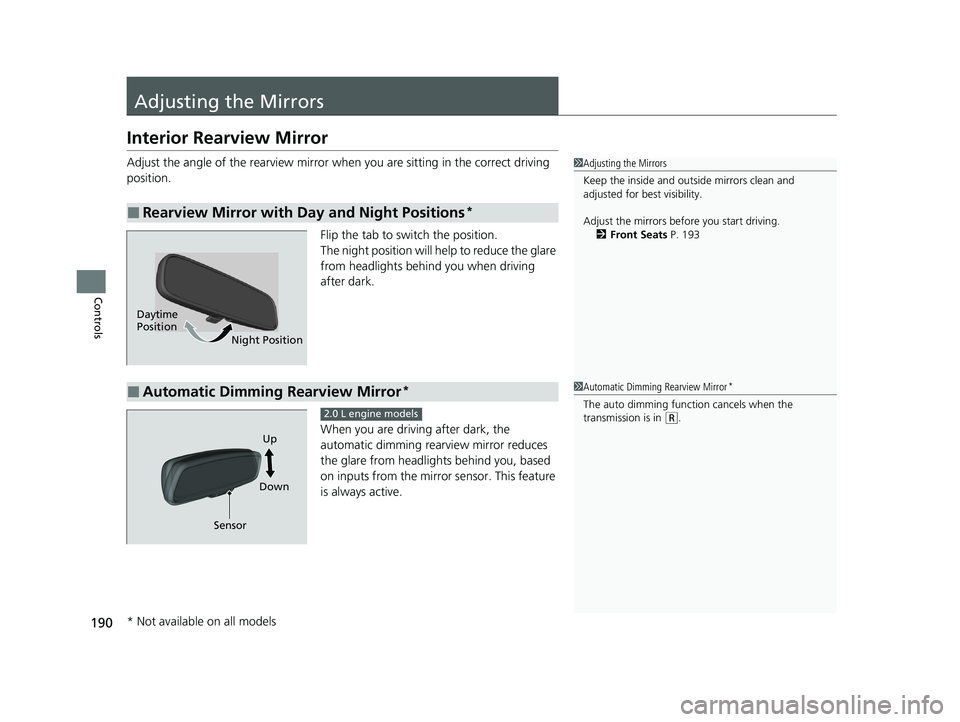
Flip the tab to switch the position.
The night position will help to reduce the glare
from headlights behind you when driving
after dark.
When you are driving after dark, the
automatic dimming rearview mirror reduces
the glare from headlights behind you, based
on inputs from the mirror sensor. This feature
is always active.
■Rearview Mirror with Day and Night Positions*
1Adjusting the Mirrors
Keep the inside and out side mirrors clean and
adjusted for best visibility.
Adjust the mirrors befo re you start driving.
2 Front Seats P. 193
Daytime
Position
Night Position
■Automatic Dimming Rearview Mirror*1Automatic Dimming Rearview Mirror*
The auto dimming function cancels when the
transmission is in (R.
Sensor DownUp
2.0 L engine models
* Not available on all models
21 CIVIC 5D HUM-31TGG6400_01.book 190 ページ 2020年8月28日 金曜日 午後1時
48分
Page 193 of 711
191
uuAdjusting the Mirrors uInterior Rearview Mirror
Controls
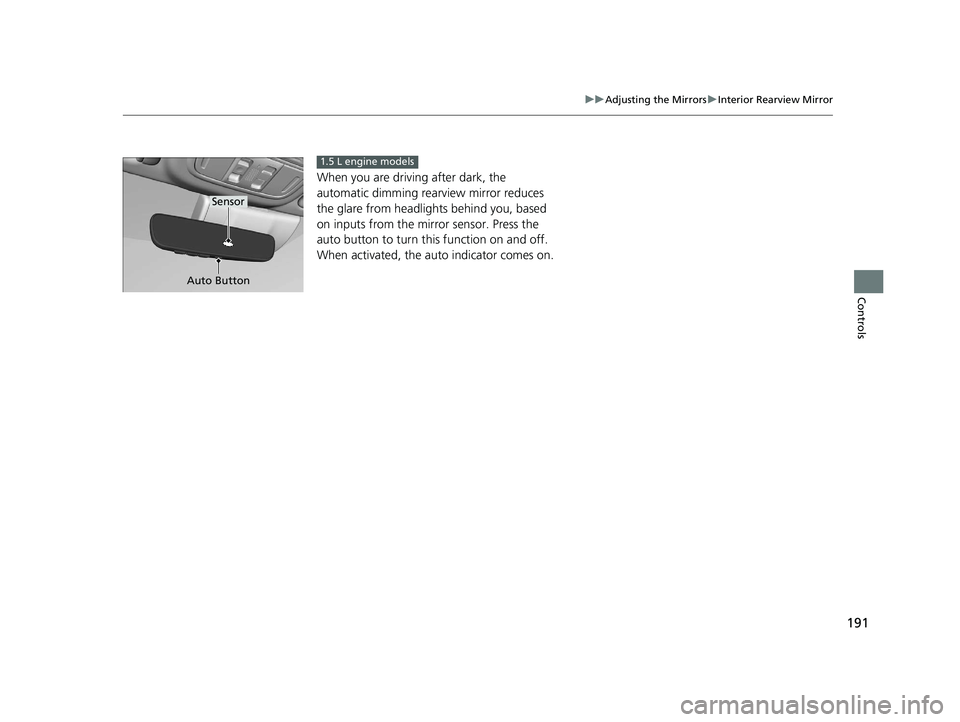
When you are driving after dark, the
automatic dimming rear view mirror reduces
the glare from headlights behind you, based
on inputs from the mirror sensor. Press the
auto button to turn this function on and off.
When activated, the au to indicator comes on.
Auto Button
Sensor
1.5 L engine models
21 CIVIC 5D HUM-31TGG6400_01.book 191 ページ 2020年8月28日 金曜日 午後1時 48分
Page 201 of 711
199
uuAdjusting the Seats uRear Seats
Controls
Rear Seats
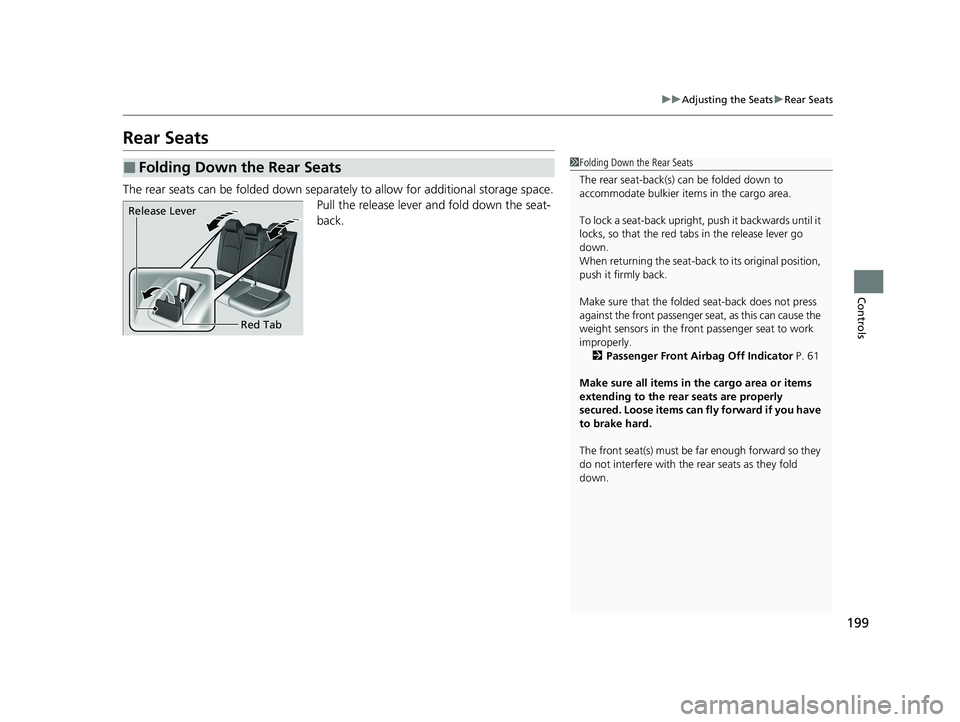
The rear seats can be folded down separa tely to allow for additional storage space.
Pull the release lever and fold down the seat-
back.
■Folding Down the Rear Seats1 Folding Down the Rear Seats
The rear seat-back(s) can be folded down to
accommodate bulkier items in the cargo area.
To lock a seat-back upright, push it backwards until it
locks, so that the red tabs in the release lever go
down.
When returning the seat-back to its original position,
push it firmly back.
Make sure that the folded seat-back does not press
against the front passenger seat, as this can cause the
weight sensors in the front passenger seat to work
improperly. 2 Passenger Front Airbag Off Indicator P. 61
Make sure all items in the cargo area or items
extending to the rear seats are properly
secured. Loose items can fly forward if you have
to brake hard.
The front seat(s) must be far enough forward so they
do not interfere with the rear seats as they fold
down.
Release Lever
Red Tab
21 CIVIC 5D HUM-31TGG6400_01.book 199 ページ 2020年8月28日 金曜日 午後1時 48分
Page 226 of 711
224
uuClimate Control System uAutomatic Climate Control Sensors
Controls
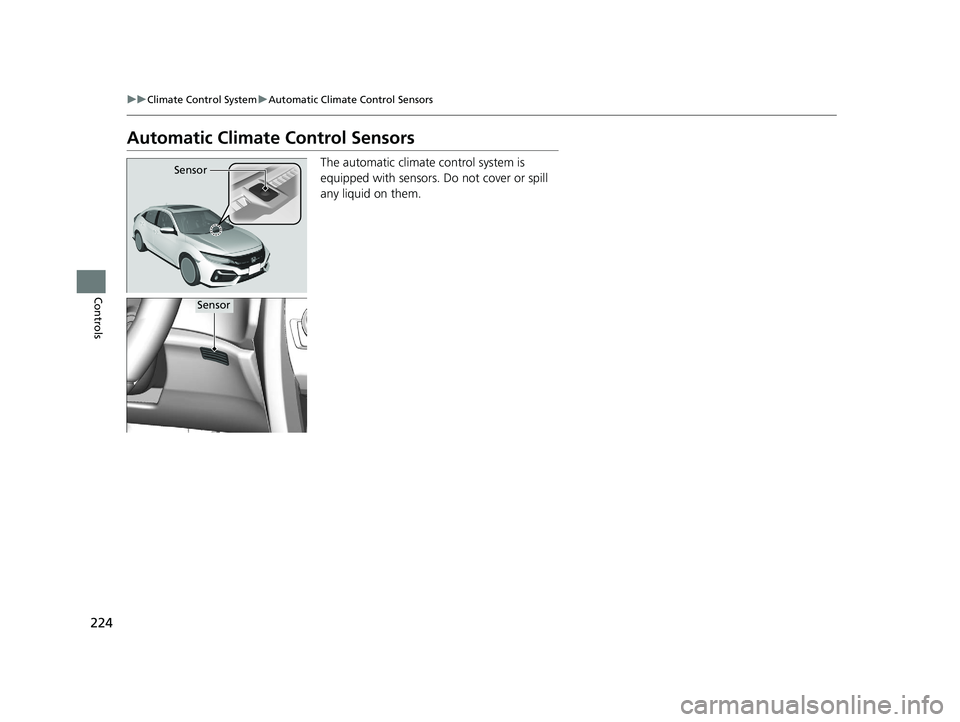
Automatic Climate Control Sensors
The automatic climate control system is
equipped with sensors. Do not cover or spill
any liquid on them.Sensor
Sensor
21 CIVIC 5D HUM-31TGG6400_01.book 224 ページ 2020年8月28日 金曜日 午後1時 48分