air conditioning HONDA CIVIC HATCHBACK 2021 Owner's Manual (in English)
[x] Cancel search | Manufacturer: HONDA, Model Year: 2021, Model line: CIVIC HATCHBACK, Model: HONDA CIVIC HATCHBACK 2021Pages: 711, PDF Size: 37.1 MB
Page 19 of 711
17
Quick Reference Guide
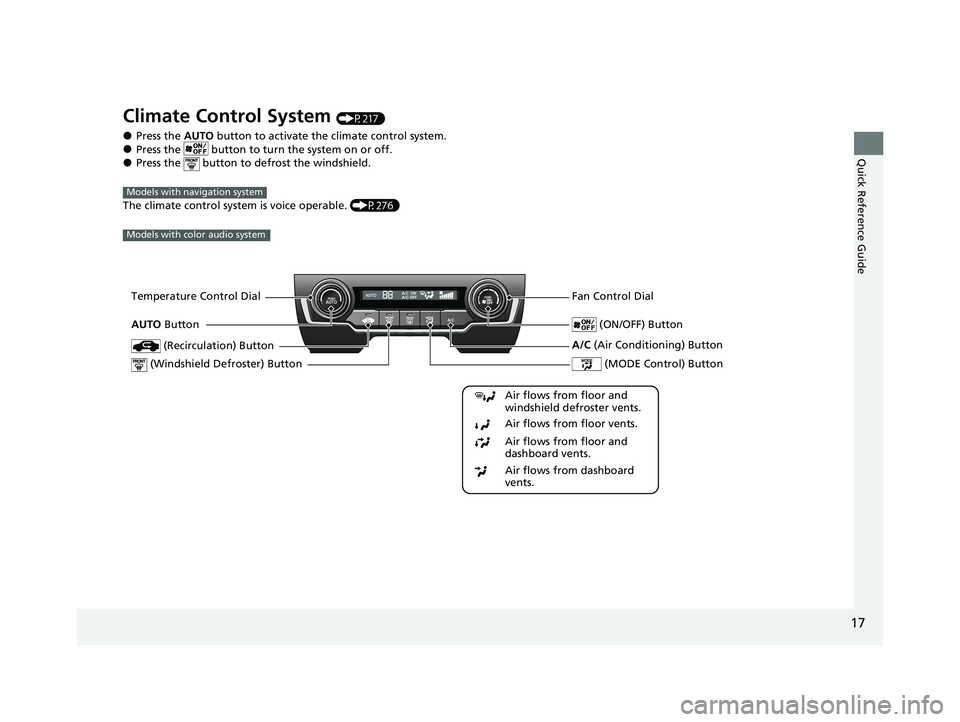
Climate Control System (P217)
●Press the AUTO button to activate th e climate control system.●Press the button to tu rn the system on or off.●Press the button to defrost the windshield.
The climate control system is voice operable. (P276)
Models with navigation system
Models with color audio system
Fan Control Dial
(Windshield De froster) ButtonTemperature Control Dial
Air flows from floor and
windshield defroster vents.
Air flows from floor vents.
Air flows from floor and
dashboard vents.
Air flows from dashboard
vents.
(Recirculation) Button
(MODE Control) Button
(ON/OFF) ButtonAUTO Button
A/C (Air Conditioning) Button
21 CIVIC 5D HUM-31TGG6400_01.book 17 ページ 2020年8月28日 金曜日 午後1時4 8分
Page 20 of 711
18
Quick Reference Guide
Models with Display Audio
Models without SYNC button
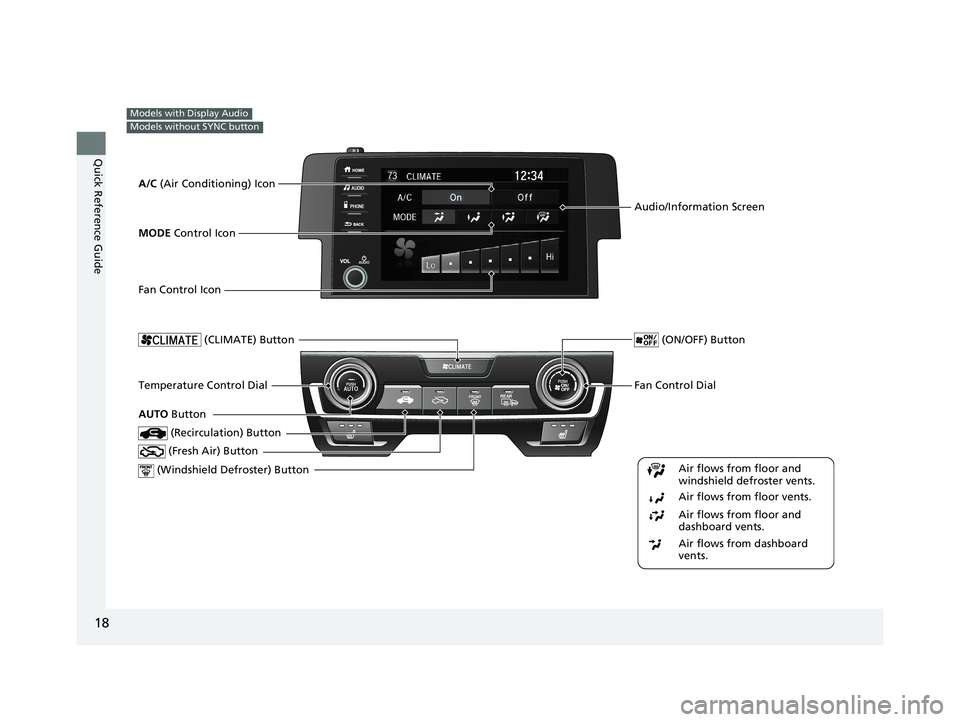
Fan Control Dial
(Windshield De froster) ButtonTemperature Control Dial
Air flows from floor and
windshield defroster vents.
Air flows from floor vents.
Air flows from floor and
dashboard vents.
Air flows from dashboard
vents.
(Recirculation) Button
(CLIMATE) Button
(Fresh Air) Button
(ON/OFF) Button
AUTO Button
Audio/Information Screen
A/C (Air Conditioning) Icon
MODE Control Icon
Fan Control Icon
21 CIVIC 5D HUM-31TGG6400_01.book 18 ページ 2020年8月28日 金曜日 午後1時4 8分
Page 21 of 711
19
Quick Reference Guide
Models with Display Audio
Models with SYNC button
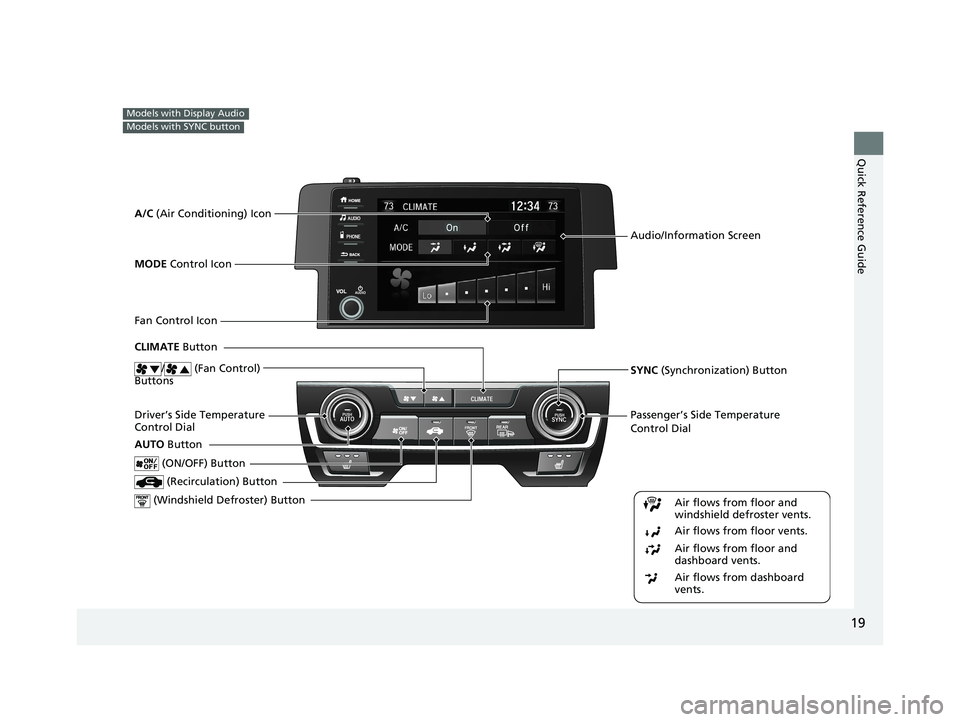
Passenger’s Side Temperature
Control Dial
(Windshield De froster) ButtonDriver’s Side Temperature
Control Dial
(Recirculation) Button
CLIMATE Button
(ON/OFF) Button
AUTO Button
Audio/Information Screen
SYNC (Synchronization) Button
Air flows from floor and
windshield defroster vents.
Air flows from floor vents.
Air flows from floor and
dashboard vents.
Air flows from dashboard
vents.
A/C (Air Conditioning) Icon
MODE Control Icon
Fan Control Icon
/ (Fan Control)
Buttons
21 CIVIC 5D HUM-31TGG6400_01.book 19 ページ 2020年8月28日 金曜日 午後1時4 8分
Page 219 of 711
217Continued
Controls
Climate Control System
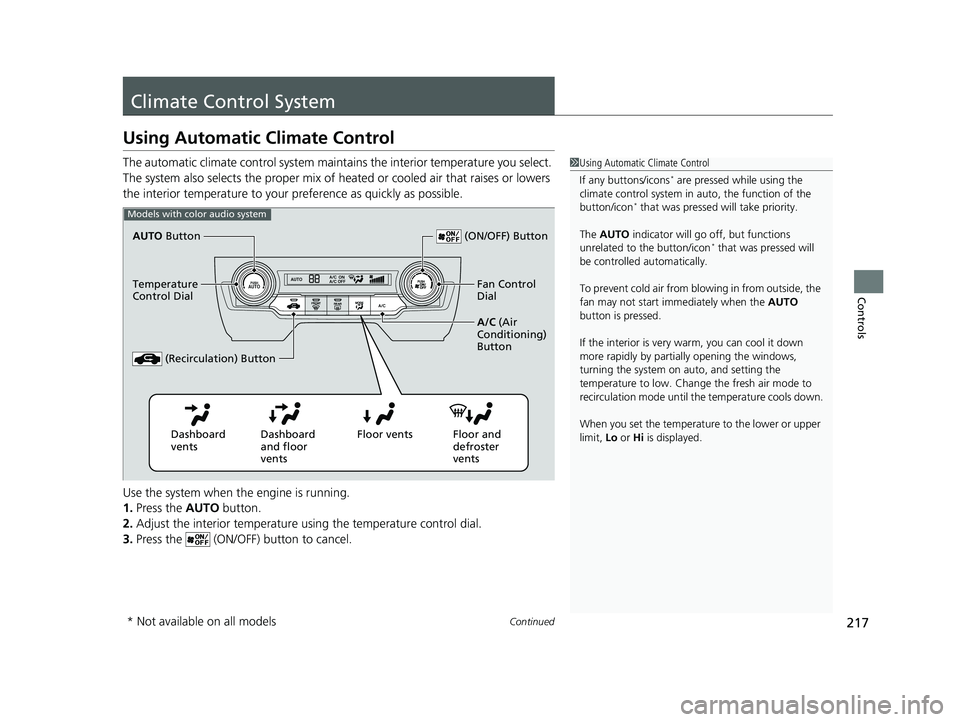
Using Automatic Climate Control
The automatic climate control system maintains the interior temperature you select.
The system also selects the proper mix of heat ed or cooled air that raises or lowers
the interior temperature to your pr eference as quickly as possible.
Use the system when the engine is running.
1. Press the AUTO button.
2. Adjust the interior temperature us ing the temperature control dial.
3. Press the (ON/OFF) button to cancel.1Using Automatic Climate Control
If any buttons/icons
* are pressed while using the
climate control system in auto, the function of the
button/icon
* that was pressed wi ll take priority.
The AUTO indicator will go off, but functions
unrelated to the button/icon
* that was pressed will
be controlled automatically.
To prevent cold air from bl owing in from outside, the
fan may not start i mmediately when the AUTO
button is pressed.
If the interior is very warm, you can cool it down
more rapidly by partial ly opening the windows,
turning the system on auto, and setting the
temperature to low. Change the fresh air mode to
recirculation mode until the temperature cools down.
When you set the temperature to the lower or upper
limit, Lo or Hi is displayed.
Models with color audio system
AUTO Button
Temperature
Control Dial
(Recirculation) Button (ON/OFF) Button
Fan Control
Dial
A/C (Air
Conditioning)
Button
Dashboard
vents Dashboard
and floor
vents Floor vents Floor and
defroster
vents
* Not available on all models
21 CIVIC 5D HUM-31TGG6400_01.book 217 ページ 2020年8月28日 金曜日 午後1時 48分
Page 220 of 711
uuClimate Control System uUsing Automatic Climate Control
218
Controls
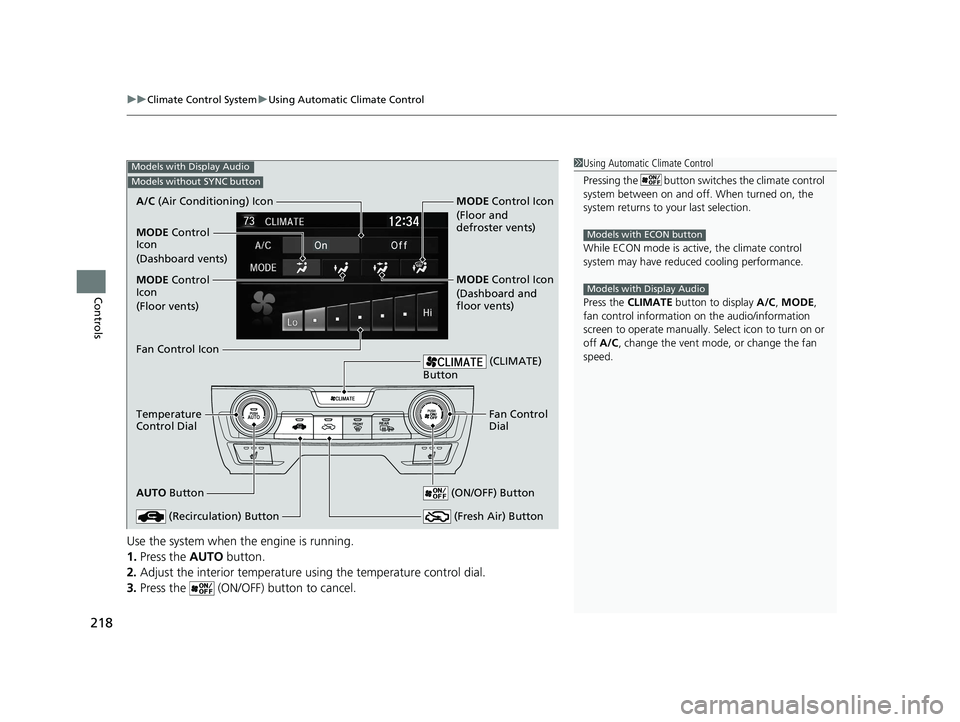
Use the system when the engine is running.
1. Press the AUTO button.
2. Adjust the interior temperature us ing the temperature control dial.
3. Press the (ON/OFF) button to cancel.
1Using Automatic Climate Control
Pressing the button switches the climate control
system between on and off. When turned on, the
system returns to your last selection.
While ECON mode is active, the climate control
system may have reduced cooling performance.
Press the CLIMATE button to display A/C, MODE,
fan control information on the audio/information
screen to operate manually. Select ic on to turn on or
off A/C , change the vent mode , or change the fan
speed.
Models with ECON button
Models with Display Audio
Models with Display Audio
Models without SYNC button
A/C (Air Conditioning) Icon
Fan Control Icon
Temperature
Control Dial
AUTO Button
(Recirculation) Button
(CLIMATE)
Button
Fan Control
Dial
(ON/OFF) Button
(Fresh Air) Button
MODE Control
Icon
(Floor vents)
MODE Control
Icon
(Dashboard vents) MODE Control Icon
(Floor and
defroster vents)
MODE Control Icon
(Dashboard and
floor vents)
21 CIVIC 5D HUM-31TGG6400_01.book 218 ページ 2020年8月28日 金曜日 午後1時
48分
Page 221 of 711
219
uuClimate Control System uUsing Automatic Climate Control
Continued
Controls
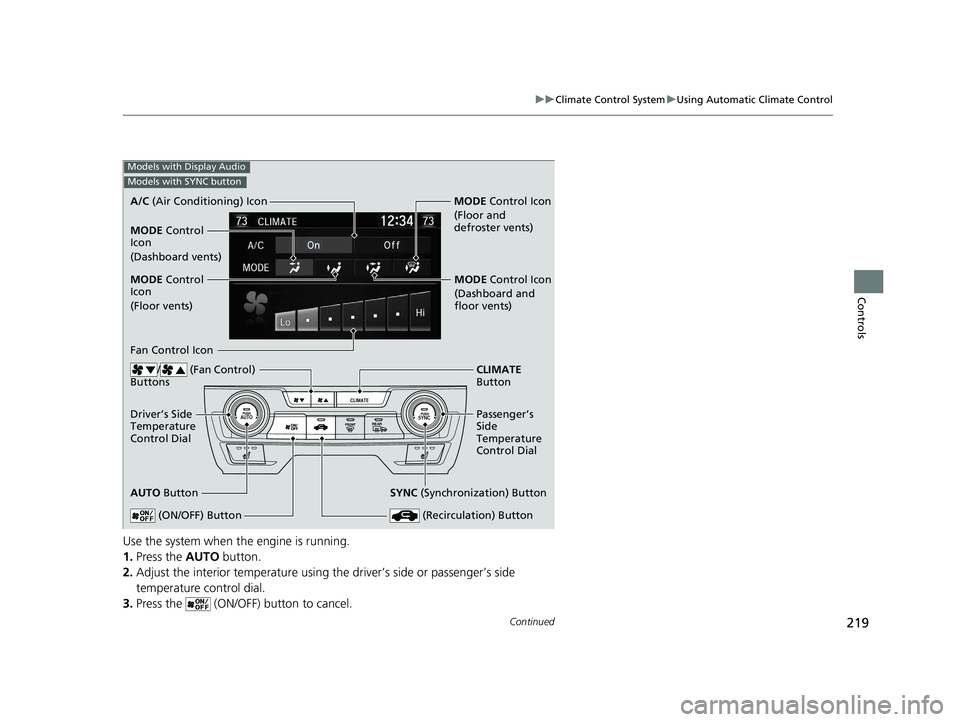
Use the system when the engine is running.
1. Press the AUTO button.
2. Adjust the interior temperature using the driver’s side or passenger’s side
temperature control dial.
3. Press the (ON/OFF) button to cancel.
Models with Display Audio
Models with SYNC button
A/C (Air Conditioning) Icon
MODE Control
Icon
(Floor vents)
Fan Control Icon
Driver’s Side
Temperature
Control Dial
AUTO Button
(Recirculation) Button
CLIMATE
Button
Passenger’s
Side
Temperature
Control Dial
(ON/OFF) Button
SYNC (Synchronization) Button
MODE Control
Icon
(Dashboard vents) MODE
Control Icon
(Floor and
defroster vents)
MODE Control Icon
(Dashboard and
floor vents)
/ (Fan Control)
Buttons
21 CIVIC 5D HUM-31TGG6400_01.book 219 ページ 2020年8月28日 金曜日 午後1時 48分
Page 223 of 711
Continued221
uuClimate Control System uUsing Automatic Climate Control
Controls
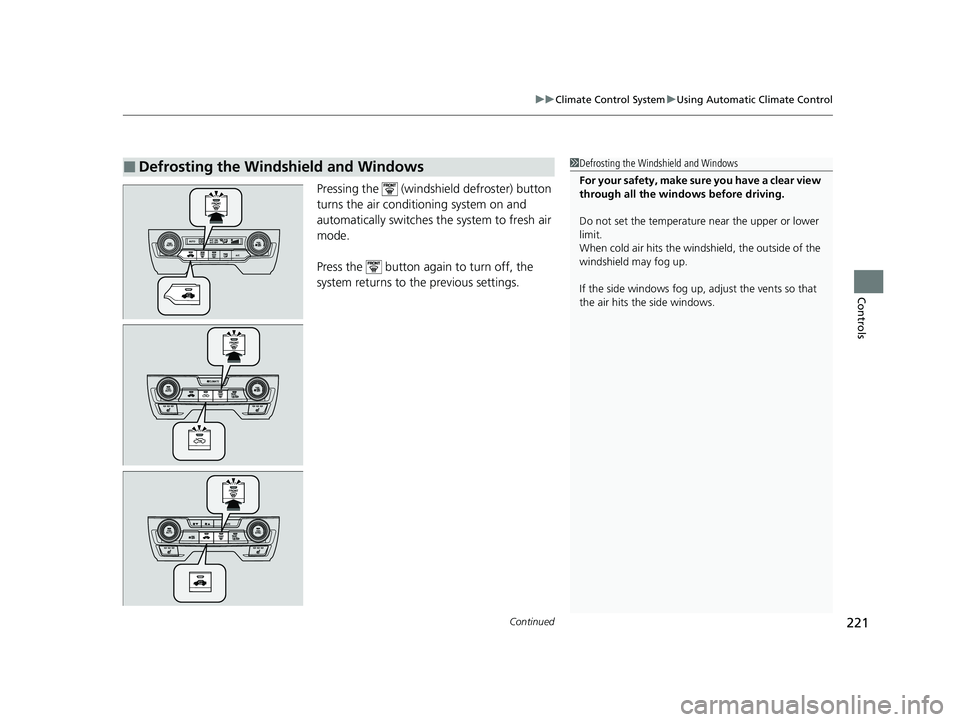
Pressing the (windshield defroster) button
turns the air conditioning system on and
automatically switches th e system to fresh air
mode.
Press the button again to turn off, the
system returns to the previous settings.
■Defrosting the Windshield and Windows1 Defrosting the Windshield and Windows
For your safety, make sure you have a clear view
through all the windows before driving.
Do not set the temperatur e near the upper or lower
limit.
When cold air hits the windshield, the outside of the
windshield may fog up.
If the side windows fog up, adjust the vents so that
the air hits th e side windows.
21 CIVIC 5D HUM-31TGG6400_01.book 221 ページ 2020年8月28日 金曜日 午後1時 48分
Page 626 of 711
624
Maintenance
Climate Control System Maintenance
Air Conditioning
To ensure proper and safe operation, th e Society of Automotive Engineers (SAE
J2845) recommends that the refrigerant sy stem only be serviced by trained and
certified technicians.
Never repair or replace the air conditioning evaporator (cooling coil) with one
removed from a used or salvaged vehicle.
New replacement mobile air conditioning evaporators must be certified (and
labeled) as meeting SAE Standard J2842.
Dust and Pollen Filter
The climate control system is equipped wi th a dust and pollen filter that collects
pollen, dust, and other debris in the air. The Maintenance MinderTM messages will let
you know when to replace the filter.
We recommend that you replace the dust and pollen filter sooner when using your
vehicle in areas with high concentrations of dust.
1Climate Control System Maintenance
NOTICE
Vented refrigerant is harmful to the environment.
To avoid refrigerant from venting, never replace the
evaporator with one re moved from a used or
salvaged vehicle.
Refrigerant in your vehicle’ s air conditioning system is
flammable and can be igni ted during servicing if
proper procedures are not followed.
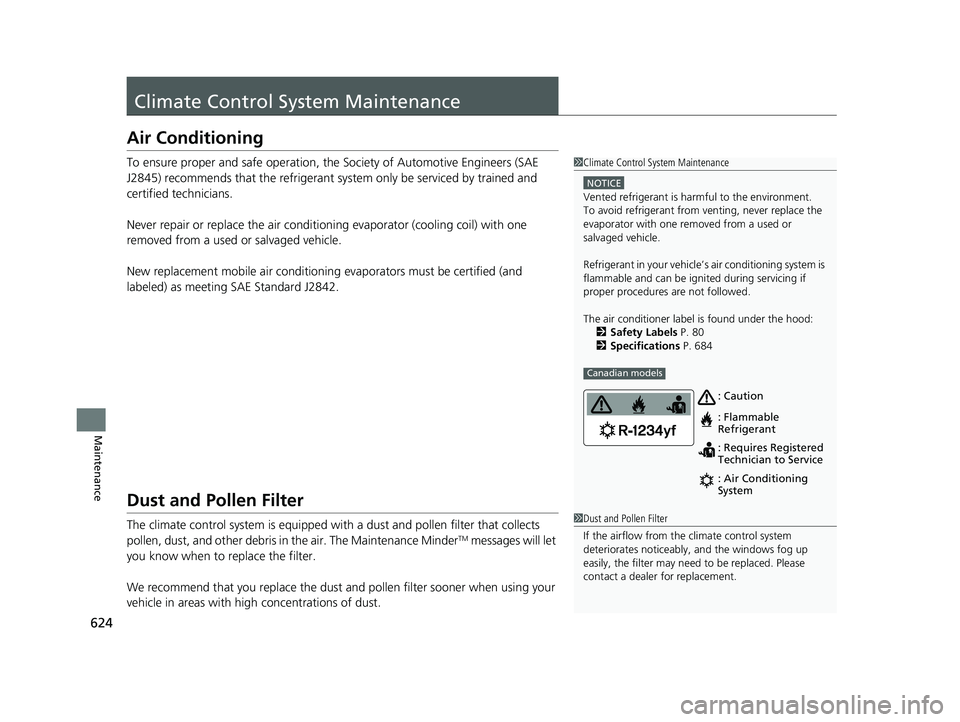
The air conditioner labe l is found under the hood:
2 Safety Labels P. 80
2 Specifications P. 684
Canadian models
: Caution
: Flammable
Refrigerant
: Requires Registered
Technician to Service
: Air Conditioning
System
1Dust and Pollen Filter
If the airflow from the climate control system
deteriorates noticeably, and the windows fog up
easily, the filter may need to be replaced. Please
contact a dealer for replacement.
21 CIVIC 5D HUM-31TGG6400_01.book 624 ページ 2020年8月28日 金曜日 午後1時 48分
Page 686 of 711
684
Information
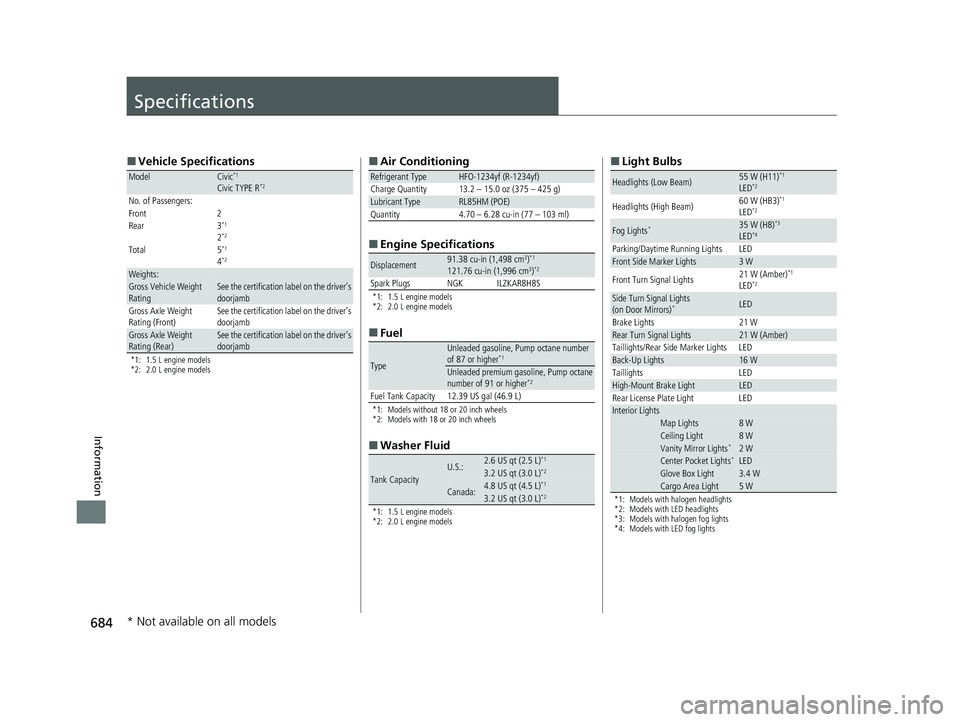
Specifications
■Vehicle Specifications
*1: 1.5 L engine models
*2: 2.0 L engine models
ModelCivic*1
Civic TYPE R*2
No. of Passengers:
Front 2
Rear 3
*1
2*2
Total 5*1
4*2
Weights:Gross Vehicle Weight
Rating See the certification label on the driver’s
doorjamb
Gross Axle Weight
Rating (Front)See the certification label on the driver’s
doorjamb
Gross Axle Weight
Rating (Rear)See the certification label on the driver’s
doorjamb
■
Air Conditioning
■ Engine Specifications
*1: 1.5 L engine models
*2: 2.0 L engine models
■Fuel
*1: Models without 18 or 20 inch wheels
*2: Models with 18 or 20 inch wheels
■Washer Fluid
*1: 1.5 L engine models
*2: 2.0 L engine models
Refrigerant TypeHFO-1234yf (R-1234yf)
Charge Quantity 13.2 – 15.0 oz (375 – 425 g)
Lubricant TypeRL85HM (POE)
Quantity 4.70 – 6.28 cu-in (77 – 103 ml)
Displacement91.38 cu-in (1,498 cm3)*1
121.76 cu-in (1,996 cm3)*2
Spark Plugs NGK ILZKAR8H8S
Type
Unleaded gasoline, Pump octane number
of 87 or higher*1
Unleaded premium gasoline, Pump octane
number of 91 or higher*2
Fuel Tank Capacity 12.39 US gal (46.9 L)
Tank CapacityU.S.:2.6 US qt (2.5 L)*1
3.2 US qt (3.0 L)*2
Canada:4.8 US qt (4.5 L)*1
3.2 US qt (3.0 L)*2
■ Light Bulbs
*1: Models with halogen headlights
*2: Models with LED headlights
*3: Models with halogen fog lights
*4: Models with LED fog lights
Headlights (Low Beam)55 W (H11)*1
LED*2
Headlights (High Beam) 60 W (HB3)*1
LED*2
Fog Lights*35 W (H8)*3
LED*4
Parking/Daytime Running Lights LEDFront Side Marker Lights3 W
Front Turn Signal Lights 21 W (Amber)*1
LED*2
Side Turn Signal Lights
(on Door Mirrors)*LED
Brake Lights 21 W
Rear Turn Signal Lights21 W (Amber)
Taillights/Rear Side Marker Lights LED
Back-Up Lights16 W
Taillights LED
High-Mount Brake LightLED
Rear License Plate Light LED
Interior LightsMap Lights8 WCeiling Light8 WVanity Mirror Lights*2 WCenter Pocket Lights* LEDGlove Box Light3.4 WCargo Area Light5 W
* Not available on all models
21 CIVIC 5D HUM-31TGG6400_01.book 684 ページ 2020年8月28日 金曜日 午後1時 48分
Page 700 of 711
Index
698
Index
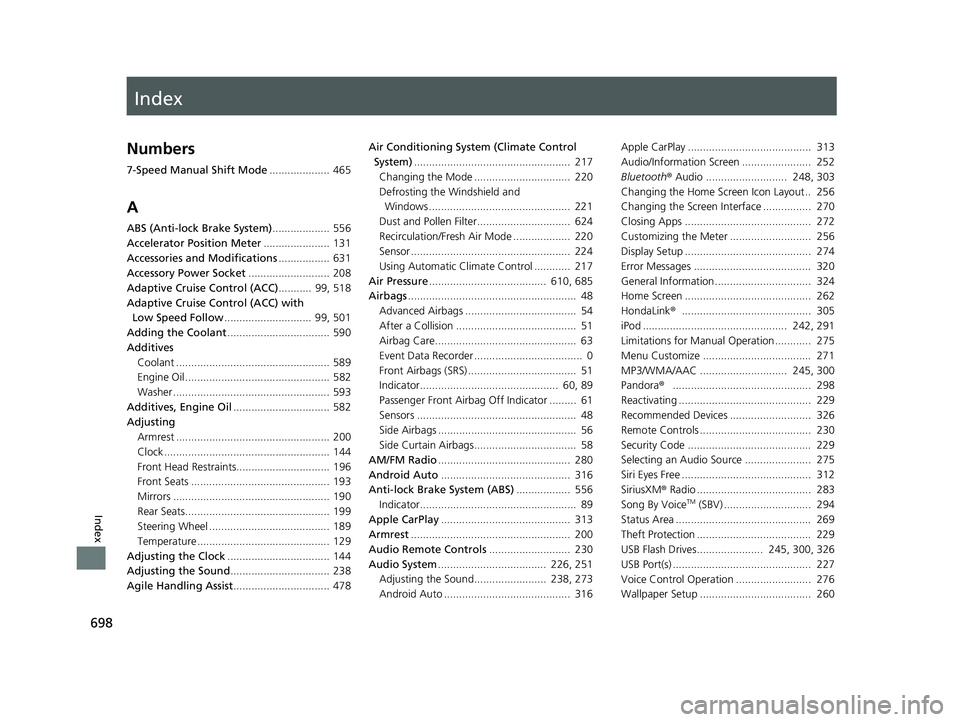
Index
Numbers
7-Speed Manual Shift Mode.................... 465
A
ABS (Anti-lock Brake System) ................... 556
Accelerator Position Meter ...................... 131
Accessories and Modifications ................. 631
Accessory Power Socket ........................... 208
Adaptive Cruise Control (ACC) ........... 99, 518
Adaptive Cruise Control (ACC) with Low Speed Follow ............................. 99, 501
Adding the Coolant .................................. 590
Additives Coolant ................................................... 589
Engine Oil ................................................ 582
Washer .................................................... 593
Additives, Engine Oil ................................ 582
Adjusting Armrest ................................................... 200
Clock ....................................................... 144
Front Head Restraints............................... 196
Front Seats .............................................. 193
Mirrors .................................................... 190
Rear Seats................................................ 199
Steering Wheel ........................................ 189
Temperature ............................................ 129
Adjusting the Clock .................................. 144
Adjusting the Sound ................................. 238
Agile Handling Assist ................................ 478 Air Conditioning System (Climate Control
System) .................................................... 217
Changing the Mode ................................ 220
Defrosting the Windshield and Windows ............................................... 221
Dust and Pollen Filter............................... 624
Recirculation/Fresh Air Mode ................... 220
Sensor ..................................................... 224
Using Automatic Climate Control ............ 217
Air Pressure ....................................... 610, 685
Airbags ........................................................ 48
Advanced Airbags ..................................... 54
After a Collision ........................................ 51
Airbag Care............................................... 63
Event Data Recorder .................................... 0
Front Airbags (SRS) .................................... 51
Indicator.............................................. 60, 89
Passenger Front Airbag Off Indicator ......... 61
Sensors ..................................................... 48
Side Airbags .............................................. 56
Side Curtain Airbags.................................. 58
AM/FM Radio ............................................ 280
Android Auto ........................................... 316
Anti-lock Brake System (ABS) .................. 556
Indicator.................................................... 89
Apple CarPlay ........................................... 313
Armrest ..................................................... 200
Audio Remote Controls ........................... 230
Audio System .................................... 226, 251
Adjusting the Sound........................ 238, 273
Android Auto .......................................... 316 Apple CarPlay ......................................... 313
Audio/Information Screen ....................... 252
Bluetooth
® Audio ........................... 248, 303
Changing the Home Screen Icon Layout.. 256
Changing the Screen Interface ................ 270
Closing Apps .......................................... 272
Customizing the Meter ........................... 256
Display Setup .......................................... 274
Error Messages ....................................... 320
General Information................................ 324
Home Screen .......................................... 262
HondaLink ®........................................... 305
iPod ................................................ 242, 291
Limitations for Manual Operation ............ 275
Menu Customize .................................... 271
MP3/WMA/AAC ............................. 245, 300
Pandora ®.............................................. 298
Reactivating ............................................ 229
Recommended Devices ........................... 326
Remote Controls ..................................... 230
Security Code ......................................... 229
Selecting an Audio Source ...................... 275
Siri Eyes Free ........................................... 312
SiriusXM ® Radio ...................................... 283
Song By Voice
TM (SBV) ............................. 294
Status Area ............................................. 269
Theft Protection ...................................... 229
USB Flash Drives...................... 245, 300, 326
USB Port(s) .............................................. 227
Voice Control Operation ......................... 276
Wallpaper Setup ..................................... 260
21 CIVIC 5D HUM-31TGG6400_01.book 698 ページ 2020年8月28日 金曜日 午後1時 48分