turn signal HONDA CIVIC HATCHBACK 2021 Owner's Manual (in English)
[x] Cancel search | Manufacturer: HONDA, Model Year: 2021, Model line: CIVIC HATCHBACK, Model: HONDA CIVIC HATCHBACK 2021Pages: 711, PDF Size: 37.1 MB
Page 9 of 711
7
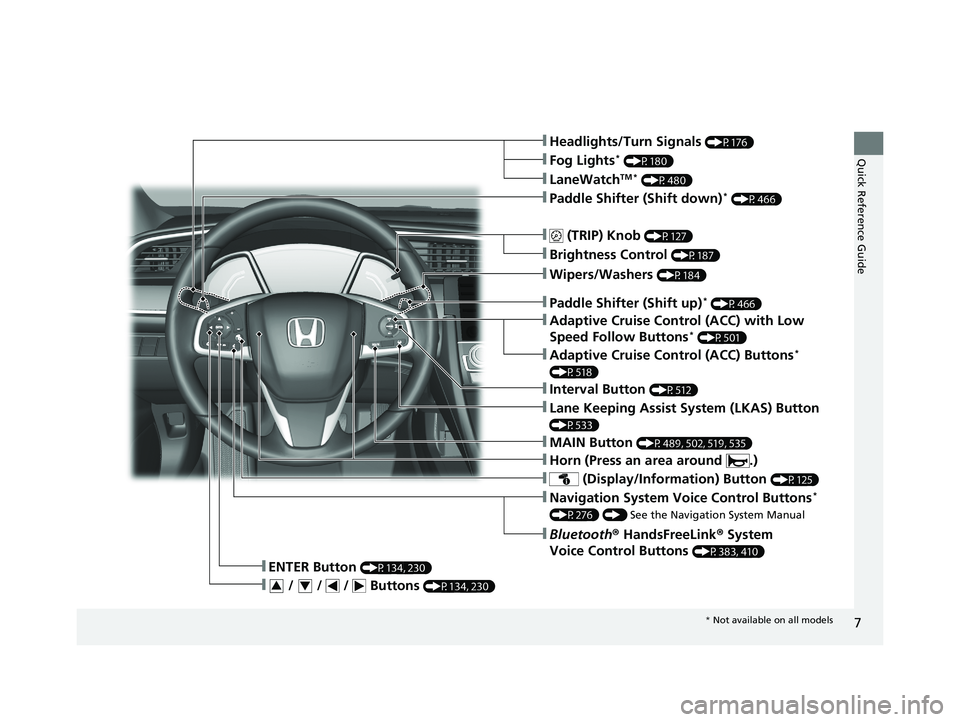
Quick Reference Guide❚Headlights/Turn Signals (P176)
❚ (TRIP) Knob (P127)
❚Brightness Control (P187)
❚LaneWatchTM * (P480)
❚Fog Lights* (P180)
❚ (Display/Information) Button (P125)
❚Navigation System Voice Control Buttons*
(P276) () See the Navigation System Manual
❚Bluetooth® HandsFreeLink ® System
Voice Control Buttons
(P383, 410)
❚ENTER Button (P134, 230)
❚ / / / Buttons (P134, 230)34
❚Lane Keeping Assist System (LKAS) Button
(P533)
❚Paddle Shifter (Shift down)* (P466)
❚Paddle Shifter (Shift up)* (P466)
❚Wipers/Washers (P184)
❚Horn (Press an area around .)
❚Adaptive Cruise Control (ACC) Buttons*
(P518)
❚Interval Button (P512)
❚MAIN Button (P489, 502, 519, 535)
❚Adaptive Cruise Control (ACC) with Low
Speed Follow Buttons* (P501)
* Not available on all models
21 CIVIC 5D HUM-31TGG6400_01.book 7 ページ 2020年8月28日 金曜日 午後1時48分
Page 12 of 711
Visual Index
10
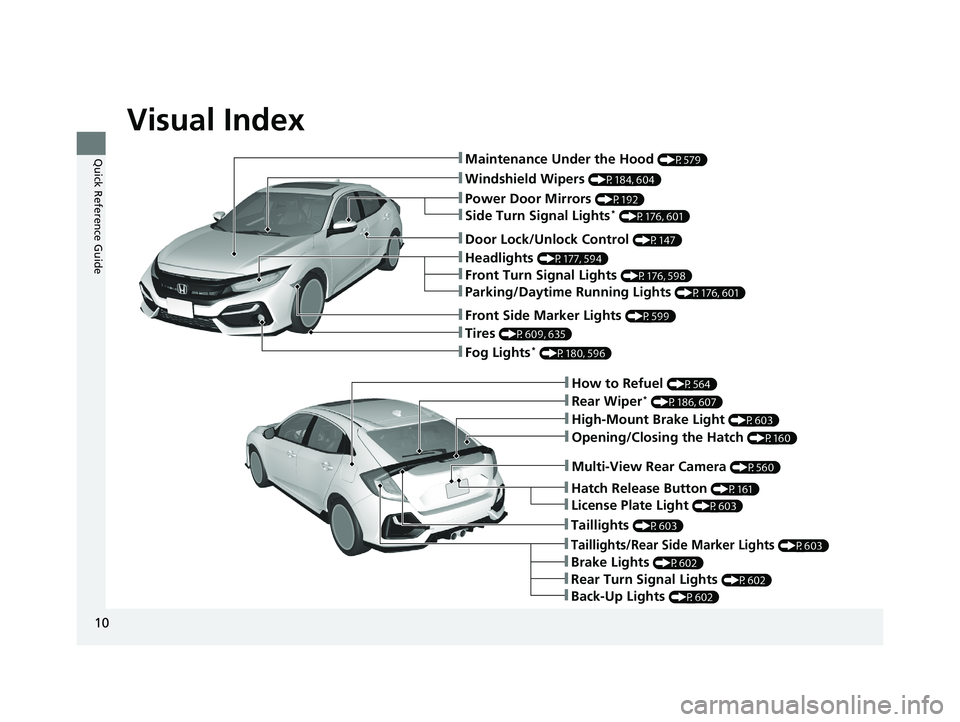
Quick Reference Guide❚Maintenance Under the Hood (P579)
❚Windshield Wipers (P184, 604)
❚Tires (P609, 635)
❚Fog Lights* (P180, 596)
❚Power Door Mirrors (P192)
❚How to Refuel (P564)
❚High-Mount Brake Light (P603)
❚Opening/Closing the Hatch (P160)
❚Multi-View Rear Camera (P560)
❚Door Lock/Unlock Control (P147)
❚Side Turn Signal Lights* (P176, 601)
❚Headlights (P177, 594)
❚Front Turn Signal Lights (P176, 598)
❚Parking/Daytime Running Lights (P176, 601)
❚Front Side Marker Lights (P599)
❚Taillights (P603)
❚Back-Up Lights (P602)
❚Brake Lights (P602)
❚Rear Turn Signal Lights (P602)
❚Taillights/Rear Side Marker Lights (P603)
❚Rear Wiper* (P186, 607)
❚Hatch Release Button (P161)
❚License Plate Light (P603)
21 CIVIC 5D HUM-31TGG6400_01.book 10 ページ 2020年8月28日 金曜日 午後1時48分
Page 15 of 711
13
Quick Reference Guide
Instrument Panel (P 81)
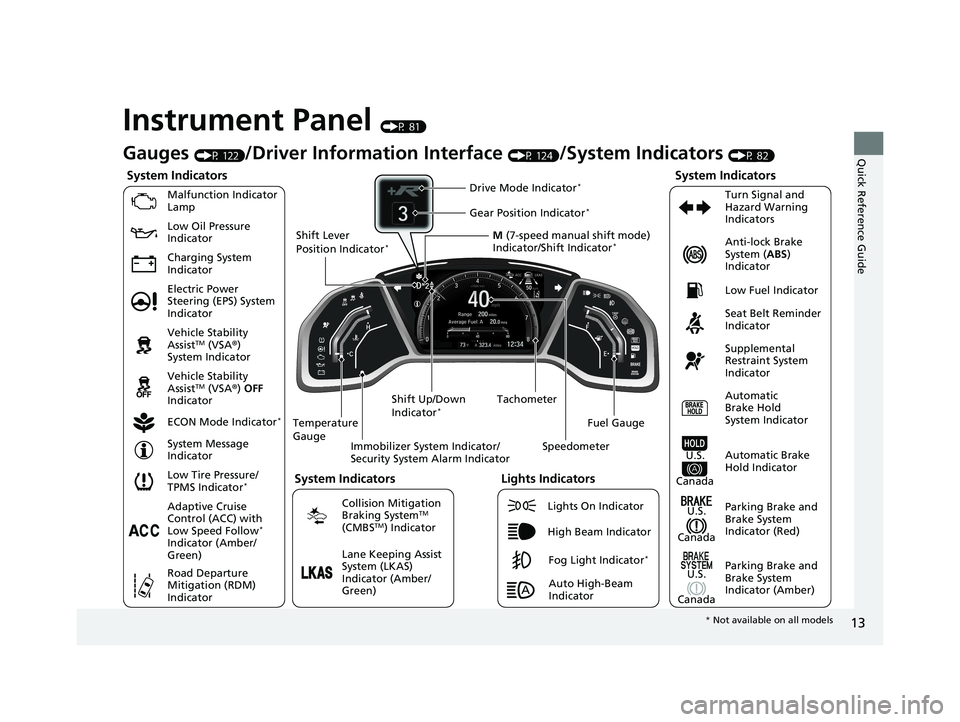
System Indicators
Malfunction Indicator
Lamp
Charging System
IndicatorAnti-lock Brake
System (
ABS)
Indicator
Vehicle Stability
Assist
TM (VSA ®)
System Indicator
Vehicle Stability
Assist
TM (VSA ®) OFF
Indicator
Low Tire Pressure/
TPMS Indicator
*
Electric Power
Steering (EPS) System
Indicator Seat Belt Reminder
Indicator
System Indicators
Parking Brake and
Brake System
Indicator (Red) Supplemental
Restraint System
Indicator
Tachometer
Immobilizer System Indicator/
Security System Alarm Indicator
Shift Lever
Position Indicator
*
Low Fuel Indicator
ECON Mode Indicator
*
Turn Signal and
Hazard Warning
Indicators
Parking Brake and
Brake System
Indicator (Amber)
System Indicators
U.S.
Canada
U.S.
Canada Automatic
Brake Hold
System Indicator
Automatic Brake
Hold IndicatorU.S.
Canada
Temperature
Gauge
Lights Indicators
Lights On Indicator
High Beam Indicator
Fog Light Indicator*
Adaptive Cruise
Control (ACC) with
Low Speed Follow
*
Indicator (Amber/
Green)
System Message
Indicator
Collision Mitigation
Braking System
TM
(CMBSTM) Indicator
Road Departure
Mitigation (RDM)
Indicator
Lane Keeping Assist
System (LKAS)
Indicator (Amber/
Green) M
(7-speed manual shift mode)
Indicator/Shift Indicator
*
Auto High-Beam
Indicator
Shift Up/Down
Indicator
*
Drive Mode Indicator*
Speedometer
Fuel Gauge
Gear Position Indicator*
Gauges (P 122)/Driver Informat
ion Interface (P 124)/System Indicators (P 82)
Low Oil Pressure
Indicator
* Not available on all models
21 CIVIC 5D HUM-31TGG6400_01.book 13 ページ 2020年8月28日 金曜日 午後1時4 8分
Page 17 of 711
15
Quick Reference Guide
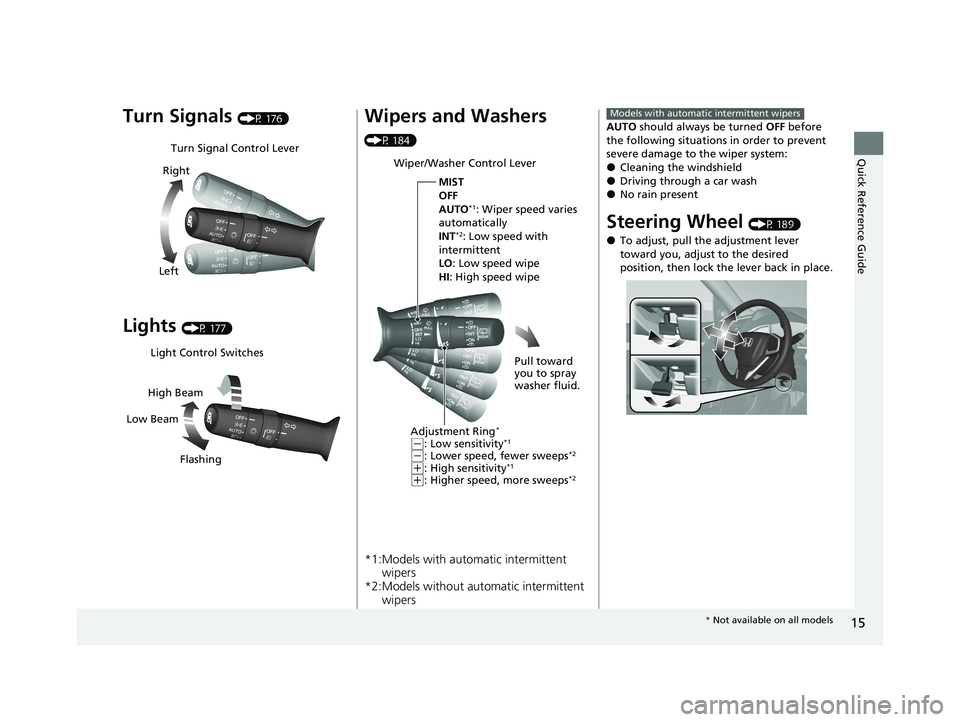
Turn Signals (P 176)
Lights (P 177)
Turn Signal Control Lever
Right
Left
Light Control Switches
Low Beam High Beam
Flashing
Wipers and Washers
(P 184)
*1:Models with automatic intermittent wipers
*2:Models without auto matic intermittent
wipers
Wiper/Washer Control Lever
Adjustment Ring
*
(-: Low sensitivity*1
(-: Lower speed, fewer sweeps*2
(+: High sensitivity*1
(+: Higher speed, more sweeps*2
MIST
OFF
AUTO
*1: Wiper speed varies
automatically
INT
*2: Low speed with
intermittent
LO : Low speed wipe
HI : High speed wipe
Pull toward
you to spray
washer fluid.
AUTO should always be turned OFF before
the following situations in order to prevent
severe damage to the wiper system:
●Cleaning the windshield●Driving through a car wash●No rain present
Steering Wheel (P 189)
●To adjust, pull the adjustment lever
toward you, adjust to the desired
position, then lock the lever back in place.
Models with automatic intermittent wipers
* Not available on all models
21 CIVIC 5D HUM-31TGG6400_01.book 15 ページ 2020年8月28日 金曜日 午後1時4 8分
Page 51 of 711
49
uuAirbags uAirbag System Components
Continued
Safe Driving
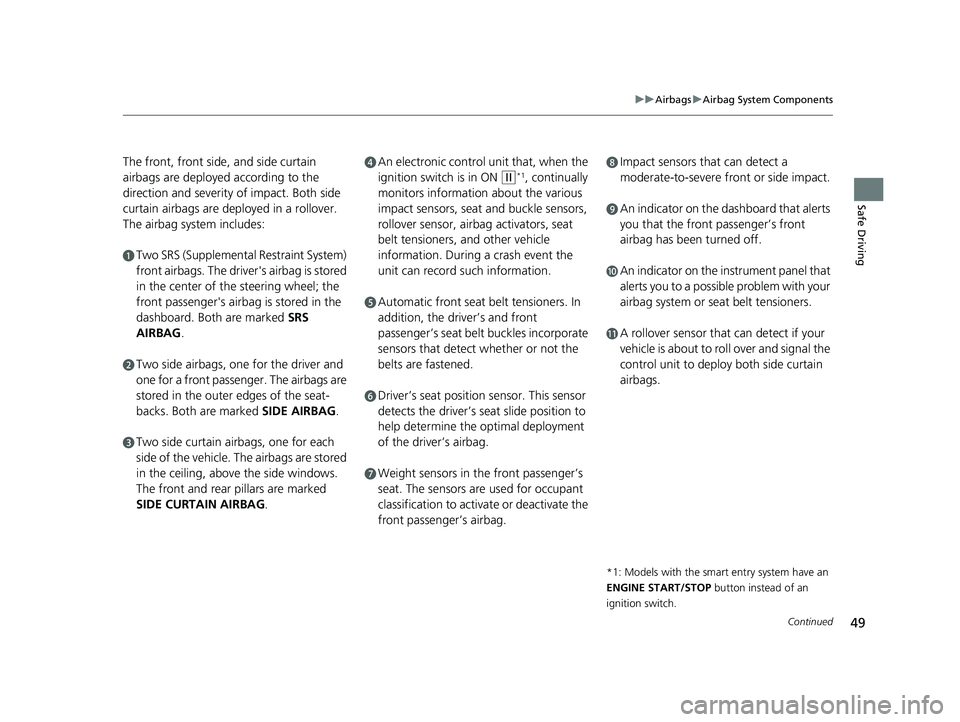
The front, front side, and side curtain
airbags are deployed according to the
direction and severity of impact. Both side
curtain airbags are deployed in a rollover.
The airbag system includes:
aTwo SRS (Supplemental Restraint System)
front airbags. The driver's airbag is stored
in the center of the steering wheel; the
front passenger's airbag is stored in the
dashboard. Both are marked SRS
AIRBAG.
bTwo side airbags, one for the driver and
one for a front passenger. The airbags are
stored in the outer edges of the seat-
backs. Both are marked SIDE AIRBAG.
cTwo side curtain ai rbags, one for each
side of the vehicle. The airbags are stored
in the ceiling, abov e the side windows.
The front and rear pillars are marked
SIDE CURTAIN AIRBAG .
dAn electronic control unit that, when the
ignition switch is in ON
(w*1, continually
monitors information about the various
impact sensors, seat and buckle sensors,
rollover sensor, airbag activators, seat
belt tensioners, and other vehicle
information. During a crash event the
unit can record such information.
eAutomatic front seat belt tensioners. In
addition, the driver’s and front
passenger’s seat belt buckles incorporate
sensors that detect whether or not the
belts are fastened.
fDriver’s seat position sensor. This sensor
detects the driver’s s eat slide position to
help determine the optimal deployment
of the driver’s airbag.
gWeight sensors in the front passenger’s
seat. The sensors are used for occupant
classification to activate or deactivate the
front passenger’s airbag.
hImpact sensors that can detect a
moderate-to-severe front or side impact.
iAn indicator on the dashboard that alerts
you that the front passenger’s front
airbag has been turned off.
jAn indicator on the instrument panel that
alerts you to a possib le problem with your
airbag system or seat belt tensioners.
kA rollover sensor that can detect if your
vehicle is about to ro ll over and signal the
control unit to deploy both side curtain
airbags.
*1: Models with the smart entry system have an
ENGINE START/STOP button instead of an
ignition switch.
21 CIVIC 5D HUM-31TGG6400_01.book 49 ページ 2020年8月28日 金曜日 午後1時4 8分
Page 94 of 711
92
uuIndicators u
Instrument Panel
IndicatorNameOn/BlinkingExplanationMessage
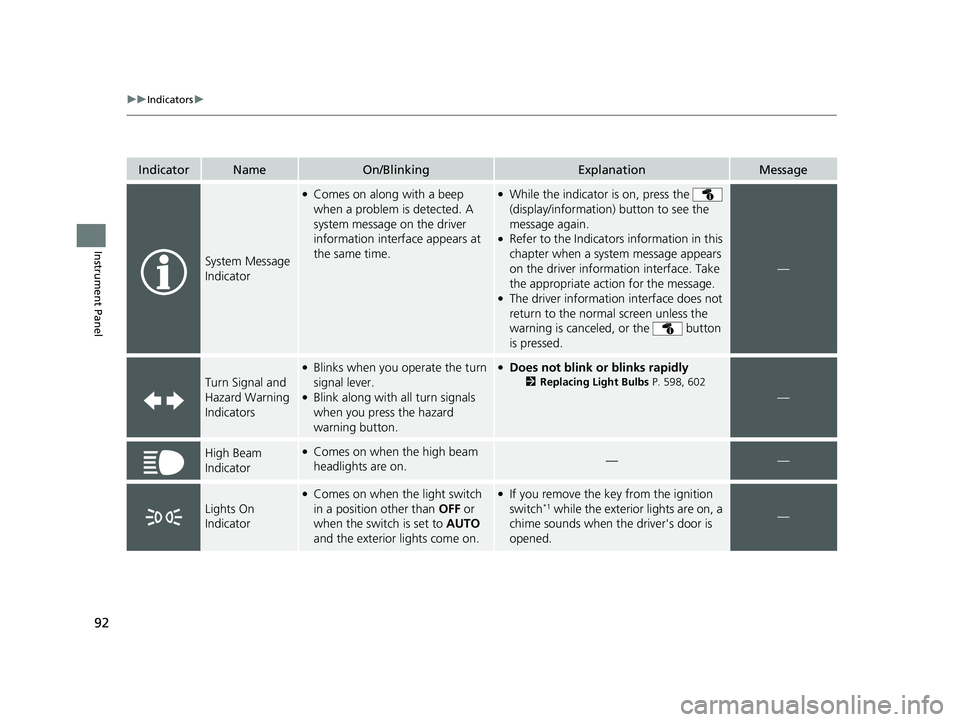
System Message
Indicator
●Comes on along with a beep
when a problem is detected. A
system message on the driver
information interface appears at
the same time.●While the indicator is on, press the
(display/information ) button to see the
message again.
●Refer to the Indicators information in this
chapter when a system message appears
on the driver information interface. Take
the appropriate action for the message.
●The driver information interface does not
return to the normal screen unless the
warning is canceled, or the button
is pressed.
—
Turn Signal and
Hazard Warning
Indicators
●Blinks when you operate the turn
signal lever.
●Blink along with all turn signals
when you press the hazard
warning button.
●Does not blink or blinks rapidly
2 Replacing Light Bulbs P. 598, 602
—
High Beam
Indicator●Comes on when the high beam
headlights are on.——
Lights On
Indicator
●Comes on when the light switch
in a position other than OFF or
when the switch is set to AUTO
and the exterior lights come on.●If you remove the key from the ignition
switch*1 while the exterior lights are on, a
chime sounds when the driver's door is
opened.—
21 CIVIC 5D HUM-31TGG6400_01.book 92 ページ 2020年8月28日 金曜日 午後1時4 8分
Page 140 of 711
138
uuGauges and Driver Information Interface uDriver Information Interface
Instrument Panel
*1:Default SettingSetup Group Customizable Features Description Selectable Settings
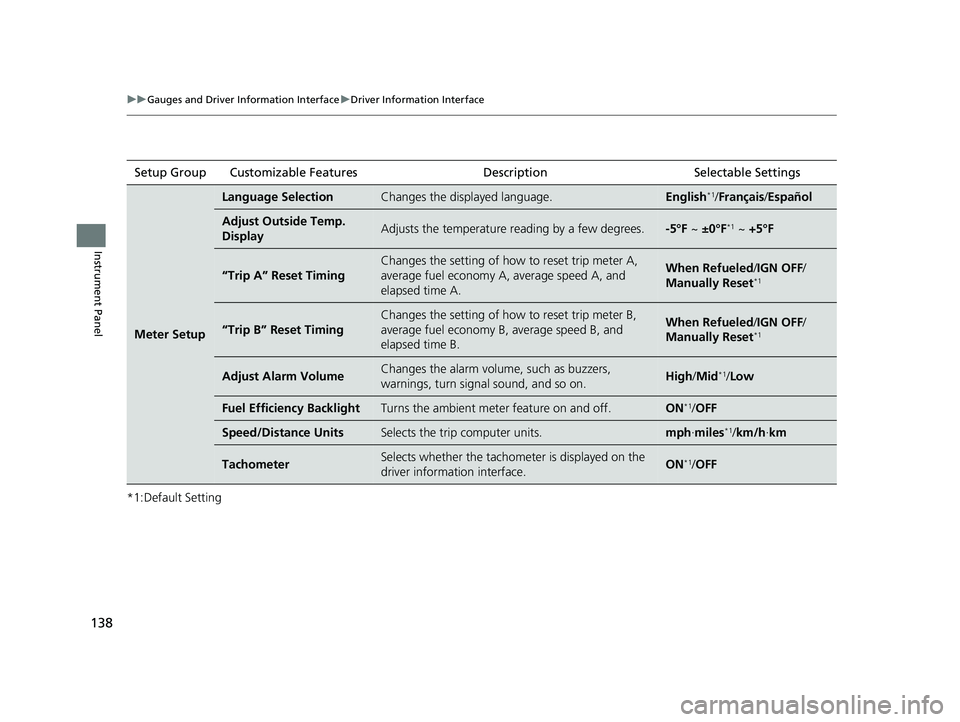
Meter Setup
Language SelectionChanges the displayed language.English*1/
Français /Español
Adjust Outside Temp.
DisplayAdjusts the temperature reading by a few degrees.-5°F ~ ±0°F*1 ~ +5°F
“Trip A” Reset Timing
Changes the setting of how to reset trip meter A,
average fuel economy A, average speed A, and
elapsed time A.When Refueled /IGN OFF /
Manually Reset*1
“Trip B” Reset Timing
Changes the setting of how to reset trip meter B,
average fuel economy B, average speed B, and
elapsed time B.When Refueled /IGN OFF /
Manually Reset*1
Adjust Alarm VolumeChanges the alarm volume, such as buzzers,
warnings, turn signal sound, and so on.High /Mid*1/Low
Fuel Efficiency BacklightTurns the ambient meter feature on and off.ON*1/OFF
Speed/Distance UnitsSelects the trip computer units.mph ∙miles*1/ km/h ∙km
TachometerSelects whether the tachomet er is displayed on the
driver information interface.ON*1/ OFF
21 CIVIC 5D HUM-31TGG6400_01.book 138 ページ 2020年8月28日 金曜日 午後1時 48分
Page 145 of 711
143
Controls
This chapter explains how to operate the various controls necessary for driving.
Clock.................................................. 144
Locking and Unlocking the Doors
Key Types and Functions .................. 145
Low Smart Entry Remote Signal Strength*.. 146Locking/Unlocking the Doors from the Outside .......................................... 147
Locking/Unlocking the Doors from the Inside ............................................. 156
Childproof Door Locks ..................... 158
Auto Door Locking/Unlocking .......... 159
Hatch ................................................. 160
Security System Immobilizer System .......................... 163
Security System Alarm ...................... 164 Opening and Closing the Windows
... 167
Moonroof
*........................................ 170
Operating the Switches Around the Steering Wheel Ignition Switch
*............................... 171
ENGINE START/STOP Button*........... 172
Ignition Switch and Power Mode Comparison ................................... 175
Turn Signals ..................................... 176
Light Switches.................................. 177
Fog Lights
*...................................... 180
Daytime Running Lights ................... 180
Auto High-Beam .............................. 181
Wipers and Washers ........................ 184 Brightness Control ........................... 187
Rear Defogger/Heated Door Mirror
*
Button ........................................... 188
Adjusting the Steering Wheel .......... 189
Adjusting the Mirrors
Interior Rearview Mirror ................... 190
Power Door Mirrors ......................... 192
Adjusting the Seats .......................... 193
Interior Lights/Interior Convenience Items ................................................ 201
Climate Control System
Using Automatic Climate Control .... 217
Automatic Climate Control Sensors......224
* Not available on all models
21 CIVIC 5D HUM-31TGG6400_01.book 143 ページ 2020年8月28日 金曜日 午後1時 48分
Page 165 of 711
163
Controls
Security System
Immobilizer System
The immobilizer system prevents a key that has not been pre-registered from
starting the engine. Each key contains electronic transmitters that use electronic
signals to verify the key.
Pay attention to the following when in serting the key into the ignition switch
* or
pressing the ENGINE START/STOP button*:
• Do not allow objects that emit strong radio waves near the ignition switch* or the
ENGINE START/STOP button*.
• Make sure the key is not covered by or touching a metal object.
• Do not bring a key from another vehicle’s immobilizer system near the ignition
switch
* or the ENGINE START/STOP button*.
• Do not put the key near magnetic items. Electronic devices, such as televisions
and audio systems emit strong magnetic fields. Note that even a key chain can
become magnetic.
1 Immobilizer System
NOTICE
Leaving the key in the vehicl e can result in theft or
accidental movement of the vehicle.
Always take the key with you whenever you leave the
vehicle unattended.
Do not alter the system or add other devices to it.
Doing so may damage the system and make your
vehicle inoperable.
Canadian models only: Apply and hold the brake
pedal before turning the vehicle on the first time after
the battery has been disconnected.
* Not available on all models
21 CIVIC 5D HUM-31TGG6400_01.book 163 ページ 2020年8月28日 金曜日 午後1時 48分
Page 178 of 711
176
uuOperating the Switches Around the Steering Wheel uTurn Signals
Controls
Turn Signals
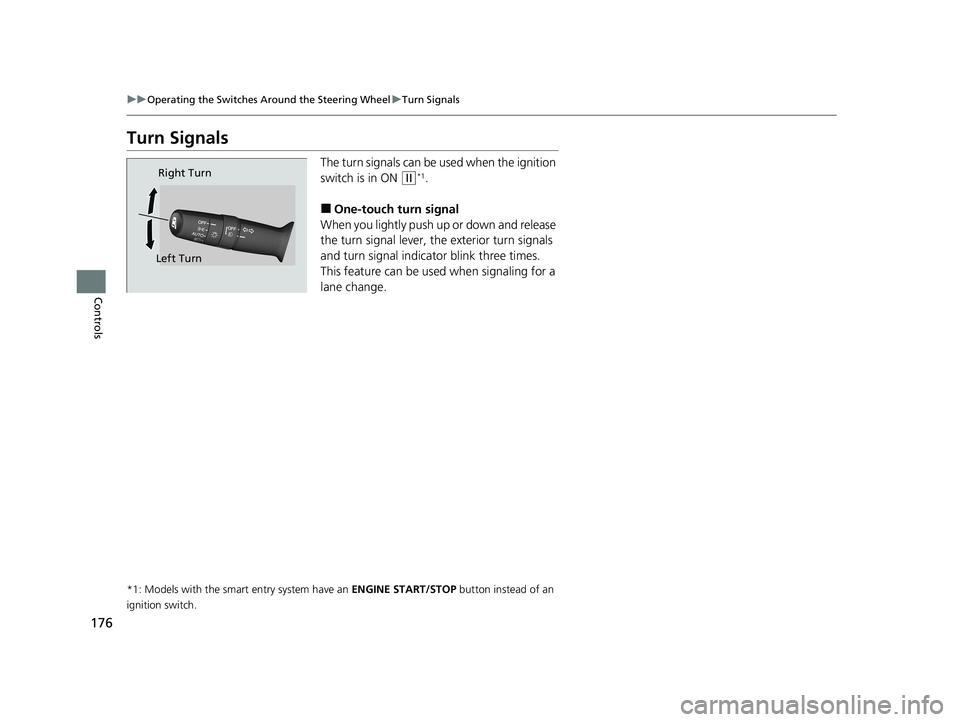
The turn signals can be used when the ignition
switch is in ON
(w*1.
■One-touch turn signal
When you lightly push up or down and release
the turn signal lever, th e exterior turn signals
and turn signal indica tor blink three times.
This feature can be used when signaling for a
lane change.
*1: Models with the smart entry system have an ENGINE START/STOP button instead of an
ignition switch.
Right Turn
Left Turn
21 CIVIC 5D HUM-31TGG6400_01.book 176 ページ 2020年8月28日 金曜日 午後1時 48分