stop start HONDA CIVIC HYBRID 2012 9.G Owner's Manual
[x] Cancel search | Manufacturer: HONDA, Model Year: 2012, Model line: CIVIC HYBRID, Model: HONDA CIVIC HYBRID 2012 9.GPages: 313, PDF Size: 8.65 MB
Page 220 of 313
Continued
219
uuParking Your Vehicle uAuto Idle Stop
Driving
The vehicle stops with the shift lever in
(D
and the brake pedal depressed.
■
Auto idle stop does not activate when:
• The low temperature indicator is on.
• The IMA battery charge is low.
• The bars of the electric motor power flow monitor do not move when
accelerating or decelerating.
• The transmission fluid temperature is low.
• The vehicle comes to a stop again before the vehicle speed reaches 9 mph
(15 km/h) after the engine starts.
• Stopped on a steep incline.
• The shift lever is in a position other than
(D
or
(N
.
■
Auto idle stop may not activate when:
• Even if the set temperature and the actual interior temperature are around the
same ambient conditions (strong sun light, high or low temperature etc) can
prevent Auto Idle Stop from activating.
• The vehicle is stopped by braking suddenly.
■
Auto Idle Stop Activates When:
1Auto Idle Stop Activates When:
The brake pedal is depressed, and the vehicle slows
down to a speed below 6 mph (10 km/h).
Page 221 of 313
220
uuParking Your Vehicle uAuto Idle Stop
Driving
The brake pedal is released.■
The engine restarts even if the brake pedal is depressed when:
• The shift position is changed to
(R
or
(L
.
• The accelerator pedal is depressed.
• The pressure to the brake pedal is reduced and the vehicle starts moving while
stopped on an incline.
• The IMA battery charge becomes low.
• The low temperature indicator comes on.
• Ambient conditions that may differentiate the interior temperature from the set
temperature can also be the cause to start the engine.
■
The Engine Automatically Restarts When:
Page 242 of 313
241
uuMaintenance Under the Hood uChanging the Engine Oil and Oil Filter
Maintenance
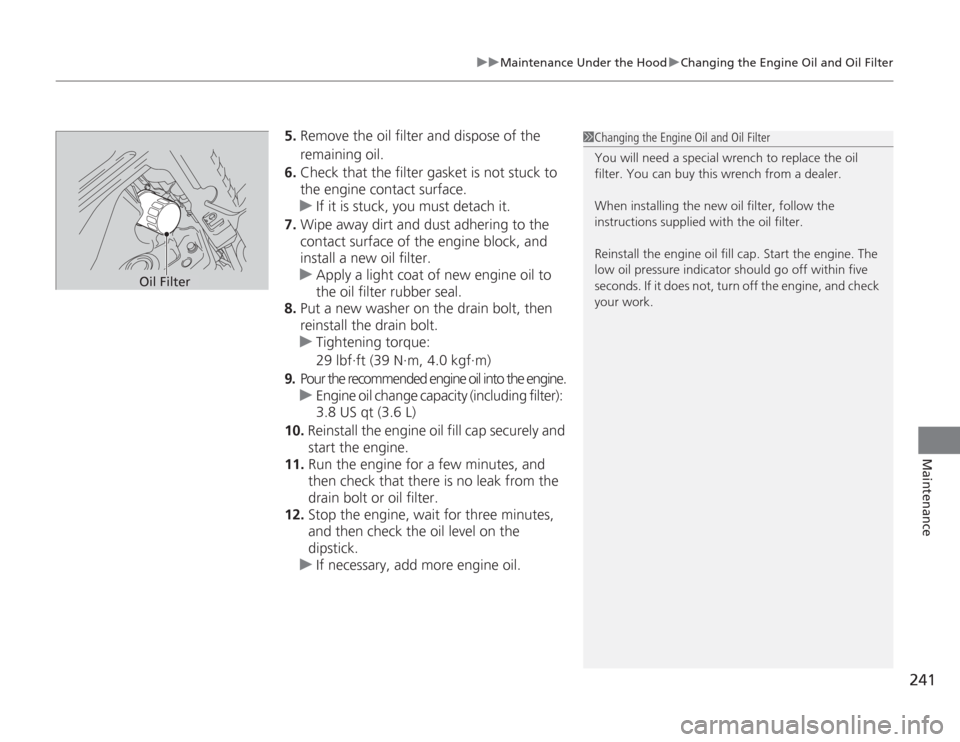
5. Remove the oil filter and dispose of the
remaining oil.
6. Check that the filter gasket is not stuck to
the engine contact surface.
u If it is stuck, you must detach it.
7. Wipe away dirt and dust adhering to the
contact surface of the engine block, and
install a new oil filter.
u Apply a light coat of new engine oil to
the oil filter rubber seal.
8. Put a new washer on the drain bolt, then
reinstall the drain bolt.
u Tightening torque:
29 lbf∙ft (39 N∙m, 4.0 kgf∙m)
9. Pour the recommended engine oil into the engine.
u Engine oil change capacity (including filter):
3.8 US qt (3.6 L)
10. Reinstall the engine oil fill cap securely and
start the engine.
11. Run the engine for a few minutes, and
then check that there is no leak from the
drain bolt or oil filter.
12. Stop the engine, wait for three minutes,
and then check the oil level on the
dipstick.
u If necessary, add more engine oil.
1Changing the Engine Oil and Oil Filter
You will need a special wrench to replace the oil
filter. You can buy this wrench from a dealer.
When installing the new oil filter, follow the
instructions supplied with the oil filter.
Reinstall the engine oil fill cap. Start the engine. The
low oil pressure indicator should go off within five
seconds. If it does not, turn off the engine, and check
your work.
Oil Filter
Page 285 of 313
uuOverheating uHow to Handle Overheating
284Handling the Unexpected
■
Next thing to do
1.Check that the cooling fan is operating and
stop the engine once the high temperature
indicator goes off.
u If the cooling fan is not operating,
immediately stop the engine.
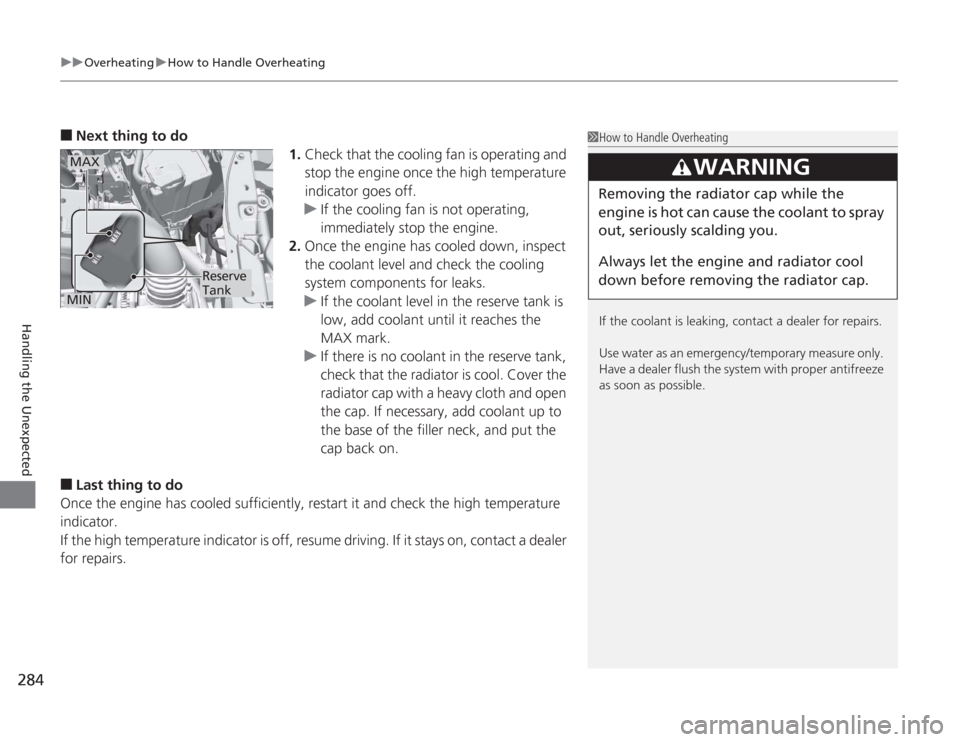
2. Once the engine has cooled down, inspect
the coolant level and check the cooling
system components for leaks.
u If the coolant level in the reserve tank is
low, add coolant until it reaches the
MAX mark.
u If there is no coolant in the reserve tank,
check that the radiator is cool. Cover the
radiator cap with a heavy cloth and open
the cap. If necessary, add coolant up to
the base of the filler neck, and put the
cap back on.
■
Last thing to do
Once the engine has co oled sufficiently, restart it and check the high temperature
indicator.
If the high temperature indicator is off, resume driving. If it stays on, contact a dealer
for repairs.
1 How to Handle Overheating
If the coolant is leaking, contact a dealer for repairs.
Use water as an emerge ncy/temporary measure only.
Have a dealer flush the system with proper antifreeze
as soon as possible.
3
WARNING
Removing the radiator cap while the
engine is hot can cause the coolant to spray
out, seriously scalding you.
Always let the engine and radiator cool
down before removing the radiator cap.
MAXMIN
Reserve
Tank
Page 286 of 313
285
Handling the Unexpected
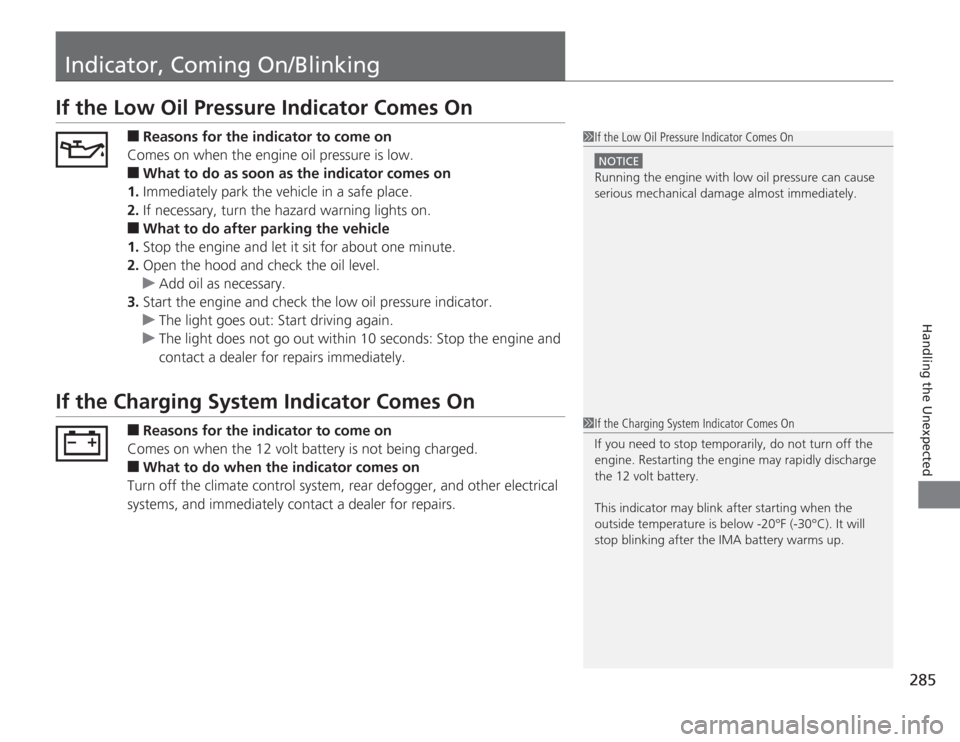
Indicator, Coming On/BlinkingIf the Low Oil Pressure Indicator Comes On
■
Reasons for the indicator to come on
Comes on when the engine oil pressure is low.
■
What to do as soon as the indicator comes on
1. Immediately park the vehicle in a safe place.
2. If necessary, turn the hazard warning lights on.
■
What to do after parking the vehicle
1. Stop the engine and let it sit for about one minute.
2. Open the hood and check the oil level.
u Add oil as necessary.
3. Start the engine and check the low oil pressure indicator.
u The light goes out: Start driving again.
u The light does not go out within 10 seconds: Stop the engine and
contact a dealer for repairs immediately.
If the Charging System Indicator Comes On
■
Reasons for the indicator to come on
Comes on when the 12 volt battery is not being charged.
■
What to do when the indicator comes on
Turn off the climate control system, rear defogger, and other electrical
systems, and immediately contact a dealer for repairs.
1 If the Low Oil Pressure Indicator Comes On
NOTICERunning the engine with low oil pressure can cause
serious mechanical damage almost immediately.1If the Charging System Indicator Comes On
If you need to stop temporarily, do not turn off the
engine. Restarting the engine may rapidly discharge
the 12 volt battery.
This indicator may blink after starting when the
outside temperature is below -20°F (-30°C). It will
stop blinking after the IMA battery warms up.
Page 287 of 313

286
uuIndicator, Coming On/Blinking uIf the Malfunction Indicator Lamp Comes On or Blinks
Handling the Unexpected
If the Malfunction Indicator Lamp Comes On or Blinks
■
Reasons for indicator lamp to come on or blink
• Comes on when there is a problem with the engine emissions control
system, or the fuel fill cap is missing, or loose.
• Blinks when engine misfiring is detected.
■
What to do when the indicator lamp comes on
Avoid high speeds and immediately get your vehicle inspected by a
dealer.
■
What to do when the indicator lamp blinks
Park the vehicle in a safe place with no flammable items and wait at least
ten minutes or more with the engine stopped until it cools.
■
The message appears on when:
An evaporative system leak is detected. This may be caused by the fuel fill cap being
loose or not being installed.
■
What to do when the message appears:
1. Stop the engine.
2. Check that the fuel fill cap is fully installed.
u If not, loosen the cap, and then retighten it until it clicks at least once.
3. Drive for several days of normal driving.
u The message should go off.
■
When the malfunction indic ator lamp comes on
Malfunction indicator lamp comes on if the system continues to detect a leak of
gasoline vapor. If this happens, check the fuel fill cap using the procedures described
above.
■
Check/Tighten Fuel Cap Message
1 If the Malfunction Indicator Lamp Comes On or Blinks
NOTICEIf you drive with the malfunction indicator lamp on,
the emissions control system and the engine could be
damaged.
If the malfunction indicator lamp blinks again when
restarting the engine, drive to the nearest dealer at
31 mph (50 km/h) or less. Have your vehicle
inspected.
Page 288 of 313
287
uuIndicator, Coming On/Blinking uIf the Brake System Indicator (Red) Comes On
Handling the Unexpected
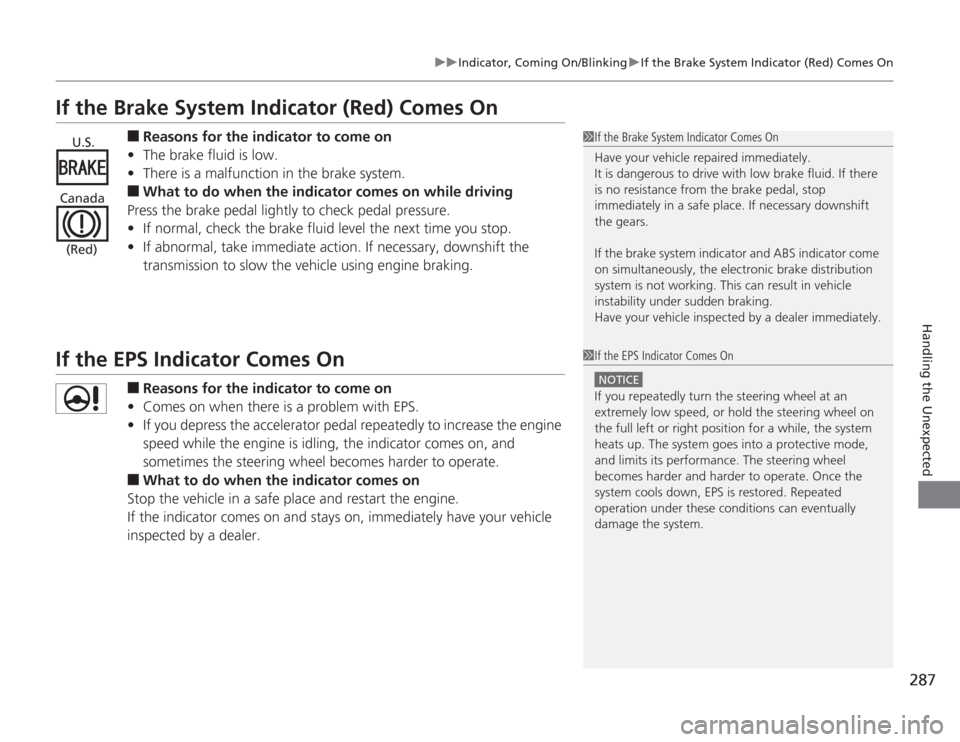
If the Brake System Indicator (Red) Comes On
■
Reasons for the indicator to come on
• The brake fluid is low.
• There is a malfunction in the brake system.
■
What to do when the indicator comes on while driving
Press the brake pedal lightly to check pedal pressure.
• If normal, check the brake fluid level the next time you stop.
• If abnormal, take immediate action. If necessary, downshift the
transmission to slow the vehic le using engine braking.
If the EPS Indicator Comes On
■
Reasons for the indicator to come on
• Comes on when there is a problem with EPS.
• If you depress the accelerator pedal repeatedly to increase the engine
speed while the engine is idling, the indicator comes on, and
sometimes the steering wheel becomes harder to operate.
■
What to do when the indicator comes on
Stop the vehicle in a safe place and restart the engine.
If the indicator comes on and stays on, immediately have your vehicle
inspected by a dealer.
1 If the Brake System Indicator Comes On
Have your vehicle repaired immediately.
It is dangerous to drive with low brake fluid. If there
is no resistance from the brake pedal, stop
immediately in a safe place. If necessary downshift
the gears.
If the brake system indicator and ABS indicator come
on simultaneously, the electronic brake distribution
system is not working. This can result in vehicle
instability under sudden braking.
Have your vehicle inspected by a dealer immediately.
U.S.
Canada (Red)
1 If the EPS Indicator Comes On
NOTICEIf you repeatedly turn the steering wheel at an
extremely low speed, or hold the steering wheel on
the full left or right position for a while, the system
heats up. The system goes into a protective mode,
and limits its performance. The steering wheel
becomes harder and harder to operate. Once the
system cools down, EPS is restored. Repeated
operation under these conditions can eventually
damage the system.
Page 290 of 313
289
Continued
Handling the Unexpected
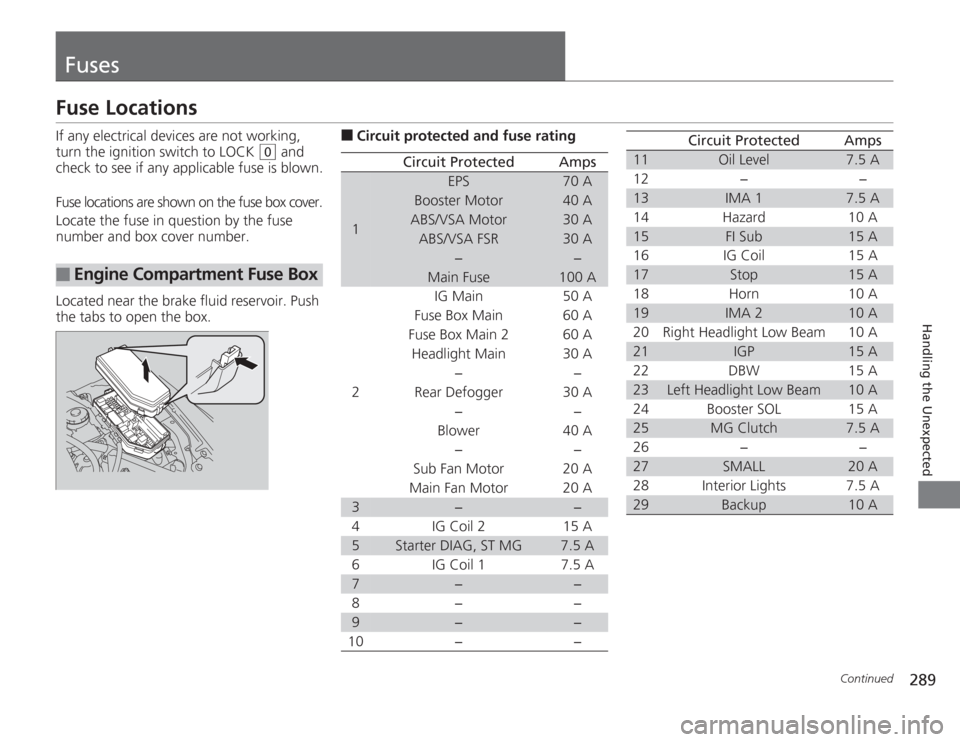
FusesFuse LocationsIf any electrical devices are not working,
turn the ignition switch to LOCK
(0
and
check to see if any applicable fuse is blown.
Fuse locations are shown on the fuse box cover.
Locate the fuse in question by the fuse
number and box cover number.
Located near the brake fluid reservoir. Push
the tabs to open the box.
■
Engine Compartmen t Fuse Box
■
Circuit protected and fuse rating
Circuit Protected
Amps
1
EPS
70 A
Booster Motor
40 A
ABS/VSA Motor
30 A
ABS/VSA FSR
30 A
−
−
Main Fuse
100 A
2
IG Main
50 A
Fuse Box Main 60 A
Fuse Box Main 2
60 A
Headlight Main 30 A
−
−
Rear Defogger 30 A −−
Blower 40 A
−−
Sub Fan Motor 20 A
Main Fan Motor 20 A
3
−
−
4 IG Coil 2 15 A
5
Starter DIAG, ST MG
7.5 A
6 IG Coil 1 7.5 A
7
−
−
8− −
9
−
−
10 − −
11
Oil Level
7.5 A
12 − −
13
IMA 1
7.5 A
14 Hazard 10 A
15
FI Sub
15 A
16 IG Coil 15 A
17
Stop
15 A
18 Horn 10 A
19
IMA 2
10 A
20 Right Headlight Low Beam 10 A
21
IGP
15 A
22 DBW 15 A
23
Left Headlight Low Beam
10 A
24 Booster SOL 15 A
25
MG Clutch
7.5 A
26 − −
27
SMALL
20 A
28 Interior Lights 7.5 A
29
Backup
10 A
Circuit Protected
Amps
Page 306 of 313
INDEX
305
INDEX
INDEX
AABS (Anti-lock Brake System).................. 215
Accessories and Modifications ................ 226
Accessory Power Sockets ......................... 134
Additives
Coolant .................................................. 242
Engine Oil ............................................... 239
Washer ................................................... 246
Additives, Engine Oil ............................... 237
Adjusting Front Seats.............................................. 126
Head Restraints ....................................... 128
Headlights .............................................. 247
Mirrors.................................................... 125
Steering Wheel ....................................... 124
Temperature ............................................. 86
Air Conditioning Sys tem (Climate Control
System) .................................................... 137
Changing the Mode................................ 137
Defrosting the Windshield and Windows .............................................. 138
Dust and Pollen Filter .............................. 265
Recirculation/Fresh Air Mode................... 137
Sensor .................................................... 139
Using Automatic Climate Control............ 137
Air Pressure ...................................... 254, 295
Airbags ....................................................... 39
Advanced Airbags ..................................... 45
After a Collision ........................................ 43
Airbag Care .............................................. 53
Event Data Recorders ................................ 24 Front Airbags (SRS) .................................... 42
Indicator ........................................ 50, 73, 77
Passenger Airbag Off Indicator .................. 51
Sensors ...................................................... 45
Side Airbag Cutoff System ......................... 48
Side Airbag Off Indicator ........................... 48
Side Airbags .............................................. 46
Side Curtain Airbags .................................. 49
AM/FM Radio ............................................ 148
Ambient Meter ............................................. 8
Anti-lock Brake System (ABS) .................. 215
Indicator .................................................... 73
Audio Antenna ......................................... 143
Audio Remote Controls ...................... 17, 146
Audio System ............................................ 142
Adjusting the Sound ................................ 147
Auxiliary Input Jack .................................. 144
Error Messages ........................................ 162
General Information ................................ 164
MP3/WMA/AAC ...................................... 157
Reactivating ............................................. 144
Recommended CDs ................................. 164
Recommended Drives .............................. 166
Remote Controls ..................................... 146
Security Code .......................................... 144
Theft Protection ....................................... 144
USB Adapter Cable .................................. 143
USB Flash Drives ...................................... 166
Authorized Manuals ................................. 303
Auto Door Locking/Unlocking ................. 109
Customize ........................................... 90, 96 Auto Idle Stop
.......................................... 218
Auto Idle Stop Indicator ............................ 75
Automatic Lighting .................................. 119
Automatic Transmission (CVT) ................. 202
Creeping ................................................. 202
Fluid ........................................................ 244
Kickdown ................................................ 202
Operating the Shift Lever................... 18, 204
Shift Lever Does Not Move ...................... 282
Shifting ................................................... 203
Auxiliary Input Jack .................................. 144
Average Fuel Economy .............................. 85
Average Speed ........................................... 85
BBattery...................................................... 263
Charging System Indicator................. 71, 285
Jump Starting .......................................... 280
Maintenance (Checking the 12 Volt Battery) ................................................. 263
Maintenance (Replacing) ......................... 264
Belts (Seat) .................................................. 32
Beverage Holders ..................................... 133
Bluetooth
® Audio ..................................... 160
Bluetooth® HandsFreeLink
®..................... 167
Booster Seats (For Children) ...................... 65
Brake System ............................................ 213
Anti-lock Brake System (ABS)................... 215
Brake Assist System ................................. 216
Brake System Indicator ...................... 70, 287
Page 309 of 313
308INDEX
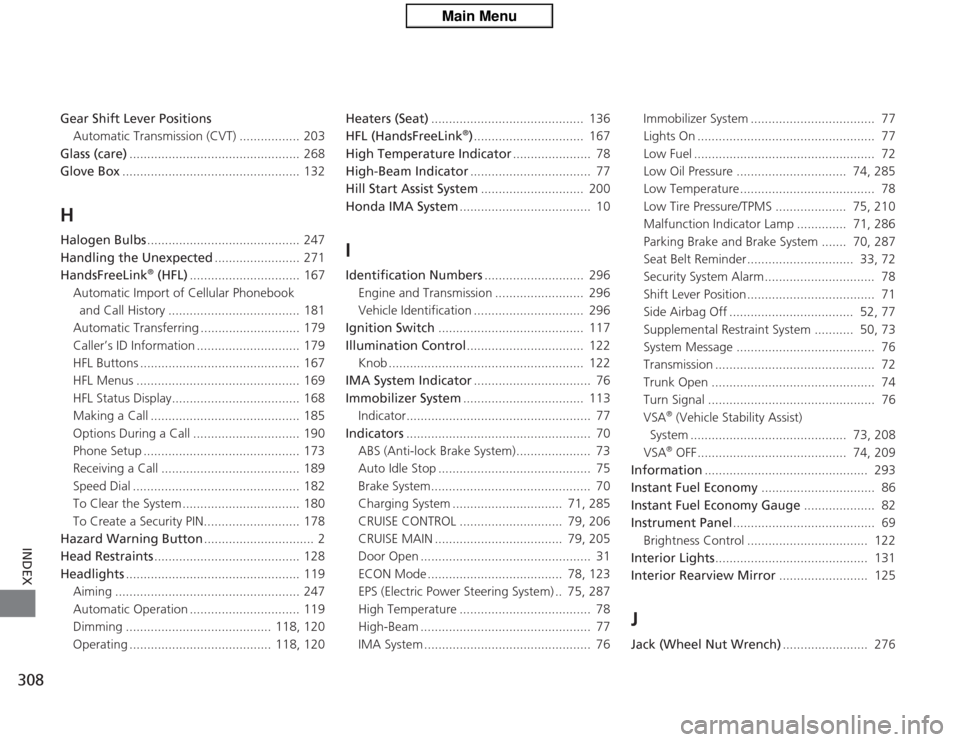
Gear Shift Lever PositionsAutomatic Transmissi on (CVT) ................. 203
Glass (care) ................................................ 268
Glove Box .................................................. 132HHalogen Bulbs ........................................... 247
Handling the Unexpected ........................ 271
HandsFreeLink
® (HFL) ............................... 167
Automatic Import of Cellular Phonebook and Call History ..................................... 181
Automatic Transferring ............................ 179
Caller’s ID Information ............................. 179
HFL Buttons ............................................. 167
HFL Menus .............................................. 169
HFL Status Display.................................... 168
Making a Call .......................................... 185
Options During a Call .............................. 190
Phone Setup ............................................ 173
Receiving a Call ....................................... 189
Speed Dial ............................................... 182
To Clear the System ................................. 180
To Create a Security PIN........................... 178
Hazard Warning Button ............................... 2
Head Restraints ......................................... 128
Headlights ................................................. 119
Aiming .................................................... 247
Automatic Operation ............................... 119
Dimming ......................................... 118, 120
Operating ........................................ 118, 120 Heaters (Seat)
........................................... 136
HFL (HandsFreeLink
®) ............................... 167
High Temperature Indicator ...................... 78
High-Beam Indicator .................................. 77
Hill Start Assist System ............................. 200
Honda IMA System ..................................... 10
IIdentification Numbers ............................ 296
Engine and Transmission ......................... 296
Vehicle Identification ............................... 296
Ignition Switch ......................................... 117
Illumination Control ................................. 122
Knob ....................................................... 122
IMA System Indicator ................................. 76
Immobilizer System .................................. 113
Indicator.................................................... 77
Indicators .................................................... 70
ABS (Anti-lock Brake System)..................... 73
Auto Idle Stop ........................................... 75
Brake System............................................. 70
Charging System ............................... 71, 285
CRUISE CONTROL ............................. 79, 206
CRUISE MAIN .................................... 79, 205
Door Open ................................................ 31
ECON Mode ...................................... 78, 123
EPS (Electric Power Steering System) .. 75, 287
High Temperature ..................................... 78
High-Beam ................................................ 77
IMA System ............................................... 76 Immobilizer System ................................... 77
Lights On .................................................. 77
Low Fuel ................................................... 72
Low Oil Pressure ............................... 74, 285
Low Temperature...................................... 78
Low Tire Pressure/TPMS .................... 75, 210
Malfunction Indicator Lamp .............. 71, 286
Parking Brake and Brake System ....... 70, 287
Seat Belt Reminder.............................. 33, 72
Security System Alarm............................... 78
Shift Lever Position.................................... 71
Side Airbag Off ................................... 52, 77
Supplemental Restraint System ........... 50, 73
System Message ....................................... 76
Transmission ............................................. 72
Trunk Open .............................................. 74
Turn Signal ............................................... 76
VSA
® (Vehicle Stability Assist)
System ............................................ 73, 208
VSA® OFF .......................................... 74, 209
Information .............................................. 293
Instant Fuel Economy ................................ 86
Instant Fuel Economy Gauge .................... 82
Instrument Panel ........................................ 69
Brightness Control .................................. 122
Interior Lights ........................................... 131
Interior Rearview Mirror ......................... 125
JJack (Wheel Nut Wrench) ........................ 276