charging HONDA CIVIC HYBRID 2012 9.G Owners Manual
[x] Cancel search | Manufacturer: HONDA, Model Year: 2012, Model line: CIVIC HYBRID, Model: HONDA CIVIC HYBRID 2012 9.GPages: 313, PDF Size: 8.65 MB
Page 11 of 313
10Quick Reference Guide
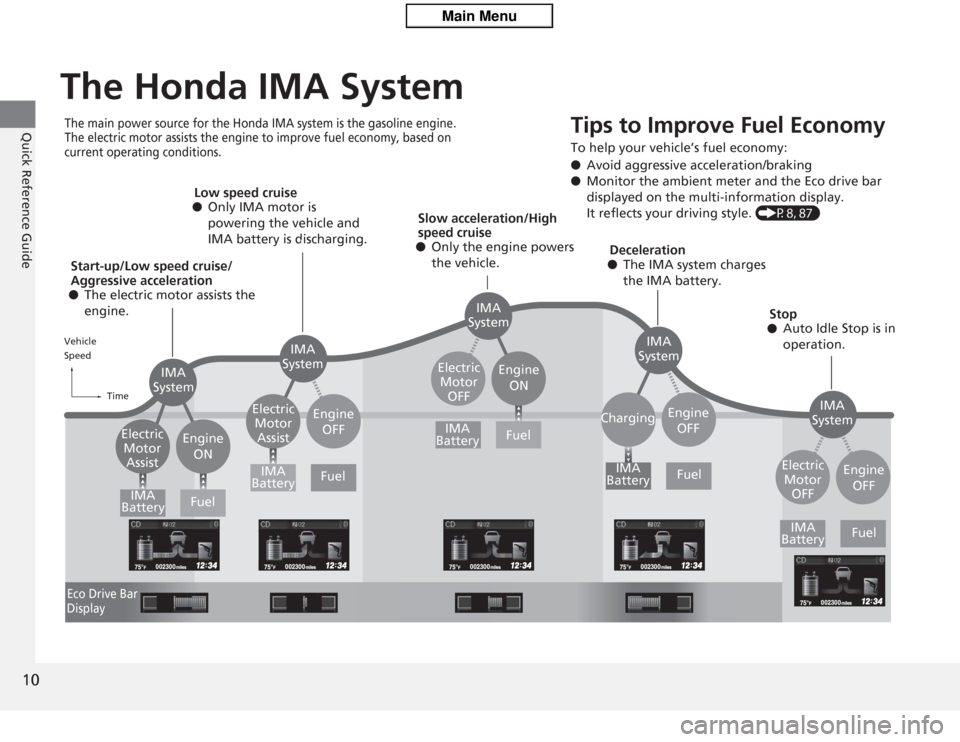
The Honda IMA SystemThe main power source for the Honda IMA system is the gasoline engine.
The electric motor assists the engine to improve fuel economy, based on
current operating conditions.
Tips to Improve Fue
l Economy
To help your vehicle’s fuel economy:
●Avoid aggressive acceleration/braking
● Monitor the ambient meter and the Eco drive bar
displayed on the multi-information display.
It reflects your driving style. (P8, 87)
Start-up/Low speed cruise/
Aggressive acceleration
● The electric motor assists the
engine. Low speed cruise
● Only IMA motor is
powering the vehicle and
IMA battery is discharging.
Slow acceleration/High
speed cruise
● Only the engine powers
the vehicle. Deceleration
● The IMA system charges
the IMA battery.
Stop
● Auto Idle Stop is in
operation.
Vehicle
Speed
TimeEco Drive Bar
Display
IMA
System IMA
System
IMA
System
IMA
System
IMA
System
Electric
Motor Assist Engine
ON Electric
Motor Assist Electric
Motor OFF
Charging
Engine
OFF Engine
ON
Engine OFF
Engine OFF
IMA
Battery IMA
Battery IMA
Battery
IMA
Battery
IMA
Battery
Fuel
Fuel Fuel
Fuel
Fuel
Electric Motor OFF
Page 12 of 313
11Quick Reference Guide
To Keep the IMA Battery in Good Condition Drive your vehicle at least once a month for more than 30 minutes. Parking your vehicle for an extended period can
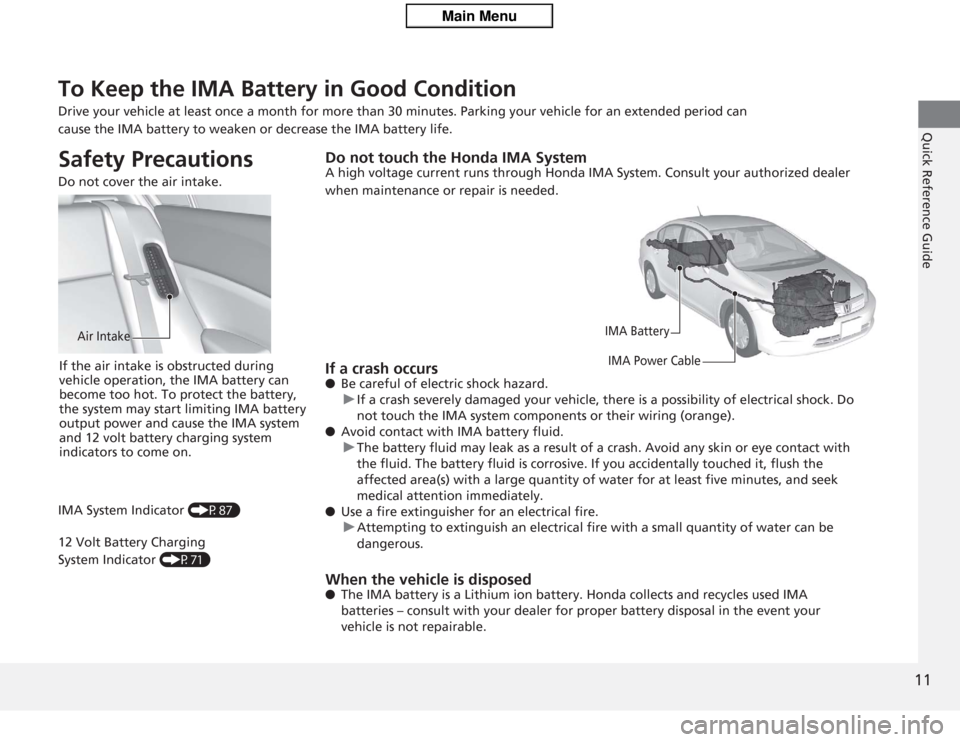
cause the IMA battery to weaken or decrease the IMA battery life.Safety Precautions Do not cover the air intake.
Air Intake
If the air intake is obstructed during
vehicle operation, the IMA battery can
become too hot. To protect the battery,
the system may start limiting IMA battery
output power and cause the IMA system
and 12 volt battery charging system
indicators to come on.
IMA System Indicator (P87)
12 Volt Battery Charging
System Indicator (P71)
Do not touch the Honda IMA SystemA high voltage current runs through Honda IMA System. Consult your authorized dealer
when maintenance or repair is needed.
IMA Battery
IMA Power Cable
If a crash occurs● Be careful of electric shock hazard.
u If a crash severely damaged your vehicle, there is a possibility of electrical shock. Do
not touch the IMA system components or their wiring (orange).
● Avoid contact with IMA battery fluid.
u The battery fluid may leak as a result of a crash. Avoid any skin or eye contact with
the fluid. The battery fluid is corrosive. If you accid entally touched it, flush the
affected area(s) with a large quantity of water for at least five minutes, and seek
medical attention immediately.
● Use a fire extinguisher for an electrical fire.
u Attempting to extinguish an electrical fire with a small quantity of water can be
dangerous.When the vehicle is disposed● The IMA battery is a Lithium ion battery. Honda collects and recycles used IMA
batteries – consult with your dealer for proper battery disposal in the event your
vehicle is not repairable.
Page 14 of 313
13Quick Reference Guide
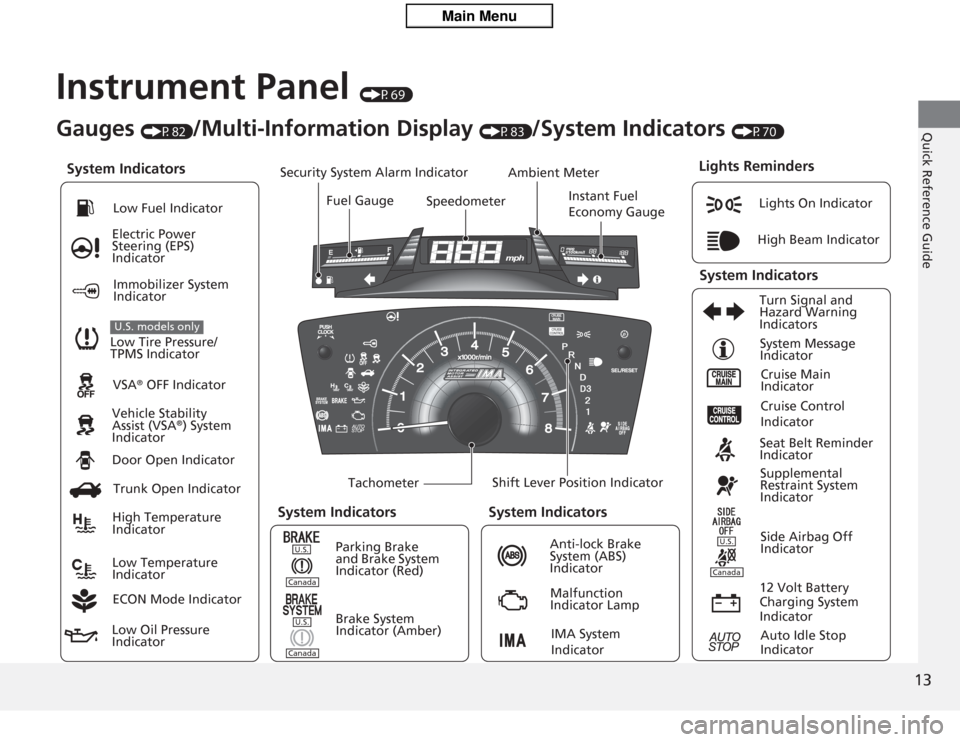
Instrument Panel
(P69)
System Indicators
Malfunction
Indicator Lamp
Low Oil Pressure
Indicator Anti-lock Brake
System (ABS)
Indicator
Vehicle Stability
Assist (VSA
®) System
Indicator VSA
® OFF Indicator
Electric Power
Steering (EPS)
Indicator
Lights On Indicator
High Beam Indicator
Immobilizer System
Indicator
Seat Belt Reminder
Indicator
Lights Reminders
Cruise Main
Indicator
System Message
Indicator
Brake System
Indicator (Amber) Supplemental
Restraint System
Indicator
Side Airbag Off
Indicator
Door Open Indicator
TachometerInstant Fuel
Economy Gauge
Speedometer
Fuel Gauge
Security System Alarm Indicator
Shift Lever Position Indicator
Low Fuel Indicator
Gauges
(P82)
/Multi-Information Display
(P83)
/System Indicators
(P70)
Trunk Open Indicator
ECON Mode Indicator Turn Signal and
Hazard Warning
Indicators
High Temperature
Indicator
Low Temperature
Indicator Ambient Meter
System Indicators
System Indicators
Low Tire Pressure/
TPMS IndicatorU.S. models only
Parking Brake
and Brake System
Indicator (Red)
IMA System
Indicator
Cruise Control
Indicator
System Indicators
12 Volt Battery
Charging System
IndicatorAuto Idle Stop
Indicator
U.S.CanadaU.S.Canada
U.S.Canada
Page 72 of 313
71
uuIndicators u
Continued
Instrument Panel
Indicator
Name
On/Blinking
Explanation
Message
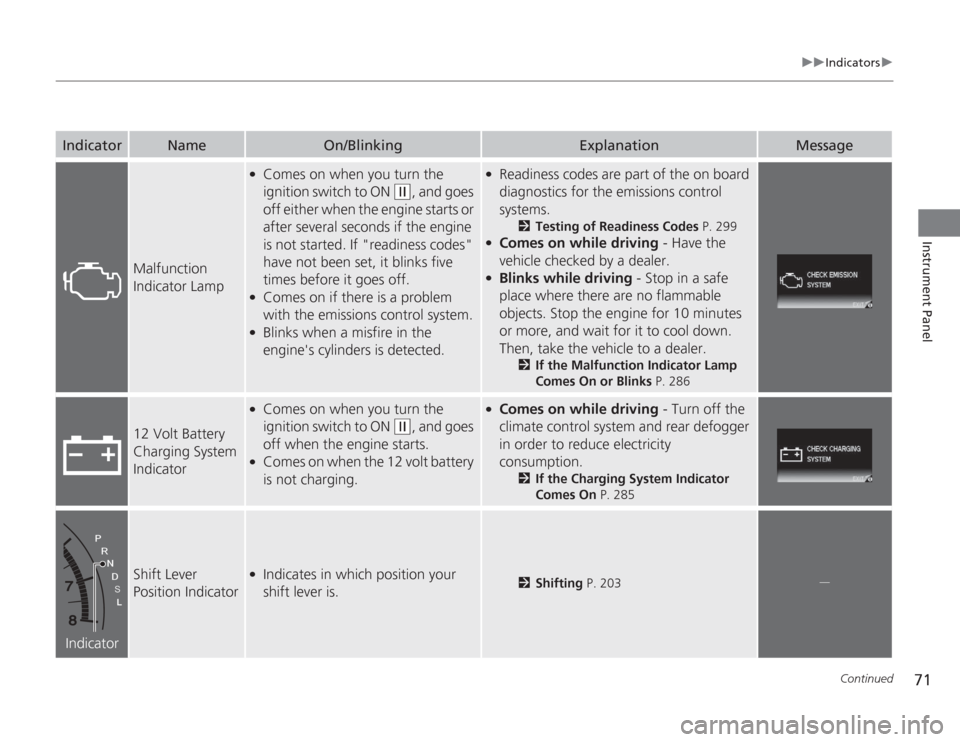
Malfunction
Indicator Lamp
●
Comes on when you turn the
ignition switch to ON
(w
, and goes
off either when the engine starts or
after several seconds if the engine
is not started. If "readiness codes"
have not been set, it blinks five
times before it goes off.
●
Comes on if there is a problem
with the emissions control system.
●
Blinks when a misfire in the
engine's cylinders is detected.
●
Readiness codes are part of the on board
diagnostics for the emissions control
systems.
2 Testing of Readiness Codes P. 299
●
Comes on while driving - Have the
vehicle checked by a dealer.
●
Blinks while driving - Stop in a safe
place where there are no flammable
objects. Stop the engine for 10 minutes
or more, and wait for it to cool down.
Then, take the vehicle to a dealer.
2 If the Malfunction Indicator Lamp
Comes On or Blinks P. 286
12 Volt Battery
Charging System
Indicator
●
Comes on when you turn the
ignition switch to ON
(w
, and goes
off when the engine starts.
●
Comes on when the 12 volt battery
is not charging.
●
Comes on while driving - Turn off the
climate control system and rear defogger
in order to reduce electricity
consumption.
2 If the Charging System Indicator
Comes On P. 285
Indicator
Shift Lever
Position Indicator
●
Indicates in which position your
shift lever is.
2Shifting P. 203
.
Page 90 of 313
Continued
89
uuGauges and Multi-Information Display uMulti-Information Display
Instrument Panel
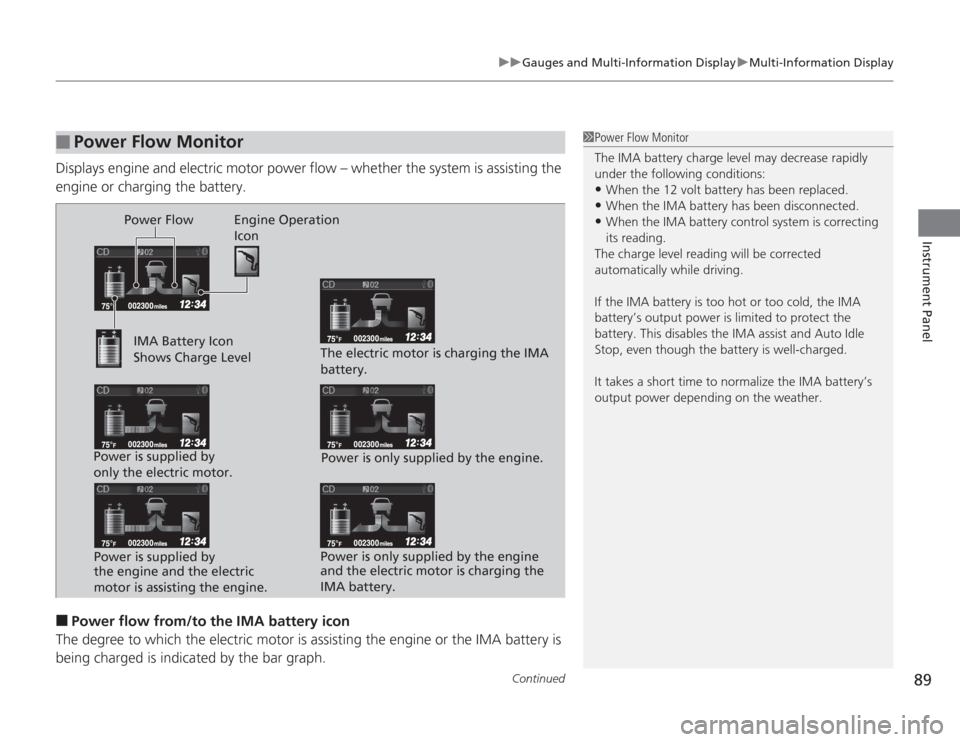
Displays engine and electric motor power flow – whether the system is assisting the
engine or charging the battery.■
Power flow from/to the IMA battery icon
The degree to which the electric motor is assisting the engine or the IMA battery is being charged is indica ted by the bar graph.
■
Power Flow Monitor
1Power Flow Monitor
The IMA battery charge level may decrease rapidly
under the following conditions:•When the 12 volt battery has been replaced.•When the IMA battery has been disconnected.•When the IMA battery control system is correcting
its reading.
The charge level reading will be corrected
automatically while driving.
If the IMA battery is too hot or too cold, the IMA
battery’s output power is limited to protect the
battery. This disables the IMA assist and Auto Idle
Stop, even though the battery is well-charged.
It takes a short time to normalize the IMA battery’s
output power depending on the weather.
Power Flow Engine Operation Icon
IMA Battery Icon
Shows Charge Level
Power is supplied by
only the electric motor. Power is supplied by
the engine and the electric
motor is assisting the engine. The electric motor is charging the IMA
battery.
Power is only supplied by the engine.
Power is only supplied by the engine
and the electric motor is charging the
IMA battery.
Page 264 of 313
263
Maintenance
12 Volt BatteryChecking the 12 Volt Battery
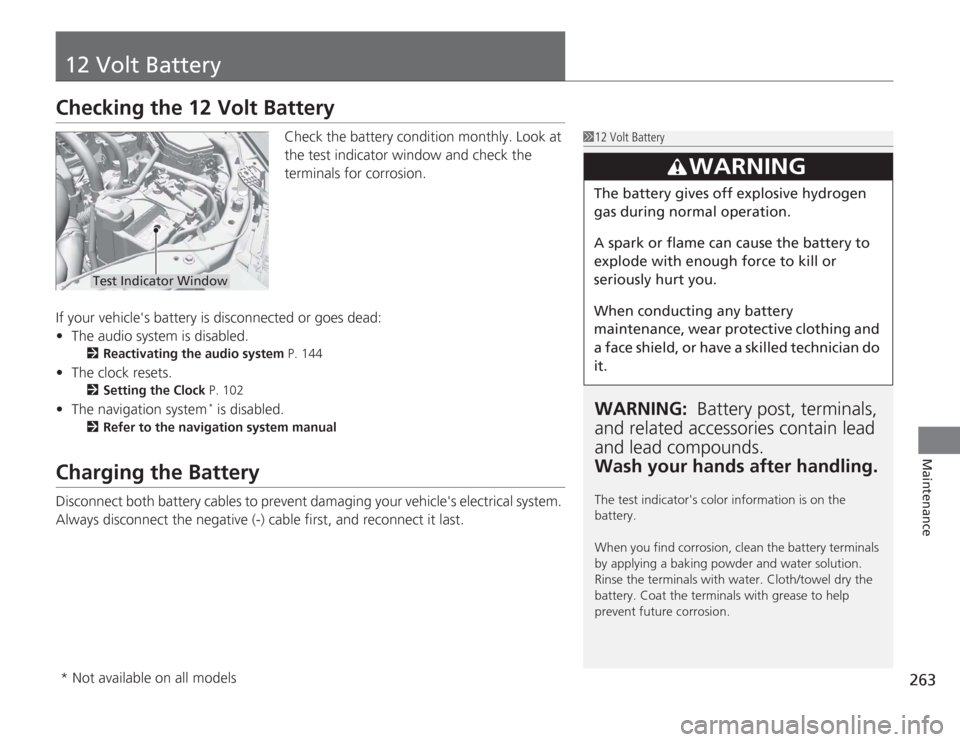
Check the battery condition monthly. Look at
the test indicator window and check the
terminals for corrosion.
If your vehicle's battery is disconnected or goes dead:
• The audio system is disabled.
2 Reactivating the audio system P. 144
•The clock resets.
2 Setting the Clock P. 102
•The navigation system
* is disabled.
2 Refer to the navigation system manual
Charging the BatteryDisconnect both battery cables to prevent damaging your vehicle's electrical system.
Always disconnect the negative (-) cab le first, and reconnect it last.
112 Volt BatteryWARNING: Battery post, terminals,
and related accessori es contain lead
and lead compounds.
Wash your hands after handling.The test indicator's color information is on the
battery.
When you find corrosion, clean the battery terminals
by applying a baking powder and water solution.
Rinse the terminals with water. Cloth/towel dry the
battery. Coat the terminals with grease to help
prevent future corrosion.
3
WARNING
The battery gives off explosive hydrogen
gas during normal operation.
A spark or flame can cause the battery to
explode with enough force to kill or
seriously hurt you.
When conducting any battery
maintenance, wear protective clothing and
a face shield, or have a skilled technician do
it.
Test Indicator Window
* Not available on all models
Page 272 of 313
271
Handling the Unexpected
This chapter explains how to handle unexpected troubles.
Tools
Types of Tools .................................. 272
If a Tire Goes Flat Changing a Flat Tire ......................... 273
Engine Does Not Start Checking the Engine ........................ 279
Jump Starting .................................... 280
Shift Lever Does Not Move .............. 282
Overheating How to Handle Overheating ............. 283 Indicator, Coming On/Blinking
If the Low Oil Pressure Indicator Comes
On ............................................. 285If the Charging System Indicator Comes
On ................................................. 285
If the Malfunction Indicator Lamp Comes On or Blinks ................................... 286If the Brake System Indicator (Red) Comes On .................................................287If the EPS Indicator Comes On.......... 287
If the IMA Indicator Comes On......... 288 If the Low Tire Pressure/TPMS Indicator
Comes On or Blinks ....................... 288
Fuses Fuse Locations ................................. 289
Inspecting and Changing Fuses ........ 291
Emergency Towing ........................... 292
Page 286 of 313
285
Handling the Unexpected
Indicator, Coming On/BlinkingIf the Low Oil Pressure Indicator Comes On
■
Reasons for the indicator to come on
Comes on when the engine oil pressure is low.
■
What to do as soon as the indicator comes on
1. Immediately park the vehicle in a safe place.
2. If necessary, turn the hazard warning lights on.
■
What to do after parking the vehicle
1. Stop the engine and let it sit for about one minute.
2. Open the hood and check the oil level.
u Add oil as necessary.
3. Start the engine and check the low oil pressure indicator.
u The light goes out: Start driving again.
u The light does not go out within 10 seconds: Stop the engine and
contact a dealer for repairs immediately.
If the Charging System Indicator Comes On
■
Reasons for the indicator to come on
Comes on when the 12 volt battery is not being charged.
■
What to do when the indicator comes on
Turn off the climate control system, rear defogger, and other electrical
systems, and immediately contact a dealer for repairs.
1 If the Low Oil Pressure Indicator Comes On
NOTICERunning the engine with low oil pressure can cause
serious mechanical damage almost immediately.1If the Charging System Indicator Comes On
If you need to stop temporarily, do not turn off the
engine. Restarting the engine may rapidly discharge
the 12 volt battery.
This indicator may blink after starting when the
outside temperature is below -20°F (-30°C). It will
stop blinking after the IMA battery warms up.
Page 306 of 313
INDEX
305
INDEX
INDEX
AABS (Anti-lock Brake System).................. 215
Accessories and Modifications ................ 226
Accessory Power Sockets ......................... 134
Additives
Coolant .................................................. 242
Engine Oil ............................................... 239
Washer ................................................... 246
Additives, Engine Oil ............................... 237
Adjusting Front Seats.............................................. 126
Head Restraints ....................................... 128
Headlights .............................................. 247
Mirrors.................................................... 125
Steering Wheel ....................................... 124
Temperature ............................................. 86
Air Conditioning Sys tem (Climate Control
System) .................................................... 137
Changing the Mode................................ 137
Defrosting the Windshield and Windows .............................................. 138
Dust and Pollen Filter .............................. 265
Recirculation/Fresh Air Mode................... 137
Sensor .................................................... 139
Using Automatic Climate Control............ 137
Air Pressure ...................................... 254, 295
Airbags ....................................................... 39
Advanced Airbags ..................................... 45
After a Collision ........................................ 43
Airbag Care .............................................. 53
Event Data Recorders ................................ 24 Front Airbags (SRS) .................................... 42
Indicator ........................................ 50, 73, 77
Passenger Airbag Off Indicator .................. 51
Sensors ...................................................... 45
Side Airbag Cutoff System ......................... 48
Side Airbag Off Indicator ........................... 48
Side Airbags .............................................. 46
Side Curtain Airbags .................................. 49
AM/FM Radio ............................................ 148
Ambient Meter ............................................. 8
Anti-lock Brake System (ABS) .................. 215
Indicator .................................................... 73
Audio Antenna ......................................... 143
Audio Remote Controls ...................... 17, 146
Audio System ............................................ 142
Adjusting the Sound ................................ 147
Auxiliary Input Jack .................................. 144
Error Messages ........................................ 162
General Information ................................ 164
MP3/WMA/AAC ...................................... 157
Reactivating ............................................. 144
Recommended CDs ................................. 164
Recommended Drives .............................. 166
Remote Controls ..................................... 146
Security Code .......................................... 144
Theft Protection ....................................... 144
USB Adapter Cable .................................. 143
USB Flash Drives ...................................... 166
Authorized Manuals ................................. 303
Auto Door Locking/Unlocking ................. 109
Customize ........................................... 90, 96 Auto Idle Stop
.......................................... 218
Auto Idle Stop Indicator ............................ 75
Automatic Lighting .................................. 119
Automatic Transmission (CVT) ................. 202
Creeping ................................................. 202
Fluid ........................................................ 244
Kickdown ................................................ 202
Operating the Shift Lever................... 18, 204
Shift Lever Does Not Move ...................... 282
Shifting ................................................... 203
Auxiliary Input Jack .................................. 144
Average Fuel Economy .............................. 85
Average Speed ........................................... 85
BBattery...................................................... 263
Charging System Indicator................. 71, 285
Jump Starting .......................................... 280
Maintenance (Checking the 12 Volt Battery) ................................................. 263
Maintenance (Replacing) ......................... 264
Belts (Seat) .................................................. 32
Beverage Holders ..................................... 133
Bluetooth
® Audio ..................................... 160
Bluetooth® HandsFreeLink
®..................... 167
Booster Seats (For Children) ...................... 65
Brake System ............................................ 213
Anti-lock Brake System (ABS)................... 215
Brake Assist System ................................. 216
Brake System Indicator ...................... 70, 287
Page 307 of 313
306INDEX
Fluid ........................................................ 245
Foot Brake ............................................... 214
Indicator ............................................ 70, 287
Parking Brake .......................................... 213
Brightness Control (In strument Panel).... 122
Bulb Replacement ..................................... 247
Back-Up Light and Rear Turn Signal Light ...................................................... 250
Brake/Taillight and Rear Si de Marker
Bulbs ..................................................... 250
Bulb Specifications ................................... 294
Front Turn Signal/Parking/Side Marker Light ...................................................... 249
Headlights ............................................... 247
High-Mount Brake Light .......................... 251
Rear License Plate Light............................ 251
Side Turn Signal/Emergency Indicator....... 249
CCarbon Monoxide Gas ................................ 66
Carrying Cargo .................................. 193, 195
CD Player ................................................... 151
Certification Label .................................... 296
Changing Bulbs ......................................... 247
Charging System Indicator ................. 71, 285
Child Safety ................................................. 54
Childproof Door Locks ............................. 108
Emergency Trunk Opener ........................ 112
Child Seat .................................................... 54
Booster Seats ............................................. 65 Child Seat for Infants................................. 56
Child Seat for Small Children ..................... 57
Installing a Child Seat with a Lap/Shoulder
Seat Belt .................................................. 61
Larger Children ......................................... 64
Rear-facing Child Seat ............................... 56
Selecting a Child Seat ................................ 58
Using a Tether ........................................... 63
Childproof Door Locks ............................. 108
Cleaning the Exterior ............................... 268
Cleaning the Interior ................................ 266
Climate Control System ............................ 137
Changing the Mode ................................ 137
Defrosting the Windshield and
Windows ............................................... 138
Dust and Pollen Filter............................... 265
Recirculation and Fresh Air Mode ............ 137
Sensors ................................................... 139
Using Automatic Climate Control ............ 137
Clock .......................................................... 102
Coat Hook ................................................. 135
Compact Spare Tire .......................... 273, 295
Console Compartment ............................. 132
Controls ..................................................... 101
Coolant (Engine) ...................................... 242
Adding to the Radiator ............................ 243
Adding to the Reserve Tank..................... 242
High Temperature Indicator ....................... 78
Low Temperature Indicator........................ 78
Overheating ............................................ 283
Creep Aid System ..................................... 200 Creeping
................................................... 202
Cruise Control .......................................... 205
Indicator ................................................... 79
Cup Holders .............................................. 133
Customer Service Information ................ 304
Customized Features ................................. 90
DDaytime Running Lights .......................... 120
Dead Battery ............................................ 280
Defrosting the Windshield and Windows ................................................. 138
Devices that Emit Radio Waves ............... 297
Dimming Headlights .............................................. 118
Rearview Mirror ...................................... 125
Dipstick (Engine Oil) ................................ 238
Directional Signals (Turn Signal) ............. 118
Display/Information Button ...................... 83
Door Mirrors ............................................. 125
Doors ........................................................ 103
Auto Door Locking.................................. 109
Auto Door Unlocking .............................. 109
Door Open Indicator ........................... 31, 74
Keys........................................................ 103
Locking/Unlocking the Doors
from the Inside...................................... 107
Locking/Unlocking the Doors from the Outside................................... 105
Lockout prevention system...................... 106