USB port HONDA CIVIC HYBRID 2013 9.G Owners Manual
[x] Cancel search | Manufacturer: HONDA, Model Year: 2013, Model line: CIVIC HYBRID, Model: HONDA CIVIC HYBRID 2013 9.GPages: 346, PDF Size: 6.95 MB
Page 97 of 346
96
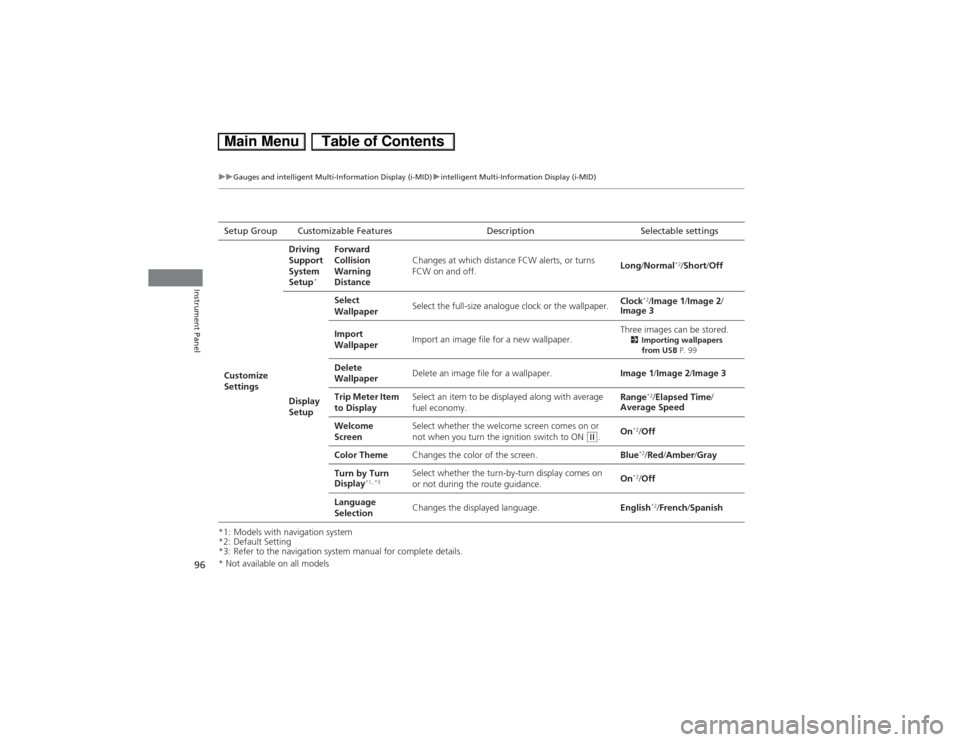
uuGauges and intelligent Multi-Information Display (i-MID)uintelligent Multi-Information Display (i-MID)
Instrument Panel
*1: Models with navigation system
*2: Default Setting
*3: Refer to the navigation system manual for complete details.Setup Group Customizable Features Description Selectable settings
Customize
SettingsDriving
Support
System
Setup
*
Forward
Collision
Warning
DistanceChanges at which distance FCW alerts, or turns
FCW on and off.Long/Normal
*2/Short/Off
Display
SetupSelect
WallpaperSelect the full-size analogue clock or the wallpaper.Clock
*2/Image 1/Image 2/
Image 3
Import
WallpaperImport an image file for a new wallpaper.Three images can be stored.
2Importing wallpapers
from USB P. 99
Delete
WallpaperDelete an image file for a wallpaper.Image 1/Image 2/Image 3
Trip Meter Item
to DisplaySelect an item to be displayed along with average
fuel economy.Range
*2/Elapsed Time/
Average Speed
Welcome
ScreenSelect whether the welcome screen comes on or
not when you turn the ignition switch to ON
(w.On
*2/Off
Color ThemeChanges the color of the screen.Blue*2/Red/Amber/Gray
Turn by Turn
Display
*1, *3
Select whether the turn-by-turn display comes on
or not during the route guidance.On
*2/Off
Language
SelectionChanges the displayed language.English*2/French/Spanish
* Not available on all models
Page 100 of 346
Continued
99
uuGauges and intelligent Multi-Information Display (i-MID)uintelligent Multi-Information Display (i-MID)
Instrument Panel
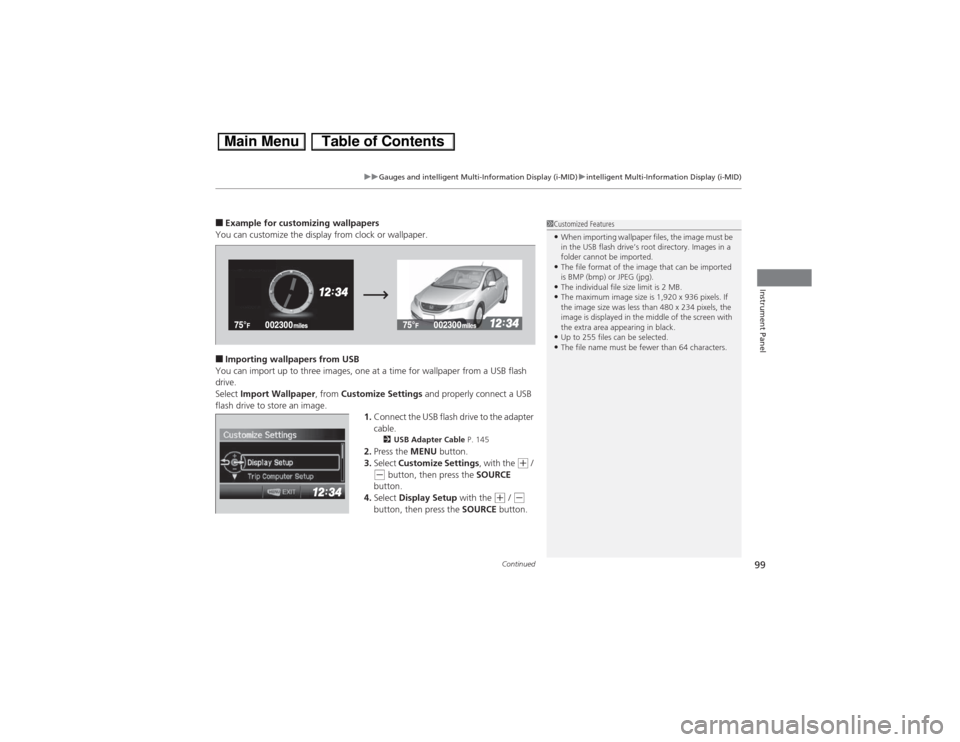
■Example for customizing wallpapers
You can customize the display from clock or wallpaper.■Importing wallpapers from USB
You can import up to three images, one at a time for wallpaper from a USB flash
drive.
Select Import Wallpaper, from Customize Settings and properly connect a USB
flash drive to store an image.
1.Connect the USB flash drive to the adapter
cable.
2USB Adapter Cable P. 145
2.Press the MENU button.
3.Select Customize Settings, with the
(+ /
(- button, then press the SOURCE
button.
4.Select Display Setup with the
(+ / (-
button, then press the SOURCE button.
1Customized Features•When importing wallpaper files, the image must be
in the USB flash drive’s root directory. Images in a
folder cannot be imported.•The file format of the image that can be imported
is BMP (bmp) or JPEG (jpg).•The individual file size limit is 2 MB.•The maximum image size is 1,920 x 936 pixels. If
the image size was less than 480 x 234 pixels, the
image is displayed in the middle of the screen with
the extra area appearing in black.•Up to 255 files can be selected.•The file name must be fewer than 64 characters.
Page 145 of 346
144Features
Audio SystemAbout Your Audio SystemOn models with navigation system, see the Navigation System Manual for operation
of the audio system, Bluetooth® HandsFreeLink®, and voice commands for these
features.
The audio system features AM/FM radio and the XM® Radio service
*. It can also play
audio CDs, WMA/MP3/AAC files, iPod®, iPhone®, USB flash drives, and Bluetooth®
devices.
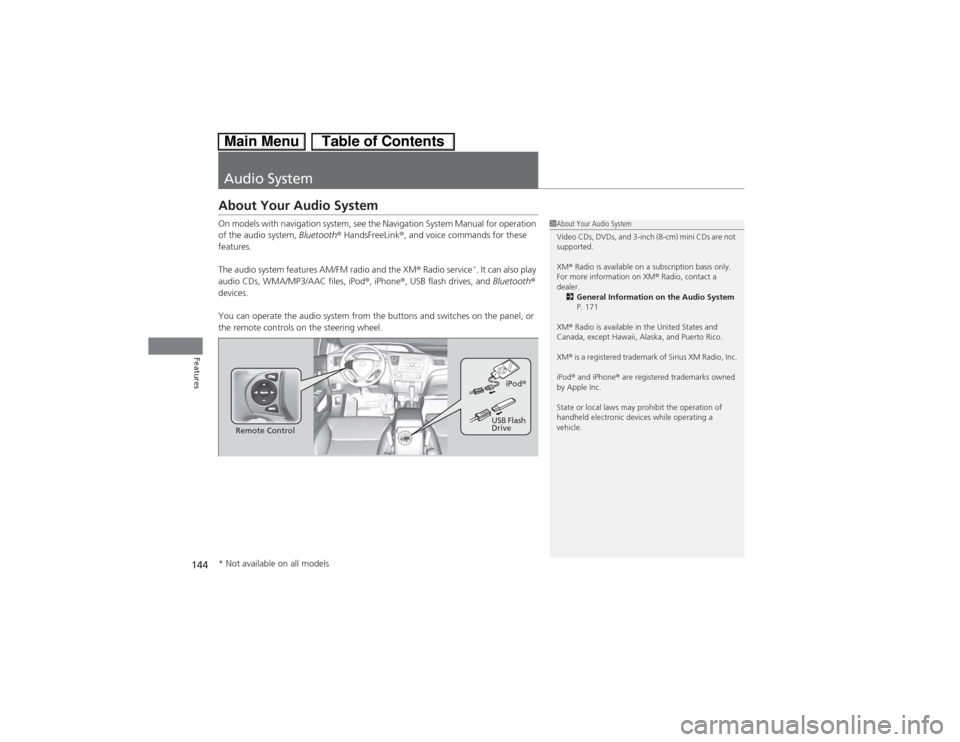
You can operate the audio system from the buttons and switches on the panel, or
the remote controls on the steering wheel.
1About Your Audio System
Video CDs, DVDs, and 3-inch (8-cm) mini CDs are not
supported.
XM® Radio is available on a subscription basis only.
For more information on XM® Radio, contact a
dealer.
2General Information on the Audio System
P. 171
XM® Radio is available in the United States and
Canada, except Hawaii, Alaska, and Puerto Rico.
XM® is a registered trademark of Sirius XM Radio, Inc.
iPod® and iPhone® are registered trademarks owned
by Apple Inc.
State or local laws may prohibit the operation of
handheld electronic devices while operating a
vehicle.
Remote ControliPod®
USB Flash
Drive
* Not available on all models
Page 170 of 346
169
uuAudio Error MessagesuiPod®/USB Flash Drive
Features
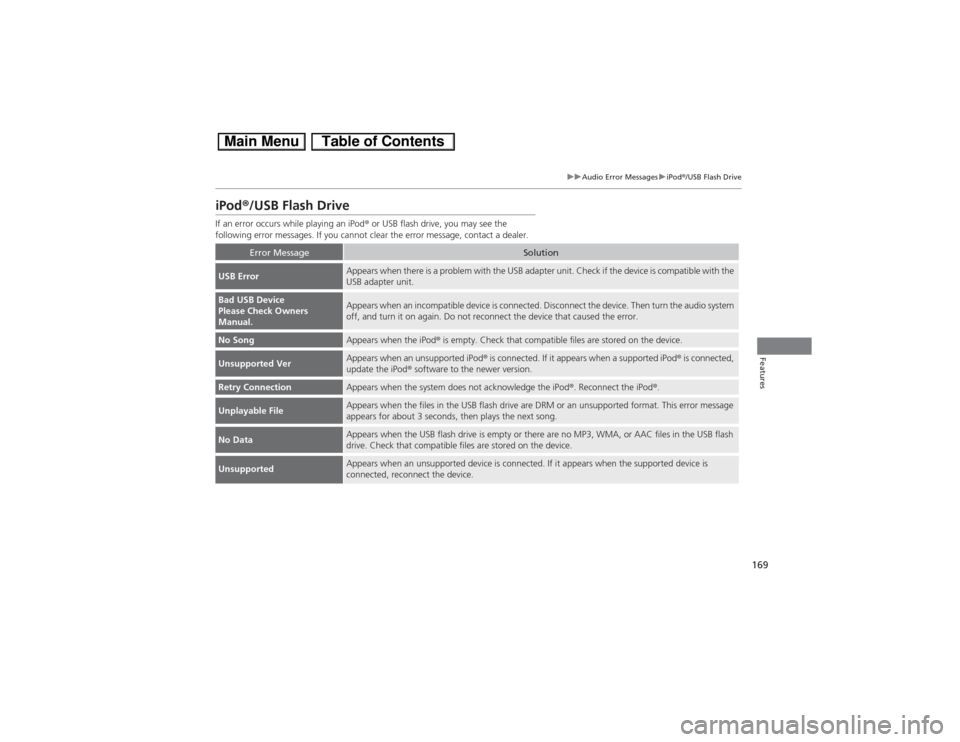
iPod®/USB Flash DriveIf an error occurs while playing an iPod® or USB flash drive, you may see the
following error messages. If you cannot clear the error message, contact a dealer.
Error Message
Solution
USB Error
Appears when there is a problem with the USB adapter unit. Check if the device is compatible with the
USB adapter unit.
Bad USB Device
Please Check Owners
Manual.
Appears when an incompatible device is connected. Disconnect the device. Then turn the audio system
off, and turn it on again. Do not reconnect the device that caused the error.
No Song
Appears when the iPod® is empty. Check that compatible files are stored on the device.
Unsupported Ver
Appears when an unsupported iPod® is connected. If it appears when a supported iPod® is connected,
update the iPod® software to the newer version.
Retry Connection
Appears when the system does not acknowledge the iPod®. Reconnect the iPod®.
Unplayable File
Appears when the files in the USB flash drive are DRM or an unsupported format. This error message
appears for about 3 seconds, then plays the next song.
No Data
Appears when the USB flash drive is empty or there are no MP3, WMA, or AAC files in the USB flash
drive. Check that compatible files are stored on the device.
Unsupported
Appears when an unsupported device is connected. If it appears when the supported device is
connected, reconnect the device.
Page 175 of 346
174
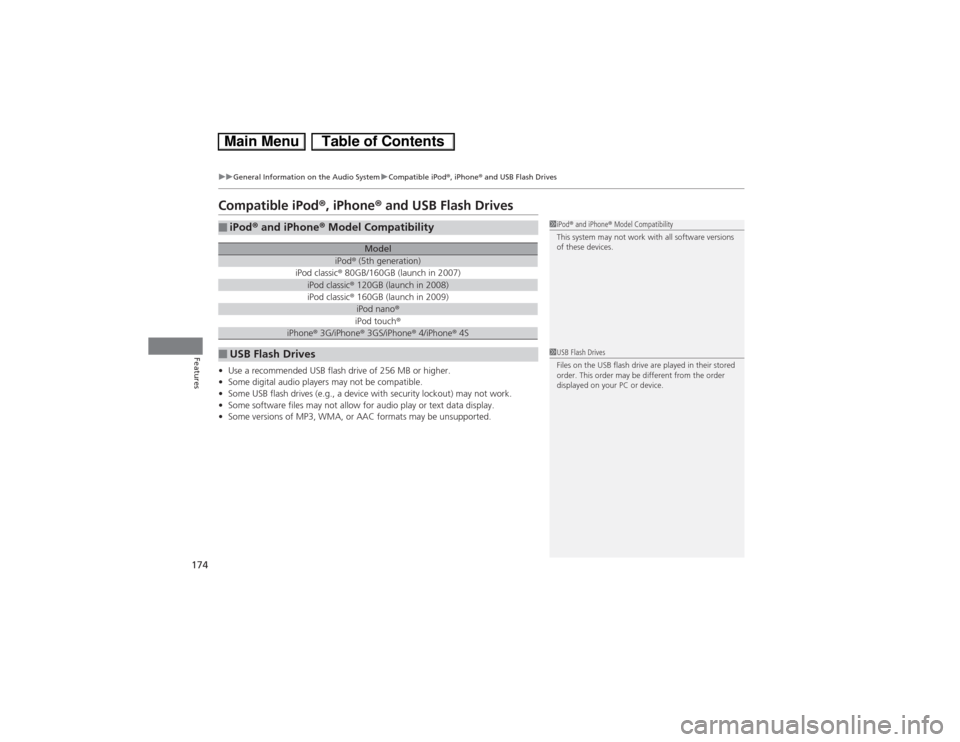
uuGeneral Information on the Audio SystemuCompatible iPod®, iPhone® and USB Flash Drives
Features
Compatible iPod®, iPhone® and USB Flash Drives•Use a recommended USB flash drive of 256 MB or higher.
•Some digital audio players may not be compatible.
•Some USB flash drives (e.g., a device with security lockout) may not work.
•Some software files may not allow for audio play or text data display.
•Some versions of MP3, WMA, or AAC formats may be unsupported.■iPod® and iPhone® Model Compatibility
Model
iPod® (5th generation)
iPod classic® 80GB/160GB (launch in 2007)iPod classic® 120GB (launch in 2008)iPod classic® 160GB (launch in 2009)
iPod nano®iPod touch®
iPhone® 3G/iPhone® 3GS/iPhone® 4/iPhone® 4S
■USB Flash Drives
1iPod® and iPhone® Model Compatibility
This system may not work with all software versions
of these devices.1USB Flash Drives
Files on the USB flash drive are played in their stored
order. This order may be different from the order
displayed on your PC or device.