buttons HONDA CIVIC SEDAN 2012 (in English) User Guide
[x] Cancel search | Manufacturer: HONDA, Model Year: 2012, Model line: CIVIC SEDAN, Model: HONDA CIVIC SEDAN 2012Pages: 345, PDF Size: 53.95 MB
Page 152 of 345
151
uuAudio System Basic Operation*uPlaying a CD
Continued
Features
Playing a CD
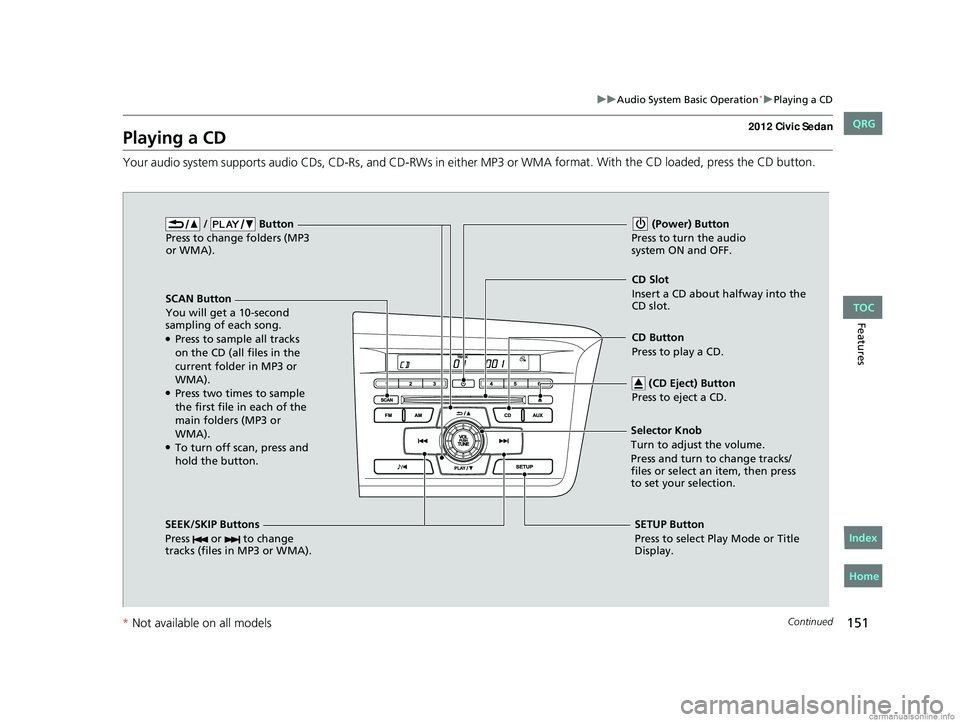
Your audio system supports audio CDs, CD -Rs, and CD-RWs in either MP3 or WMA format. With the CD loaded, press the CD button.
/ Button
Press to change folders (MP3
or WMA).
SCAN Button
You will get a 10-second
sampling of each song.
●Press to sample all tracks
on the CD (all files in the
current folder in MP3 or
WMA).
●Press two times to sample
the first file in each of the
main folders (MP3 or
WMA).
●To turn off scan, press and
hold the button. (Power) Button
Press to turn the audio
system ON and OFF.
CD Slot
Insert a CD about halfway into the
CD slot.
SEEK/SKIP Buttons
Press or to change
tracks (files in MP3 or WMA).
SETUP Button
Press to select Play Mode or Title
Display.
Selector Knob
Turn to adjust the volume.
Press and turn to change tracks/
files or select an item, then press
to set your selection.
CD Button
Press to play a CD.
(CD Eject) Button
Press to eject a CD.
CIVIC 4D-31TR3600.book 151 ページ 2011年2月14日 月曜日 午後2時51分
TOC
Home
QRG
Index
* Not availabl eon allmo dels
Page 157 of 345
156
uuAudio System Basic Operation*uAudio Remote Controls*
Features
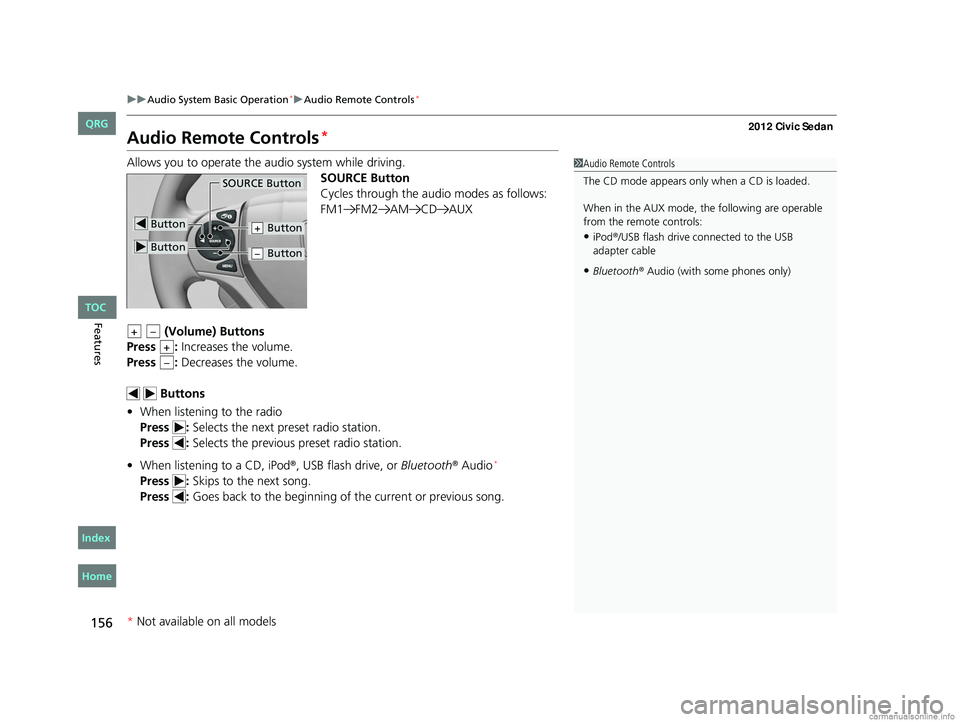
Audio Remote Controls*
Allows you to operate the audio system while driving.
SOURCE Button
Cycles through the audio modes as follows:
FM1 FM2 AM CD AUX
(Volume) Buttons
Press : Increases the volume.
Press : Decreases the volume.
Buttons
• When listening to the radio
Press : Selects the next preset radio station.
Press : Selects the previous preset radio station.
• When listening to a CD, iPod
®, USB flash drive, or Bluetooth® Audio*
Press : Skips to the next song.
Press : Goes back to the beginning of the current or previous song.
1Audio Remote Controls
The CD mode appears only when a CD is loaded.
When in the AUX mode, the following are operable
from the remote controls:
•iPod®/USB flash drive connected to the USB
adapter cable
•Bluetooth® Audio (with some phones only)
Button
SOURCE Button
Button
Button+
Button–
+–
+
–
* Not available on all models
CIVIC 4D-31TR3600.book 156 ページ 2011年2月14日 月曜日 午後2時51分
TOC
Home
QRG
Index
Page 159 of 345
158
uuAudio System Basic Operation*uPlaying the AM/FM Radio
Features
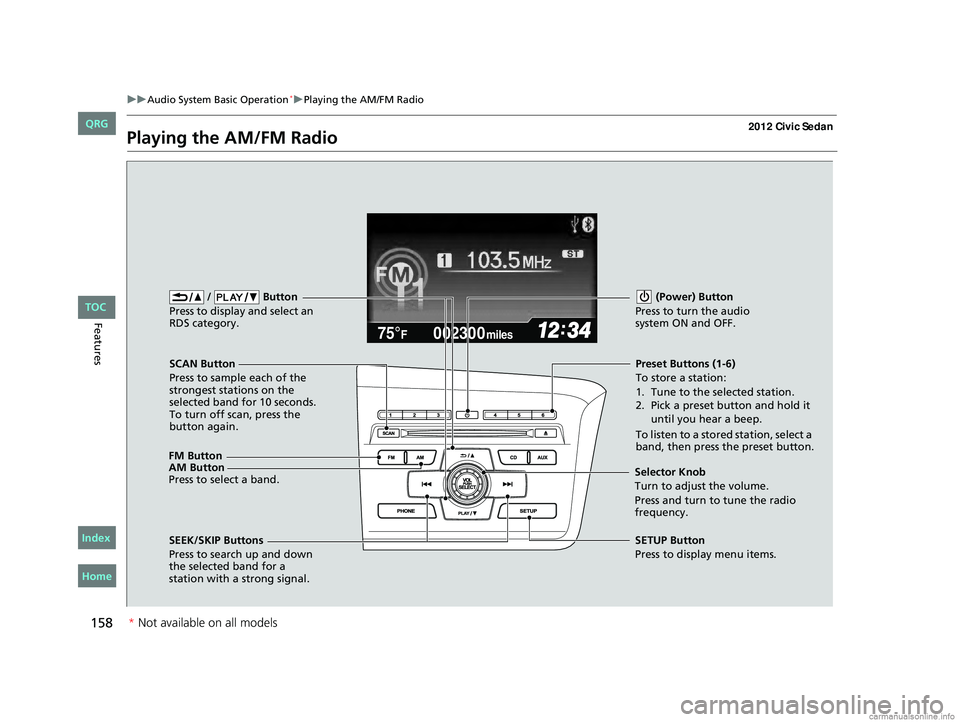
Playing the AM/FM Radio
002300
75°F miles
FM Button / Button
Press to display and select an
RDS category.
SCAN Button
Press to sample each of the
strongest stations on the
selected band for 10 seconds.
To turn off scan, press the
button again. (Power) Button
Press to turn the audio
system ON and OFF.Preset Buttons (1-6)
To store a station:
1. Tune to the selected station.
2. Pick a preset button and hold it until you hear a beep.
To listen to a stored station, select a
band, then press the preset button.
SEEK/SKIP Buttons
Press to search up and down
the selected band for a
station with a strong signal. SETUP Button
Press to display menu items.
Selector Knob
Turn to adjust the volume.
Press and turn to tune the radio
frequency.
AM Button
Press to select a band.
CIVIC 4D-31TR3600.book 158 ページ 2011年2月14日 月曜日 午後2時51分
TOC
Home
QRG
Index
*
Not av ailable on all mo dels
Page 162 of 345
161
uuAudio System Basic Operation*uPlaying a CD
Continued
Features
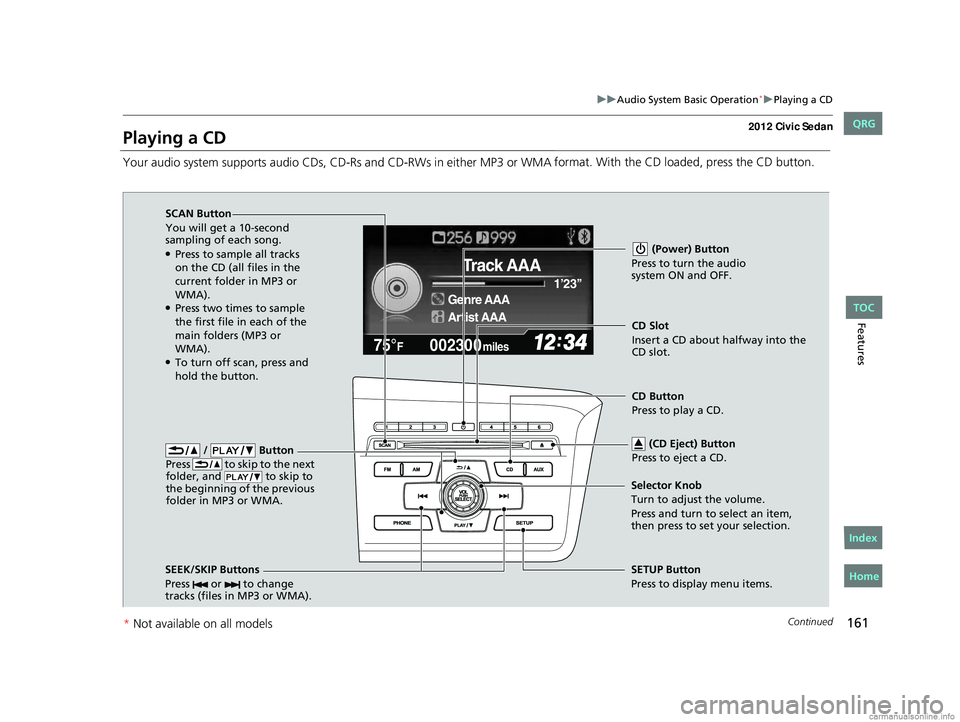
Playing a CD
Your audio system supports audio CDs, CD-Rs and CD-RWs in either MP3 or WMA format. With the CD loaded, press the CD button.
002300
75°F miles
Genre AAA 1’23’’
Track AAA
Artist AAA
/ Button
Press to skip to the next
folder, and to skip to
the beginning of the previous
folder in MP3 or WMA.
SCAN Button
You will get a 10-second
sampling of each song.
●Press to sample all tracks
on the CD (all files in the
current folder in MP3 or
WMA).
●Press two times to sample
the first file in each of the
main folders (MP3 or
WMA).
●To turn off scan, press and
hold the button. (Power) Button
Press to turn the audio
system ON and OFF.
CD Slot
Insert a CD about halfway into the
CD slot.
SEEK/SKIP Buttons
Press or to change
tracks (files in MP3 or WMA).
SETUP Button
Press to display menu items.
Selector Knob
Turn to adjust the volume.
Press and turn to select an item,
then press to set your selection. CD Button
Press to play a CD.
(CD Eject) Button
Press to eject a CD.
CIVIC 4D-31TR3600.book 161 ページ 2011年2月14日 月曜日 午後2時51分
TOC
* Not availabl eon allmo dels
Home
QRG
Index
Page 165 of 345
164
uuAudio System Basic Operation*uPlaying an iPod®
Features
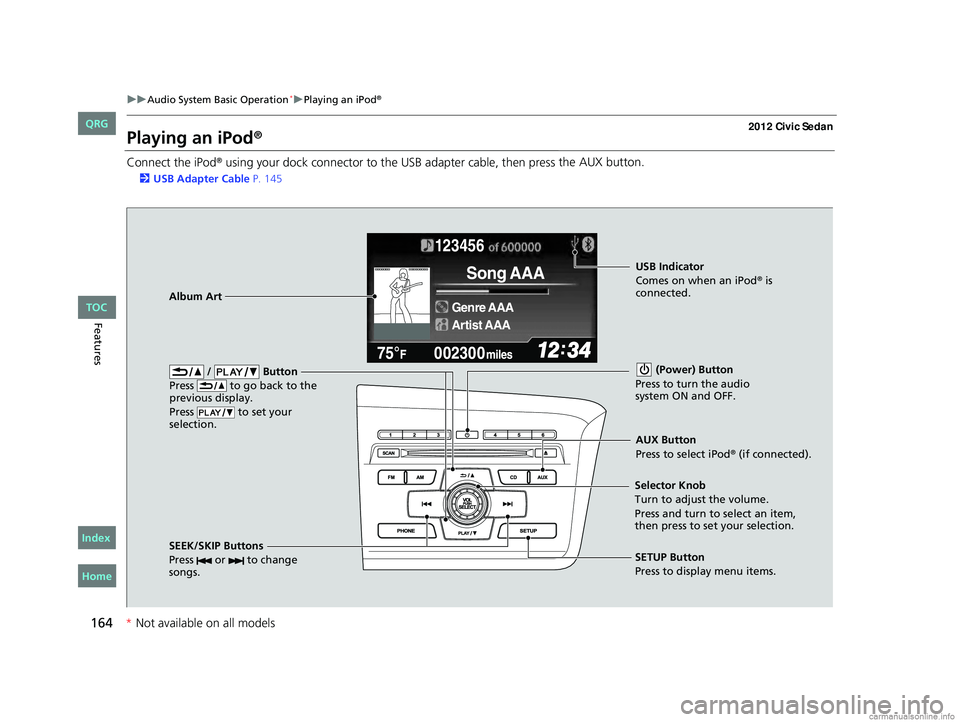
Playing an iPod®
Connect the iPod® using your dock connector to the USB adapter cable, then press the AUX button.
2
USB Adapter Cable P. 145
123456
Genre AAA
Song AAA
Artist AAA
/ Button
Press to go back to the
previous display.
Press to set your
selection. (Power) Button
Press to turn the audio
system ON and OFF.
SEEK/SKIP Buttons
Press or to change
songs.SETUP Button
Press to display menu items.
Selector Knob
Turn to adjust the volume.
Press and turn to select an item,
then press to set your selection.
AUX Button
Press to select iPod® (if connected).
Album Art
USB Indicator
Comes on when an iPod® is
connected.
CIVIC 4D-31TR3600.book 164 ページ 2011年2月14日 月曜日 午後2時51分
TOC
* Not availabl eon allmo dels
Home
QRG
Index
Page 168 of 345
167
uuAudio System Basic Operation*uPlaying a USB Flash Drive
Continued
Features
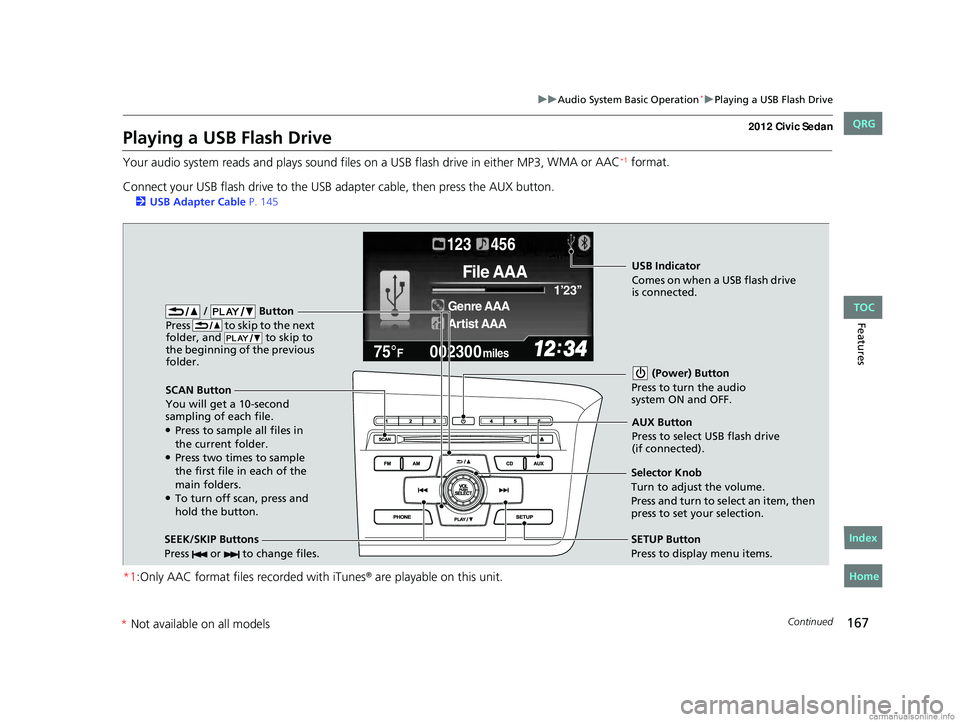
Playing a USB Flash Drive
Your audio system reads and plays sound files on a USB flash drive in either MP3, WMA or AAC*1 format.
Connect your USB flash drive to the USB adapter cable, then press the AUX button.
2 USB Adapter Cable P. 145
*1:Only AAC format files recorded with iTunes® are playable on this unit.
002300
75°F miles
Genre AAA 1’23’’
File AAA
Artist AAA
123 456
/ Button
Press to skip to the next
folder, and to skip to
the beginning of the previous
folder.
SCAN Button
You will get a 10-second
sampling of each file.
●Press to sample all files in
the current folder.
●Press two times to sample
the first file in each of the
main folders.
●To turn off scan, press and
hold the button. (Power) Button
Press to turn the audio
system ON and OFF.
SEEK/SKIP Buttons
Press or to change files.SETUP Button
Press to display menu items.
Selector Knob
Turn to adjust the volume.
Press and turn to select an item, then
press to set your selection. AUX Button
Press to select USB flash drive
(if connected).
USB Indicator
Comes on when a USB flash drive
is connected.
CIVIC 4D-31TR3600.book 167 ページ 2011年2月14日 月曜日 午後2時51分
TOC
*
Not available on all models
Home
QRG
Index
Page 171 of 345
170
uuAudio System Basic Operation*uPlaying Bluetooth® Audio
Features
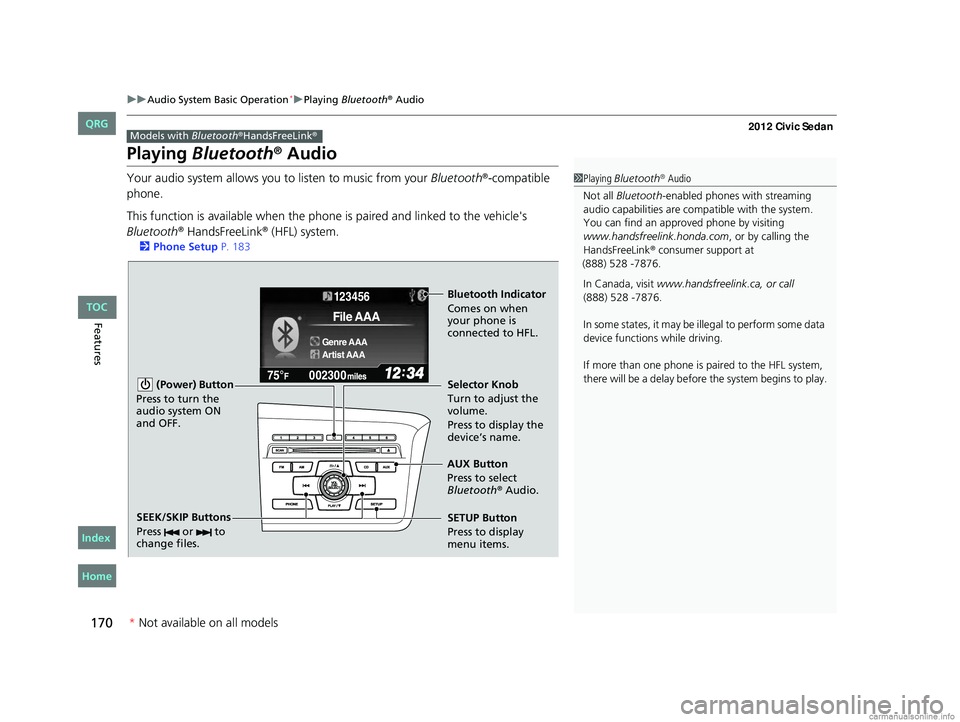
Playing Bluetooth® Audio
Your audio system allows you to listen to music from your Bluetooth®-compatible
phone.
This function is available when the phone is paired and linked to the vehicle's
Bluetooth
® HandsFreeLink® (HFL) system.
2 Phone Setup P. 183
Models with Bluetooth®HandsFreeLink®
1Playing Bluetooth® Audio
Not all Bluetooth -enabled phones with streaming
audio capabilities are compatible with the system.
You can find an appr oved phone by visiting
www.handsfreelink.honda.com , or by calling the
HandsFreeLink
® consumer support at
(888) 528 -7876.
In Canada, visit www.handsfreelink.ca, or call
(888) 528 -7876.
In some states, it may be illegal to perform some data
device functions while driving.
If more than one phone is paired to the HFL system,
there will be a delay before the system begins to play.
123456
Genre AAA
File AAA
Artist AAA
(Power) Button
Press to turn the
audio system ON
and OFF.
SETUP Button
Press to display
menu items. Selector Knob
Turn to adjust the
volume.
Press to display the
device’s name.
AUX Button
Press to select
Bluetooth
® Audio.
SEEK/SKIP Buttons
Press or to
change files.
Bluetooth Indicator
Comes on when
your phone is
connected to HFL.
CIVIC 4D-31TR3600.book 170 ページ 2011年2月14日 月曜日 午後2時51分
* Not available on all models
TOC
Home
QRG
Index
Page 178 of 345
177Continued
Features
Bluetooth® HandsFreeLink®*
For models with the navigation system, see Navigation System Manual for how to
operate the Bluetooth® HandsFreeLink®.
Bluetooth
® HandsFreeLink® (HFL) allows you to place and receive phone calls using
your vehicle's audio system, without handling your cell phone.
Using HFL
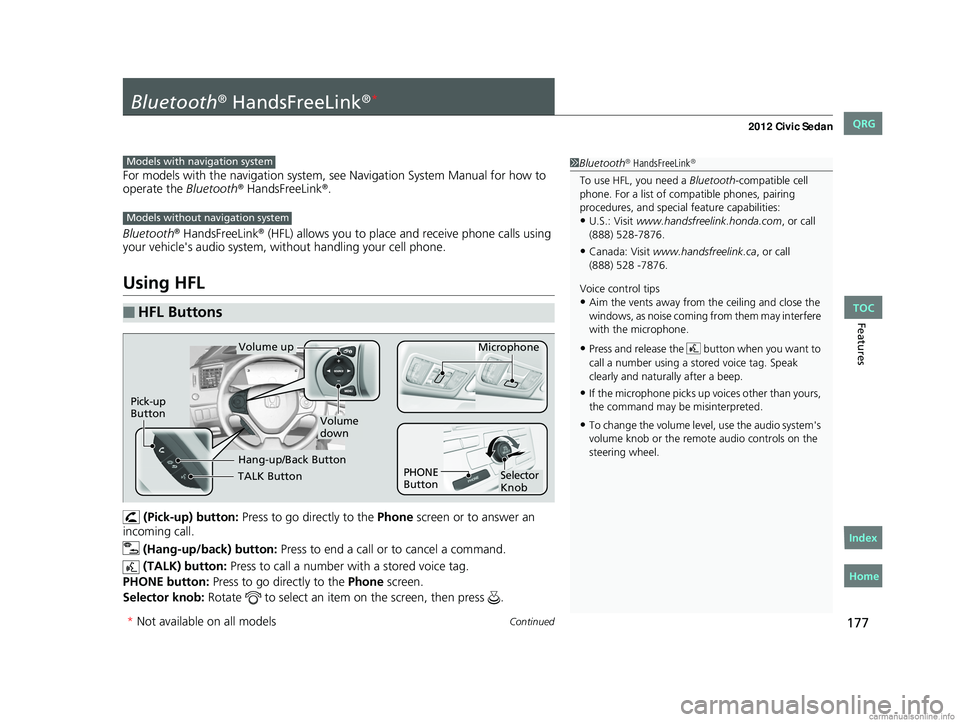
(Pick-up) button: Press to go directly to the Phone screen or to answer an
incoming call.
(Hang-up/back) button: Press to end a call or to cancel a command.
(TALK) button: Press to call a number with a stored voice tag.
PHONE button: Press to go directly to the Phone screen.
Selector knob: Rotate to select an item on the screen, then press .
■HFL Buttons
1Bluetooth® HandsFreeLink®
To use HFL, you need a Bluetooth-compatible cell
phone. For a list of compatible phones, pairing
procedures, and special feature capabilities:
•U.S.: Visit www.handsfreelink.honda.com , or call
(888) 528-7876.
•Canada: Visit www.handsfreelink.ca , or call
Voice control tips
•Aim the vents away from the ceiling and close the
windows, as noise coming fr om them may interfere
with the microphone.
•Press and release the button when you want to
call a number using a st ored voice tag. Speak
clearly and naturally after a beep.
•If the microphone picks up vo ices other than yours,
the command may be misinterpreted.
•To change the volume level, use the audio system's
volume knob or the remote audio controls on the
steering wheel.
Models with navigation system
Models without navigation system
TALK Button
Volume up Microphone
Hang-up/Back Button
Pick-up
Button
Volume
down
Selector
Knob
PHONE
Button
* Not available on all models
CIVIC 4D-31TR3600.book 177 ページ 2011年2月14日 月曜日 午後2時51分
TOC
Home
QRG
Index
(888) 528 -7876.
Page 193 of 345
uuBluetooth® HandsFreeLink®*uHFL Menus
192
Features
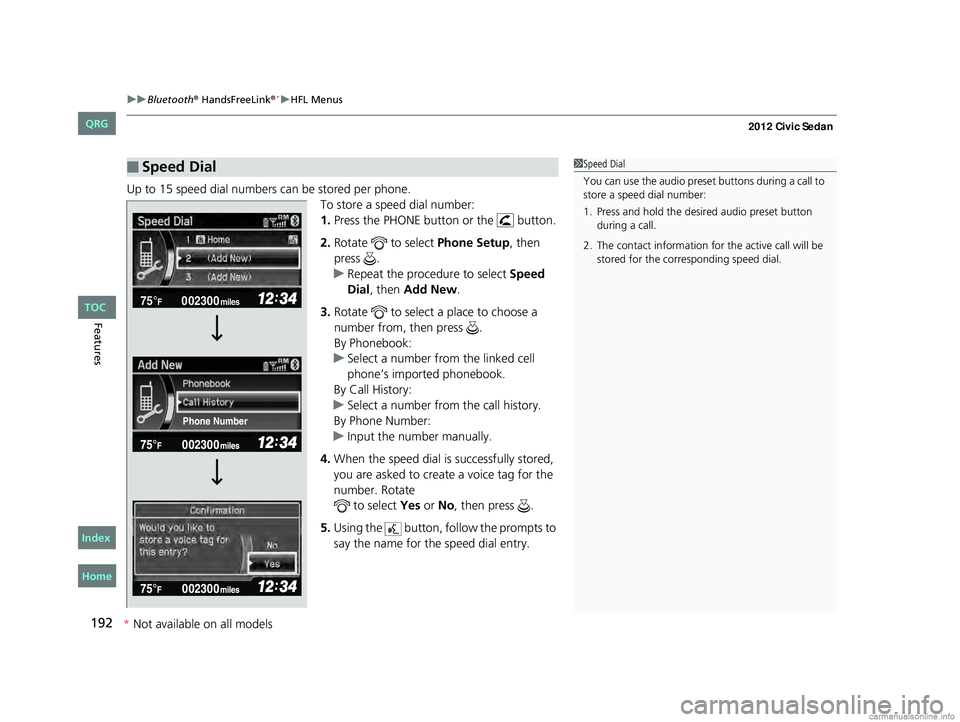
Up to 15 speed dial numbers can be stored per phone.
To store a speed dial number:
1.Press the PHONE button or the button.
2. Rotate to select Phone Setup, then
press .
u Repeat the procedure to select Speed
Dial, then Add New.
3. Rotate to select a place to choose a
number from, then press .
By Phonebook:
u Select a number from the linked cell
phone’s imported phonebook.
By Call History:
u Select a number from the call history.
By Phone Number:
u Input the number manually.
4. When the speed dial is successfully stored,
you are asked to create a voice tag for the
number. Rotate to select Yes or No, then press .
5. Using the button, fo llow the prompts to
say the name for the speed dial entry.
■Speed Dial1 Speed Dial
You can use the audio preset buttons during a call to
store a speed dial number:
1. Press and hold the desired audio preset button during a call.
2. The contact information for the active call will be stored for the corresponding speed dial.
002300
75°F miles
Phone Number
CIVIC 4D-31TR3600.book 192 ページ 2011年2月14日 月曜日 午後2時51分
*Not available on all models
TOC
Home
QRG
Index
Page 199 of 345
uuBluetooth® HandsFreeLink®*uHFL Menus
198
Features
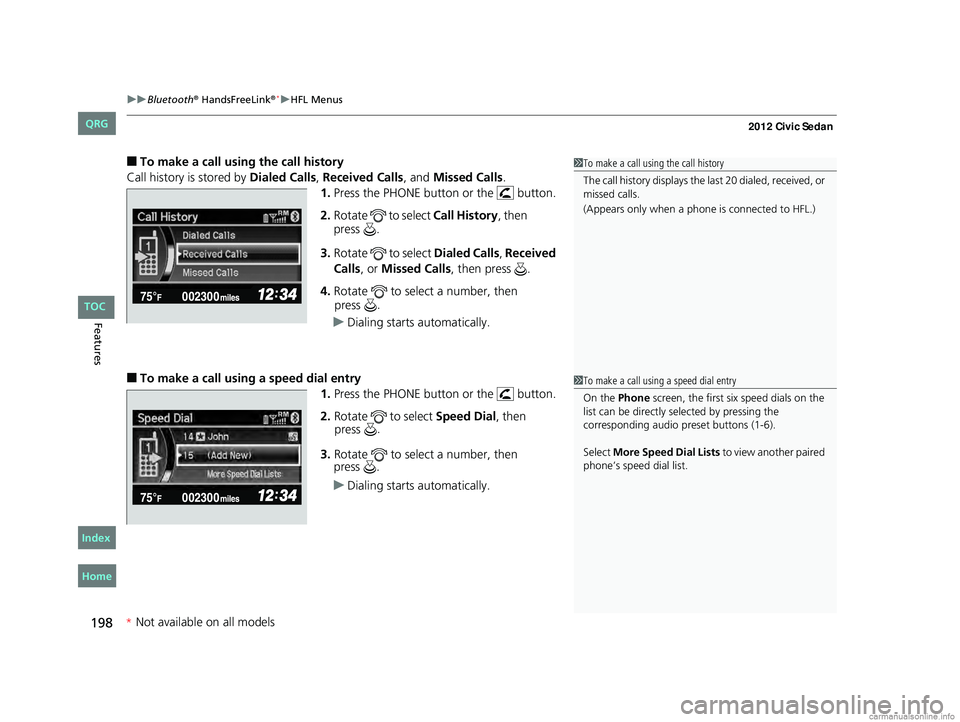
■To make a call usin g the call history
Call history is stored by Dialed Calls , Received Calls, and Missed Calls .
1. Press the PHONE button or the button.
2. Rotate to select Call History, then
3. Rotate to select Dialed Calls , Received
Calls , or Missed Calls, then press .
4. Rotate to select a number, then
u Dialing starts automatically.
■To make a call using a speed dial entry
1.Press the PHONE button or the button.
2. Rotate to select Speed Dial, then
3. Rotate to select a number, then
u Dialing starts automatically.
1To make a call using the call history
The call history disp lays the last 20 dialed, received, or
missed calls.
(Appears only when a phone is connected to HFL.)
1 To make a call using a speed dial entry
On the Phone screen, the first six speed dials on the
list can be directly selected by pressing the
corresponding audio preset buttons (1-6).
Select More Speed Dial Lists to view another paired
phone’s speed dial list.
CIVIC 4D-31TR3600.book 198 ページ 2011年2月14日 月曜日 午後2時51分
* Not available on all models
TOC
Home
QRG
Index
press
.
press .
press .
press .