Display panel HONDA CIVIC SEDAN 2012 Owner's Manual (in English)
[x] Cancel search | Manufacturer: HONDA, Model Year: 2012, Model line: CIVIC SEDAN, Model: HONDA CIVIC SEDAN 2012Pages: 345, PDF Size: 53.95 MB
Page 1 of 345
Contents
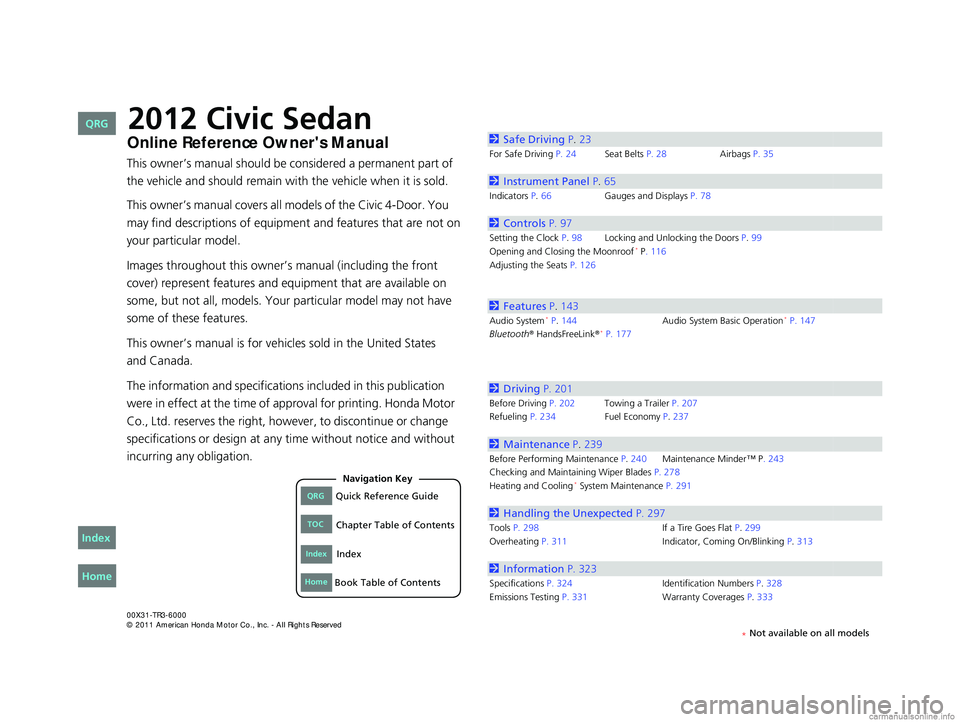
This owner’s manual should be considered a permanent part of
the vehicle and should remain with the vehicle when it is sold.
This owner’s manual covers all models of the Civic 4-Door. You
may find descriptions of equipment and features that are not on
your particular model.
Images throughout this owner’s manual (including the front
cover) represent features and equipment that are available on
some, but not all, models. Your particular model may not have
some of these features.
This owner’s manual is for vehicles sold in the United States
The information and specifications included in this publication
were in effect at the time of approval for printing. Honda Motor
Co., Ltd. reserves the right, however, to discontinue or change
specifications or design at any time without notice and without
incurring any obligation.
2Safe Driving P.23
For Safe Driving P. 24 Seat Belts P. 28Airbags P. 35
2Instrument Panel P. 65
Indicators P.66 Gauges and Displays P. 78
2Controls P. 97
Setting the Clock P. 98Locking and Unlocking the Doors P. 99
Opening and Closing the Moonroof* P. 116
Adjusting the Seats P. 126
2Features P. 143
Audio System* P. 144 Audio System Basic Operation* P. 147
Bluetooth® HandsFreeLink®* P. 177
2 Driving P. 201
Before Driving P. 202 Towing a Trailer P. 207
Refueling P. 234 Fuel Economy P.237
2Maintenance P. 239
Before Performing Maintenance P. 240Maintenance Minder™ P. 243
Checking and Maintaining Wiper Blades P. 278
Heating and Cooling
* System Maintenance P. 291
2 Handling the Unexpected P. 297
Tools P. 298 If a Tire Goes Flat P.299
Overheating P. 311 Indicator, Coming On/Blinking P.313
2Information P. 323
Specifications P. 324 Identification Numbers P. 328
Emissions Testing P. 331 Warranty Coverages P.333
CIVIC 4D-31TR3600.book 0 ページ 2011年2月14日 月曜日 午後2時51分
QRGQuick Reference Guide
IndexIndex
HomeBook Table of Contents
TOCChapter Table of Contents
Navigation Key
2012 Civic Sedan
* Not available on all models
Home
QRG
Index
and Canada.Online Reference Owner's Manual
Page 10 of 345
9
Quick Reference Guide - 2012 Civic SedanInstrument Panel (P 65)
U. S.
Canada
U. S.
Canada
Syste m In di ca tor s
Malfu nction
In dica to r Lam p
Low Oil Pressure
In dica to r
Ch argi ng S yst em
In dica to r
A nti-lo ck Brak e
S ystem (ABS)
In dica to r
Veh icle Stability
A ssist (VSA
®) Syst em
In dica to r
VSA
® OFF In dicator
Low Tire Pressure
Indicator
*/
Low Tire Pressure/
TPMS Ind icator
*
Elec tr ic Power
Steering (EPS)
In dicato r
Ligh ts R emi nd ers
Ligh ts On In dicator
Hig h B eam In dicato r
F o g L igh t In dicato r
*
Imm ob ilizer Sys tem
Ind icator Seat Belt R
eminder
In dicato r
System Indicat ors
Cru ise Con trol
Ind icator*
Sy stem Message
Ind icator*
Parking Brake
and Brake Syst em
Ind icator S
upp lemental
Re straint Syst em
Ind icator
Side Ai rb ag Off
Ind icator
Doo r Op en In dicato r
Cruise M ain Indic ator
*
T acho meter Instant Fuel
Econ
omy G aug e
*
Speed om et er
Fu el Gau ge
S e curity Alarm
S y stem Indica to r
*Shi ft Lever Position Indicator*
Lo w Fu el In dicat or
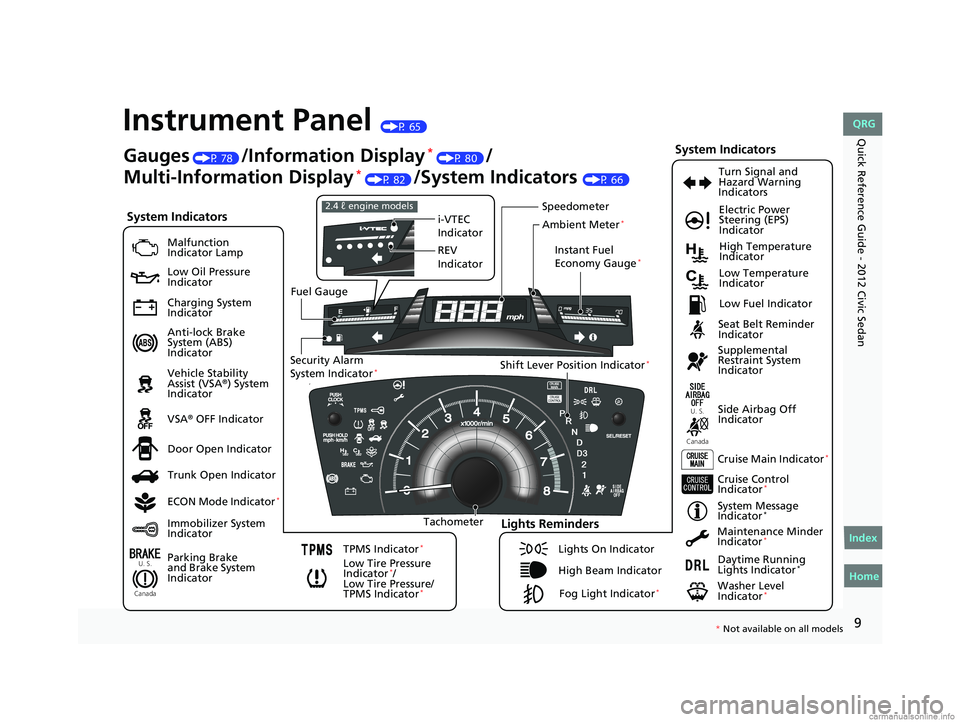
Gauges (P 78 )/Information Display* (P 80)/
Multi-Information Display
* (P 82 )/System Indicators (P 66)
Trunk Open In dicator
ECO N M ode Indicato r
*
TPMS Ind icator*
T u rn Sign al and
H aza rd Warning
In dic ators
H ig h Te mperat ur e
In dicato r
Low Te mperatu re
In dicato r
M aintena nce Minder
Ind icator
*
Dayti me Ru nnin g
Lights Indicator*
Wash er Level
Ind icator*
i- VTEC
I ndic ator
RE V
I ndic ator
2. 4 ℓ engi ne mod els
A m bient Meter*
* No t avai lable on all m odel s
CIVI C 4D-31TR3600.book 9 ペー ジ 20 11年2月14日 月曜日 午後2時51分
Home
QRG
Index
Page 66 of 345
65
Instrument Panel
This chapter describes the buttons, indicators, and gauges that are used while driving.
Indicators............................................ 66
Multi-Information Display Warning and Information Messages
*.................... 76
Gauges and Displays
Gauges .............................................. 78
Information Display
*.......................... 80
Multi-Information Display*................. 82
* Not available on all models
CIVIC 4D-31TR3600.book 65 ページ 2011年2月14日 月曜日 午後2時51分
Home
QRG
Index 2012 Civic Sedan
Page 72 of 345
71
uuIndicatorsu
Continued
Instrument Panel
IndicatorNameOn/BlinkingExplanationMessage*
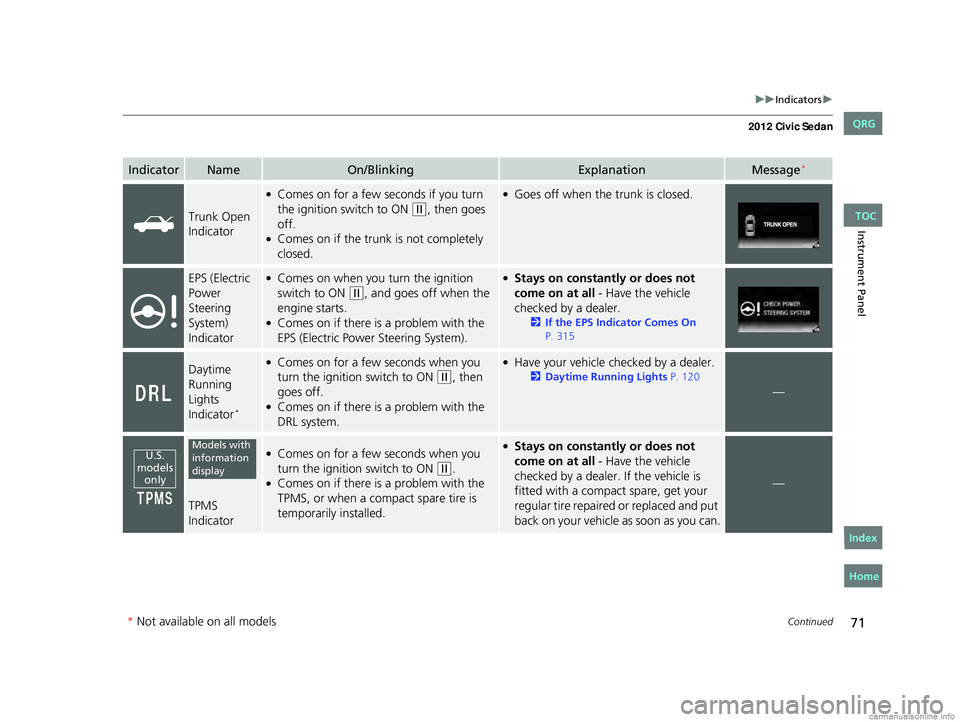
Trunk Open
Indicator
●Comes on for a few seconds if you turn
the ignition switch to ON (w, then goes
off.●Comes on if the trunk is not completely
closed.
●Goes off when the trunk is closed.
EPS (Electric
Power
Steering
System)
Indicator
●Comes on when you turn the ignition
switch to ON (w, and goes off when the
engine starts.●Comes on if there is a problem with the
EPS (Electric Power Steering System).
●Stays on constantly or does not
come on at all - Have the vehicle
checked by a dealer.
2If the EPS Indicator Comes On
P. 315
Daytime
Running
Lights
Indicator*
●Comes on for a few seconds when you
turn the ignition switch to ON (w, then
goes off.●Comes on if there is a problem with the
DRL system.
●Have your vehicle checked by a dealer.
2Daytime Running Lights P. 120
—
TPMS
Indicator
●Comes on for a few seconds when you
turn the ignition switch to ON (w.●Comes on if there is a problem with the
TPMS, or when a compact spare tire is
temporarily installed.
●Stays on constantly or does not
come on at all - Have the vehicle
checked by a dealer. If the vehicle is
fitted with a compact spare, get your
regular tire repaired or replaced and put
back on your vehicle as soon as you can.
—
U.S. models only
Models with information display
* Not available on all models
CIVIC 4D-31TR3600.book 71 ページ 2011年2月14日 月曜日 午後2時51分
TOC
Home
QRG
Index
Page 73 of 345
72
uuIndicators u
Instrument Panel
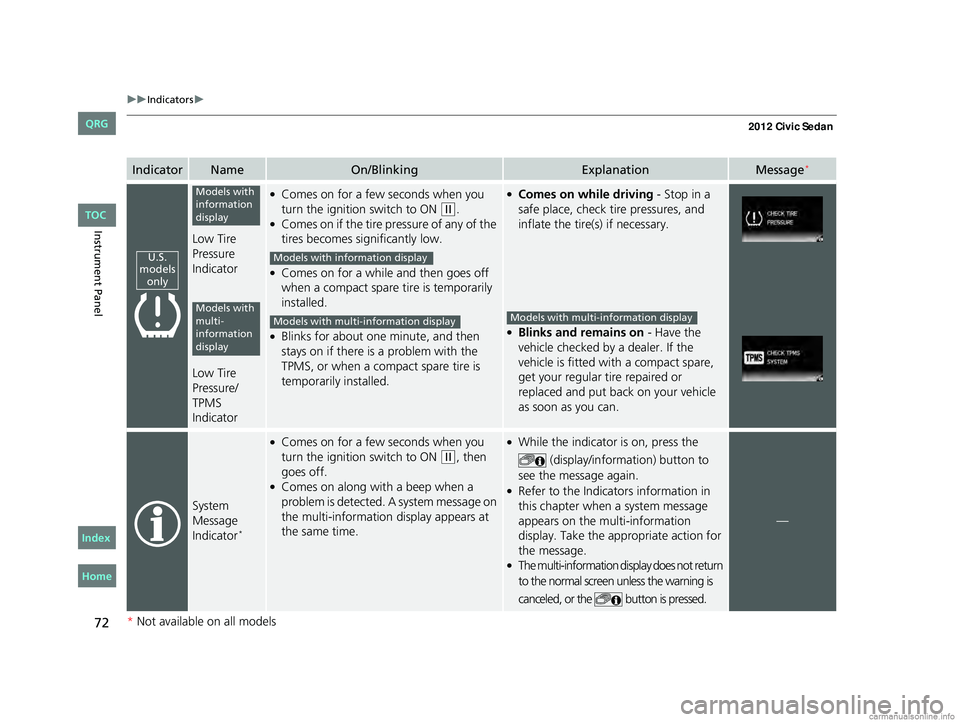
IndicatorNameOn/BlinkingExplanationMessage*
Low Tire
Pressure
Indicator
Low Tire
Pressure/
TPMS
Indicator
●Comes on for a few seconds when you
turn the ignition switch to ON
(w.●Comes on if the tire pressure of any of the
tires becomes significantly low.
●Comes on for a while and then goes off
when a compact spare tire is temporarily
installed.
●Blinks for about one minute, and then
stays on if there is a problem with the
TPMS, or when a comp act spare tire is
temporarily installed.
●Comes on while driving - Stop in a
safe place, check tire pressures, and
inflate the tire(s) if necessary.
●Blinks and remains on - Have the
vehicle checked by a dealer. If the
vehicle is fitted with a compact spare,
get your regular tire repaired or
replaced and put back on your vehicle
as soon as you can.
System
Message
Indicator
*
●Comes on for a few seconds when you
turn the ignition switch to ON
(w, then
goes off.
●Comes on along with a beep when a
problem is detected. A system message on
the multi-information display appears at
the same time.
●While the indicator is on, press the
(display/information) button to
see the message again.
●Refer to the Indicators information in
this chapter when a system message
appears on the multi-information
display. Take the appropriate action for
the message.
●The multi-information display does not return
to the normal screen unless the warning is
canceled, or the button is pressed.
—
U.S.
models only
Models with
information
display
Models with
multi-
information
display
Models with info rmation display
Models with multi- information displayModels with multi-information display
* Not available on all models
CIVIC 4D-31TR3600.book 72 ページ 2011年2月14日 月曜日 午後2時51分
TOC
Home
QRG
Index
Page 77 of 345
76
uuIndicators uMulti-Information Display Warn ing and Information Messages*
Instrument Panel
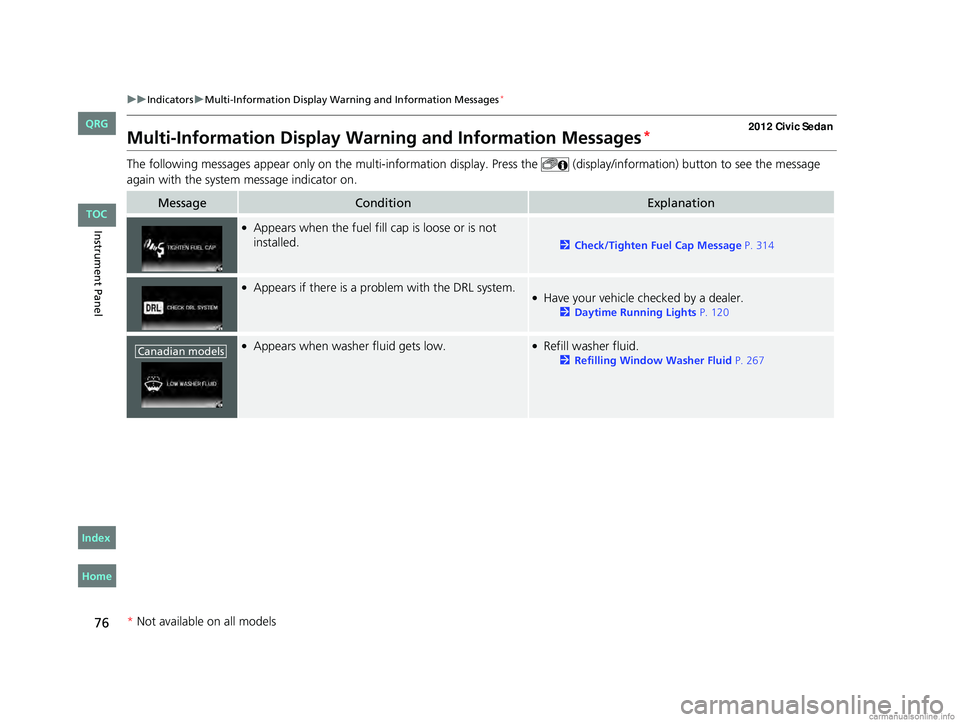
Multi-Information Display Warn ing and Information Messages*
The following messages appear only on the mu lti-information display. Press the (display/information) button to see the message
again with the system message indicator on.
MessageConditionExplanation
●Appears when the fuel fill cap is loose or is not
installed.
2Check/Tighten Fuel Cap Message P. 314
●Appears if there is a problem with the DRL system.●Have your vehicle checked by a dealer.
2Daytime Running Lights P. 120
●Appears when washer fluid gets low.●Refill washer fluid.
2Refilling Window Washer Fluid P. 267Canadian models
* Not available on all models
CIVIC 4D-31TR3600.book 76 ページ 2011年2月14日 月曜日 午後2時51分
TOC
Home
QRG
Index
Page 78 of 345
77
uuIndicators uMulti-Information Display Warn ing and Information Messages*
Instrument Panel
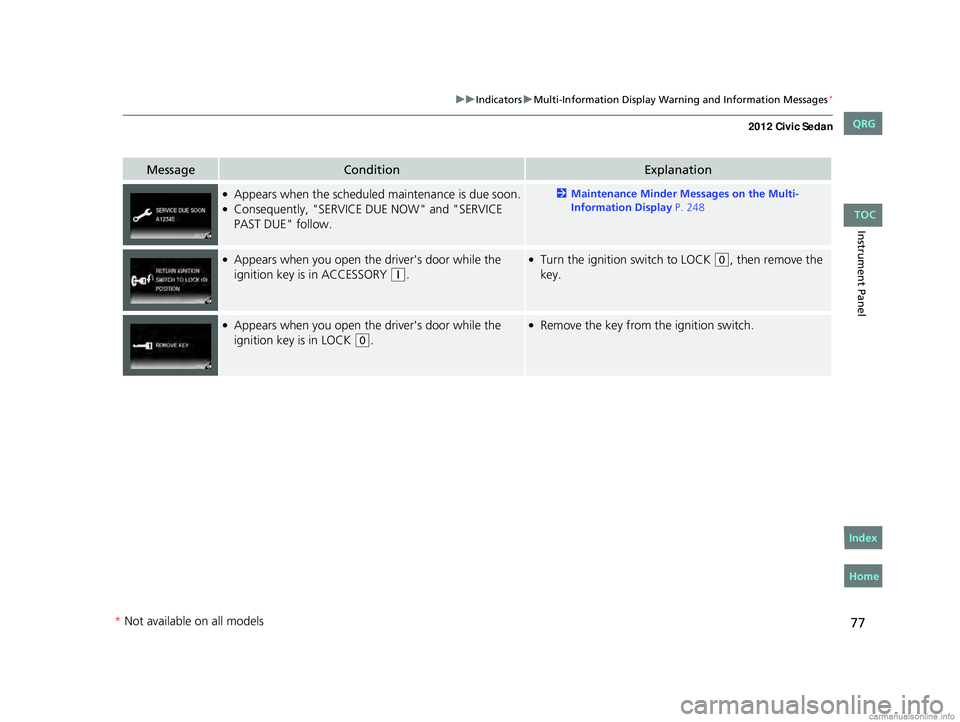
MessageConditionExplanation
●Appears when the scheduled maintenance is due soon.●Consequently, "SERVICE DUE NOW" and "SERVICE
PAST DUE" follow.
2Maintenance Minder Messages on the Multi-
Information Display P. 248
●Appears when you open the driver's door while the
ignition key is in ACCESSORY
(q.
●Turn the ignition switch to LOCK (0, then remove the
key.
●Appears when you open the driver's door while the
ignition key is in LOCK
(0.
●Remove the key from th e ignition switch.
CIVIC 4D-31TR3600.book 77 ページ 2011年2月14日 月曜日 午後2時51分
TOC
Home
QRG
Index
* Not av ailable on all mo dels
Page 79 of 345
78
Instrument Panel
Gauges and Displays
Gauges
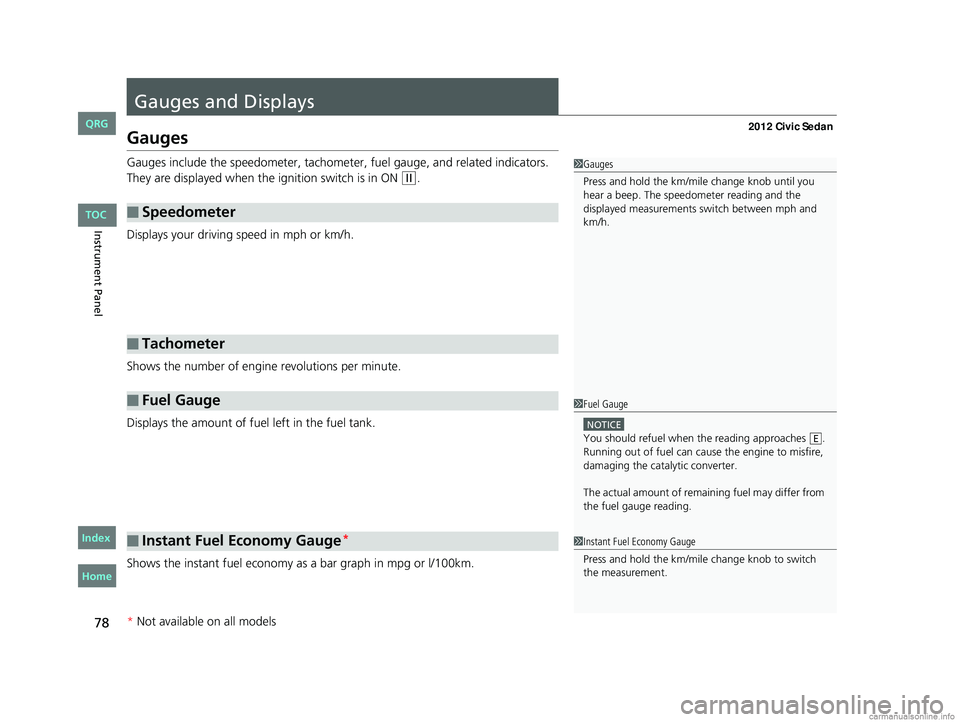
Gauges include the speedometer, tachometer, fuel gauge, and related indicators.
They are displayed when the ignition switch is in ON
(w.
Displays your driving speed in mph or km/h.
Shows the number of engine revolutions per minute.
Displays the amount of fuel left in the fuel tank.
Shows the instant fuel economy as a bar graph in mpg or l/100km.
■Speedometer
■Tachometer
■Fuel Gauge
■Instant Fuel Economy Gauge*
1 Gauges
Press and hold the km/mil e change knob until you
hear a beep. The speedometer reading and the
displayed measurements switch between mph and
km/h.
1 Fuel Gauge
NOTICE
You should refuel when the reading approaches .
Running out of fuel can cause the engine to misfire,
damaging the cata lytic converter.
The actual amount of remain ing fuel may differ from
the fuel gauge reading.E
1 Instant Fuel Economy Gauge
Press and hold the km/mile change knob to switch
the measurement.
* Not available on all models
CIVIC 4D-31TR3600.book 78 ページ 2011年2月14日 月曜日 午後2時51分
TOC
Home
QRG
Index
Page 80 of 345
79
uuGauges and Displays uGauges
Instrument Panel
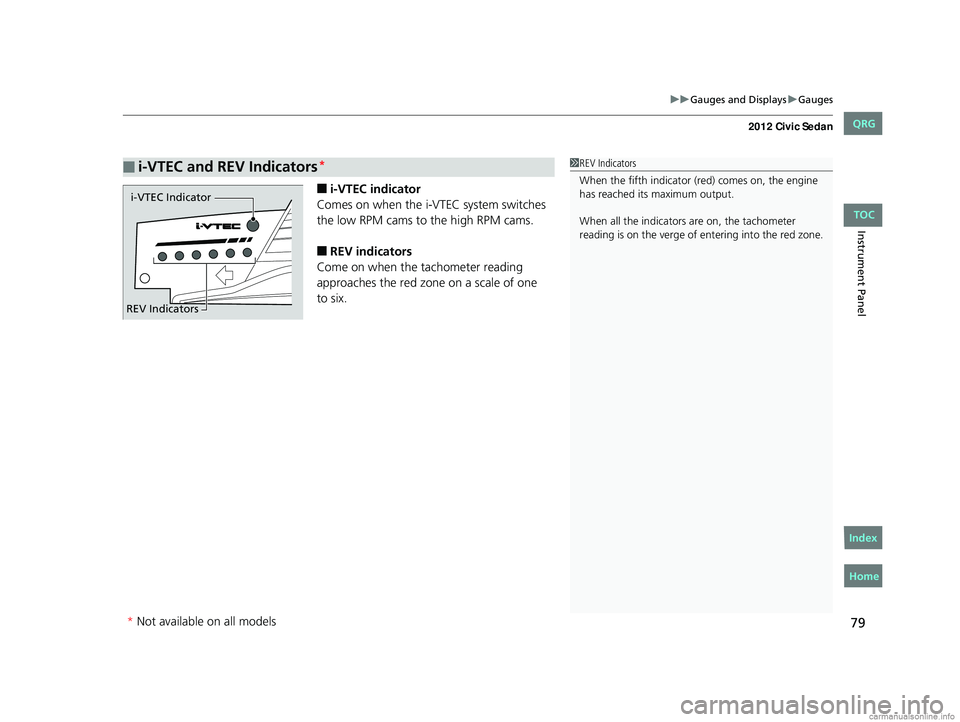
■i-VTEC indicator
Comes on when the i-VTEC system switches
the low RPM cams to the high RPM cams.
■REV indicators
Come on when the tachometer reading
approaches the red zone on a scale of one
■i-VTEC and REV Indicators*1 REV Indicators
When the fifth indicator (red) comes on, the engine
has reached its maximum output.
When all the indicators are on, the tachometer
reading is on the verge of entering into the red zone.
i-VTEC Indicator
REV Indicators
* Not available on all models
CIVIC 4D-31TR3600.book 79 ページ 2011年2月14日 月曜日 午後2時51分
TOC
Home
QRG
Index
to six.
Page 81 of 345
80
uuGauges and Displays uInformation Display*
Instrument Panel
Information Display*
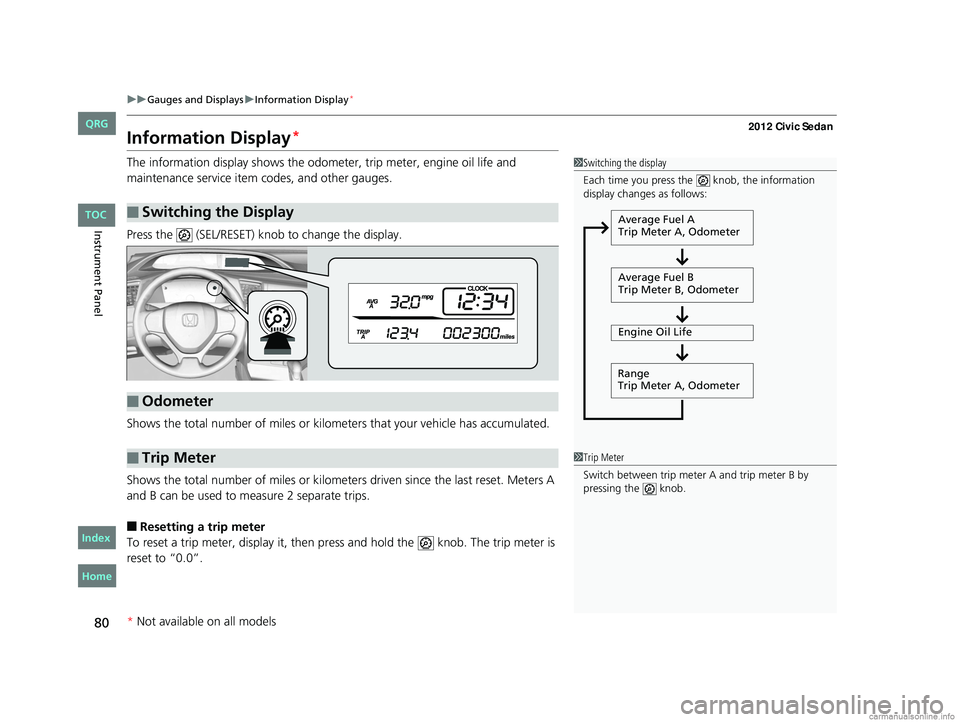
The information display shows the odome ter, trip meter, engine oil life and
maintenance service item codes, and other gauges.
Press the (SEL/RESET) knob to change the display.
Shows the total number of miles or kilome ters that your vehicle has accumulated.
Shows the total number of miles or kilomete rs driven since the last reset. Meters A
and B can be used to measure 2 separate trips.
■Resetting a trip meter
To reset a trip meter, display it, then pr ess and hold the knob. The trip meter is
reset to “0.0”.
■Switching the Display
1 Switching the display
Each time you press the knob, the information
display changes as follows:
Average Fuel A
Trip Meter A, Odometer
Average Fuel B
Trip Meter B, Odometer
Engine Oil Life
Range
Trip Meter A, Odometer
■Odometer
■Trip Meter1 Trip Meter
Switch between trip meter A and trip meter B by
pressing the knob.
* Not available on all models
CIVIC 4D-31TR3600.book 80 ページ 2011年2月14日 月曜日 午後2時51分
TOC
Home
QRG
Index