phone HONDA CIVIC SEDAN 2019 Owner's Manual (in English)
[x] Cancel search | Manufacturer: HONDA, Model Year: 2019, Model line: CIVIC SEDAN, Model: HONDA CIVIC SEDAN 2019Pages: 679, PDF Size: 40.24 MB
Page 23 of 679
21
Quick Reference Guide
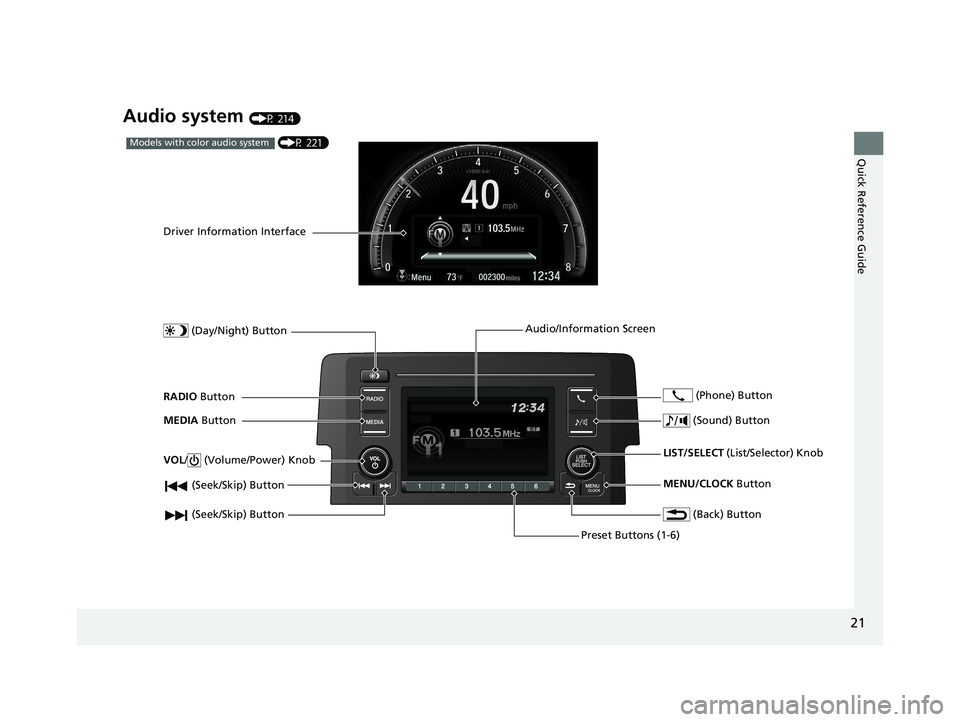
Audio system (P 214)
(P 221)Models with color audio system
(Seek/Skip) Button
RADIO Button
Driver Information Interface
(Day/Night) Button
MEDIA Button
Preset Buttons (1-6)
(Seek/Skip) Button
VOL
/ (Volume/Power) Knob
Audio/Information Screen
(Back) Button
(Sound) Button
MENU/CLOCK Button
LIST/SELECT
(List/Selector) Knob
(Phone) Button
19 CIVIC 4D HCM_HMIN_J (KA KL KC)-31TBA6301.book 21 ページ 2018年10月26日 金曜日 午前7時42分
Page 24 of 679
22
Quick Reference Guide
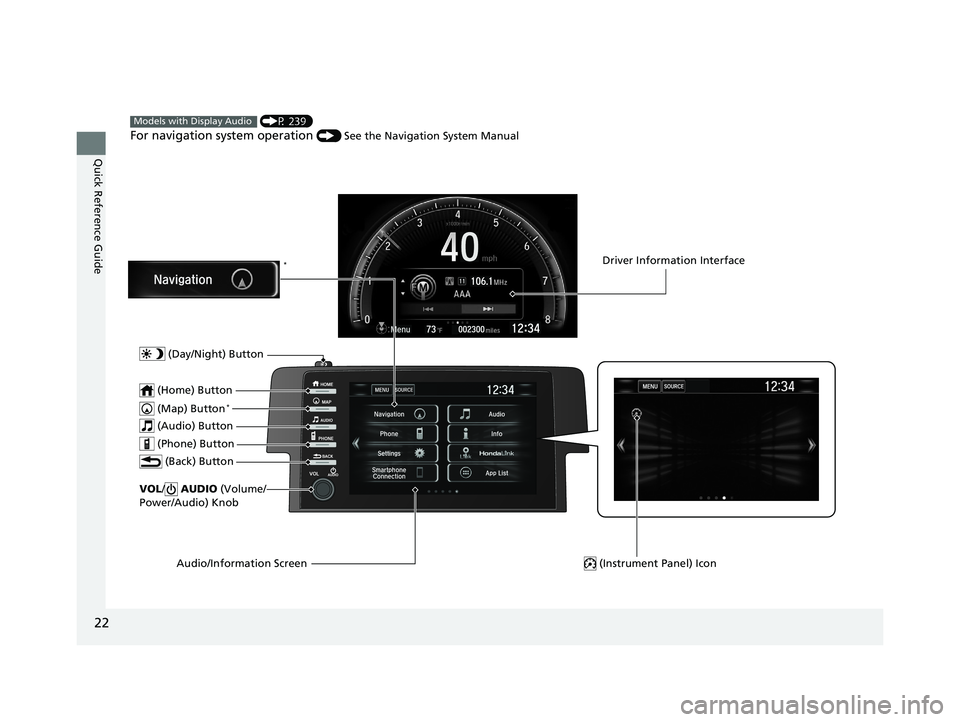
(P 239)
For navigation system operation () See the Navigation System Manual
Models with Display Audio
(Map) Button*
VOL/ AUDIO (Volume/
Power/Audio) Knob
(Home) Button
(Back) Button
Audio/Information Screen
(Audio) Button
Driver Information Interface
(Instrument Panel) Icon
(Day/Night) Button
*
(Phone) Button
19 CIVIC 4D HCM_HMIN_J (KA KL KC)-31TBA6301.book 22 ページ 2018年10月26日 金曜日 午前7時42分
Page 36 of 679
34
Safe Driving
For Safe Driving
The following pages explain your vehicle's safety features and how to use them
properly. The safety precautions below are ones that we consider to be among the
most important.
Important Safety Precautions
■Always wear your seat belt
A seat belt is your best protection in all types of collisions. Airbags are designed to
supplement seat belts, not replace them. So even though your vehicle is equipped
with airbags, make sure you and your passengers always wear your seat belts, and
wear them properly.
■Restrain all children
Children ages 12 and under should ride prop erly restrained in a back seat, not the
front seat. Infants and small children should be restrained in a child seat. Larger
children should use a booster seat and a lap/shoulder seat belt until they can use the
belt properly without a booster seat.
■Be aware of airbag hazards
While airbags can save lives, they can cause serious or fatal injuries to occupants
who sit too close to them, or are not prop erly restrained. Infants, young children,
and short adults are at the greatest risk. Be sure to follow all instructions and
warnings in this manual.
■Don't drink and drive
Alcohol and driving don't mix. Even one dr ink can reduce your ability to respond to
changing conditions, and your reaction time gets worse with every additional drink.
So don't drink and drive, and don't let your friends drink and drive, either.
1Important Safety Precautions
Some states, provinces and territories prohibit the use
of cell phones other than hands-free devices by the
driver while driving.
19 CIVIC 4D HCM_HMIN_J (KA KL KC)-31TBA6301.book 34 ページ 2018年10月26日 金曜日 午前7時42分
Page 37 of 679
35
uuFor Safe Driving uImportant Safety Precautions
Safe Driving
■Pay appropriate attention to the task of driving safely
Engaging in cell phone conversation or other activities that keep you from paying
close attention to the road, other vehicles , and pedestrians could lead to a crash.
Remember, situations can change quickly, and only you can decide when it is safe to
divert some attention away from driving.
■Control your speed
Excessive speed is a major factor in crash injuries and deaths. Generally, the higher
the speed, the greater the risk, but serious injuries can also occur at lower speeds.
Never drive faster than is safe for current conditions, regardless of the maximum
speed posted.
■Keep your vehicle in safe condition
Having a tire blowout or a mechanical failure can be extremely hazardous.
To reduce the possibility of such problems, check your tire pressures and condition
frequently, and perform all re gularly scheduled maintenance.
■Do not leave children unattended in the vehicle
Children, pets and people needing assistan ce left unattended in the vehicle may be
injured if they activate one or more of the vehicle controls. They may also cause the
vehicle to move, resulting in a crash in wh ich they and/or another person(s) can be
injured or killed. Also, depending on the am bient temperature, the temperature of
the interior may reach extreme levels, which ca n result in harm or death. Even if the
heating system
*/climate control system* is on, never leave them in the vehicle
unattended as the heating system*/climate control system* can shut off at any time.
* Not available on all models
19 CIVIC 4D HCM_HMIN_J (KA KL KC)-31TBA6301.book 35 ページ 2018年10月26日 金曜日 午前7時42分
Page 116 of 679
114
uuGauges and Driver Information Interface uDriver Information Interface
Instrument Panel
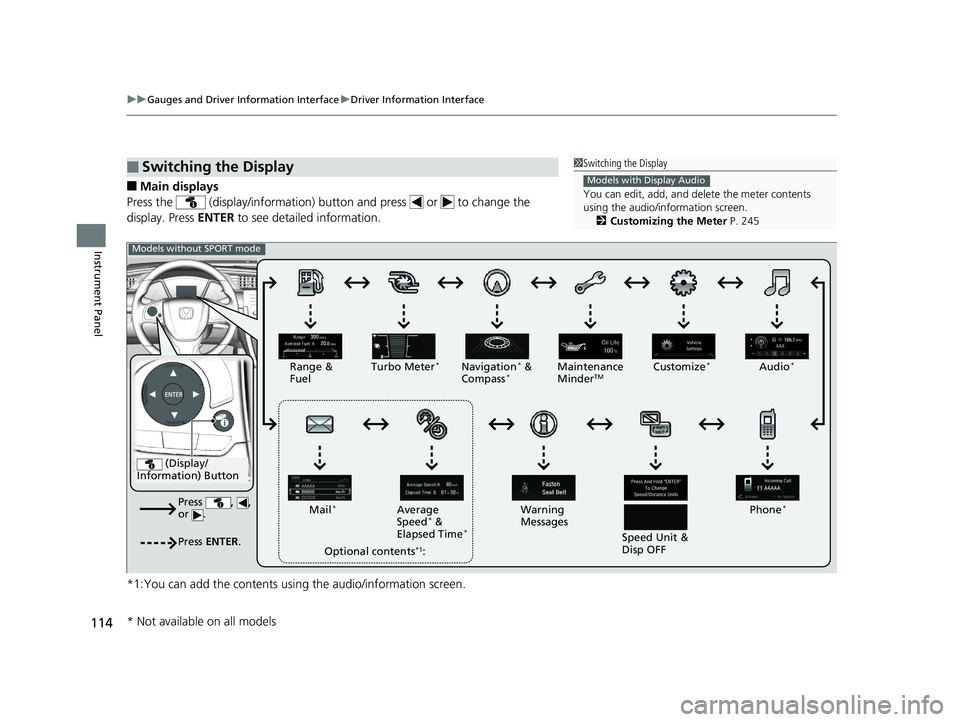
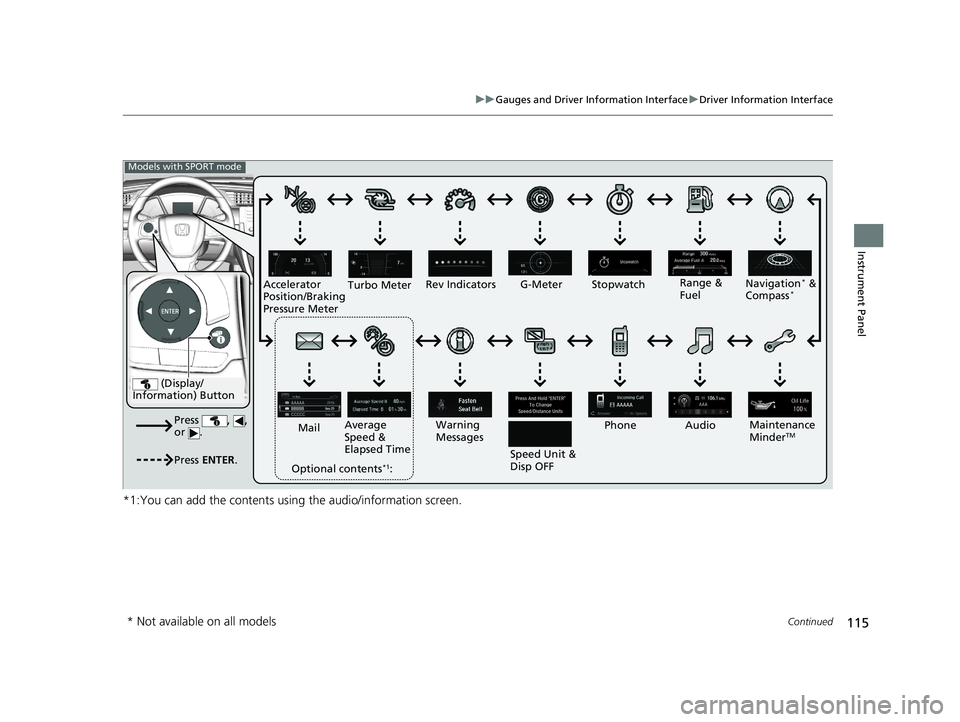
■Main displays
Press the (display/information) butto n and press or to change the
display. Press ENTER to see detailed information.
*1:You can add the contents usin g the audio/information screen.
■Switching the Display1Switching the Display
You can edit, add, and de lete the meter contents
using the audio/information screen. 2 Customizing the Meter P. 245
Models with Display Audio
(Display/
Information) Button
Press , ,
or .
Press ENTER .
Range &
Fuel Turbo Meter*Navigation* &
Compass*Maintenance
MinderTMCustomize*Audio*
Phone*
Speed Unit &
Disp OFF
Warning
Messages
Average
Speed
* &
Elapsed Time*
Mail*
Optional contents*1:
Models without SPORT mode
* Not available on all models
19 CIVIC 4D HCM_HMIN_J (KA KL KC)-31TBA6301.book 114 ページ 2018年10月26日 金曜日 午前7時42分
Page 117 of 679
115
uuGauges and Driver Information Interface uDriver Information Interface
Continued
Instrument Panel
*1:You can add the contents using the audio/information screen.
(Display/
Information) Button
Press , ,
or .
Press ENTER .
Range &
Fuel
Turbo Meter
Navigation* &
Compass*
Maintenance
MinderTM
Rev Indicators
Audio
Phone
Speed Unit &
Disp OFF
Warning
Messages
Average
Speed &
Elapsed Time
Mail
Optional contents
*1:
Models with SPORT mode
G-Meter Stopwatch
Accelerator
Position/Braking
Pressure Meter
* Not available on all models
19 CIVIC 4D HCM_HMIN_J (KA KL KC)-31TBA6301.book 115 ページ 2018年10月26日 金曜日 午前7時42分
Page 121 of 679
Continued119
uuGauges and Driver Information Interface uDriver Information Interface
Instrument Panel
Display Audio shows you turn-by-turn directions to your destination.
When the navigation system is not prov iding driving guidance, an image of a
compass appears in the driver information interface.
2 Refer to the Navigation System Manual
Shows the current audio information.
2Audio System Basic Operation P. 239
Shows the current mail information.
2Bluetooth ® HandsFreeLink ® P. 394
Shows the current phone information.
2 Bluetooth ® HandsFreeLink ® P. 394
■Turn-by-Turn Directions*
■Audio*
■Mail*
■Phone*
1 Turn-by-Turn Directions*
Turn-by-turn directions wi ll be shown on the driver
information interface only when your android phone
is connected to Android Auto. 2 Android Auto P. 305
You can select whether the turn-by-turn display
comes on or not during the route guidance. 2 Customized Features P. 337
Models with Display AudioModels with Display Audio
Models with navigation system
* Not available on all models
19 CIVIC 4D HCM_HMIN_J (KA KL KC)-31TBA6301.book 119 ページ 2018年10月26日 金曜日 午前7時42分
Page 137 of 679
135
uuClock uAdjusting the Clock
Controls
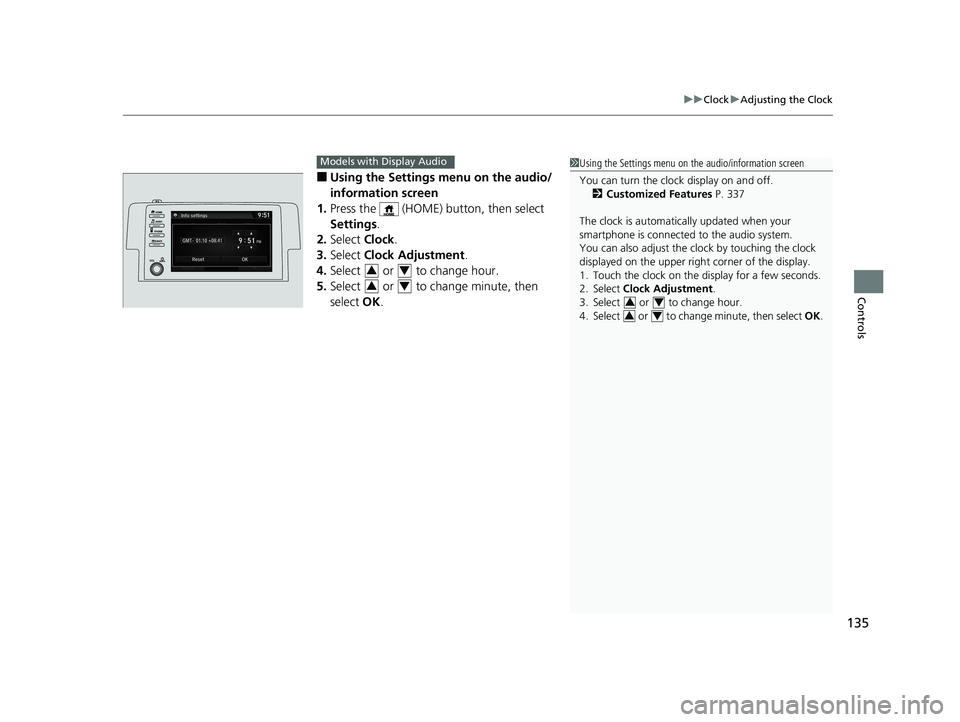
■Using the Settings menu on the audio/
information screen
1. Press the (HOME) button, then select
Settings .
2. Select Clock.
3. Select Clock Adjustment .
4. Select or to change hour.
5. Select or to change minute, then
select OK.
Models with Display Audio1Using the Settings menu on the audio/information screen
You can turn the clock display on and off.
2 Customized Features P. 337
The clock is automatica lly updated when your
smartphone is connected to the audio system.
You can also adjust the clock by touching the clock
displayed on the upper right corner of the display.
1. Touch the clock on the display for a few seconds.
2. Select Clock Adjustment .
3. Select or to change hour.
4. Select or to change minute, then select OK.
34
34
34
34
19 CIVIC 4D HCM_HMIN_J (KA KL KC)-31TBA6301.book 135 ページ 2018年10月26日 金曜日 午前7時42分
Page 140 of 679
138
uuLocking and Unlocking the Doors uLow Smart Entry Remote Signal Strength*
Controls
Low Smart Entry Remo te Signal Strength*
The vehicle transmits radio waves to loca te the smart entry remote when locking/
unlocking the doors and fuel fill door, opening the trunk, or starting the engine.
In the following cases, locking/unlocking the doors, opening the trunk, or starting
the engine may be inhibited or operation may be unstable:
• Strong radio waves are being tra nsmitted by nearby equipment.
• You are carrying the smart entry remote together with telecommunications
equipment, laptop computers, ce ll phones, or wireless devices.
• A metallic object is touching or covering the smart entry remote.1Low Smart Entry Remote Signal Strength*
Communication between the smart entry remote and
the vehicle consumes the smart entry remote’s
battery.
Battery life is about two years, but this varies
depending on regularity of use.
The battery is consumed whenever the smart entry
remote is receivi ng strong radio wave s. Avoid placing
it near electrical appliances such as televisions and
personal computers.
* Not available on all models
19 CIVIC 4D HCM_HMIN_J (KA KL KC)-31TBA6301.book 138 ページ 2018年10月26日 金曜日 午前7時42分
Page 216 of 679
214
Features
Audio System
About Your Audio System
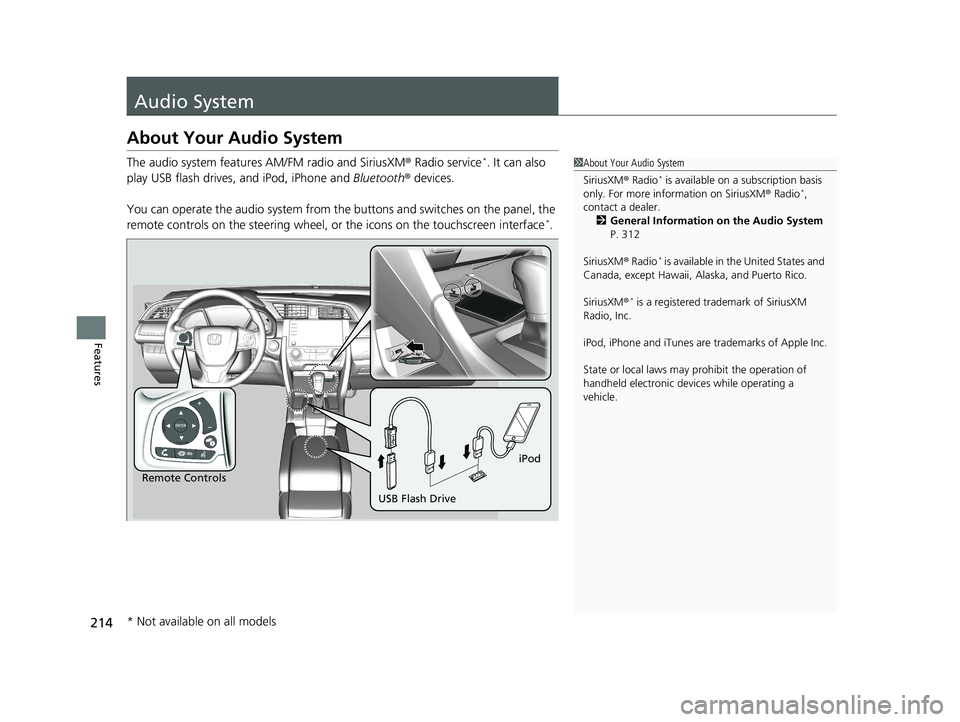
The audio system features AM/FM radio and SiriusXM ® Radio service*. It can also
play USB flash drives, and iPod, iPhone and Bluetooth® devices.
You can operate the audio system from the buttons and switches on the panel, the
remote controls on the steering wheel, or the icons on the touchscreen interface
*.
1About Your Audio System
SiriusXM ® Radio
* is available on a subscription basis
only. For more information on SiriusXM ® Radio*,
contact a dealer.
2 General Information on the Audio System
P. 312
SiriusXM ® Radio
* is available in the United States and
Canada, except Ha waii, Alaska, and Puerto Rico.
SiriusXM ®
* is a registered trademark of SiriusXM
Radio, Inc.
iPod, iPhone and iTunes are trademarks of Apple Inc.
State or local laws may pr ohibit the operation of
handheld electronic devi ces while operating a
vehicle.
Remote Controls iPod
USB Flash Drive
* Not available on all models
19 CIVIC 4D HCM_HMIN_J (KA KL KC)-31TBA6301.book 214 ページ 2018年10月26日 金曜日 午前7時42分