audio HONDA CLARITY FUEL CELL 2019 Owner's Manual (in English)
[x] Cancel search | Manufacturer: HONDA, Model Year: 2019, Model line: CLARITY FUEL CELL, Model: HONDA CLARITY FUEL CELL 2019Pages: 551, PDF Size: 27.39 MB
Page 299 of 551
297
uuGeneral Information on the Audio System uLegal Information on Apple CarPlay/Android Auto
Features
YOU EXPRESSLY ACKNOWLEDGE AND AGREE THAT USE OF APPLE CARPLAY OR ANDROID AUTO (“THE APPLICATIONS”) IS AT YOUR
SOLE RISK AND THAT THE ENTIRE RISK AS TO SATISFACTORY Q UALITY, PERFORMANCE, ACCURACY AND EFFORT IS WITH YOU TO THE
MAXIMUM EXTENT PERMITTED BY APPLICABLE LAW, AND THAT TH E APPLICATIONS AND INFORMATION ON THE APPLICATIONS IS
PROVIDED “AS IS” AND “AS AVAILABLE,” WITH ALL FAUL TS AND WITHOUT WARRANTY OF ANY KIND, AND HONDA HEREBY
DISCLAIMS ALL WARRANTIES AND CONDITIONS WITH RESPECT TO THE APPLICATIONS AND INFORMATION ON THE APPLICATIONS,
EITHER EXPRESS, IMPLIED OR STATUTORY, INCLUDING, BUT NOT LIMITED TO, THE IMPLIED WARRANTIES AND/OR CONDITIONS OF
MERCHANTABILITY, SATISFACTORY QUALITY, FITNESS FOR A PA RTICULAR PURPOSE, ACCURACY, QUIET ENJOYMENT, AND NON-
INFRINGEMENT OF THIRD PARTY RIGHTS. NO ORAL OR WRITTEN INFORMATION OR ADVICE GIVEN BY HONDA OR AN AUTHORIZED
REPRESENTATIVE SHALL CREATE A WARRANTY. AS EXAMPLES, AND WITHOUT LIMITATION, HONDA DISCLAIMS ANY WARRANTY
REGARDING THE ACCURACY OF DATA PROVIDED BY THE APPLI CATIONS, SUCH AS THE ACCURACY OF DIRECTIONS, ESTIMATED
TRAVEL TIME, SPEED LIMITS, ROAD CONDITIONS, NEWS, WEATHER, TRAF FIC, OR OTHER CONTENT PROVIDED BY APPLE, GOOGLE, THEIR
AFFILIATES, OR THIRD PARTY PROVIDERS; HONDA DOES NOT GUARANTEE AGAINST LO SS OF APPLICATION DATA, WHICH MAY BE LOST
AT ANY TIME; HONDA DOES NOT GUARANTEE THAT THE APPLICATIO NS OR ANY SERVICES PROVIDED THROUGH THEM WILL BE
PROVIDED AT ALL TIMES OR THAT ANY OR ALL SERVICES WILL BE AVAILABLE AT ANY PA RTICULAR TIME OR LOCATION. FOR EXAMPLE,
SERVICES MAY BE SUSPENDED OR INTERRUPTED WITHOUT NOTICE FOR REPAIR, MAINTENANCE, SECURITY FIXES, UPDATES, ETC.,
SERVICES MAY BE UNAVAILABLE IN YOUR AREA OR LOCATION, ETC. IN ADDITION, YOU UNDERSTAND THAT CHANGES IN THIRD PARTY
TECHNOLOGY OR GOVERNMENT REGULATION MAY RENDER THE SERVICES AND/OR APPLICATIONS OBSOLETE AND/OR UNUSABLE.
TO THE EXTENT NOT PROHIBITED BY LAW, IN NO EVENT SHALL HONDA OR ITS AFFILIATES BE LIABLE FOR PERSONAL INJURY, OR ANY
INCIDENTAL, SPECIAL, INDIRECT OR CO NSEQUENTIAL DAMAGES WHATSOEVER, INCLUDI NG, WITHOUT LIMITATION, DAMAGES FOR
LOSS OF PROFITS, CORRUPTION OR LOSS OF DATA, FAILURE TO TRANSMIT OR RECEIVE ANY DATA, BUSINESS INTERRUPTION OR ANY
OTHER COMMERCIAL DAMAGES OR LOSSES, ARISIN G OUT OF OR RELATED TO THE APPLICATIONS OR YOUR USE OF OR INABILITY TO
USE THE APPLICATIONS OR INFORMATION ON THE APPLICATIONS, HOWEVER CAUSED, REGARDLESS OF THE THEORY OF LIABILITY
(CONTRACT, TORT OR OTHERWISE) AND EVEN IF HONDA WERE ADVISED OF THE POSSIBILITY OF SUCH DAMAGES. SOME STATES AND
JURISDICTIONS DISALLOW THE EXCLUSION OR LIMITATION OF LI ABILITY FOR DAMAGES, SO THESE LIMITATIONS AND EXCLUSIONS MAY
NOT APPLY TO YOU. IN NO EVENT SHALL HONDA’S TOTAL LIABILITY TO YOU FOR ALL DAM AGES (OTHER THAN AS MAY BE REQUIRED
BY APPLICABLE LAW IN CASES INVOLVING PERSONAL INJURY) EXCE ED THE AMOUNT OF FIVE DOLLARS ($5.00). THE FOREGOING
LIMITATIONS WILL APPLY EVEN IF THE ABOVE STATED REMEDY FAILS OF ITS ESSENTIAL PURPOSE.
■DISCLAIMER OF WARRANTIES; LIMITATION ON LIABILITY
19 CLARITY FCV CSS-31TRT6200.book 297 ページ 2019年1月17日 木曜日 午前11 時54分
Page 300 of 551
298
uuGeneral Information on the Audio System uAbout Open Source Licenses
Features
About Open Source Licenses
To see the open source license information, follow these steps.
1. Select .
2. Select Settings .
3. Select System .
4. Select the Others tab.
5. Select Detail Information .
6. Select About device .
7. Select Legal information .
8. Select Open source licenses .
19 CLARITY FCV CSS-31TRT6200.book 298 ページ 2019年1月17日 木曜日 午前11 時54分
Page 301 of 551
299
uuGeneral Information on the Audio System uLicense information
Features
License information
For DTS patents, see http://patents.dts.com . Manufactured under license from DTS
Licensing Limited. DTS, the Symbol, & DTS and the Symbol together are registered
trademarks, and DTS Neural Surround is a tra demark of DTS, Inc. © DTS, Inc. All
Rights Reserved.
■DTS
19 CLARITY FCV CSS-31TRT6200.book 299 ページ 2019年1月17日 木曜日 午前11 時54分
Page 302 of 551
300
Features
Customized Features
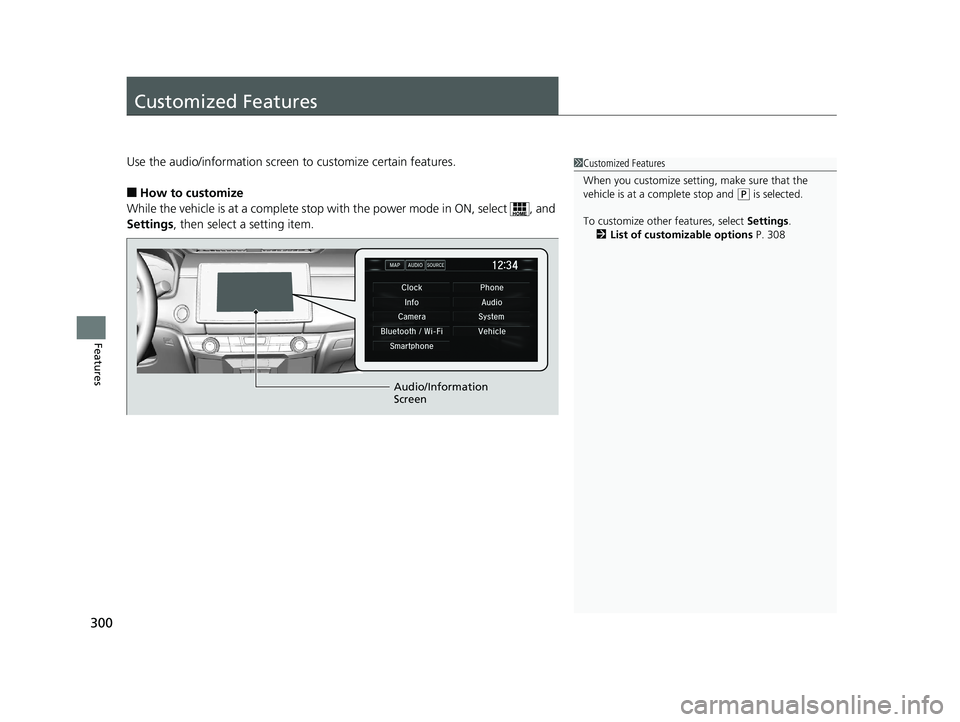
Use the audio/information screen to customize certain features.
■How to customize
While the vehicle is at a complete stop wi th the power mode in ON, select , and
Settings , then select a setting item.
1Customized Features
When you customize setting, make sure that the
vehicle is at a complete stop and
(P is selected.
To customize other features, select Settings.
2 List of customizable options P. 308
Audio/Information
Screen
19 CLARITY FCV CSS-31TRT6200.book 300 ページ 2019年1月17日 木曜日 午前11 時54分
Page 304 of 551
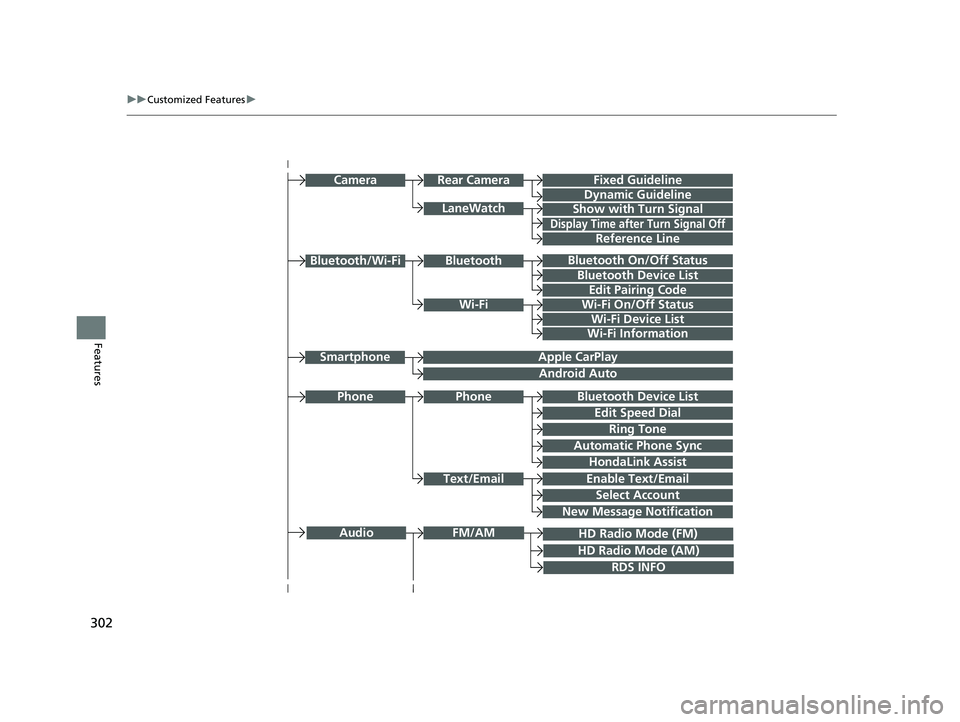
302
uuCustomized Features u
Features
Bluetooth On/Off Status
Bluetooth Device List
Edit Pairing Code
Wi-Fi On/Off Status
Wi-Fi Device List
Wi-Fi
BluetoothBluetooth/Wi-Fi
Wi-Fi Information
Text/Email
Bluetooth Device List
Edit Speed Dial
Ring Tone
Phone
Automatic Phone Sync
HondaLink Assist
Enable Text/Email
Select Account
New Message Notification
Phone
LaneWatch
Fixed Guideline
Dynamic Guideline
Show with Turn Signal
Rear CameraCamera
Display Time after Turn Signal Off
Reference Line
HD Radio Mode (FM)
RDS INFO
AudioFM/AM
HD Radio Mode (AM)
Apple CarPlay
Android Auto
Smartphone
19 CLARITY FCV CSS-31TRT6200.book 302 ページ 2019年1月17日 木曜日 午前11 時54分
Page 305 of 551
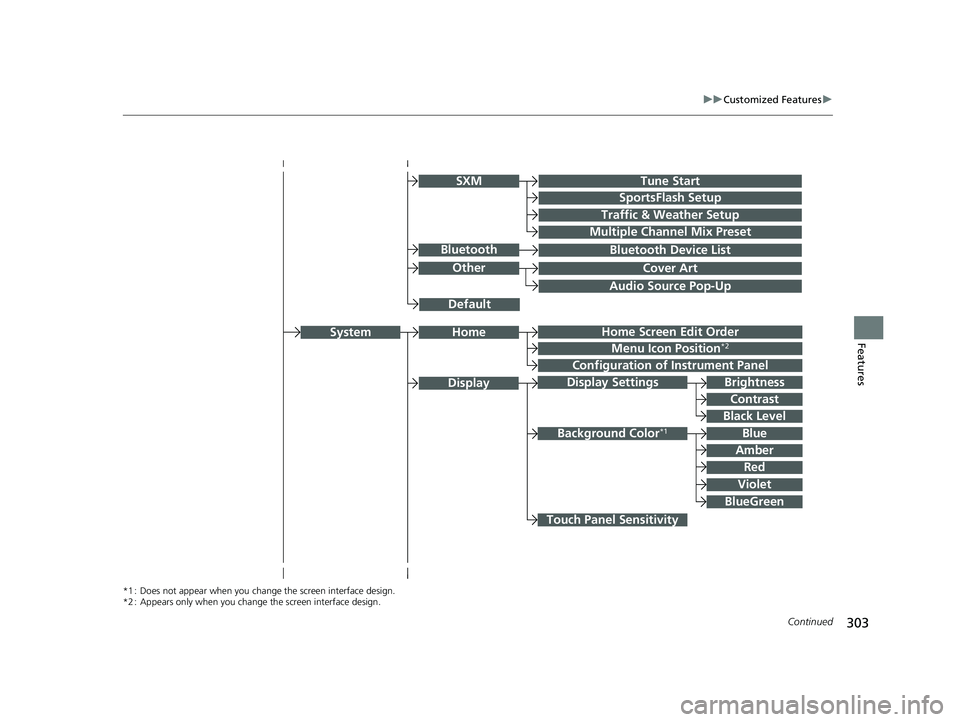
303
uuCustomized Features u
Continued
Features
Audio Source Pop-Up
Cover Art
Tune Start
SportsFlash Setup
Traffic & Weather Setup
Other
SXM
Default
Bluetooth Device ListBluetooth
Multiple Channel Mix Preset
Home Screen Edit Order
Configuration of Instrument Panel
Display Settings
Background Color*1
Display
System
Touch Panel Sensitivity
Brightness
Contrast
Black Level
Blue
Amber
Red
Violet
BlueGreen
Home
Menu Icon Position*2
*1 : Does not appear when you chan ge the screen interface design.
*2 : Appears only when you change the screen interface design.
19 CLARITY FCV CSS-31TRT6200.book 303 ページ 2019年1月17日 木曜日 午前11 時54分
Page 316 of 551
314
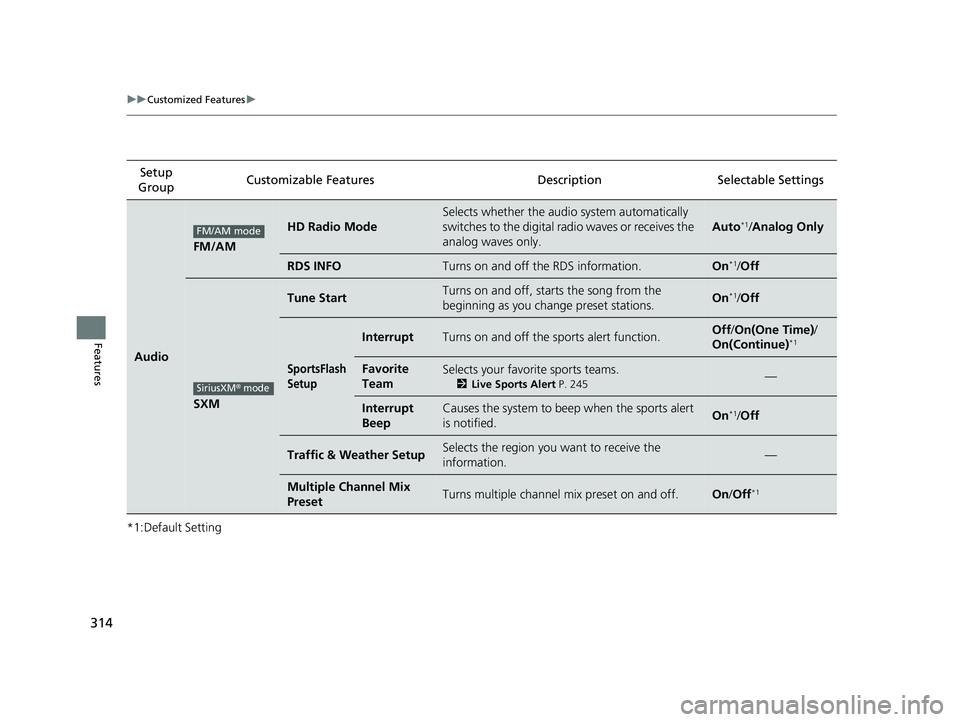
uuCustomized Features u
Features
*1:Default SettingSetup
Group Customizable Features Description Selectable Settings
Audio
FM/AM
HD Radio Mode
Selects whether the audi
o system automatically
switches to the digital radio waves or receives the
analog waves only.
Auto*1/ Analog Only
RDS INFOTurns on and off the RDS information.On*1/Off
SXM
Tune StartTurns on and off, sta rts the song from the
beginning as you change preset stations.On*1/ Off
SportsFlash
Setup
InterruptTurns on and off the sp orts alert function.Off/On(One Time) /
On(Continue)*1
Favorite
TeamSelects your favorite sports teams.
2 Live Sports Alert P. 245—
Interrupt
BeepCauses the system to beep when the sports alert
is notified.On*1/ Off
Traffic & Weather SetupSelects the region you want to receive the
information.—
Multiple Channel Mix
PresetTurns multiple channel mix preset on and off.On /Off*1
FM/AM mode
SiriusXM® mode
19 CLARITY FCV CSS-31TRT6200.book 314 ページ 2019年1月17日 木曜日 午前11 時54分
Page 317 of 551
315
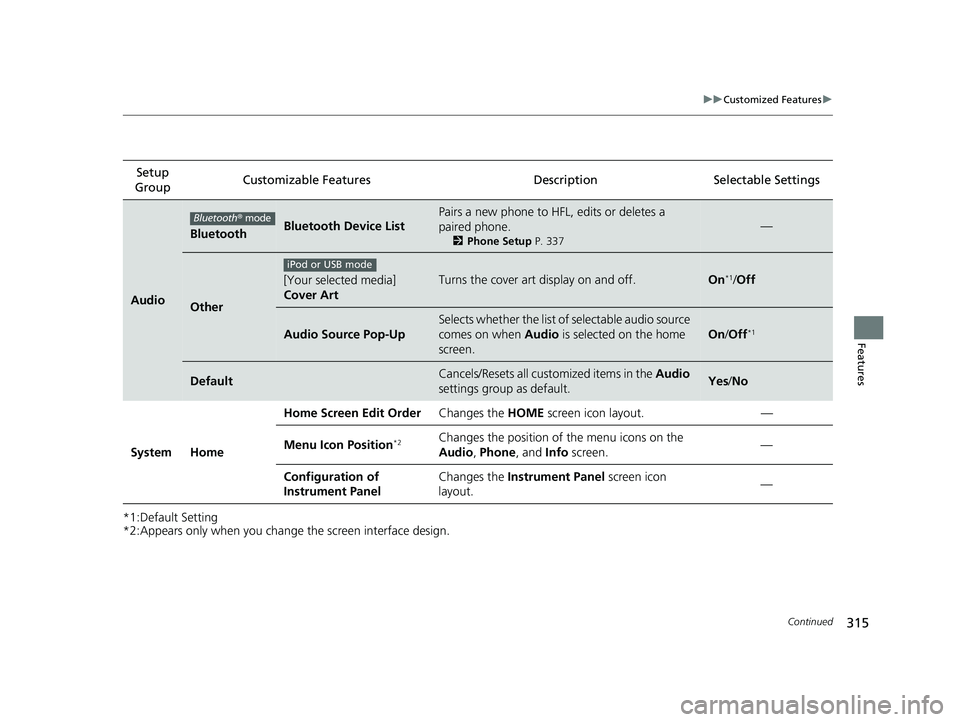
uuCustomized Features u
Continued
Features
*1:Default Setting
*2:Appears only when you change the screen interface design.
Setup
Group Customizable Features Description Selectable Settings
Audio
BluetoothBluetooth Device List
Pairs a new phone to HFL, edits or deletes a
paired phone.
2
Phone Setup P. 337
—
Other
[Your selected media]
Cover ArtTurns the cover art display on and off.On*1/Off
Audio Source Pop-Up
Selects whether the list of selectable audio source
comes on when Audio is selected on the home
screen.
On /Off*1
DefaultCancels/Resets all customized items in the Audio
settings group as default.Yes /No
System Home Home Screen Edit Order
Changes the HOME screen icon layout. —
Menu Icon Position
*2Changes the position of the menu icons on the
Audio , Phone, and Info screen. —
Configuration of
Instrument Panel Changes the
Instrument Panel screen icon
layout. —
Bluetooth
® mode
iPod or USB mode
19 CLARITY FCV CSS-31TRT6200.book 315 ページ 2019年1月17日 木曜日 午前11 時54分
Page 318 of 551
316
uuCustomized Features u
Features
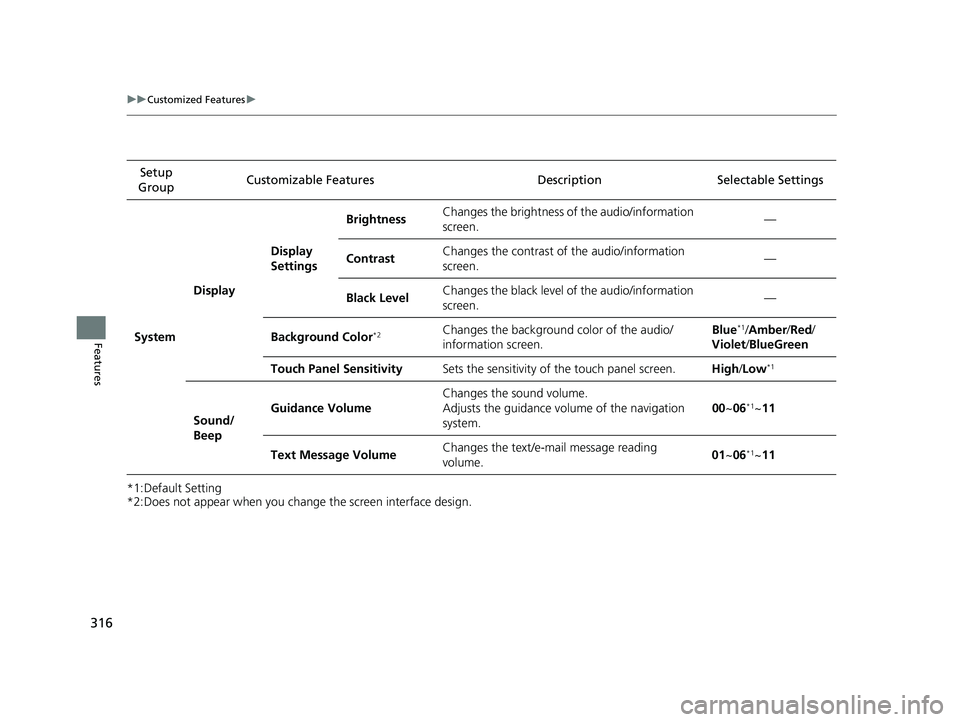
*1:Default Setting
*2:Does not appear when you change the screen interface design.Setup
Group Customizable Features Descri
ption Selectable Settings
System Display
Display
SettingsBrightness
Changes the brightness of the audio/information
screen. —
Contrast Changes the contrast of the audio/information
screen.
—
Black Level Changes the black level of the audio/information
screen. —
Background Color
*2Changes the background color of the audio/
information screen. Blue*1/
Amber /Red /
Violet /BlueGreen
Touch Panel Sensitivity Sets the sensitivity of the touch panel screen. High/Low
*1
Sound/
Beep Guidance Volume
Changes the sound volume.
Adjusts the guidance volume of the navigation
system. 00
~06
*1~11
Text Message Volume Changes the text/e-mail message reading
volume. 01
~06
*1~11
19 CLARITY FCV CSS-31TRT6200.book 316 ページ 2019年1月17日 木曜日 午前11 時54分
Page 321 of 551
319
uuCustomized Features u
Continued
Features
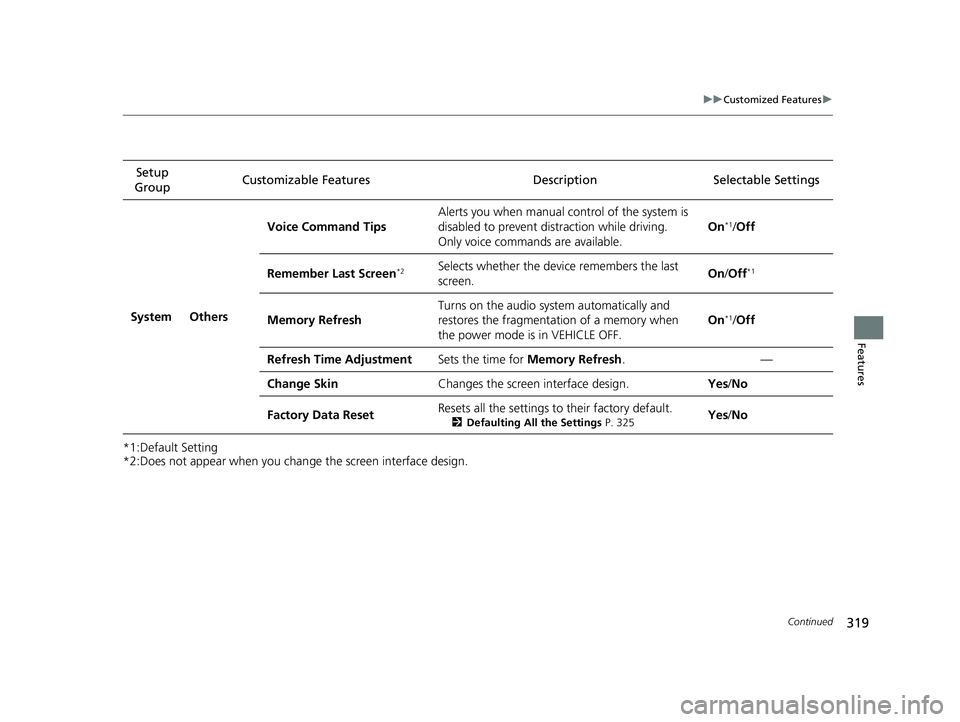
*1:Default Setting
*2:Does not appear when you chan ge the screen interface design.
Setup
Group Customizable Features Description
Selectable Settings
System Others Voice Command Tips
Alerts you when manual c
ontrol of the system is
disabled to prevent distraction while driving.
Only voice comman ds are available. On
*1/
Off
Remember Last Screen
*2Selects whether the device remembers the last
screen. On
/Off*1
Memory Refresh Turns on the audio system automatically and
restores the fragmentation of a memory when
the power mode is in VEHICLE OFF. On*1/
Off
Refresh Time Adjustment Sets the time for Memory Refresh . —
Change Skin Changes the screen interface design. Yes/No
Factory Data Reset Resets all the settings to their factory default.
2
Defaulting All the Settings P. 325Yes/No
19 CLARITY FCV CSS-31TRT6200.book 319 ページ 2019年1月17日 木曜日 午前11 時54分