audio HONDA CLARITY FUEL CELL 2019 (in English) Manual Online
[x] Cancel search | Manufacturer: HONDA, Model Year: 2019, Model line: CLARITY FUEL CELL, Model: HONDA CLARITY FUEL CELL 2019Pages: 551, PDF Size: 27.39 MB
Page 259 of 551
257
uuAudio System Basic Operation uPlaying a USB Flash Drive
Continued
Features
Playing a USB Flash Drive
Your audio system reads and plays sound files on a USB flash drive in either MP3,
WMA, or AAC*1 format.
Connect your USB flash drive to the USB port, then select the USB mode.
2 USB Ports P. 199
*1:Only AAC format files recorded with iTunes are playable on this unit.
*2:Some or all of the lists may not be displayed.
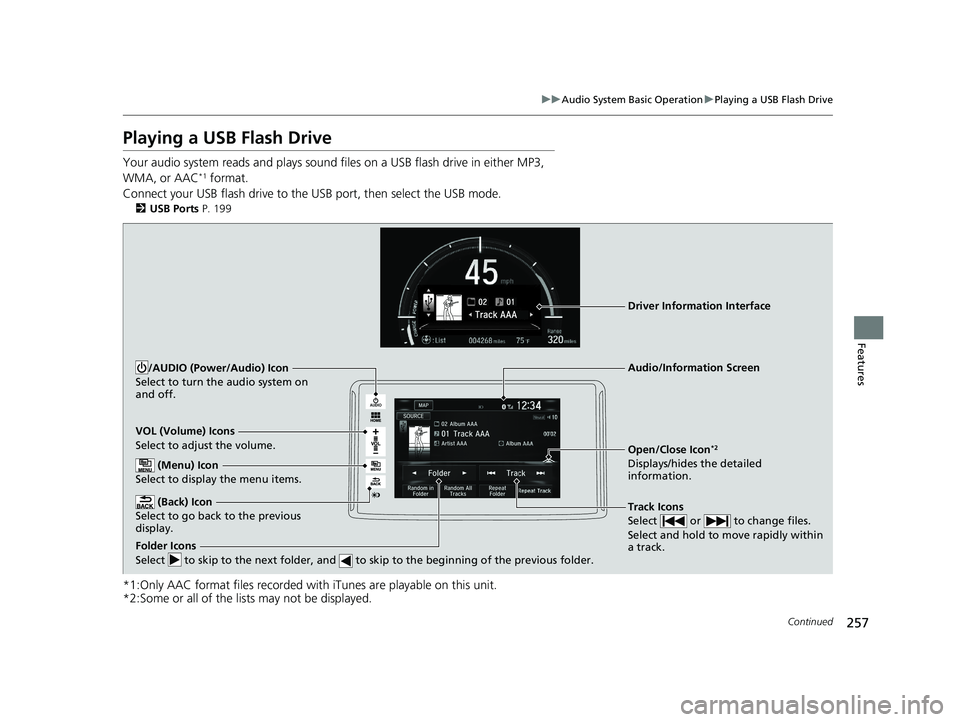
VOL (Volume) Icons
Select to adjust the volume.
(Back) Icon
Select to go back to the previous
display.
Track Icons
Select or to change files.
Select and hold to move rapidly within
a track.
/AUDIO (Power/Audio) Icon
Select to turn the audio system on
and off.
Open/Close Icon*2
Displays/hides the detailed
information.
(Menu) Icon
Select to display the menu items.
Folder Icons
Select to skip to the next folder, and to skip to the beginning of the previous folder.
Audio/Information Screen
Driver Information Interface
19 CLARITY FCV CSS-31TRT6200.book 257 ページ 2019年1月17日 木曜日 午前11 時54分
Page 260 of 551
uuAudio System Basic Operation uPlaying a USB Flash Drive
258
Features
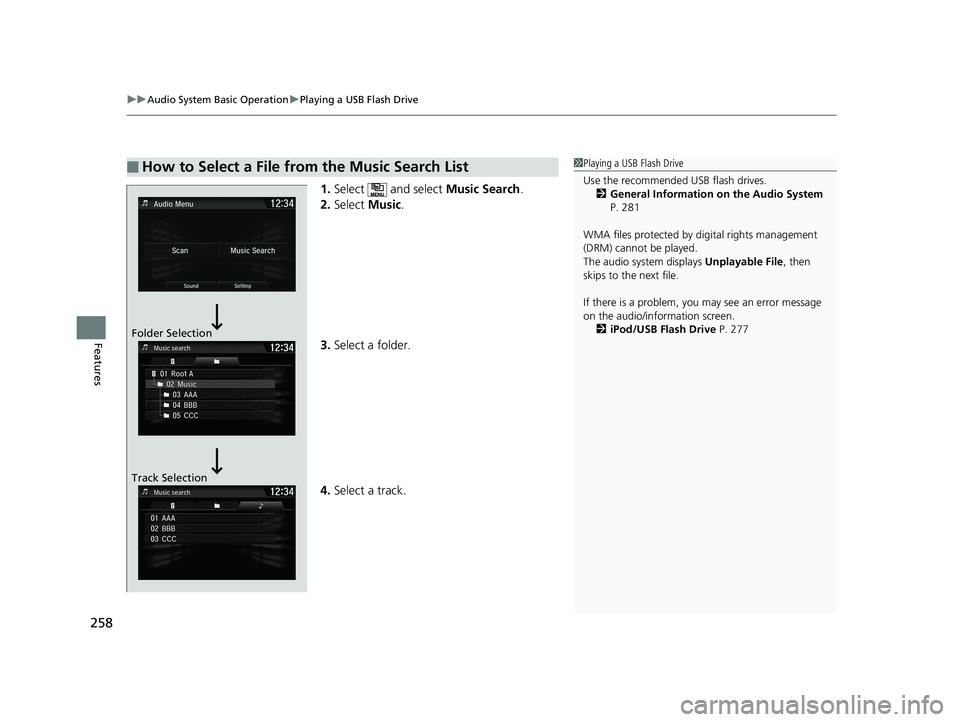
1. Select and select Music Search.
2. Select Music.
3. Select a folder.
4. Select a track.
■How to Select a File from the Music Search List1Playing a USB Flash Drive
Use the recommended USB flash drives.
2 General Information on the Audio System
P. 281
WMA files protected by di gital rights management
(DRM) cannot be played.
The audio system displays Unplayable File, then
skips to the next file.
If there is a problem, you may see an error message
on the audio/information screen.
2 iPod/USB Flash Drive P. 277
Folder Selection
Track Selection
19 CLARITY FCV CSS-31TRT6200.book 258 ページ 2019年1月17日 木曜日 午前11 時54分
Page 261 of 551
259
uuAudio System Basic Operation uPlaying a USB Flash Drive
Features
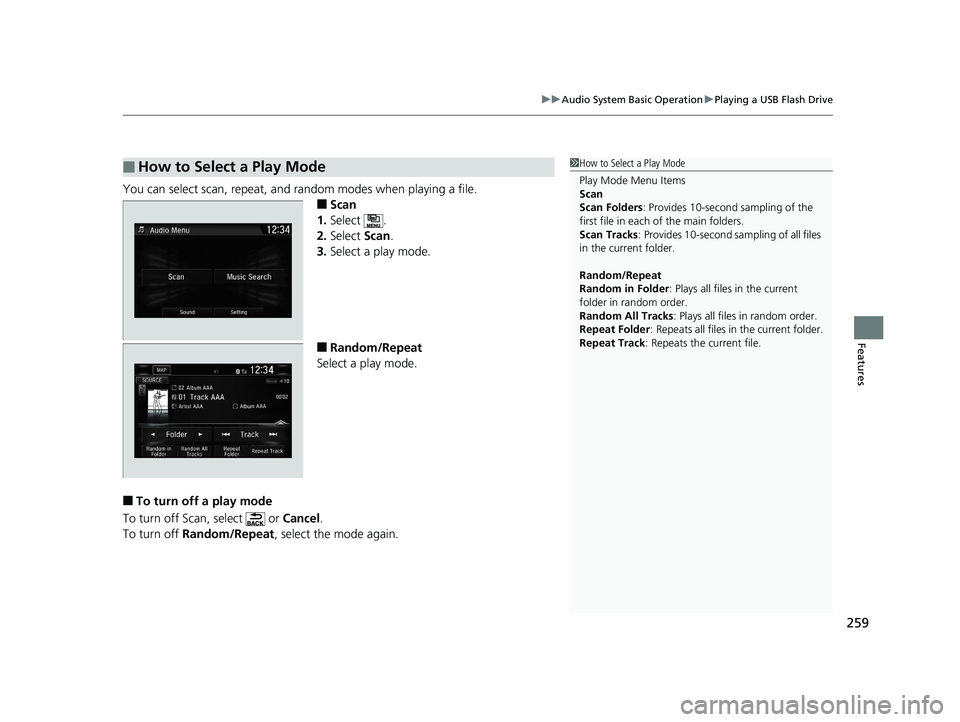
You can select scan, repeat, and random modes when playing a file.
■Scan
1. Select .
2. Select Scan.
3. Select a play mode.
■Random/Repeat
Select a play mode.
■To turn off a play mode
To turn off Scan, select or Cancel.
To turn off Random/Repeat , select the mode again.
■How to Select a Play Mode1How to Select a Play Mode
Play Mode Menu Items
Scan
Scan Folders : Provides 10-second sampling of the
first file in each of the main folders.
Scan Tracks : Provides 10-second sa mpling of all files
in the current folder.
Random/Repeat
Random in Folder : Plays all files in the current
folder in random order.
Random All Tracks : Plays all files in random order.
Repeat Folder : Repeats all files in the current folder.
Repeat Track: Repeats the current file.
19 CLARITY FCV CSS-31TRT6200.book 259 ページ 2019年1月17日 木曜日 午前11 時54分
Page 262 of 551
260
uuAudio System Basic Operation uPlaying Bluetooth ® Audio
Features
Playing Bluetooth ® Audio
Your audio system allows you to listen to music from your Bluetooth-compatible
phone.
This function is available when the phone is paired and connected to the vehicle’s
Bluetooth ® HandsFreeLink ® (HFL) system.
2 Phone Setup P. 337
*1:Depending on the Bluetooth® device you connect, some or all of the lists may not
be displayed.
1 Playing Bluetooth ® Audio
Not all Bluetooth -enabled phones with streaming
audio capabilities are compatible.
To check if your phone is compatible, visit
automobiles.honda.com /handsfreelink/.
It may be illegal to pe rform some data device
functions while driving.
Only one phone can be used with HFL at a time.
When there are more than two paired phones in the
vehicle, the first paired phone the system finds is
automatically connected.
The connected phone for Bluetooth® Audio can be
different.
If more than one phone is paired to the HFL system,
there may be a delay before the system begins to
play.
In some cases, the name of the artist, album, or track
may not appear correctly.
Some functions may not be available on some
devices.
If a phone is currently conne cted via Apple CarPlay or
Android Auto, Bluetooth® Audio from that phone is
unavailable. However, a se cond previously paired
phone can stream Bluetooth® Audio by selecting
Connect from the Bluetooth Device List .
2 Phone Setup P. 337
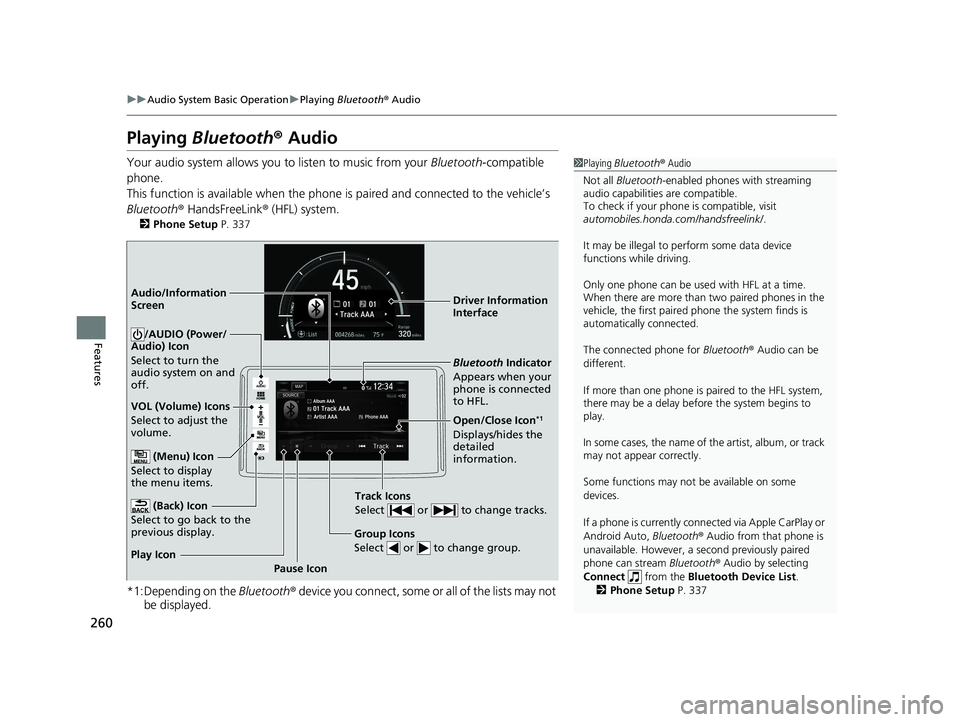
Audio/Information
Screen
VOL (Volume) Icons
Select to adjust the
volume.
(Back) Icon
Select to go back to the
previous display.
/AUDIO (Power/
Audio) Icon
Select to turn the
audio system on and
off.
(Menu) Icon
Select to display
the menu items.
Group Icons
Select or to change group.
Pause Icon
Play Icon
Bluetooth
Indicator
Appears when your
phone is connected
to HFL.
Track Icons
Select or to change tracks.
Open/Close Icon*1
Displays/hides the
detailed
information. Driver Information
Interface
19 CLARITY FCV CSS-31TRT6200.book 260 ページ 2019年1月17日 木曜日 午前11 時54分
Page 263 of 551
261
uuAudio System Basic Operation uPlaying Bluetooth ® Audio
Features
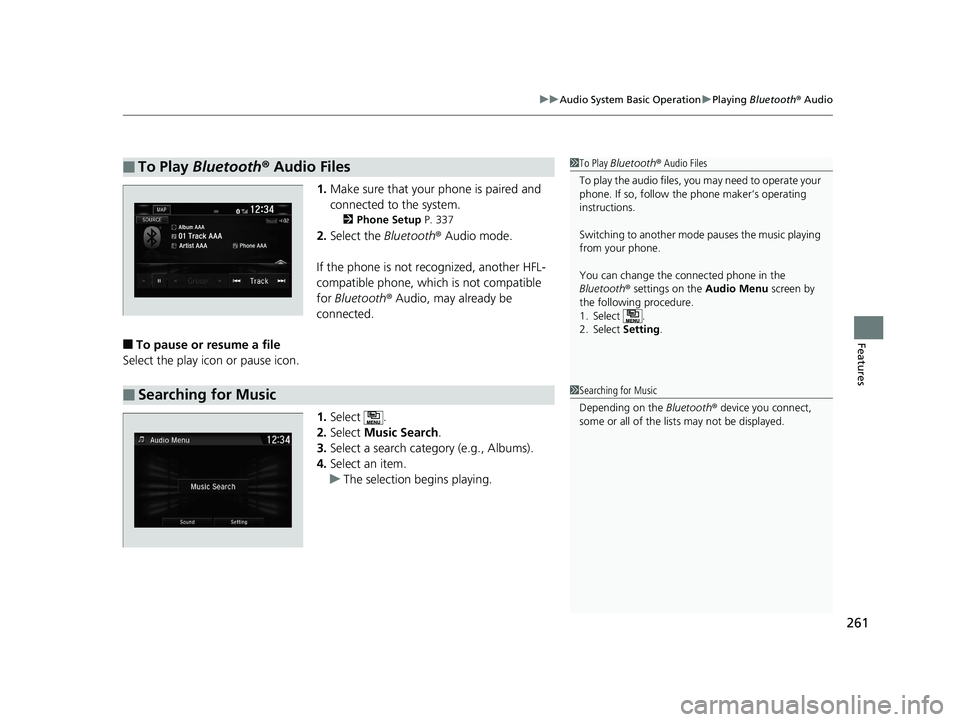
1. Make sure that your phone is paired and
connected to the system.
2 Phone Setup P. 337
2.Select the Bluetooth® Audio mode.
If the phone is not recognized, another HFL-
compatible phone, which is not compatible
for Bluetooth ® Audio, may already be
connected.
■To pause or resume a file
Select the play icon or pause icon.
1.Select .
2. Select Music Search.
3. Select a search catego ry (e.g., Albums).
4. Select an item.
u The selection begins playing.
■To Play Bluetooth ® Audio Files1 To Play Bluetooth ® Audio Files
To play the audio files, y ou may need to operate your
phone. If so, follow the phone maker’s operating
instructions.
Switching to another mode pauses the music playing
from your phone.
You can change the connected phone in the
Bluetooth ® settings on the Audio Menu screen by
the following procedure.
1. Select .
2. Select Setting .
■Searching for Music1Searching for Music
Depending on the Bluetooth® device you connect,
some or all of the list s may not be displayed.
19 CLARITY FCV CSS-31TRT6200.book 261 ページ 2019年1月17日 木曜日 午前11 時54分
Page 264 of 551
262
uuAudio System Basic Operation uHondaLink ®
Features
HondaLink ®
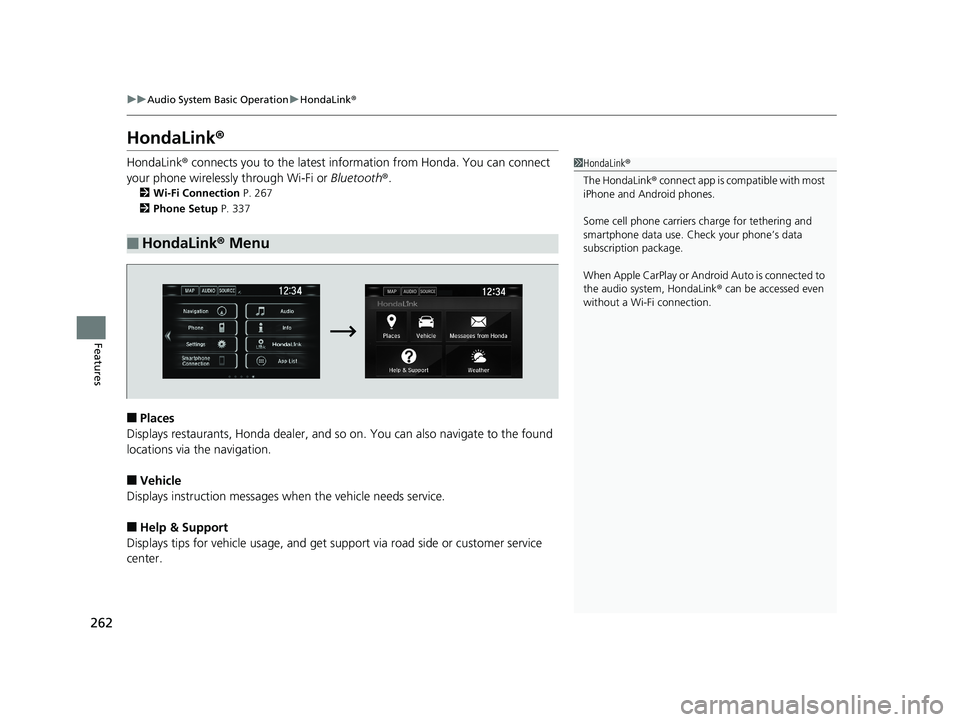
HondaLink® connects you to the latest information from Honda. You can connect
your phone wirelessly through Wi-Fi or Bluetooth®.
2Wi-Fi Connection P. 267
2 Phone Setup P. 337
■Places
Displays restaurants, Honda dealer, and so on. You can also navigate to the found
locations via the navigation.
■Vehicle
Displays instruction messages wh en the vehicle needs service.
■Help & Support
Displays tips for vehicle usage, and get support via road side or customer service
center.
■HondaLink ® Menu
1 HondaLink ®
The HondaLink ® connect app is compatible with most
iPhone and Android phones.
Some cell phone carriers charge for tethering and
smartphone data use. Check your phone’s data
subscription package.
When Apple CarPlay or Android Auto is connected to
the audio system, HondaLink ® can be accessed even
without a Wi-Fi connection.
19 CLARITY FCV CSS-31TRT6200.book 262 ページ 2019年1月17日 木曜日 午前11 時54分
Page 265 of 551
263
uuAudio System Basic Operation uHondaLink ®
Continued
Features
■Messages from Honda
Displays helpful and important information from Honda.
■Weather
Displays a weekly five-day weather forecast for any lo cation you want. You can
change the ZIP Code at any time.
Use the following procedure to connect to HondaLink ® service.
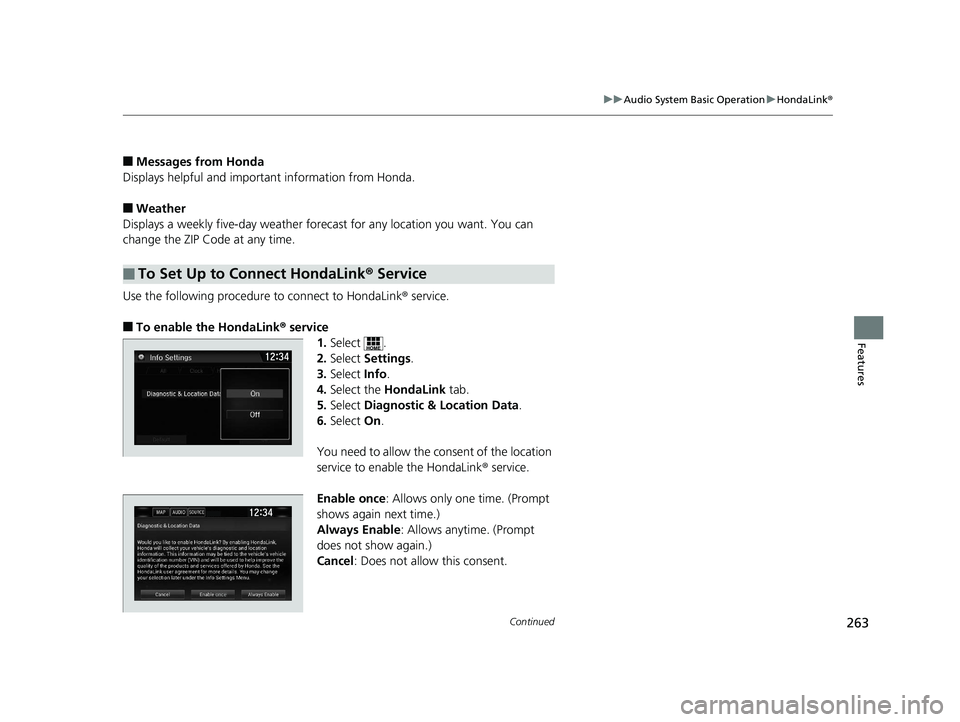
■To enable the HondaLink® service
1.Select .
2. Select Settings .
3. Select Info.
4. Select the HondaLink tab.
5. Select Diagnostic & Location Data.
6. Select On.
You need to allow the consent of the location
service to enable the HondaLink ® service.
Enable once : Allows only one time. (Prompt
shows again next time.)
Always Enable: Allows anytime. (Prompt
does not show again.)
Cancel : Does not allow this consent.
■To Set Up to Connect HondaLink ® Service
19 CLARITY FCV CSS-31TRT6200.book 263 ページ 2019年1月17日 木曜日 午前11 時54分
Page 266 of 551
264
uuAudio System Basic Operation uHondaLink ®
Features
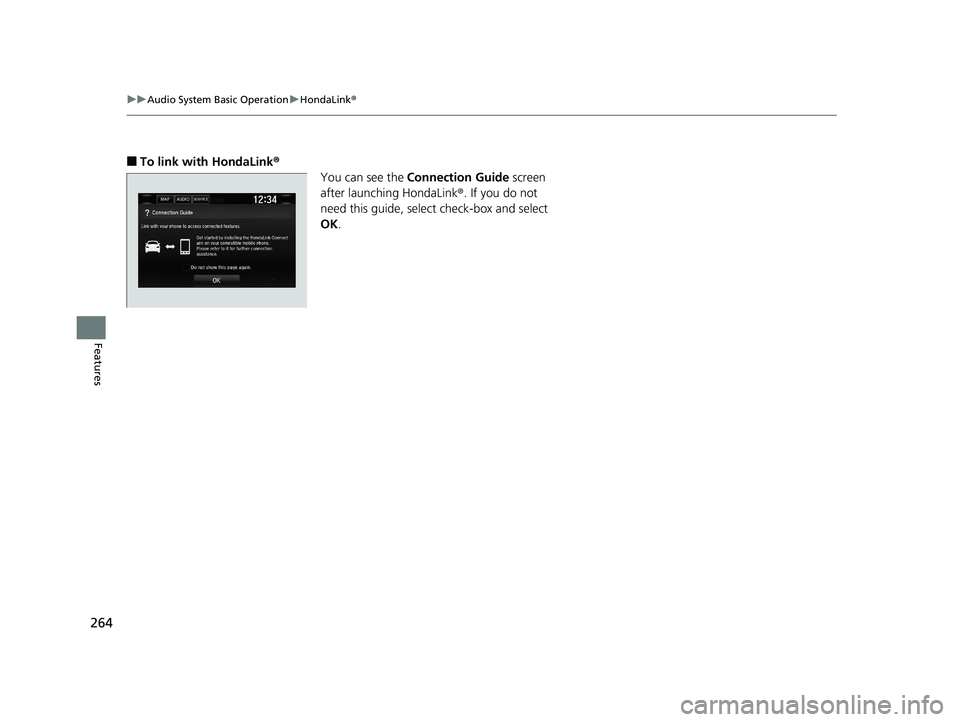
■To link with HondaLink ®
You can see the Connection Guide screen
after launching HondaLink ®. If you do not
need this guide, select check-box and select
OK .
19 CLARITY FCV CSS-31TRT6200.book 264 ページ 2019年1月17日 木曜日 午前11 時54分
Page 267 of 551
265
uuAudio System Basic Operation uHondaLink ®
Continued
Features
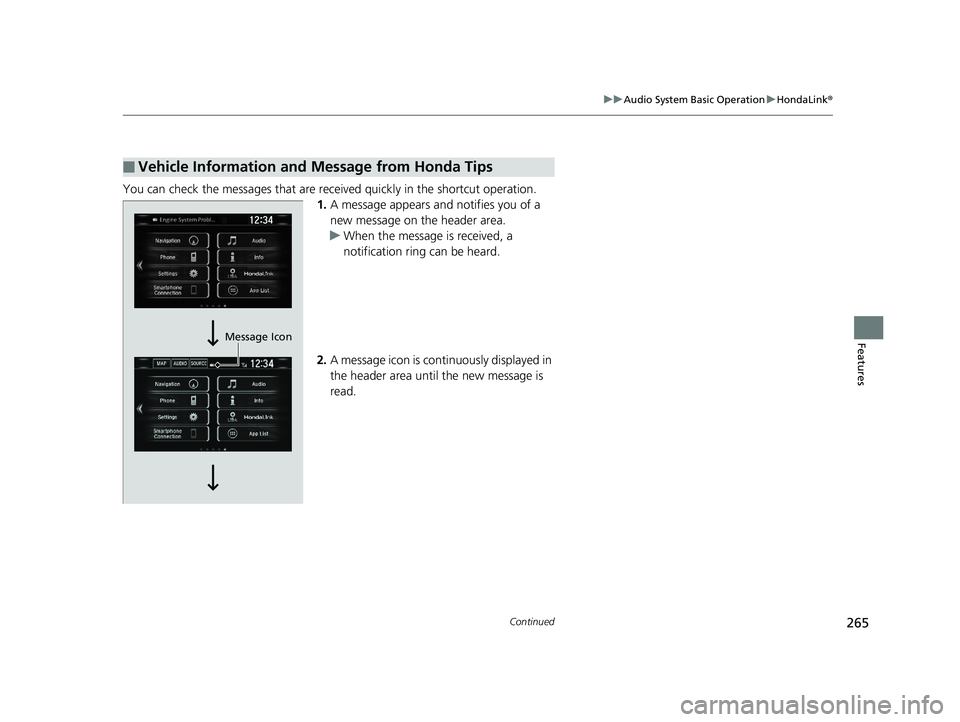
You can check the messages that are receiv ed quickly in the shortcut operation.
1. A message appears and notifies you of a
new message on the header area.
u When the message is received, a
notification ring can be heard.
2. A message icon is continuously displayed in
the header area until the new message is
read.
■Vehicle Information and Message from Honda Tips
Message Icon
19 CLARITY FCV CSS-31TRT6200.book 265 ページ 2019年1月17日 木曜日 午前11 時54分
Page 268 of 551
266
uuAudio System Basic Operation uHondaLink ®
Features
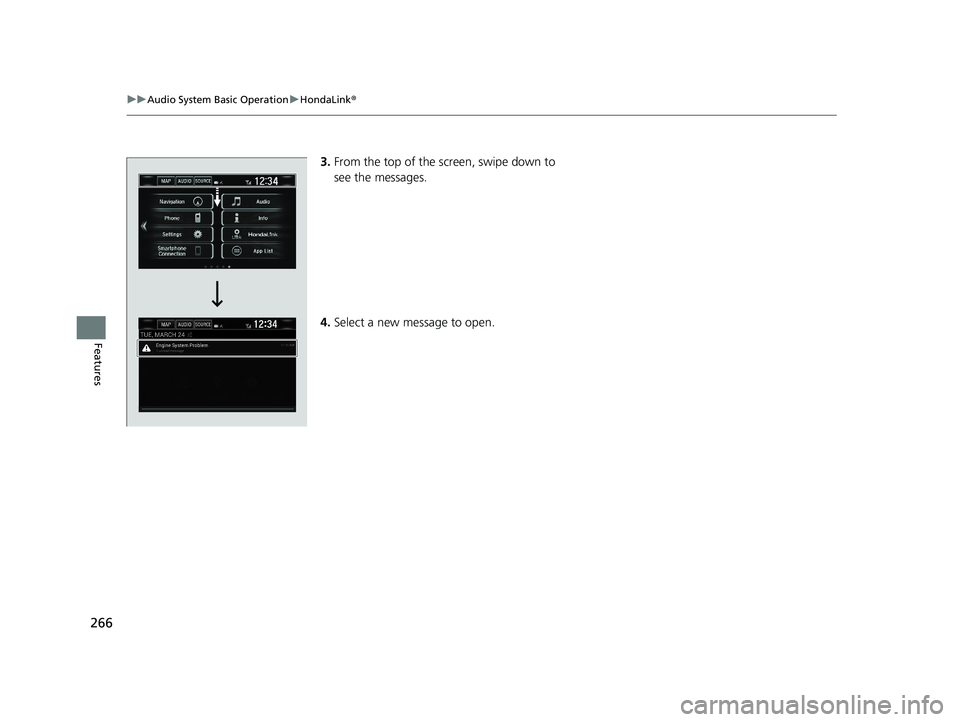
3.From the top of the screen, swipe down to
see the messages.
4. Select a new message to open.
19 CLARITY FCV CSS-31TRT6200.book 266 ページ 2019年1月17日 木曜日 午前11 時54分