hood open HONDA CLARITY PLUG-IN 2018 (in English) User Guide
[x] Cancel search | Manufacturer: HONDA, Model Year: 2018, Model line: CLARITY PLUG-IN, Model: HONDA CLARITY PLUG-IN 2018Pages: 591, PDF Size: 29.97 MB
Page 483 of 591
481
uuMaintenance Under the Hood uOpening the Hood
Maintenance
Opening the Hood
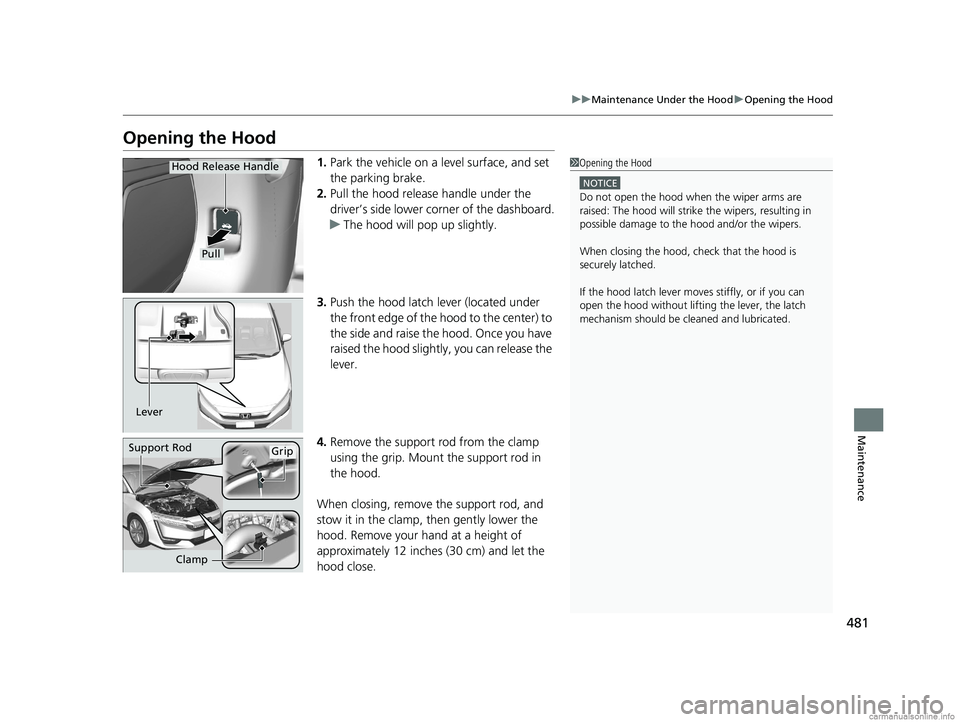
1. Park the vehicle on a level surface, and set
the parking brake.
2. Pull the hood release handle under the
driver’s side lower corner of the dashboard.
u The hood will pop up slightly.
3. Push the hood latch lever (located under
the front edge of the hood to the center) to
the side and raise the hood. Once you have
raised the hood slightly , you can release the
lever.
4. Remove the support rod from the clamp
using the grip. Mount the support rod in
the hood.
When closing, remove the support rod, and
stow it in the clamp, then gently lower the
hood. Remove your hand at a height of
approximately 12 inches (30 cm) and let the
hood close.1 Opening the Hood
NOTICE
Do not open the hood when the wiper arms are
raised: The hood will strike the wipers, resulting in
possible damage to the hood and/or the wipers.
When closing the hood, check that the hood is
securely latched.
If the hood latch lever moves stiffly, or if you can
open the hood without lifti ng the lever, the latch
mechanism should be cl eaned and lubricated.
Pull
Hood Release Handle
Lever
Support RodGrip
Clamp
18 CLARITY PHEV CSS-31TRW6000.book 481 ページ 2017年12月25日 月曜日 午後2時22分
Page 487 of 591
485
uuMaintenance Under the Hood uChanging the Engine Oil and Oil Filter
Continued
Maintenance
Changing the Engine Oil and Oil Filter
You must change the engine oil and oil fi lter regularly in order to maintain the
engine's lubrication. The engine may be damaged if they are not changed regularly.
Turning the power system on automatically starts the engine if the High Voltage
battery charge level gauge shows one segment or less.
2 High Voltage Battery Charge Level Gauge P. 123
To start the engine, the vehicle needs to be in HV Charge.
2HV Button P. 16
Change the oil and filter in accordance with the maintenance message on the driver
information interface.
1.Run the engine until it reaches normal
operating temperature, and then turn the
engine off.
u If necessary, drive the vehicle until the
engine turns on.
2. Open the hood and remove the engine oil
fill cap.
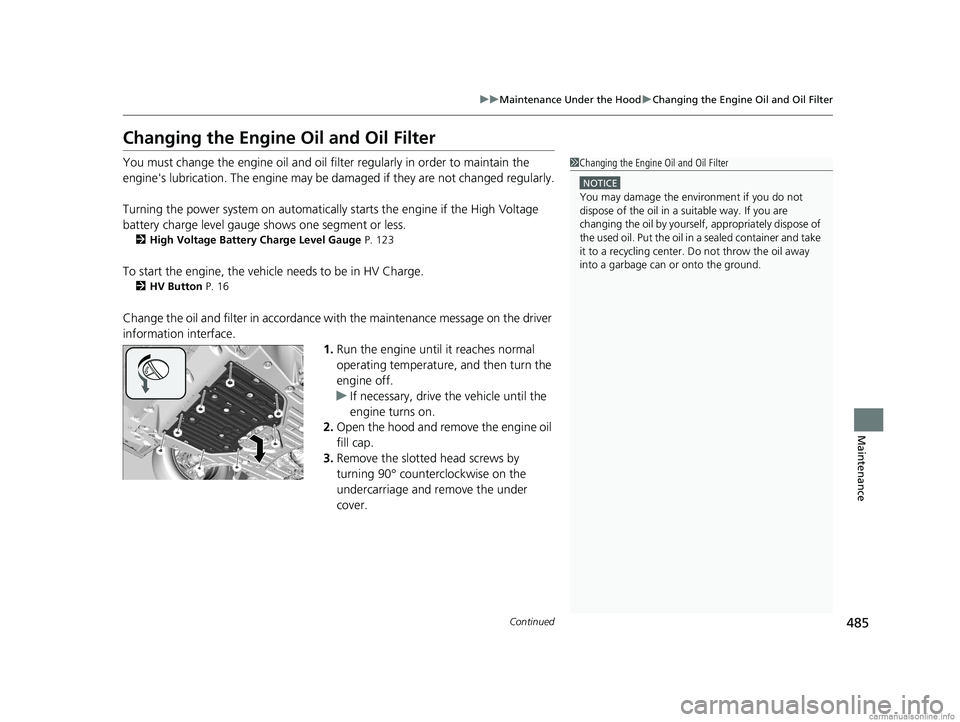
3. Remove the slotted head screws by
turning 90° counterclockwise on the
undercarriage and remove the under
cover.
1Changing the Engine Oil and Oil Filter
NOTICE
You may damage the environment if you do not
dispose of the oil in a suitable way. If you are
changing the oil by yourself , appropriately dispose of
the used oil. Put the oil in a sealed container and take
it to a recycling center. Do not throw the oil away
into a garbage can or onto the ground.
18 CLARITY PHEV CSS-31TRW6000.book 485 ページ 2017年12月25日 月曜日 午後2時22分
Page 541 of 591
539Continued
Handling the Unexpected
Jump Starting
Turn off the power to electric devices, such as the audio and lights. Turn off the
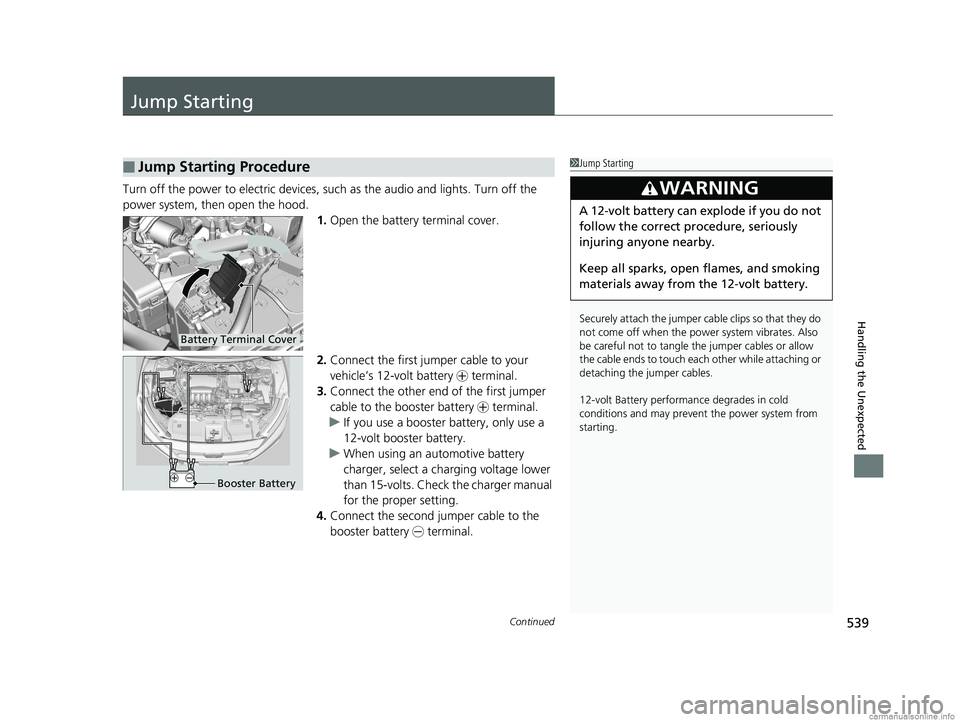
power system, then open the hood. 1.Open the battery terminal cover.
2. Connect the first jumper cable to your
vehicle’s 12-volt battery + terminal.
3. Connect the other end of the first jumper
cable to the booster battery + terminal.
u If you use a booster battery, only use a
12-volt booster battery.
u When using an automotive battery
charger, select a charging voltage lower
than 15-volts. Check the charger manual
for the proper setting.
4. Connect the second jumper cable to the
booster battery - terminal.
■Jump Starting Procedure1Jump Starting
Securely attach the jumper cable clips so that they do
not come off when the power system vibrates. Also
be careful not to tangle the jumper cables or allow
the cable ends to touch eac h other while attaching or
detaching the jumper cables.
12-volt Battery performa nce degrades in cold
conditions and may prevent the power system from
starting.
3WARNING
A 12-volt battery can explode if you do not
follow the correct procedure, seriously
injuring anyone nearby.
Keep all sparks, open flames, and smoking
materials away from the 12-volt battery.
Battery Terminal Cover
Booster Battery
18 CLARITY PHEV CSS-31TRW6000.book 539 ページ 2017年12月25日 月曜日 午後2時22分
Page 545 of 591
Continued543
uuOverheating uHow to Handle Overheating
Handling the Unexpected
■First thing to do
1. Immediately park the vehicle in a safe place.
2. Turn off all accessories and turn on the hazard warning lights.
u No steam or spray present: Keep the power system on and open the hood.
u Steam or spray is present: Turn off the power system and wait until it
subsides. Then open the hood.
■The Stop Driving When Safe. Engine Temperature Too Hot
Message Appears on the Multi-Information Display1 The Stop Driving When Safe. Engine Temperature Too
Hot Message Appears on the Multi-Information Display
NOTICE
Continuing to drive with the Stop Driving When
Safe. Engine Temperature Too Hot message on
the multi-information display may damage the
engine.
3WARNING
Steam and spray from an overheated
engine can seri ously scald you.
Do not open the hood if steam is coming
out.
18 CLARITY PHEV CSS-31TRW6000.book 543 ページ 2017年12月25日 月曜日 午後2時22分
Page 547 of 591
545
Handling the Unexpected
Indicator, Coming On/Blinking
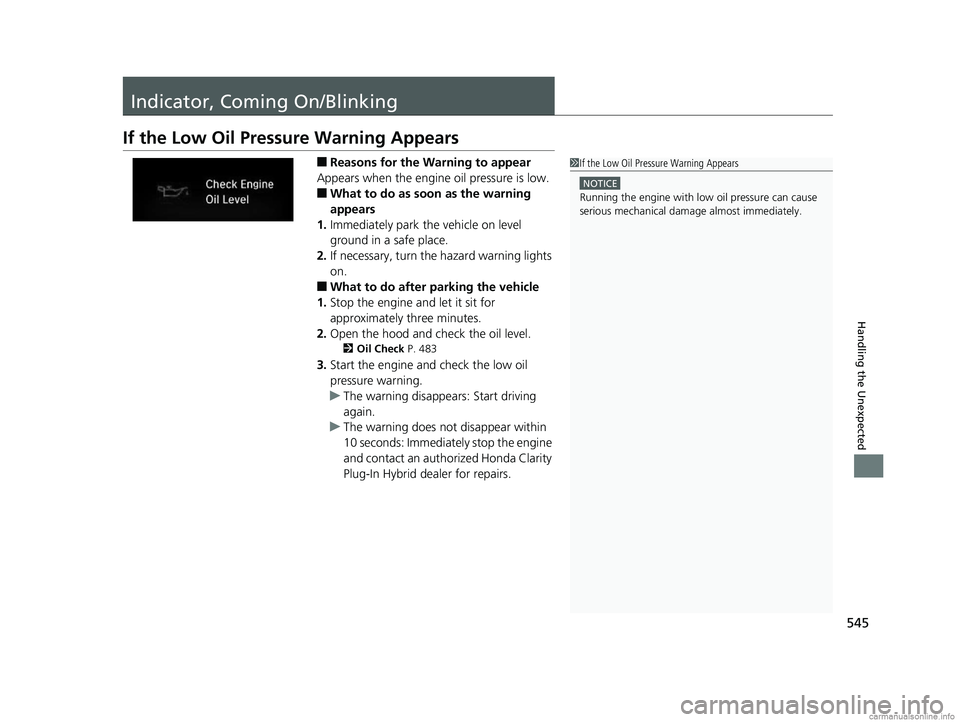
If the Low Oil Pressure Warning Appears
■Reasons for the Warning to appear
Appears when the engine oil pressure is low.
■What to do as soon as the warning
appears
1. Immediately park the vehicle on level
ground in a safe place.
2. If necessary, turn the hazard warning lights
on.
■What to do after parking the vehicle
1. Stop the engine and let it sit for
approximately three minutes.
2. Open the hood and ch eck the oil level.
2Oil Check P. 483
3.Start the engine and check the low oil
pressure warning.
u The warning disappears: Start driving
again.
u The warning does not disappear within
10 seconds: Immediately stop the engine
and contact an authorized Honda Clarity
Plug-In Hybrid dealer for repairs.
1If the Low Oil Pressure Warning Appears
NOTICE
Running the engine with low oil pressure can cause
serious mechanical damage almost immediately.
18 CLARITY PHEV CSS-31TRW6000.book 545 ページ 2017年12月25日 月曜日 午後2時22分
Page 586 of 591
584
Index
Lower Anchors............................................ 74
Luggage (Maximum Load Limit) .............. 373
M
Maintenance............................................. 471
12-Volt Battery ........................................ 508
Brake Fluid............................................... 492
Cleaning .................................................. 513
Climate Control System ........................... 511
Coolant ................................................... 488
Maintenance Minder
TM............................ 475
Oil ........................................................... 483
Precautions .............................................. 472
Radiator................................................... 489
Remote Transmitter ................................. 510
Replacing Light Bulbs ............................... 494
Safety ...................................................... 473
Service Items............................................ 477
Tires ........................................................ 499
Transmission Fluid.................................... 492
Under the Hood....................................... 480
Malfunction Indicator Lamp ...................... 90
Map Lights ................................................ 184
Maximum Load Limit ................................ 373
Meters, Gauges ......................................... 121
Mirrors ....................................................... 173
Adjusting ................................................. 173
Door ........................................................ 174
Exterior .................................................... 174
Interior Rearview...................................... 173 Modifications (and Accessories)
.............. 519
Motor ........................................................ 568
Jump Starting .......................................... 539
MP3 ........................................................... 264
Multi-View Rear Camera .......................... 449
N
Numbers (Identification).......................... 568
O
Odometer................................................. 126
Oil (Engine) ............................................... 482
Adding .................................................... 484
Checking................................................. 483
Displaying Oil Life .................................... 475
Recommended Engine Oil ....................... 482
Viscosity .................................................. 482
Warning .................................................. 545
Open Source Licences ............................... 305
Opening Trunk ...................................................... 564
Opening/Closing Hood....................................................... 481
Power Windows ...................................... 156
Trunk ...................................................... 150
Operating the Switches Around the Steering Wheel ....................................... 158
Outside Temperature Display .................. 126
Overheating .............................................. 542
P
Pandora®.................................................. 262
Panic Mode ............................................... 155
Parking ..................................................... 447
Parking Brake ........................................... 431
Parking Brake and Brake System Indicator (Red) ........................................ 550
Passenger Front Airbag Off Indicator ....... 67
Passing Indicators ..................................... 162
Playing Bluetooth ® Audio ....................... 267
POWER Button ......................................... 158
Power Flow Monitor ................................ 132
Power System Turning on .............................................. 376
POWER SYSTEM Indicator ......................... 88
Power Windows ....................................... 156
POWER/CHARGE Gauge .......................... 122
Precautions While Driving Rain ........................................................ 380
Pregnant Women ....................................... 52
Puncture (Tire) ......................................... 522
R
Radiator.................................................... 489
Radio (FM/AM) ......................................... 243
Radio (SiriusXM ®)..................................... 247
Radio Data System (RDS) ......................... 245
Range ................................................ 121, 129
RDS (Radio Data System) ......................... 245
Readiness Codes (Emissions Testing) ...... 572
18 CLARITY PHEV CSS-31TRW6000.book 584 ページ 2017年12月25日 月曜日 午後2時22分