light HONDA CLARITY PLUG-IN 2018 (in English) User Guide
[x] Cancel search | Manufacturer: HONDA, Model Year: 2018, Model line: CLARITY PLUG-IN, Model: HONDA CLARITY PLUG-IN 2018Pages: 591, PDF Size: 29.97 MB
Page 37 of 591
35
Quick Reference Guide
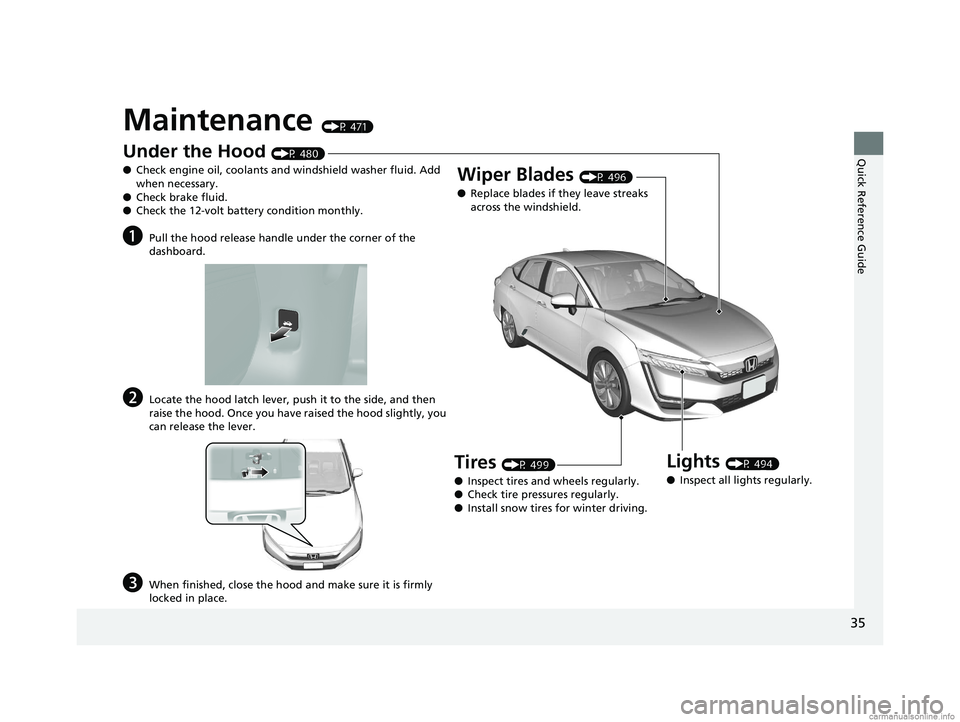
Maintenance (P 471)
Under the Hood (P 480)
● Check engine oil, coolants and windshield washer fluid. Add
when necessary.
● Check brake fluid.
● Check the 12-volt battery condition monthly.
aPull the hood release handle under the corner of the
dashboard.
bLocate the hood latch lever, push it to the side, and then
raise the hood. Once you have raised the hood slightly, you
can release the lever.
cWhen finished, close the hood and make sure it is firmly
locked in place.
Lights (P 494)
● Inspect all lights regularly.
Wiper Blades (P 496)
● Replace blades if they leave streaks
across the windshield.
Tires (P 499)
● Inspect tires and wheels regularly.
● Check tire pressures regularly.
● Install snow tires for winter driving.
18 CLARITY PHEV CSS-31TRW6000.book 35 ページ 2017年12月25日 月曜日 午後2時22分
Page 39 of 591
37
Quick Reference Guide
What to Do If
Why do I hear an operating
noise when applying the
brakes?This can occur when the ABS activates and does not indicate a
problem. Apply firm, steady pressure on the brake pedal. Never
pump the brake pedal.
2Anti-lock Brake System (ABS) (P437)
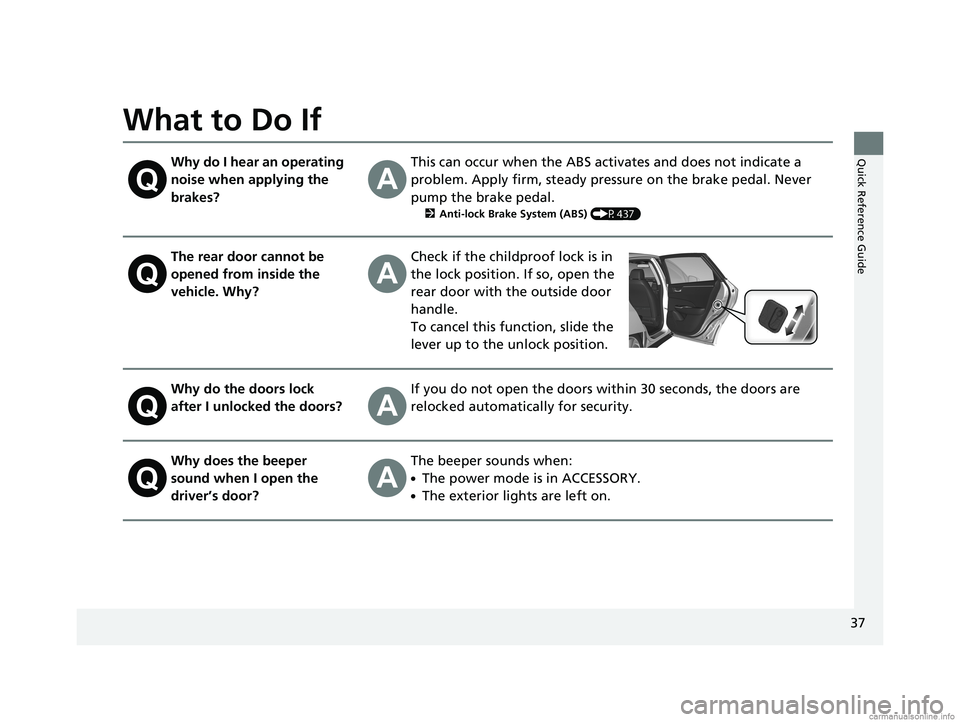
The rear door cannot be
opened from inside the
vehicle. Why?Check if the childproof lock is in
the lock position. If so, open the
rear door with the outside door
handle.
To cancel this function, slide the
lever up to the unlock position.
Why do the doors lock
after I unlocked the doors?If you do not open the doors within 30 seconds, the doors are
relocked automatically for security.
Why does the beeper
sound when I open the
driver’s door?The beeper sounds when:
●The power mode is in ACCESSORY.
●The exterior lights are left on.
18 CLARITY PHEV CSS-31TRW6000.book 37 ページ 2017年12月25日 月曜日 午後2時22分
Page 69 of 591
67
uuAirbags uAirbag System Indicators
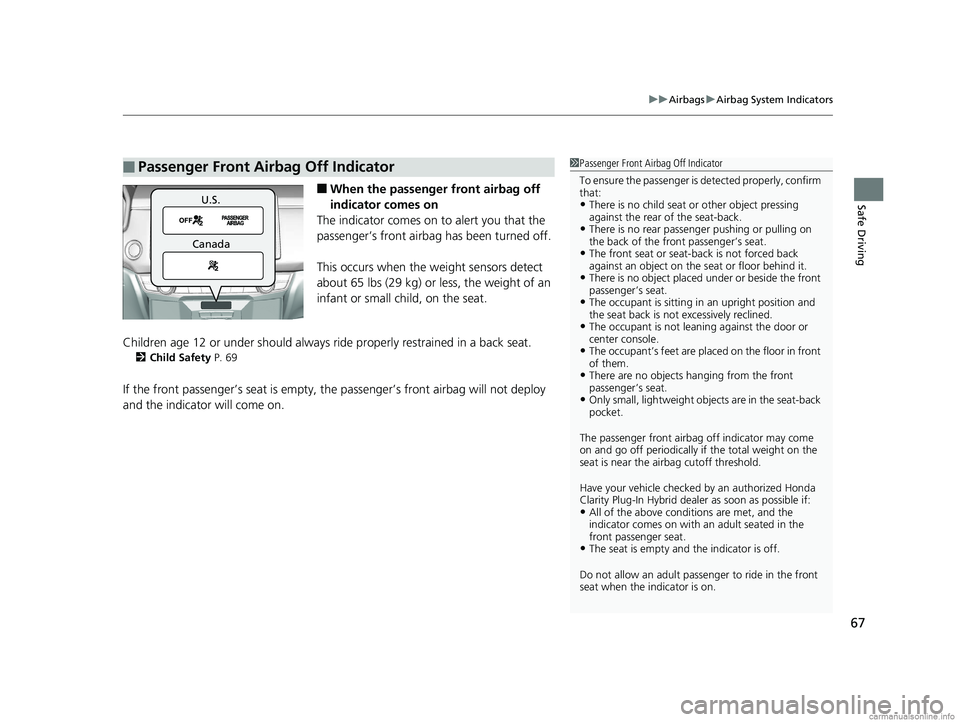
Safe Driving■When the passenger front airbag off
indicator comes on
The indicator comes on to alert you that the
passenger’s front airbag has been turned off.
This occurs when the weight sensors detect
about 65 lbs (29 kg) or less, the weight of an
infant or small child, on the seat.
Children age 12 or under should always ride properly restrained in a back seat.
2 Child Safety P. 69
If the front passenger’s seat is empty, th e passenger’s front airbag will not deploy
and the indicator will come on.
■Passenger Front Airbag Off Indicator1 Passenger Front Airbag Off Indicator
To ensure the passenger is detected properly, confirm
that:
•There is no child seat or other object pressing
against the rear of the seat-back.
•There is no rear passenger pushing or pulling on
the back of the front passenger’s seat.
•The front seat or seat-b ack is not forced back
against an object on the s eat or floor behind it.
•There is no object placed under or beside the front
passenger’s seat.
•The occupant is sitting in an upright position and
the seat back is not excessively reclined.
•The occupant is not leaning against the door or
center console.
•The occupant’s feet are plac ed on the floor in front
of them.
•There are no objects ha nging from the front
passenger’s seat.
•Only small, lightweight objects are in the seat-back
pocket.
The passenger front airbag off indicator may come
on and go off periodically if the total weight on the
seat is near the airbag cutoff threshold.
Have your vehicle checked by an authorized Honda
Clarity Plug-In Hybrid deal er as soon as possible if:
•All of the above conditions are met, and the
indicator comes on with an adult seated in the
front passenger seat.
•The seat is empty and the indicator is off.
Do not allow an adult passe nger to ride in the front
seat when the indicator is on.
U.S.
Canada
18 CLARITY PHEV CSS-31TRW6000.book 67 ページ 2017年12月25日 月曜日 午後2時22分
Page 94 of 591
92
uuIndicators u
Instrument Panel
IndicatorNameOn/BlinkingExplanationMessage
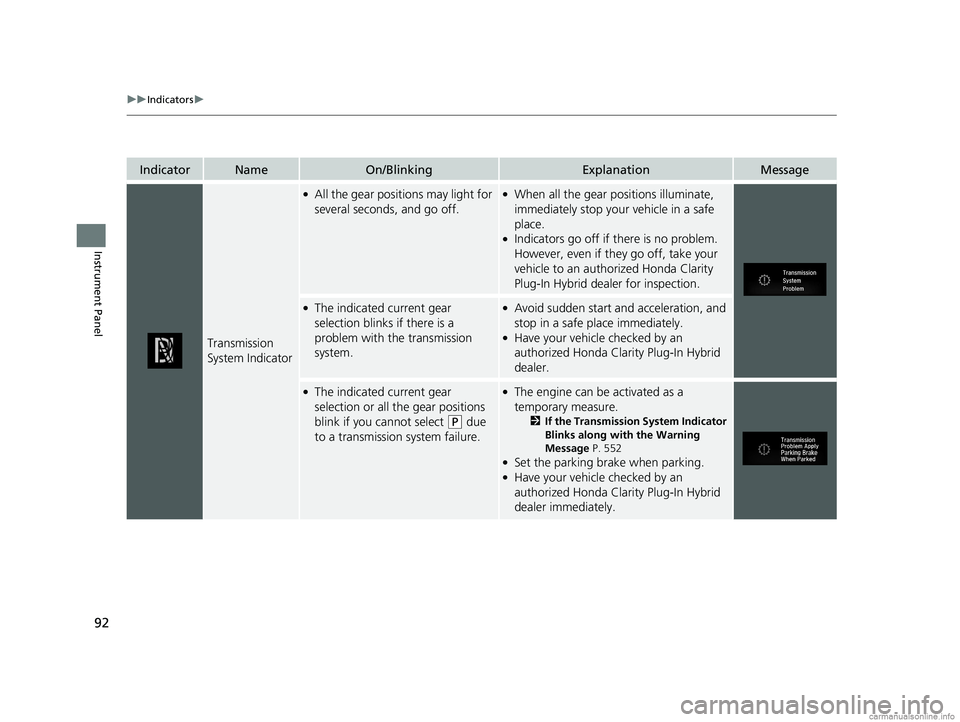
Transmission
System Indicator
●All the gear positions may light for
several seconds, and go off.●When all the gear positions illuminate,
immediately stop your vehicle in a safe
place.
●Indicators go off if there is no problem.
However, even if they go off, take your
vehicle to an authorized Honda Clarity
Plug-In Hybrid dealer for inspection.
●The indicated current gear
selection blinks if there is a
problem with the transmission
system.●Avoid sudden start and acceleration, and
stop in a safe place immediately.
●Have your vehicle checked by an
authorized Honda Clarity Plug-In Hybrid
dealer.
●The indicated current gear
selection or all the gear positions
blink if you cannot select
(P due
to a transmission system failure.
●The engine can be activated as a
temporary measure.
2 If the Transmission System Indicator
Blinks along with the Warning
Message P. 552
●Set the parking brake when parking.●Have your vehicle checked by an
authorized Honda Clarity Plug-In Hybrid
dealer immediately.
18 CLARITY PHEV CSS-31TRW6000.book 92 ページ 2017年12月25日 月曜日 午後2時22分
Page 99 of 591
97
uuIndicators u
Continued
Instrument Panel
*1:Canadian models only: Apply and hold the brake pedal before selecting the ON mode.
IndicatorNameOn/BlinkingExplanationMessage
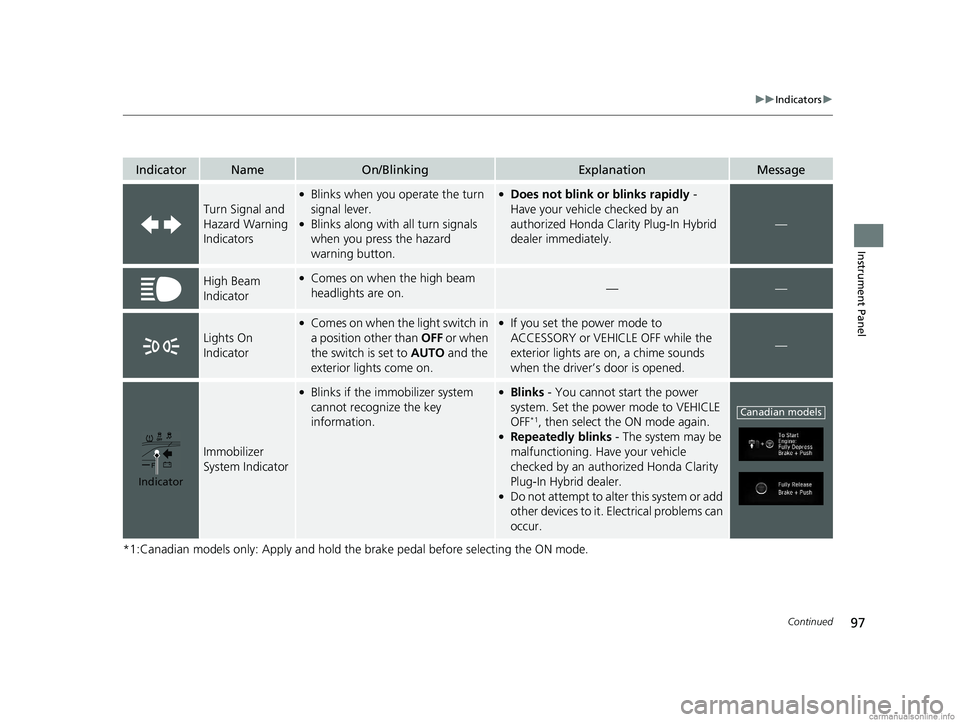
Turn Signal and
Hazard Warning
Indicators
●Blinks when you operate the turn
signal lever.
●Blinks along with all turn signals
when you press the hazard
warning button.
●Does not blink or blinks rapidly -
Have your vehicle checked by an
authorized Honda Clarity Plug-In Hybrid
dealer immediately.
—
High Beam
Indicator●Comes on when the high beam
headlights are on.——
Lights On
Indicator
●Comes on when the light switch in
a position other than OFF or when
the switch is set to AUTO and the
exterior lights come on.●If you set the power mode to
ACCESSORY or VEHICLE OFF while the
exterior lights are on, a chime sounds
when the driver’s door is opened.
—
Immobilizer
System Indicator
●Blinks if the immobilizer system
cannot recognize the key
information.●Blinks - You cannot start the power
system. Set the power mode to VEHICLE
OFF
*1, then select the ON mode again.●Repeatedly blinks - The system may be
malfunctioning. Have your vehicle
checked by an authorized Honda Clarity
Plug-In Hybrid dealer.
●Do not attempt to alter this system or add
other devices to it. Electrical problems can
occur.
Indicator
Canadian models
18 CLARITY PHEV CSS-31TRW6000.book 97 ページ 2017年12月25日 月曜日 午後2時22分
Page 115 of 591
113
uuIndicators uDriver Information Interface Wa rning and Information Messages
Continued
Instrument Panel
MessageConditionExplanation
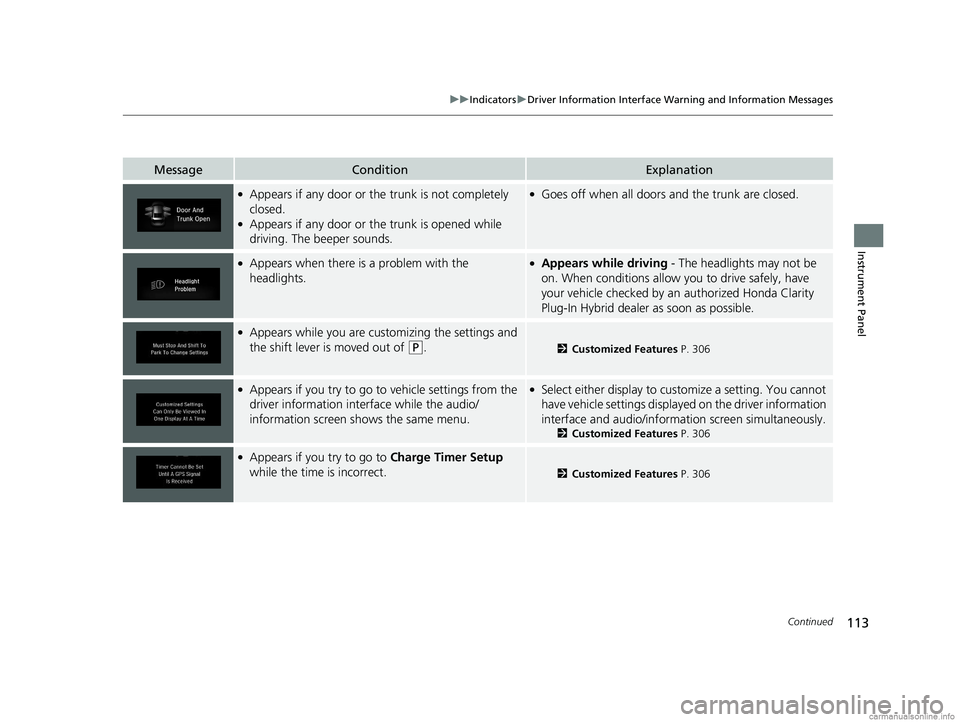
●Appears if any door or the trunk is not completely
closed.
●Appears if any door or the trunk is opened while
driving. The beeper sounds.
●Goes off when all doors and the trunk are closed.
●Appears when there is a problem with the
headlights.●Appears while driving - The headlights may not be
on. When conditions allow you to drive safely, have
your vehicle checked by an authorized Honda Clarity
Plug-In Hybrid dealer as soon as possible.
●Appears while you are customizing the settings and
the shift lever is moved out of
(P.2 Customized Features P. 306
●Appears if you try to go to vehicle settings from the
driver information interface while the audio/
information screen sh ows the same menu.●Select either display to customize a setting. You cannot
have vehicle settings displayed on the driver information
interface and audio/informati on screen simultaneously.
2Customized Features P. 306
●Appears if you try to go to Charge Timer Setup
while the time is incorrect.
2 Customized Features P. 306
18 CLARITY PHEV CSS-31TRW6000.book 113 ページ 2017年12月25日 月曜日 午後2時22分
Page 133 of 591
131
uuGauges and Driver Information Interface uDriver Information Interface
Continued
Instrument Panel
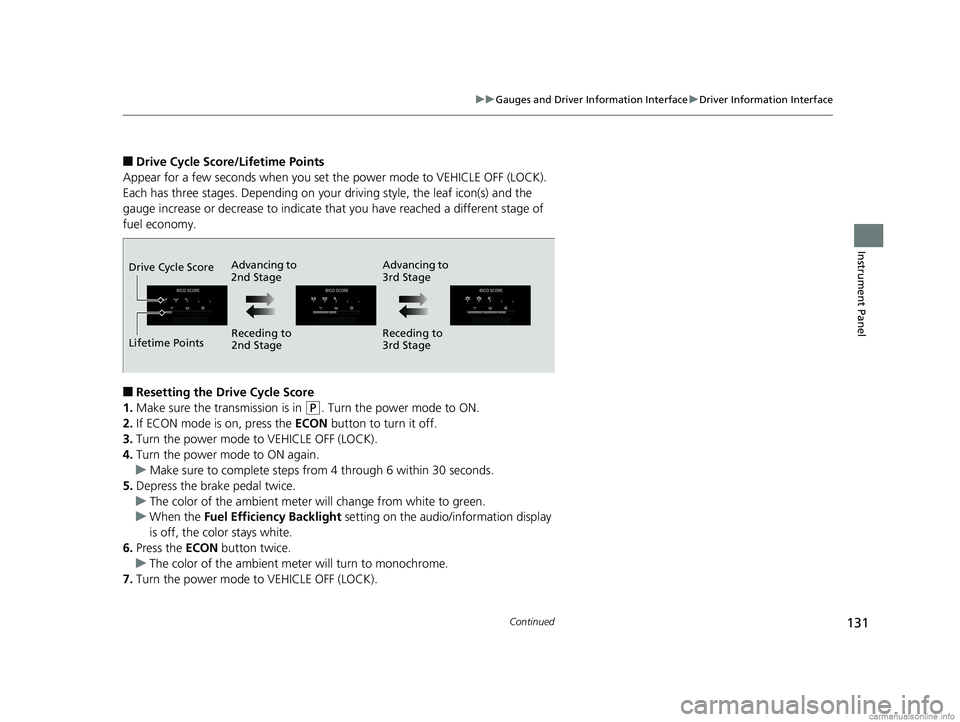
■Drive Cycle Score/Lifetime Points
Appear for a few seconds when you set the power mode to VEHICLE OFF (LOCK).
Each has three stages. Depending on your driving style, the leaf icon(s) and the
gauge increase or decrease to indicate that you have reached a different stage of
fuel economy.
■Resetting the Drive Cycle Score
1. Make sure the transmission is in
(P. Turn the power mode to ON.
2. If ECON mode is on, press the ECON button to turn it off.
3. Turn the power mode to VEHICLE OFF (LOCK).
4. Turn the power mode to ON again.
u Make sure to complete steps fro m 4 through 6 within 30 seconds.
5. Depress the brake pedal twice.
u The color of the ambient meter wi ll change from white to green.
u When the Fuel Efficiency Backlight setting on the audio/information display
is off, the color stays white.
6. Press the ECON button twice.
u The color of the ambient mete r will turn to monochrome.
7. Turn the power mode to VEHICLE OFF (LOCK).
Advancing to
2nd Stage Advancing to
3rd Stage
Receding to
2nd Stage Receding to
3rd Stage
Lifetime Points Drive Cycle Score
18 CLARITY PHEV CSS-31TRW6000.book 131 ページ 2017年12月25日 月曜日 午後2時22分
Page 137 of 591
135
Controls
This chapter explains how to operate the various controls necessary for driving.
Clock.................................................. 136
Locking and Unlocking the Doors Key Types and Functions .................. 137
Low Smart Entry Remote Signal Strength .. 138Locking/Unlocking the Doors from the Outside .......................................... 139
Locking/Unlocking the Doors from the Inside ............................................. 146
Childproof Door Locks ..................... 148
Auto Door Locking/Unlocking .......... 149
Opening and Closing the Trunk ....... 150
Security System ................................ 153
Immobilizer System .......................... 153 Security System Alarm...................... 153
Opening and Closing the Windows ... 156
Operating the Switches Around the
Steering Wheel POWER Button................................. 158
Turn Signals ..................................... 161
Light Switches.................................. 162
Daytime Running Lights ................... 165
Wipers and Washers ........................ 166
Brightness Control ........................... 168
Rear Defogger/Heated Door Mirror Button........................................ 169
Driving Position Memory System*.... 170 Adjusting the Steering Wheel .......... 172
Adjusting the Mirrors ....................... 173
Interior Rearview Mirror ................... 173
Power Door Mirrors ......................... 174
Adjusting the Seats .......................... 175
Front Seats ...................................... 175
Interior Lights/Interior Convenience Items ................................................ 183
Interior Lights .................................. 183
Interior Convenience Items .............. 185
Climate Control System ................... 193
Using Automatic Climate Control .... 193
Automatic Climate Control Sensors ... 201
* Not available on all models
18 CLARITY PHEV CSS-31TRW6000.book 135 ページ 2017年12月25日 月曜日 午後2時22分
Page 139 of 591
137Continued
Controls
Locking and Unlocking the Doors
Key Types and Functions
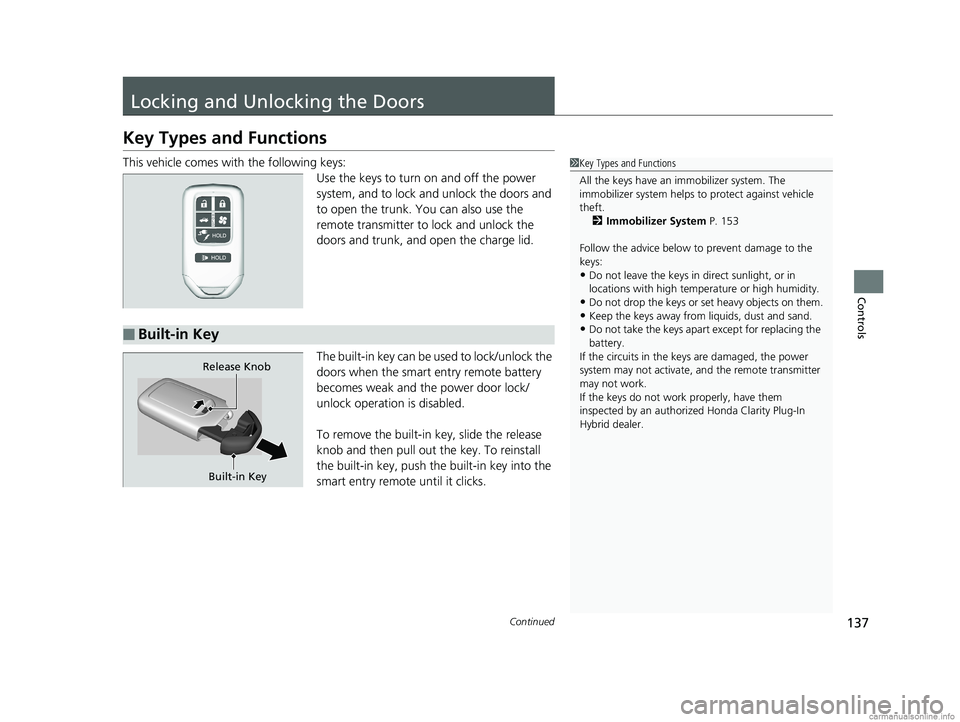
This vehicle comes with the following keys:
Use the keys to turn on and off the power
system, and to lock and unlock the doors and
to open the trunk. You can also use the
remote transmitter to lock and unlock the
doors and trunk, and open the charge lid.
The built-in key can be us ed to lock/unlock the
doors when the smart entry remote battery
becomes weak and the power door lock/
unlock operation is disabled.
To remove the built-in key, slide the release
knob and then pull out the key. To reinstall
the built-in key, push the built-in key into the
smart entry remote until it clicks.1 Key Types and Functions
All the keys have an immobilizer system. The
immobilizer system helps to protect against vehicle
theft. 2 Immobilizer System P. 153
Follow the advice below to prevent damage to the
keys:
•Do not leave the keys in direct sunlight, or in
locations with high temperature or high humidity.
•Do not drop the keys or set heavy objects on them.•Keep the keys away from liquids, dust and sand.
•Do not take the keys apart except for replacing the
battery.
If the circuits in the keys are damaged, the power
system may not activate, and the remote transmitter
may not work.
If the keys do not work properly, have them
inspected by an authorized Honda Clarity Plug-In
Hybrid dealer.■Built-in Key
Built-in Key
Release Knob
18 CLARITY PHEV CSS-31TRW6000.book 137 ページ 2017年12月25日 月曜日 午後2時22分
Page 141 of 591
139
uuLocking and Unlocking the Doors uLocking/Unlocking the Doors from the Outside
Continued
Controls
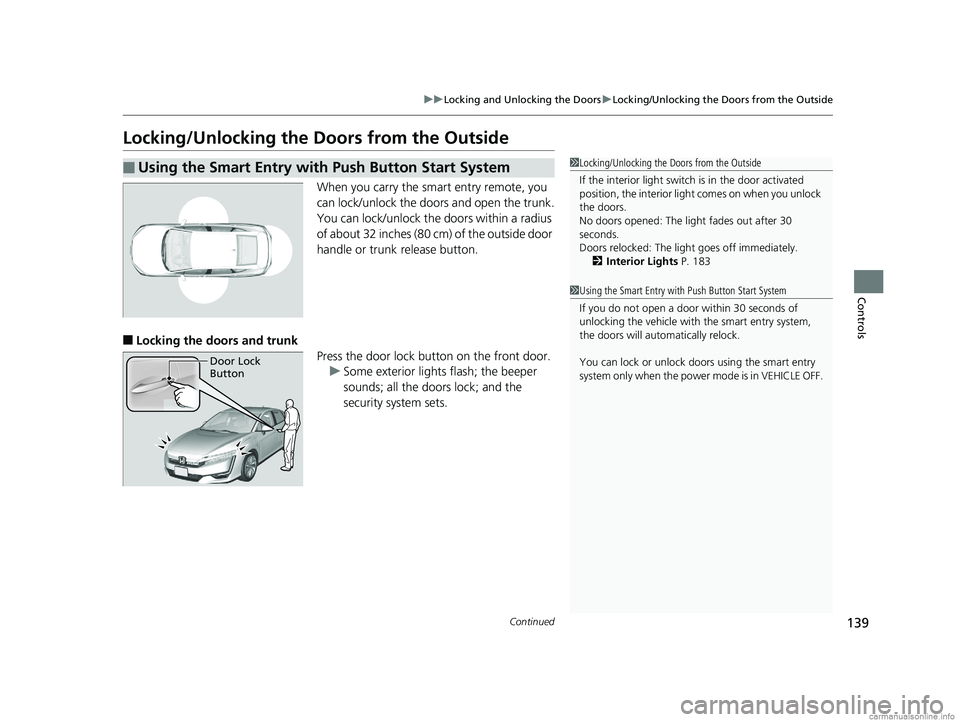
Locking/Unlocking the Doors from the Outside
When you carry the sm art entry remote, you
can lock/unlock the doors and open the trunk.
You can lock/unlock the doors within a radius
of about 32 inches (80 cm) of the outside door
handle or trunk release button.
■Locking the doors and trunk Press the door lock button on the front door.u Some exterior lights flash; the beeper
sounds; all the doors lock; and the
security system sets.
■Using the Smart Entry with Push Button Start System1Locking/Unlocking the Doors from the Outside
If the interior light switch is in the door activated
position, the interior light comes on when you unlock
the doors.
No doors opened: The li ght fades out after 30
seconds.
Doors relocked: The light goes off immediately.
2 Interior Lights P. 183
1Using the Smart Entry with Push Button Start System
If you do not open a door within 30 seconds of
unlocking the vehicle with the smart entry system,
the doors will automatically relock.
You can lock or unlock doors using the smart entry
system only when the power mode is in VEHICLE OFF.
Door Lock
Button
18 CLARITY PHEV CSS-31TRW6000.book 139 ページ 2017年12月25日 月曜日 午後2時22分