warning HONDA CLARITY PLUG-IN 2018 (in English) Owner's Guide
[x] Cancel search | Manufacturer: HONDA, Model Year: 2018, Model line: CLARITY PLUG-IN, Model: HONDA CLARITY PLUG-IN 2018Pages: 591, PDF Size: 29.97 MB
Page 87 of 591
85
Instrument Panel
This chapter describes the buttons, indicators, and gauges that are used while driving.
Indicators............................................ 86
Driver Information Interface Warning and Information Messages ..................... 103
Gauges and Driver Information Interface ....................................... 121
Gauges ............................................ 121
Driver Information Interface ............. 124
18 CLARITY PHEV CSS-31TRW6000.book 85 ページ 2017年12月25日 月曜日 午後2時22分
Page 94 of 591
92
uuIndicators u
Instrument Panel
IndicatorNameOn/BlinkingExplanationMessage
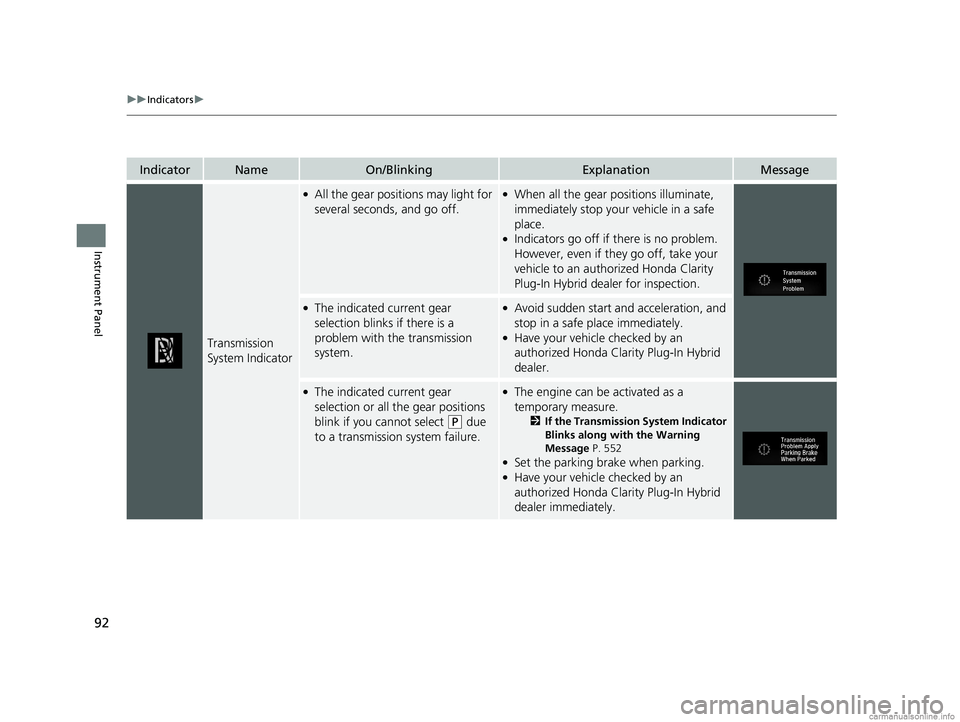
Transmission
System Indicator
●All the gear positions may light for
several seconds, and go off.●When all the gear positions illuminate,
immediately stop your vehicle in a safe
place.
●Indicators go off if there is no problem.
However, even if they go off, take your
vehicle to an authorized Honda Clarity
Plug-In Hybrid dealer for inspection.
●The indicated current gear
selection blinks if there is a
problem with the transmission
system.●Avoid sudden start and acceleration, and
stop in a safe place immediately.
●Have your vehicle checked by an
authorized Honda Clarity Plug-In Hybrid
dealer.
●The indicated current gear
selection or all the gear positions
blink if you cannot select
(P due
to a transmission system failure.
●The engine can be activated as a
temporary measure.
2 If the Transmission System Indicator
Blinks along with the Warning
Message P. 552
●Set the parking brake when parking.●Have your vehicle checked by an
authorized Honda Clarity Plug-In Hybrid
dealer immediately.
18 CLARITY PHEV CSS-31TRW6000.book 92 ページ 2017年12月25日 月曜日 午後2時22分
Page 99 of 591
97
uuIndicators u
Continued
Instrument Panel
*1:Canadian models only: Apply and hold the brake pedal before selecting the ON mode.
IndicatorNameOn/BlinkingExplanationMessage
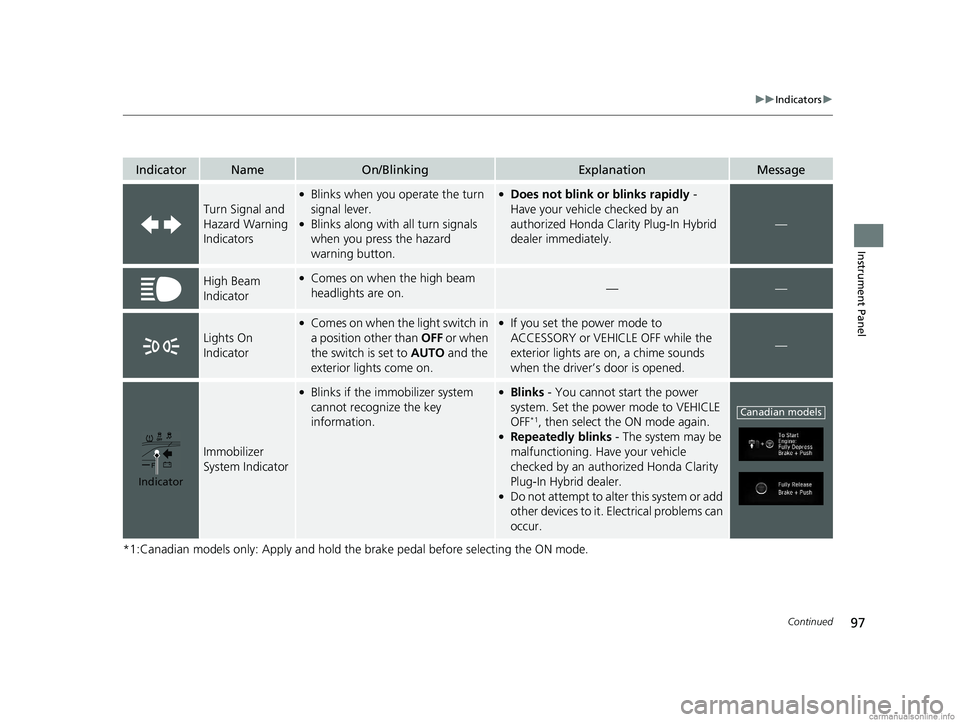
Turn Signal and
Hazard Warning
Indicators
●Blinks when you operate the turn
signal lever.
●Blinks along with all turn signals
when you press the hazard
warning button.
●Does not blink or blinks rapidly -
Have your vehicle checked by an
authorized Honda Clarity Plug-In Hybrid
dealer immediately.
—
High Beam
Indicator●Comes on when the high beam
headlights are on.——
Lights On
Indicator
●Comes on when the light switch in
a position other than OFF or when
the switch is set to AUTO and the
exterior lights come on.●If you set the power mode to
ACCESSORY or VEHICLE OFF while the
exterior lights are on, a chime sounds
when the driver’s door is opened.
—
Immobilizer
System Indicator
●Blinks if the immobilizer system
cannot recognize the key
information.●Blinks - You cannot start the power
system. Set the power mode to VEHICLE
OFF
*1, then select the ON mode again.●Repeatedly blinks - The system may be
malfunctioning. Have your vehicle
checked by an authorized Honda Clarity
Plug-In Hybrid dealer.
●Do not attempt to alter this system or add
other devices to it. Electrical problems can
occur.
Indicator
Canadian models
18 CLARITY PHEV CSS-31TRW6000.book 97 ページ 2017年12月25日 月曜日 午後2時22分
Page 100 of 591
98
uuIndicators u
Instrument Panel
IndicatorNameOn/BlinkingExplanationMessage
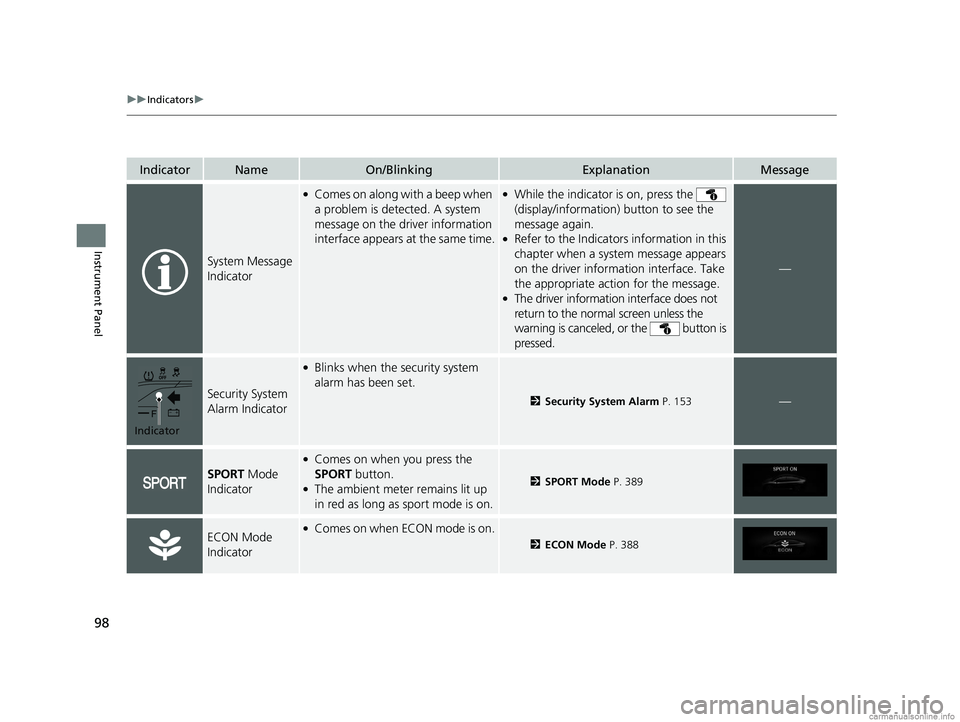
System Message
Indicator
●Comes on along with a beep when
a problem is detected. A system
message on the driver information
interface appears at the same time.●While the indicator is on, press the
(display/information) button to see the
message again.
●Refer to the Indicators information in this
chapter when a system message appears
on the driver information interface. Take
the appropriate action for the message.
●The driver information interface does not
return to the normal screen unless the
warning is canceled, or the button is
pressed.
—
Security System
Alarm Indicator
●Blinks when the security system
alarm has been set.
2 Security System Alarm P. 153—
SPORT Mode
Indicator
●Comes on when you press the
SPORT button.
●The ambient meter remains lit up
in red as long as sport mode is on.2 SPORT Mode P. 389
ECON Mode
Indicator●Comes on when ECON mode is on.
2ECON Mode P. 388
Indicator
18 CLARITY PHEV CSS-31TRW6000.book 98 ページ 2017年12月25日 月曜日 午後2時22分
Page 105 of 591
103
uuIndicators uDriver Information Interface Wa rning and Information Messages
Continued
Instrument Panel
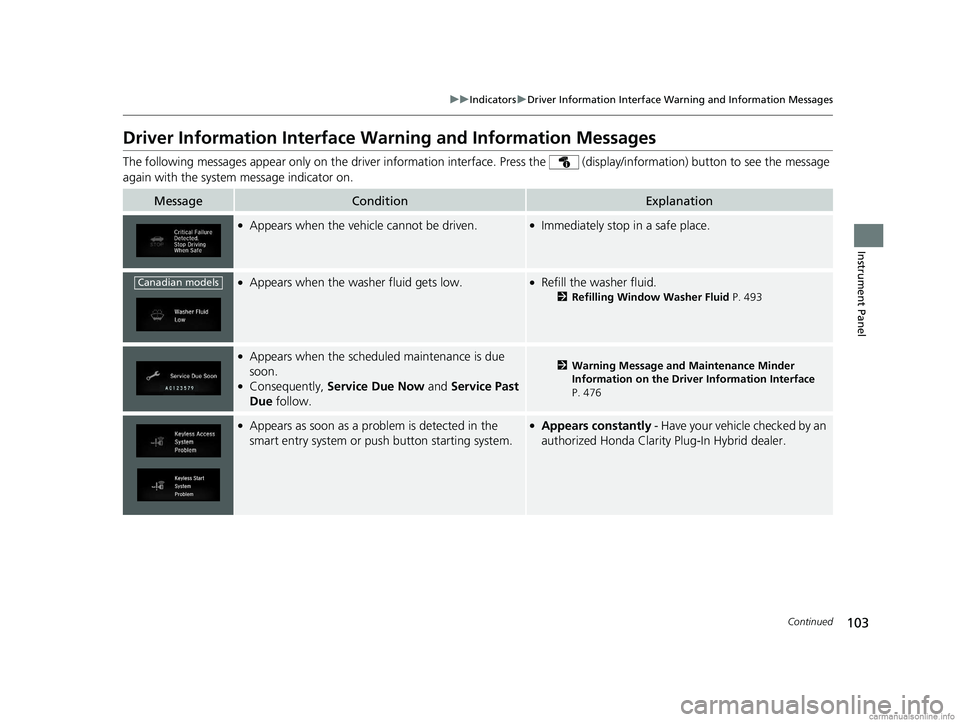
Driver Information Interface Warning and Information Messages
The following messages appear only on the dr iver information interface. Press the (display/information) button to see the message
again with the system message indicator on.
MessageConditionExplanation
●Appears when the vehicle cannot be driven.●Immediately stop in a safe place.
●Appears when the washer fluid gets low.●Refill the washer fluid.
2 Refilling Window Washer Fluid P. 493
●Appears when the scheduled maintenance is due
soon.
●Consequently, Service Due Now and Service Past
Due follow.
2Warning Message and Maintenance Minder
Information on the Driver Information Interface
P. 476
●Appears as soon as a problem is detected in the
smart entry system or push button starting system.●Appears constantly - Have your vehicle checked by an
authorized Honda Clarity Plug-In Hybrid dealer.
Canadian models
18 CLARITY PHEV CSS-31TRW6000.book 103 ページ 2017年12月25日 月曜日 午後2時22分
Page 106 of 591
104
uuIndicators uDriver Information Interface Wa rning and Information Messages
Instrument Panel
MessageConditionExplanation
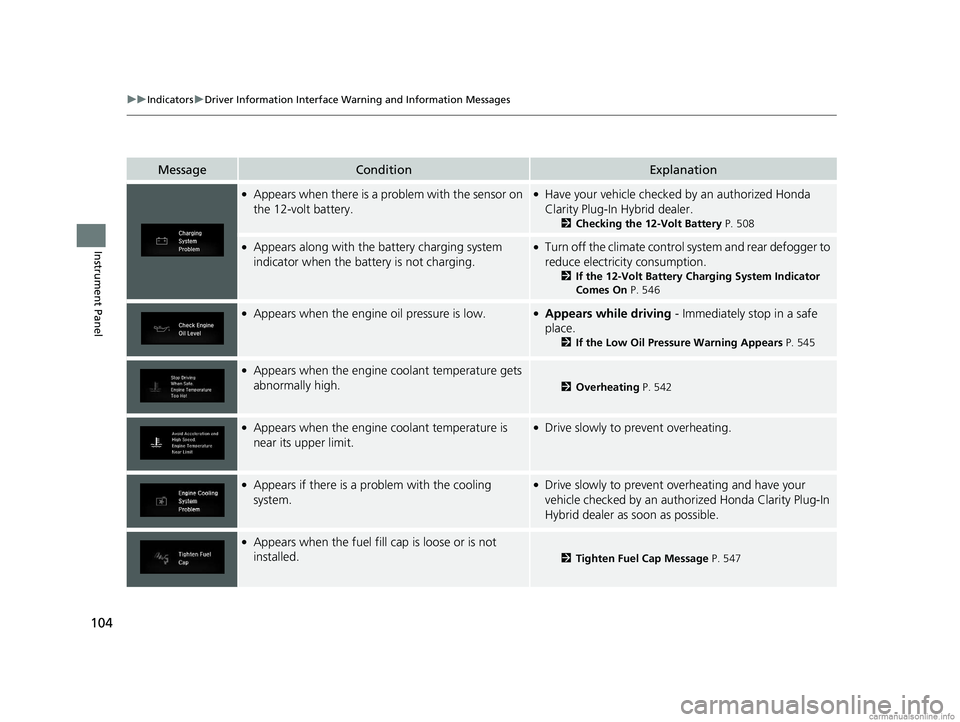
●Appears when there is a problem with the sensor on
the 12-volt battery.●Have your vehicle checked by an authorized Honda
Clarity Plug-In Hybrid dealer.
2 Checking the 12-Volt Battery P. 508
●Appears along with the battery charging system
indicator when the battery is not charging.●Turn off the climate control system and rear defogger to
reduce electricity consumption.
2If the 12-Volt Battery Charging System Indicator
Comes On P. 546
●Appears when the engine oil pressure is low.●Appears while driving - Immediately stop in a safe
place.
2If the Low Oil Pressure Warning Appears P. 545
●Appears when the engine coolant temperature gets
abnormally high.
2 Overheating P. 542
●Appears when the engine coolant temperature is
near its upper limit.●Drive slowly to prevent overheating.
●Appears if there is a pr oblem with the cooling
system.●Drive slowly to prevent overheating and have your
vehicle checked by an author ized Honda Clarity Plug-In
Hybrid dealer as soon as possible.
●Appears when the fuel fill cap is loose or is not
installed.
2 Tighten Fuel Cap Message P. 547
18 CLARITY PHEV CSS-31TRW6000.book 104 ページ 2017年12月25日 月曜日 午後2時22分
Page 121 of 591
119
uuIndicators uDriver Information Interface Wa rning and Information Messages
Continued
Instrument Panel
MessageConditionExplanation
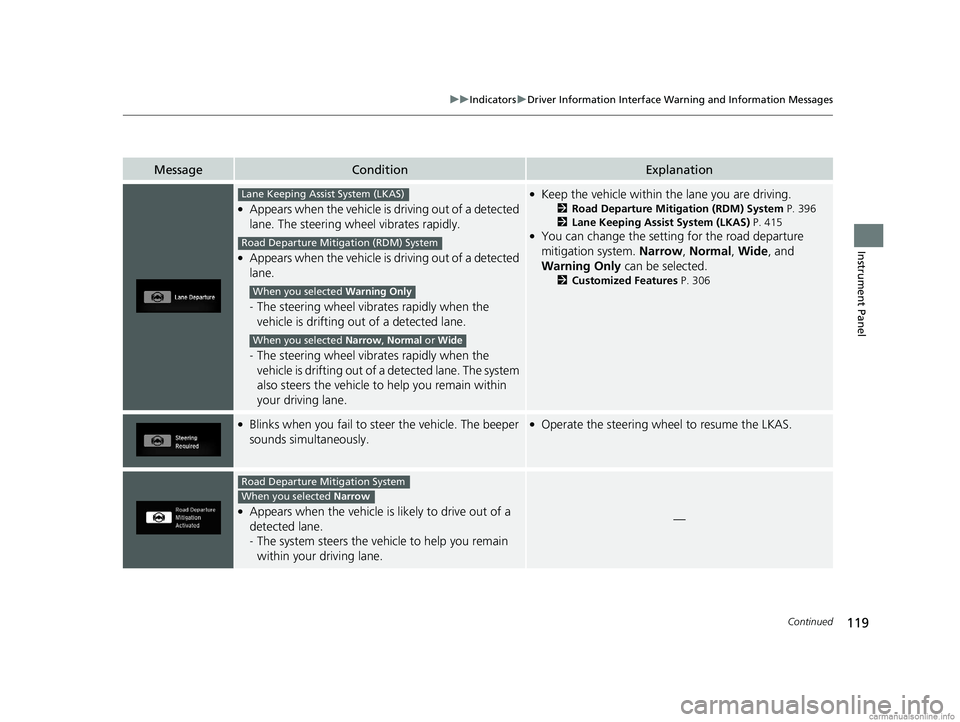
●Appears when the vehicle is driving out of a detected
lane. The steering wheel vibrates rapidly.
●Appears when the vehicle is driving out of a detected
lane.
- The steering wheel vibr ates rapidly when the
vehicle is drifting out of a detected lane.
- The steering wheel vibr ates rapidly when the
vehicle is drifting out of a detected lane. The system
also steers the vehicle to help you remain within
your driving lane.
●Keep the vehicle within the lane you are driving.
2Road Departure Mitigation (RDM) System P. 396
2 Lane Keeping Assist System (LKAS) P. 415
●You can change the setting for the road departure
mitigation system. Narrow, Normal, Wide, and
Warning Only can be selected.
2Customized Features P. 306
●Blinks when you fail to steer the vehicle. The beeper
sounds simultaneously.●Operate the steering wheel to resume the LKAS.
●Appears when the vehicle is likely to drive out of a
detected lane.
- The system steers the vehi cle to help you remain
within your driving lane.—
Lane Keeping Assist System (LKAS)
Road Departure Mitigation (RDM) System
When you selected Warning Only
When you selected Narrow, Normal or Wide
Road Departure Mitigation System
When you selected Narrow
18 CLARITY PHEV CSS-31TRW6000.book 119 ページ 2017年12月25日 月曜日 午後2時22分
Page 126 of 591
124
uuGauges and Driver Information Interface uDriver Information Interface
Instrument Panel
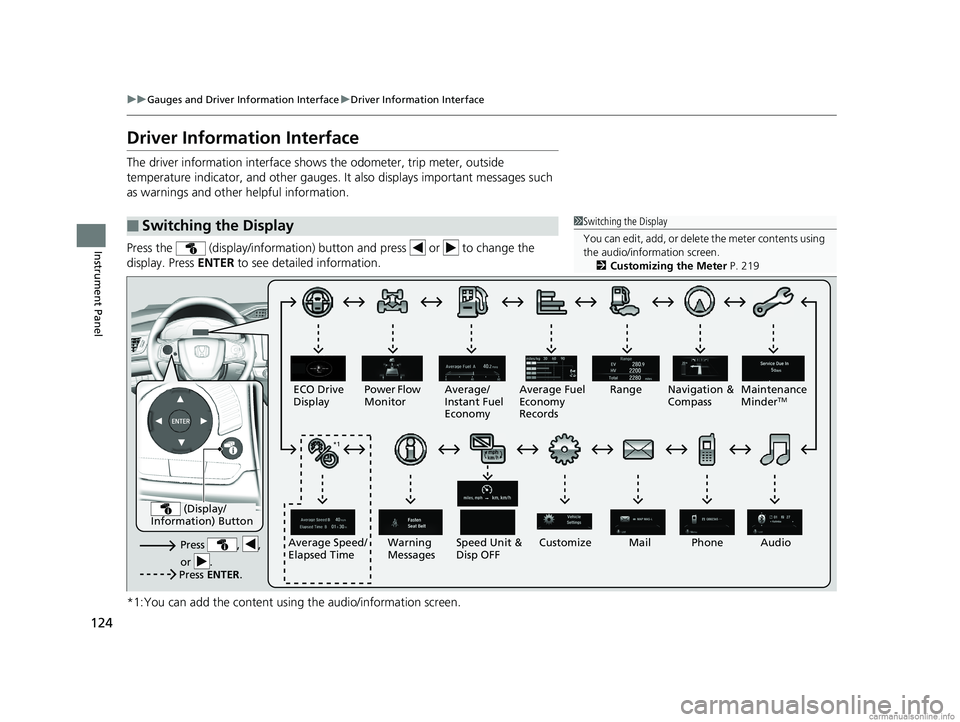
Driver Information Interface
The driver information interface shows the odometer, trip meter, outside
temperature indicator, and other gauges. It also displays important messages such
as warnings and other helpful information.
Press the (display/information) button and press or to change the
display. Press ENTER to see detailed information.
*1:You can add the content using the audio/information screen.
■Switching the Display1 Switching the Display
You can edit, add, or delete the meter contents using
the audio/information screen. 2 Customizing the Meter P. 219
Press , ,
or .Speed Unit &
Disp OFF
ECO Drive
Display
Power Flow
Monitor
Customize
Warning
Messages Audio
Average Speed/
Elapsed Time Average/
Instant Fuel
Economy
Range Maintenance
Minder
TMAverage Fuel
Economy
Records
Phone
Press ENTER .
(Display/
Information) Button
*1 Navigation &
Compass
Mail*1
18 CLARITY PHEV CSS-31TRW6000.book 124 ページ 2017年12月25日 月曜日 午後2時22分
Page 143 of 591
Continued141
uuLocking and Unlocking the Doors uLocking/Unlocking the Doors from the Outside
Controls
To temporarily deactivate the function:
1. Set the power mode to OFF.
2. Open the driv er’s door.
3. Using the master door lock switch, operate
the lock as follows:
Lock Unlock Lock Unlock.
u The beeper sounds an d the function is
deactivated.
To restore the function:
• Set the power mode to ON.
• Lock the vehicle without using the auto lock
function.
• With the smart entry remote on you, move
out of the auto lock function operation
range.
• Open any door.1Locking the doors and trunk (Walk away auto lock)
The auto lock function does not operate when any of
the following conditions are met.
•The smart entry remote is inside the vehicle.
•A door or the hood is not closed.
•The power mode is set to any mode other than
OFF.
•The smart entry remote is not located within a
radius of about 5 feet (1 .5 m) from the vehicle
when you get out of the vehicle and close the
doors.
Auto lock function operation stop beeper
After the auto lock function has been activated, the
auto lock operation stop beeper sounds for
approximately two seconds in the following cases.
•The smart entry remote is put inside the vehicle
through a window.
•You are located too close to the vehicle.
•The smart entry remote is put inside the trunk.
If the warning beeper sounds, check that you are
carrying the smart entry remote. Then, open/close a
door and confirm the auto lock activation beeper
sounds once.
18 CLARITY PHEV CSS-31TRW6000.book 141 ページ 2017年12月25日 月曜日 午後2時22分
Page 158 of 591
156
Controls
Opening and Closing the Windows
Opening/Closing the Power Windows
The power windows can be opened and closed when the power mode is in ON,
using the switches on the doors.
The driver’s side switches can be used to open and close all the windows. The power
window lock button on the driver’s side must be switched off (indicator off) to open
and close the windows from anywhere other than the driver’s seat.
When the power window lock button is pressed, the indicator comes on and you
can only operate the driver’s window. Turn the power window lock button on if a
child is in the vehicle.
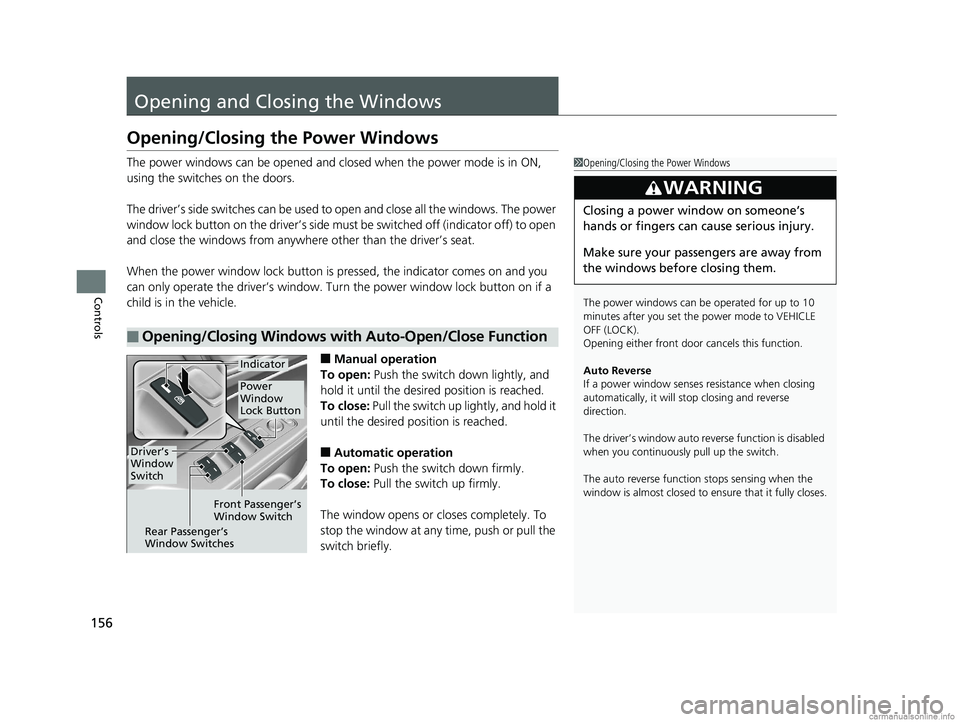
■Manual operation
To open: Push the switch down lightly, and
hold it until the desired position is reached.
To close: Pull the switch up lightly, and hold it
until the desired position is reached.
■Automatic operation
To open: Push the switch down firmly.
To close: Pull the switch up firmly.
The window opens or cl oses completely. To
stop the window at any time, push or pull the
switch briefly.
■Opening/Closing Windows with Auto-Open/Close Function
1 Opening/Closing the Power Windows
The power windows can be operated for up to 10
minutes after you set the power mode to VEHICLE
OFF (LOCK).
Opening either front door cancels this function.
Auto Reverse
If a power window senses resistance when closing
automatically, it will stop closing and reverse
direction.
The driver’s window auto re verse function is disabled
when you continuously pull up the switch.
The auto reverse function stops sensing when the
window is almost closed to en sure that it fully closes.
3WARNING
Closing a power window on someone’s
hands or fingers can cause serious injury.
Make sure your passengers are away from
the windows before closing them.
Driver’s
Window
Switch
Front Passenger’s
Window Switch
Rear Passenger’s
Window Switches
Power
Window
Lock Button
Indicator
18 CLARITY PHEV CSS-31TRW6000.book 156 ページ 2017年12月25日 月曜日 午後2時22分