ACC HONDA CLARITY PLUG-IN 2018 Owner's Manual (in English)
[x] Cancel search | Manufacturer: HONDA, Model Year: 2018, Model line: CLARITY PLUG-IN, Model: HONDA CLARITY PLUG-IN 2018Pages: 591, PDF Size: 29.97 MB
Page 2 of 591
Event Data Recorders
This vehicle is equipped with an event data recorder (EDR).
The main purpose of an EDR is to record, in certain crash or near
crash-like situations, such as an air bag deployment or hitting a
road obstacle, data that will assi st in understanding how a vehicle’s
systems performed. The EDR is designed to record data related
to vehicle dynamics and safety systems for a short period of
time, typically 30 seconds or le ss. The EDR in this vehicle is
designed to record such data as:
• How various systems in your vehicle were operating;
• Whether or not the driver and passenger safety belts were
buckled/fastened;
3WARNING
California Proposition 65 Warning
Operating, servicing and maintaining a
passenger vehicle or off-road vehicle can
expose you to chemicals including engine
exhaust, carbon monoxide, phthalates, and
lead, which are known to the State of
California to cause cancer and birth defects or
other reproductive harm. To minimize
exposure, avoid breathing exhaust, do not
idle the engine except as necessary, service
your vehicle in a well-ventilated area and
wear gloves or wash your hands frequently
when servicing your vehicle. For more
information go to
www.P65Warnings.ca.gov/
passenger-vehicle
.
• How far (if at all) the driver was depressing the accelerator
and/or brake pedal; and,
• How fast the vehicle was traveling.
These data can help provide a better understanding of the
circumstances in which crashes and injuries occur. NOTE: EDR data
are recorded by your vehicle only if a non-trivial crash situation
occurs; no data are recorded by the EDR under normal driving
conditions and no personal data (e.g., name, gender, age, and
crash location) are recorded. Howeve r, other parties, such as law
enforcement, could co mbine the EDR data with the type of
personally identifying data routinely acquired during a crash
investigation.
To read data recorded by an ED R, special equipment is required,
and access to the vehicle or the EDR is needed. In addition to the
vehicle manufacturer, other parties, such as law enforcement, that
have the special equipment, can re ad the information if they have
access to the vehicle or the EDR.
The data belongs to the vehicle ow ner and may not be accessed by
anyone else except as legally requ ired or with the permission of the
vehicle owner.
Service Diagnostic Recorders
This vehicle is equipped with serv ice-related devices that record
information about powertrain perform ance. The data can be used
to verify emissions law requirem ents and/or help technicians
diagnose and solve service problems. It may also be combined with
data from other sources for res earch purposes, but it remains
confidential. Some diagnostic and maintenance information is
uploaded to Honda upon vehicle start up.
18 CLARITY PHEV CSS-31TRW6000.book 0 ページ 2017年12月25日 月曜日 午後2時22分
Page 7 of 591
Contents
Child Safety P. 69Safety Labels P. 83
Opening and Closing the Trunk P. 150 Security System P. 153 Opening and Closing the Windows P. 156
Adjusting the Mirrors P. 173 Adjusting the Seats P. 175
Climate Control System P. 193
Audio Error Messages P. 284 General Information on the Audio System P. 288
Bluetooth ® HandsFreeLink ® P. 335
When Driving P. 376 Braking P. 431Parking Your Vehicle P. 447
Charging P. 454 Fuel Economy and CO
2 Emissions P. 469
Maintenance Under the Hood P. 480 Replacing Light Bulbs P. 494
Checking and Maintaining Tires P. 499 12-Volt Battery P. 508 Remote Transmitter Care P. 510
Accessories and Modifications P. 519
Power System Won’t Start P. 535 Jump Starting P. 539 Overheating P. 542
Fuses P. 553 Emergency Towing P. 561
When You Cannot Open the Charge Lid P. 563 When You Cannot Open the Trunk P. 564
Devices that Emit Radio Waves P. 569 Reporting Safety Defects P. 571
Authorized Manuals P. 576 Customer Service Information P. 577
Quick Reference GuideP. 6
Safe DrivingP. 41
Instrument PanelP. 85
ControlsP. 135
FeaturesP. 203
DrivingP. 369
MaintenanceP. 471
Handling the UnexpectedP. 521
InformationP. 565
IndexP. 579
18 CLARITY PHEV CSS-31TRW6000.book 7 ページ 2017年12月25日 月曜日 午後2時22分
Page 9 of 591
7
Quick Reference Guide
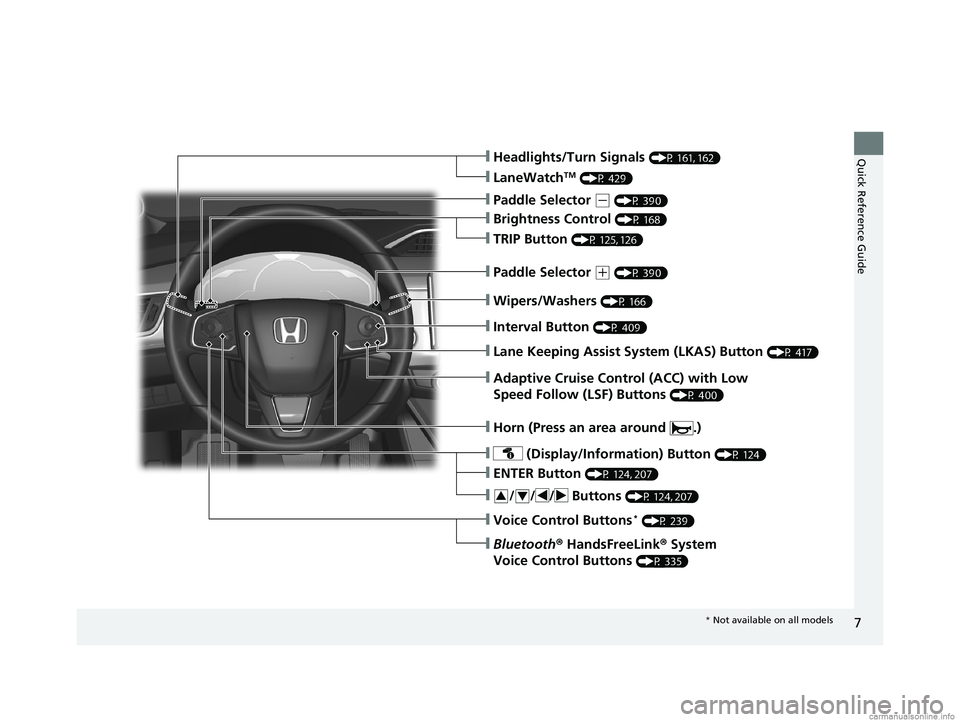
❙Wipers/Washers (P 166)
❙Headlights/Turn Signals (P 161, 162)
❙Brightness Control (P 168)
❙LaneWatchTM (P 429)
❙TRIP Button (P 125, 126)
❙Interval Button (P 409)
❙Lane Keeping Assist System (LKAS) Button (P 417)
❙Adaptive Cruise Control (ACC) with Low
Speed Follow (LSF) Buttons
(P 400)
❙ (Display/Information) Button (P 124)
❙/ / / Buttons (P 124, 207)34
❙ENTER Button (P 124, 207)
❙Voice Control Buttons* (P 239)
❙Bluetooth® HandsFreeLink ® System
Voice Control Buttons
(P 335)
❙Horn (Press an area around .)
❙Paddle Selector (- (P 390)
❙Paddle Selector (+ (P 390)
* Not available on all models
18 CLARITY PHEV CSS-31TRW6000.book 7 ページ 2017年12月25日 月曜日 午後2時22分
Page 10 of 591
Visual Index
8
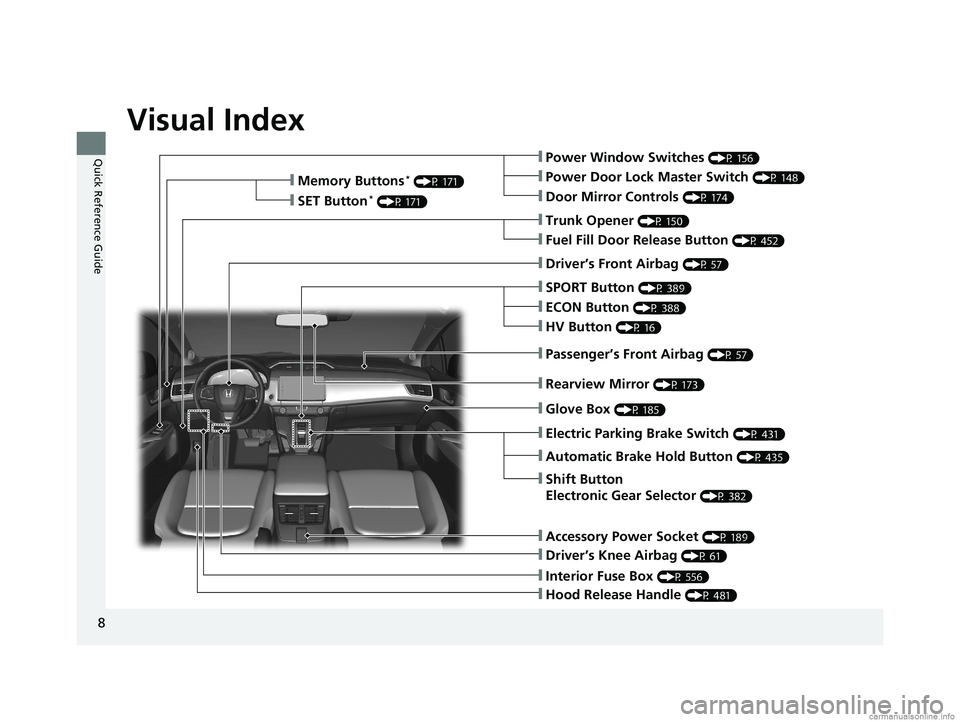
Quick Reference Guide❙Power Window Switches (P 156)
❙Trunk Opener (P 150)
❙Driver’s Knee Airbag (P 61)
❙Door Mirror Controls (P 174)
❙Power Door Lock Master Switch (P 148)
❙Fuel Fill Door Release Button (P 452)
❙Memory Buttons* (P 171)
❙SET Button* (P 171)
❙Interior Fuse Box (P 556)
❙Automatic Brake Hold Button (P 435)
❙Driver’s Front Airbag (P 57)
❙Passenger’s Front Airbag (P 57)
❙SPORT Button (P 389)
❙Glove Box (P 185)
❙Electric Parking Brake Switch (P 431)
❙Shift Button
Electronic Gear Selector
(P 382)
❙Accessory Power Socket (P 189)
❙Hood Release Handle (P 481)
❙ECON Button (P 388)
❙HV Button (P 16)
❙Rearview Mirror (P 173)
18 CLARITY PHEV CSS-31TRW6000.book 8 ページ 2017年12月25日 月曜日 午後2時22分
Page 11 of 591
9
Quick Reference Guide
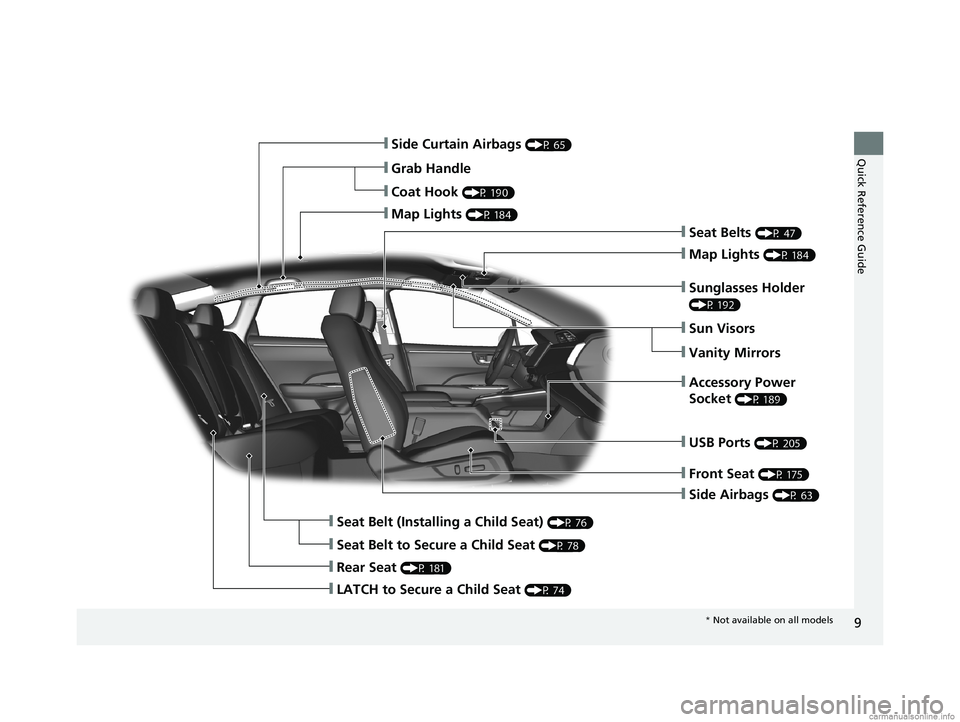
❙Side Airbags (P 63)
❙Side Curtain Airbags (P 65)
❙Seat Belts (P 47)
❙Seat Belt (Installing a Child Seat) (P 76)
❙Rear Seat (P 181)
❙Coat Hook (P 190)
❙Map Lights (P 184)
❙Sun Visors
❙Vanity Mirrors
❙Seat Belt to Secure a Child Seat (P 78)
❙Map Lights (P 184)
❙Grab Handle
❙Sunglasses Holder
(P 192)
❙Accessory Power
Socket
(P 189)
❙Front Seat (P 175)
❙USB Ports (P 205)
❙LATCH to Secure a Child Seat (P 74)
* Not available on all models
18 CLARITY PHEV CSS-31TRW6000.book 9 ページ 2017年12月25日 月曜日 午後2時22分
Page 14 of 591
12
Quick Reference Guide
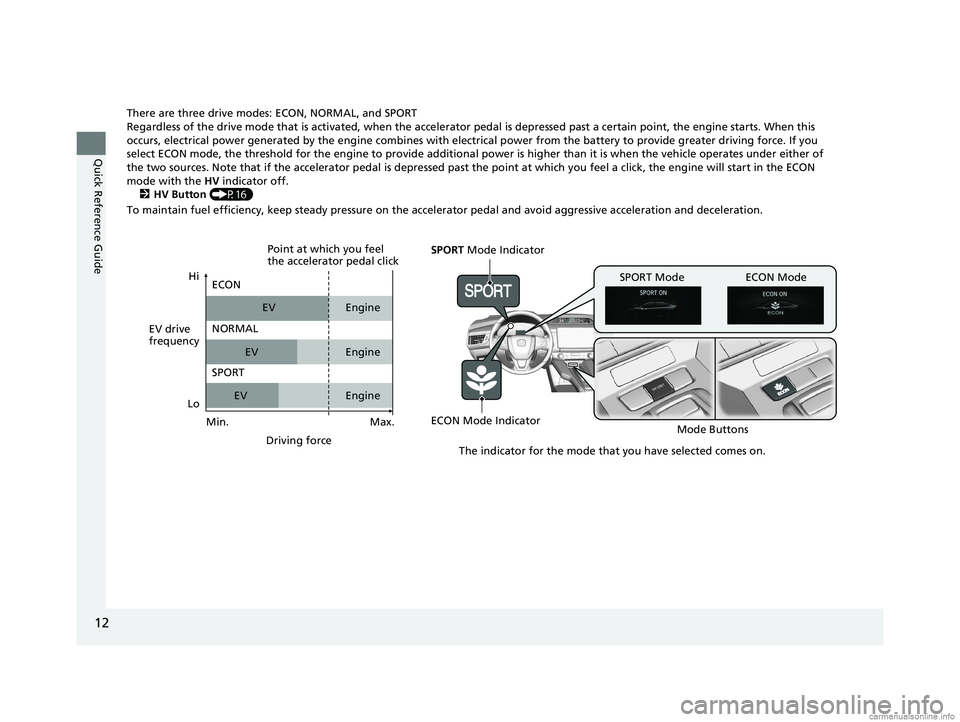
There are three drive modes: ECON, NORMAL, and SPORT
Regardless of the drive mode that is activated, when the accelerator pedal is depressed past a certain point, the engine starts. When this
occurs, electrical power generated by the en gine combines with electrical power from the battery to provide greater driving force. If you
select ECON mode, the threshold for the engine to provide additional power is higher than it is when the vehicle operates under either of
the two sources. Note that if the accelerator pedal is depressed past the point at which you feel a click, the engine will star t in the ECON
mode with the HV indicator off.
2 HV Button (P16)
To maintain fuel efficiency, keep steady pressure on the accelerator pedal and avoid aggressive acceleration and deceleration.
SPORT Mode Indicator
ECON Mode Indicator Mode Buttons
SPORT Mode ECON Mode
The indicator for the mode that you have selected comes on.
EV drive
frequencyHi
Max.
Driving force
ECON
NORMAL
SPORT
EV
EV
EV Engine
Engine
Engine
Point at which you feel
the accelerator pedal click
Min.
Lo
18 CLARITY PHEV CSS-31TRW6000.book 12 ページ 2017年12月25日 月曜日 午後2時22分
Page 15 of 591
13
Quick Reference Guide
Auto Engine Stop/Start
The car will select the appropriate source of power depending on the drive mode you select.
As a result, the engine will automatically start or stop as needed to either charge the battery or provide supplemental power.
Under certain circumstances, the engine may turn on or, if it is already on, it may not turn off.
● You are going uphill or accelerating aggressively.
● The climate control system is in heavy use.
● The Ambient temperature is too hot or too cold.
● The High Voltage Battery state of charge is very low.
● The vehicle is running a system check.
System Check
When the engine initially starts (between the time the POWER button is turned on and turned of f), the vehicle conducts a system check.
● While the check is being conducted, the engine may periodically turn on and off. This, however, is normal.
● The curved blue line in the POWER/CHARGE Gauge will not appear during the system check ( EV indicator may still turn on).
● Once the engine starts, it will continue to run until the system reaches operating temperature.
The curved blue line in the POWER/CHARGE Gauge will reappear once the system check is completed.
2 POWER/CHARGE Gauge (P122)
18 CLARITY PHEV CSS-31TRW6000.book 13 ページ 2017年12月25日 月曜日 午後2時22分
Page 16 of 591
14
Quick Reference Guide
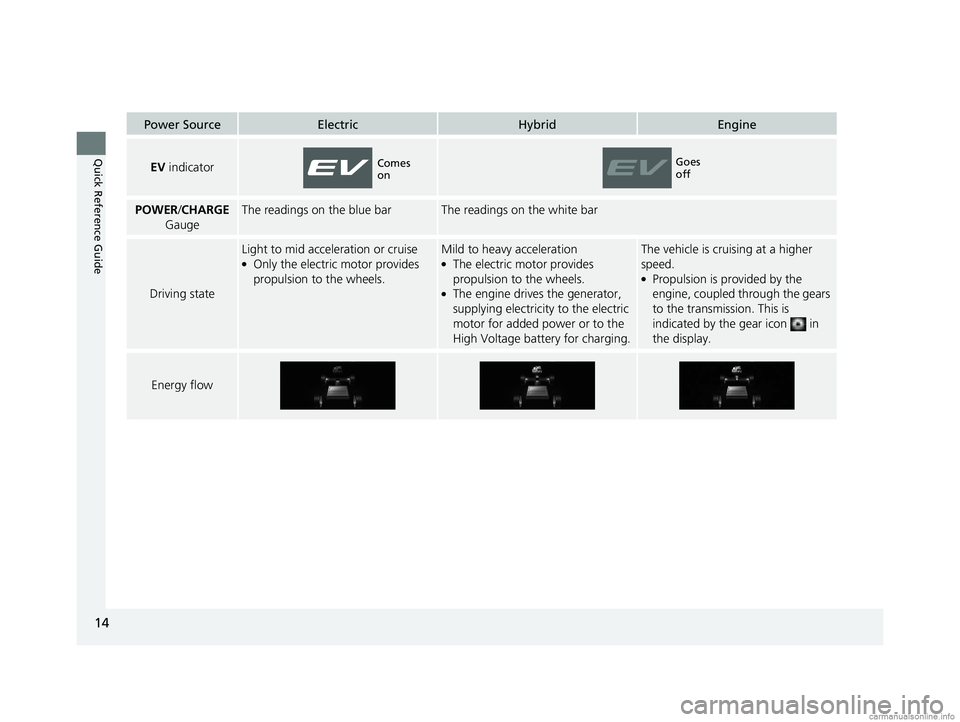
Power SourceElectricHybridEngine
EV indicator
POWER /CHARGE
GaugeThe readings on the blue barThe readings on the white bar
Driving state
Light to mid acceleration or cruise●Only the electric motor provides
propulsion to the wheels.
Mild to heavy acceleration●The electric motor provides
propulsion to the wheels.
●The engine drives the generator,
supplying electricity to the electric
motor for added power or to the
High Voltage battery for charging.
The vehicle is cruising at a higher
speed.
●Propulsion is provided by the
engine, coupled through the gears
to the transmission. This is
indicated by the gear icon in
the display.
Energy flow
Comes
onGoes
off
18 CLARITY PHEV CSS-31TRW6000.book 14 ページ 2017年12月25日 月曜日 午後2時22分
Page 17 of 591
15
Quick Reference Guide
Power Source and Charging
Electric SourceWhen the High Voltage battery is sufficiently charged, the vehicle is propelled solely by the electric motor. When the remaining power of
the High Voltage battery drops to a certain level, the vehicle switches to HV. u To maintain charge levels, you can, at any time, use the HV button to switch the vehicle to HV.
2 Switching to HV (P16)
u If the High Voltage battery charge drops below levels that are necessary for the vehicle to run in Electric, you can enable charging of
the battery by pressing and holding the HV button.
2 Switching to HV CHARGE (P17)
Hybrid SourceIn hybrid, the electric motor receives powe r either from the High Voltage battery or from the generator which is driven by the engine, or
from both the High Volt age battery and generator.
Engine SourceWhen the vehicle is driving under light load within a certain speed range, the engine provides direct power to the wheels.
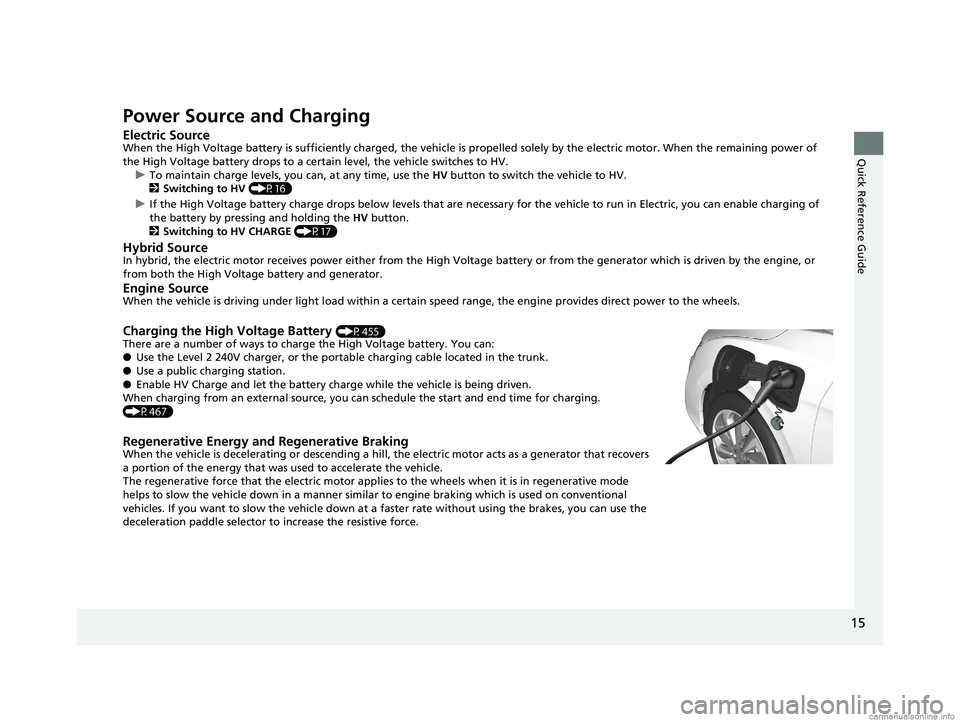
Charging the High Voltage Battery (P455)
There are a number of ways to charge the High Voltage battery. You can:
● Use the Level 2 240V charger, or the portable charging cable located in the trunk.
● Use a public charging station.
● Enable HV Charge and let the battery charge while the vehicle is being driven.
When charging from an external source, you ca n schedule the start and end time for charging.
(P467)
Regenerative Energy and Regenerative BrakingWhen the vehicle is decelerating or descending a hill, the electric motor acts as a generator that recovers
a portion of the energy that was used to accelerate the vehicle.
The regenerative force that the electric motor applie s to the wheels when it is in regenerative mode
helps to slow the vehicle down in a manner similar to engine braking which is used on conventional
vehicles. If you want to slow the vehicle down at a faster rate without using the brakes, you can use the
deceleration paddle selector to increase the resistive force.
18 CLARITY PHEV CSS-31TRW6000.book 15 ページ 2017年12月25日 月曜日 午後2時22分
Page 18 of 591
16
Quick Reference Guide
HV Button
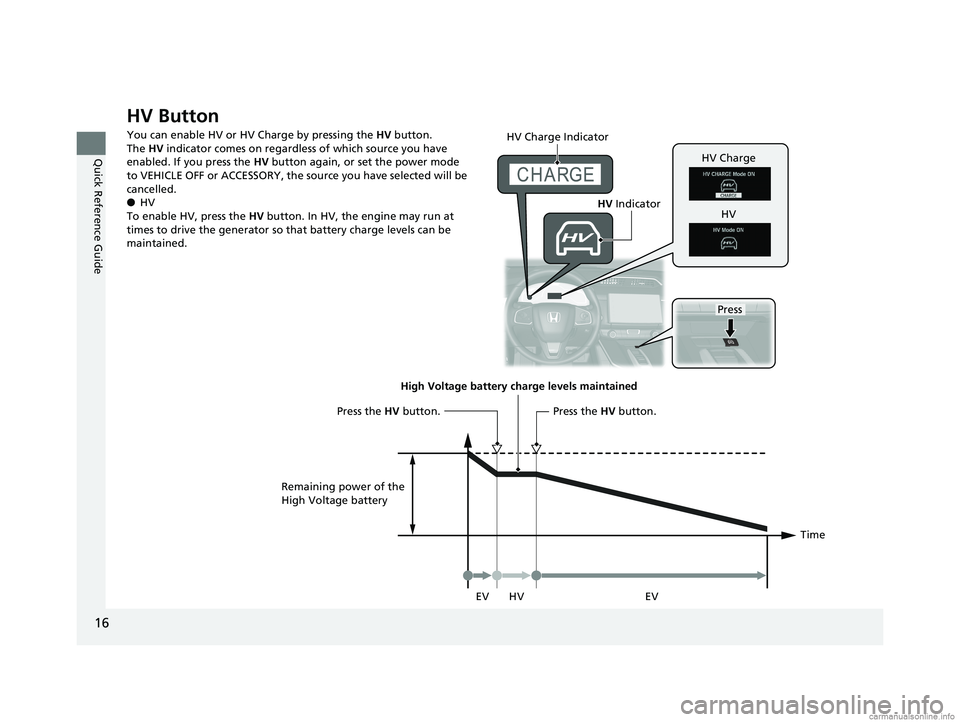
You can enable HV or HV Charge by pressing the HV button.
The HV indicator comes on regardless of which source you have
enabled. If you press the HV button again, or set the power mode
to VEHICLE OFF or ACCESSORY, the source you have selected will be
cancelled.
● HV
To enable HV, press the HV button. In HV, the engine may run at
times to drive the generator so that battery charge levels can be
maintained.
Press
HV Charge Indicator
HV
Indicator
HV Charge
HV
Time
High Voltage battery charge levels maintained
HV
Remaining power of the
High Voltage battery
Press the
HV button.Press the HV button.
EV EV
18 CLARITY PHEV CSS-31TRW6000.book 16 ページ 2017年12月25日 月曜日 午後2時22分