audio HONDA CLARITY PLUG-IN 2020 (in English) Owner's Guide
[x] Cancel search | Manufacturer: HONDA, Model Year: 2020, Model line: CLARITY PLUG-IN, Model: HONDA CLARITY PLUG-IN 2020Pages: 595, PDF Size: 30.43 MB
Page 195 of 595
193Continued
Controls
Climate Control System
Using Automatic Climate Control
The automatic climate control system maintains the interior temperature you select.
The system also selects the proper mix of heat ed or cooled air that raises or lowers
the interior temperature to your pr eference as quickly as possible.1Using Automatic Climate Control
Press the CLIMATE button to display A/C, MODE,
fan control information on the audio/information
screen to operate manually. Select ic on to turn on or
off A/C , change the vent mode , or change the fan
speed.
If any buttons/icons are pressed while using the
climate control system in auto, the function of the
button/icon that was presse d will take priority.
The AUTO indicator will go off, but functions
unrelated to the button/icon that was pressed will be
controlled automatically.
To prevent cold air from bl owing in from outside, the
fan may operate at low speed for a while after the
AUTO button has been pressed.
If the interior is very warm, you can cool it down
more rapidly by partial ly opening the windows,
turning the system on auto, and setting the
temperature to low. Change the fresh air mode to
recirculation mode until the temperature cools down.
When you set the temperature to the lower or upper
limit, Lo or Hi is displayed.
Pressing the button switches the climate
control system between on and off. When turned on,
the system returns to your last selection.
20 CLARITY PHEV-31TRW6200.book 193 ページ 2019年9月24日 火曜日 午後12時9分
Page 205 of 595
203
Features
This chapter describes how to operate technology features.
Audio SystemAbout Your Audio System ................ 204
USB Ports ......................................... 205
Audio System Theft Protection ......... 206
Audio Remote Controls .................... 207
Audio System Basic Operation ........ 210
Audio/Information Screen ................ 211
Adjusting the Sound ........................ 236
Display Setup ................................... 237
Voice Control Operation .................. 239
Playing AM/FM Radio ....................... 243
Playing SiriusXM ® Radio
*................. 247 Playing an iPod ................................ 255
Song By Voice
TM (SBV) ...................... 258
Playing Pandora ®*1........................... 262
Playing a USB Flash Drive ................. 264
Playing Bluetooth ® Audio................. 267
HondaLink ®..................................... 269
Wi-Fi Connection ............................. 274
Siri Eyes Free .................................... 276
Apple CarPlay .................................. 277
Android Auto................................... 280
Audio Error Messages ...................... 284
General Information on the Audio
System
............................................. 288
Customized Features............................306
HomeLink® Universal Transceiver*......334
Bluetooth ® HandsFreeLink® ............. 337
*1: Available only on U.S. models.
* Not available on all models
20 CLARITY PHEV-31TRW6200.book 203 ページ 2019年9月24日 火曜日 午後12時9分
Page 206 of 595
204
Features
Audio System
About Your Audio System
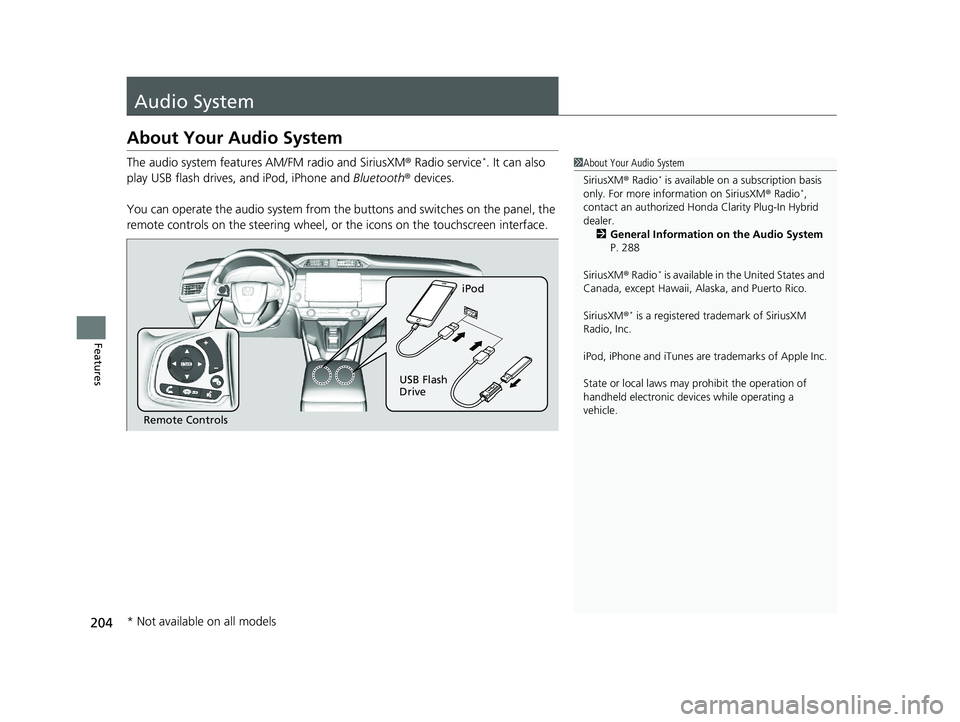
The audio system features AM/FM radio and SiriusXM ® Radio service*. It can also
play USB flash drives, and iPod, iPhone and Bluetooth® devices.
You can operate the audio system from the buttons and switches on the panel, the
remote controls on the steering wheel, or the icons on the touchscreen interface.1About Your Audio System
SiriusXM ® Radio
* is available on a subscription basis
only. For more information on SiriusXM ® Radio*,
contact an authorized Honda Clarity Plug-In Hybrid
dealer.
2 General Information on the Audio System
P. 288
SiriusXM ® Radio
* is available in the United States and
Canada, except Ha waii, Alaska, and Puerto Rico.
SiriusXM ®
* is a registered tra demark of SiriusXM
Radio, Inc.
iPod, iPhone and iTunes are trademarks of Apple Inc.
State or local laws may pr ohibit the operation of
handheld electronic devi ces while operating a
vehicle.
Remote Controls iPod
USB Flash
Drive
* Not available on all models
20 CLARITY PHEV-31TRW6200.book 204 ページ 2019年9月24日 火曜日 午後12時9分
Page 207 of 595
205
uuAudio System uUSB Ports
Features
USB Ports
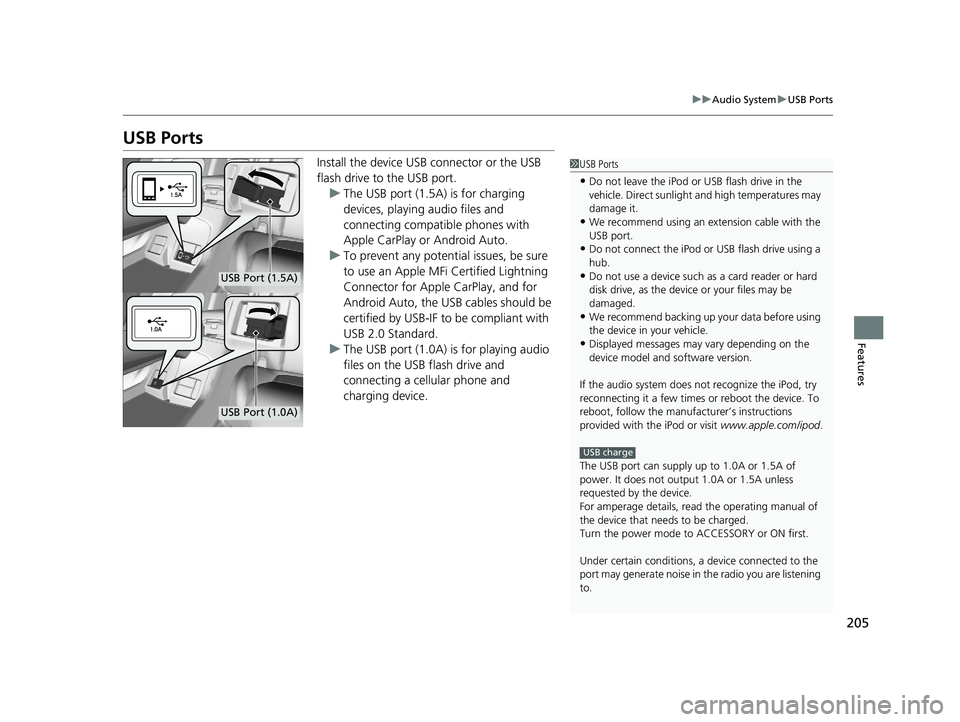
Install the device USB connector or the USB
flash drive to the USB port.
u The USB port (1.5A) is for charging
devices, playing audio files and
connecting compatib le phones with
Apple CarPlay or Android Auto.
u To prevent any potenti al issues, be sure
to use an Apple MFi Certified Lightning
Connector for Apple CarPlay, and for
Android Auto, the USB cables should be
certified by USB-IF to be compliant with
USB 2.0 Standard.
u The USB port (1.0A) is for playing audio
files on the USB flash drive and
connecting a cellular phone and
charging device.1USB Ports
•Do not leave the iPod or USB flash drive in the
vehicle. Direct sunlight and high temperatures may
damage it.
•We recommend using an ex tension cable with the
USB port.
•Do not connect the iPod or USB flash drive using a
hub.
•Do not use a device such as a card reader or hard
disk drive, as the device or your files may be
damaged.
•We recommend backing up yo ur data before using
the device in your vehicle.
•Displayed messages may vary depending on the
device model and software version.
If the audio system does not recognize the iPod, try
reconnecting it a few times or reboot the device. To
reboot, follow the manufac turer’s instructions
provided with the iPod or visit www.apple.com/ipod.
The USB port can supply up to 1.0A or 1.5A of
power. It does not output 1.0A or 1.5A unless
requested by the device.
For amperage details, read the operating manual of
the device that ne eds to be charged.
Turn the power mode to ACCESSORY or ON first.
Under certain condi tions, a device connected to the
port may generate noise in the radio you are listening
to.
USB charge
USB Port (1.5A)
USB Port (1.0A)
20 CLARITY PHEV-31TRW6200.book 205 ページ 2019年9月24日 火曜日 午後12時9分
Page 208 of 595
206
uuAudio System uAudio System Theft Protection
Features
Audio System Theft Protection
The audio system is disabled when it is disconnected from the power source, such as
when the 12-volt battery is disconnected or goes dead. In certain conditions, the
system may display a code entry screen. If this occurs, reactivate the audio system.
■Reactivating the audio system
1. Set the power mode to ON.
2. Turn on the audio system.
3. Select and hold the audio system power icon for more than two seconds.
u The audio system is reac tivated when the audio co ntrol unit establishes a
connection with the vehicle control unit. If the control unit fails to recognize
the audio unit, you must go to an authorized Honda Clarity Plug-In Hybrid
dealer and have the audio unit checked.
20 CLARITY PHEV-31TRW6200.book 206 ページ 2019年9月24日 火曜日 午後12時9分
Page 209 of 595
207
uuAudio System uAudio Remote Controls
Continued
Features
Audio Remote Controls
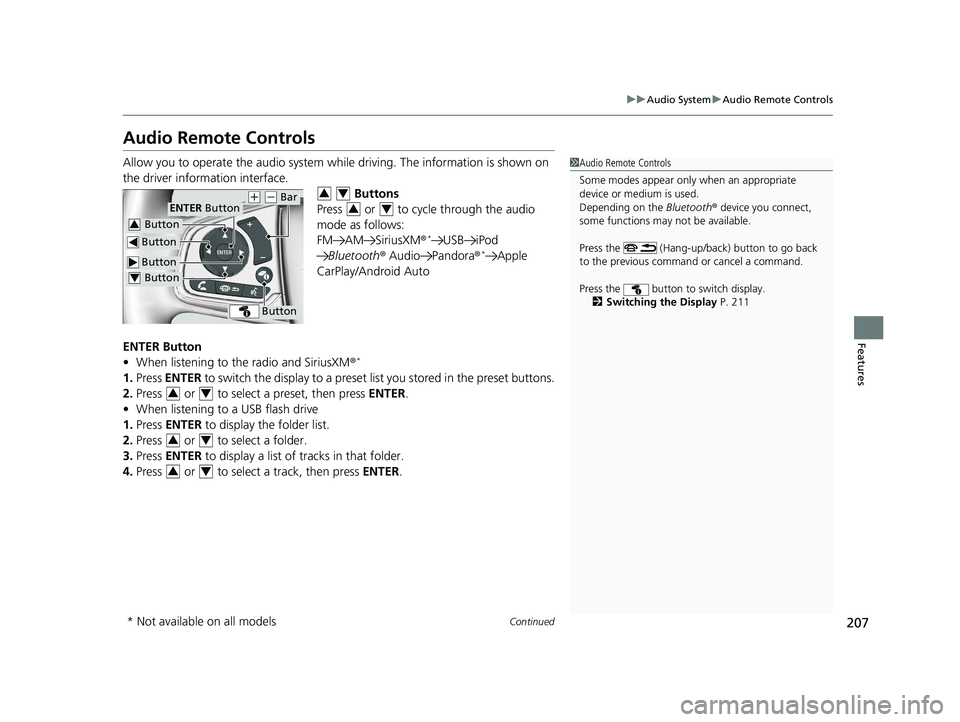
Allow you to operate the audio system whil e driving. The information is shown on
the driver information interface. Buttons
Press or to cycle through the audio
mode as follows:
FM AM SiriusXM ®
*USB iPod
Bluetooth ® Audio Pandora ®*Apple
CarPlay/Android Auto
ENTER Button
• When listening to the radio and SiriusXM ®
*
1.Press ENTER to switch the disp lay to a preset list you stored in the preset buttons.
2. Press or to select a preset, then press ENTER.
• When listening to a USB flash drive
1. Press ENTER to display the folder list.
2. Press or to select a folder.
3. Press ENTER to display a list of tracks in that folder.
4. Press or to select a track, then press ENTER.
1Audio Remote Controls
Some modes appear only when an appropriate
device or medium is used.
Depending on the Bluetooth® device you connect,
some functions may not be available.
Press the (Hang-up/back) button to go back
to the previous command or cancel a command.
Press the button to switch display. 2 Switching the Display P. 211
Button
ENTER Button
Button
(+ (- Bar
Button
Button3
Button4
34
34
34
34
34
* Not available on all models
20 CLARITY PHEV-31TRW6200.book 207 ページ 2019年9月24日 火曜日 午後12時9分
Page 210 of 595
208
uuAudio System uAudio Remote Controls
Features
• When listening to an iPod
1. Press ENTER to display the iPod music list.
2. Press or to select a category.
3. Press ENTER to display a list of items in the category.
4. Press or to select an item, then press ENTER.
u Press ENTER and press or repeatedly until the desired mode you want
to listen to is displayed.
• When listening to Pandora ®
*
1.Press ENTER to display the station list.
2. Press or to select an item, then press ENTER.
• When listening to Bluetooth®Audio
1. Press ENTER to display the track list.
2. Press or to select a track, then press ENTER.
34
34
34
34
34
* Not available on all models
20 CLARITY PHEV-31TRW6200.book 208 ページ 2019年9月24日 火曜日 午後12時9分
Page 211 of 595
209
uuAudio System uAudio Remote Controls
Features
(+ (- (Volume) Bar
Press
(+: To increase the volume.
Press
(-: To decrease the volume.
Buttons
• When listening to the radio
Press : To select the next preset radio station.
Press : To select the previous preset radio station.
Press and hold : To select the next strong station.
Press and hold : To select the previous strong station.
• When listening to an iPod, USB flash drive, or Bluetooth® Audio
Press : To skip to the next song.
Press : To go back to the beginning of the current or previous song.
• When listening to a USB flash drive
Press and hold : To skip to the next folder.
Press and hold : To go back to the previous folder.
• When listening to Pandora ®
*
Press : To skip to the next track.
Press and hold : To select the next station.
Press and hold : To select the previous station.
* Not available on all models
20 CLARITY PHEV-31TRW6200.book 209 ページ 2019年9月24日 火曜日 午後12時9分
Page 212 of 595
210
Features
Audio System Basic Operation
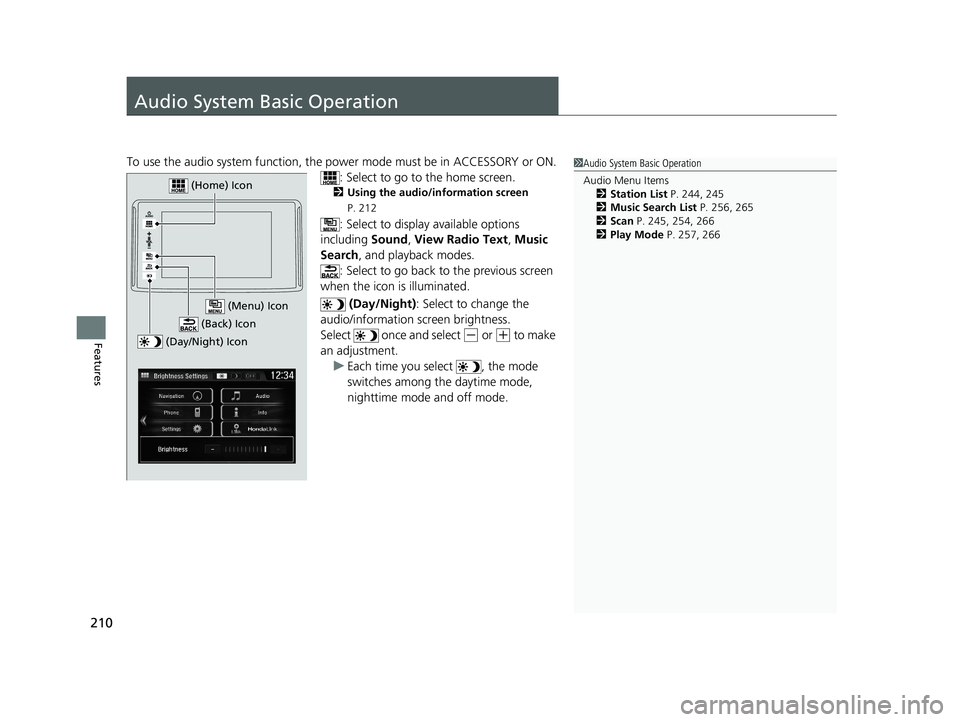
To use the audio system function, the power mode must be in ACCESSORY or ON.
: Select to go to the home screen.
2Using the audio/information screen
P. 212
: Select to display available options
including Sound, View Radio Text , Music
Search , and playback modes.
: Select to go back to the previous screen
when the icon is illuminated.
(Day/Night): Select to change the
audio/information screen brightness.
Select once and select
(- or (+ to make
an adjustment. u Each time you select , the mode
switches among the daytime mode,
nighttime mode and off mode.
1Audio System Basic Operation
Audio Menu Items
2 Station List P. 244, 245
2 Music Search List P. 256, 265
2 Scan P. 245, 254, 266
2 Play Mode P. 257, 266
(Day/Night) Icon
(Home) Icon
(Back) Icon
(Menu) Icon
20 CLARITY PHEV-31TRW6200.book 210 ページ 2019年9月24日 火曜日 午後12時9分
Page 213 of 595
211
uuAudio System Basic Operation uAudio/Information Screen
Continued
Features
Audio/Information Screen
Displays the audio status and wallpaper. From this display, you can go to various
setup options.
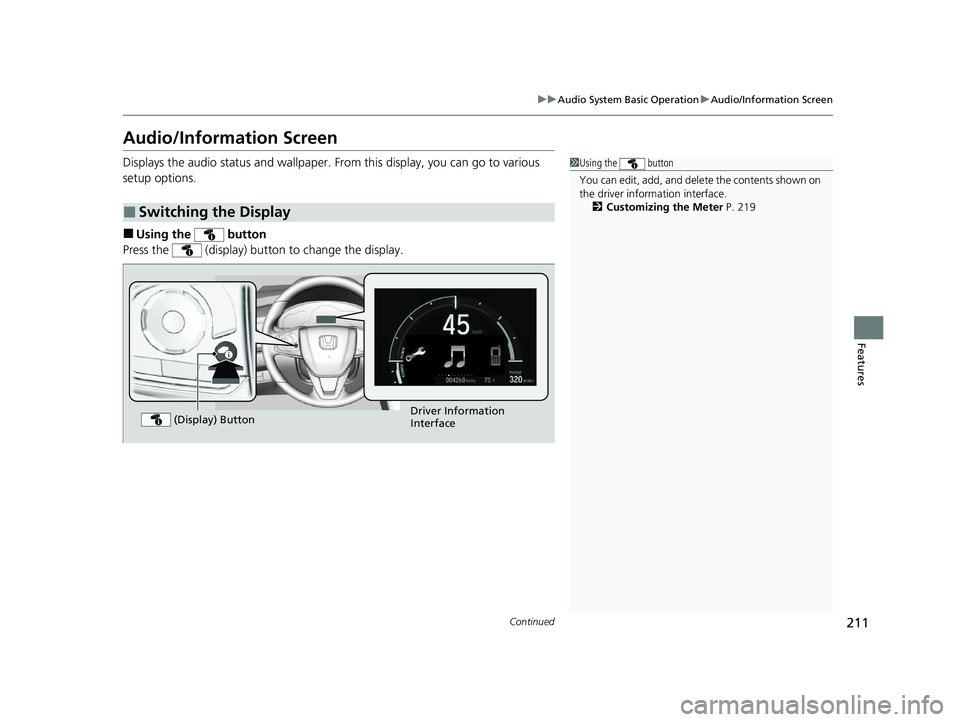
■Using the button
Press the (display) button to change the display.
■Switching the Display
1 Using the button
You can edit, add, and dele te the contents shown on
the driver information interface. 2 Customizing the Meter P. 219
Driver Information
Interface
(Display) Button
20 CLARITY PHEV-31TRW6200.book 211 ページ 2019年9月24日 火曜日 午後12時9分