audio HONDA CLARITY PLUG-IN 2020 (in English) Service Manual
[x] Cancel search | Manufacturer: HONDA, Model Year: 2020, Model line: CLARITY PLUG-IN, Model: HONDA CLARITY PLUG-IN 2020Pages: 595, PDF Size: 30.43 MB
Page 224 of 595
uuAudio System Basic Operation uAudio/Information Screen
222
Features
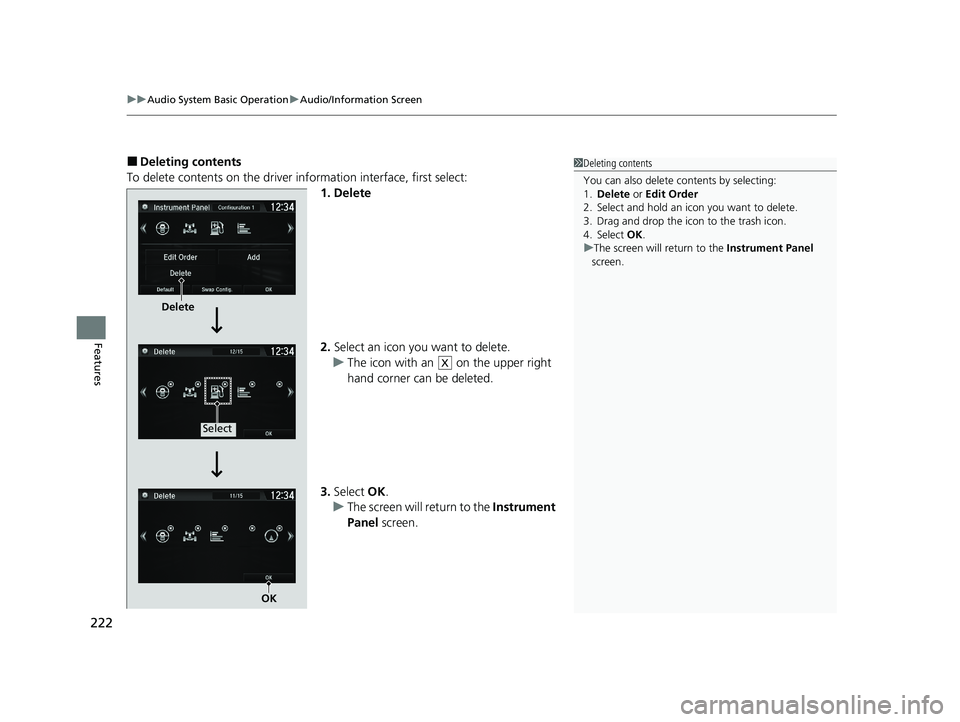
■Deleting contents
To delete contents on the driver information interface, first select:
1. Delete
2.Select an icon you want to delete.
u The icon with an on the upper right
hand corner can be deleted.
3. Select OK.
u The screen will return to the Instrument
Panel screen.1Deleting contents
You can also delete c ontents by selecting:
1. Delete or Edit Order
2. Select and hold an icon you want to delete.
3. Drag and drop the icon to the trash icon.
4. Select OK .
u The screen will return to the Instrument Panel
screen.
Delete
Select
OK
X
20 CLARITY PHEV-31TRW6200.book 222 ページ 2019年9月24日 火曜日 午後12時9分
Page 225 of 595
Continued223
uuAudio System Basic Operation uAudio/Information Screen
Features
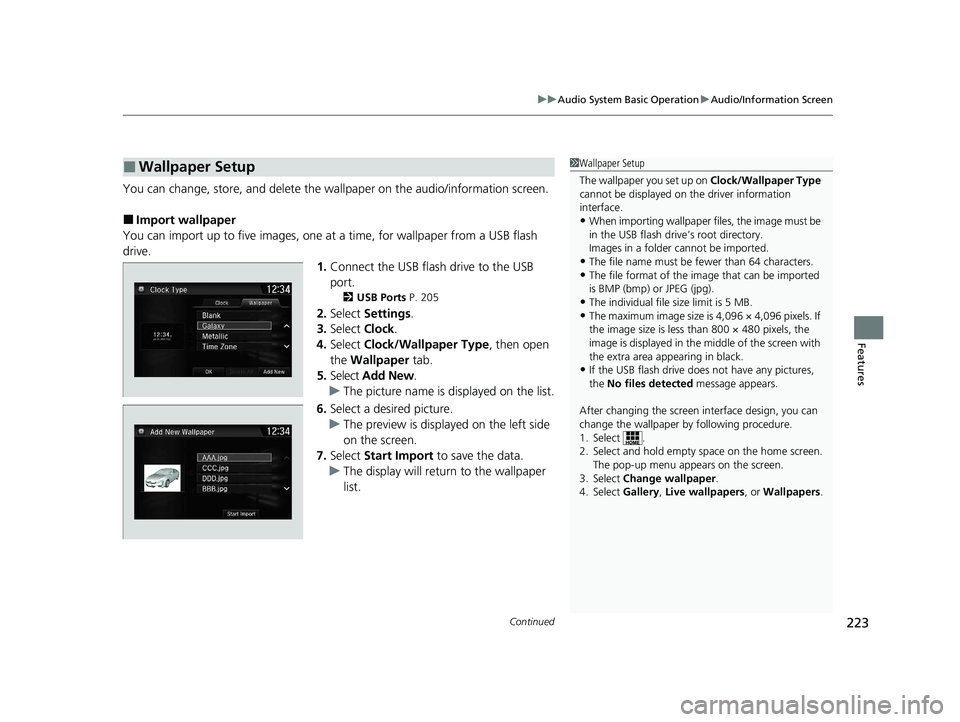
You can change, store, and delete the wa llpaper on the audio/information screen.
■Import wallpaper
You can import up to five images, one at a time, for wallpaper from a USB flash
drive. 1.Connect the USB flash drive to the USB
port.
2 USB Ports P. 205
2.Select Settings .
3. Select Clock.
4. Select Clock/Wallpaper Type , then open
the Wallpaper tab.
5. Select Add New .
u The picture name is displayed on the list.
6. Select a desired picture.
u The preview is displayed on the left side
on the screen.
7. Select Start Import to save the data.
u The display will return to the wallpaper
list.
■Wallpaper Setup1Wallpaper Setup
The wallpaper you set up on Clock/Wallpaper Type
cannot be displayed on th e driver information
interface.
•When importing wallpaper files, the image must be
in the USB flash drive’s root directory.
Images in a folder cannot be imported.
•The file name must be fewer than 64 characters.•The file format of the im age that can be imported
is BMP (bmp) or JPEG (jpg).
•The individual file size limit is 5 MB.•The maximum image size is 4,096 × 4,096 pixels. If
the image size is less than 800 × 480 pixels, the
image is displayed in the middle of the screen with
the extra area appearing in black.
•If the USB flash drive doe s not have any pictures,
the No files detected message appears.
After changing the screen interface design, you can
change the wallpaper by following procedure.
1. Select .
2. Select and hold empty space on the home screen. The pop-up menu appears on the screen.
3. Select Change wallpaper .
4. Select Gallery , Live wallpapers , or Wallpapers .
20 CLARITY PHEV-31TRW6200.book 223 ページ 2019年9月24日 火曜日 午後12時9分
Page 226 of 595
uuAudio System Basic Operation uAudio/Information Screen
224
Features
■Select wallpaper
1. Select Settings .
2. Select Clock.
3. Select Clock/Wallpaper Type , then open the Wallpaper tab.
u The screen changes to the wallpaper list.
4. Select a desired wallpaper.
u The preview is displayed on the left side on the screen.
u The pop-up menu appears on the screen.
5. Select Set.
u The display will return to the wallpaper list.
■To view wallpaper once it is set
1. Select .
2. Select Info.
3. Select .
4. Select Clock/Wallpaper .
■Delete wallpaper
1. Select Settings .
2. Select Clock.
3. Select Clock/Wallpaper Type , then open the Wallpaper tab.
u The screen changes to the wallpaper list.
4. Select a wallpaper that you want to delete.
u The preview is displayed on the left side on the screen.
u The pop-up menu appears on the screen.
5. Select Delete.
u A confirmation message appears on the screen.
6. Select Yes to delete completely.
u The display will return to the wallpaper list.
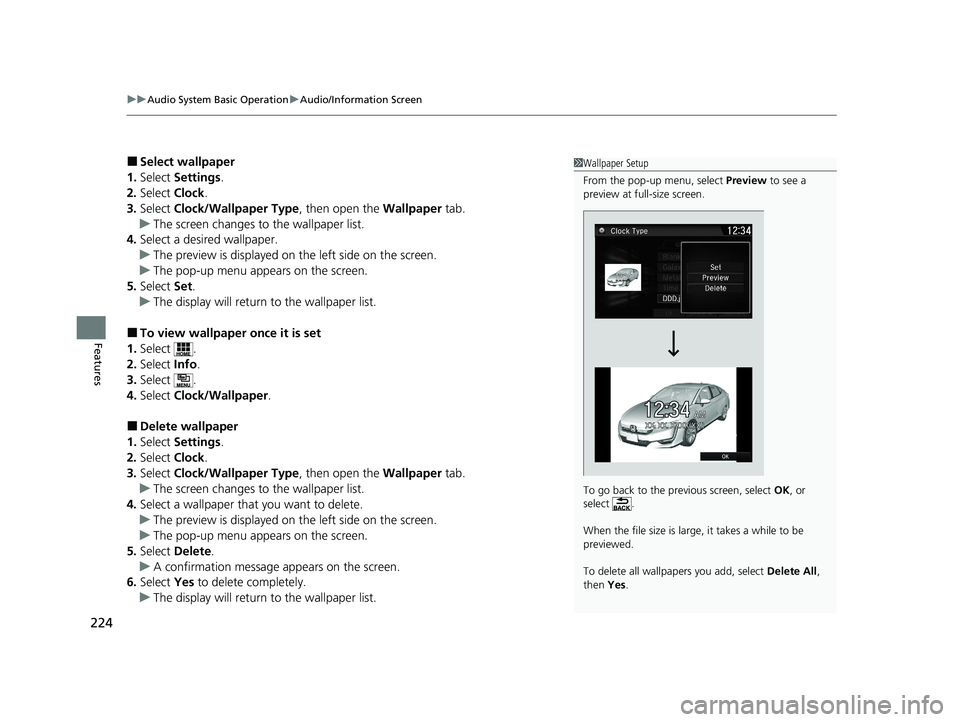
1Wallpaper Setup
From the pop-up menu, select Preview to see a
preview at full-size screen.
To go back to the previous screen, select OK, or
select .
When the file size is large, it takes a while to be
previewed.
To delete all wallpapers you add, select Delete All,
then Yes.
20 CLARITY PHEV-31TRW6200.book 224 ページ 2019年9月24日 火曜日 午後12時9分
Page 227 of 595
Continued225
uuAudio System Basic Operation uAudio/Information Screen
Features
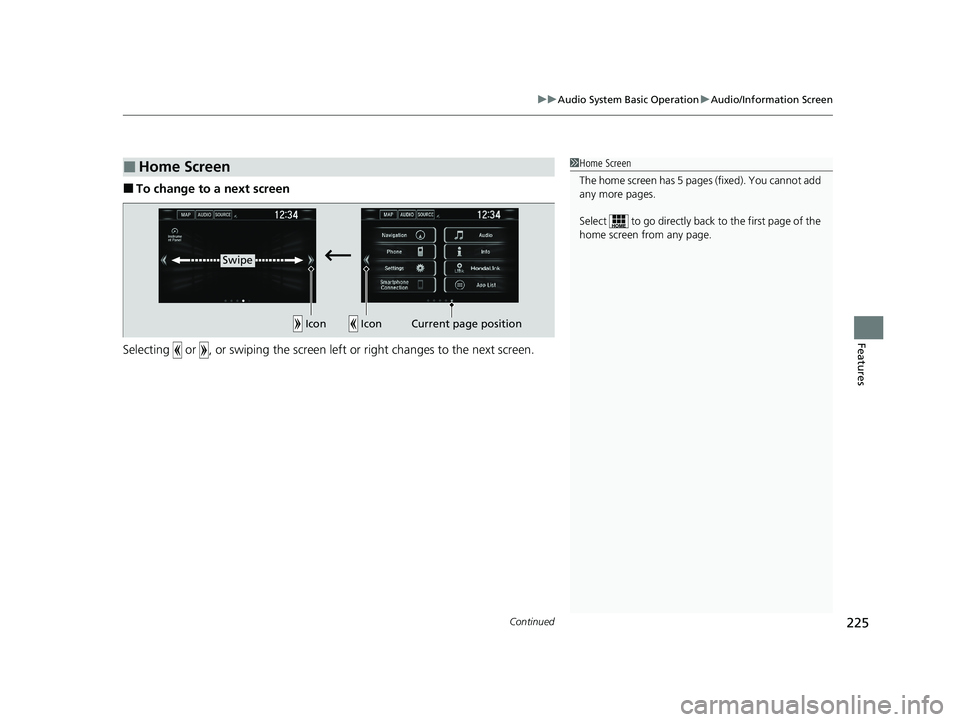
■To change to a next screen
Selecting or , or swiping the screen le ft or right changes to the next screen.
■Home Screen1Home Screen
The home screen has 5 pages (fixed). You cannot add
any more pages.
Select to go directly back to the first page of the
home screen from any page.
Swipe
Icon
IconCurrent page position
20 CLARITY PHEV-31TRW6200.book 225 ページ 2019年9月24日 火曜日 午後12時9分
Page 228 of 595
uuAudio System Basic Operation uAudio/Information Screen
226
Features
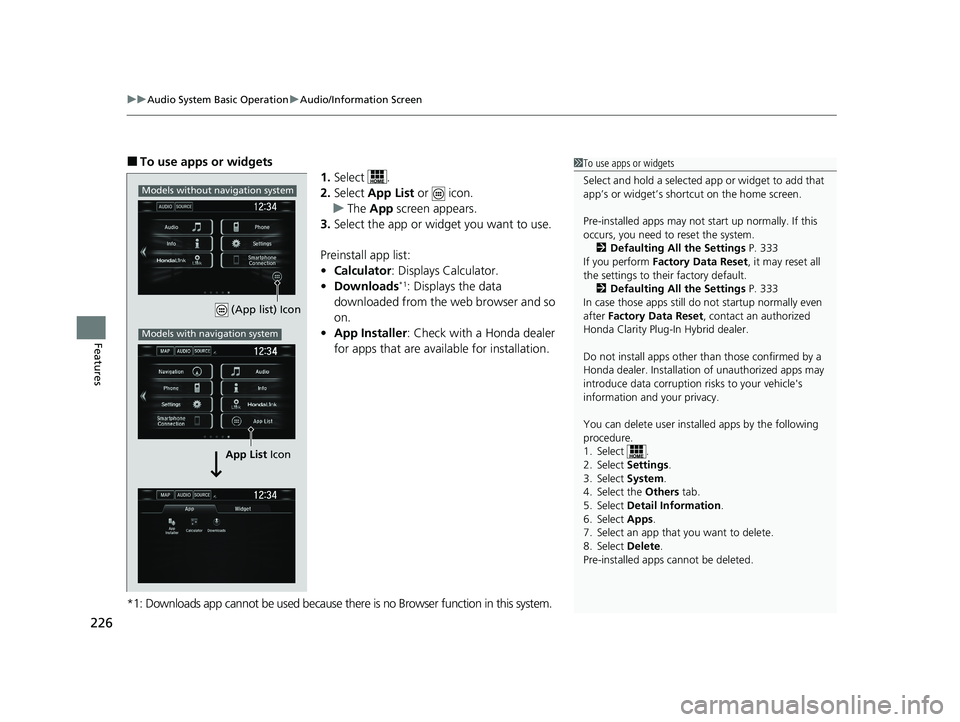
■To use apps or widgets
1.Select .
2. Select App List or icon.
u The App screen appears.
3. Select the app or widget you want to use.
Preinstall app list:
• Calculator : Displays Calculator.
• Downloads
*1: Displays the data
downloaded from the web browser and so
on.
• App Installer : Check with a Honda dealer
for apps that are available for installation.
*1: Downloads app cannot be used because there is no Browser function in this system.
1 To use apps or widgets
Select and hold a selected app or widget to add that
app’s or widget’s shortcut on the home screen.
Pre-installed apps may not start up normally. If this
occurs, you need to reset the system.
2 Defaulting All the Settings P. 333
If you perform Factory Data Reset , it may reset all
the settings to their factory default.
2 Defaulting All the Settings P. 333
In case those apps still do not startup normally even
after Factory Data Reset , contact an authorized
Honda Clarity Plug-In Hybrid dealer.
Do not install apps other than those confirmed by a
Honda dealer. Installation of unauthorized apps may
introduce data corruption risks to your vehicle's
information and your privacy.
You can delete user installed apps by the following
procedure.
1. Select .
2. Select Settings .
3. Select System .
4. Select the Others tab.
5. Select Detail Information .
6. Select Apps .
7. Select an app that you want to delete.
8. Select Delete .
Pre-installed apps cannot be deleted.
(App list) Icon
App List Icon
Models without navigation system
Models with navigation system
20 CLARITY PHEV-31TRW6200.book 226 ページ 2019年9月24日 火曜日 午後12時9分
Page 229 of 595
227
uuAudio System Basic Operation uAudio/Information Screen
Continued
Features
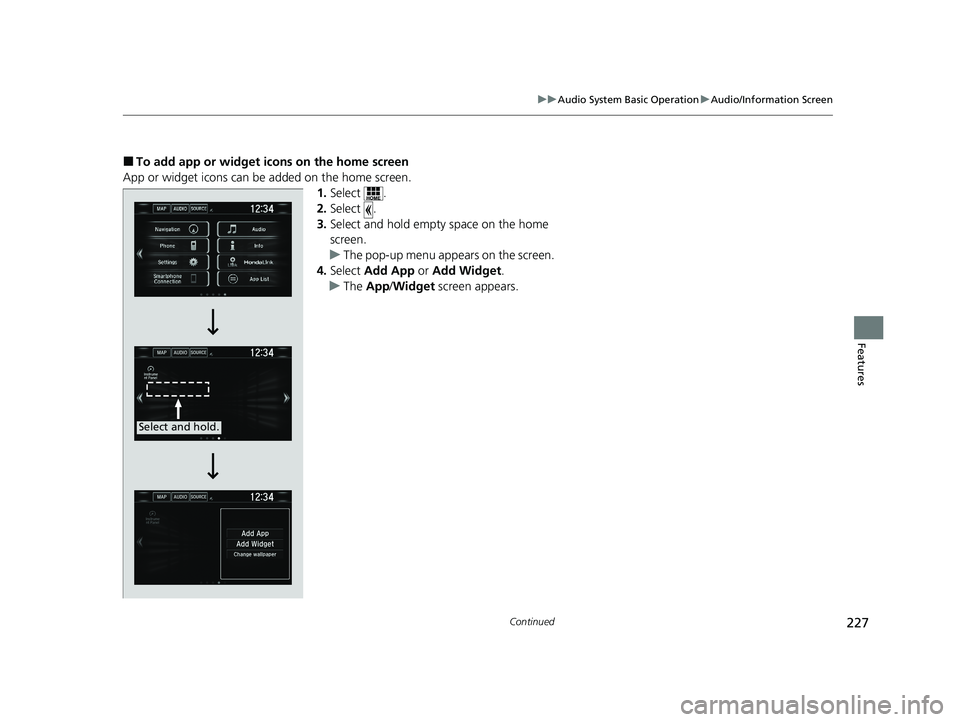
■To add app or widget icons on the home screen
App or widget icons can be added on the home screen. 1.Select .
2. Select .
3. Select and hold empty space on the home
screen.
u The pop-up menu appears on the screen.
4. Select Add App or Add Widget .
u The App /Widget screen appears.
Select and hold.
20 CLARITY PHEV-31TRW6200.book 227 ページ 2019年9月24日 火曜日 午後12時9分
Page 230 of 595
228
uuAudio System Basic Operation uAudio/Information Screen
Features
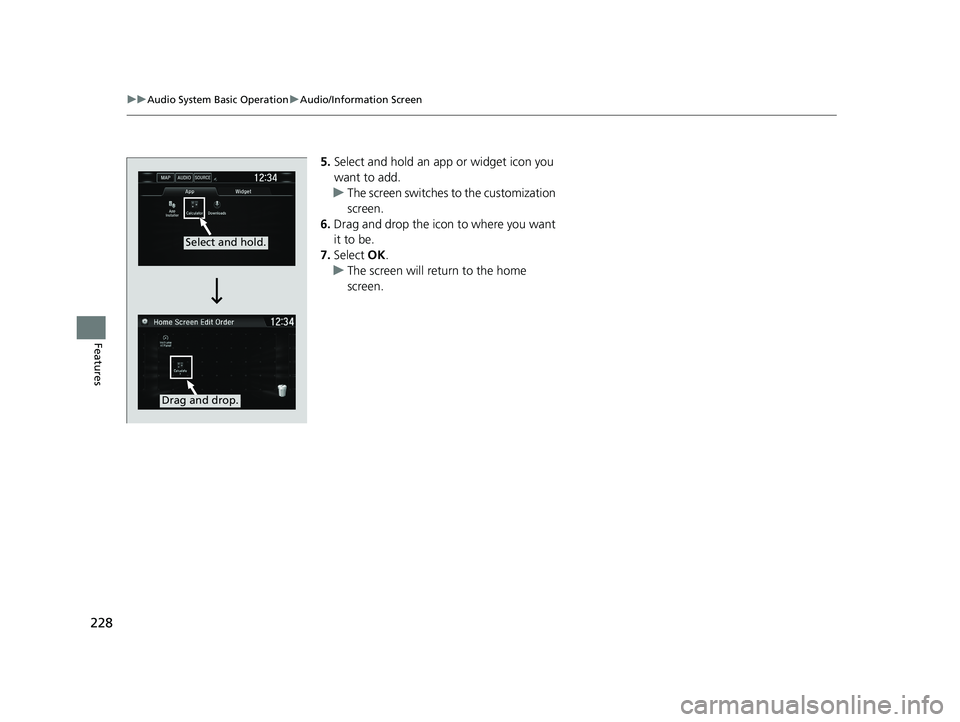
5. Select and hold an a pp or widget icon you
want to add.
u The screen switches to the customization
screen.
6. Drag and drop the icon to where you want
it to be.
7. Select OK.
u The screen will return to the home
screen.
Select and hold.
Drag and drop.
20 CLARITY PHEV-31TRW6200.book 228 ページ 2019年9月24日 火曜日 午後12時9分
Page 231 of 595

Continued229
uuAudio System Basic Operation uAudio/Information Screen
Features
■To move icons on the home screen
You can change location on the home screen. 1.Select and hold an icon.
u The screen switches to the customization
screen.
2. Drag and drop the icon to where you want
it to be.
3. Select OK.
u The screen will return to the home
screen.1To move icons on the home screen
You can also move the Phone, Info, Audio ,
Settings , Navigation
*, HondaLink , Smartphone
Connection , App List ( ), and Instrument Panel
icons in the same manner.
Select and hold.
Drag and drop.
* Not available on all models
20 CLARITY PHEV-31TRW6200.book 229 ページ 2019年9月24日 火曜日 午後12時9分
Page 232 of 595
uuAudio System Basic Operation uAudio/Information Screen
230
Features
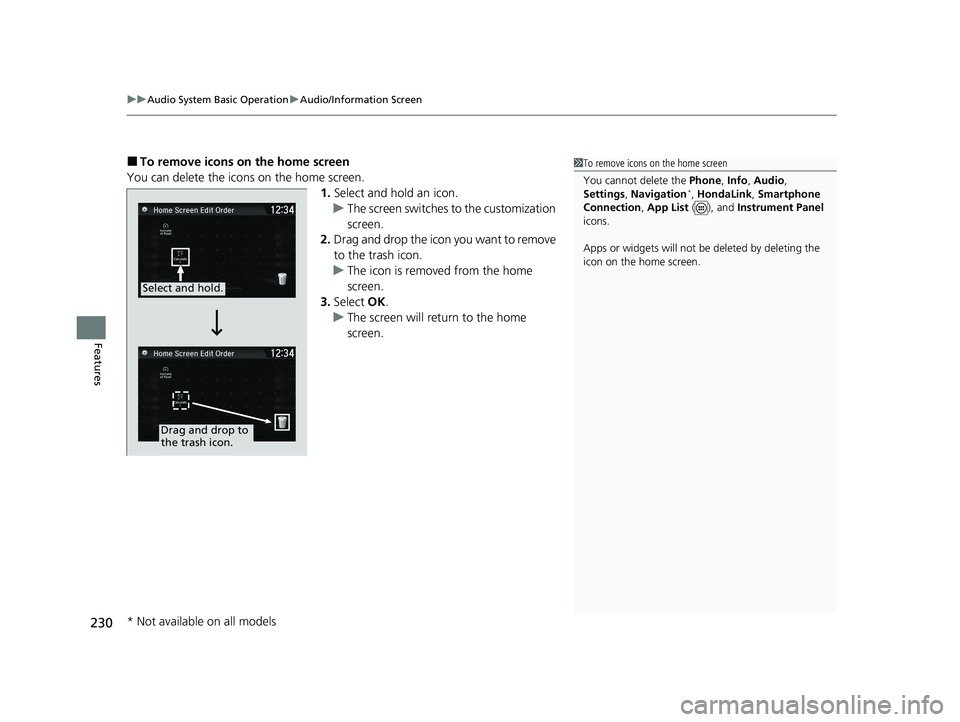
■To remove icons on the home screen
You can delete the icons on the home screen. 1.Select and hold an icon.
u The screen switches to the customization
screen.
2. Drag and drop the icon you want to remove
to the trash icon.
u The icon is removed from the home
screen.
3. Select OK.
u The screen will return to the home
screen.1To remove icons on the home screen
You cannot delete the Phone, Info, Audio ,
Settings , Navigation
*, HondaLink , Smartphone
Connection , App List ( ), and Instrument Panel
icons.
Apps or widgets will not be deleted by deleting the
icon on the home screen.
Select and hold.
Drag and drop to
the trash icon.
* Not available on all models
20 CLARITY PHEV-31TRW6200.book 230 ページ 2019年9月24日 火曜日 午後12時9分
Page 233 of 595
231
uuAudio System Basic Operation uAudio/Information Screen
Continued
Features
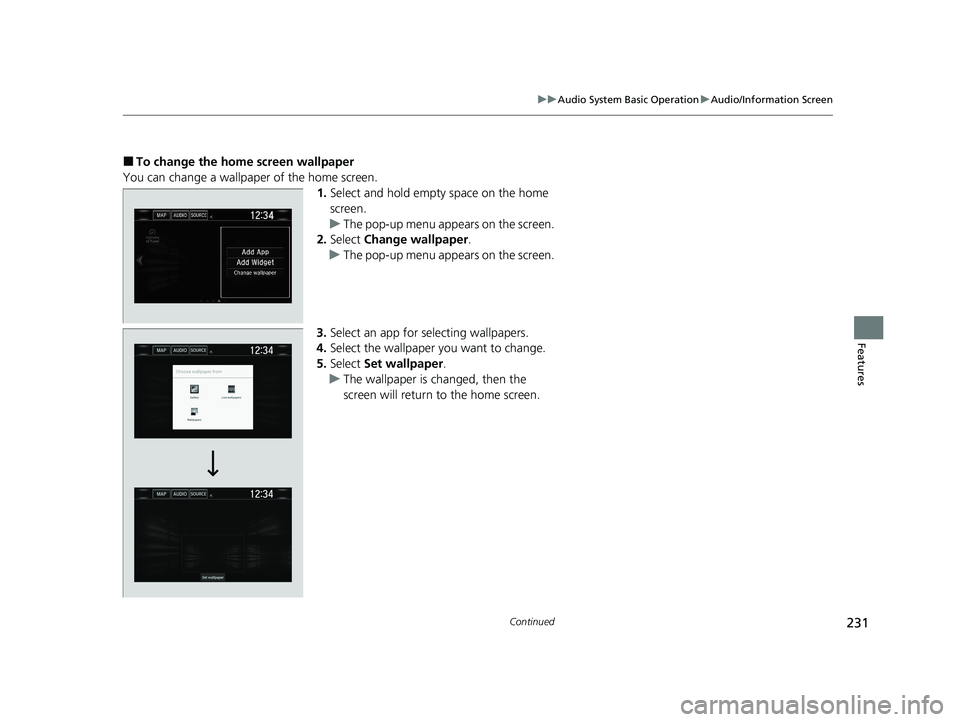
■To change the home screen wallpaper
You can change a wallpaper of the home screen. 1.Select and hold empty space on the home
screen.
u The pop-up menu appears on the screen.
2. Select Change wallpaper .
u The pop-up menu appears on the screen.
3. Select an app for selecting wallpapers.
4. Select the wallpaper you want to change.
5. Select Set wallpaper .
u The wallpaper is changed, then the
screen will return to the home screen.
20 CLARITY PHEV-31TRW6200.book 231 ページ 2019年9月24日 火曜日 午後12時9分