belt HONDA CR-V 2004 RD4-RD7 / 2.G Service Manual
[x] Cancel search | Manufacturer: HONDA, Model Year: 2004, Model line: CR-V, Model: HONDA CR-V 2004 RD4-RD7 / 2.GPages: 256, PDF Size: 2.96 MB
Page 60 of 256

The instrument panel has many
indicators that give you important
inf ormation about your vehicle.
See page .
If this indicator comes on when the
engine is running, the battery is not
being charged. For more inf ormation,
see page .Itcomesonwhenyouturnthe
ignition switch to ON (II). It is a
reminder to check the parking
brake. Driving with the parking
brake not f ully released can
damage the brakes and tires.
This indicator has two f unctions:
If the indicator remains lit after
you have f ully released the
parking brake while the engine is
running, or if it comes on while
driving, it can indicate a problem
in the brake system. For complete
inf ormation, see page . This indicator comes on when you
turn the ignition switch to ON (II). It
is a reminder you and your
passengers to protect yourselves by
f astening you seat belts. A beeper
also sounds if you have not f astened
your seat belt.
If you do not f asten your seat belt,
the beeper will stop af ter a f ew
seconds but the indicator stays on
until you do. Both the indicator and
the beeper stay of f if you f asten your
seat belt bef ore turning on the
ignition.
The engine can be severely damaged
if this indicator f lashes or stays on
when the engine is running. For
more inf ormation, see page .
2. 1.
213 213
215
214
Inst rument s and Cont rols
Instrument Panel
Malf unction Indicator
Lamp
L ow Oil Pressure
Indicator
Charging System
Indicator Parking Brake and
Brake System
Indicator
Seat Belt Reminder
Indicator
56
U.S. Canada
Page 61 of 256

This indicator comes on f or a f ew
seconds when you turn the ignition
switch to ON (II). It will then go of f
if you have inserted a properly-coded
ignition key. If it is not a properly-
coded key, the indicator will blink
and the engine will not start (see
page ).
This indicator also blinks several
times when you turn the ignition
switch f rom ON (II) to ACCESSORY
(I) or LOCK (0).
This indicator comes on when you
turn the ignition switch to ON (II). If
it comes on at any other time, it
indicates a potential problem with
your f ront airbags. This indicator will
also alert you to a potential problem
with your side airbags, passenger’s
side airbag automatic cutoff system
or automatic seat belt tensioners.
For complete inf ormation, see page
.
This indicator comes on when you
turn the ignition switch to ON (II). If
it comes on at any other time, it
indicates that the passenger’s side
airbag has automatically shut off.
For more inf ormation, see page . This indicator normally comes on f or
a f ew seconds when you turn the
ignition switch to ON (II), and when
the ignition switch is turned to
START (III). If it comes on at any
other time, there is a problem with
theABS.If thishappens,haveyour
vehicle checked at a dealer. With
this on, your vehicle still has normal
braking ability but no anti-lock
brakes. For complete inf ormation,
see page .
27
70
26 149
If equipped If equipped
Inst rument s and Cont rols
Supplemental Restraint
System Indicator
Anti-lock Brake System (ABS)
Indicator Immobilizer System
Indicator
Side Airbag Of f Indicator
Instrument Panel
57
U.S Canada
Page 82 of 256
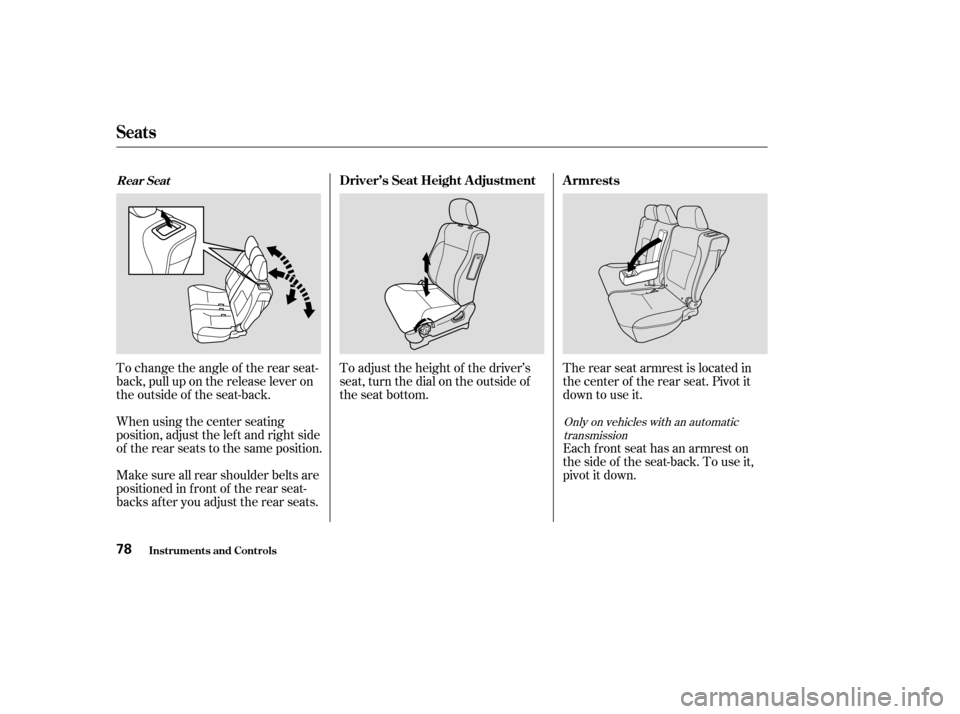
To adjust the height of the driver’s
seat, turn the dial on the outside of
the seat bottom.
To change the angle of the rear seat-
back, pull up on the release lever on
the outside of the seat-back. The rear seat armrest is located in
the center of the rear seat. Pivot it
down to use it.
Each front seat has an armrest on
thesideof theseat-back.Touseit,
pivotitdown.
When using the center seating
position, adjust the lef t and right side
of the rear seats to the same position.
Make sure all rear shoulder belts are
positioned in f ront of the rear seat-
backs af ter you adjust the rear seats.
Only on vehicles with an automatic
transmission
Seats
Inst rument s and Cont rols
Driver’s Seat Height A djustment A rmrestsRear Seat
78
Page 85 of 256
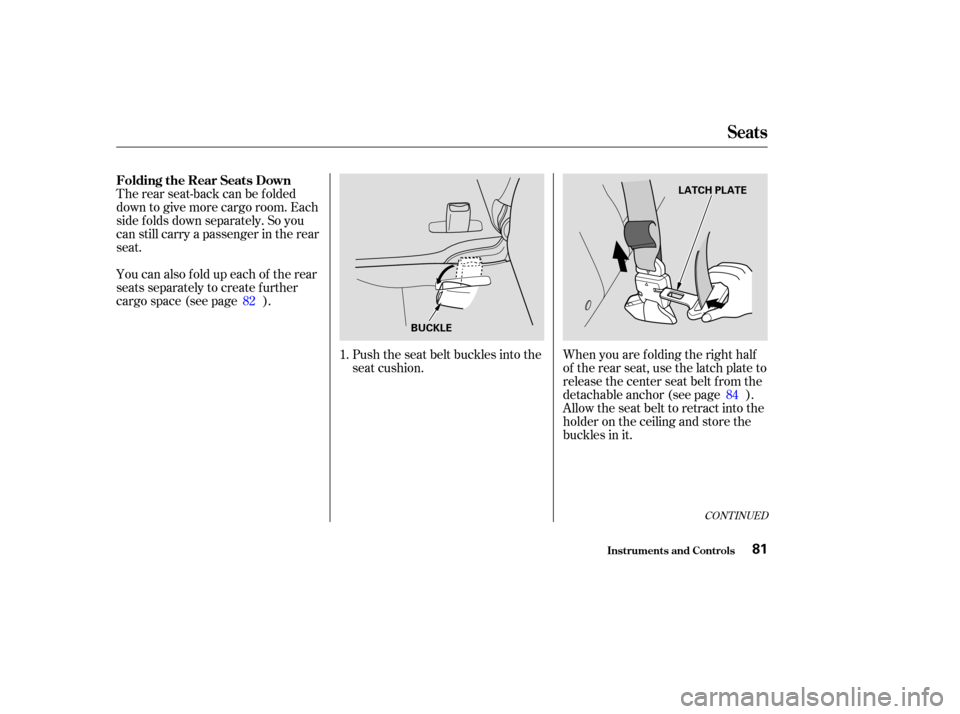
The rear seat-back can be f olded
down to give more cargo room. Each
side f olds down separately. So you
can still carry a passenger in the rear
seat.
You can also f old up each of the rear
seats separately to create further
cargo space (see page ).Push the seat belt buckles into the
seat cushion.When you are f olding the right half
of the rear seat, use the latch plate to
release the center seat belt from the
detachable anchor (see page ).
Allow the seat belt to retract into the
holder on the ceiling and store the
buckles in it.
1.
84
82
CONT INUED
Folding the Rear Seats Down
Seats
Inst rument s and Cont rols81
BUCKLE LATCH PLATE
Page 86 of 256
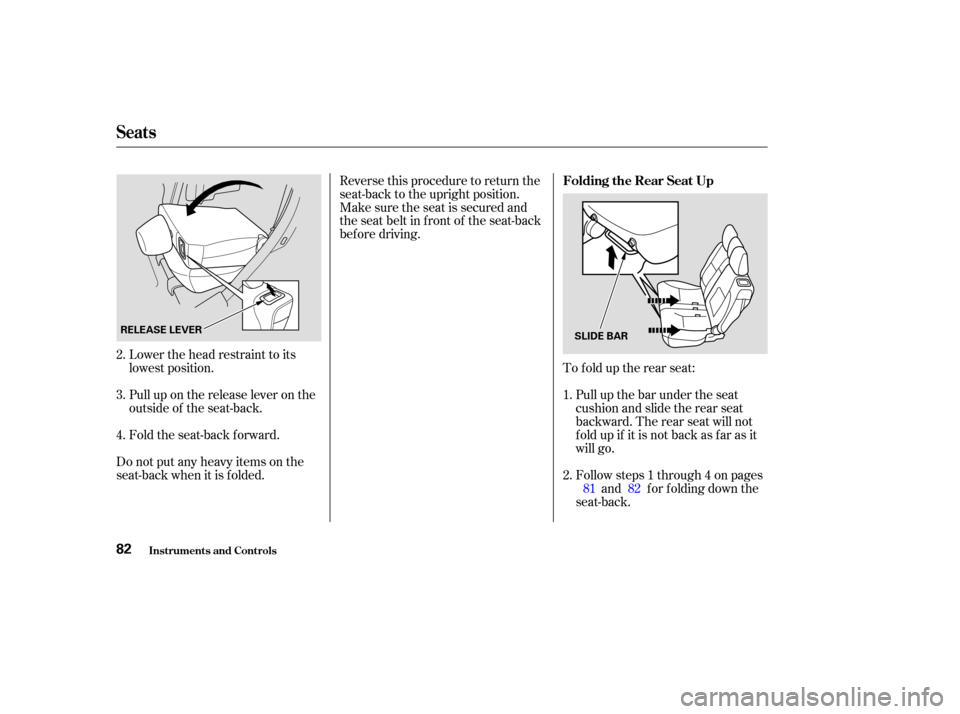
Lower the head restraint to its
lowest position.
Pull up on the release lever on the
outside of the seat-back.
Fold the seat-back forward.
Do not put any heavy items on the
seat-back when it is folded. Reverse this procedure to return the
seat-back to the upright position.
Make sure the seat is secured and
the seat belt in f ront of the seat-back
bef ore driving.
To f old up the rear seat:Pull up the bar under the seat
cushion and slide the rear seat
backward. The rear seat will not
f old up if it is not back as f ar as it
will go.
Follow steps 1 through 4 on pages and f or f olding down the
seat-back.
3. 2.
4.
2. 1.
8281
Folding the Rear Seat Up
Seats
Inst rument s and Cont rols82
RELEASE LEVER
SLIDE BAR
Page 88 of 256
Reverse this procedure to return the
seat to the upright position.
Make sure the seat is securely
latched bef ore driving.
When you are not using the
f astening strap, roll up the strap and
store it properly into the slit on the
seat-back.
Make sure all rear shoulder belts are
positioned in f ront of the rear seat-
backs.In the center seating position of the
rear seat, be sure the detachable
anchor is latched securely bef ore
using the seat belt (see page ).
Make sure all items in the cargo area
are secured. Loose items can f ly
f orward and cause injury if you have
to brake hard. See
on page .
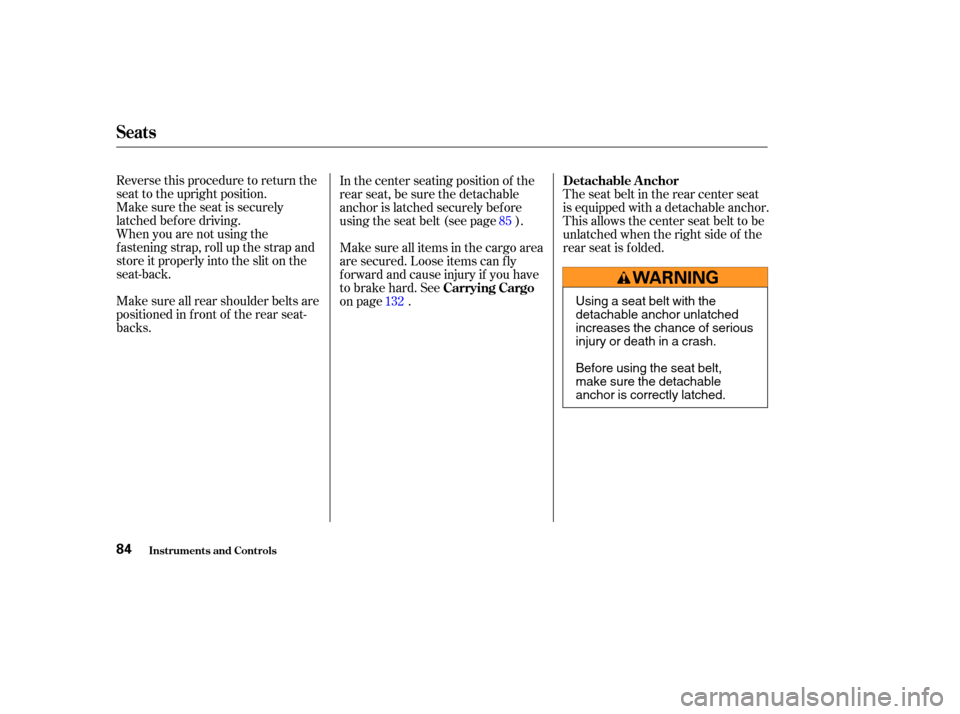
The seat belt in the rear center seat
is equipped with a detachable anchor.
This allows the center seat belt to be
unlatched when the right side of the
rear seat is folded.
85
132 Carrying Cargo Detachable A nchor
Seats
Inst rument s and Cont rols84
Using a seat belt with the
detachable anchor unlatched
increases the chance of serious
injury or death in a crash.
Before using the seat belt,
make sure the detachable
anchor is correctly latched.
Page 89 of 256
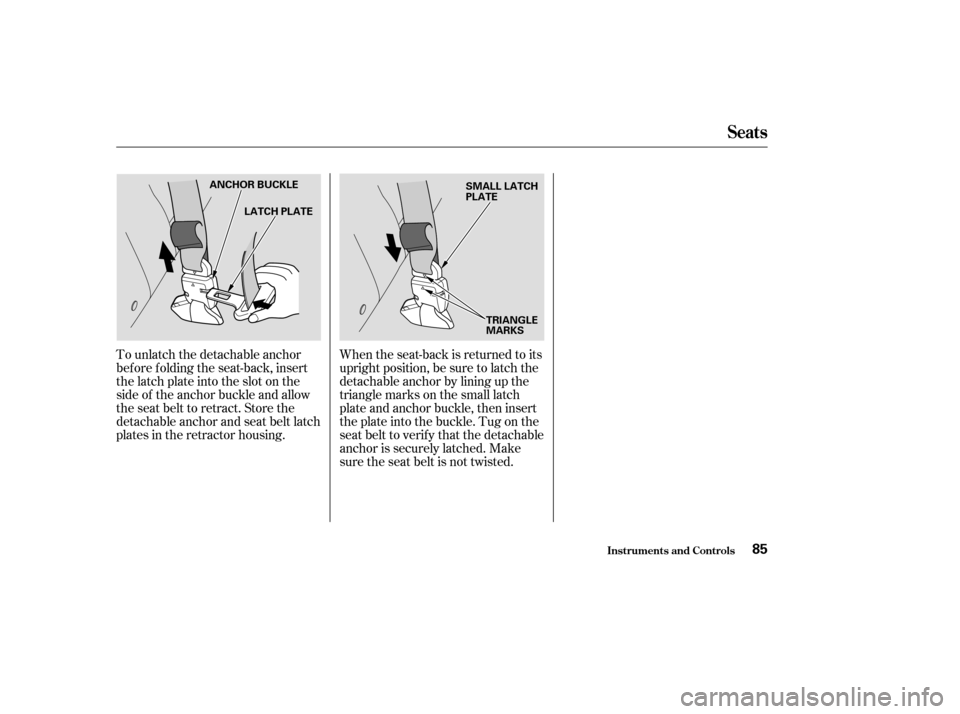
To unlatch the detachable anchor
bef ore f olding the seat-back, insert
the latch plate into the slot on the
side of the anchor buckle and allow
the seat belt to retract. Store the
detachable anchor and seat belt latch
plates in the retractor housing.When the seat-back is returned to its
upright position, be sure to latch the
detachable anchor by lining up the
triangle marks on the small latch
plate and anchor buckle, then insert
the plate into the buckle. Tug on the
seat belt to verify that the detachable
anchor is securely latched. Make
sure the seat belt is not twisted.
Seats
Inst rument s and Cont rols85
ANCHOR BUCKLE
LATCH PLATE SMALL LATCH
PLATE
TRIANGLE
MARKS
Page 91 of 256
If your vehicle’s battery is
disconnected or goes dead, or the
driver’s window f use is removed, the
AUTO f unction will be disabled. The
power window system needs to be
reset af ter reconnecting the battery
or installing the f use.Start the engine. Push down and
hold the driver’s window switch
until the window is f ully open.
Pull and hold the driver’s window
switch to close the window
completely, then hold the switch
f or a second or two more.
If the power windows do not operate
properly af ter resetting, have your
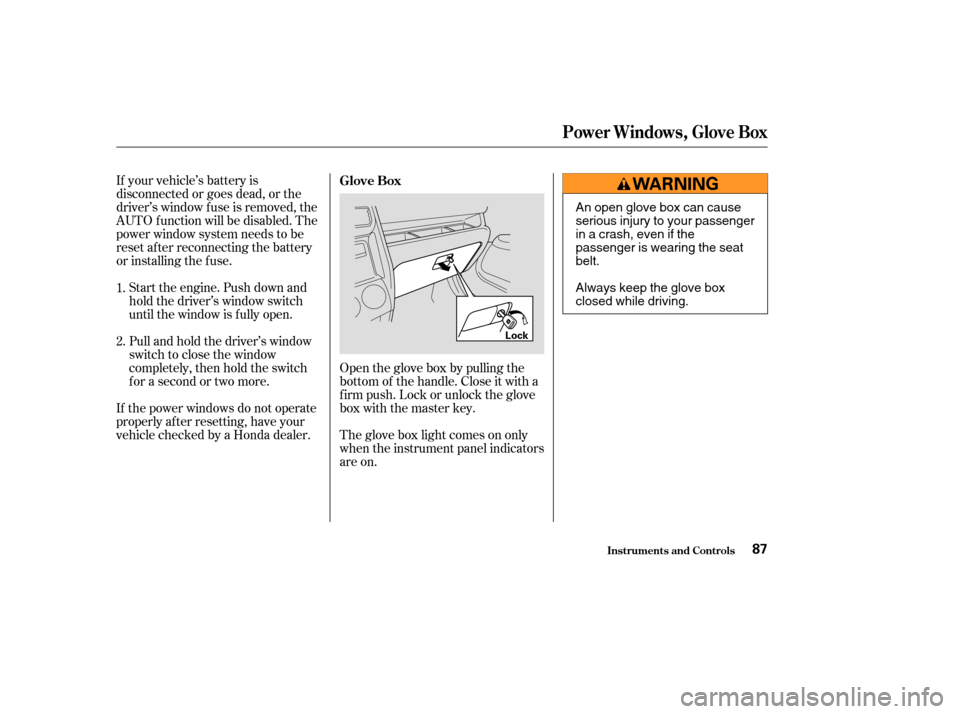
vehicle checked by a Honda dealer. Open the glove box by pulling the
bottom of the handle. Close it with a
f irm push. Lock or unlock the glove
box with the master key.
The glove box light comes on only
when the instrument panel indicators
are on.
1.
2.
Glove Box
Inst rument s and Cont rols
Power Windows, Glove Box
87
Lock
An open glove box can cause
serious injury to your passenger
inacrash,evenifthe
passenger is wearing the seat
belt.
Always keep the glove box
closed while driving.
Page 141 of 256

Check that any items you may be
carrying with you inside are stored
properly or f astened down
securely. Visually check the tires. If a tire
looks low, use a gauge to check its
pressure. Check that the hood, tailgate and
hatch glass are f ully closed. Make sure all windows, mirrors,
and outside lights are clean and
unobstructed. Remove f rost, snow,
or ice.
Youshoulddothefollowingchecks
and adjustments bef ore you drive
your vehicle.
Check the seat adjustment (see
page ).
Check the adjustment of the
inside and outside mirrors (see
page ).
Check the steering wheel
adjustment (see page ).Make sure the doors and tailgate
are securely closed and locked.
Fasten your seat belt. Check that
your passengers have f astened
their seat belts (see page ).
When you start the engine, check
the gauges and indicator lights in
the instrument panel (see page
).
1.
2.
3.
4. 5.
6.
7.
8.
9.
10.
77
89 68 15
55
Driving Guidelines
Driving
Preparing to Drive
137
Page 163 of 256

To avoid loss of control or rollover,
be sure to f ollow all precautions and
recommendations.Be sure to store cargo properly
and do not exceed your Honda
cargo load limits (see pages and ).
Wherever you drive, make sure
you and your passengers always
wear seat belts.
Keep your speed low, and never
go faster than the conditions allow.
It’s up to you to continually assess
the situation and drive within the
limits.
Your vehicle has been designed
primarily f or use on pavement. But
its higher ground clearance allows
you to occasionally travel on unpaved
roads, to campgrounds, picnic sites,
and similar locations. It is not
designed f or trail-blazing, mountain
climbing, or other challenging of f -
road activities.
If you decide to drive on unpaved
roads, you will f ind that it requires
somewhat dif f erent driving skills.
Your vehicle will also handle
somewhat dif f erently than it does on
pavement. So be sure to read this
owner’s manual, pay special attention
to the precautions and tips in this
section, and get acquainted with
your vehicle before you leave the
pavement.
133 151
Driving
General Inf ormation
Important Saf ety Precautions
Of f -Highway Driving Guidelines
159
Improperly operating this
vehicle on or off-pavement can
cause an accident or rollover in
which you and your passengers
could be seriously injured or
killed.
Follow all instructions and
guidelines in the owner’s
manual.
Keep your speed low and
don’t drive faster than
conditions permit.