power steering HONDA CR-V 2013 RM1, RM3, RM4 / 4.G Owners Manual
[x] Cancel search | Manufacturer: HONDA, Model Year: 2013, Model line: CR-V, Model: HONDA CR-V 2013 RM1, RM3, RM4 / 4.GPages: 361, PDF Size: 6.58 MB
Page 10 of 361
9
Quick Reference Guide
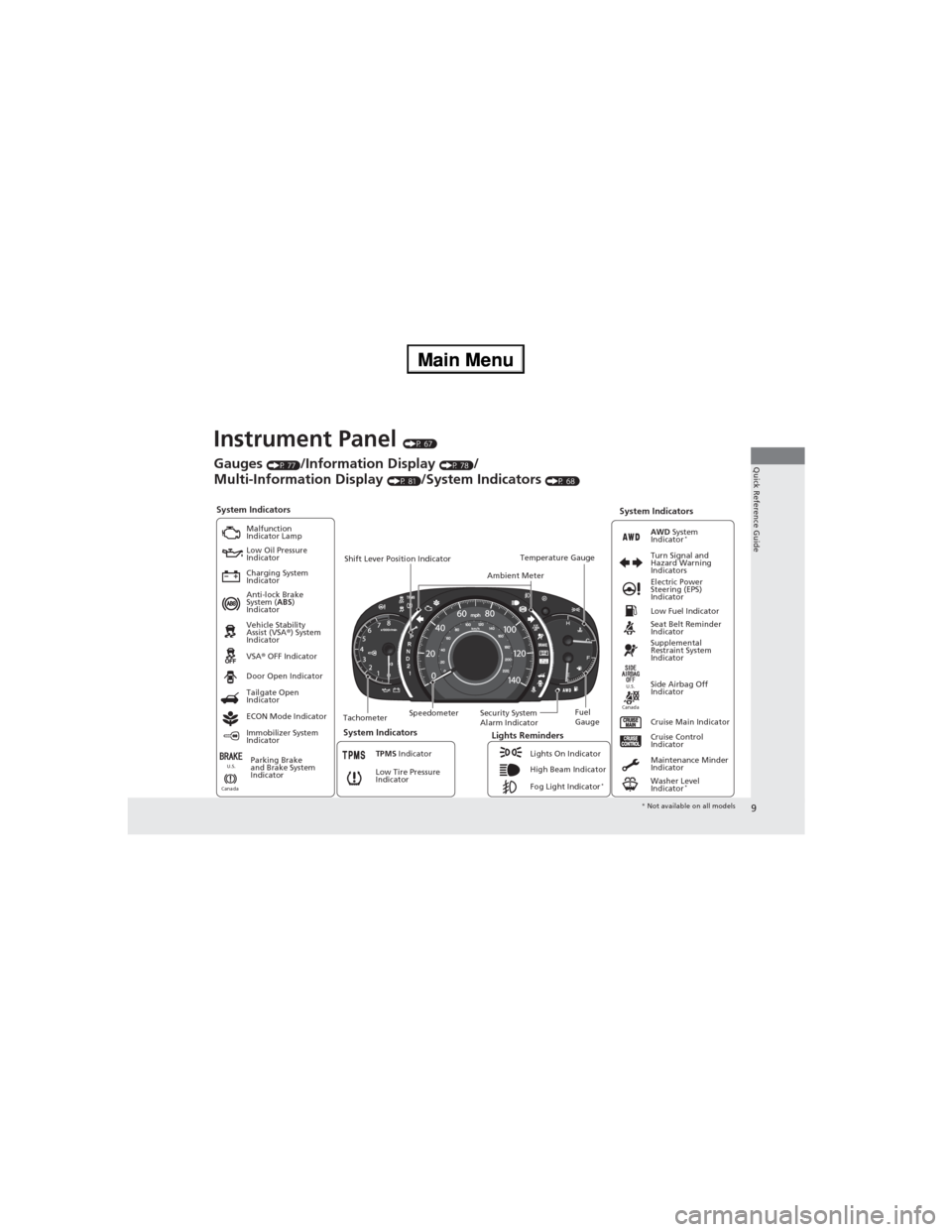
Instrument Panel (P 67)
System Indicators
Malfunction
Indicator Lamp
Low Oil Pressure
Indicator
Charging System
Indicator
Anti-lock Brake
System (ABS)
Indicator
Vehicle Stability
Assist (VSA®) System
Indicator
VSA® OFF Indicator
Low Tire Pressure
Indicator
Lights Reminders
Lights On Indicator
High Beam Indicator
Fog Light Indicator
*
Immobilizer System
IndicatorSeat Belt Reminder
Indicator
System Indicators
Cruise Control
Indicator
Parking Brake
and Brake System
IndicatorSupplemental
Restraint System
Indicator
Side Airbag Off
Indicator Door Open Indicator
Cruise Main Indicator TachometerSpeedometerFuel
Gauge Security System
Alarm Indicator Shift Lever Position Indicator
Low Fuel Indicator
Gauges (P 77)/Information Display (P 78)/
Multi-Information Display
(P 81)/System Indicators (P 68)
Tailgate Open
Indicator
ECON Mode Indicator
TPMS Indicator
Maintenance Minder
Indicator
Washer Level
Indicator
*
Ambient MeterTemperature GaugeElectric Power
Steering (EPS)
Indicator Turn Signal and
Hazard Warning
Indicators
AWD System
Indicator*
System Indicators
CanadaU.S.
CanadaU.S.
* Not available on all models
Page 12 of 361
11
Quick Reference Guide
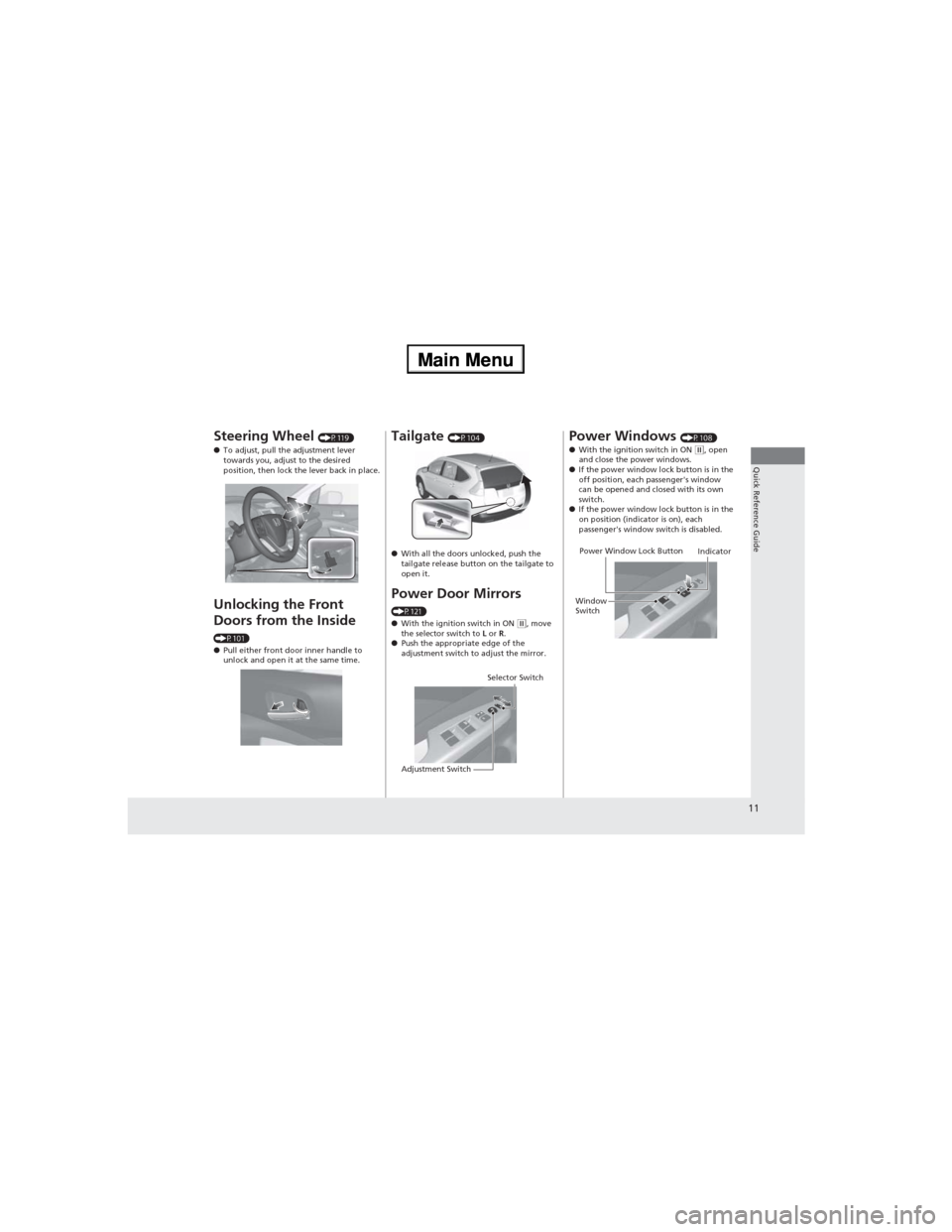
Steering Wheel (P119)
●To adjust, pull the adjustment lever
towards you, adjust to the desired
position, then lock the lever back in place.
Unlocking the Front
Doors from the Inside
(P101)
●Pull either front door inner handle to
unlock and open it at the same time.
Tailgate (P104)
●With all the doors unlocked, push the
tailgate release button on the tailgate to
open it.
Power Door Mirrors
(P121)
●With the ignition switch in ON (w, move
the selector switch to L or R.
●Push the appropriate edge of the
adjustment switch to adjust the mirror.
Selector Switch
Adjustment Switch
Power Windows (P108)
●With the ignition switch in ON (w, open
and close the power windows.
●If the power window lock button is in the
off position, each passenger's window
can be opened and closed with its own
switch.
●If the power window lock button is in the
on position (indicator is on), each
passenger's window switch is disabled.
Power Window Lock Button
Window
SwitchIndicator
Page 74 of 361
73
uuIndicatorsu
Continued
Instrument Panel
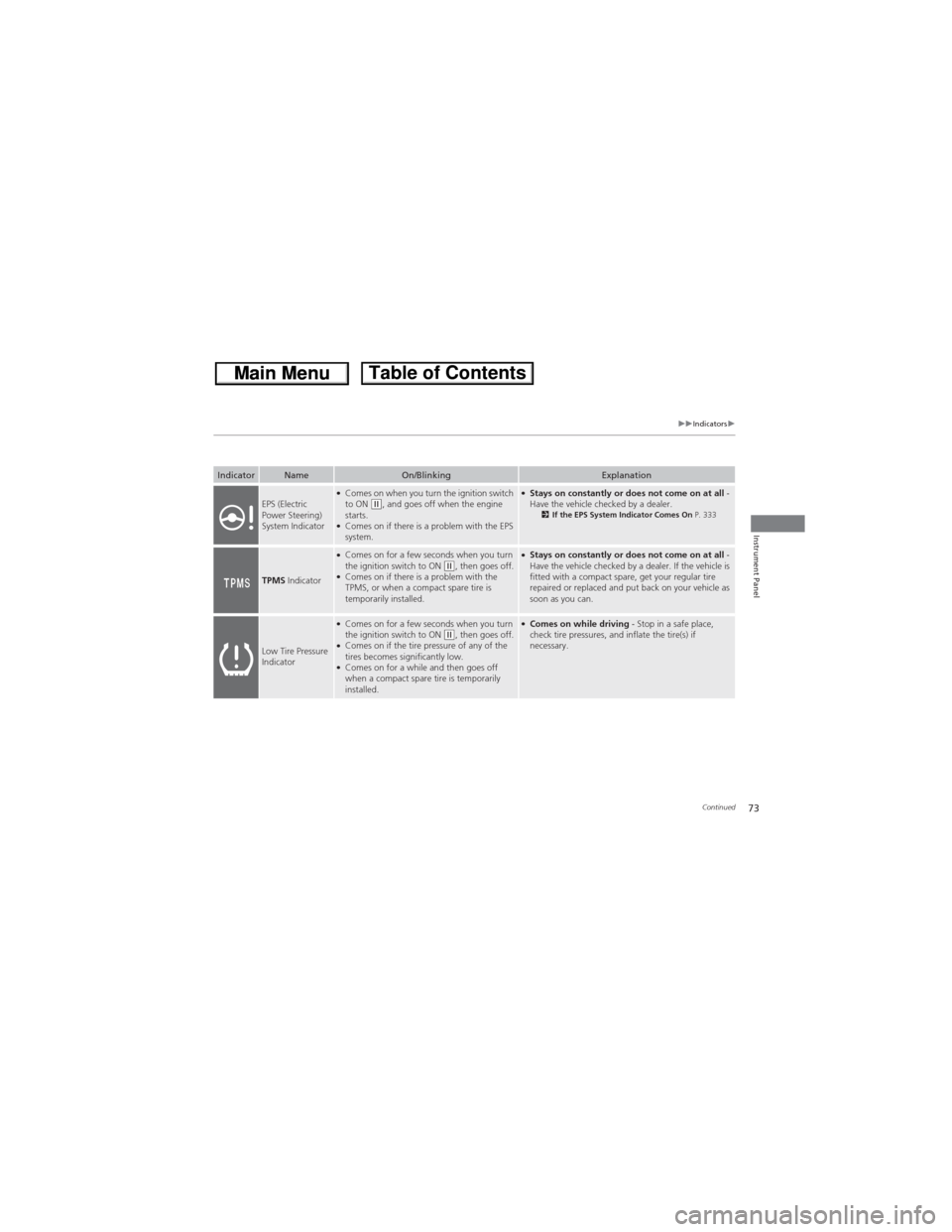
IndicatorNameOn/BlinkingExplanation
EPS (Electric
Power Steering)
System Indicator●Comes on when you turn the ignition switch
to ON (w, and goes off when the engine
starts.
●Comes on if there is a problem with the EPS
system.
●Stays on constantly or does not come on at all -
Have the vehicle checked by a dealer.
2If the EPS System Indicator Comes On P. 333
TPMS Indicator
●Comes on for a few seconds when you turn
the ignition switch to ON (w, then goes off.●Comes on if there is a problem with the
TPMS, or when a compact spare tire is
temporarily installed.
●Stays on constantly or does not come on at all -
Have the vehicle checked by a dealer. If the vehicle is
fitted with a compact spare, get your regular tire
repaired or replaced and put back on your vehicle as
soon as you can.
Low Tire Pressure
Indicator
●Comes on for a few seconds when you turn
the ignition switch to ON (w, then goes off.●Comes on if the tire pressure of any of the
tires becomes significantly low.
●Comes on for a while and then goes off
when a compact spare tire is temporarily
installed.
●Comes on while driving - Stop in a safe place,
check tire pressures, and inflate the tire(s) if
necessary.
Page 96 of 361
95
Controls
This chapter explains how to operate the various controls necessary for driving.
Clock.................................................... 96
Locking and Unlocking the Doors
Key Types and Functions .................... 97
Locking/Unlocking the Doors from the
Outside ............................................ 99
Locking/Unlocking the Doors from the
Inside ............................................. 101
Childproof Door Locks ..................... 102
Auto Door Locking/Unlocking .......... 103
Opening and Closing the Tailgate... 104
Security System................................ 106
Immobilizer System .......................... 106
Security System Alarm
*.................... 106Opening and Closing the Windows..... 108
Opening and Closing the Moonroof*.. 110Operating the Switches Around the
Steering Wheel
Ignition Switch ................................. 111
Turn Signals ..................................... 112
Light Switches.................................. 112
Fog Lights
*...................................... 114
Daytime Running Lights ................... 114
Wipers and Washers ........................ 115
Brightness Control ........................... 117
Rear Defogger/Heated Door Mirror
*
Button ........................................... 118
Adjusting the Steering Wheel........... 119Adjusting the Mirrors....................... 120
Interior Rearview Mirror ................... 120
Power Door Mirrors ......................... 121
Adjusting the Seats.......................... 122
Adjusting the Seat Positions ............. 122
Interior Lights/Interior Convenience
Items................................................ 132
Interior Lights .................................. 132
Interior Convenience Items .............. 133
Heating and Cooling System*......... 142
Using Vents, Heating and A/C.......... 142
Climate Control System*.................. 145
Using Automatic Climate Control .... 145
Automatic Climate Control Sensors ... 148
* Not available on all models
Page 119 of 361
118
uuOperating the Switches Around the Steering WheeluRear Defogger/Heated Door Mirror* Button
Controls
Rear Defogger/Heated Door Mirror* Button
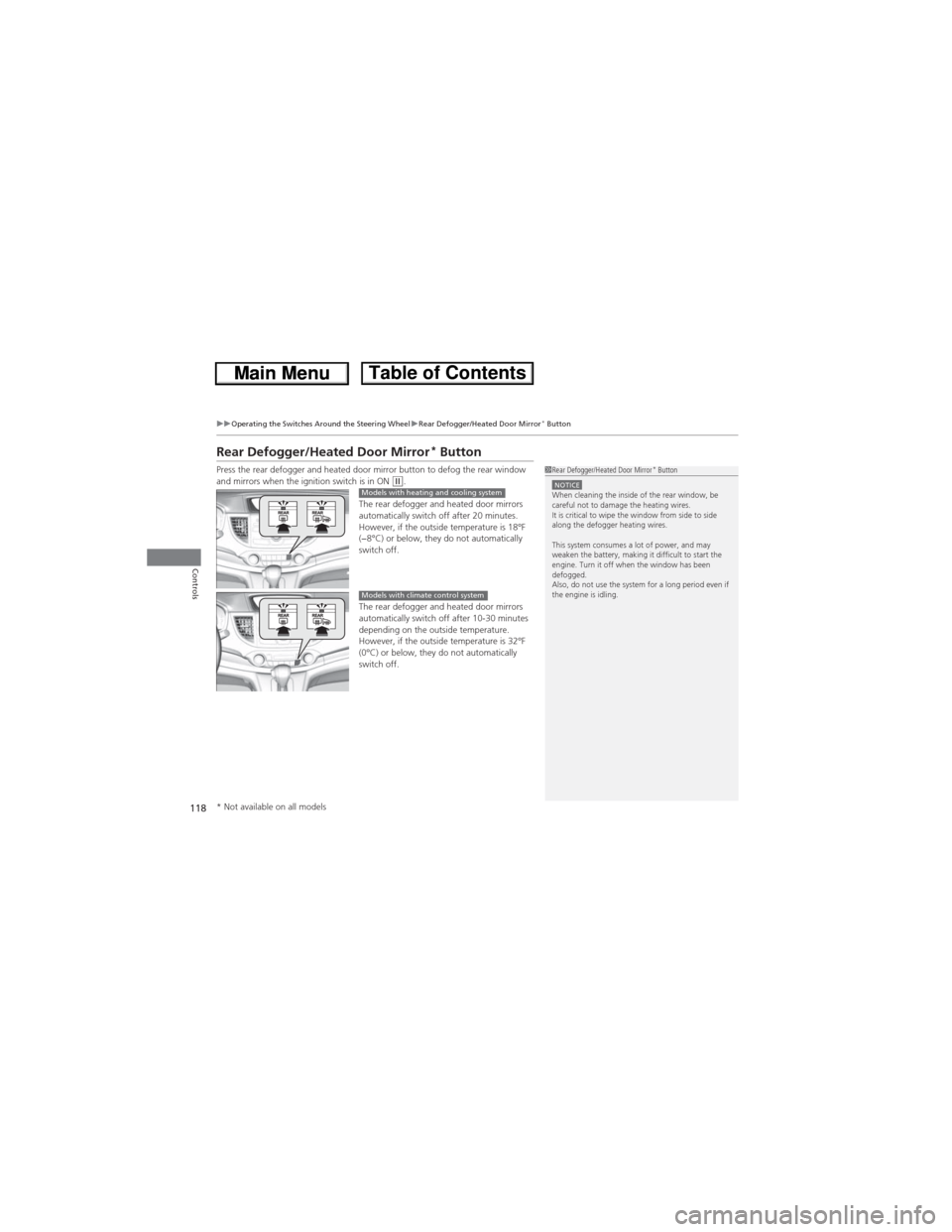
Press the rear defogger and heated door mirror button to defog the rear window
and mirrors when the ignition switch is in ON (w.
The rear defogger and heated door mirrors
automatically switch off after 20 minutes.
However, if the outside temperature is 18°F
(−8°C) or below, they do not automatically
switch off.
The rear defogger and heated door mirrors
automatically switch off after 10-30 minutes
depending on the outside temperature.
However, if the outside temperature is 32°F
(0°C) or below, they do not automatically
switch off.1Rear Defogger/Heated Door Mirror* ButtonNOTICEWhen cleaning the inside of the rear window, be
careful not to damage the heating wires.
It is critical to wipe the window from side to side
along the defogger heating wires.
This system consumes a lot of power, and may
weaken the battery, making it difficult to start the
engine. Turn it off when the window has been
defogged.
Also, do not use the system for a long period even if
the engine is idling.Models with heating and cooling system
Models with climate control system
* Not available on all models
Page 123 of 361
122
Controls
Adjusting the Seats
Adjusting the Seat Positions
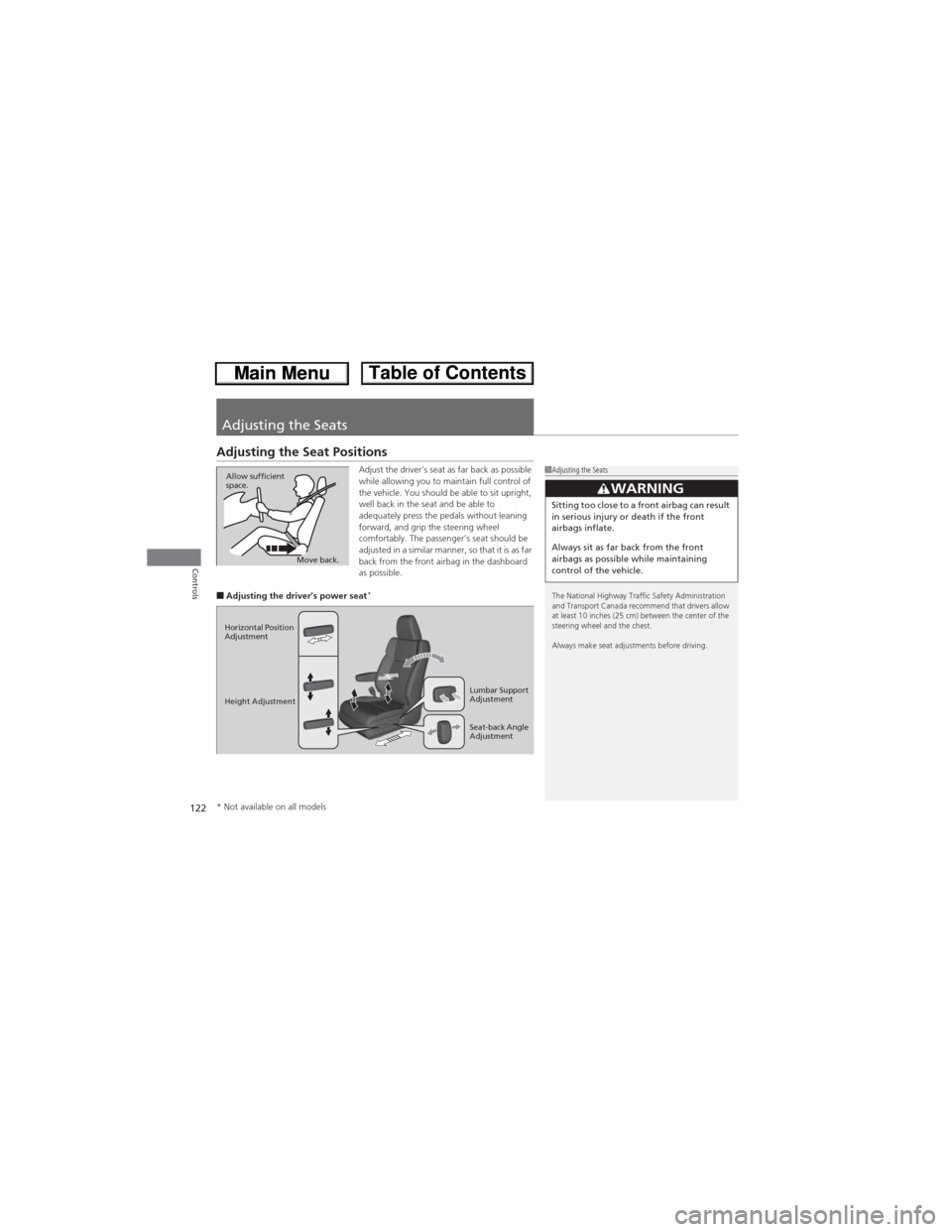
Adjust the driver's seat as far back as possible
while allowing you to maintain full control of
the vehicle. You should be able to sit upright,
well back in the seat and be able to
adequately press the pedals without leaning
forward, and grip the steering wheel
comfortably. The passenger's seat should be
adjusted in a similar manner, so that it is as far
back from the front airbag in the dashboard
as possible.
■Adjusting the driver’s power seat*
1Adjusting the Seats
The National Highway Traffic Safety Administration
and Transport Canada recommend that drivers allow
at least 10 inches (25 cm) between the center of the
steering wheel and the chest.
Always make seat adjustments before driving.
3WARNINGSitting too close to a front airbag can result
in serious injury or death if the front
airbags inflate.
Always sit as far back from the front
airbags as possible while maintaining
control of the vehicle.
Move back. Allow sufficient
space.
Horizontal Position
Adjustment
Height Adjustment
Seat-back Angle
Adjustment Lumbar Support
Adjustment
* Not available on all models
Page 236 of 361
235
uuTowing a TraileruTowing Your Vehicle
Continued
Driving
Towing Your Vehicle
Your vehicle can be towed behind a motorhome.
Perform the following procedure before towing your vehicle.
1.Check the transmission fluid level.
uMake sure the fluid level is between the upper and lower marks.
2.Start the engine.
3.Depress the brake pedal. Move the shift lever through all its positions.
4.Shift to
(D and hold for five seconds, then to (N. Let the engine run for three
minutes, then turn it off.
5.Release the parking brake.
6.Leave the ignition switch in ACCESSORY
(q.
uMake sure the steering wheel does not lock.
7.Turn off all the electric devices. Do not use any accessory power sockets.
uThis can prevent the battery from running down.
■When Your Vehicle is Towed Behind a Motorhome
1Towing Your VehicleNOTICEFailure to follow the recommended instructions
exactly will result in severe automatic transmission
damage. If you cannot shift the transmission or start
the engine, your vehicle must be transported on a
flat-bed truck or trailer.
Do not exceed 65 mph (100 km/h).
To avoid damage to the AWD system, your vehicle
must be towed with all four wheels on the ground.
Consult your towing parts sales or rental agency if
any other items are recommended or required for
your towing situation.
If you tow your vehicle behind a motorhome, the
transmission fluid must be changed every 2 years or
30,000 miles (48,000 km), whichever comes first.
AWD models
1When Your Vehicle is Towed Behind a MotorhomeNOTICESevere transmission damage will occur if the vehicle is
shifted from (R to (N and then towed with the drive
wheels on the ground.
Page 242 of 361
241
uuWhen DrivinguPrecautions While Driving
Driving
Precautions While Driving
Utility vehicles have a significantly higher rollover rate than other types of vehicles.
To prevent rollovers or loss of control:
•Take corners at slower speeds than you would with a passenger vehicle.
•Avoid sharp turns and abrupt maneuvers whenever possible.
•Do not modify your vehicle in any way that you would raise the center of gravity.
•Do not carry heavy cargo on the roof.
Avoid driving in deep water and on flooded roads. This can damage the engine,
driveline, or cause electrical component failure.
If there is a strong impact with something under the vehicle, stop in a safe location.
Check the underside of the vehicle for damage or any fluid leaks.■Driving Guidelines for Your Utility Vehicle
■In Rain
■Other Precautions
1Driving Guidelines for Your Utility Vehicle
Failure to operate your vehicle correctly might result
in a crash or a rollover.
2Important Handling Information P. 26
2Precautions While Driving P. 241
1Precautions While DrivingNOTICEDo not operate the shift lever while pressing the
accelerator pedal. You could damage the
transmission.
If the ignition switch is turned to ACCESSORY
(q or
LOCK (0 while driving, the engine will shut down
and all steering and brake power assist functions will
stop, making it difficult to control the vehicle.
Do not put the shift lever in
(N, as you will lose
engine braking (and acceleration) performance.
During the first 600 miles (1,000 km) of operation,
avoid sudden acceleration or full throttle operation so
as to not damage the engine or powertrain.
Avoid hard braking for the first 200 miles (300 km).
You should also follow this when the brake pads are
replaced.
Page 252 of 361
251
uuWhen DrivinguReal Time AWD with Intelligent Control System™*
Driving
Real Time AWD with Intelligent Control System™*
When the system senses a loss of front wheel traction, it automatically transfers
some power to the rear wheels. This allows you to utilize all available traction and
may increase mobility.
You still need to exercise the same care when accelerating, steering, and braking
that you would in a two wheel drive vehicle.
If you excessively spin all four wheels and overheat the AWD system, only the front
wheels receive power. Stop until the system cools down.
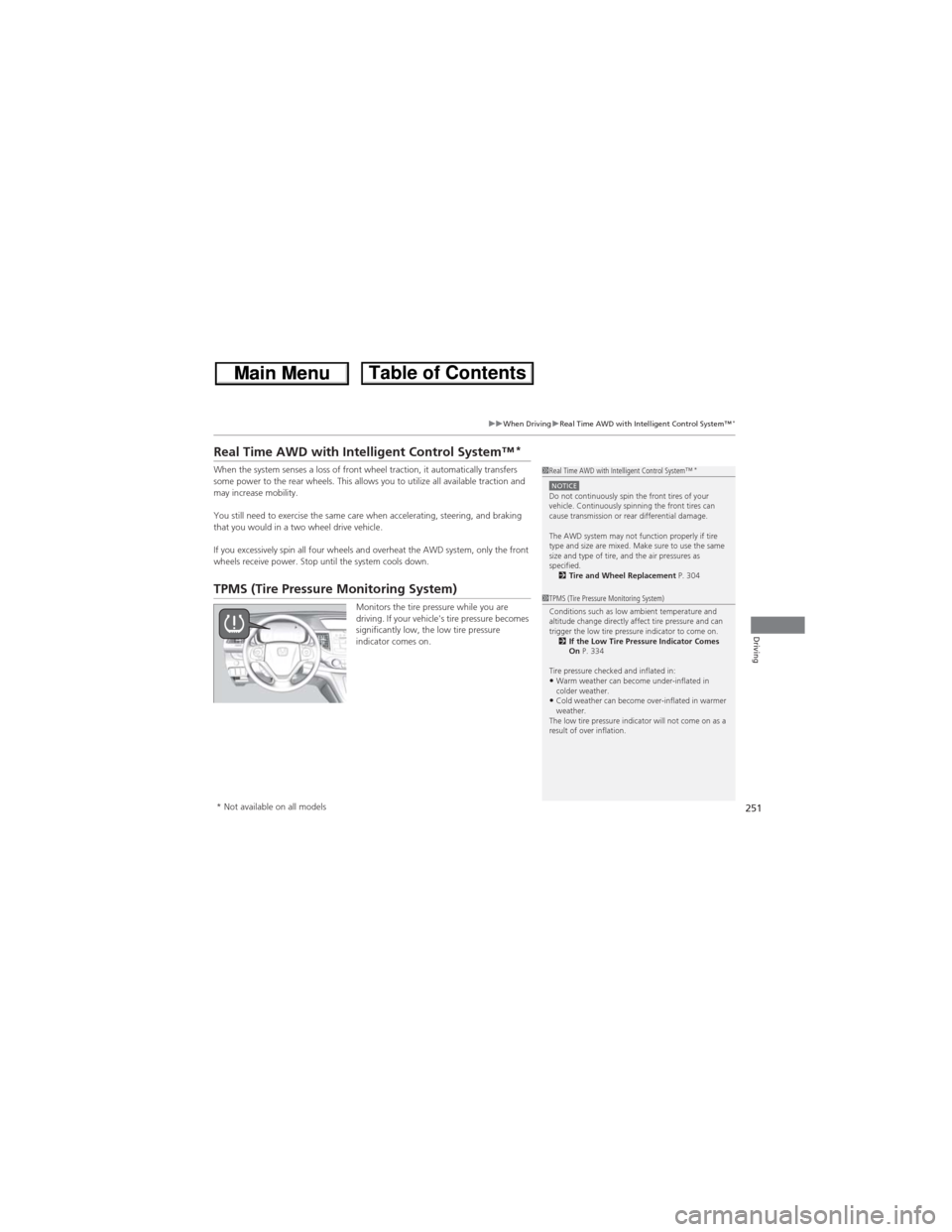
TPMS (Tire Pressure Monitoring System)
Monitors the tire pressure while you are
driving. If your vehicle's tire pressure becomes
significantly low, the low tire pressure
indicator comes on.
1Real Time AWD with Intelligent Control System™*
NOTICEDo not continuously spin the front tires of your
vehicle. Continuously spinning the front tires can
cause transmission or rear differential damage.
The AWD system may not function properly if tire
type and size are mixed. Make sure to use the same
size and type of tire, and the air pressures as
specified.
2Tire and Wheel Replacement P. 304
1TPMS (Tire Pressure Monitoring System)
Conditions such as low ambient temperature and
altitude change directly affect tire pressure and can
trigger the low tire pressure indicator to come on.
2If the Low Tire Pressure Indicator Comes
On P. 334
Tire pressure checked and inflated in:
•Warm weather can become under-inflated in
colder weather.
•Cold weather can become over-inflated in warmer
weather.
The low tire pressure indicator will not come on as a
result of over inflation.
* Not available on all models
Page 256 of 361
255
uuBrakinguBrake System
Driving
Your vehicle is equipped with disc brakes at all four wheels. A vacuum power assist
helps reduce the effort needed on the brake pedal. The brake assist system increases
the stopping force when you depress the brake pedal hard in an emergency
situation. The anti-lock brake system (ABS) helps you retain steering control when
braking very hard.
2Brake Assist System P. 257
2ABS (Anti-lock Brake System) P. 256
■Foot Brake1Foot Brake
Check the brakes after driving through deep water,
or if there is a buildup of road surface water. If
necessary, dry the brakes by lightly depressing the
pedal several times.
If you hear a continuous metallic friction sound when
applying the brakes, the brake pads need to be
replaced. Have the vehicle checked by a dealer.
Constantly using the brake pedal while going down a
long hill builds up heat, which reduces the brake
effectiveness. Apply engine braking by taking your
foot off the accelerator pedal and downshifting to a
lower gear.
Do not rest your foot on the brake pedal while
driving, as it will lightly apply the brakes and cause
them to lose effectiveness over time and reduce pad
life. It will also confuse drivers behind you.