charging HONDA CR-V 2017 RM1, RM3, RM4 / 4.G Owners Manual
[x] Cancel search | Manufacturer: HONDA, Model Year: 2017, Model line: CR-V, Model: HONDA CR-V 2017 RM1, RM3, RM4 / 4.GPages: 657
Page 12 of 657
11
Quick Reference Guide
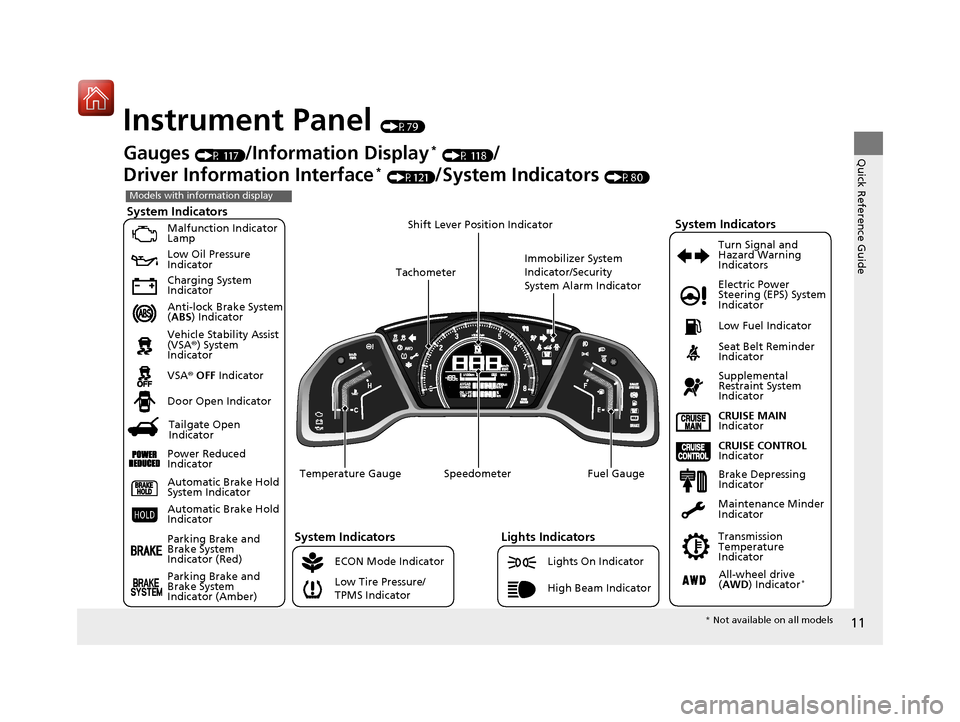
Instrument Panel (P79)
System Indicators
Malfunction Indicator
Lamp
Low Oil Pressure
Indicator
Charging System
Indicator
Anti-lock Brake System
(ABS ) Indicator
Vehicle Stability Assist
(VSA ®) System
Indicator
VSA ® OFF Indicator
Low Tire Pressure/
TPMS Indicator Electric Power
Steering (EPS) System
Indicator
Lights Indicators
Lights On Indicator
High Beam Indicator
Seat Belt Reminder
Indicator
System Indicators
CRUISE CONTROL
Indicator
Parking Brake and
Brake System
Indicator (Red) Supplemental
Restraint System
Indicator
Door Open Indicator
CRUISE MAIN
Indicator
Immobilizer System
Indicator/Security
System Alarm Indicator
Speedometer Fuel Gauge
Tachometer
Shift Lever Position Indicator
Low Fuel Indicator
Gauges (P 117)/Information Display* (P 118)/
Driver Information Interface
* (P121)/System Indicators (P80)
ECON Mode Indicator Turn Signal and
Hazard Warning
Indicators
Maintenance Minder
Indicator
Transmission
Temperature
Indicator
Models with information display
Parking Brake and
Brake System
Indicator (Amber)
System Indicators
Automatic Brake Hold
System Indicator
Automatic Brake Hold
Indicator
Temperature Gauge
Brake Depressing
Indicator
Tailgate Open
Indicator
Power Reduced
Indicator
All-wheel drive
( AWD ) Indicator*
* Not available on all models
17 CR-V-31TLA6000.book 11 ページ 2016年10月11日 火曜日 午後6時37分
Page 13 of 657
12
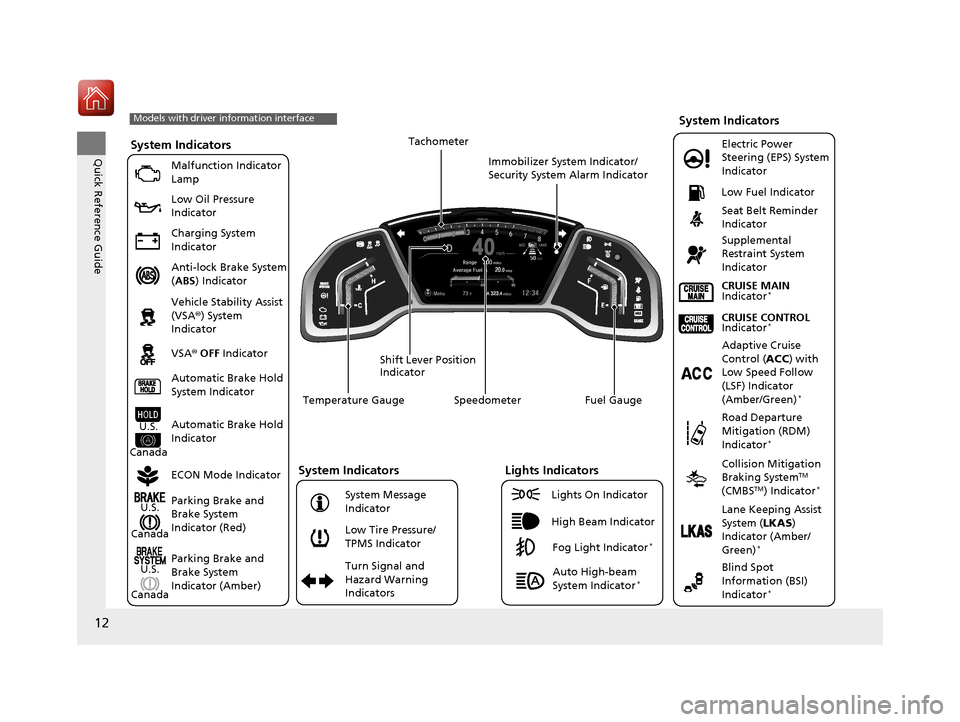
Quick Reference GuideSystem Indicators
Malfunction Indicator
Lamp
Low Oil Pressure
Indicator
Charging System
Indicator
Anti-lock Brake System
(ABS ) Indicator
Vehicle Stability Assist
(VSA ®) System
Indicator
VSA ® OFF Indicator
Low Tire Pressure/
TPMS Indicator Electric Power
Steering (EPS) System
Indicator
Seat Belt Reminder
Indicator
System Indicators
Parking Brake and
Brake System
Indicator (Red)
Supplemental
Restraint System
Indicator
Speedometer Fuel Gauge
Shift Lever Position
Indicator Immobilizer System Indicator/
Security System Alarm Indicator
Low Fuel Indicator
ECON Mode Indicator Turn Signal and
Hazard Warning
Indicators
Models with driver information interface
Parking Brake and
Brake System
Indicator (Amber)
System Indicators
U.S.
Canada
U.S.
Canada Automatic Brake Hold
System Indicator
Automatic Brake Hold
IndicatorU.S.
Canada Temperature Gauge
Lights Indicators
Lights On Indicator
High Beam Indicator
Fog Light Indicator*
Adaptive Cruise
Control (
ACC) with
Low Speed Follow
(LSF) Indicator
(Amber/Green)
*
System Message
Indicator Collision Mitigation
Braking System
TM
(CMBSTM) Indicator*
Road Departure
Mitigation (RDM)
Indicator
*
Lane Keeping Assist
System ( LKAS)
Indicator (Amber/
Green)
*
Tachometer
Auto High-beam
System Indicator*
CRUISE CONTROL
Indicator*
CRUISE MAIN
Indicator*
Blind Spot
Information (BSI)
Indicator
*
17 CR-V-31TLA6000.book 12 ページ 2016年10月11日 火曜日 午後6時37分
Page 84 of 657
83
uuIndicators u
Continued
Instrument Panel
*1:Models with the smart entry system have an ENGINE START/STOP button instead of an ignition switch.
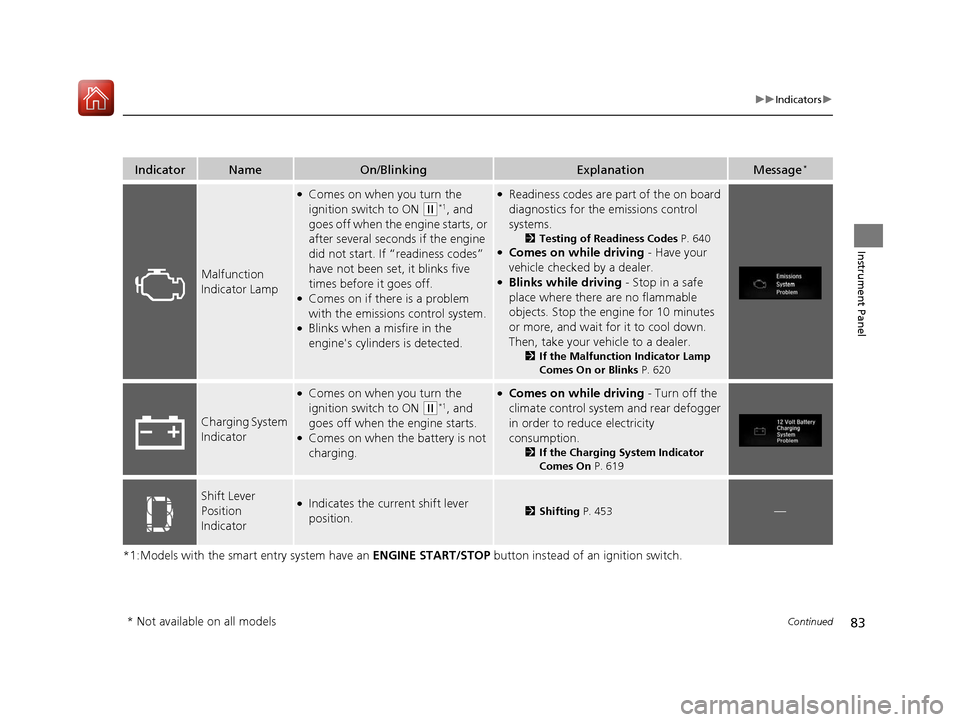
IndicatorNameOn/BlinkingExplanationMessage*
Malfunction
Indicator Lamp
●Comes on when you turn the
ignition switch to ON
(w*1, and
goes off when the engine starts, or
after several seconds if the engine
did not start. If “readiness codes”
have not been set, it blinks five
times before it goes off.
●Comes on if there is a problem
with the emissions control system.
●Blinks when a misfire in the
engine's cylinders is detected.
●Readiness codes are part of the on board
diagnostics for the emissions control
systems.
2 Testing of Readiness Codes P. 640●Comes on while driving - Have your
vehicle checked by a dealer.
●Blinks while driving - Stop in a safe
place where there are no flammable
objects. Stop the engine for 10 minutes
or more, and wait for it to cool down.
Then, take your vehicle to a dealer.
2 If the Malfunction Indicator Lamp
Comes On or Blinks P. 620
Charging System
Indicator
●Comes on when you turn the
ignition switch to ON
(w*1, and
goes off when the engine starts.
●Comes on when the battery is not
charging.
●Comes on while driving - Turn off the
climate control system and rear defogger
in order to reduce electricity
consumption.
2 If the Charging System Indicator
Comes On P. 619
Shift Lever
Position
Indicator●Indicates the current shift lever
position.2Shifting P. 453—
* Not available on all models
17 CR-V-31TLA6000.book 83 ページ 2016年10月11日 火曜日 午後6時37分
Page 105 of 657
104
uuIndicators uDriver Information Interface Wa rning and Information Messages*
Instrument Panel
*1:Models with the smart entry system have an ENGINE START/STOP button instead of an ignition switch.
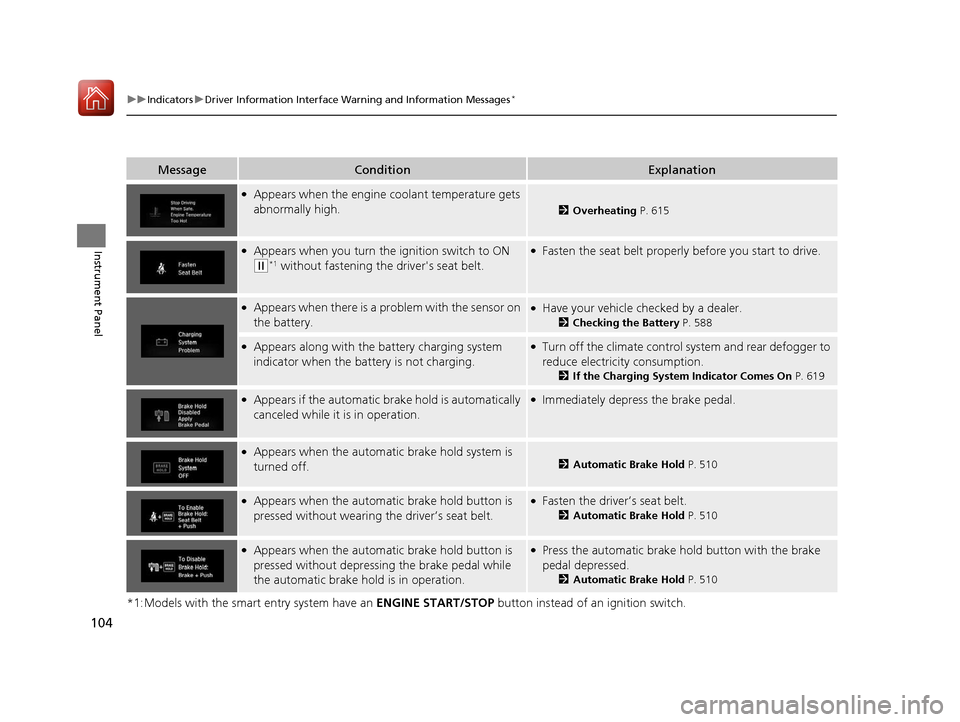
MessageConditionExplanation
●Appears when the engine coolant temperature gets
abnormally high.
2Overheating P. 615
●Appears when you turn the ignition switch to ON
(w*1 without fastening the driver's seat belt.
●Fasten the seat belt properly before you start to drive.
●Appears when there is a pr oblem with the sensor on
the battery.●Have your vehicle checked by a dealer.
2 Checking the Battery P. 588
●Appears along with the battery charging system
indicator when the batte ry is not charging.●Turn off the climate control system and rear defogger to
reduce electricity consumption.
2If the Charging System Indicator Comes On P. 619
●Appears if the automatic brake hold is automatically
canceled while it is in operation.●Immediately depress the brake pedal.
●Appears when the automa tic brake hold system is
turned off.2 Automatic Brake Hold P. 510
●Appears when the automa tic brake hold button is
pressed without wearing the driver’s seat belt.●Fasten the driver’s seat belt.
2 Automatic Brake Hold P. 510
●Appears when the automa tic brake hold button is
pressed without depressing the brake pedal while
the automatic brake hold is in operation.●Press the automatic brake hold button with the brake
pedal depressed.
2 Automatic Brake Hold P. 510
17 CR-V-31TLA6000.book 104 ページ 2016年10月11日 火曜日 午後6時37分
Page 230 of 657
229
uuAudio System uUSB Port(s)
Features
USB Port(s)
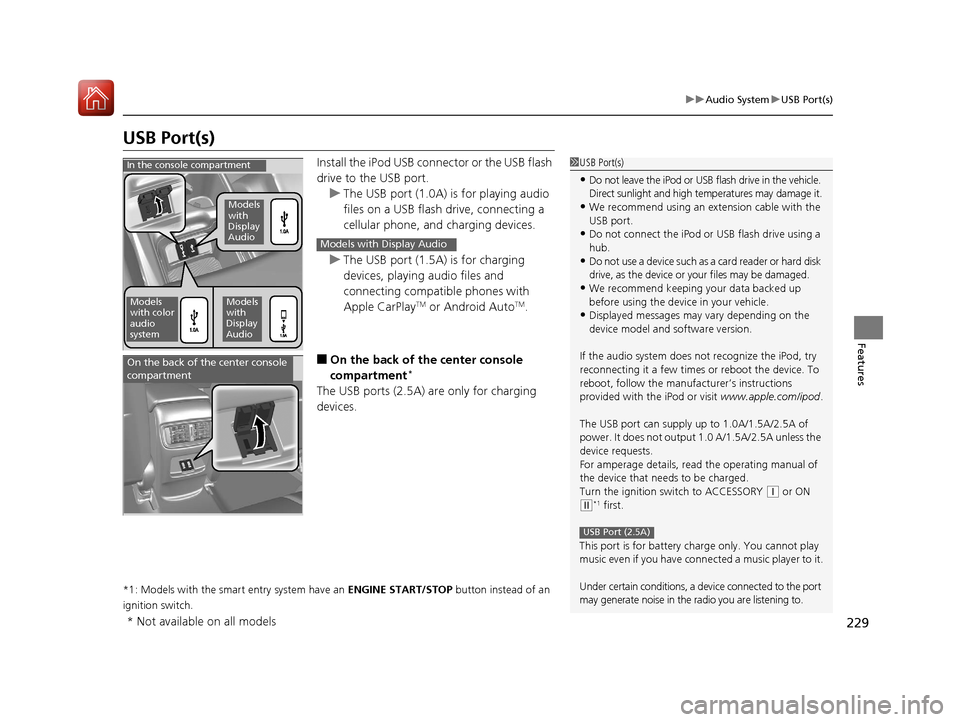
Install the iPod USB connector or the USB flash
drive to the USB port.
u The USB port (1.0A) is for playing audio
files on a USB flash drive, connecting a
cellular phone, and charging devices.
u The USB port (1.5A) is for charging
devices, playing audio files and
connecting compatib le phones with
Apple CarPlay
TM or Android AutoTM.
■On the back of the center console
compartment*
The USB ports (2.5A) are only for charging
devices.
*1: Models with the smart entry system have an ENGINE START/STOP button instead of an
ignition switch.
1 USB Port(s)
•Do not leave the iPod or USB flash drive in the vehicle.
Direct sunlight and high te mperatures may damage it.
•We recommend using an extension cable with the
USB port.
•Do not connect the iPod or USB flash drive using a
hub.
•Do not use a device such as a card reader or hard disk
drive, as the device or your files may be damaged.
•We recommend keeping y our data backed up
before using the device in your vehicle.
•Displayed messages may vary depending on the
device model and software version.
If the audio system does not recognize the iPod, try
reconnecting it a few times or reboot the device. To
reboot, follow the manufac turer’s instructions
provided with the iPod or visit www.apple.com/ipod.
The USB port can supply up to 1.0A/1.5A/2.5A of
power. It does not output 1.0 A/1.5A/2.5A unless the
device requests.
For amperage details, read the operating manual of
the device that ne eds to be charged.
Turn the ignition switch to ACCESSORY
( q or ON
(w*1 first.
This port is for battery charge only. You cannot play
music even if you have conne cted a music player to it.
Under certain conditions, a de vice connected to the port
may generate noise in the radio you are listening to.
USB Port (2.5A)
In the console compartment
Models
with
Display
Audio
Models
with color
audio
systemModels
with
Display
Audio
Models with Display Audio
On the back of the center console
compartment
* Not available on all models
17 CR-V-31TLA6000.book 229 ページ 2016年10月11日 火曜日 午後6時37分
Page 590 of 657
589
uuBattery uCharging the Battery
Maintenance
Charging the Battery
Disconnect both battery cables to prevent damaging your vehicle's electrical system.
Always disconnect the negative (–) cable first, and reconnect it last.
*1: Models with the smart entry system have an ENGINE START/STOP button instead of an
ignition switch.
1 Battery
When you find corrosion, cl ean the battery terminals
by applying a baking powder and water solution.
Clean the terminals with a damp towel. Cloth/towel
dry the battery. Coat the terminals with grease to
help prevent future corrosion.
When replacing the battery, the replacement must be
of the same specifications.
Consult a dealer for more information.
The indicators for Electric Power Steering (EPS)
system, Vehicle Stability Assist (VSA ®) system, VSA®
OFF, Collision Mitigation Braking System
TM
(CMBSTM)*, and low tire pressure/Tire Pressure
Monitoring System (TPMS)* may come on when you
turn the ignition switch to ON
( w*1 after re-
connecting the battery.
Drive a short distance at 12 mph (20 km/h). The
indicator should go off. If it does not, have your
vehicle checked by a dealer.
* Not available on all models
17 CR-V-31TLA6000.book 589 ページ 2016年10月11日 火曜日 午後6時37分
Page 600 of 657
599
Handling the Unexpected
This chapter explains how to handle unexpected troubles.
ToolsTypes of Tools .................................. 600
If a Tire Goes Flat Changing a Flat Tire ......................... 601
Engine Does Not Start Checking the Engine ........................ 608
If the Smart Entry Remote Battery is Weak .......................................... 609
Emergency Engine Stop ................... 610
Jump Starting .................................... 611
Shift Lever Does Not Move .............. 614
Overheating How to Handle Overheating ............. 615 Indicator, Coming On/Blinking
If the Low Oil Pressure Indicator Comes
On................................................ 619
If the Charging System Indicator Comes
On ................................................. 619
If the Malfunction Indicator Lamp Comes On or Blinks ................................... 620
If the Brake System Indicator (Red) Comes On or Blinks ....................................... 621
If the Brake System Indicator (Red) Comes On or
Blinks at the Same Time When the Brake
System Indicator (Amber) Comes On ..... 622
If the Electric Power Steering (EPS) System Indicator Comes On ........................... 623
If the Low Tire Pressure/TPMS Indicator Comes On or Blinks ....................... 624
Fuses Fuse Locations ................................. 625
Inspecting and Changing Fuses ........ 628
Emergency Towing ........................... 629
When You Cannot Open the Tailgate.. 630Refueling................................................. 631
17 CR-V-31TLA6000.book 599 ページ 2016年10月11日 火曜日 午後6時37分
Page 612 of 657
611Continued
Handling the Unexpected
Jump Starting
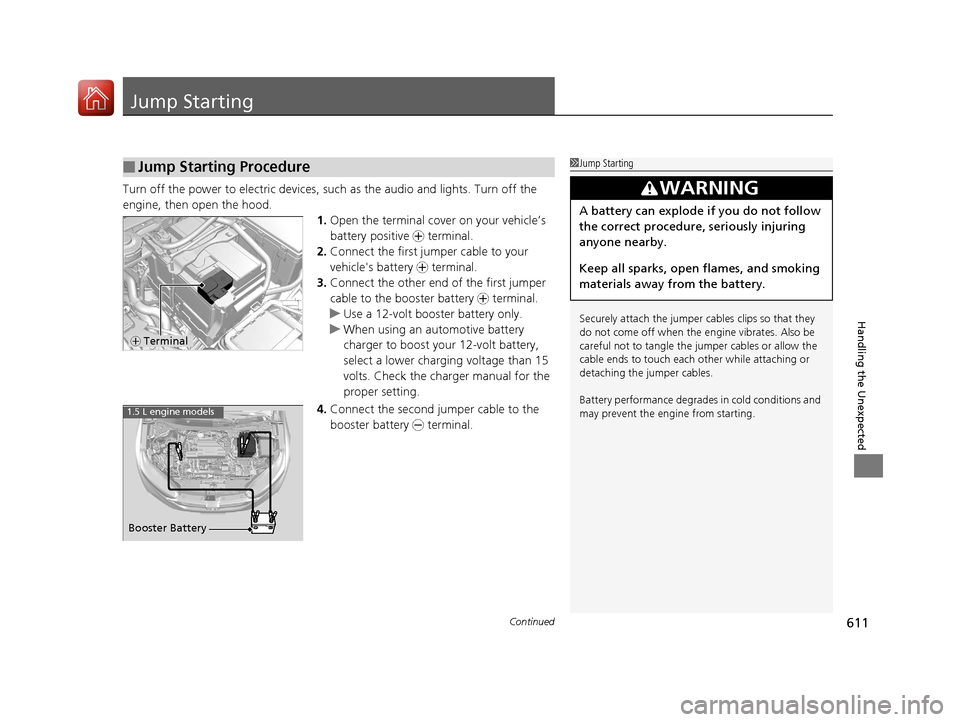
Turn off the power to electric devices, such as the audio and lights. Turn off the
engine, then open the hood. 1.Open the terminal cover on your vehicle’s
battery positive + terminal.
2. Connect the first jumper cable to your
vehicle's battery + terminal.
3. Connect the other end of the first jumper
cable to the booster battery + terminal.
u Use a 12-volt booster battery only.
u When using an automotive battery
charger to boost your 12-volt battery,
select a lower charging voltage than 15
volts. Check the ch arger manual for the
proper setting.
4. Connect the second jumper cable to the
booster battery - terminal.
■Jump Starting Procedure1Jump Starting
Securely attach the jumper cables clips so that they
do not come off when the e ngine vibrates. Also be
careful not to tangle the ju mper cables or allow the
cable ends to touch each other while attaching or
detaching the jumper cables.
Battery performance degrades in cold conditions and
may prevent the engi ne from starting.
3WARNING
A battery can explode if you do not follow
the correct procedure, seriously injuring
anyone nearby.
Keep all sparks, open flames, and smoking
materials away from the battery.
+ Terminal
Booster Battery
1.5 L engine models
17 CR-V-31TLA6000.book 611 ページ 2016年10月11日 火曜日 午後6時37分
Page 620 of 657
619
Handling the Unexpected
Indicator, Coming On/Blinking
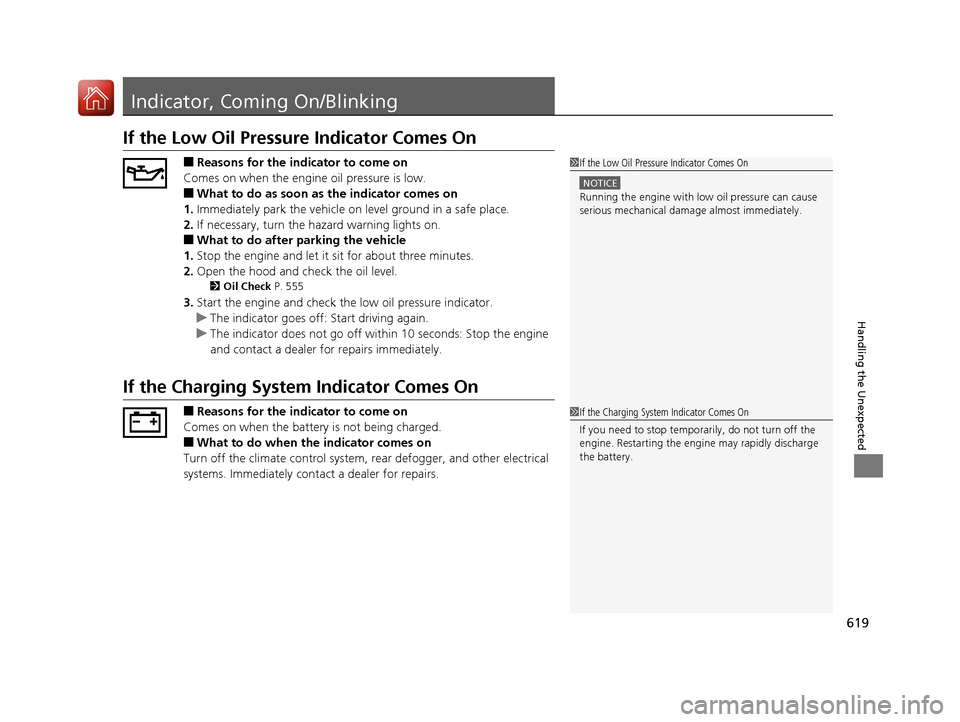
If the Low Oil Pressure Indicator Comes On
■Reasons for the indicator to come on
Comes on when the engine oil pressure is low.
■What to do as soon as the indicator comes on
1. Immediately park the vehicle on level ground in a safe place.
2. If necessary, turn the hazard warning lights on.
■What to do after parking the vehicle
1. Stop the engine and let it sit for about three minutes.
2. Open the hood and check the oil level.
2 Oil Check P. 555
3.Start the engine and check th e low oil pressure indicator.
u The indicator goes off: Start driving again.
u The indicator does not go off with in 10 seconds: Stop the engine
and contact a dealer for repairs immediately.
If the Charging System Indicator Comes On
■Reasons for the indicator to come on
Comes on when the battery is not being charged.
■What to do when th e indicator comes on
Turn off the climate control system, rear defogger, and other electrical
systems. Immediately cont act a dealer for repairs.
1If the Low Oil Pressure Indicator Comes On
NOTICE
Running the engine with low oil pressure can cause
serious mechanical damage almost immediately.
1If the Charging System Indicator Comes On
If you need to stop temporarily, do not turn off the
engine. Restarting the engi ne may rapidly discharge
the battery.
17 CR-V-31TLA6000.book 619 ページ 2016年10月11日 火曜日 午後6時37分
Page 649 of 657
648
Index
Auto Door Locking/Unlocking................. 146
Auto High-Beam System .......................... 178
Automatic Brake Hold .............................. 510
Indicator ............................................ 82, 510
Automatic Intermittent Wipers ............... 183
Automatic Lighting .................................. 175
Average Fuel Economy ..................... 119, 124
Average Speed .......................................... 124
AWD (All-Wheel Drive) ............................ 500
B
Battery....................................................... 588
Charging System Indicator ................. 83, 619
Jump Starting .......................................... 611
Maintenance (Checking the Battery) ........ 588
Maintenance (Replacing).......................... 590
Belts (Seat) .................................................. 40
Beverage Holders ...................................... 210
Blind spot information (BSI) System ........ 495
Bluetooth ® Audio ............................. 252, 308
Bluetooth ® HandsFreeLink ®............. 371, 394
Booster Seats (For Children) ....................... 75
Brake System ............................................. 506
Anti-lock Brake System (ABS) ................... 512
Automatic Brake Hold.............................. 510
Brake Assist System ................................. 513
Fluid ........................................................ 566
Foot Brake ............................................... 509
Indicator (Red) ........................... 80, 621, 622
Parking Brake .......................................... 506 Brightness Control
(Instrument Panel).... 185
Bulb Replacement .................................... 568
Brake/Taillight, Rear Turn Signal Light and
Rear Side Marker Lights ......................... 572
Fog Lights ............................................... 570
Front Turn Signal/ Front Side Marker Lights .................................................... 572
Headlights ............................................... 568
High-Mount Brake Light .......................... 574
Parking/Daytime Running Lights .............. 572
Rear License Plate Light ........................... 574
Side Turn Signal/Emergency Indicator Lights .................................................... 572
Taillight and Back-Up Lights .................... 573
Bulb Specifications ................................... 634
C
Carbon Monoxide Gas ............................... 76
Cargo Hook ............................................... 215
Carrying Cargo ................................. 433, 435
Certification Label .................................... 636
Changing Bulbs ........................................ 568
Charging System Indicator ................. 83, 619
Child Safety ................................................. 63
Childproof Door Locks............................. 145
Child Seat .................................................... 63
Booster Seats ............................................ 75
Child Seat for Infants................................. 65
Child Seat for Small Children ..................... 66 Installing a Child Seat
with a Lap/Shoulder
Seat Belt ................................................. 71
Larger Children ......................................... 74
Rear-facing Child Seat............................... 65
Selecting a Child Seat ............................... 67
Childproof Door Locks ............................. 145
Cleaning the Exterior ............................... 595
Cleaning the Interior ............................... 593
Climate Control System ........................... 221
Changing the Mode................................ 221
Defrosting the Windshield and
Windows .............................................. 222
Dust and Pollen Filter .............................. 592
Recirculation/Fresh Air Mode................... 222
Sensors ................................................... 225
Synchronized Mode ................................ 224
Using Automatic Climate Control............ 221
Clock ......................................................... 132
CMBSTM (Collision Mitigation Braking
SystemTM) ................................................ 514
Coat Hook ................................................ 214
Collision Mitigation Braking System
TM
(CMBSTM) ................................................. 514
Compact Spare Tire .......................... 601, 635
Compass .................................................... 428
Continuously Variable Transmission ....... 452
Creeping................................................. 452
Fluid ....................................................... 565
Kickdown ............................................... 452
Operating the Shift Lever .................. 23, 454
Shift Lever Does Not Move ...................... 614
17 CR-V-31TLA6000.book 648 ページ 2016年10月11日 火曜日 午後6時37分