warning HONDA CR-V 2018 (in English) Service Manual
[x] Cancel search | Manufacturer: HONDA, Model Year: 2018, Model line: CR-V, Model: HONDA CR-V 2018Pages: 679, PDF Size: 23.22 MB
Page 226 of 679
uuInterior Lights/Interior Convenience Items uInterior Convenience Items
224
Controls
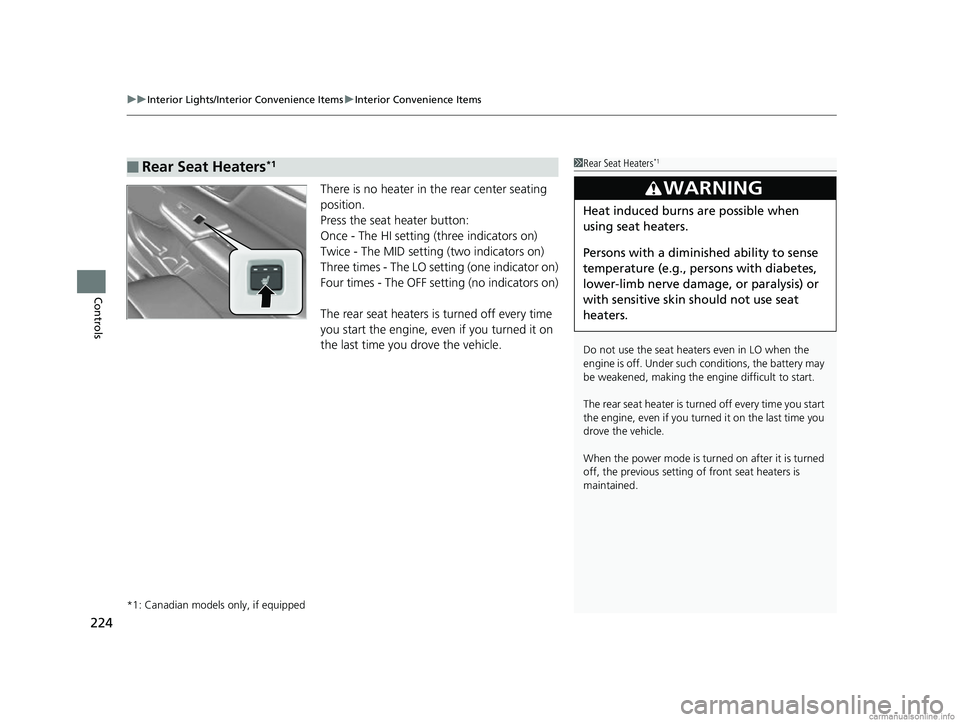
There is no heater in the rear center seating
position.
Press the seat heater button:
Once - The HI setting (three indicators on)
Twice - The MID setting (two indicators on)
Three times - The LO setting (one indicator on)
Four times - The OFF se tting (no indicators on)
The rear seat heaters is turned off every time
you start the engine, even if you turned it on
the last time you drove the vehicle.
*1: Canadian models only, if equipped
■Rear Seat Heaters*11 Rear Seat Heaters*1
Do not use the seat heaters even in LO when the
engine is off. Under such conditions, the battery may
be weakened, making the engine difficult to start.
The rear seat heater is turned off every time you start
the engine, even if you turned it on the last time you
drove the vehicle.
When the power mode is turned on after it is turned
off, the previous setting of front seat heaters is
maintained.
3WARNING
Heat induced burns are possible when
using seat heaters.
Persons with a diminished ability to sense
temperature (e.g., persons with diabetes,
lower-limb nerve damage, or paralysis) or
with sensitive skin should not use seat
heaters.
18 CR-V-31TLA6100.book 224 ページ 2017年9月7日 木曜日 午後3時56分
Page 342 of 679
340
uuGeneral Information on the Audio System uHonda App License Agreement
Features
5. Unauthorized Use and Abuse. You are responsible for ensuring your (and any authorized third parties’) use of the SOFTWARE and
SERVICES remains in compliance with this AGREEMENT and all other applicable HONDA TERMS and PROVIDER TERMS. You acknowledge
and agree that any use of the SOFTWARE or SERVICES occurring th rough your VEHICLE will be deemed your actions and that HONDA an d
PROVIDERS may rely upon such ac tions. You agree to immediately notify us if you suspect fraudulent or abusive activity involvin g the
SOFTWARE or SERVICES. If you so notify us or if we otherwise suspect fraudulent or abusive activity, you agree to cooperate with us in any
fraud investigation and to use any fraud prevention measures we pres cribe. Your failure to immediately notify us or cooperate to use such
measures will result in your liability for all fraudulent us age or abusive activity associated with your VEHICLE.
6. SOFTWARE Updates.
The SOFTWARE and SERVICES may be updated when your VEHICLE is serviced by a DEALER or remotely, over-the-
air, by HONDA from time to time; such update s may occur with or without further notice or your future consent. The SOFTWARE may be
updated at HONDA’s discretion and for any pu rpose including, without limitation, to patch or otherwise improve the SOFTWARE or
SERVICES functionality, se curity, or stability. All updates to the SOFTWARE and SERVICES are su bject to this AGREEMENT and any other
applicable HONDA TERMS and PROVIDER TERMS.
7. Uninstalling, Removing, an d Replacing the SOFTWARE.
Replacing SOFTWARE or HONDA SERVICES with software or firmware not
provided and installed by HONDA or a DEALER will render all representation s and warranties for the SOFTWARE, HONDA SERVICES, an d
VEHICLE functionality reliant upon the SOFTWARE or HONDA SERVICES null and void.
D. SOFTWARE Operationa l Notices and Warnings
1. Vehicle Geolocation Information.
You acknowledge that your VEHICLE may be equi pped with certain traffic and map features. The
traffic feature will automatically collect an d transmit, through GPS technology, your Ve hicle’s current location (longitude and latitude),
travel direction and speed (“VEHICLE GEOLOCATION INFORMAT ION”) to HONDA and PROVIDERS. The VEHICLE GEOLOCATION
INFORMATION is used by HONDA and PROVIDERS to provide traffic and navigation-related information to you, but may also be used to
provide other SERVICES or offers to you. HONDA will not use such VEHICLE GEOLOCATION INFORMATION for its own marketing efforts,
or provide such information to unaffiliated third parties for their own purposes, without your express consent.
18 CR-V-31TLA6100.book 340 ページ 2017年9月7日 木曜日 午後3時56分
Page 344 of 679
342
uuGeneral Information on the Audio System uHonda App License Agreement
Features
E. Information Collection and Storage
1. Information Collection , Use, Transmission and Storage of Data. Consent to Use of Data:
You agree that HONDA and PROVIDERS may
collect and use your information gathered in any manner as part of product support services related to the SOFTWARE or related services.
HONDA may share such information with third parties, including, without limitation, PROV IDERS, third party software and service s
suppliers, their affiliates and/or their design ated agents, solely to improve their products or to provide services or technologies to you.
HONDA, third party software and systems supp liers, their affiliates and/or their designated agent may disclose this information to others,
but not in a form that pe rsonally identifies you.
2. Information Storage.
Depending on the type of multimedia system you have in your VEHICLE, certain information may be stored for ease
of use of the SOFTWARE including, without limitation, search hi story, location history in certain applications, previous and saved
destinations, map locations within certain applications, and device numbers and contact information.
(a) Vehicle Health Information.
Your VEHICLE may remotely trans mit information regarding the status and health of your VEHICLE
(“VEHICLE INFORMATION”) to HONDA without notification to you. VEHICLE INFORMATION may contain VEHICLE maintenance and
malfunction status that is derived from VEHICLE diagnostic data and includes, but is not limited to, status of powered doors and windows,
battery life data, battery charging data, VEHICLE speed, coolant temperat ure, air compressor revolution, output power, warning codes,
diagnostic trouble codes, fuel injection volume, and engine rotati ons per minute. VEHICLE HEALTH INFORMATION may be used by HONDA
for research and development, to deliver HO NDA SERVICES and information to you, and to contact you, and is retained only for a period
of time necessary to fulfill these goals.
(b) VEHICLE Geolocation Data (non-navigation/map based).
If you opt-in to geolocation-based SERVICES, your vehicle’s geolocation data
(latitude and longitude) will be automatically sent from your VEHICLE to HONDA and PROVIDERS.
(c) You understand that the inputting or uploading of information to your VEHICLE’s multimedia system or the SOFTWARE or SERVICES is
at your own risk and that HONDA is not resp onsible for unauthorized access to or use of any personal or other information. All information
uploaded to the SOFTWARE and SERVICES may be stored on your VEHI CLES’s multimedia system and you understand that the security and
safety of your VEHICLE’s multimedia system is your sole responsibility.
18 CR-V-31TLA6100.book 342 ページ 2017年9月7日 木曜日 午後3時56分
Page 367 of 679
365
uuCustomized Features u
Continued
Features
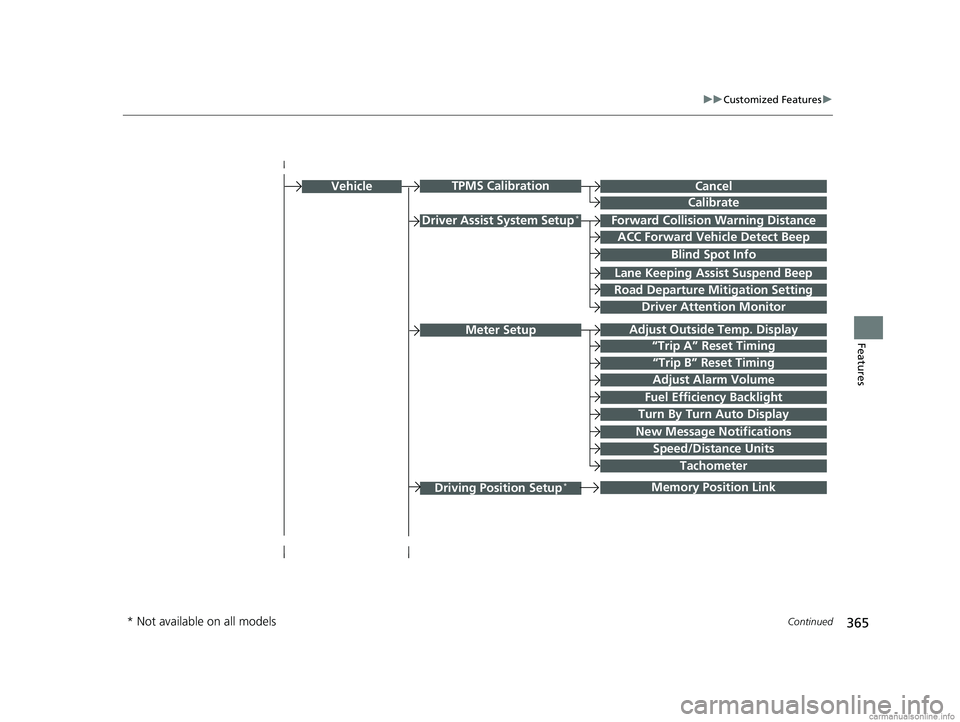
Driver Assist System Setup*Forward Collision Warning Distance
ACC Forward Vehicle Detect Beep
Lane Keeping Assist Suspend Beep
Road Departure Mi tigation Setting
Adjust Outside Temp. Display
“Trip A” Reset Timing
“Trip B” Reset Timing
Vehicle
Meter Setup
Adjust Alarm Volume
Speed/Distance Units
Fuel Efficiency Backlight
New Message Notifications
Tachometer
CancelTPMS Calibration
Calibrate
Blind Spot Info
Turn By Turn Auto Display
Driving Position Setup*Memory Position Link
Driver Attention Monitor
* Not available on all models
18 CR-V-31TLA6100.book 365 ページ 2017年9月7日 木曜日 午後3時56分
Page 380 of 679
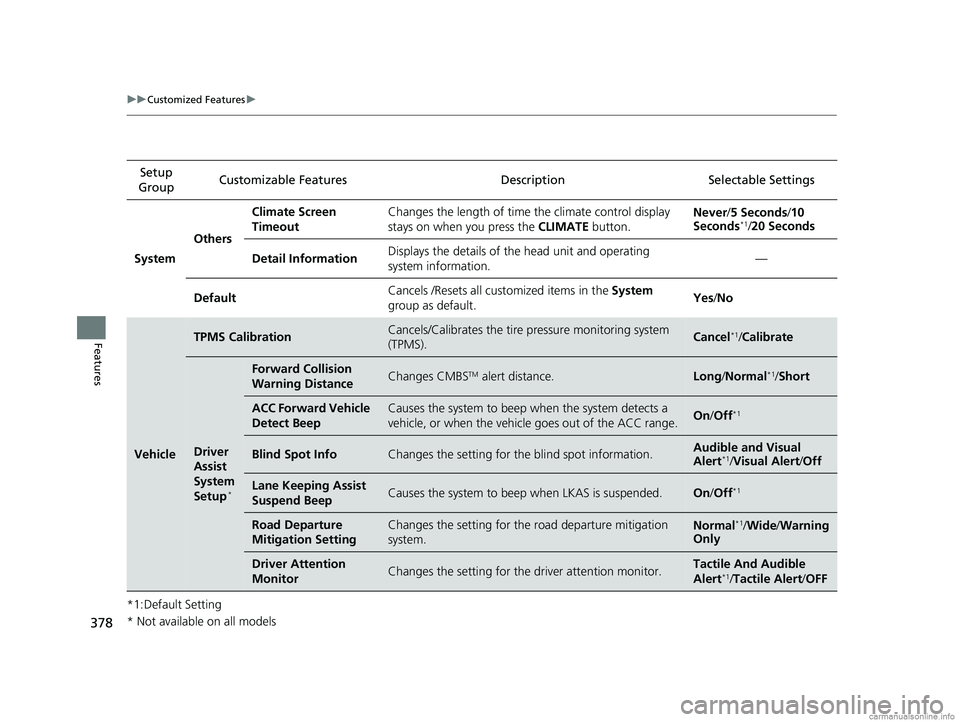
378
uuCustomized Features u
Features
*1:Default SettingSetup
Group Customizable Features Description Selectable Settings
System OthersClimate Screen
Timeout
Changes the length of time the climate control display
stays on when you press the
CLIMATE button. Never/
5 Seconds /10
Seconds
*1/ 20 Seconds
Detail Information Displays the details of th
e head unit and operating
system information. —
Default Cancels /Resets all cust
omized items in the System
group as default. Yes
/No
Vehicle
TPMS CalibrationCancels/Calibrates the tire pressure monitoring system
(TPMS).Cancel*1/ Calibrate
Driver
Assist
System
Setup
*
Forward Collision
Warning DistanceChanges CMBSTM alert distance.Long /Normal*1/ Short
ACC Forward Vehicle
Detect BeepCauses the system to beep when the system detects a
vehicle, or when the vehicle goes out of the ACC range.On/Off*1
Blind Spot InfoChanges the setting for th e blind spot information.Audible and Visual
Alert*1/Visual Alert /Off
Lane Keeping Assist
Suspend BeepCauses the system to beep when LKAS is suspended.On/Off*1
Road Departure
Mitigation SettingChanges the setting for the road departure mitigation
system.Normal*1/Wide /Warning
Only
Driver Attention
MonitorChanges the setting for the driver attention monitor.Tactile And Audible
Alert*1/ Tactile Alert/ OFF
* Not available on all models
18 CR-V-31TLA6100.book 378 ページ 2017年9月7日 木曜日 午後3時56分
Page 381 of 679
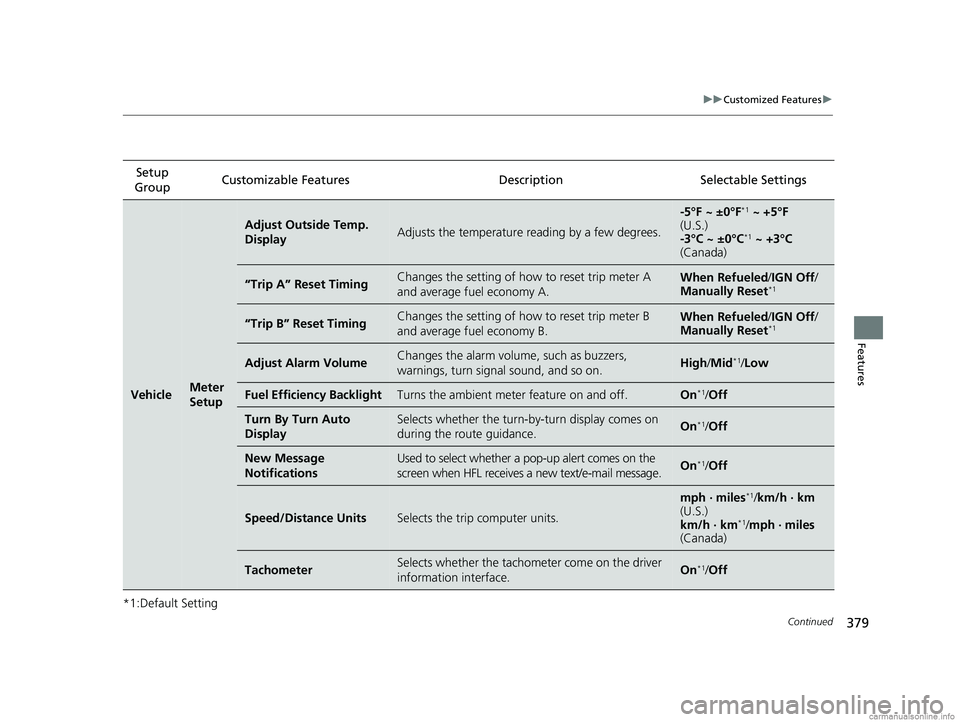
379
uuCustomized Features u
Continued
Features
*1:Default SettingSetup
Group Customizable Features Descri
ption Selectable Settings
VehicleMeter
Setup
Adjust Outside Temp.
DisplayAdjusts the temperature reading by a few degrees.
-5°F ~ ±0°F*1 ~ +5°F
(U.S.)
-3°C ~ ±0°C
*1 ~ +3°C
(Canada)
“Trip A” Reset TimingChanges the setting of how to reset trip meter A
and average fuel economy A.When Refueled /IGN Off /
Manually Reset*1
“Trip B” Reset TimingChanges the setting of how to reset trip meter B
and average fuel economy B.When Refueled /IGN Off /
Manually Reset*1
Adjust Alarm VolumeChanges the alarm volume , such as buzzers,
warnings, turn signal sound, and so on.High /Mid*1/Low
Fuel Efficiency BacklightTurns the ambient meter feature on and off.On*1/Off
Turn By Turn Auto
DisplaySelects whether the turn-b y-turn display comes on
during the route guidance.On*1/ Off
New Message
NotificationsUsed to select whether a pop-up alert comes on the
screen when HFL receives a new text/e-mail message.On*1/Off
Speed/Distance UnitsSelects the trip computer units.
mph · miles*1/ km/h · km
(U.S.)
km/h · km
*1/ mph · miles
(Canada)
TachometerSelects whether the tachometer come on the driver
information interface.On*1/ Off
18 CR-V-31TLA6100.book 379 ページ 2017年9月7日 木曜日 午後3時56分
Page 453 of 679
451
uuBefore Driving uMaximum Load Limit
Continued
Driving
Maximum Load Limit
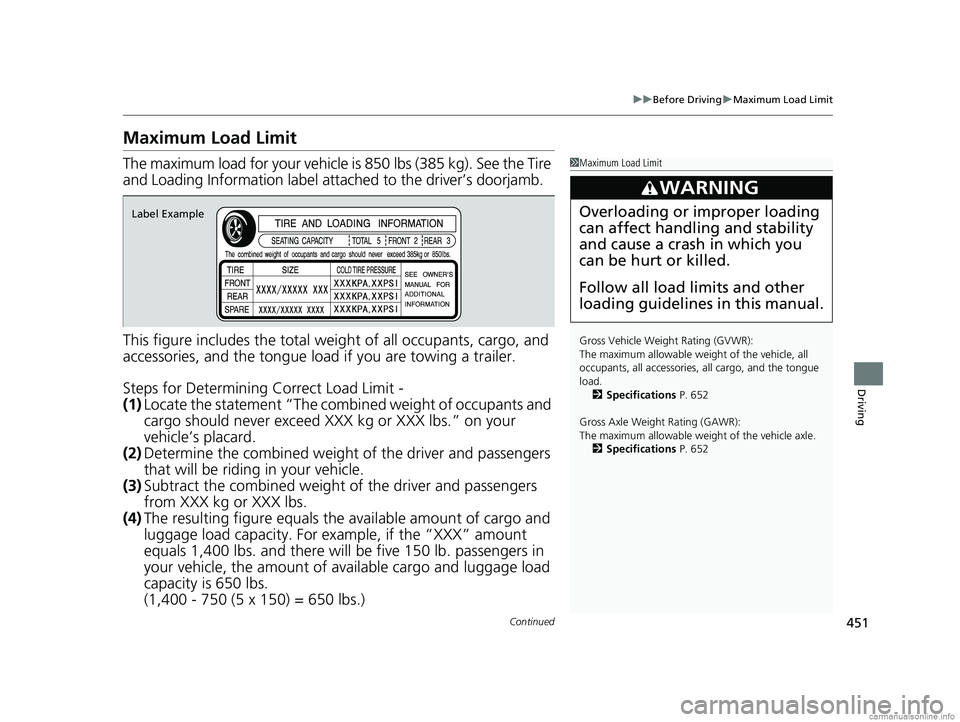
The maximum load for your vehicle is 850 lbs (385 kg). See the Tire
and Loading Information label atta ched to the driver’s doorjamb.
This figure includes the total weig ht of all occupants, cargo, and
accessories, and the tongue load if you are towing a trailer.
Steps for Determining Correct Load Limit -
(1) Locate the statement “The comb ined weight of occupants and
cargo should never exceed XXX kg or XXX lbs.” on your
vehicle’s placard.
(2) Determine the combined weight of the driver and passengers
that will be riding in your vehicle.
(3) Subtract the combined weight of the driver and passengers
from XXX kg or XXX lbs.
(4) The resulting figure equals the available amount of cargo and
luggage load capacity. For example, if the “XXX” amount
equals 1,400 lbs. and there will be five 150 lb. passengers in
your vehicle, the am ount of available cargo and luggage load
capacity is 650 lbs.
(1,400 - 750 (5 x 150) = 650 lbs.)1 Maximum Load Limit
Gross Vehicle Weight Rating (GVWR):
The maximum allowable weight of the vehicle, all
occupants, all a ccessories, all cargo, and the tongue
load. 2 Specifications P. 652
Gross Axle Weight Rating (GAWR):
The maximum allowable weight of the vehicle axle. 2 Specifications P. 652
3WARNING
Overloading or improper loading
can affect handling and stability
and cause a crash in which you
can be hurt or killed.
Follow all load limits and other
loading guidelines in this manual.Label Example
18 CR-V-31TLA6100.book 451 ページ 2017年9月7日 木曜日 午後3時56分
Page 455 of 679
453Continued
Driving
Towing a Trailer
Towing Preparation
Your vehicle can tow a trailer if you carefully observe the load limits, use the proper
equipment, and follow the towing guidelin es. Check the load limits before driving.
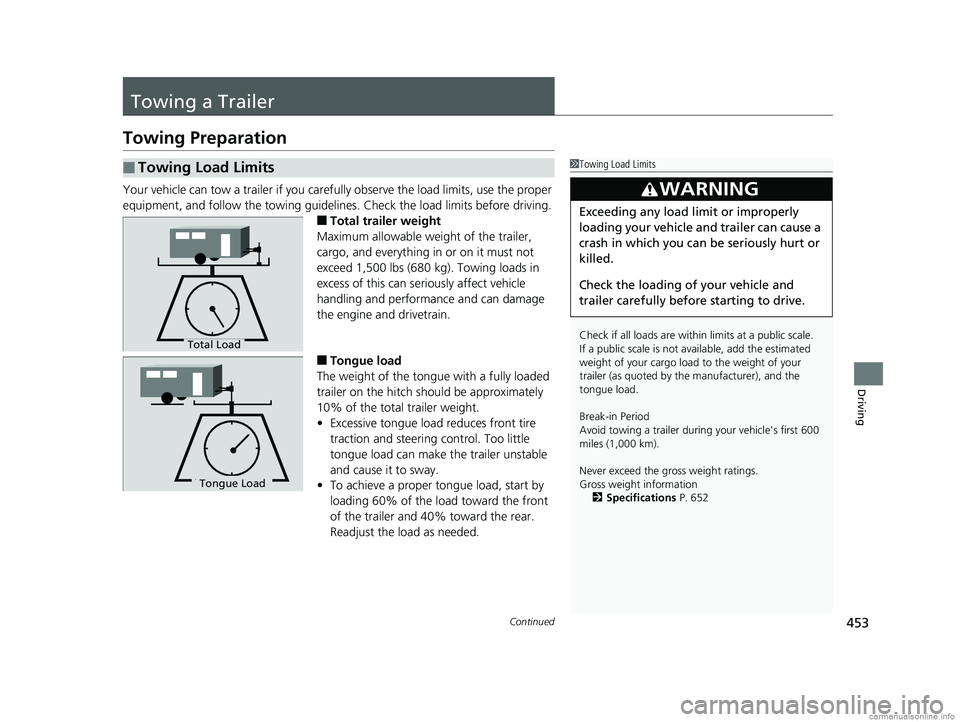
■Total trailer weight
Maximum allowable weight of the trailer,
cargo, and everything in or on it must not
exceed 1,500 lbs (680 kg). Towing loads in
excess of this can seriously affect vehicle
handling and performance and can damage
the engine and drivetrain.
■Tongue load
The weight of the tongue with a fully loaded
trailer on the hitch should be approximately
10% of the total trailer weight.
• Excessive tongue load reduces front tire
traction and steering control. Too little
tongue load can make the trailer unstable
and cause it to sway.
• To achieve a proper tongue load, start by
loading 60% of the load toward the front
of the trailer and 40% toward the rear.
Readjust the lo ad as needed.
■Towing Load Limits1Towing Load Limits
Check if all loads are within limits at a public scale.
If a public scale is not available, add the estimated
weight of your cargo load to the weight of your
trailer (as quoted by th e manufacturer), and the
tongue load.
Break-in Period
Avoid towing a trailer duri ng your vehicle's first 600
miles (1,000 km).
Never exceed the gross weight ratings.
Gross weight information 2 Specifications P. 652
3WARNING
Exceeding any load limit or improperly
loading your vehicle and trailer can cause a
crash in which you can be seriously hurt or
killed.
Check the loading of your vehicle and
trailer carefully before starting to drive.
Total Load
To ngue LoadTongue Load
18 CR-V-31TLA6100.book 453 ページ 2017年9月7日 木曜日 午後3時56分
Page 460 of 679
458
Driving
Off-Highway Driving Guidelines
General Information
Your vehicle has been designed primarily for use on pavement, however, its higher
ground clearance allows you to occasionally travel on unpaved roads. It is not
designed for trail-blazing, or other challenging off-road activities.
If you decide to drive on unpaved roads, you will find that it requires somewhat
different driving skills and that your vehicle will handle somewhat differently than it
does on pavement. Pay attention to the precautions and tips in this section, and get
acquainted with your vehicle before leaving the pavement.
Important Safety Precautions
To avoid loss of control or rollover, be sure to follow all precautions and
recommendations:
• Be sure to store cargo properly and do not exceed your cargo load limits.
2 Maximum Load Limit P. 451
•Whenever you drive, make sure you and your passengers always wear seat belts.
• Keep your speed low, and never go faster than the conditions allow.
• It’s up to you to continually assess the situation and drive within the limits.
1Off-Highway Driving Guidelines
Failure to operate your vehi cle correctly might result
in a crash or a rollover.
2 Important Handling Information P. 36
2 Precautions While Driving P. 467
3WARNING
Improperly operating this vehicle on or the
off pavement can cause a crash or rollover
in which you and your passengers could be
seriously injured or killed.
•Follow all instructions and guidelines in
this owner’s manual.
• Keep your speed low, and don’t drive
faster than conditions permit.
18 CR-V-31TLA6100.book 458 ページ 2017年9月7日 木曜日 午後3時56分
Page 466 of 679
uuWhen Driving uStarting the Engine
464
Driving
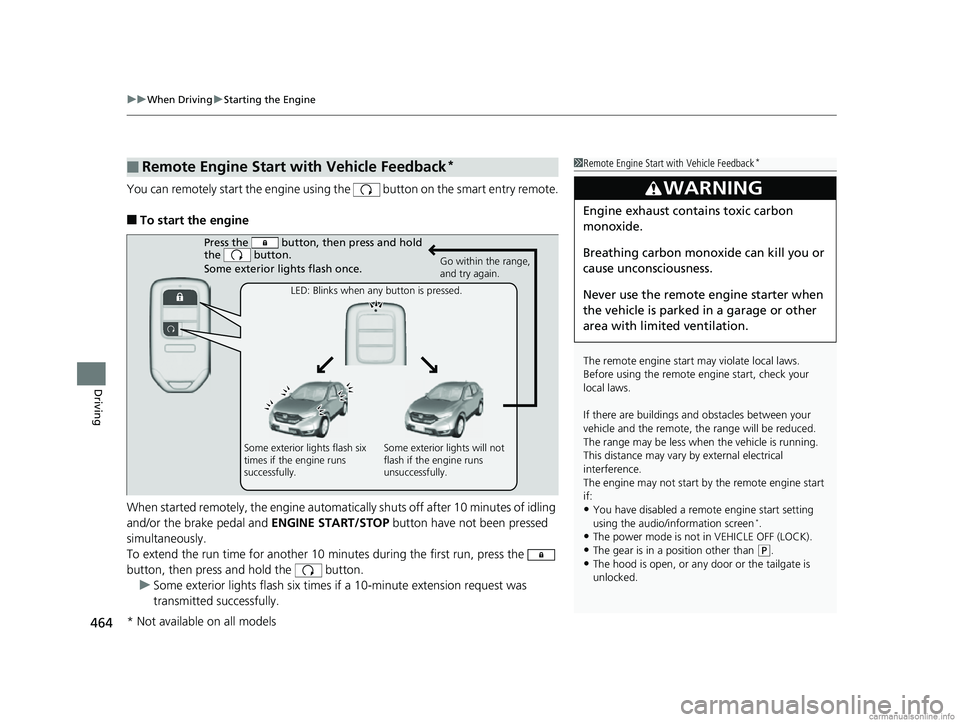
You can remotely start the engine using the button on the smart entry remote.
■To start the engine
When started remotely, the engine automati cally shuts off after 10 minutes of idling
and/or the brake pedal and ENGINE START/STOP button have not been pressed
simultaneously.
To extend the run time for another 10 minutes during the first run, press the
button, then press and hold the button. u Some exterior lights flash six times if a 10-minute extension request was
transmitted successfully.
■Remote Engine Start with Vehicle Feedback*1Remote Engine Start with Vehicle Feedback*
The remote engine start may violate local laws.
Before using the remote e ngine start, check your
local laws.
If there are buildings an d obstacles between your
vehicle and the remote, th e range will be reduced.
The range may be less when the vehicle is running.
This distance may vary by external electrical
interference.
The engine may not start by the remote engine start
if:
•You have disabled a remo te engine start setting
using the audio/information screen*.
•The power mode is not in VEHICLE OFF (LOCK).•The gear is in a position other than ( P.
•The hood is open, or any door or the tailgate is
unlocked.
3WARNING
Engine exhaust contains toxic carbon
monoxide.
Breathing carbon monoxide can kill you or
cause unconsciousness.
Never use the remote engine starter when
the vehicle is parked in a garage or other
area with limited ventilation.
Press the button, th en press and hold
the button.
Some exterior lights flash once.
Go within the range,
and try again.
LED: Blinks when any button is pressed.
Some exterior lights flash six
times if the engine runs
successfully. Some exterior lights will not
flash if the engine runs
unsuccessfully.
* Not available on all models
18 CR-V-31TLA6100.book 464 ページ 2017年9月7日 木曜日 午後3時56分