warning HONDA CR-V 2018 (in English) Workshop Manual
[x] Cancel search | Manufacturer: HONDA, Model Year: 2018, Model line: CR-V, Model: HONDA CR-V 2018Pages: 679, PDF Size: 23.22 MB
Page 474 of 679
472
uuWhen Driving uCruise Control*
Driving
Cruise Control*
Maintains a constant vehicle speed without having to keep your foot on the
accelerator. Use cruise control on freeways or open roads where you can travel at a
constant speed with little acceleration or deceleration.
1Cruise Control*
It may not be possible to maintain a constant speed
when driving uphill or downhill.
When not using cruise control:
Turn off cruise control by pressing the CRUISE
button.
While in the ECON mode, it may take relatively more
time to accelerate to maintain the set speed.
3WARNING
Improper use of the cruise control can lead
to a crash.
Use the cruise control only when traveling
on open highways in good weather.
Models with info rmation display
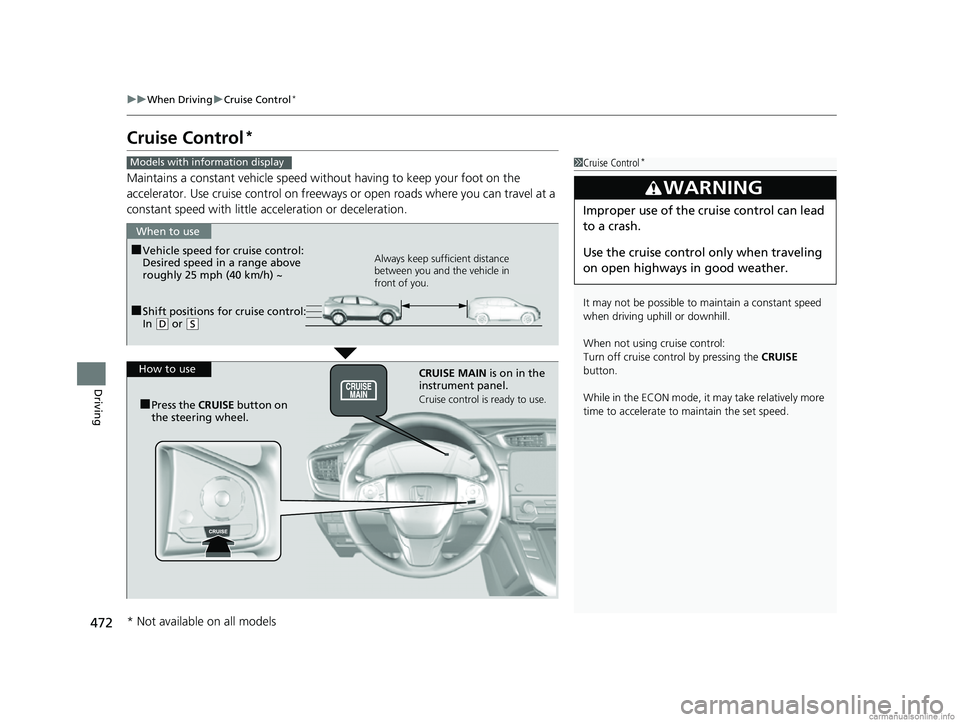
■Shift positions for cruise control:
In (D or (S
When to use
Always keep sufficient distance
between you and the vehicle in
front of you.■Vehicle speed for cruise control:
Desired speed in a range above
roughly 25 mph (40 km/h) ~
How to use CRUISE MAIN is on in the
instrument panel.
Cruise control is ready to use.■Press the CRUISE button on
the steering wheel.
* Not available on all models
18 CR-V-31TLA6100.book 472 ページ 2017年9月7日 木曜日 午後3時56分
Page 477 of 679
475
uuWhen Driving uCruise Control*
Continued
Driving
Cruise Control*
Maintains a constant vehicle speed without having to keep your foot on the
accelerator. Use cruise control on freeways or open road s where you can travel at a
constant speed with little ac celeration or deceleration.
1Cruise Control*
It may not be possible to maintain a constant speed
when driving uphill or downhill.
When not using cruise control:
Turn off cruise control by pressing the CRUISE
button.
While in the ECON mode, it may take relatively more
time to accelerate to maintain the set speed.
3WARNING
Improper use of the cruise control can lead
to a crash.
Use the cruise control only when traveling
on open highways in good weather.
Models with driver information interface
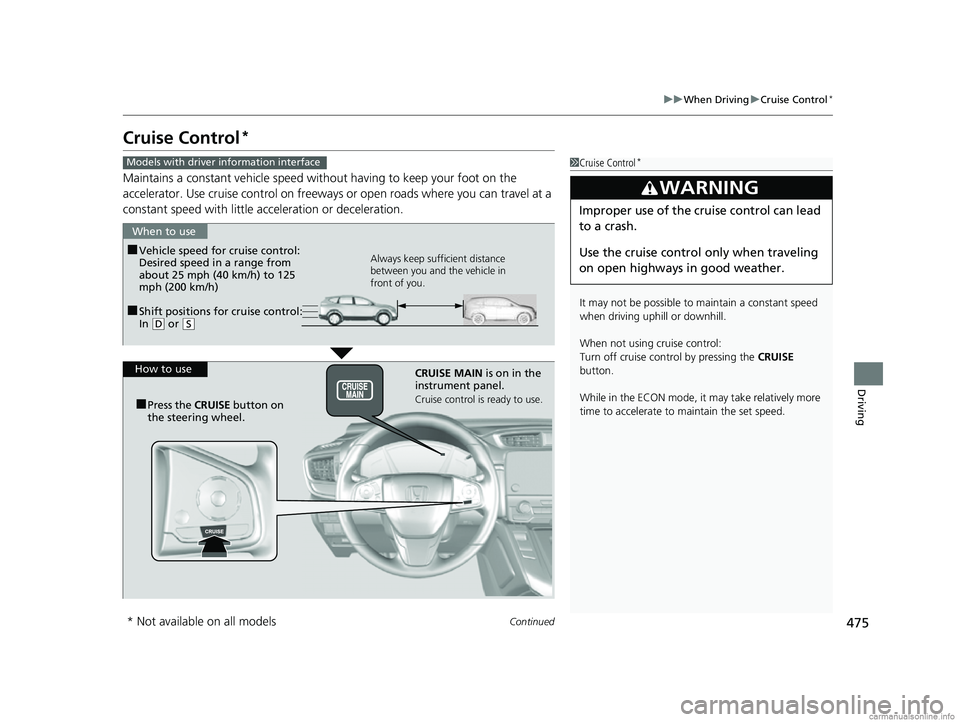
■Shift positions for cruise control:
In ( D or (S
When to use
Always keep sufficient distance
between you and the vehicle in
front of you.■Vehicle speed for cruise control:
Desired speed in a range from
about 25 mph (40 km/h) to 125
mph (200 km/h)
How to use CRUISE MAIN is on in the
instrument panel.
Cruise control is ready to use.■Press the CRUISE button on
the steering wheel.
* Not available on all models
18 CR-V-31TLA6100.book 475 ページ 2017年9月7日 木曜日 午後3時56分
Page 483 of 679
481
uuWhen Driving uAdaptive Cruise Control (ACC) with Low Speed Follow (LSF)*
Continued
Driving
Adaptive Cruise Control (ACC) with Low Speed Follow (LSF)*
Helps maintain a constant vehicle speed an d a set following-interval behind a vehicle
detected ahead of yours and, if the detect ed vehicle comes to a stop, can decelerate
and stop your ve hicle, without yo u having to keep your foot on the brake or the
accelerator.
When ACC with LSF slows your vehicle by applying the brakes, your vehicle’s brake
lights will illuminate.1 Adaptive Cruise Control (ACC) with Low Speed Follow (LSF)*
Important Reminder
As with any system, there are limits to ACC with LSF.
Use the brake pedal whenever necessary, and always
keep a safe distance between your vehicle and other
vehicles.
3WARNING
Improper use of ACC with LSF can lead
to a crash.
Use ACC with LSF only when driving on
expressways or freeways and in good
weather conditions.
3WARNING
ACC with LSF has limited braking
capability and may not stop your vehicle
in time to avoid a co llision with a vehicle
that quickly stops in front of you.
Always be prepared to apply the brake
pedal if the cond itions require.
When to use
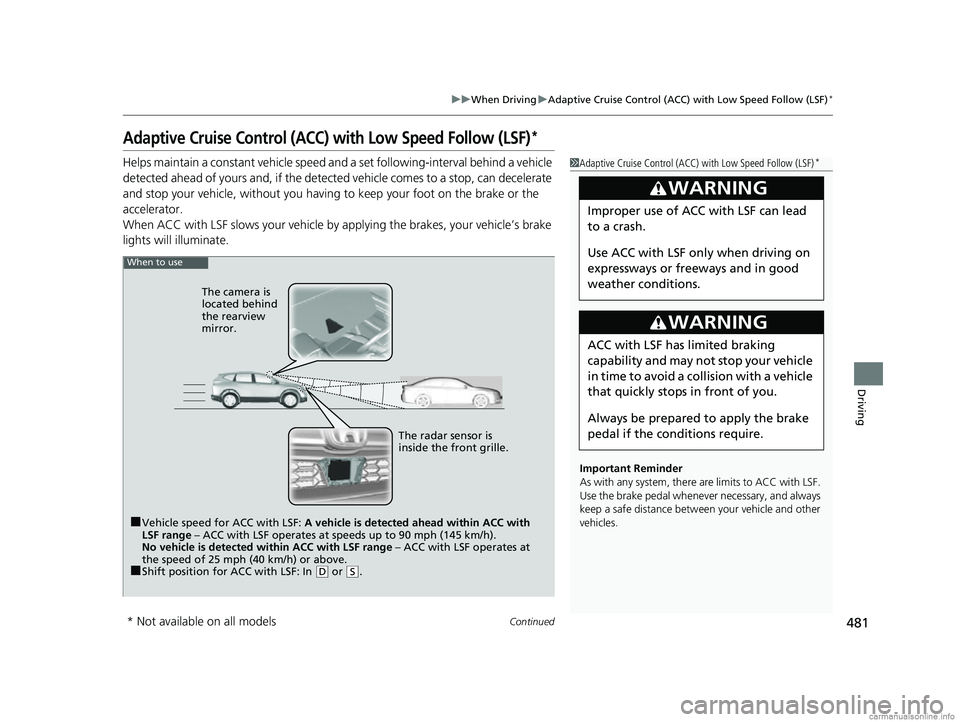
■Vehicle speed for ACC with LSF: A vehicle is detected ahead within ACC with
LSF range – ACC with LSF operates at speeds up to 90 mph (145 km/h).
No vehicle is detected within ACC with LSF range – ACC with LSF operates at
the speed of 25 mph (40 km/h) or above.
■Shift position for ACC with LSF: In (D or (S. The radar sensor is
inside the front grille.
The camera is
located behind
the rearview
mirror.
* Not available on all models
18 CR-V-31TLA6100.book 481 ページ 2017年9月7日 木曜日 午後3時56分
Page 489 of 679
Continued487
uuWhen Driving uAdaptive Cruise Control (ACC) with Low Speed Follow (LSF)*
Driving
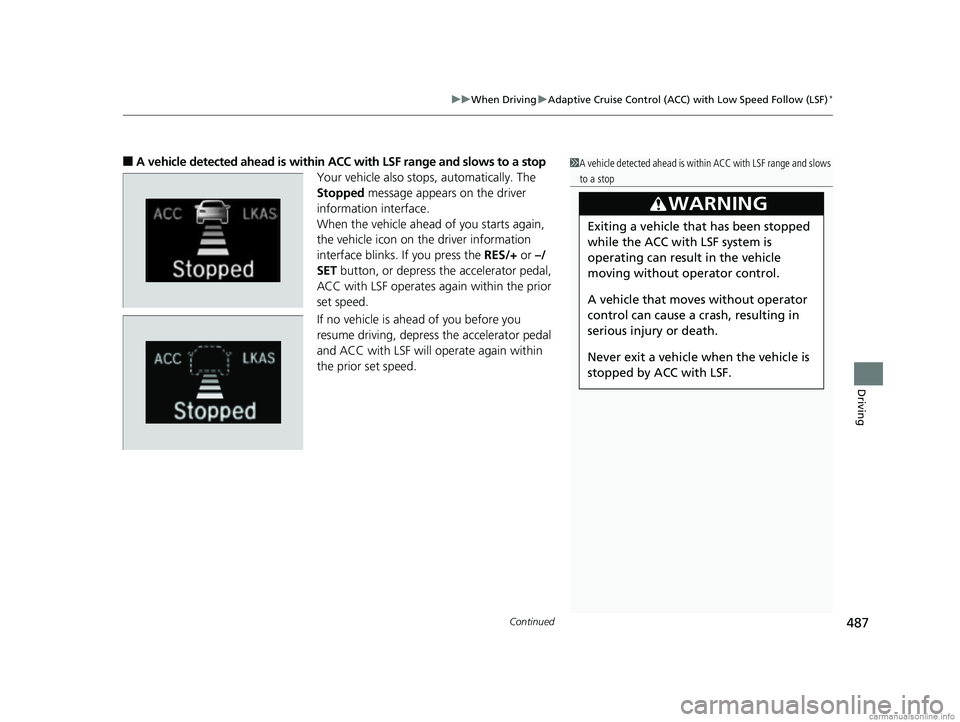
■A vehicle detected ahead is within AC C with LSF range and slows to a stop
Your vehicle also stops, automatically. The
Stopped message appears on the driver
information interface.
When the vehicle ahead of you starts again,
the vehicle icon on the driver information
interface blinks. If you press the RES/+ or –/
SET button, or depress the accelerator pedal,
ACC with LSF operates again within the prior
set speed.
If no vehicle is ahead of you before you
resume driving, depress the accelerator pedal
and ACC with LSF will operate again within
the prior set speed.1 A vehicle detected ahead is with in ACC with LSF range and slows
to a stop
3WARNING
Exiting a vehicle that has been stopped
while the ACC with LSF system is
operating can result in the vehicle
moving without operator control.
A vehicle that moves without operator
control can cause a crash, resulting in
serious injury or death.
Never exit a vehicle when the vehicle is
stopped by ACC with LSF.
18 CR-V-31TLA6100.book 487 ページ 2017年9月7日 木曜日 午後3時56分
Page 490 of 679
uuWhen Driving uAdaptive Cruise Control (ACC) with Low Speed Follow (LSF)*
488
Driving
The system may automatically shut off and the ACC indicator will come on under
certain conditions. Some examples of th ese conditions are listed below. Other
conditions may reduce some of the ACC functions.
2 Front Sensor Camera* P. 479
■Environmental conditions
• Driving in bad weather (rain, fog, snow, etc.).
■Roadway conditions
• Driving on a snowy or wet roadway (obscured lane marking, vehicle tracks,
reflected lights, road spray, high contrast).
■Vehicle conditions
• The outside of the windshie ld is blocked by dirt, mud, leaves, wet snow, etc.
• An abnormal tire or wheel condition (Wro ng size, varied size or construction,
improperly inflated, comp act spare tire, etc.).
• The camera temperature gets too high.
• The parking brake is applied.
• When the front grille is dirty.
• The vehicle is tilted due to a heav y load or suspension modifications.
• When tire chains are installed.
■ACC with LSF Conditions and Limitations1ACC with LSF Conditions and Limitations
The radar sensor for ACC with LSF is shared with the
collision mitigation braking system
TM (CMBSTM).
2 Collision Mitigation Braking SystemTM
(CMBSTM)* P. 532
You can read about handling information for the
camera equipped with this system. 2 Front Sensor Camera
* P. 479
Do not put a sticker on the radar sensor cover or
replace the radar sensor cover.
Have your vehicle checked by a dealer if you find any
unusual behavior of the system (e.g., the warning
message appears too frequently).
If the front of the vehicle is impacted in any of the
following situations, the ra dar sensor may not work
properly. Have your vehi cle checked by a dealer:
•The vehicle mounted onto a bump, curb, chock,
embankment, etc.
•You drive the vehicle where the water is deep.
•Your vehicle has a frontal collision.
* Not available on all models
18 CR-V-31TLA6100.book 488 ページ 2017年9月7日 木曜日 午後3時56分
Page 500 of 679
uuWhen Driving uRoad Departure Mitigation (RDM) System*
498
Driving
The system becomes ready to start sear ching for lane markings when all the
following conditions are met:
• The vehicle is traveling between about 45 and 90 mph (72 and 145 km/h).
• The vehicle is on a straight or slightly curved road.
• The turn signals are off.
• The brake pedal is not depressed.
• The wipers are not in continuous operation.
• The system makes a determination that the driver is not actively accelerating,
braking or steering.
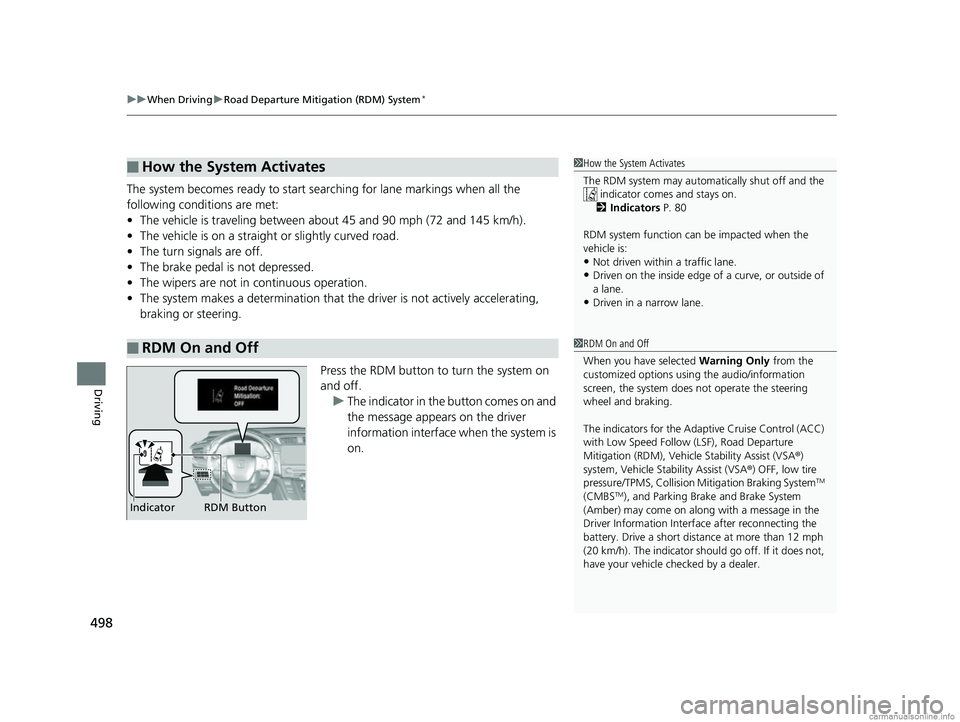
Press the RDM button to turn the system on
and off.u The indicator in the button comes on and
the message appears on the driver
information interface when the system is
on.
■How the System Activates
■RDM On and Off
1How the System Activates
The RDM system may automa tically shut off and the
indicator comes and stays on.
2 Indicators P. 80
RDM system function can be impacted when the
vehicle is:
•Not driven within a traffic lane.•Driven on the inside edge of a curve, or outside of
a lane.
•Driven in a narrow lane.
1 RDM On and Off
When you have selected Warning Only from the
customized options using the audio/information
screen, the system does not operate the steering
wheel and braking.
The indicators for the Adaptive Cruise Control (ACC)
with Low Speed Follow (LSF), Road Departure
Mitigation (RDM), Vehicle Stability Assist (VSA®)
system, Vehicle Stability Assist (VSA ®) OFF, low tire
pressure/TPMS, Collisi on Mitigation Braking System
TM
(CMBSTM), and Parking Brake and Brake System
(Amber) may come on along with a message in the
Driver Information Interf ace after reconnecting the
battery. Drive a short distance at more than 12 mph
(20 km/h). The indicator shoul d go off. If it does not,
have your vehicle ch ecked by a dealer.RDM Button
Indicator
18 CR-V-31TLA6100.book 498 ページ 2017年9月7日 木曜日 午後3時56分
Page 503 of 679
501
uuWhen Driving uLane Keeping Assist System (LKAS)*
Continued
Driving
Lane Keeping Assist System (LKAS)*
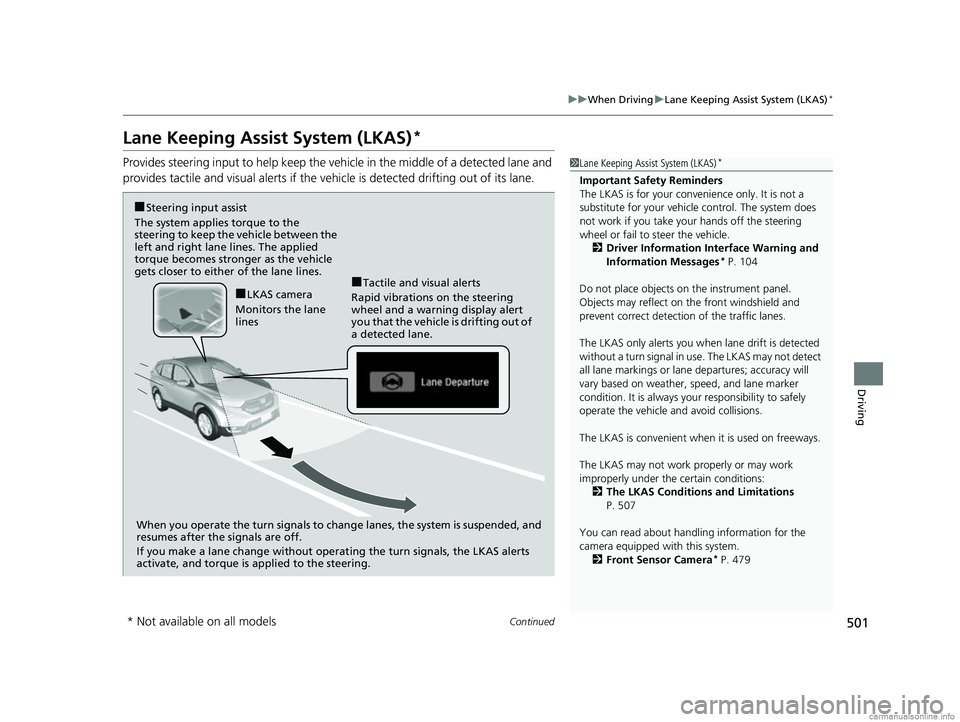
Provides steering input to help keep the vehicle in the middle of a detected lane and
provides tactile and visual al erts if the vehicle is detected drifting out of its lane.1Lane Keeping Assist System (LKAS)*
Important Safety Reminders
The LKAS is for your convenience only. It is not a
substitute for your vehicl e control. The system does
not work if you take y our hands off the steering
wheel or fail to steer the vehicle.
2 Driver Information Interface Warning and
Information Messages
* P. 104
Do not place objects on the instrument panel.
Objects may reflect on th e front windshield and
prevent correct detectio n of the traffic lanes.
The LKAS only alerts you when lane drift is detected
without a turn signal in us e. The LKAS may not detect
all lane markings or lane departures; accuracy will
vary based on weather, speed, and lane marker
condition. It is always your responsibility to safely
operate the vehicle an d avoid collisions.
The LKAS is convenient when it is used on freeways.
The LKAS may not work properly or may work
improperly under the certain conditions: 2 The LKAS Conditions and Limitations
P. 507
You can read about handling information for the
camera equipped with this system. 2 Front Sensor Camera
* P. 479
■Steering input assist
The system applies torque to the
steering to keep the vehicle between the
left and right lane lines. The applied
torque becomes stronger as the vehicle
gets closer to either of the lane lines.
When you operate the turn signals to chan ge lanes, the system is suspended, and
resumes after the signals are off.
If you make a lane change without operat ing the turn signals, the LKAS alerts
activate, and torque is applied to the steering.
■LKAS camera
Monitors the lane
lines■Tactile and visual alerts
Rapid vibrations on the steering
wheel and a warning display alert
you that the vehicle is drifting out of
a detected lane.
* Not available on all models
18 CR-V-31TLA6100.book 501 ページ 2017年9月7日 木曜日 午後3時56分
Page 504 of 679
uuWhen Driving uLane Keeping Assist System (LKAS)*
502
Driving
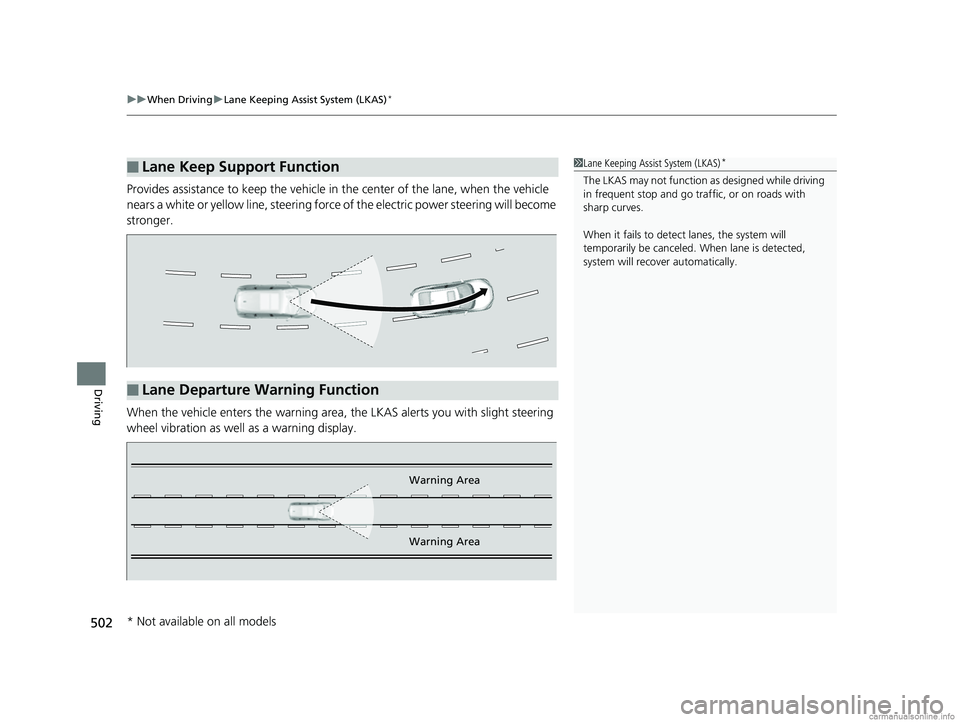
Provides assistance to keep the vehicle in the center of the lane, when the vehicle
nears a white or yellow line, steering force of the electric power steering will become
stronger.
When the vehicle enters the warning area, the LKAS alerts you with slight steering
wheel vibration as well as a warning display.
■Lane Keep Support Function1 Lane Keeping Assist System (LKAS)*
The LKAS may not function as designed while driving
in frequent stop and go traf fic, or on roads with
sharp curves.
When it fails to detect lanes, the system will
temporarily be canceled. When lane is detected,
system will recover automatically.
■Lane Departure Warning Function
Warning Area
Warning Area
* Not available on all models
18 CR-V-31TLA6100.book 502 ページ 2017年9月7日 木曜日 午後3時56分
Page 514 of 679
512
uuWhen Driving uBlind spot information (BSI) System*
Driving
Blind spot information (BSI) System*
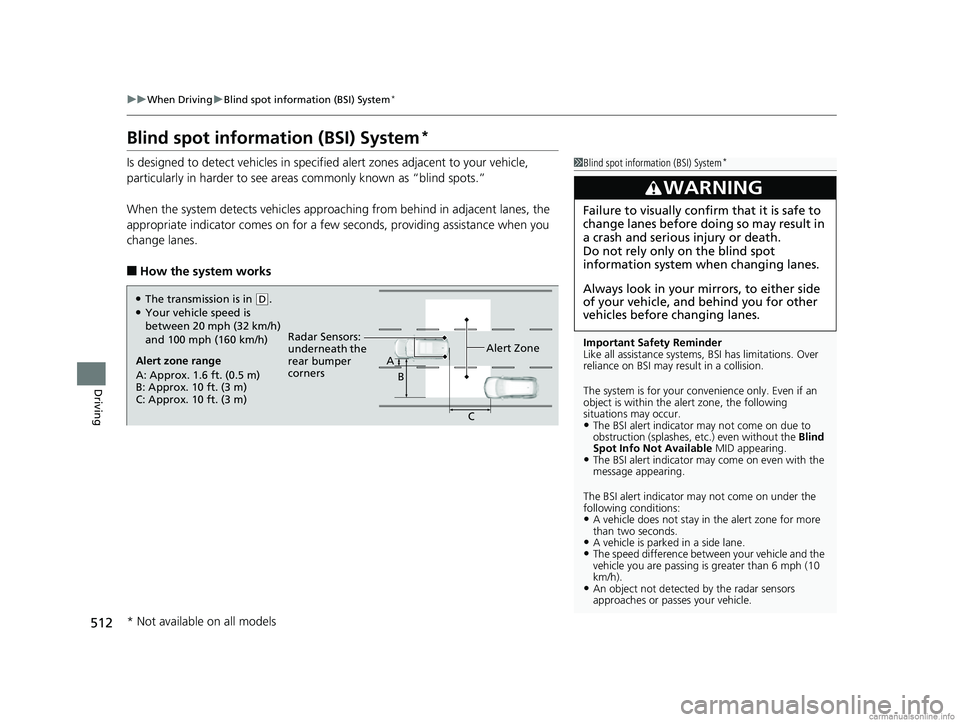
Is designed to detect vehicl es in specified alert zones adjacent to your vehicle,
particularly in harder to see areas commonly known as “blind spots.”
When the system detects vehi cles approaching from behind in adjacent lanes, the
appropriate indicator comes on for a few se conds, providing assistance when you
change lanes.
■How the system works
1 Blind spot inform ation (BSI) System*
Important Safety Reminder
Like all assistance systems, BSI has limitations. Over
reliance on BSI may result in a collision.
The system is for your convenience only. Even if an
object is within the alert zone, the following
situations may occur.
•The BSI alert indicator may not come on due to
obstruction (splashes, et c.) even without the Blind
Spot Info Not Available MID appearing.
•The BSI alert indicator may come on even with the
message appearing.
The BSI alert i ndicator may not come on under the
following conditions:
•A vehicle does not stay in the alert zone for more
than two seconds.
•A vehicle is parked in a side lane.•The speed difference betw een your vehicle and the
vehicle you are passing is greater than 6 mph (10
km/h).
•An object not detected by the radar sensors
approaches or passes your vehicle.
3WARNING
Failure to visually confirm that it is safe to
change lanes before doing so may result in
a crash and serious injury or death.
Do not rely only on the blind spot
information system wh en changing lanes.
Always look in your mirrors, to either side
of your vehicle, and behind you for other
vehicles before changing lanes.
Alert zone range
A: Approx. 1.6 ft. (0.5 m)
B: Approx. 10 ft. (3 m)
C: Approx. 10 ft. (3 m) Radar Sensors:
underneath the
rear bumper
corners
Alert ZoneA
B
C
●The transmission is in (D.●Your vehicle speed is
between 20 mph (32 km/h)
and 100 mph (160 km/h)
* Not available on all models
18 CR-V-31TLA6100.book 512 ページ 2017年9月7日 木曜日 午後3時56分
Page 517 of 679
515
uuWhen Driving uLaneWatchTM*
Continued
Driving
LaneWatchTM*
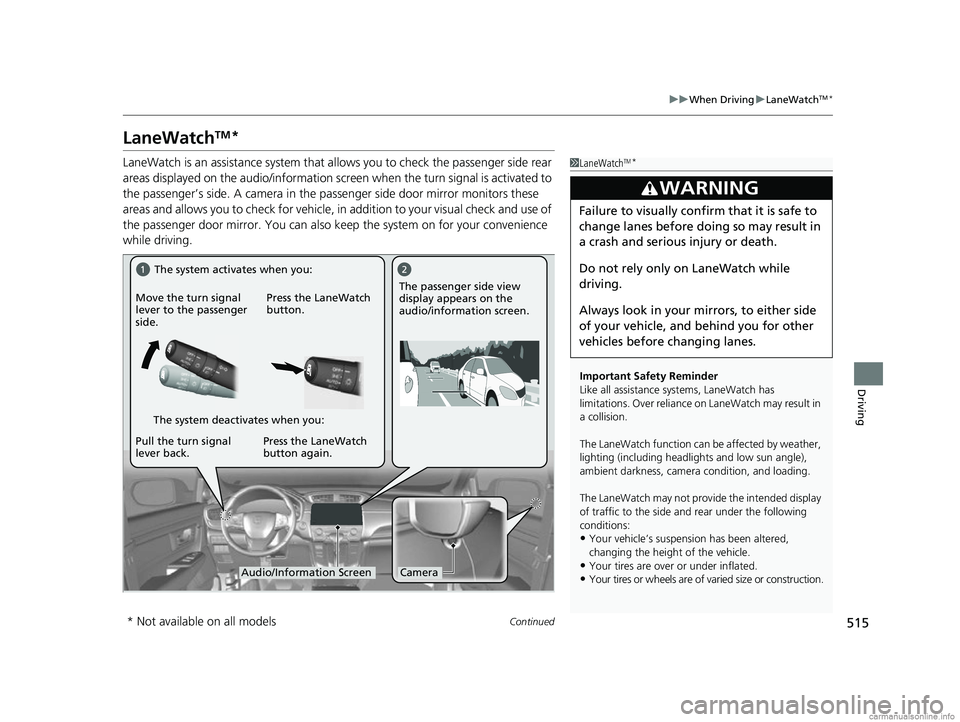
LaneWatch is an assistance system that al lows you to check the passenger side rear
areas displayed on the audio/information screen when the turn signal is activated to
the passenger’s side. A camera in the pa ssenger side door mirror monitors these
areas and allows you to check for vehicle, in addition to your visual check and use of
the passenger door mirror. You can also keep the system on for your convenience
while driving.1 LaneWatchTM*
Important Safety Reminder
Like all assistance systems, LaneWatch has
limitations. Over reliance on LaneWatch may result in
a collision.
The LaneWatch func tion can be affected by weather,
lighting (including headli ghts and low sun angle),
ambient darkness, camera condition, and loading.
The LaneWatch may not prov ide the intended display
of traffic to the side and rear under the following
conditions:
•Your vehicle’s suspension has been altered,
changing the height of the vehicle.
•Your tires are over or under inflated.
•Your tires or wheels are of varied size or construction.
3WARNING
Failure to visually confirm that it is safe to
change lanes before doing so may result in
a crash and serious injury or death.
Do not rely only on LaneWatch while
driving.
Always look in your mirrors, to either side
of your vehicle, and behind you for other
vehicles before changing lanes.
CameraAudio/Information Screen
Move the turn signal
lever to the passenger
side.
Press the LaneWatch
button.
Pull the turn signal
lever back. Press the LaneWatch
button again. The passenger side view
display appears on the
audio/information screen.
The system activates when you:
The system deactivates when you:
* Not available on all models
18 CR-V-31TLA6100.book 515 ページ 2017年9月7日 木曜日 午後3時56分