TPMS HONDA CR-V 2018 Owner's Manual (in English)
[x] Cancel search | Manufacturer: HONDA, Model Year: 2018, Model line: CR-V, Model: HONDA CR-V 2018Pages: 679, PDF Size: 23.22 MB
Page 6 of 679
4
Quick Reference Guide
Quick Reference Guide
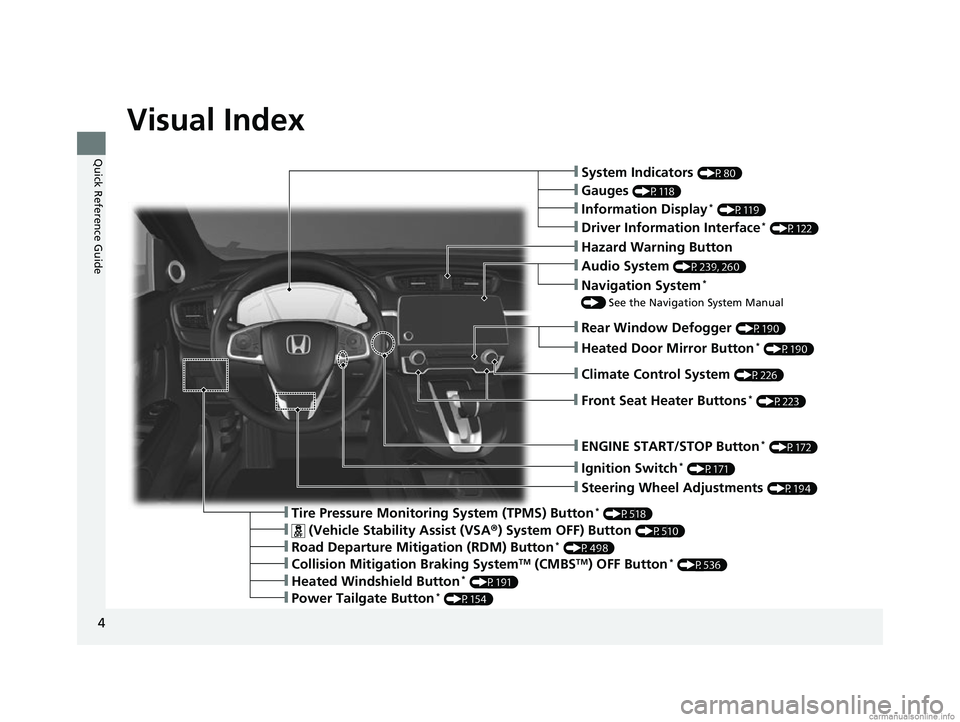
Visual Index
❙Ignition Switch* (P171)
❙Steering Wheel Adjustments (P194)
❙Information Display* (P119)
❙Tire Pressure Monitoring System (TPMS) Button* (P518)
❙Hazard Warning Button
❙System Indicators (P80)
❙Rear Window Defogger (P190)
❙Gauges (P118)
❙Driver Information Interface* (P122)
❙ENGINE START/STOP Button* (P172)
❙Audio System (P239, 260)
❙Navigation System*
() See the Navigation System Manual
❙ (Vehicle Stability Assist (VSA ®) System OFF) Button (P510)
❙Road Departure Mitigation (RDM) Button* (P498)
❙Collision Mitigation Braking SystemTM (CMBSTM) OFF Button* (P536)
❙Heated Windshield Button* (P191)
❙Power Tailgate Button* (P154)
❙Heated Door Mirror Button* (P190)
❙Climate Control System (P226)
❙Front Seat Heater Buttons* (P223)
18 CR-V-31TLA6100.book 4 ページ 2017年9月7日 木曜日 午後3時56分
Page 13 of 679
11
Quick Reference Guide
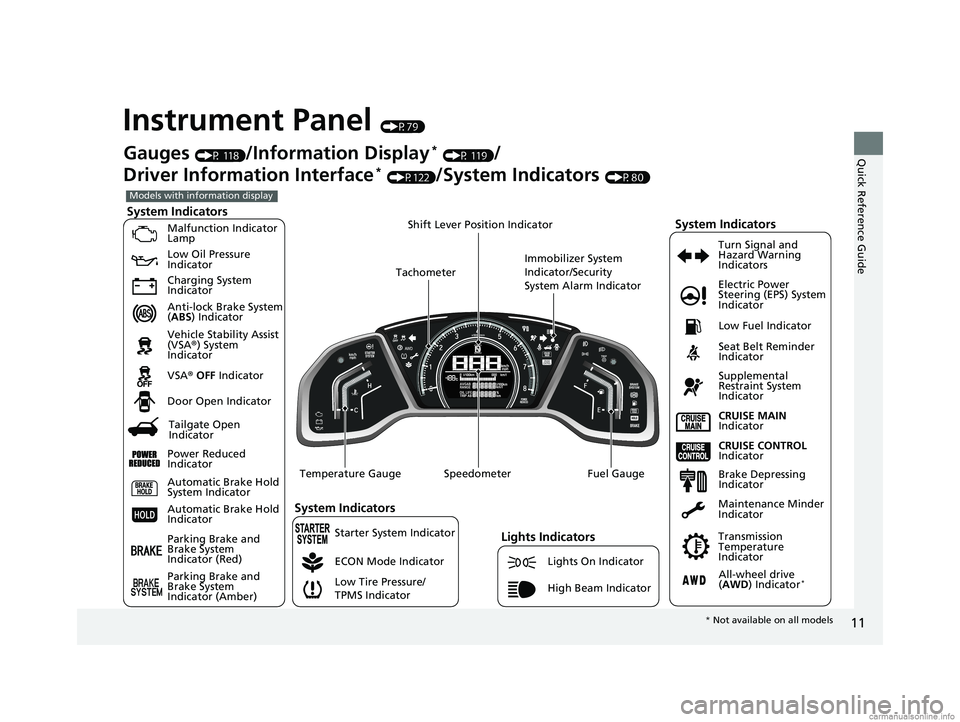
Instrument Panel (P79)
System Indicators
Malfunction Indicator
Lamp
Low Oil Pressure
Indicator
Charging System
Indicator
Anti-lock Brake System
(ABS ) Indicator
Vehicle Stability Assist
(VSA ®) System
Indicator
VSA ® OFF Indicator
Low Tire Pressure/
TPMS Indicator Electric Power
Steering (EPS) System
Indicator
Lights Indicators
Lights On Indicator
High Beam Indicator
Seat Belt Reminder
Indicator
System Indicators
CRUISE CONTROL
Indicator
Parking Brake and
Brake System
Indicator (Red) Supplemental
Restraint System
Indicator
Door Open Indicator
CRUISE MAIN
Indicator
Immobilizer System
Indicator/Security
System Alarm Indicator
Speedometer Fuel Gauge
Tachometer
Shift Lever Position Indicator
Low Fuel Indicator
Gauges (P 118)/Information Display* (P 119)/
Driver Information Interface
* (P122)/System Indicators (P80)
ECON Mode Indicator Turn Signal and
Hazard Warning
Indicators
Maintenance Minder
Indicator
Transmission
Temperature
Indicator
Models with information display
Parking Brake and
Brake System
Indicator (Amber)
System Indicators
Automatic Brake Hold
System Indicator
Automatic Brake Hold
Indicator
Temperature Gauge
Brake Depressing
Indicator
Tailgate Open
Indicator
Power Reduced
Indicator
All-wheel drive
( AWD ) Indicator*
Starter System Indicator
* Not available on all models
18 CR-V-31TLA6100.book 11 ページ 2017年9月7日 木曜日 午後3時56分
Page 14 of 679
12
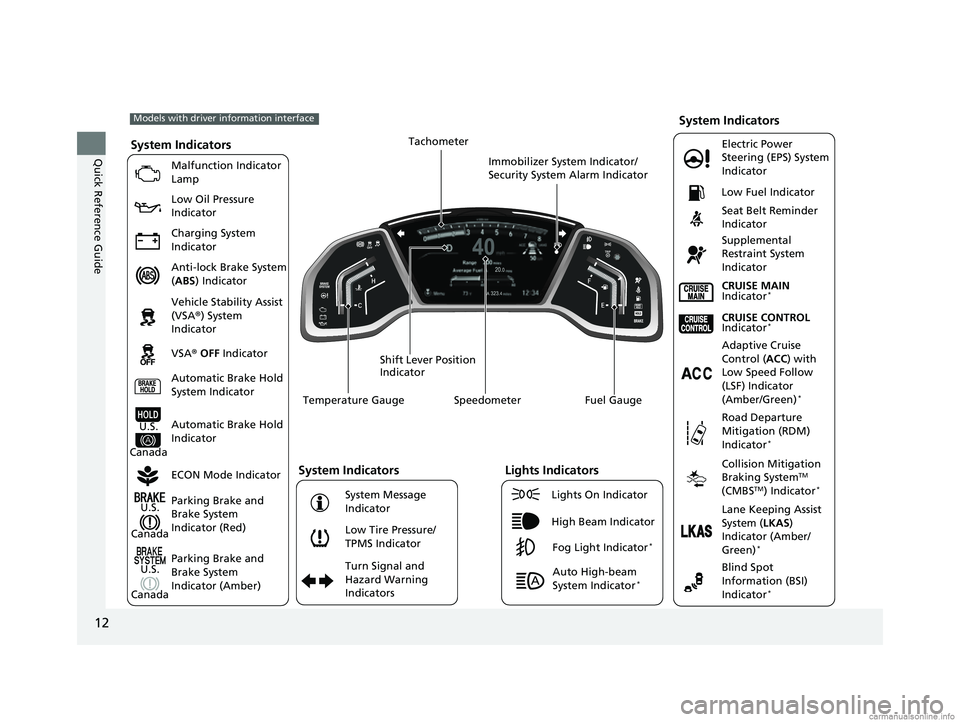
Quick Reference GuideSystem Indicators
Malfunction Indicator
Lamp
Low Oil Pressure
Indicator
Charging System
Indicator
Anti-lock Brake System
(ABS ) Indicator
Vehicle Stability Assist
(VSA ®) System
Indicator
VSA ® OFF Indicator
Low Tire Pressure/
TPMS Indicator Electric Power
Steering (EPS) System
Indicator
Seat Belt Reminder
Indicator
System Indicators
Parking Brake and
Brake System
Indicator (Red)
Supplemental
Restraint System
Indicator
Speedometer Fuel Gauge
Shift Lever Position
Indicator Immobilizer System Indicator/
Security System Alarm Indicator
Low Fuel Indicator
ECON Mode Indicator Turn Signal and
Hazard Warning
Indicators
Models with driver information interface
Parking Brake and
Brake System
Indicator (Amber)
System Indicators
U.S.
Canada
U.S.
Canada Automatic Brake Hold
System Indicator
Automatic Brake Hold
IndicatorU.S.
Canada Temperature Gauge
Lights Indicators
Lights On Indicator
High Beam Indicator
Fog Light Indicator*
Adaptive Cruise
Control (
ACC) with
Low Speed Follow
(LSF) Indicator
(Amber/Green)
*
System Message
Indicator Collision Mitigation
Braking System
TM
(CMBSTM) Indicator*
Road Departure
Mitigation (RDM)
Indicator
*
Lane Keeping Assist
System ( LKAS)
Indicator (Amber/
Green)
*
Tachometer
Auto High-beam
System Indicator*
CRUISE CONTROL
Indicator*
CRUISE MAIN
Indicator*
Blind Spot
Information (BSI)
Indicator
*
18 CR-V-31TLA6100.book 12 ページ 2017年9月7日 木曜日 午後3時56分
Page 26 of 679
24
Quick Reference Guide
VSA® On and Off (P510)
● The vehicle stability assist (VSA® ) system
helps stabilize the vehicle during
cornering, and helps maintain traction
while accelerating on loose or slippery
road surfaces.
● VSA ® comes on automatically every time
you start the engine.
● To partially disable VSA functionality/
features, press and hold it until you hear
a beep.
Cruise Control* (P472, 475)
● Cruise control allows you to maintain a
set speed without keeping your foot on
the accelerator pedal.
● To use cruise control, press the CRUISE
button, then press –/SET once you have
achieved the desired speed (above 25
mph or 40 km/h).
Tire Pressure Monitoring
System (TPMS)
(P518)
● Detects a change in tire conditions and
overall dimensions due to decrease in tire
pressures.
● The TPMS is turned on automatically
every time you start the engine.
● A calibration procedure must be
performed when certain conditions arise.
CMBSTM On and Off
(P536)
● When a possible collision is likely
unavoidable, the CMBS
TM can help you to
reduce the vehicle speed and the severity
of the collision.
● The CMBS
TM is turned on every time you
start the engine.
● To turn the CMBS
TM on or off, press and
hold the button until you hear a beep.
18 CR-V-31TLA6100.book 24 ページ 2017年9月7日 木曜日 午後3時56分
Page 33 of 679
31
Quick Reference Guide
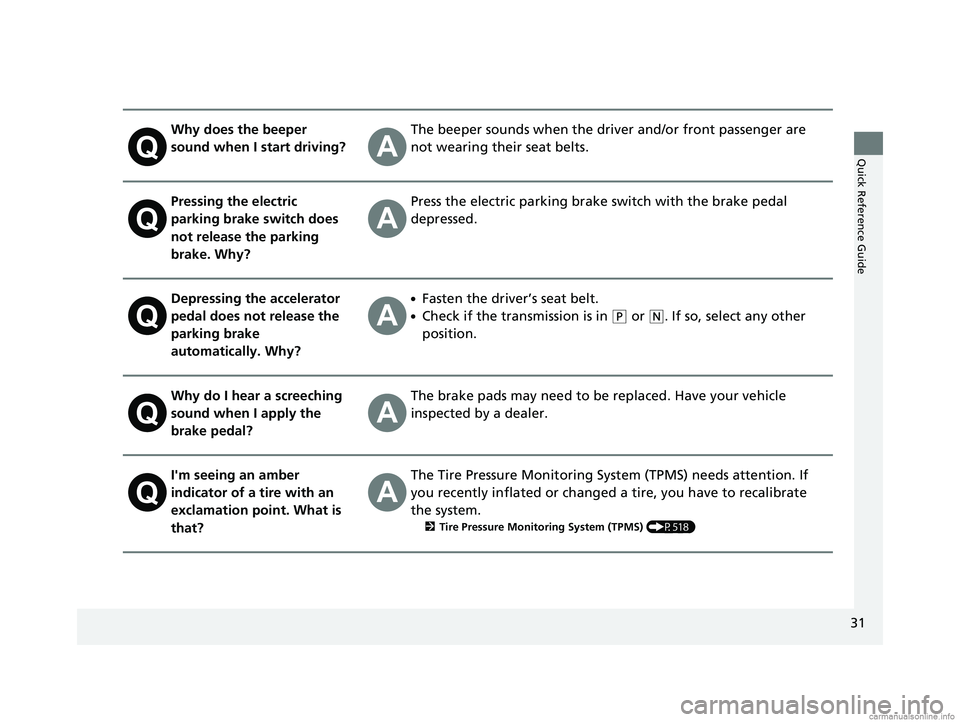
Why does the beeper
sound when I start driving?The beeper sounds when the driver and/or front passenger are
not wearing their seat belts.
Pressing the electric
parking brake switch does
not release the parking
brake. Why?Press the electric parking brake switch with the brake pedal
depressed.
Depressing the accelerator
pedal does not release the
parking brake
automatically. Why?●Fasten the driver’s seat belt.
●Check if the transmission is in (P or (N. If so, select any other
position.
Why do I hear a screeching
sound when I apply the
brake pedal?The brake pads may need to be replaced. Have your vehicle
inspected by a dealer.
I'm seeing an amber
indicator of a tire with an
exclamation point. What is
that?The Tire Pressure Monitoring Syst em (TPMS) needs attention. If
you recently inflated or changed a tire, you have to recalibrate
the system.
2 Tire Pressure Monitoring System (TPMS) (P518)
18 CR-V-31TLA6100.book 31 ページ 2017年9月7日 木曜日 午後3時56分
Page 91 of 679
89
uuIndicators u
Continued
Instrument Panel
*1:Models with the smart entry system have an ENGINE START/STOP button instead of an ignition switch.
IndicatorNameOn/BlinkingExplanationMessage*
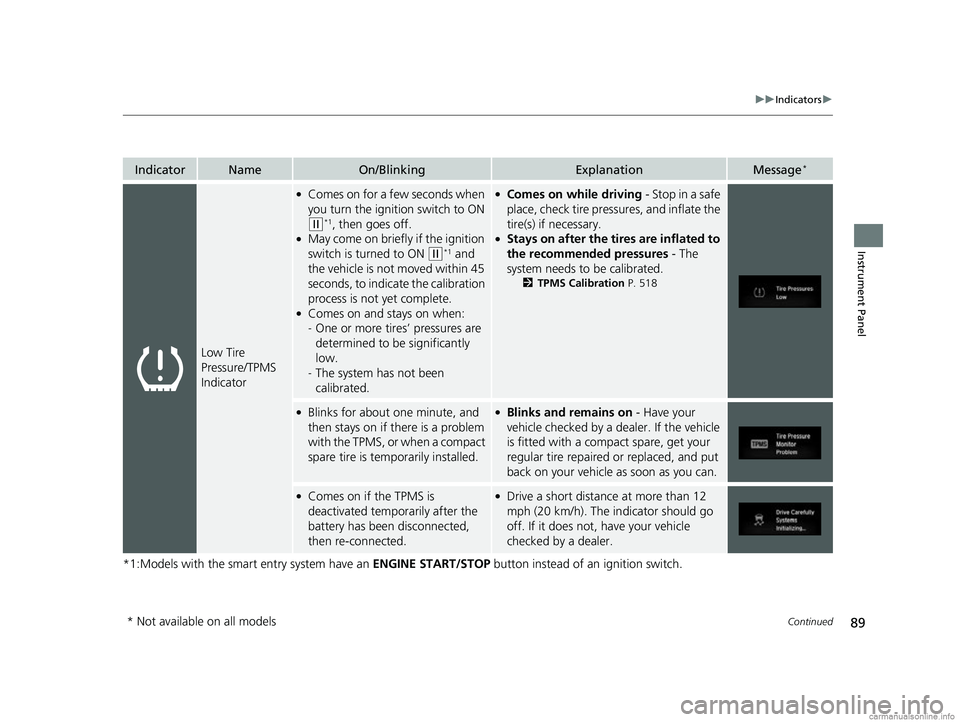
Low Tire
Pressure/TPMS
Indicator
●Comes on for a few seconds when
you turn the ignition switch to ON
(w*1, then goes off.●May come on briefly if the ignition
switch is turned to ON
(w*1 and
the vehicle is not moved within 45
seconds, to indicate the calibration
process is not yet complete.
●Comes on and stays on when:
- One or more tires’ pressures are
determined to be significantly
low.
- The system has not been
calibrated.
●Comes on while driving - Stop in a safe
place, check tire pressures, and inflate the
tire(s) if necessary.
●Stays on after the tires are inflated to
the recommended pressures - The
system needs to be calibrated.
2 TPMS Calibration P. 518
●Blinks for about one minute, and
then stays on if there is a problem
with the TPMS, or when a compact
spare tire is temporarily installed.●Blinks and remains on - Have your
vehicle checked by a dealer. If the vehicle
is fitted with a compact spare, get your
regular tire repaired or replaced, and put
back on your vehicle as soon as you can.
●Comes on if the TPMS is
deactivated temporarily after the
battery has been disconnected,
then re-connected.●Drive a short distance at more than 12
mph (20 km/h). The in dicator should go
off. If it does not, have your vehicle
checked by a dealer.
* Not available on all models
18 CR-V-31TLA6100.book 89 ページ 2017年9月7日 木曜日 午後3時56分
Page 367 of 679
365
uuCustomized Features u
Continued
Features
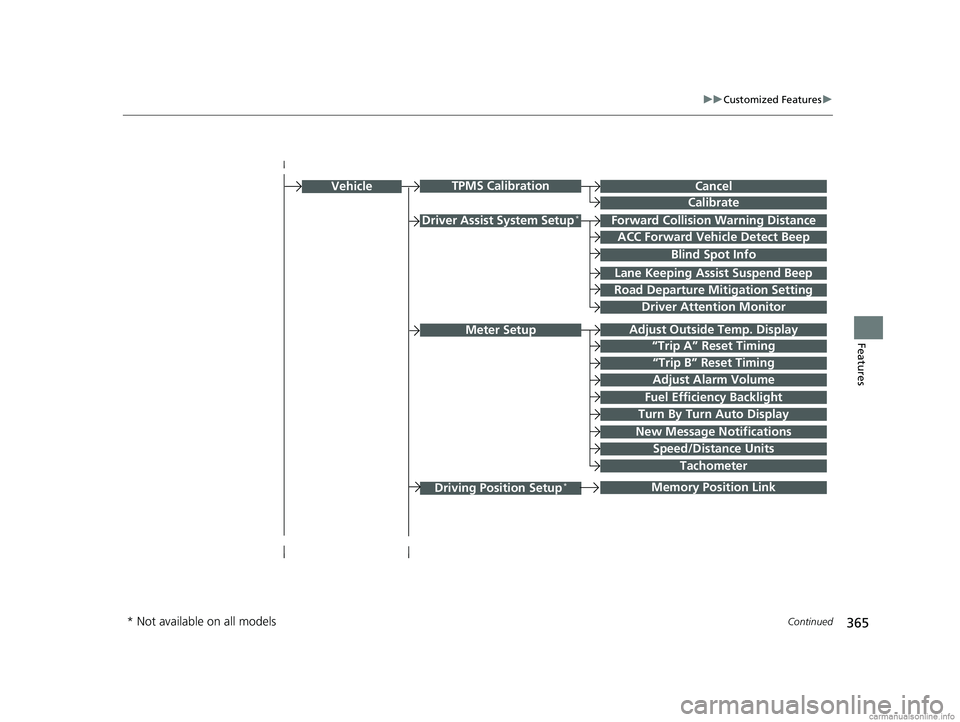
Driver Assist System Setup*Forward Collision Warning Distance
ACC Forward Vehicle Detect Beep
Lane Keeping Assist Suspend Beep
Road Departure Mi tigation Setting
Adjust Outside Temp. Display
“Trip A” Reset Timing
“Trip B” Reset Timing
Vehicle
Meter Setup
Adjust Alarm Volume
Speed/Distance Units
Fuel Efficiency Backlight
New Message Notifications
Tachometer
CancelTPMS Calibration
Calibrate
Blind Spot Info
Turn By Turn Auto Display
Driving Position Setup*Memory Position Link
Driver Attention Monitor
* Not available on all models
18 CR-V-31TLA6100.book 365 ページ 2017年9月7日 木曜日 午後3時56分
Page 380 of 679
378
uuCustomized Features u
Features
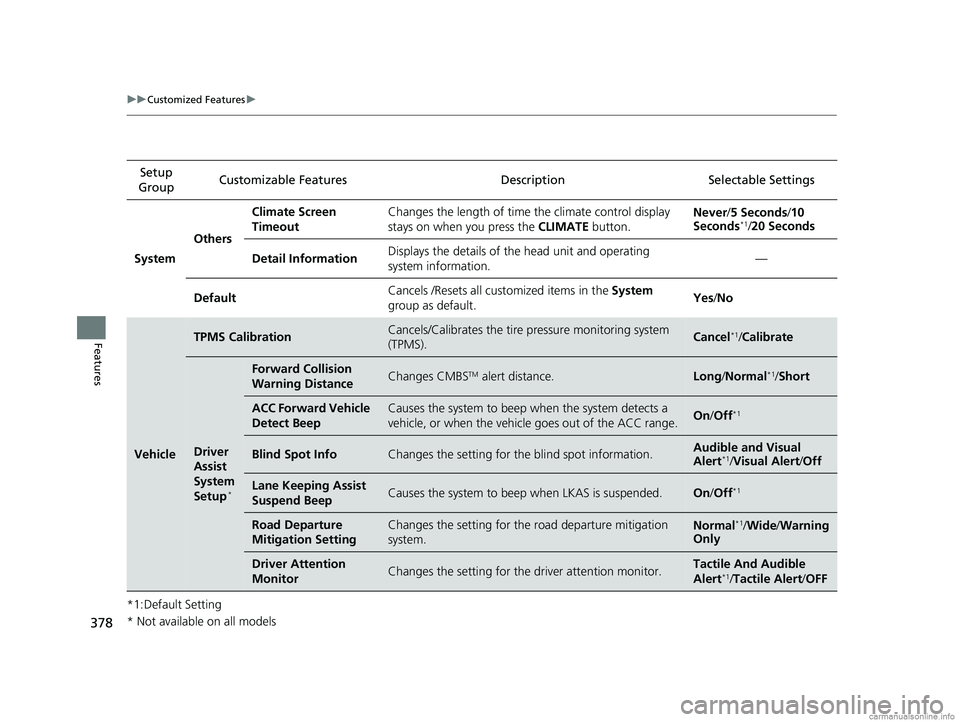
*1:Default SettingSetup
Group Customizable Features Description Selectable Settings
System OthersClimate Screen
Timeout
Changes the length of time the climate control display
stays on when you press the
CLIMATE button. Never/
5 Seconds /10
Seconds
*1/ 20 Seconds
Detail Information Displays the details of th
e head unit and operating
system information. —
Default Cancels /Resets all cust
omized items in the System
group as default. Yes
/No
Vehicle
TPMS CalibrationCancels/Calibrates the tire pressure monitoring system
(TPMS).Cancel*1/ Calibrate
Driver
Assist
System
Setup
*
Forward Collision
Warning DistanceChanges CMBSTM alert distance.Long /Normal*1/ Short
ACC Forward Vehicle
Detect BeepCauses the system to beep when the system detects a
vehicle, or when the vehicle goes out of the ACC range.On/Off*1
Blind Spot InfoChanges the setting for th e blind spot information.Audible and Visual
Alert*1/Visual Alert /Off
Lane Keeping Assist
Suspend BeepCauses the system to beep when LKAS is suspended.On/Off*1
Road Departure
Mitigation SettingChanges the setting for the road departure mitigation
system.Normal*1/Wide /Warning
Only
Driver Attention
MonitorChanges the setting for the driver attention monitor.Tactile And Audible
Alert*1/ Tactile Alert/ OFF
* Not available on all models
18 CR-V-31TLA6100.book 378 ページ 2017年9月7日 木曜日 午後3時56分
Page 449 of 679
447
Driving
This chapter discusses driving and refueling.
Before Driving................................... 448
Towing a Trailer Towing Preparation .......................... 453
Driving Safely with a Trailer .............. 456
Towing Your Vehicle ........................ 457
Off-Highway Driving Guidelines
General Information ......................... 458
Important Safety Precautions............ 458
Avoiding Trouble ............................. 459
When Driving
Starting the Engine .......................... 460
Starting the Engine .......................... 462
Precautions While Driving................. 467
Models without smart entry system
Models with smart entry system
Continuously Variable Transmission... 468
Shifting ............................................ 469
ECON Button ................................... 471
Cruise Control
*............................... 472
Front Sensor Camera*..................... 479
Adaptive Cruise Control (ACC) with Low
Speed Follow (LSF)
*....................... 481Road Departure Mitigation (RDM) System*..................................... 497Lane Keeping Assist System (LKAS)*.. 501Vehicle Stability Assist (VSA®), aka Electronic
Stability Control (ESC), System............. 509
LaneWatchTM*.................................. 515
Real Time AWD with Intelligent Control System
TM*...................................... 517
Tire Pressure Monitoring System (TPMS) ... 518Tire Pressure Monitoring System (TPMS) - Required Federal Explanation ......... 522
Braking Brake System ................................... 524
Anti-lock Brake System (ABS) ........... 530
Brake Assist System ......................... 531
Collision Mitigation Braking System
TM
(CMBSTM)*..................................... 532
Parking Your Vehicle When Stopped ................................ 542
Multi-View Rear Camera .................. 547
Refueling ........................................... 549
Fuel Economy and CO
2 Emissions .... 552
Turbo Engine Vehicle*...................... 553
* Not available on all models
18 CR-V-31TLA6100.book 447 ページ 2017年9月7日 木曜日 午後3時56分
Page 485 of 679
Continued483
uuWhen Driving uAdaptive Cruise Control (ACC) with Low Speed Follow (LSF)*
Driving
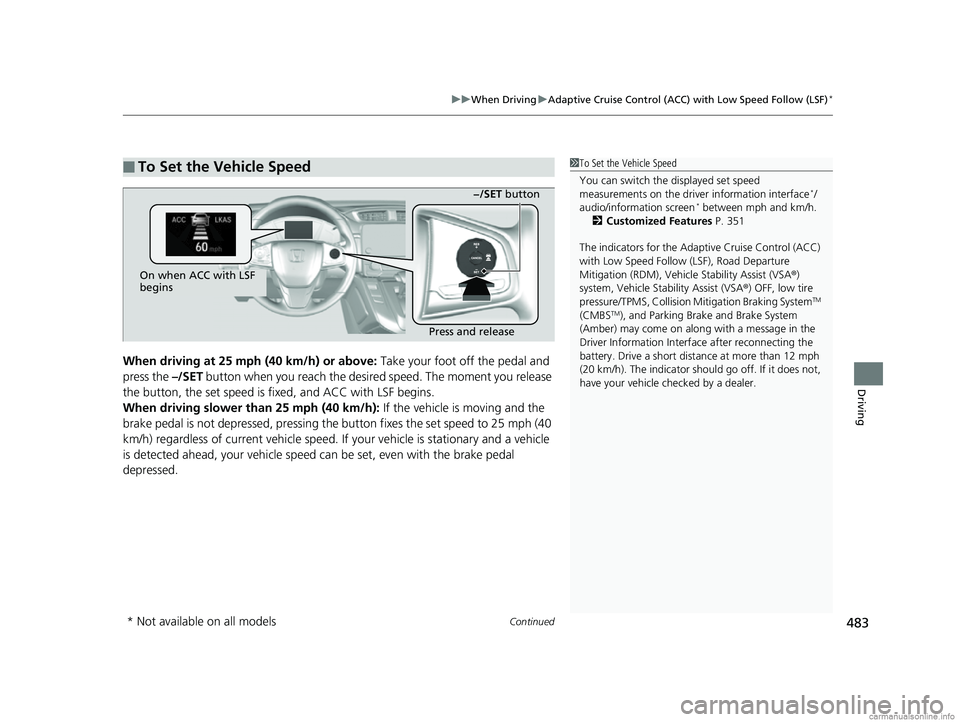
When driving at 25 mph (40 km/h) or above: Take your foot off the pedal and
press the –/SET button when you reach the desire d speed. The moment you release
the button, the set speed is fixed, and ACC with LSF begins.
When driving slower than 25 mph (40 km/h): If the vehicle is moving and the
brake pedal is not depressed, pressing th e button fixes the set speed to 25 mph (40
km/h) regardless of current vehicle speed. If your vehicle is stationary and a vehicle
is detected ahead, your vehicle speed can be set, even with the brake pedal
depressed.
■To Set the Vehicle Speed1 To Set the Vehicle Speed
You can switch the displayed set speed
measurements on the driver information interface
*/
audio/information screen* between mph and km/h.
2 Customized Features P. 351
The indicators for the Adaptive Cruise Control (ACC)
with Low Speed Follow (LSF), Road Departure
Mitigation (RDM), Vehicle Stability Assist (VSA®)
system, Vehicle Stability Assist (VSA ®) OFF, low tire
pressure/TPMS, Collisi on Mitigation Braking System
TM
(CMBSTM), and Parking Brake and Brake System
(Amber) may come on along with a message in the
Driver Information Interf ace after reconnecting the
battery. Drive a short distance at more than 12 mph
(20 km/h). The indicator shoul d go off. If it does not,
have your vehicle ch ecked by a dealer.
On when ACC with LSF
begins
Press and release−/SET button
* Not available on all models
18 CR-V-31TLA6100.book 483 ページ 2017年9月7日 木曜日 午後3時56分