USB port HONDA CR-V 2018 Owner's Manual (in English)
[x] Cancel search | Manufacturer: HONDA, Model Year: 2018, Model line: CR-V, Model: HONDA CR-V 2018Pages: 679, PDF Size: 23.22 MB
Page 8 of 679
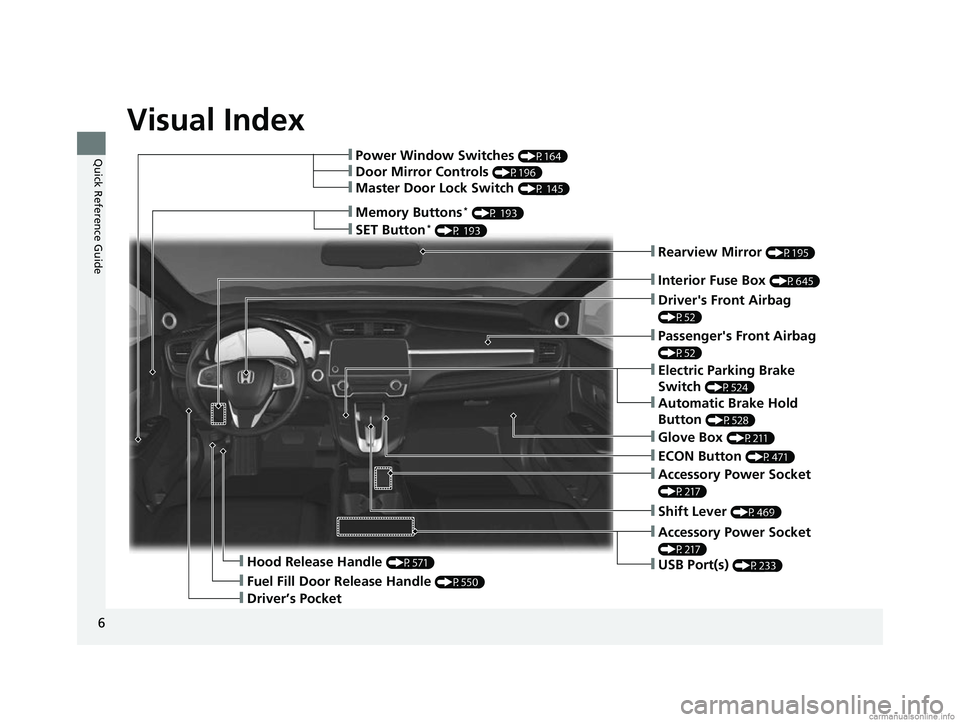
Visual Index
6
Quick Reference Guide
❙Rearview Mirror (P195)
❙Driver's Front Airbag
(P52)
❙Hood Release Handle (P571)
❙Driver’s Pocket
❙Fuel Fill Door Release Handle (P550)
❙Memory Buttons* (P 193)
❙Interior Fuse Box (P645)
❙Passenger's Front Airbag
(P52)
❙SET Button* (P 193)
❙Power Window Switches (P164)
❙Door Mirror Controls (P196)
❙Master Door Lock Switch (P 145)
❙Electric Parking Brake
Switch
(P524)
❙Automatic Brake Hold
Button
(P528)
❙Glove Box (P211)
❙Accessory Power Socket
(P217)
❙ECON Button (P471)
❙Shift Lever (P469)
❙Accessory Power Socket
(P217)
❙USB Port(s) (P233)
18 CR-V-31TLA6100.book 6 ページ 2017年9月7日 木曜日 午後3時56分
Page 9 of 679
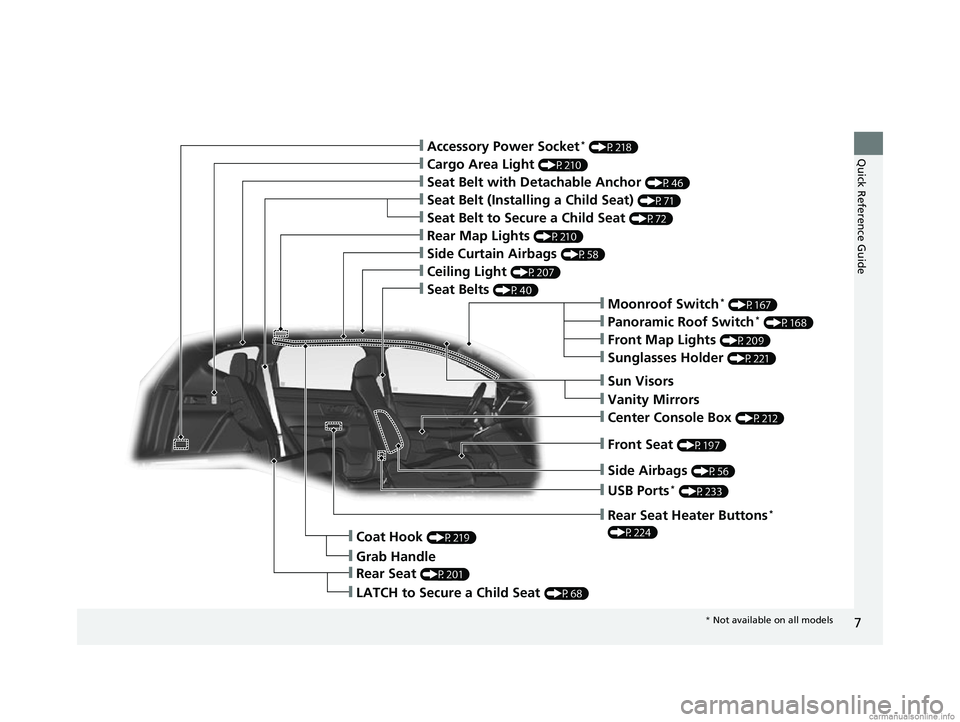
7
Quick Reference Guide
❙Moonroof Switch* (P167)
❙Side Airbags (P56)
❙Rear Seat (P201)
❙LATCH to Secure a Child Seat (P68)
❙Grab Handle
❙Coat Hook (P219)
❙Panoramic Roof Switch* (P168)
❙Front Map Lights (P209)
❙Seat Belts (P40)
❙Rear Map Lights (P210)
❙Side Curtain Airbags (P58)
❙Seat Belt with Detachable Anchor (P46)
❙Cargo Area Light (P210)
❙Seat Belt to Secure a Child Seat (P72)
❙Seat Belt (Installing a Child Seat) (P71)
❙Accessory Power Socket* (P218)
❙USB Ports* (P233)
❙Front Seat (P197)
❙Sun Visors
❙Vanity Mirrors
❙Center Console Box (P212)
❙Rear Seat Heater Buttons*
(P224)
❙Sunglasses Holder (P221)
❙Ceiling Light (P207)
* Not available on all models
18 CR-V-31TLA6100.book 7 ページ 2017年9月7日 木曜日 午後3時56分
Page 233 of 679
231
Features
This chapter describes how to operate technology features.
Audio SystemAbout Your Audio System ................ 232
USB Port(s) ....................................... 233
Audio System Theft Protection ......... 234
Audio Remote Controls .................... 235
Audio System Basic Operation Audio/Information Screen ................ 240
Adjusting the Sound ........................ 244
Display Setup ................................... 245
Playing AM/FM Radio ....................... 246
Playing an iPod ................................ 248
Playing Pandora ®.............................. 251
Playing a USB Flash Drive ................. 253
Models with color audio system
Playing Bluetooth ® Audio................. 256
Siri ® Eyes Free .................................. 259
Audio System Basic Operation Audio/Information Screen ................ 261
Adjusting the Sound ........................ 282
Display Setup ................................... 283
Voice Control Operation .................. 285
Playing AM/FM Radio ....................... 289
Playing SiriusXM ® Radio
*................. 293
Playing an iPod ................................ 300
Song By Voice
TM (SBV) ...................... 303
Playing Pandora ®*............................ 307
Playing a USB Flash Drive ................. 309
Models with Display Audio
Playing Bluetooth ® Audio ................ 312
HondaLink ®..................................... 314
Wi-Fi Connection ............................. 319
Siri ® Eyes Free .................................. 321
Apple CarPlay
TM............................... 322
Android AutoTM............................... 325
Audio Error Messages ...................... 329
General Information on the Audio System ............................................. 334
Customized Features ........................ 351
HomeLink ® Universal Transceiver
*.. 384
Bluetooth ® HandsFreeLink® ..... 387, 410
Compass
*.......................................... 444
* Not available on all models
18 CR-V-31TLA6100.book 231 ページ 2017年9月7日 木曜日 午後3時56分
Page 235 of 679
233
uuAudio System uUSB Port(s)
Features
USB Port(s)
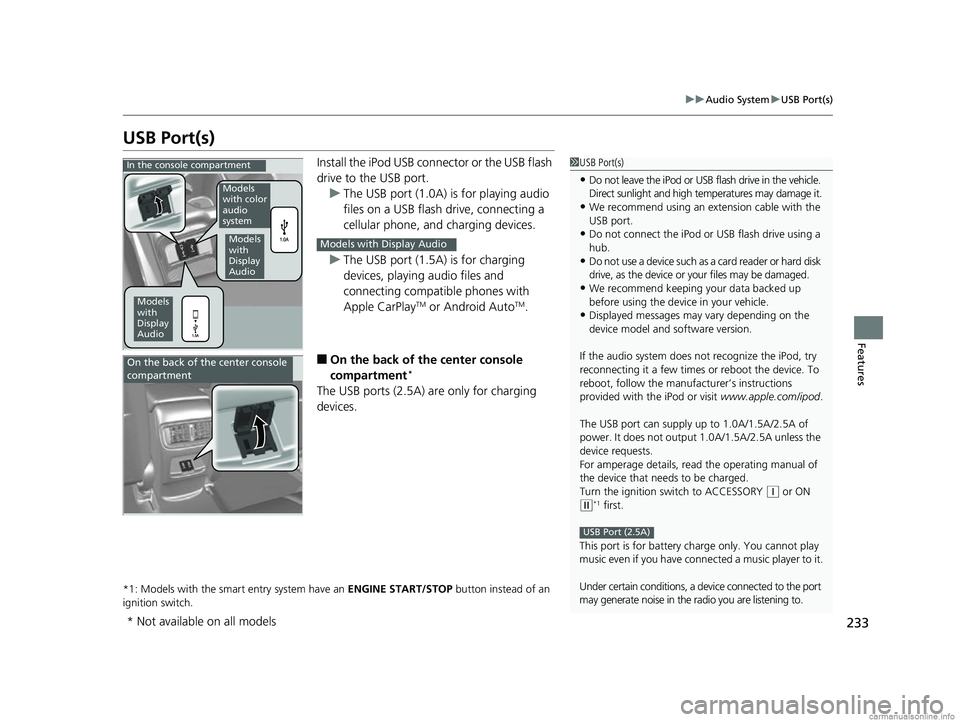
Install the iPod USB connector or the USB flash
drive to the USB port.
u The USB port (1.0A) is for playing audio
files on a USB flash drive, connecting a
cellular phone, and charging devices.
u The USB port (1.5A) is for charging
devices, playing audio files and
connecting compatib le phones with
Apple CarPlay
TM or Android AutoTM.
■On the back of the center console
compartment*
The USB ports (2.5A) are only for charging
devices.
*1: Models with the smart entry system have an ENGINE START/STOP button instead of an
ignition switch.
1 USB Port(s)
•Do not leave the iPod or USB flash drive in the vehicle.
Direct sunlight and high te mperatures may damage it.
•We recommend using an extension cable with the
USB port.
•Do not connect the iPod or USB flash drive using a
hub.
•Do not use a device such as a card reader or hard disk
drive, as the device or your files may be damaged.
•We recommend keeping y our data backed up
before using the device in your vehicle.
•Displayed messages may vary depending on the
device model and software version.
If the audio system does not recognize the iPod, try
reconnecting it a few times or reboot the device. To
reboot, follow the manufac turer’s instructions
provided with the iPod or visit www.apple.com/ipod.
The USB port can supply up to 1.0A/1.5A/2.5A of
power. It does not output 1.0A/1.5A/2.5A unless the
device requests.
For amperage details, read the operating manual of
the device that ne eds to be charged.
Turn the ignition switch to ACCESSORY
( q or ON
(w*1 first.
This port is for battery charge only. You cannot play
music even if you have conne cted a music player to it.
Under certain conditions, a de vice connected to the port
may generate noise in the radio you are listening to.
USB Port (2.5A)
In the console compartment
Models
with
Display
Audio
Models
with color
audio
system
Models
with
Display
Audio
Models with Display Audio
On the back of the center console
compartment
* Not available on all models
18 CR-V-31TLA6100.book 233 ページ 2017年9月7日 木曜日 午後3時56分
Page 244 of 679
uuAudio System Basic Operation uAudio/Information Screen
242
Features
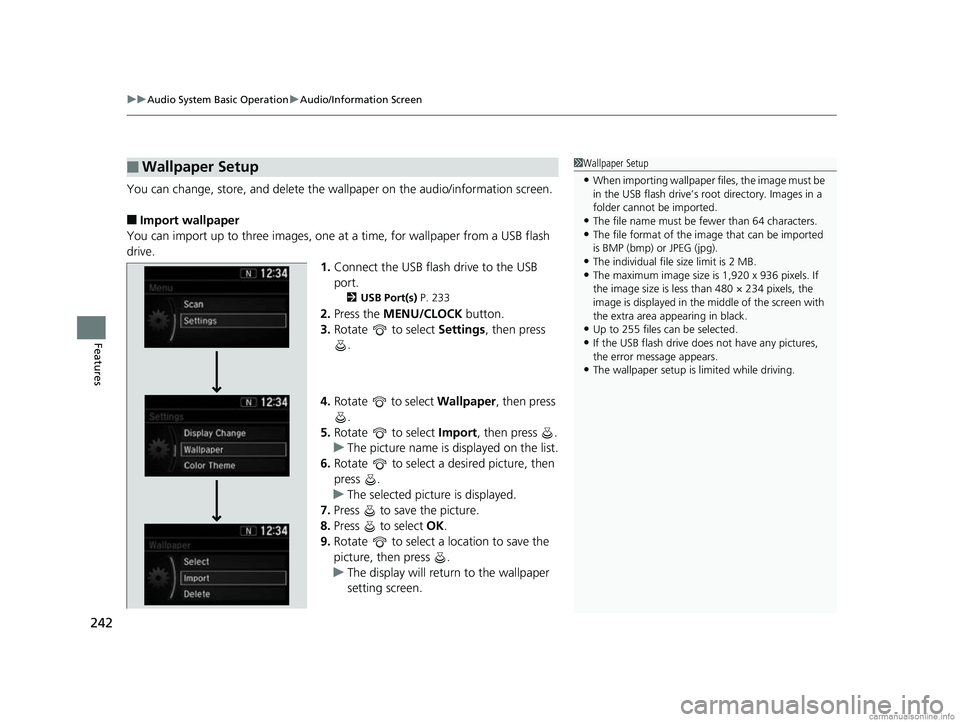
You can change, store, and delete the wa llpaper on the audio/information screen.
■Import wallpaper
You can import up to three images, one at a time, for wallpaper from a USB flash
drive.
1.Connect the USB flash drive to the USB
port.
2 USB Port(s) P. 233
2.Press the MENU/CLOCK button.
3. Rotate to select Settings, then press
.
4. Rotate to select Wallpaper, then press
.
5. Rotate to select Import, then press .
u The picture name is displayed on the list.
6. Rotate to select a desired picture, then
press .
u The selected picture is displayed.
7. Press to save the picture.
8. Press to select OK.
9. Rotate to select a location to save the
picture, then press .
u The display will return to the wallpaper
setting screen.
■Wallpaper Setup1Wallpaper Setup
•When importing wallpaper files, the image must be
in the USB flash drive’s root directory. Images in a
folder cannot be imported.
•The file name must be fewer than 64 characters.•The file format of the im age that can be imported
is BMP (bmp) or JPEG (jpg).
•The individual file size limit is 2 MB.•The maximum image size is 1,920 x 936 pixels. If
the image size is less than 480 × 234 pixels, the
image is displayed in the middle of the screen with
the extra area appearing in black.
•Up to 255 files can be selected.
•If the USB flash drive doe s not have any pictures,
the error message appears.
•The wallpaper setup is limited while driving.
18 CR-V-31TLA6100.book 242 ページ 2017年9月7日 木曜日 午後3時56分
Page 250 of 679
248
uuAudio System Basic Operation uPlaying an iPod
Features
Playing an iPod
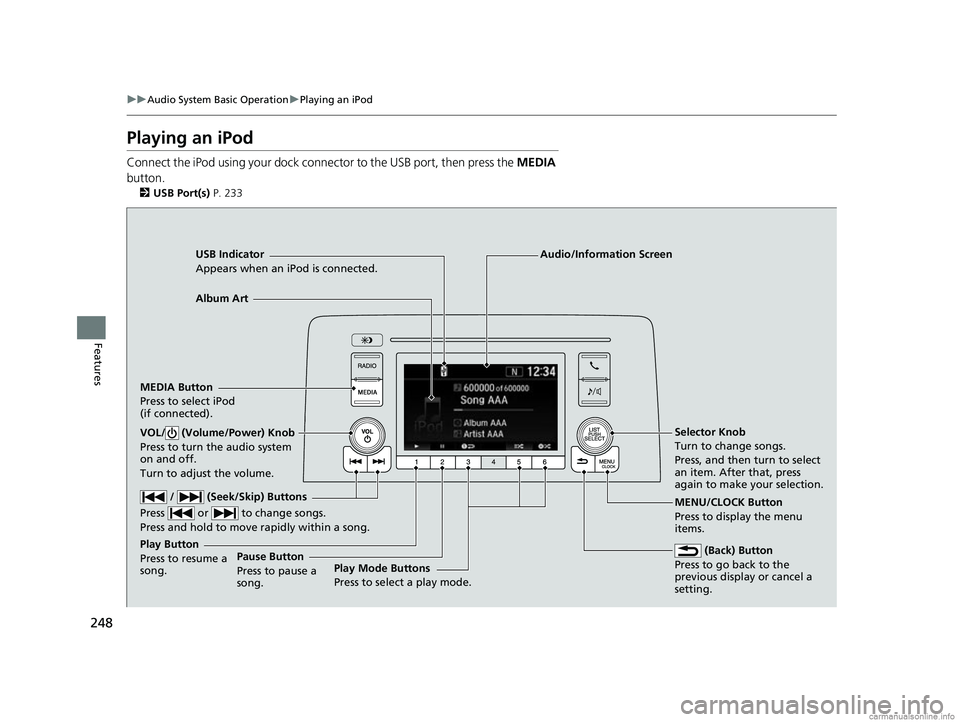
Connect the iPod using your dock conn ector to the USB port, then press the MEDIA
button.
2 USB Port(s) P. 233
USB Indicator
Appears when an iPod is connected.
MEDIA Button
Press to select iPod
(if connected).
(Back) Button
Press to go back to the
previous display or cancel a
setting.
/ (Seek/Skip) Buttons
Press or to change songs.
Press and hold to move rapidly within a song.
VOL/ (Volume/Power) Knob
Press to turn the audio system
on and off.
Turn to adjust the volume.Selector Knob
Turn to change songs.
Press, and then turn to select
an item. After that, press
again to make your selection.
MENU/CLOCK Button
Press to display the menu
items.
Audio/Information Screen
Album Art
Play Mode Buttons
Press to select a play mode.
Play Button
Press to resume a
song.Pause Button
Press to pause a
song.
18 CR-V-31TLA6100.book 248 ページ 2017年9月7日 木曜日 午後3時56分
Page 253 of 679
251
uuAudio System Basic Operation uPlaying Pandora ®
Continued
Features
Playing Pandora ®
Your audio system allows you to listen to music from the Pandora ® app on a
compatible smartphone.
This function is available when the phone is paired an d connected to the vehicle’s
Bluetooth ® HandsFreeLink ® (HFL) system, or with an iPhone, you can connect using
your USB cable to the USB port.
2 Phone Setup P. 393
2 USB Port(s) P. 233
1Playing Pandora ®
Pandora ®, the Pandora logo, and the Pandora trade
dress are trademarks or registered trademarks of
Pandora Media, Inc., used with permission. Pandora
is only available in certai n countries. Visit the Pandora
website for more information.
To find out if your phone is compatible with this
feature, visit automobiles.honda.com /handsfreelink/,
or call 1-888-528-7876.
To use this service in your vehicle, the Pandora ® app
must first be installed on your phone. Visit
www.pandora.com. for more information.
Pandora ® is free, personalized radio that plays music
and comedy you’ll love. Just start with the name of
one of your favorite arti sts, tracks, comedians or
composers and Pandora ® will create a custom station
that plays similar tracks. Pandora® also features
hundreds of genre stations ranging from Dubstep to
Smooth Jazz to Power Workout.
If you cannot operate Pandora ® through the audio
system, it may be streaming through Bluetooth®
Audio. Make sure Pandora ® mode on your audio
system is selected.
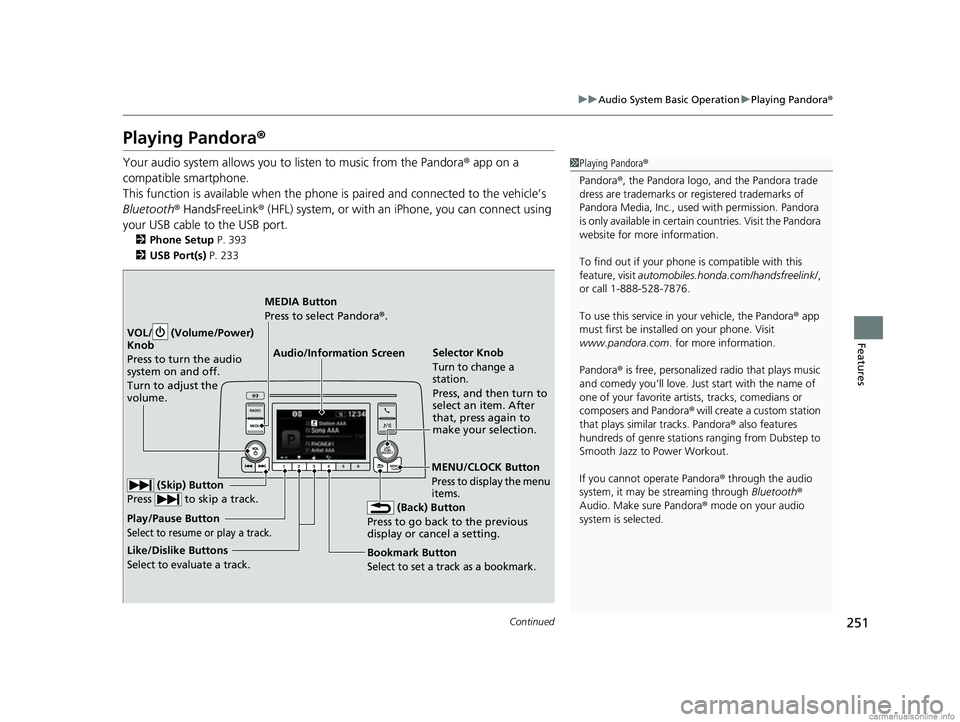
Audio/Information Screen Selector Knob
Turn to change a
station.
Press, and then turn to
select an item. After
that, press again to
make your selection.
VOL/ (Volume/Power)
Knob
Press to turn the audio
system on and off.
Turn to adjust the
volume.
(Back) Button
Press to go back to the previous
display or cancel a setting.
MEDIA Button
Press to select Pandora ®.
Play/Pause Button
Select to resume or play a track.
(Skip) Button
Press to skip a track.
Like/Dislike Buttons
Select to evaluate a track.
MENU/CLOCK Button
Press to display the menu
items.
Bookmark Button
Select to set a track as a bookmark.
18 CR-V-31TLA6100.book 251 ページ 2017年9月7日 木曜日 午後3時56分
Page 255 of 679
253
uuAudio System Basic Operation uPlaying a USB Flash Drive
Continued
Features
Playing a USB Flash Drive
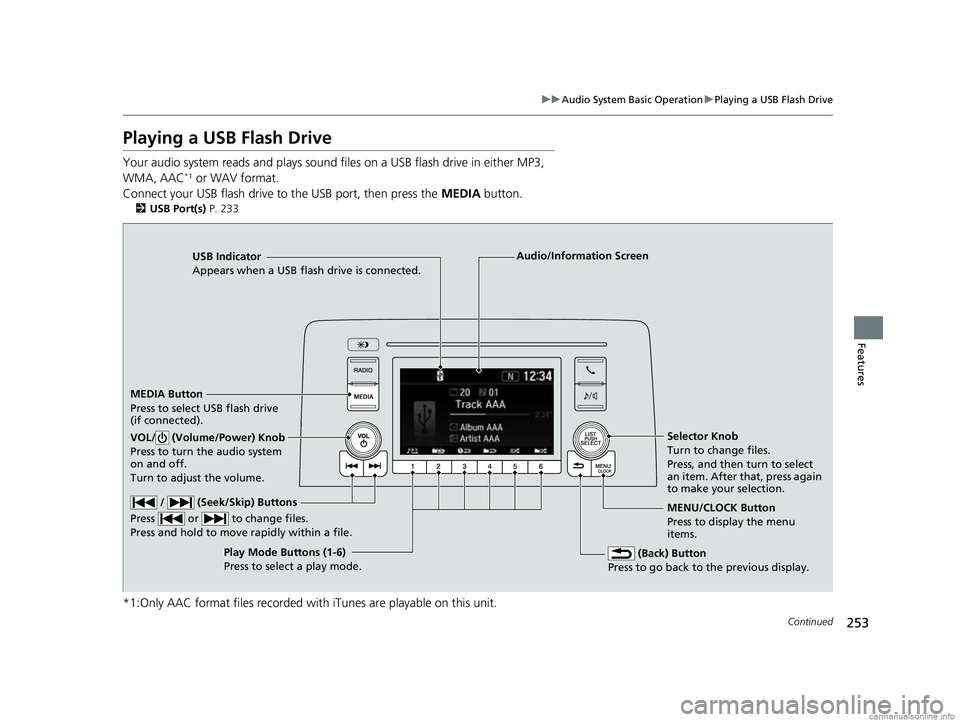
Your audio system reads and plays sound files on a USB flash drive in either MP3,
WMA, AAC*1 or WAV format.
Connect your USB flash drive to the USB port, then press the MEDIA button.
2USB Port(s) P. 233
*1:Only AAC format files recorded with iTunes are playable on this unit.
USB Indicator
Appears when a USB flash drive is connected.
MEDIA Button
Press to select USB flash drive
(if connected).
(Back) Button
Press to go back to the previous display.
/ (Seek/Skip) Buttons
Press or to change files.
Press and hold to move rapidly within a file.
VOL/ (Volume/Power) Knob
Press to turn the audio system
on and off.
Turn to adjust the volume.Selector Knob
Turn to change files.
Press, and then turn to select
an item. After that, press again
to make your selection.
MENU/CLOCK Button
Press to display the menu
items.
Audio/Information Screen
Play Mode Buttons (1-6)
Press to select a play mode.
18 CR-V-31TLA6100.book 253 ページ 2017年9月7日 木曜日 午後3時56分
Page 259 of 679
Continued257
uuAudio System Basic Operation uPlaying Bluetooth ® Audio
Features
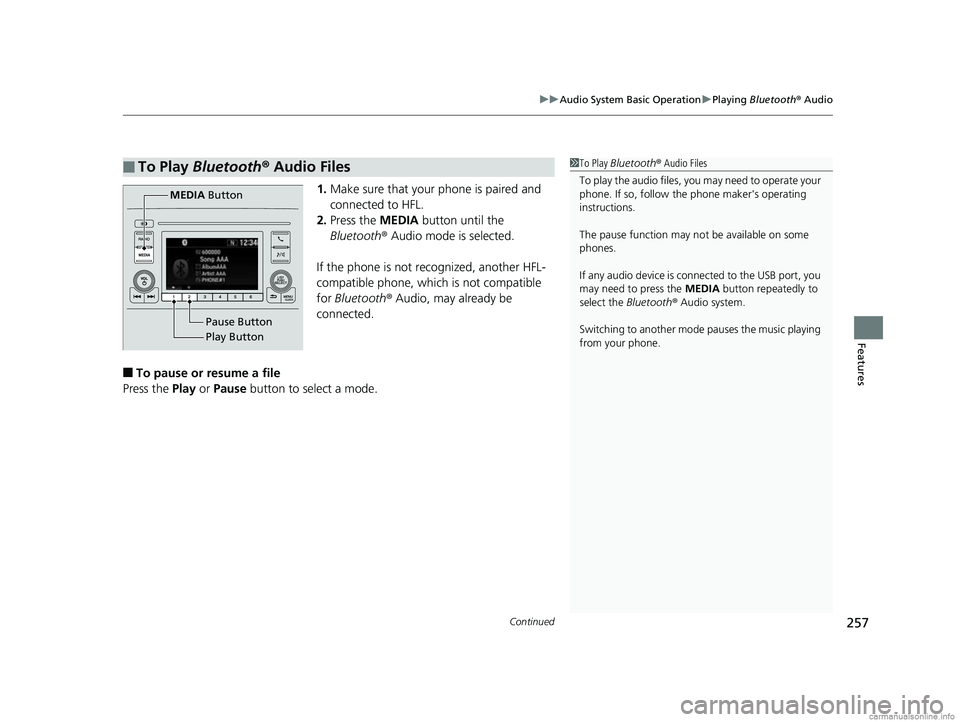
1. Make sure that your phone is paired and
connected to HFL.
2. Press the MEDIA button until the
Bluetooth ® Audio mode is selected.
If the phone is not recognized, another HFL-
compatible phone, which is not compatible
for Bluetooth ® Audio, may already be
connected.
■To pause or resume a file
Press the Play or Pause button to select a mode.
■To Play Bluetooth ® Audio Files1 To Play Bluetooth ® Audio Files
To play the audio files, y ou may need to operate your
phone. If so, follow the phone maker's operating
instructions.
The pause function may no t be available on some
phones.
If any audio device is connected to the USB port, you
may need to press the MEDIA button repeatedly to
select the Bluetooth ® Audio system.
Switching to another mode pauses the music playing
from your phone.
Play Button Pause Button
MEDIA
Button
18 CR-V-31TLA6100.book 257 ページ 2017年9月7日 木曜日 午後3時56分
Page 272 of 679
uuAudio System Basic Operation uAudio/Information Screen
270
Features
You can change, store, and delete the wa llpaper on the audio/information screen.
■Import wallpaper
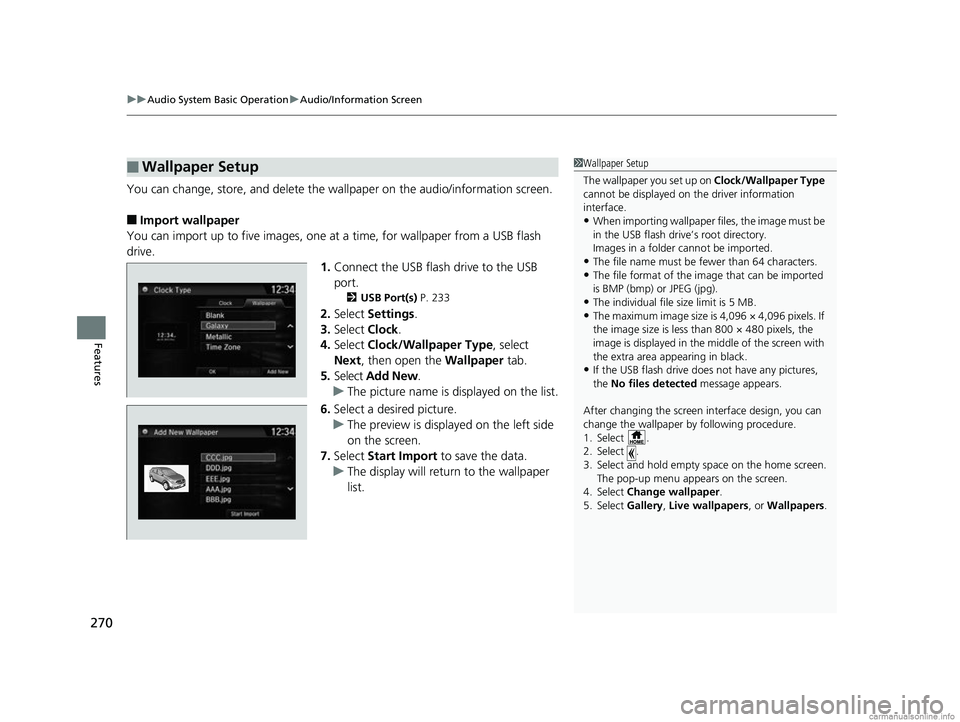
You can import up to five images, one at a time, for wallpaper from a USB flash
drive.
1.Connect the USB flash drive to the USB
port.
2 USB Port(s) P. 233
2.Select Settings .
3. Select Clock.
4. Select Clock/Wallpaper Type , select
Next, then open the Wallpaper tab.
5. Select Add New .
u The picture name is displayed on the list.
6. Select a desired picture.
u The preview is displayed on the left side
on the screen.
7. Select Start Import to save the data.
u The display will return to the wallpaper
list.
■Wallpaper Setup1Wallpaper Setup
The wallpaper you set up on Clock/Wallpaper Type
cannot be displayed on th e driver information
interface.
•When importing wallpaper files, the image must be
in the USB flash drive’s root directory.
Images in a folder cannot be imported.
•The file name must be fewer than 64 characters.•The file format of the im age that can be imported
is BMP (bmp) or JPEG (jpg).
•The individual file size limit is 5 MB.•The maximum image size is 4,096 × 4,096 pixels. If
the image size is less than 800 × 480 pixels, the
image is displayed in the middle of the screen with
the extra area appearing in black.
•If the USB flash drive doe s not have any pictures,
the No files detected message appears.
After changing the screen interface design, you can
change the wallpaper by following procedure.
1. Select .
2. Select .
3. Select and hold empty space on the home screen. The pop-up menu appears on the screen.
4. Select Change wallpaper .
5. Select Gallery, Live wallpapers , or Wallpapers.
18 CR-V-31TLA6100.book 270 ページ 2017年9月7日 木曜日 午後3時56分