drain HONDA CR-V 2020 Owner's Manual (in English)
[x] Cancel search | Manufacturer: HONDA, Model Year: 2020, Model line: CR-V, Model: HONDA CR-V 2020Pages: 671, PDF Size: 33.11 MB
Page 174 of 671
uuOperating the Switches Around the Steering Wheel uENGINE START/STOP Button*
172
Controls
If you leave the vehicle for 30 to 60 minutes with the shift lever in (P and the power
mode in ACCESSORY, the vehicle automati cally goes into the mode similar to
VEHICLE OFF (LOCK) to avoid the battery drain.
When in this mode:
The steering wheel does not lock.
You cannot lock or unlock doors with th e remote transmitter or the smart entry
system.
Press the ENGINE START/STOP button three times to swit ch the mode to VEHICLE
OFF (LOCK).
■Automatic Power Off1 ENGINE START/STOP Button*
If the power mode does not change from VEHICLE
OFF to ACCESSORY, press the ENGINE START/STOP
button while moving the st eering wheel left and
right. The steering wheel will unlock, allowing the
mode to change.
Do not leave the power mode in ACCESSORY or ON
when you get out.
Canadian models
Canadian models
* Not available on all models
20 CR-V PET ELP_MAP_HMIN_HCM_J-31TLA6310.book 172 ページ 2019年10月3日 木曜日 午後4時55分
Page 211 of 671
Continued209
uuInterior Lights/Interior Convenience Items uInterior Lights
Controls
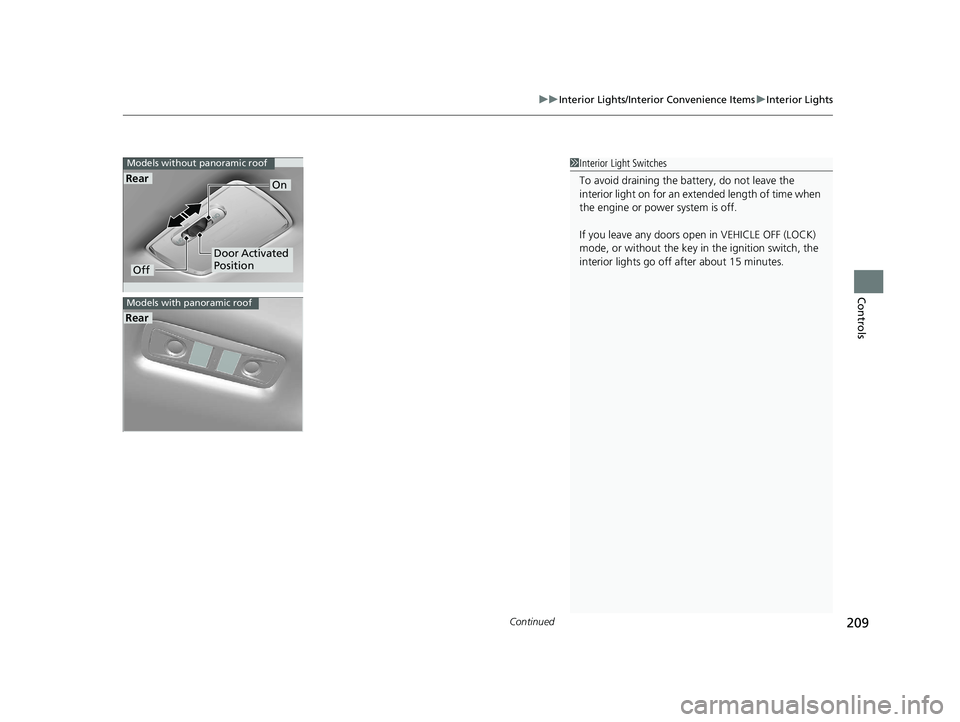
1Interior Light Switches
To avoid draining the ba ttery, do not leave the
interior light on for an extended length of time when
the engine or power system is off.
If you leave any doors open in VEHICLE OFF (LOCK)
mode, or without the key in the ignition switch, the
interior lights go off after about 15 minutes.
Rear
Models without panoramic roof
Off
On
Door Activated
Position
Rear
Models with panoramic roof
20 CR-V PET ELP_MAP_HMIN_HCM_J-31TLA6310.book 209 ページ 2019年10月3日 木曜日 午後4時55分
Page 219 of 671
Continued217
uuInterior Lights/Interior Convenience Items uInterior Convenience Items
Controls
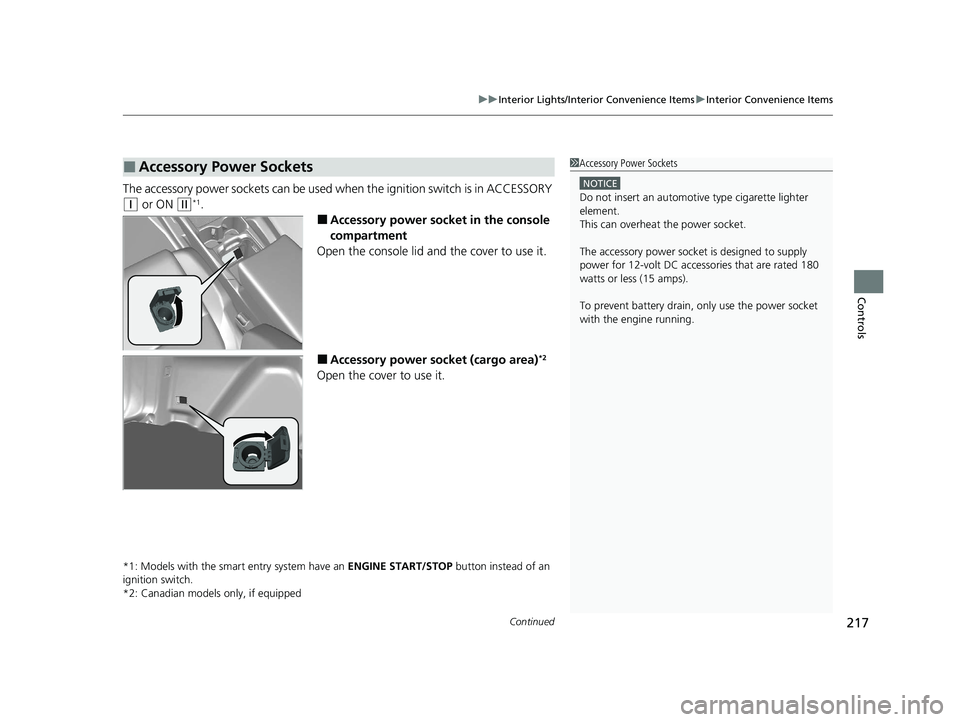
The accessory power sockets can be used wh en the ignition switch is in ACCESSORY
(q or ON (w*1.
■Accessory power socket in the console
compartment
Open the console lid and the cover to use it.
■Accessory power socket (cargo area)*2
Open the cover to use it.
*1: Models with the smart entry system have an ENGINE START/STOP button instead of an
ignition switch.
*2: Canadian models only, if equipped
■Accessory Power Sockets1 Accessory Power Sockets
NOTICE
Do not insert an automotive type cigarette lighter
element.
This can overheat the power socket.
The accessory power socket is designed to supply
power for 12-volt DC accessories that are rated 180
watts or less (15 amps).
To prevent battery drain, only use the power socket
with the engine running.
20 CR-V PET ELP_MAP_HMIN_HCM_J-31TLA6310.book 217 ページ 2019年10月3日 木曜日 午後4時55分
Page 467 of 671
465Continued
Driving
When Driving
Starting the Engine
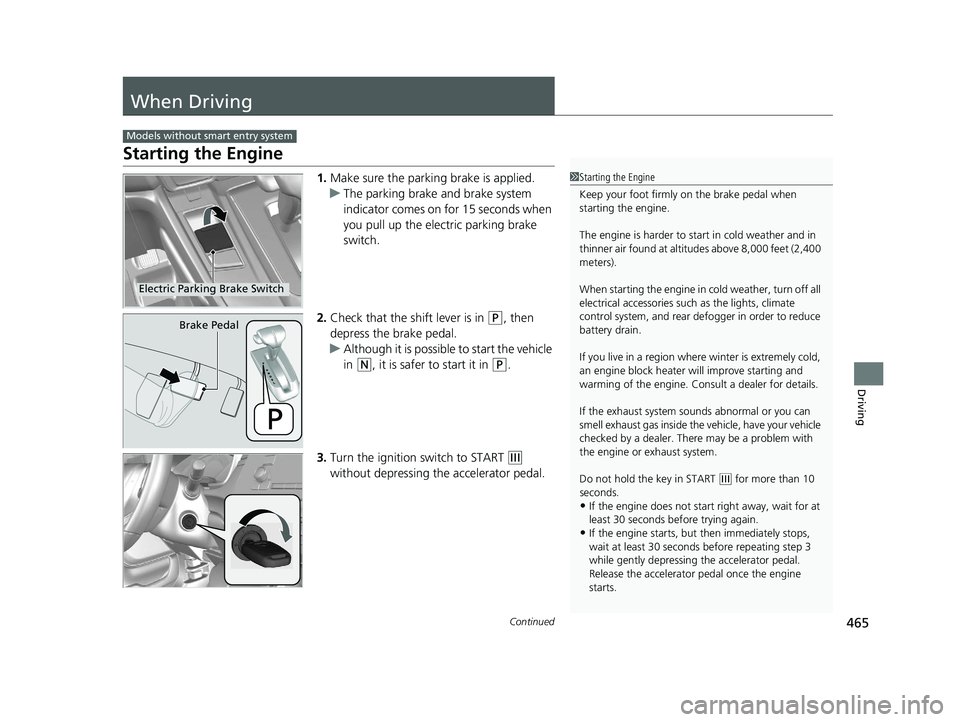
1.Make sure the parkin g brake is applied.
u The parking brake and brake system
indicator comes on for 15 seconds when
you pull up the electric parking brake
switch.
2. Check that the shift lever is in
(P, then
depress the brake pedal.
u Although it is possible to start the vehicle
in
(N, it is safer to start it in (P.
3. Turn the ignition switch to START
(e
without depressing the accelerator pedal.
Models without smart entry system
1 Starting the Engine
Keep your foot firmly on the brake pedal when
starting the engine.
The engine is harder to st art in cold weather and in
thinner air found at altit udes above 8,000 feet (2,400
meters).
When starting the engine in cold weather, turn off all
electrical accessories such as the lights, climate
control system, and rear de fogger in order to reduce
battery drain.
If you live in a region where winter is extremely cold,
an engine block heater will improve starting and
warming of the engine. Cons ult a dealer for details.
If the exhaust system sounds abnormal or you can
smell exhaust gas inside the vehicle, have your vehicle
checked by a dealer. There may be a problem with
the engine or exhaust system.
Do not hold the key in START
( e for more than 10
seconds.
•If the engine does not start right away, wait for at
least 30 seconds before trying again.
•If the engine starts, but then immediately stops,
wait at least 30 seconds before repeating step 3
while gently depressing the accelerator pedal.
Release the accelerator pedal once the engine
starts.
Electric Parking Brake Switch
Brake Pedal
20 CR-V PET ELP_MAP_HMIN_HCM_J-31TLA6310.book 465 ページ 2019年10月3日 木曜日 午後4時55分
Page 469 of 671
467
uuWhen Driving uStarting the Engine
Continued
Driving
Starting the Engine
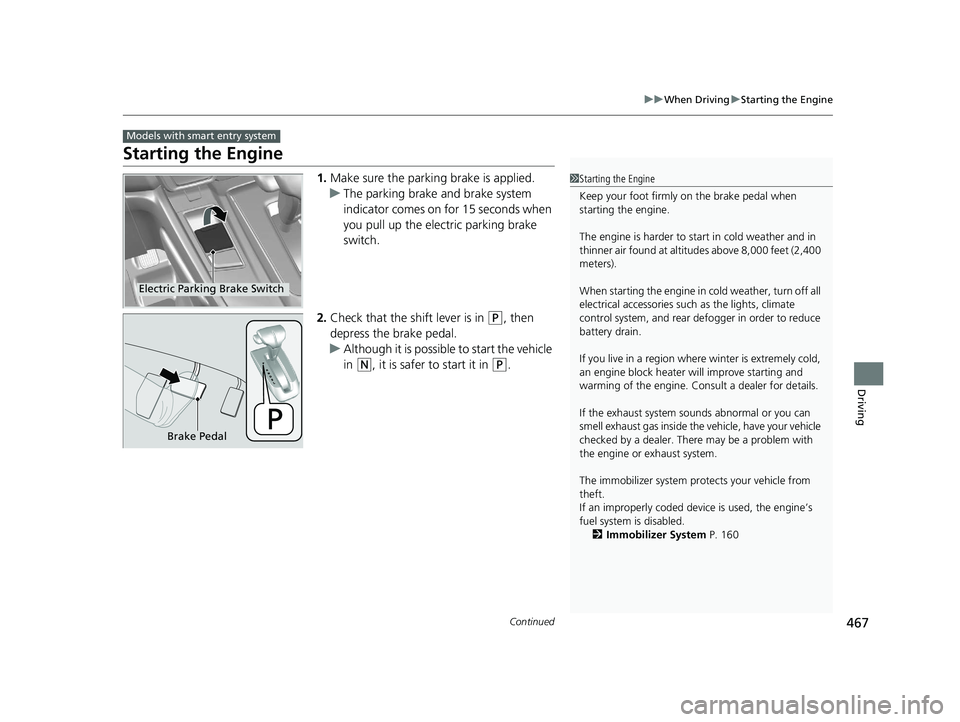
1. Make sure the parkin g brake is applied.
u The parking brake and brake system
indicator comes on for 15 seconds when
you pull up the electric parking brake
switch.
2. Check that the shift lever is in
(P, then
depress the brake pedal.
u Although it is possible to start the vehicle
in
(N, it is safer to start it in (P.
Models with smart entry system
1Starting the Engine
Keep your foot firmly on the brake pedal when
starting the engine.
The engine is harder to st art in cold weather and in
thinner air found at altit udes above 8,000 feet (2,400
meters).
When starting the engine in cold weather, turn off all
electrical accessories such as the lights, climate
control system, and rear de fogger in order to reduce
battery drain.
If you live in a region where winter is extremely cold,
an engine block heater will improve starting and
warming of the engine. Cons ult a dealer for details.
If the exhaust system sounds abnormal or you can
smell exhaust gas inside the vehicle, have your vehicle
checked by a dealer. There may be a problem with
the engine or exhaust system.
The immobilizer system pr otects your vehicle from
theft.
If an improperly c oded device is used, the engine’s
fuel system is disabled. 2 Immobilizer System P. 160
Electric Parking Brake Switch
Brake Pedal
20 CR-V PET ELP_MAP_HMIN_HCM_J-31TLA6310.book 467 ページ 2019年10月3日 木曜日 午後4時55分
Page 576 of 671
574
uuMaintenance Under the Hood uChanging the Engine Oil and Oil Filter
Maintenance
Changing the Engine Oil and Oil Filter
You must change the engine oil and oil f ilter regularly in order to maintain the
engine's lubrication. The engine may be damaged if they are not changed regularly.
Specialized equipment and proc edures are required to change the engine oil and oil
filter. Have an authorized Honda dealer replace them.
Do not attempt to change the engine oil and oil filter yourself.
Change the oil and filter in accordance with the maintenance message on the driver
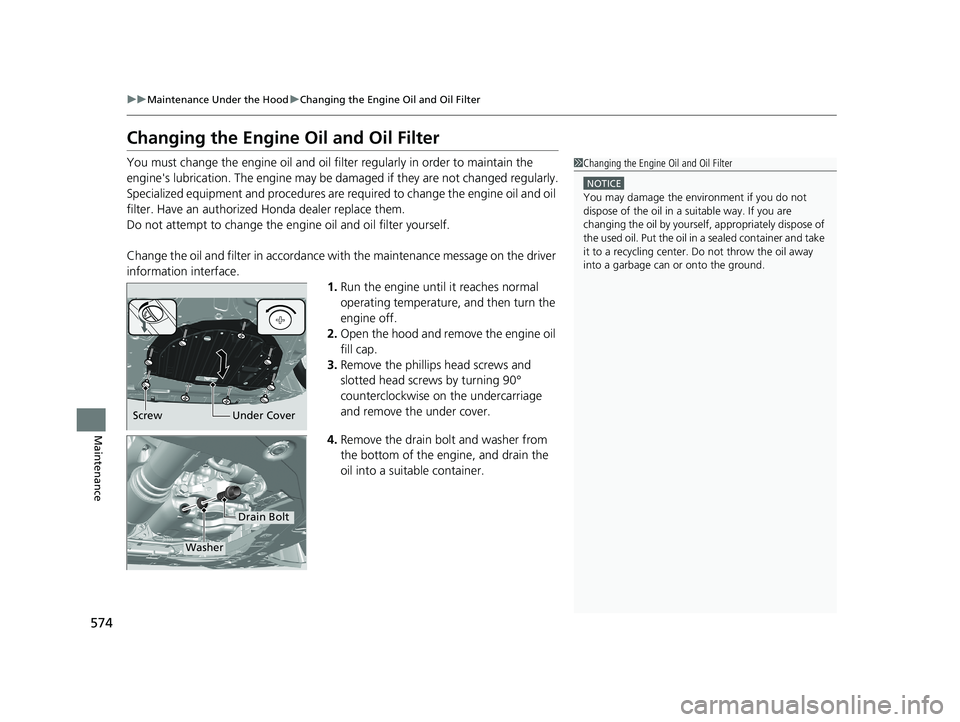
information interface. 1.Run the engine until it reaches normal
operating temperature, and then turn the
engine off.
2. Open the hood and remove the engine oil
fill cap.
3. Remove the phillips head screws and
slotted head screws by turning 90°
counterclockwise on the undercarriage
and remove the under cover.
4. Remove the drain bolt and washer from
the bottom of the engine, and drain the
oil into a suitable container.1Changing the Engine Oil and Oil Filter
NOTICE
You may damage the environment if you do not
dispose of the oil in a suitable way. If you are
changing the oil by yourself , appropriately dispose of
the used oil. Put the oil in a sealed container and take
it to a recycling center. Do not throw the oil away
into a garbage can or onto the ground.
Screw Under Cover
Drain Bolt
Washer
20 CR-V PET ELP_MAP_HMIN_HCM_J-31TLA6310.book 574 ページ 2019年10月3日 木曜日 午後4時55分
Page 577 of 671
575
uuMaintenance Under the Hood uChanging the Engine Oil and Oil Filter
Maintenance
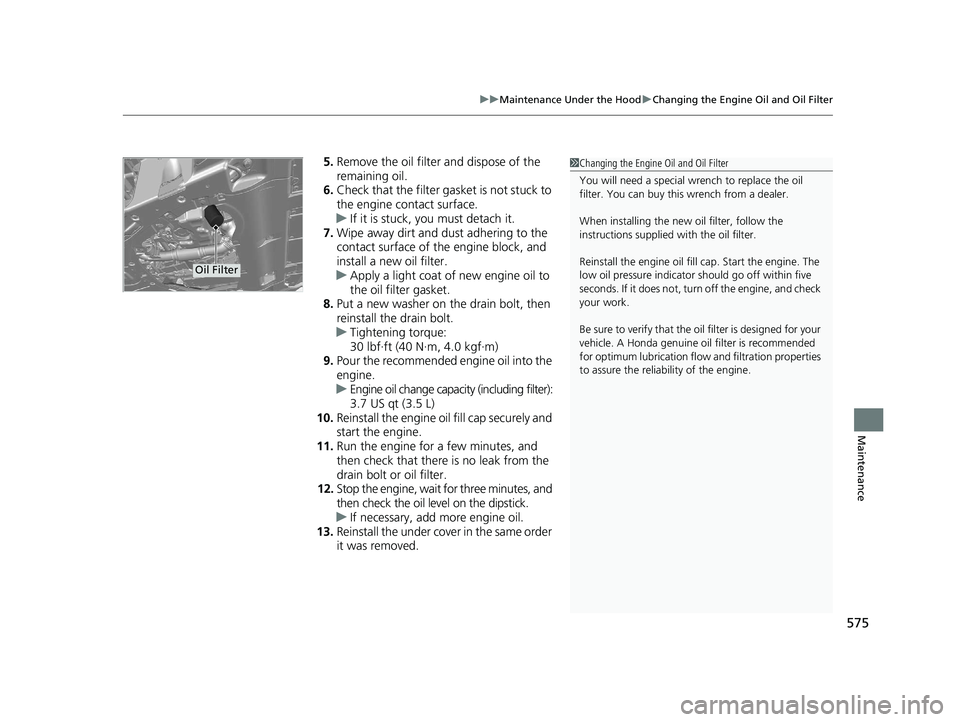
5. Remove the oil filter and dispose of the
remaining oil.
6. Check that the filter gasket is not stuck to
the engine contact surface.
u If it is stuck, you must detach it.
7. Wipe away dirt and dust adhering to the
contact surface of the engine block, and
install a new oil filter.
u Apply a light coat of new engine oil to
the oil filter gasket.
8. Put a new washer on the drain bolt, then
reinstall the drain bolt.
u Tightening torque:
30 lbf∙ft (40 N∙m, 4.0 kgf∙m)
9. Pour the recommended engine oil into the
engine.
u Engine oil change capacity (including filter):
3.7 US qt (3.5 L)
10. Reinstall the engine oil fill cap securely and
start the engine.
11. Run the engine for a few minutes, and
then check that there is no leak from the
drain bolt or oil filter.
12. Stop the engine, wait for three minutes, and
then check the oil level on the dipstick.
u If necessary, add more engine oil.
13. Reinstall the under cover in the same order
it was removed.1Changing the Engine Oil and Oil Filter
You will need a special wrench to replace the oil
filter. You can buy this wrench from a dealer.
When installing the new oil filter, follow the
instructions supplied with the oil filter.
Reinstall the engine oil fill cap. Start the engine. The
low oil pressure indicator should go off within five
seconds. If it does not, turn off the engine, and check
your work.
Be sure to verify that the o il filter is designed for your
vehicle. A Honda genuine oil filter is recommended
for optimum lubrication flow and filtration properties
to assure the reliability of the engine.
Oil Filter
20 CR-V PET ELP_MAP_HMIN_HCM_J-31TLA6310.book 575 ページ 2019年10月3日 木曜日 午後4時55分
Page 611 of 671
609
Maintenance
Accessories and Modifications
Accessories
When installing accessories, check the following:
• Do not install accessories on the windsh ield. They can obstruct your view and
delay your reaction to driving conditions.
• Do not install any accessories over areas marked SRS Airbag, on the sides or backs
of the front seats, on front or side pillars, or near the side windows.
Accessories installed in these areas may interfere with proper operation of the
vehicle’s airbags or may be propelled into you or another occupant if the airbags
deploy.
• Be sure electronic accessories do not overload electrical circuits or interfere with
proper operation of your vehicle.
2 Fuses P. 635
•Before installing any electro nic accessory, have the installer contact a dealer for
assistance. If possible, have a deal er inspect the final installation.
Modifications
Do not modify your vehicle in a manner that may affect its handling, stability, or reliability,
or install non-genuine Honda parts or accessories that may have a similar effect.
Even minor modifications to vehicle systems can affect overall vehicle performance.
Always make sure all equipment is properly installed and maintained, and do not make any
modification to your vehicle or its systems that might cause your vehicle to no longer meet
federal, state, province, territory, and local regulations.
The on-board diagnostic port (OBD-II/SAE J1 962 connector) installed on this vehicle
is intended to be used with automobile system diagnostic devices or with other
devices that Honda has approved. Use of any other type of device may adversely
affect the vehicle's electronic systems or allow them to be compromised, possibly
resulting in a system malfunction, drained battery, or other unexpected problems.
Do not modify or attempt to repair any of the electrical components.
1Accessories and Modifications
Honda Genuine accessor ies are recommended to
ensure proper operati on on your vehicle.
3WARNING
Improper accessories or modifications can
affect your vehicle's handling, stability, and
performance, and cause a crash in which
you can be seriously hurt or killed.
Follow all instruction s in this owner's
manual regarding accessories and
modifications.
20 CR-V PET ELP_MAP_HMIN_HCM_J-31TLA6310.book 609 ページ 2019年10月3日 木曜日 午後4時55分