lock HONDA CR-V 2020 Owner's Manual (in English)
[x] Cancel search | Manufacturer: HONDA, Model Year: 2020, Model line: CR-V, Model: HONDA CR-V 2020Pages: 671, PDF Size: 33.11 MB
Page 4 of 671
Contents
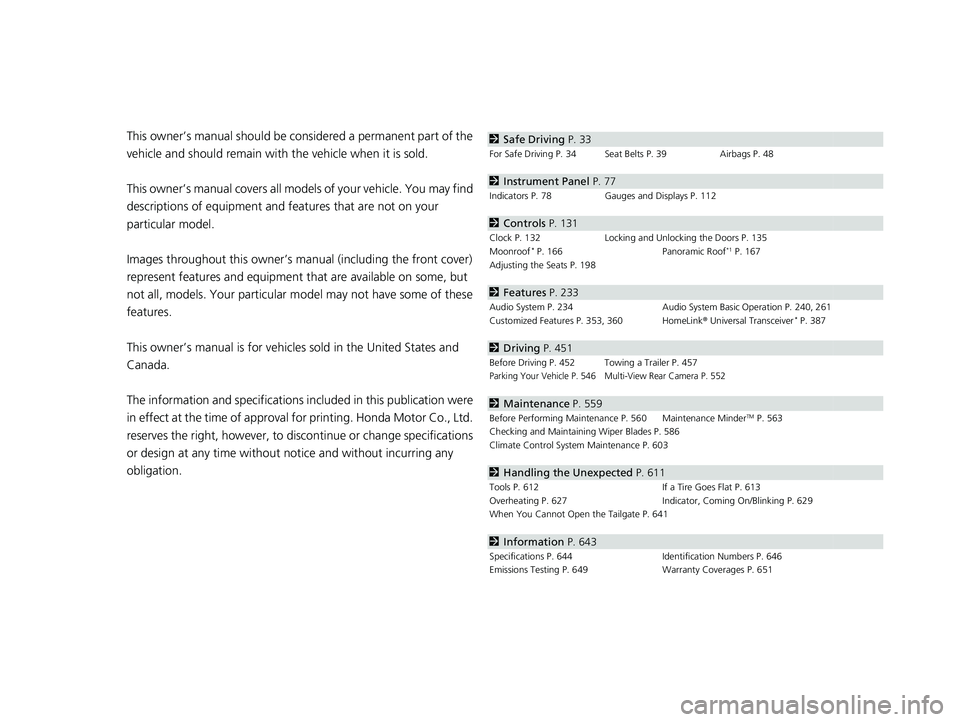
This owner’s manual should be considered a permanent part of the
vehicle and should remain with the vehicle when it is sold.
This owner’s manual covers all models of your vehicle. You may find
descriptions of equipment and features that are not on your
particular model.
Images throughout this owner’s manual (including the front cover)
represent features and equipment that are available on some, but
not all, models. Your particular mo del may not have some of these
features.
This owner’s manual is for vehicles sold in the United States and
Canada.
The information and specifications in cluded in this publication were
in effect at the time of approval for printing. Honda Motor Co., Ltd.
reserves the right, however, to discontinue or change specifications
or design at any time without notice and without incurring any
obligation.2 Safe Driving P. 33
For Safe Driving P. 34 Seat Belts P. 39 Airbags P. 48
2Instrument Panel P. 77
Indicators P. 78 Gauges and Displays P. 112
2Controls P. 131
Clock P. 132 Locking and Unlocking the Doors P. 135
Moonroof* P. 166 Panoramic Roof*1 P. 167
Adjusting the Seats P. 198
2 Features P. 233
Audio System P. 234 Audio System Basic Operation P. 240, 261
Customized Features P. 353, 360 HomeLink ® Universal Transceiver* P. 387
2 Driving P. 451
Before Driving P. 452 Towing a Trailer P. 457Parking Your Vehicle P. 546 Multi-View Rear Camera P. 552
2Maintenance P. 559
Before Performing Maintenance P. 560 Maintenance MinderTM P. 563
Checking and Maintaining Wiper Blades P. 586
Climate Control System Maintenance P. 603
2Handling the Unexpected P. 611
Tools P. 612 If a Tire Goes Flat P. 613
Overheating P. 627 Indicator, Coming On/Blinking P. 629
When You Cannot Open the Tailgate P. 641
2 Information P. 643
Specifications P. 644 Identification Numbers P. 646
Emissions Testing P. 649 Warranty Coverages P. 651
20 CR-V PET ELP_MAP_HMIN_HCM_J-31TLA6310.book 2 ページ 2019年10月3日 木曜日 午後4時55分
Page 8 of 671
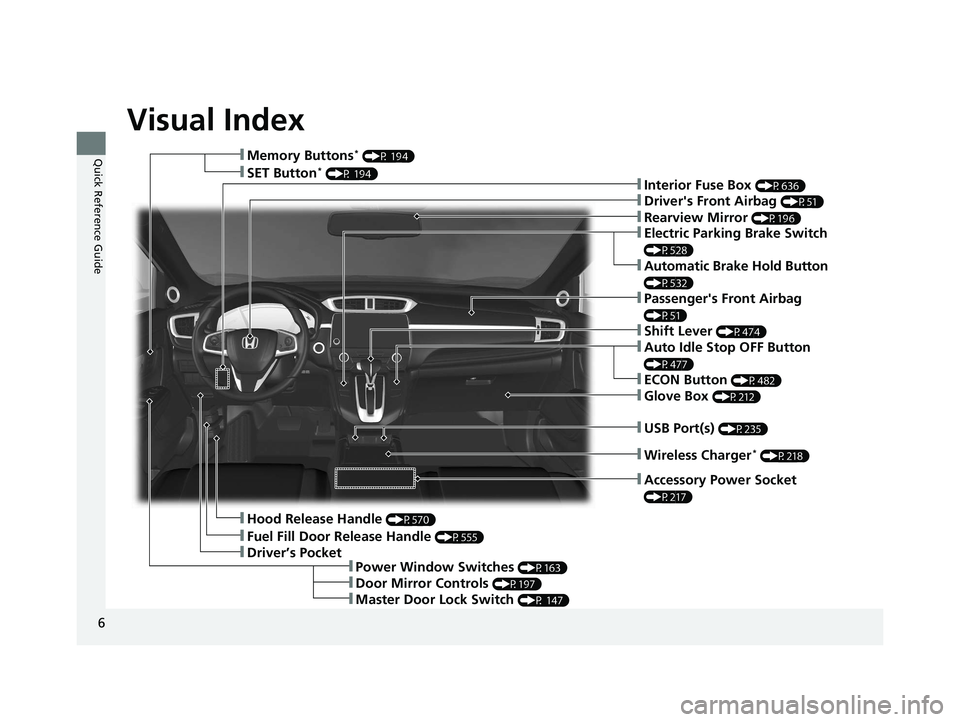
Visual Index
6
Quick Reference Guide
❚Rearview Mirror (P196)
❚Driver's Front Airbag (P51)
❚Hood Release Handle (P570)
❚Driver’s Pocket
❚Fuel Fill Door Release Handle (P555)
❚Memory Buttons* (P 194)
❚Interior Fuse Box (P636)❚SET Button* (P 194)
❚Power Window Switches (P163)
❚Door Mirror Controls (P197)
❚Master Door Lock Switch (P 147)
❚Electric Parking Brake Switch
(P528)
❚Automatic Brake Hold Button
(P532)
❚Shift Lever (P474)
❚Auto Idle Stop OFF Button
(P477)
❚ECON Button (P482)
❚Wireless Charger* (P218)
❚Passenger's Front Airbag
(P51)
❚Accessory Power Socket
(P217)
❚USB Port(s) (P235)
❚Glove Box (P212)
20 CR-V PET ELP_MAP_HMIN_HCM_J-31TLA6310.book 6 ページ 2019年10月3日 木曜日 午後4時55分
Page 10 of 671
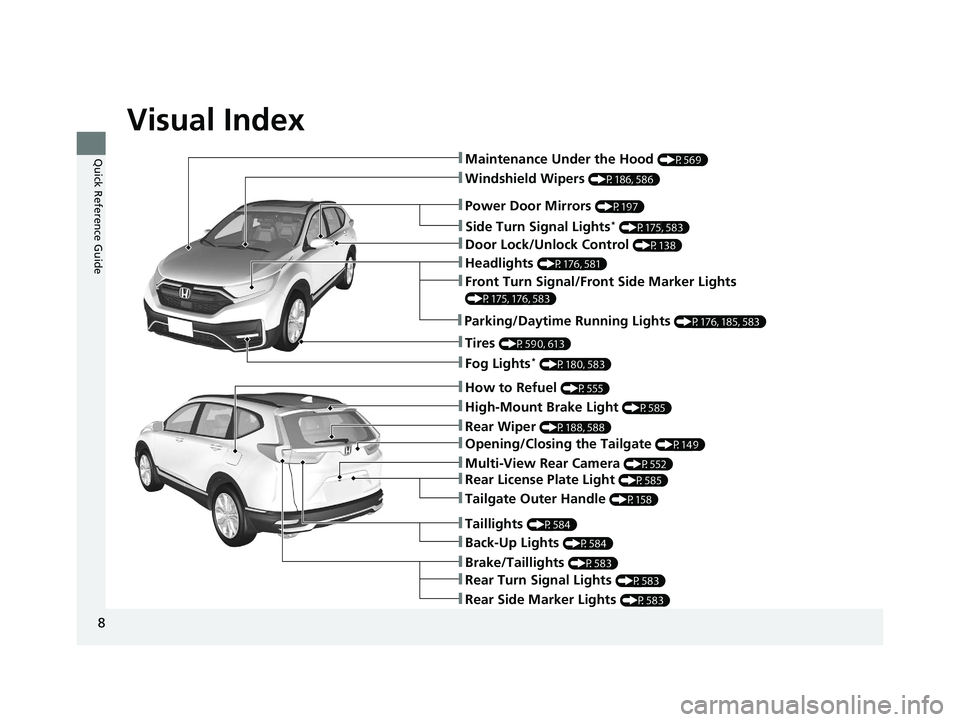
Visual Index
8
Quick Reference Guide
❚Windshield Wipers (P186, 586)
❚Door Lock/Unlock Control (P138)
❚How to Refuel (P555)
❚High-Mount Brake Light (P585)
❚Rear Wiper (P188, 588)
❚Brake/Taillights (P583)
❚Power Door Mirrors (P197)
❚Maintenance Under the Hood (P569)
❚Fog Lights* (P180, 583)
❚Multi-View Rear Camera (P552)
❚Front Turn Signal/Front Side Marker Lights
(P175, 176, 583)
❚Tires (P590, 613)
❚Opening/Closing the Tailgate (P149)
❚Side Turn Signal Lights* (P175, 583)
❚Headlights (P176, 581)
❚Taillights (P584)
❚Rear Turn Signal Lights (P583)
❚Rear Side Marker Lights (P583)
❚Back-Up Lights (P584)
❚Rear License Plate Light (P585)
❚Parking/Daytime Running Lights (P176, 185, 583)
❚Tailgate Outer Handle (P158)
20 CR-V PET ELP_MAP_HMIN_HCM_J-31TLA6310.book 8 ページ 2019年10月3日 木曜日 午後4時55分
Page 14 of 671
12
Quick Reference Guide
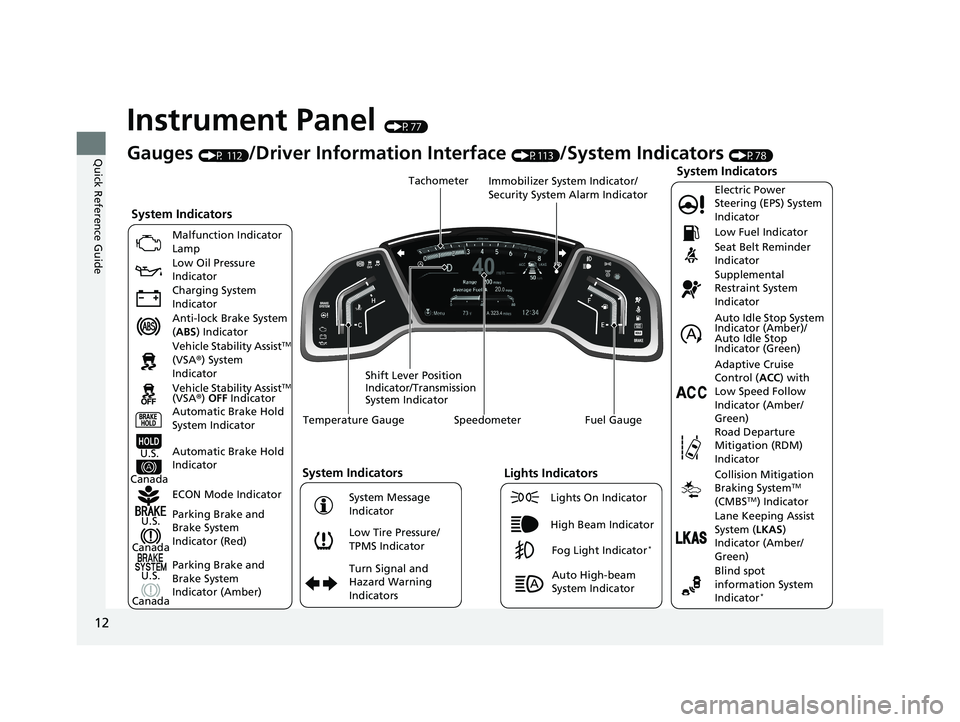
Instrument Panel (P77)
Gauges (P 112)/Driver Information Interface (P113)/System Indicators (P78)
U.S.
Canada
System Indicators
Malfunction Indicator
Lamp
Low Oil Pressure
Indicator
Charging System
Indicator
Anti-lock Brake System
( ABS ) Indicator
Vehicle Stability Assist
TM
(VSA® ) System
Indicator
Parking Brake and
Brake System
Indicator (Red) ECON Mode Indicator
Parking Brake and
Brake System
Indicator (Amber)
U.S.
Canada Automatic Brake Hold
System Indicator
Automatic Brake Hold
IndicatorU.S.
Canada Vehicle Stability Assist
TM
(VSA® ) OFF Indicator
Speedometer Fuel Gauge
Shift Lever Position
Indicator/Transmission
System Indicator Immobilizer System Indicator/
Security System Alarm Indicator
Temperature Gauge Tachometer
Low Tire Pressure/
TPMS Indicator
Turn Signal and
Hazard Warning
Indicators
System Indicators
System Message
Indicator
Lights Indicators
Lights On Indicator
High Beam Indicator
Fog Light Indicator*
Auto High-beam
System Indicator
Electric Power
Steering (EPS) System
Indicator
Seat Belt Reminder
Indicator
System Indicators
Supplemental
Restraint System
Indicator Low Fuel Indicator
Adaptive Cruise
Control (
ACC) with
Low Speed Follow
Indicator (Amber/
Green)
Collision Mitigation
Braking SystemTM
(CMBSTM) Indicator
Road Departure
Mitigation (RDM)
Indicator
Lane Keeping Assist
System ( LKAS)
Indicator (Amber/
Green) Auto Idle Stop System
Indicator (Amber)/
Auto Idle Stop
Indicator (Green)
Blind spot
information System
Indicator
*
20 CR-V PET ELP_MAP_HMIN_HCM_J-31TLA6310.book 12 ページ 2019年10月3日 木曜日 午後4時55分
Page 15 of 671
13
Quick Reference Guide
Controls (P131)
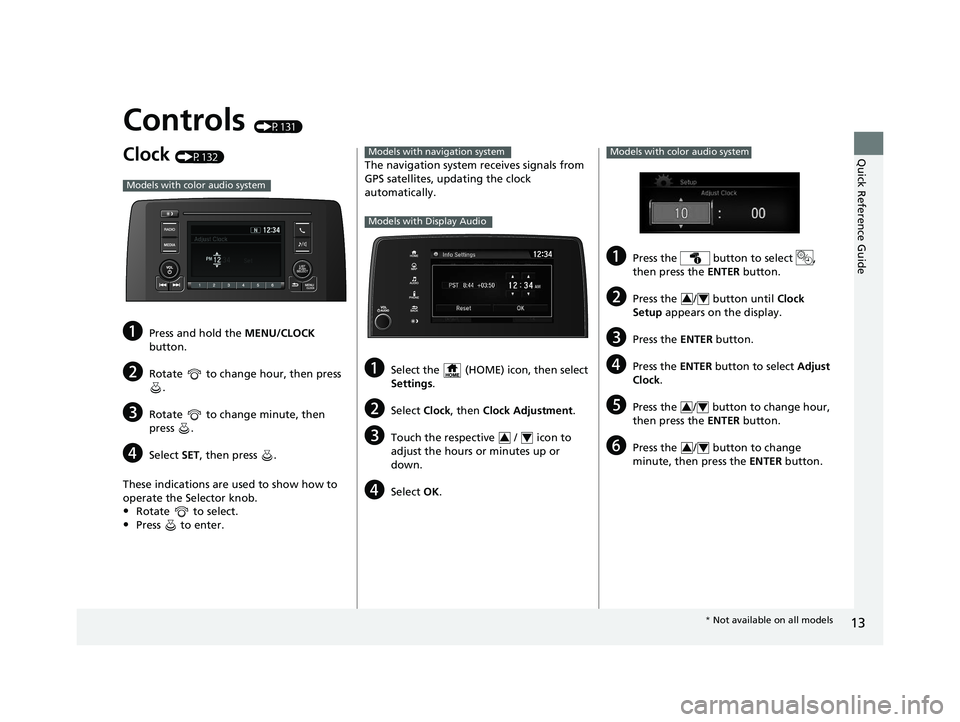
Clock (P132)
aPress and hold the MENU/CLOCK
button.
bRotate to change hour, then press .
cRotate to change minute, then
press .
dSelect SET, then press .
These indications are used to show how to
operate the Selector knob.
•Rotate to select.
•Press to enter.
Models with color audio system
The navigation system receives signals from
GPS satellites, updating the clock
automatically.
aSelect the (HOME) icon, then select
Settings .
bSelect Clock, then Clock Adjustment .
cTouch the respective / icon to
adjust the hours or minutes up or
down.
dSelect OK.
Models with navigation system
Models with Display Audio
34
aPress the button to select ,
then press the ENTER button.
bPress the / button until Clock
Setup appears on the display.
cPress the ENTER button.
dPress the ENTER button to select Adjust
Clock .
ePress the / button to change hour,
then press the ENTER button.
fPress the / button to change
minute, then press the ENTER button.
Models with color audio system
34
34
34
* Not available on all models
20 CR-V PET ELP_MAP_HMIN_HCM_J-31TLA6310.book 13 ページ 2019年10月3日 木曜日 午後4時55分
Page 17 of 671
15
Quick Reference Guide
AUTO should always be turned OFF before
the following situations in order to prevent
severe damage to the wiper system:
●Cleaning the windshield●Driving through a car wash●No rain present
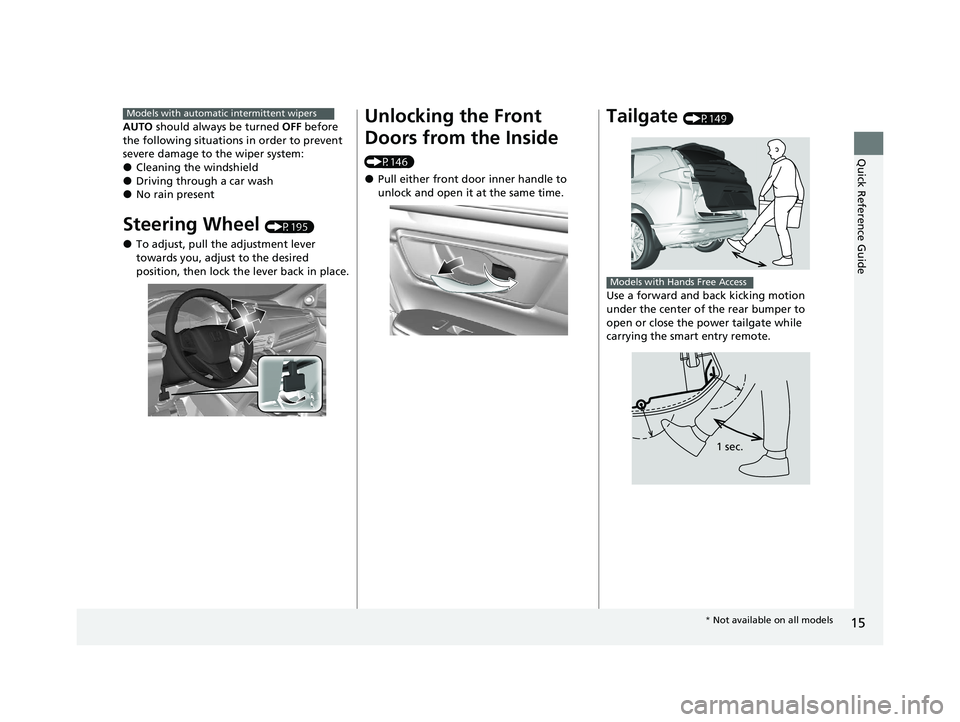
Steering Wheel (P195)
●To adjust, pull the adjustment lever
towards you, adjust to the desired
position, then lock the lever back in place.
Models with automatic intermittent wipersUnlocking the Front
Doors from the Inside
(P146)
●Pull either front door inner handle to
unlock and open it at the same time.
Tailgate (P149)
Use a forward and back kicking motion
under the center of the rear bumper to
open or close the power tailgate while
carrying the smart entry remote.
Models with Hands Free Access
1 sec.
* Not available on all models
20 CR-V PET ELP_MAP_HMIN_HCM_J-31TLA6310.book 15 ページ 2019年10月3日 木曜日 午後4時55分
Page 18 of 671
16
Quick Reference Guide
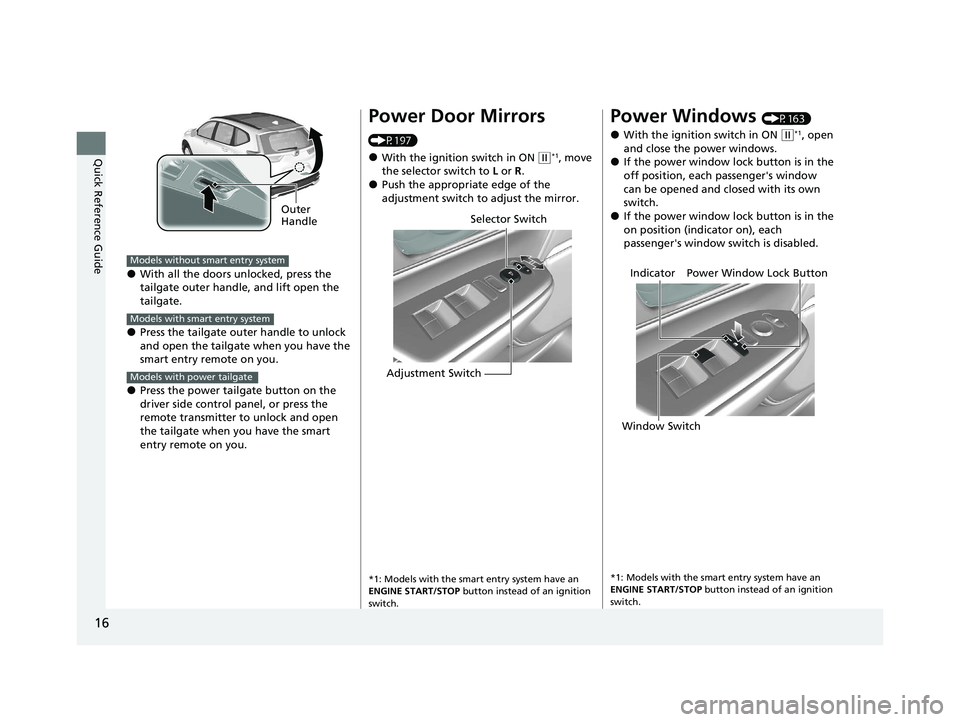
●With all the doors unlocked, press the
tailgate outer handle, and lift open the
tailgate.
●Press the tailgate outer handle to unlock
and open the tailgate when you have the
smart entry remote on you.
●Press the power tailgate button on the
driver side control panel, or press the
remote transmitter to unlock and open
the tailgate when you have the smart
entry remote on you.
Outer
Handle
Models without smart entry system
Models with smart entry system
Models with power tailgate
Power Door Mirrors
(P197)
●With the ignition switch in ON (w*1, move
the selector switch to L or R .
●Push the appropriate edge of the
adjustment switch to adjust the mirror.
*1: Models with the smart entry system have an
ENGINE START/STOP button instead of an ignition
switch.
Selector Switch
Adjustment Switch
Power Windows (P163)
●With the ignition switch in ON ( w*1, open
and close the power windows.
●If the power window lock button is in the
off position, each passenger's window
can be opened and closed with its own
switch.
●If the power window lock button is in the
on position (indicator on), each
passenger's window switch is disabled.
*1: Models with the smart entry system have an
ENGINE START/STOP button instead of an ignition
switch.
Power Window Lock Button
Window Switch Indicator
20 CR-V PET ELP_MAP_HMIN_HCM_J-31TLA6310.book 16 ページ 2019年10月3日 木曜日 午後4時55分
Page 23 of 671
21
Quick Reference Guide
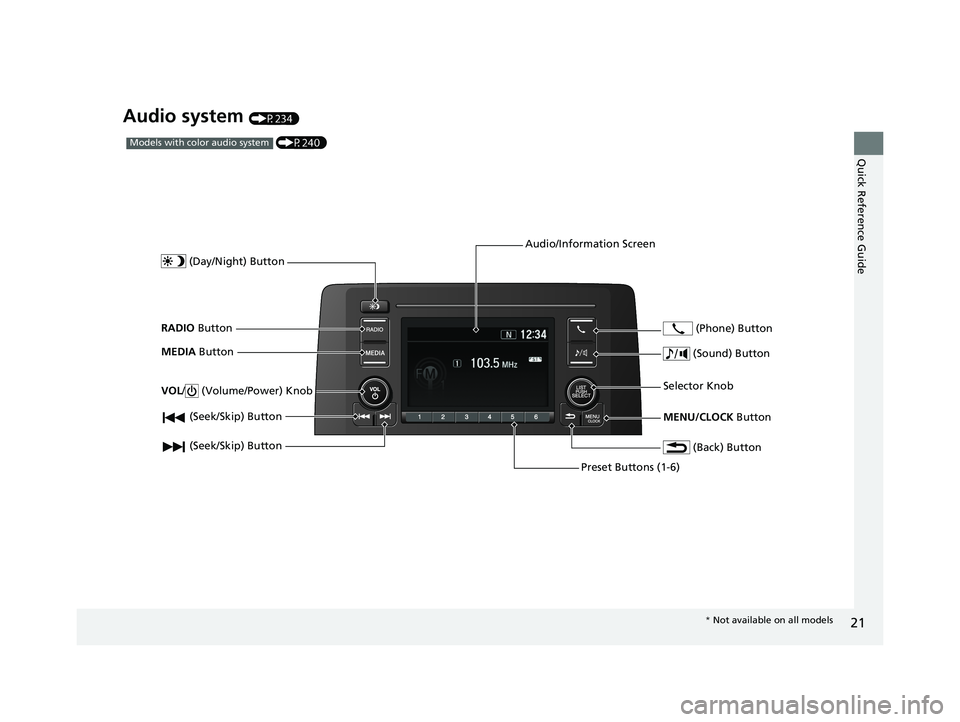
Audio system (P234)
(P240)Models with color audio system
(Seek/Skip) Button
RADIO Button
(Day/Night) Button
MEDIA Button
Preset Buttons (1-6)
(Seek/Skip) Button
VOL
/ (Volume/Power) Knob
Audio/Information Screen
(Back) Button
(Sound) Button
MENU/CLOCK Button
Selector Knob (Phone) Button
*
Not available on all models
20 CR-V PET ELP_MAP_HMIN_HCM_J-31TLA6310.book 21 ページ 2019年10月3日 木曜日 午後4時55分
Page 25 of 671
23
Quick Reference Guide
Driving (P451)
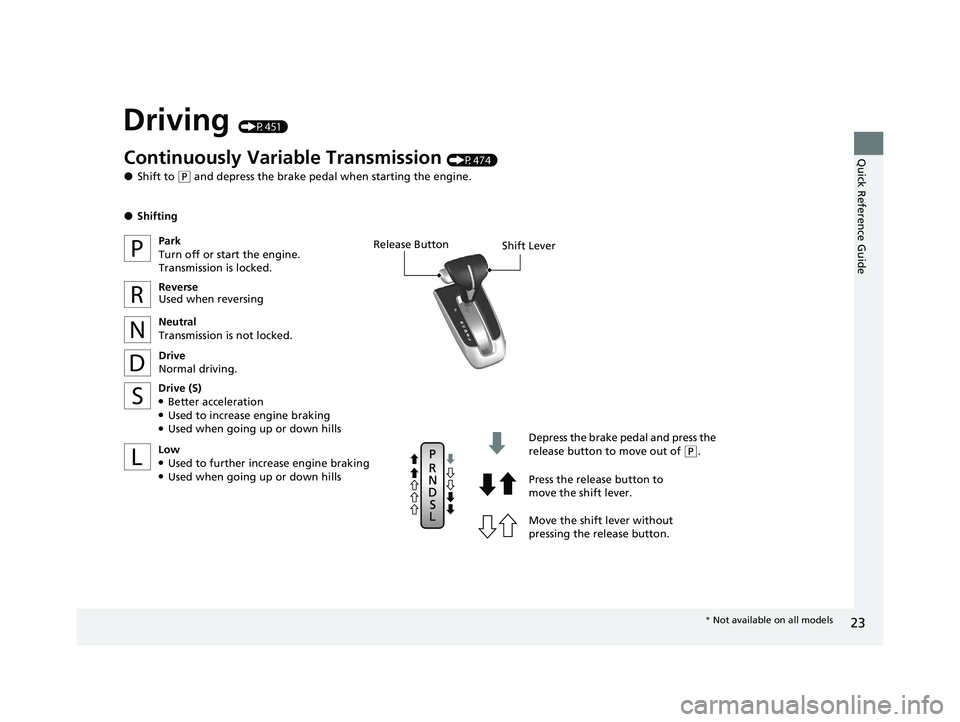
Release ButtonShift Lever
Depress the brake pedal and press the
release button to move out of
(P.
Move the shift lever without
pressing the release button. Press the release button to
move the shift lever.
Continuously Variable Transmission (P474)
●Shift to ( P and depress the brake pedal when starting the engine.
●Shifting
Park
Turn off or start the engine.
Transmission is locked.
Reverse
Used when reversing
Neutral
Transmission is not locked.
Drive
Normal driving.
Drive (S)
●Better acceleration●Used to increase engine braking●Used when going up or down hills
Low
●Used to further increase engine braking●Used when going up or down hills
* Not available on all models
20 CR-V PET ELP_MAP_HMIN_HCM_J-31TLA6310.book 23 ページ 2019年10月3日 木曜日 午後4時55分
Page 29 of 671
27
Quick Reference Guide
Maintenance (P559)
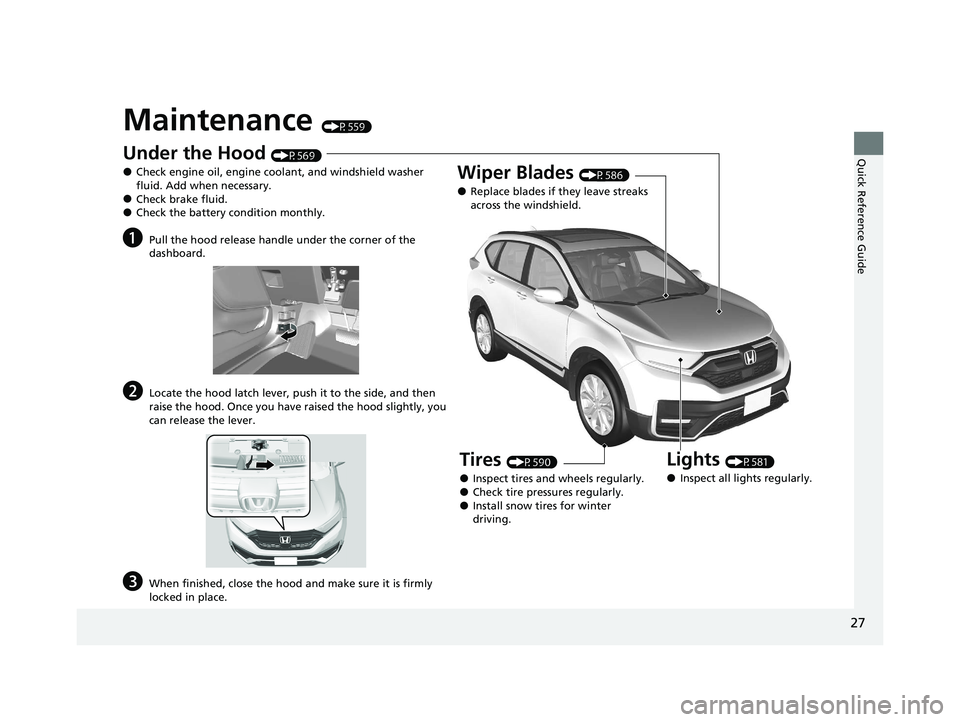
Under the Hood (P569)
●Check engine oil, engine coolant, and windshield washer
fluid. Add when necessary.
●Check brake fluid.●Check the battery condition monthly.
aPull the hood release handle under the corner of the
dashboard.
bLocate the hood latch lever, push it to the side, and then
raise the hood. Once you have raised the hood slightly, you
can release the lever.
cWhen finished, close the hood and make sure it is firmly
locked in place.
Lights (P581)
●Inspect all lights regularly.
Wiper Blades (P586)
●Replace blades if they leave streaks
across the windshield.
Tires (P590)
●Inspect tires and wheels regularly.●Check tire pressures regularly.●Install snow tires for winter
driving.
20 CR-V PET ELP_MAP_HMIN_HCM_J-31TLA6310.book 27 ページ 2019年10月3日 木曜日 午後4時55分