instrument panel HONDA CR-V 2021 (in English) Repair Manual
[x] Cancel search | Manufacturer: HONDA, Model Year: 2021, Model line: CR-V, Model: HONDA CR-V 2021Pages: 690, PDF Size: 42.09 MB
Page 142 of 690
141
uuGauges and Driver Information Interface uDriver Information Interface
Continued
Instrument Panel
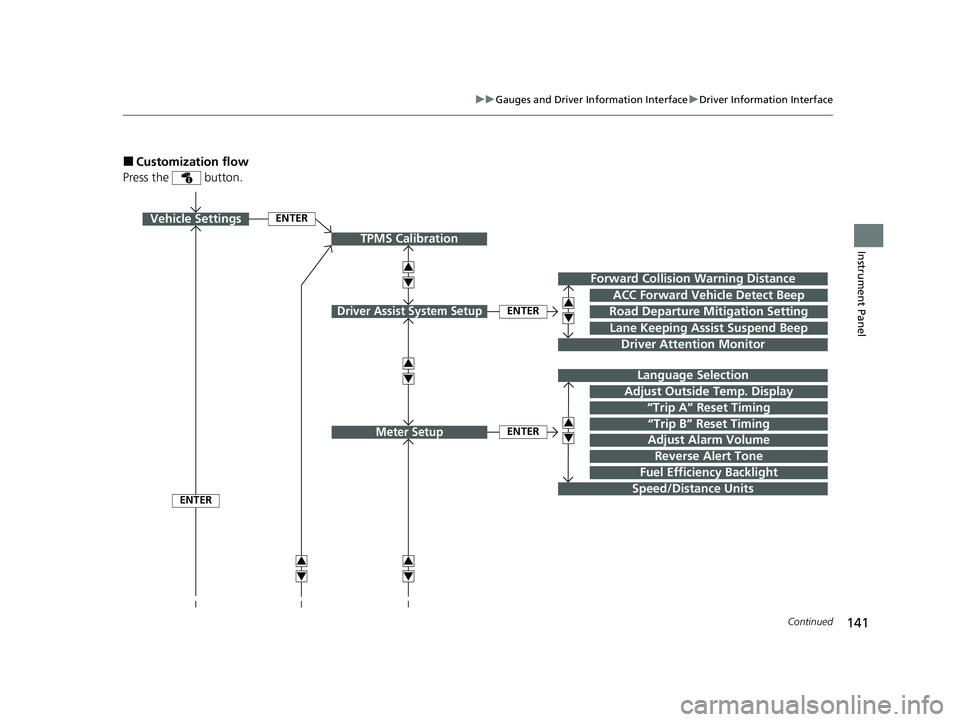
■Customization flow
Press the button.
ENTER
TPMS Calibration
Vehicle Settings
Lane Keeping Assist Suspend Beep
Forward Collision Warning Distance
Road Departure Mitigation Setting
Driver Attention Monitor
Driver Assist System SetupENTER
ACC Forward Vehicle Detect Beep
“Trip B” Reset Timing
Language Selection
“Trip A” Reset Timing
Adjust Alarm Volume
Speed/Distance Units
Reverse Alert Tone
Meter SetupENTER
Adjust Outside Temp. Display
3
4
3
4
3
4
3
4
3
4
3
4
ENTER
Fuel Efficiency Backlight
21 CR-V HYBRID HMIN-31TPG6100.book 141 ページ 2020年9月14日 月曜日 午前11時36分
Page 143 of 690
142
uuGauges and Driver Information Interface uDriver Information Interface
Instrument Panel
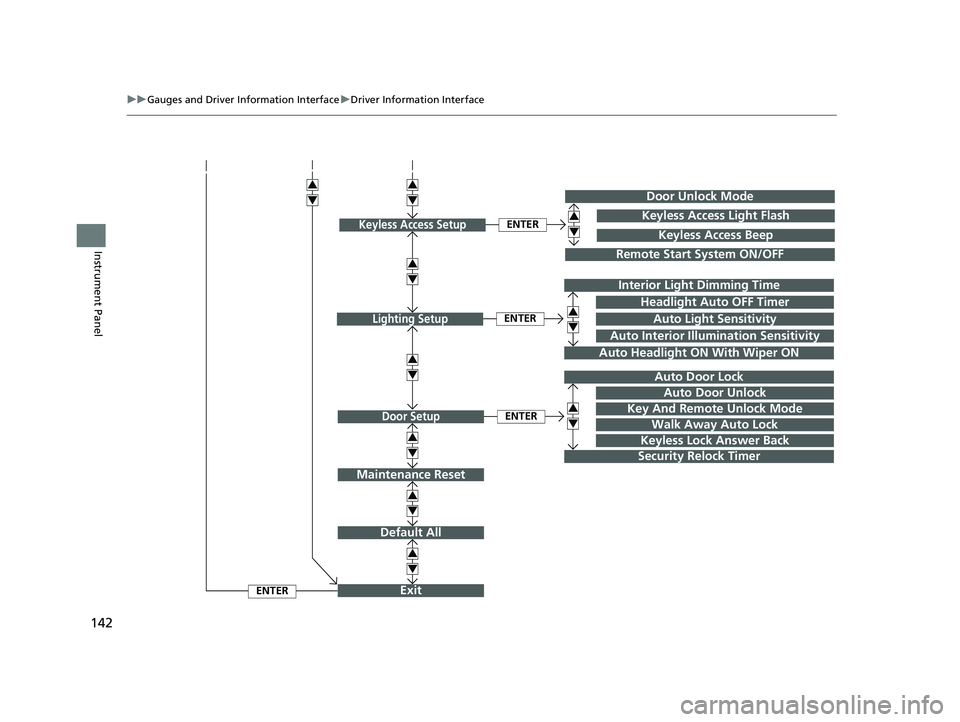
Exit
Default All
Auto Door Lock
Walk Away Auto Lock
Security Relock Timer
Headlight Auto OFF Timer
Auto Headlight ON With Wiper ON
ENTER
ENTER
Lighting Setup
Door Setup
ENTER
Auto Interior Illumination Sensitivity
Door Unlock Mode
Remote Start System ON/OFF
ENTERKeyless Access SetupKeyless Access Light Flash
Keyless Access Beep
3
4
3
4
3
4
3
4
3
4
3
4
3
4Interior Light Dimming Time
Auto Light Sensitivity
Key And Remote Unlock Mode
Keyless Lock Answer Back
Auto Door Unlock
Maintenance Reset
3
4
3
4
3
4
21 CR-V HYBRID HMIN-31TPG6100.book 142 ページ 2020年9月14日 月曜日 午前11時36分
Page 144 of 690
143
uuGauges and Driver Information Interface uDriver Information Interface
Continued
Instrument Panel
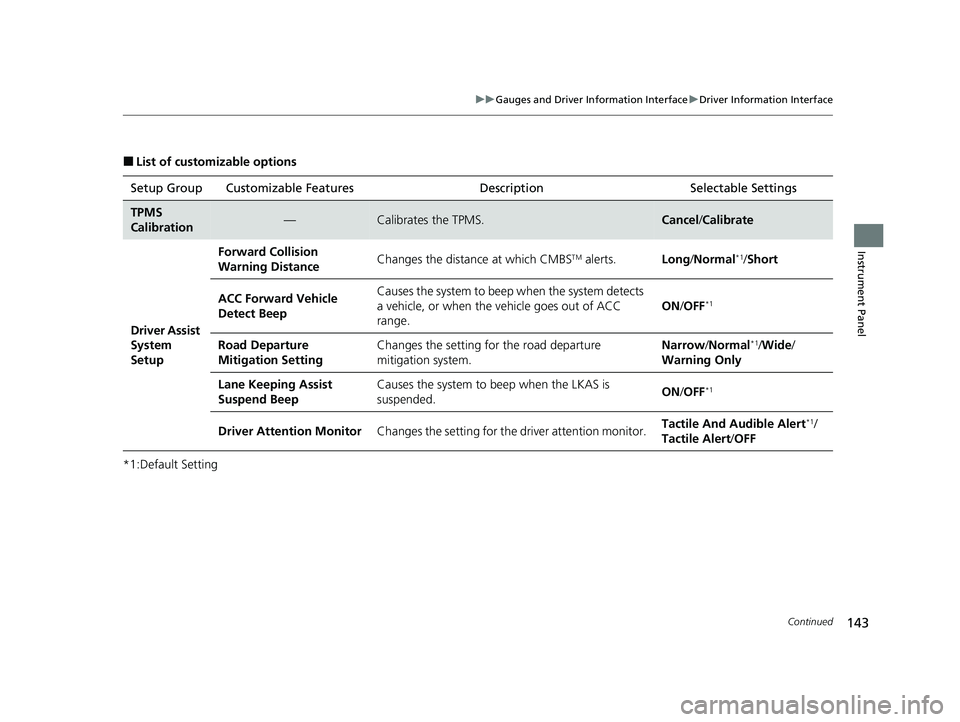
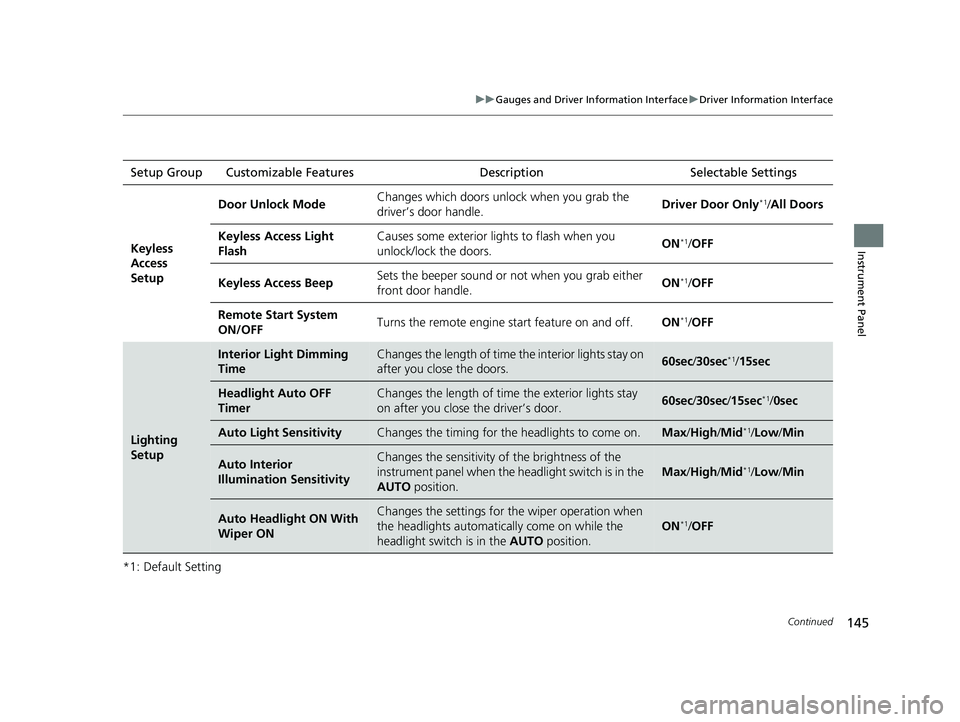
■List of customizable options
*1:Default Setting Setup Group Customizable Features
Description Selectable Settings
TPMS
Calibration—Calibrates the TPMS.Cancel/Calibrate
Driver Assist
System
Setup
Forward Collision
Warning DistanceChanges the distance at which CMBSTM alerts.Long /Normal*1/ Short
ACC Forward Vehicle
Detect BeepCauses the system to beep when the system detects
a vehicle, or when the vehicle goes out of ACC
range.
ON /OFF*1
Road Departure
Mitigation SettingChanges the setting fo r the road departure
mitigation system.Narrow/ Normal*1/Wide /
Warning Only
Lane Keeping Assist
Suspend BeepCauses the system to b eep when the LKAS is
suspended.ON /OFF*1
Driver Attention MonitorChanges the setting for the driver attention monitor.Tactile And Audible Alert*1/
Tactile Alert /OFF
21 CR-V HYBRID HMIN-31TPG6100.book 143 ページ 2020年9月14日 月曜日 午前11時36分
Page 145 of 690
144
uuGauges and Driver Information Interface uDriver Information Interface
Instrument Panel
*1:Default SettingSetup Group Customizable Features
Description Selectable Settings
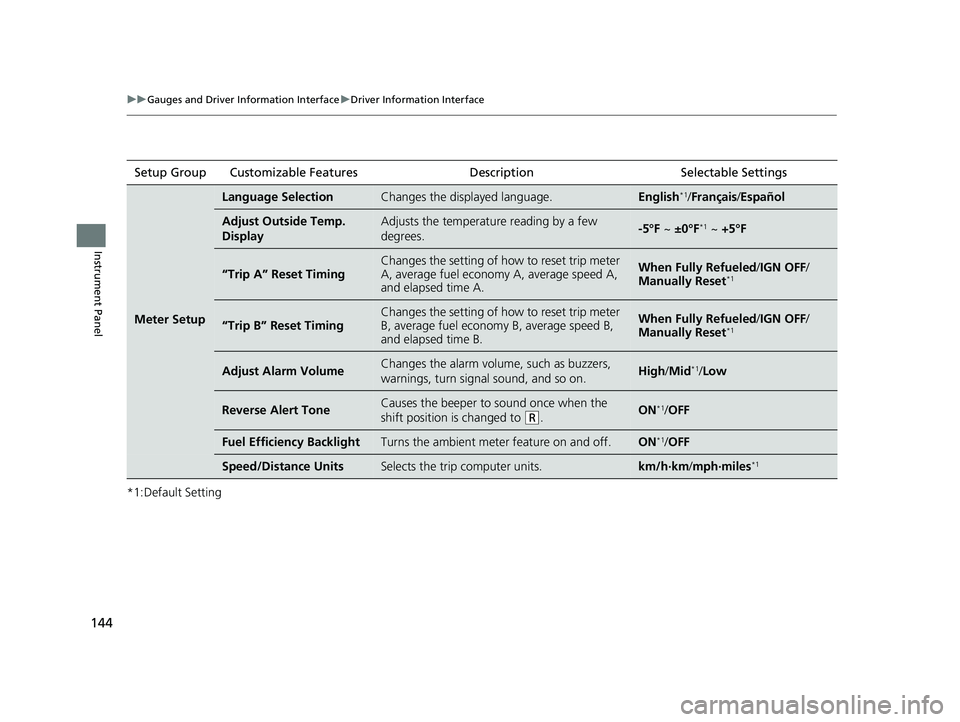
Meter Setup
Language SelectionChanges the displayed language.English*1/Français /Español
Adjust Outside Temp.
DisplayAdjusts the temperature reading by a few
degrees.-5°F ~ ±0°F*1 ~ +5°F
“Trip A” Reset TimingChanges the setting of how to reset trip meter
A, average fuel economy A, average speed A,
and elapsed time A.When Fully Refueled /IGN OFF /
Manually Reset*1
“Trip B” Reset Timing
Changes the setting of how to reset trip meter
B, average fuel economy B, average speed B,
and elapsed time B.When Fully Refueled /IGN OFF /
Manually Reset*1
Adjust Alarm VolumeChanges the alarm volume, such as buzzers,
warnings, turn signal sound, and so on.High /Mid*1/Low
Reverse Alert ToneCauses the beeper to sound once when the
shift position is changed to
(R.ON*1/OFF
Fuel Efficien cy BacklightTurns the ambient meter feature on and off.ON*1/OFF
Speed/Distance UnitsSelects the trip computer units.km/h∙km /mph∙miles*1
21 CR-V HYBRID HMIN-31TPG6100.book 144 ページ 2020年9月14日 月曜日 午前11時36分
Page 146 of 690
145
uuGauges and Driver Information Interface uDriver Information Interface
Continued
Instrument Panel
*1: Default SettingSetup Group Customizable Features
Description Selectable Settings
Keyless
Access
Setup
Door Unlock ModeChanges which doors unlock when you grab the
driver’s door handle.Driver Door Only*1/All Doors
Keyless Access Light
FlashCauses some exterior li ghts to flash when you
unlock/lock the doors.ON*1/ OFF
Keyless Access BeepSets the beeper sound or not when you grab either
front door handle.ON*1/OFF
Remote Start System
ON/OFFTurns the remote engine start feature on and off.ON*1/OFF
Lighting
Setup
Interior Light Dimming
TimeChanges the length of time the interior lights stay on
after you close the doors.60sec /30sec*1/15sec
Headlight Auto OFF
TimerChanges the length of time the exterior lights stay
on after you close the driver’s door.60sec /30sec /15sec*1/ 0sec
Auto Light SensitivityChanges the timing for th e headlights to come on.Max/High /Mid*1/Low /Min
Auto Interior
Illumination SensitivityChanges the sensitivity of the brightness of the
instrument panel when the headlight switch is in the
AUTO position.
Max/High /Mid*1/Low /Min
Auto Headlight ON With
Wiper ONChanges the settings for th e wiper operation when
the headlights automatica lly come on while the
headlight switch is in the AUTO position.
ON*1/OFF
21 CR-V HYBRID HMIN-31TPG6100.book 145 ページ 2020年9月14日 月曜日 午前11時36分
Page 147 of 690
146
uuGauges and Driver Information Interface uDriver Information Interface
Instrument Panel
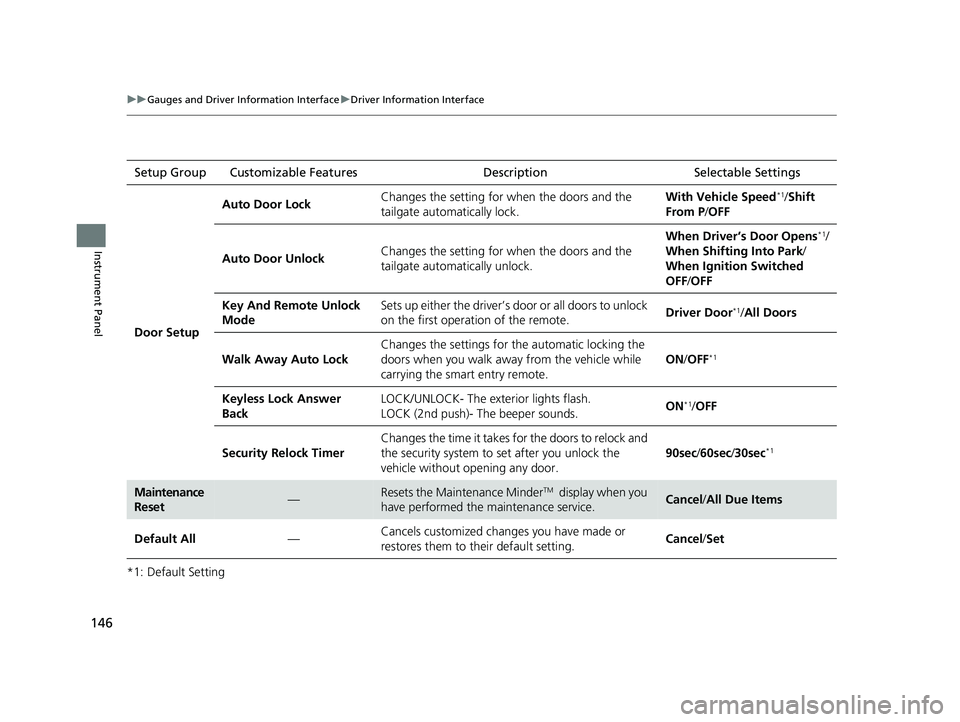
*1: Default SettingSetup Group Customizable Features Description Selectable Settings
Door Setup
Auto Door LockChanges the setting for when the doors and the
tailgate automatically lock.With Vehicle Speed*1/
Shift
From P /OFF
Auto Door UnlockChanges the setting for when the doors and the
tailgate automatically unlock.
When Driver’s Door Opens*1/
When Shifting Into Park/
When Ignition Switched
OFF /OFF
Key And Remote Unlock
ModeSets up either the driver’s door or all doors to unlock
on the first operation of the remote.Driver Door*1/ All Doors
Walk Away Auto Lock
Changes the settings for the automatic locking the
doors when you walk away from the vehicle while
carrying the smart entry remote.
ON /OFF*1
Keyless Lock Answer
BackLOCK/UNLOCK- The exterior lights flash.
LOCK (2nd push)- The beeper sounds.ON*1/OFF
Security Relock Timer
Changes the time it takes for the doors to relock and
the security system to set after you unlock the
vehicle without opening any door.
90sec /60sec /30sec*1
Maintenance
Reset—Resets the Maintenance MinderTM display when you
have performed the maintenance service.Cancel /All Due Items
Default All—Cancels customized changes you have made or
restores them to their default setting.Cancel /Set
21 CR-V HYBRID HMIN-31TPG6100.book 146 ページ 2020年9月14日 月曜日 午前11時36分
Page 148 of 690
147
uuGauges and Driver Information Interface uDriver Information Interface
Continued
Instrument Panel
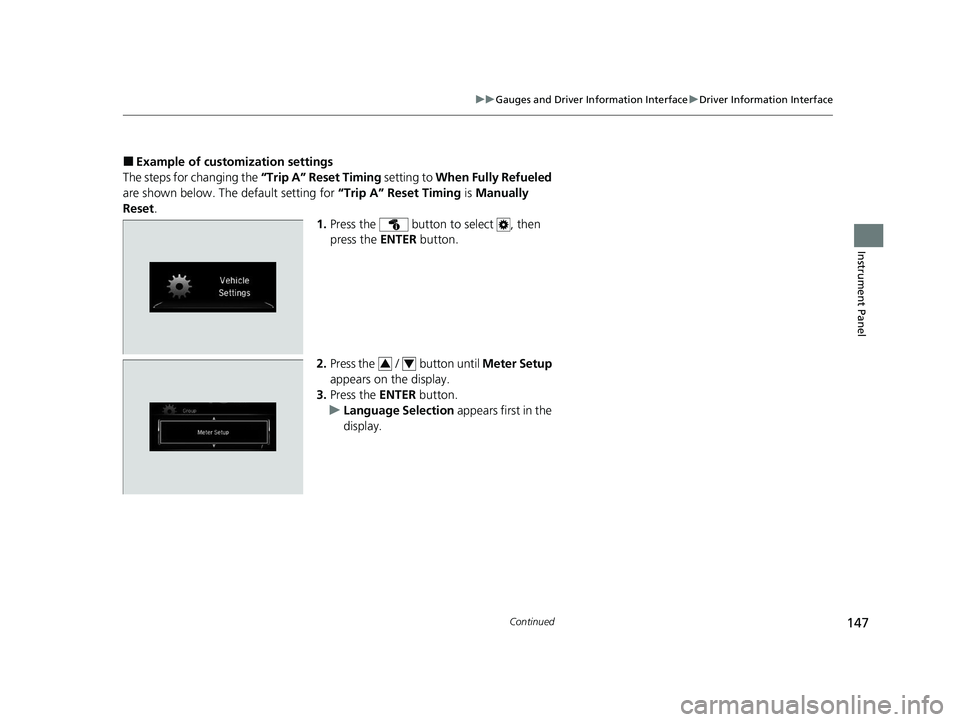
■Example of customization settings
The steps for changing the “Trip A” Reset Timing setting to When Fully Refueled
are shown below. The default setting for “Trip A” Reset Timing is Manually
Reset .
1.Press the button to select , then
press the ENTER button.
2. Press the / button until Meter Setup
appears on the display.
3. Press the ENTER button.
u Language Selection appears first in the
display.
34
21 CR-V HYBRID HMIN-31TPG6100.book 147 ページ 2020年9月14日 月曜日 午前11時36分
Page 149 of 690
148
uuGauges and Driver Information Interface uDriver Information Interface
Instrument Panel
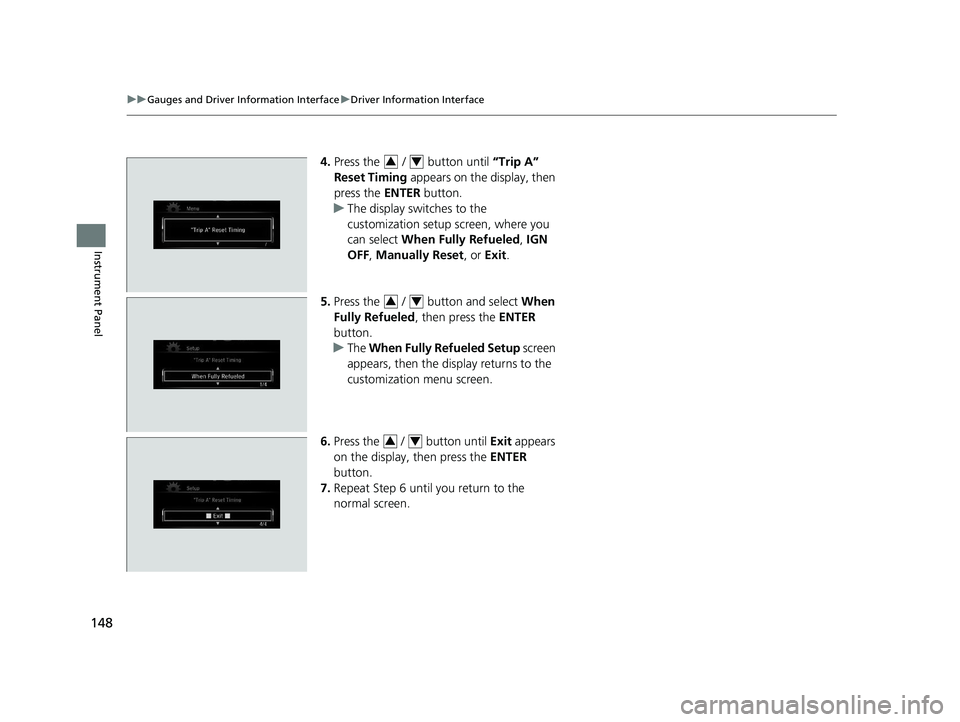
4. Press the / button until “Trip A”
Reset Timing appears on the display, then
press the ENTER button.
u The display switches to the
customization setup screen, where you
can select When Fully Refueled , IGN
OFF , Manually Reset , or Exit .
5. Press the / button and select When
Fully Refueled , then press the ENTER
button.
u The When Fully Refueled Setup screen
appears, then the di splay returns to the
customization menu screen.
6. Press the / button until Exit appears
on the display, then press the ENTER
button.
7. Repeat Step 6 until you return to the
normal screen.34
34
34
21 CR-V HYBRID HMIN-31TPG6100.book 148 ページ 2020年9月14日 月曜日 午前11時36分
Page 179 of 690
uuSecurity System uSecurity System Alarm*
178
Controls
■To deactivate the security system alarm
Unlock the vehicle using the key, remote transmitter or smart entry system, or turn
the power mode is set to ON. The system, along with the horn and flashing lights, is
deactivated.
■Setting the security system alarm
The security system alarm automatically sets when the following conditions have
been met:
• The power mode is set to VEHICLE OFF (LOCK).
• The hood and tailgate are closed.
• All doors and tailgate are locked from outsi de with the key, remote transmitter,
or smart entry system.
■When the security system alarm sets
The security system alarm indicator in the instrument panel blinks and the blinking
interval changes after about 15 seconds.
■To cancel the security system alarm
The security system alarm is canceled when the vehicle is unlocked using the remote
transmitter or smart entry system, or wh en the power mode is set to ON. The
security system alarm indicator goes off at the same time.
1 Security System Alarm*
Do not set the security system alarm when someone
is in the vehicle or a window is open. The system can
accidentally activate when:
•Unlocking the door with the lock tab.•Opening the hood with the hood release handle.
If the 12-volt battery goes dead after you have set the
security system alarm, the security alarm may go off
once the 12-volt battery is recharged or replaced.
If this occurs, deactivate the security system alarm by
unlocking a door using the ke y, remote transmitter,
or smart entry system.
Do not alter the system or add other devices to it.
Doing so may damage the system and make your
vehicle inoperable.
* Not available on all models
21 CR-V HYBRID HMIN-31TPG6100.book 178 ページ 2020年9月14日 月曜日 午前11時36分
Page 188 of 690
187
uuOperating the Switches Around the Steering Wheel uPOWER Button
Controls
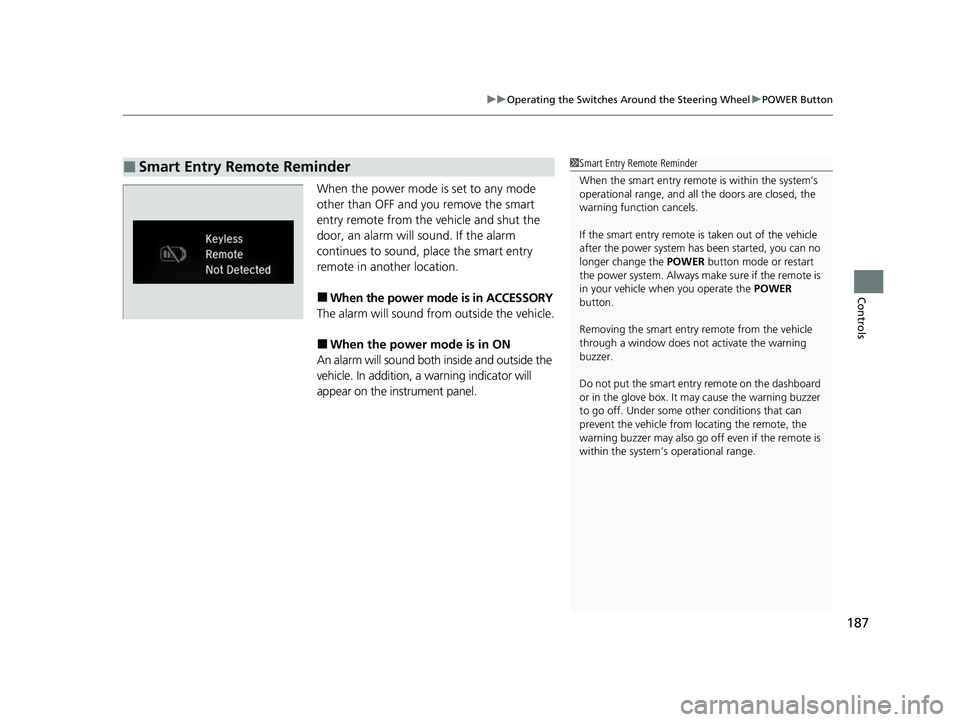
When the power mode is set to any mode
other than OFF and you remove the smart
entry remote from the vehicle and shut the
door, an alarm will sound. If the alarm
continues to sound, place the smart entry
remote in another location.
■When the power mode is in ACCESSORY
The alarm will sound from outside the vehicle.
■When the power mode is in ON
An alarm will sound both inside and outside the
vehicle. In addition, a warning indicator will
appear on the instrument panel.
■Smart Entry Remote Reminder1 Smart Entry Remote Reminder
When the smart entry remote is within the system’s
operational range, and all the doors are closed, the
warning function cancels.
If the smart entry remote is taken out of the vehicle
after the power system has been started, you can no
longer change the POWER button mode or restart
the power system. Always make sure if the remote is
in your vehicle when you operate the POWER
button.
Removing the smart entry remote from the vehicle
through a window does not activate the warning
buzzer.
Do not put the smart entr y remote on the dashboard
or in the glove box. It may cause the warning buzzer
to go off. Under some other conditions that can
prevent the vehicle from locating the remote, the
warning buzzer may al so go off even if the remote is
within the system’s operational range.
21 CR-V HYBRID HMIN-31TPG6100.book 187 ページ 2020年9月14日 月曜日 午前11時36分