instrument panel HONDA CR-V 2021 (in English) Manual Online
[x] Cancel search | Manufacturer: HONDA, Model Year: 2021, Model line: CR-V, Model: HONDA CR-V 2021Pages: 690, PDF Size: 42.09 MB
Page 287 of 690
uuAudio System Basic Operation uAudio/Information Screen
286
Features
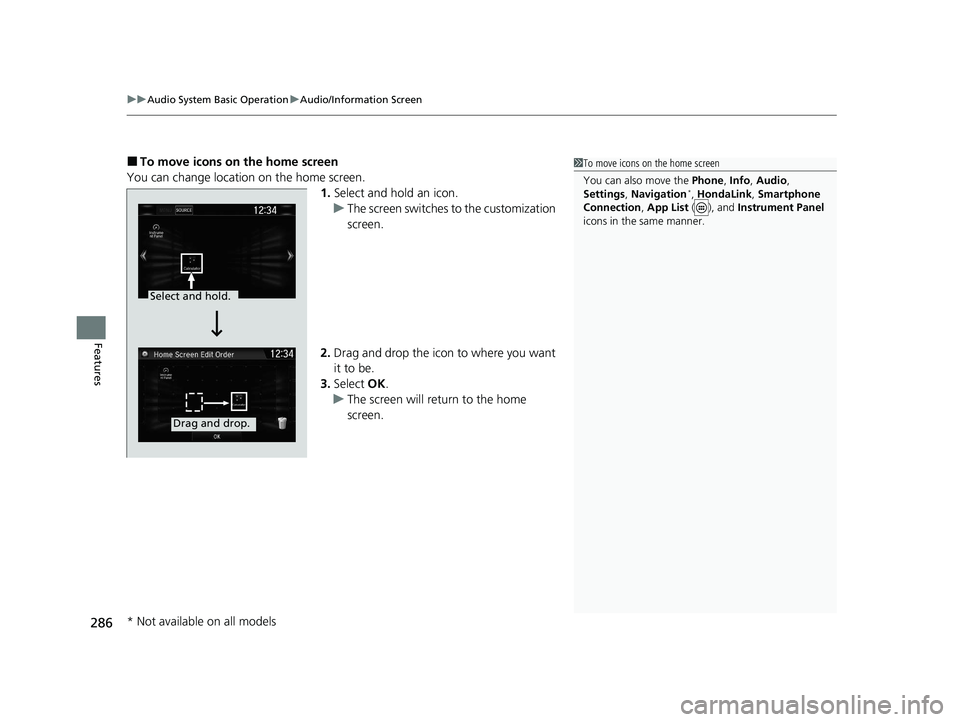
■To move icons on the home screen
You can change location on the home screen. 1.Select and hold an icon.
u The screen switches to the customization
screen.
2. Drag and drop the icon to where you want
it to be.
3. Select OK.
u The screen will return to the home
screen.1To move icons on the home screen
You can also move the Phone, Info, Audio ,
Settings , Navigation
*, HondaLink , Smartphone
Connection , App List ( ), and Instrument Panel
icons in the same manner.
Select and hold.
Drag and drop.
* Not available on all models
21 CR-V HYBRID HMIN-31TPG6100.book 286 ページ 2020年9月14日 月曜日 午前11時36分
Page 288 of 690
Continued287
uuAudio System Basic Operation uAudio/Information Screen
Features
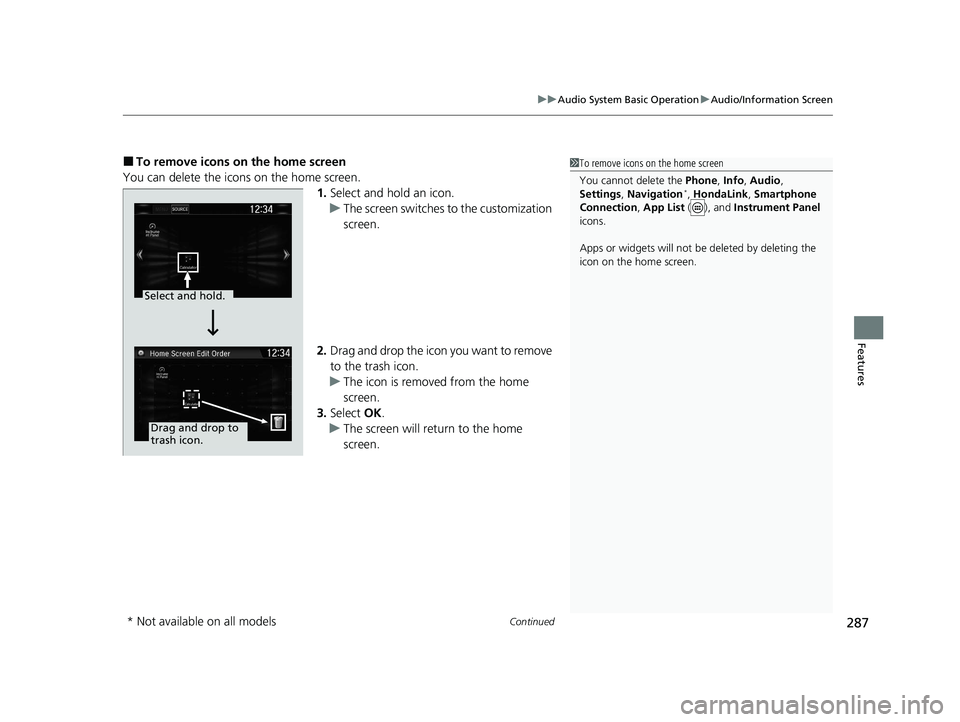
■To remove icons on the home screen
You can delete the icons on the home screen. 1.Select and hold an icon.
u The screen switches to the customization
screen.
2. Drag and drop the icon you want to remove
to the trash icon.
u The icon is removed from the home
screen.
3. Select OK.
u The screen will return to the home
screen.1To remove icons on the home screen
You cannot delete the Phone, Info, Audio ,
Settings , Navigation
*, HondaLink , Smartphone
Connection , App List ( ), and Instrument Panel
icons.
Apps or widgets will not be deleted by deleting the
icon on the home screen.
Select and hold.
Drag and drop to
trash icon.
* Not available on all models
21 CR-V HYBRID HMIN-31TPG6100.book 287 ページ 2020年9月14日 月曜日 午前11時36分
Page 373 of 690
372
uuCustomized Features u
Features
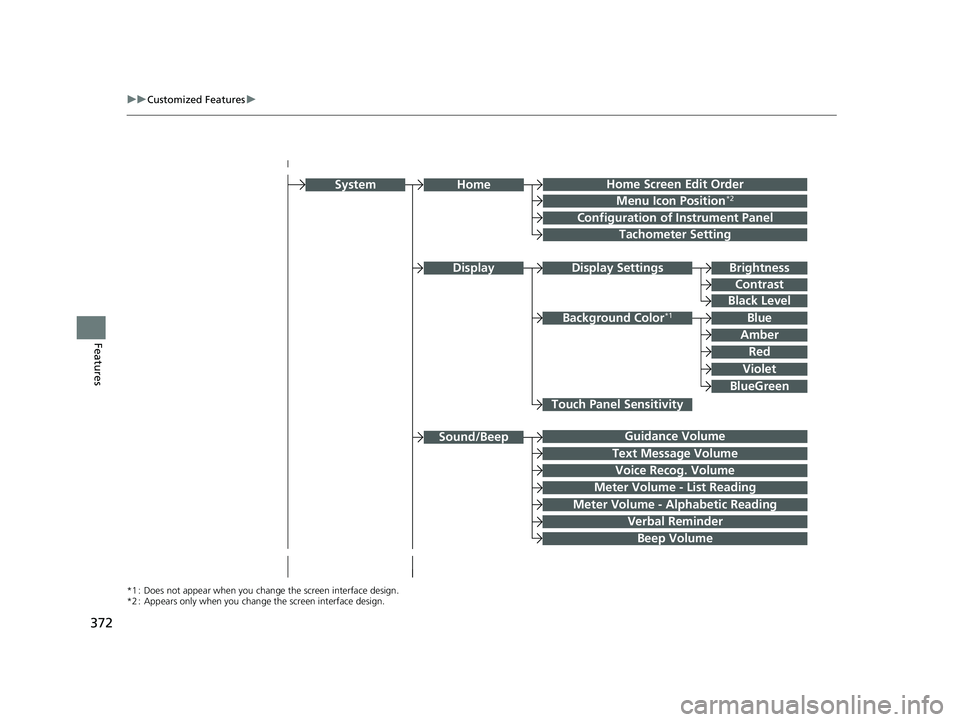
Home Screen Edit Order
Configuration of Instrument Panel
Display Settings
Background Color*1
System
Touch Panel Sensitivity
Brightness
Contrast
Black Level
Blue
Amber
Red
Violet
BlueGreen
Guidance Volume
Text Message Volume
Sound/Beep
Voice Recog. Volume
Verbal Reminder
Beep Volume
Home
Meter Volume - List Reading
Meter Volume - Alphabetic Reading
*1 : Does not appear when you chang e the screen interface design.
*2 : Appears only when you change the screen interface design.
Menu Icon Position*2
Display
Tachometer Setting
21 CR-V HYBRID HMIN-31TPG6100.book 372 ページ 2020年9月14日 月曜日 午前11時36分
Page 384 of 690
383
uuCustomized Features u
Continued
Features
*1:Default Setting
*2:Appears only when you change the screen interface design.Setup
Group Customizable Features Descri
ption Selectable Settings
Audio
BluetoothBluetooth Device List
Pairs a new phone to HFL, edits or deletes a
paired phone.
2Phone Setup P. 429
—
Other
[Your selected media]
Cover ArtTurns the cover art display on and off.On*1/Off
Audio Source Pop-Up
Selects whether the list of selectable audio source
comes on when Audio is selected on the home
screen.
On /Off*1
SoundAdjusts the settings of the audio speakers’ sound.
2 Adjusting the Sound P. 292—
DefaultCancels/Resets all customized items in the Audio
settings group as default.Yes /No
SystemHome
Home Screen Edit OrderChanges the home screen icon layout.—
Menu Icon Position*2Changes the position of the menu icons on the
Audio, Phone, and Info screen.—
Configuration of
Instrument PanelChanges the Instrument Panel screen icon
layout. —
Tachometer SettingNot available on this model—
Bluetooth® mode
iPod or USB mode
21 CR-V HYBRID HMIN-31TPG6100.book 383 ページ 2020年9月14日 月曜日 午前11時36分
Page 391 of 690
390
uuCustomized Features u
Features
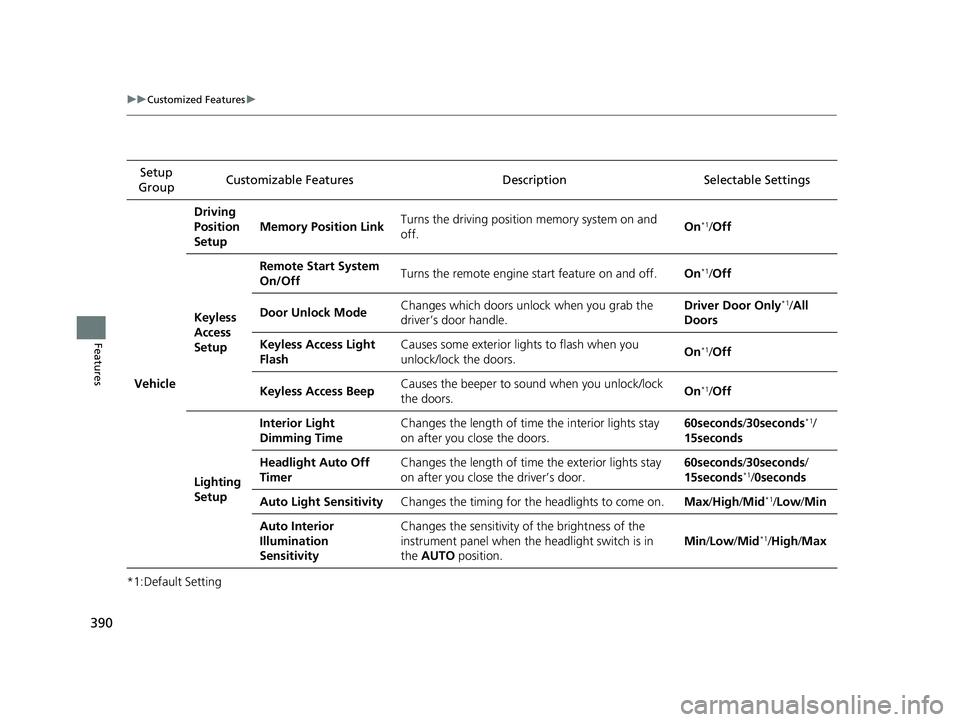
*1:Default SettingSetup
Group Customizable Featur
es Description Selectable Settings
Vehicle
Driving
Position
Setup
Memory Position LinkTurns the driving position memory system on and
off.On*1/Off
Keyless
Access
Setup
Remote Start System
On/OffTurns the remote engine start feature on and off.On*1/Off
Door Unlock ModeChanges which doors unlock when you grab the
driver’s door handle.Driver Door Only*1/All
Doors
Keyless Access Light
FlashCauses some exterior lights to flash when you
unlock/lock the doors.On*1/ Off
Keyless Access BeepCauses the beeper to sound when you unlock/lock
the doors.On*1/Off
Lighting
Setup
Interior Light
Dimming TimeChanges the length of time the interior lights stay
on after you close the doors.60seconds /30seconds*1/
15seconds
Headlight Auto Off
TimerChanges the length of time the exterior lights stay
on after you close the driver’s door.60seconds /30seconds /
15seconds*1/ 0seconds
Auto Light SensitivityChanges the timing for the headlights to come on.Max/High /Mid*1/Low /Min
Auto Interior
Illumination
SensitivityChanges the sensitivity of the brightness of the
instrument panel when the headlight switch is in
the AUTO position.
Min/Low /Mid*1/High/ Max
21 CR-V HYBRID HMIN-31TPG6100.book 390 ページ 2020年9月14日 月曜日 午前11時36分
Page 461 of 690
460
uuBefore Driving uDriving Preparation
Driving
• Be sure items placed on the floor behind the front seats cannot roll under the
seats.
u They can interfere with the driver's ability to operate the pedals, the operation
of the seats, or the operation of the sensors under the seats.
• Everyone in the vehicle must fasten their seat belt.
2Fastening a Seat Belt P. 51
•Make sure that the indicators in the instrument panel come on when you start the
vehicle, and go off soon after.
u Always have a dealer check the vehicle if a problem is indicated.
2 Indicators P. 90
21 CR-V HYBRID HMIN-31TPG6100.book 460 ページ 2020年9月14日 月曜日 午前11時36分
Page 509 of 690
uuHonda Sensing ®u Collision Mitigation Braking SystemTM (CMBSTM)
508
Driving
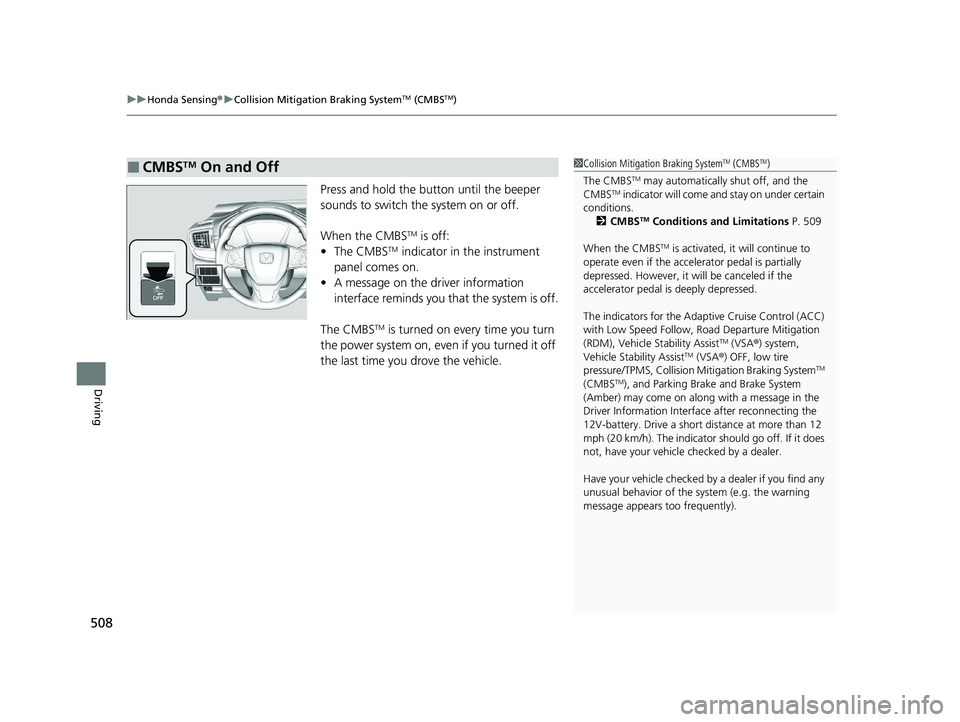
Press and hold the button until the beeper
sounds to switch the system on or off.
When the CMBS
TM is off:
• The CMBSTM indicator in the instrument
panel comes on.
• A message on the driver information
interface reminds you that the system is off.
The CMBS
TM is turned on every time you turn
the power system on, even if you turned it off
the last time you drove the vehicle.
■CMBSTM On and Off1 Collision Mitigation Braking SystemTM (CMBSTM)
The CMBS
TM may automatically shut off, and the
CMBSTM indicator will come and stay on under certain
conditions.
2 CMBS
TM Conditions and Limitations P. 509
When the CMBS
TM is activated, it will continue to
operate even if the accele rator pedal is partially
depressed. However, it w ill be canceled if the
accelerator pedal is deeply depressed.
The indicators for the Adaptive Cruise Control (ACC)
with Low Speed Follow, Road Departure Mitigation
(RDM), Vehicle Stability Assist
TM (VSA ®) system,
Vehicle Stability AssistTM (VSA ®) OFF, low tire
pressure/TPMS, Collision Mitigation Braking SystemTM
(CMBSTM), and Parking Brake and Brake System
(Amber) may come on along with a message in the
Driver Information Interf ace after reconnecting the
12V-battery. Drive a short distance at more than 12
mph (20 km/h). The indicator should go off. If it does
not, have your vehicle checked by a dealer.
Have your vehicle checked by a dealer if you find any
unusual behavior of the system (e.g. the warning
message appears too frequently).
21 CR-V HYBRID HMIN-31TPG6100.book 508 ページ 2020年9月14日 月曜日 午前11時36分
Page 533 of 690
532
uuHonda Sensing ®u Lane Keeping Assist System (LKAS)
Driving
Lane Keeping Assist System (LKAS)
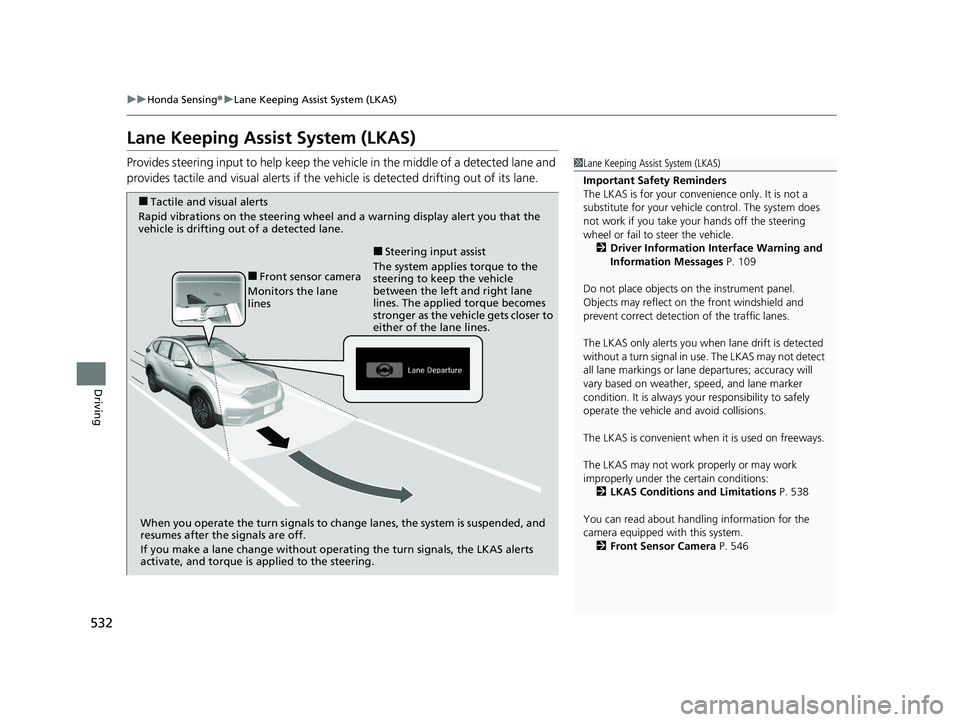
Provides steering input to help keep the vehicle in the middle of a detected lane and
provides tactile and visual alerts if the ve hicle is detected drifting out of its lane.1Lane Keeping Assist System (LKAS)
Important Safety Reminders
The LKAS is for your convenience only. It is not a
substitute for your vehicle control. The system does
not work if you take y our hands off the steering
wheel or fail to steer the vehicle.
2 Driver Information Interface Warning and
Information Messages P. 109
Do not place objects on the instrument panel.
Objects may reflect on th e front windshield and
prevent correct detectio n of the traffic lanes.
The LKAS only alerts you when lane drift is detected
without a turn signal in use. The LKAS may not detect
all lane markings or lane departures; accuracy will
vary based on weather, speed, and lane marker
condition. It is always your responsibility to safely
operate the vehicle an d avoid collisions.
The LKAS is convenient when it is used on freeways.
The LKAS may not work properly or may work
improperly under the certain conditions: 2 LKAS Conditions and Limitations P. 538
You can read about handling information for the
camera equipped with this system. 2 Front Sensor Camera P. 546
■Tactile and visual alerts
Rapid vibrations on the steering wheel and a warning display alert you that the
vehicle is drifting out of a detected lane.
When you operate the turn signals to chan ge lanes, the system is suspended, and
resumes after the signals are off.
If you make a lane change without operat ing the turn signals, the LKAS alerts
activate, and torque is applied to the steering.
■Front sensor camera
Monitors the lane
lines The system applies torque to the
steering to keep the vehicle
between the left and right lane
lines. The applied torque becomes
stronger as the vehicle gets closer to
either of the lane lines.
■Steering input assist
21 CR-V HYBRID HMIN-31TPG6100.book 532 ページ 2020年9月14日 月曜日 午前11時36分
Page 548 of 690
547
uuHonda Sensing ®u Front Sensor Camera
Driving
1Front Sensor Camera
Do not place an object on the top of the instrument
panel. It may reflect onto the windshield and prevent
the system from detecting lane lines properly.
If the Some Driver Assist Systems Cannot
Operate:Camera Temperature Too High :
message appears:
•Use the climate control system to cool down the
interior and, if necessary, also use defroster mode
with the air flow directed toward the camera.
•Start driving the vehicle to lower the windshield
temperature, which cool s down the area around
the camera.
If the Some Driver Assist Systems Cannot
Operate:Clean Front Windshield : message
appears:
•Park your vehicle in a sa fe place, and clean the
windshield. If the message does not disappear after
you have cleaned the windshield and driven for a
while, have your vehicle checked by a dealer.
21 CR-V HYBRID HMIN-31TPG6100.book 547 ページ 2020年9月14日 月曜日 午前11時36分
Page 681 of 690
680
Index
USB Flash Drives ...................... 263, 319, 345
USB Port(s)............................................... 243
Voice Control Operation .......................... 295
Wallpaper Setup .............................. 252, 280
Wi-Fi Connection ..................................... 329
Audio/Information Screen ................ 250, 271
Authorized Manuals ................................. 676
Auto Door Locking/Unlocking ................. 165
Auto High-Beam ....................................... 194
Indicator .................................................. 101
Automatic Brake Hold .............................. 553
Indicator ............................................ 93, 553
Automatic Brake Hold System Indicator .................................................... 93
Automatic Intermittent Wipers ............... 198
Automatic Lighting .................................. 190
Average Fuel Economy ............................. 130
Average Fuel Economy Records ............... 131
Average Speed .......................................... 130
AWD (All-Wheel Drive) ............................ 490
B
Battery......................................................... 12
Charging System Indicator ......................... 95
High Voltage ..................................... 12, 500
If the 12-Volt Battery Is Dead ................... 645
Maintenance (Replacing).......................... 615
Belts (Seat) .................................................. 47
Beverage Holders ...................................... 221 Blind spot information System
................ 497
Indicator.................................................. 102
Bluetooth® Audio............................. 266, 322
Bluetooth® HandsFreeLink ®........... 397, 421
Booster Seats (For Children) ...................... 85
Brake System ............................................ 549
Anti-lock Brake System (ABS)................... 555
Automatic Brake Hold ............................. 553
Brake Assist System ................................. 556
Fluid ........................................................ 594
Foot Brake............................................... 552
Indicator.............................................. 91, 92
Indicator (Red) ................................. 652, 653
Parking Brake .......................................... 549
Brightness Control (Instrument Panel) .... 201
Bulb Replacement .................................... 596
Brake/Taillights, Rear Turn Signal Lights and
Rear Side Marker Lights ......................... 596
Front Turn Signal/ Front Side Marker
Lights .................................................... 596
Headlights ............................................... 596
High-Mount Brake Light .......................... 598
Parking/Daytime Running Lights .............. 596
Rear License Plate Light ........................... 598
Side Turn Signal/Emergency Indicator
Lights .................................................... 596
Taillights and Back-Up Lights ................... 597
Bulb Specifications ................................... 666
C
Carbon Monoxide Gas ............................... 86
Cargo Hook .............................................. 224
Carrying Cargo ................................. 459, 461
Certification Label ................................... 668
Changing Bulbs ........................................ 596
Charging System Indicator ................ 95, 650
Child Safety ................................................ 72
Childproof Door Locks ............................ 164
Child Seat ................................................... 72
Booster Seats ............................................ 85
Child Seat for Infants ................................ 74
Child Seat for Small Children .................... 75
Installing a Child Seat with a Lap/Shoulder
Seat Belt ................................................. 80
Larger Children ......................................... 84
Rear-facing Child Seat............................... 74
Selecting a Child Seat ............................... 76
Childproof Door Locks ............................. 164
Cleaning the Exterior ............................... 619
Cleaning the Interior ............................... 617
Climate Control System ........................... 234
Changing the Mode................................ 234
Defrosting the Windshield and Windows .............................................. 237
Dust and Pollen Filter .............................. 616
Recirculation/Fresh Air Mode................... 237
Sensors ................................................... 240
Synchronization Mode ............................ 239
Using Automatic Climate Control............ 234
Clock ......................................................... 150
21 CR-V HYBRID HMIN-31TPG6100.book 680 ページ 2020年9月14日 月曜日 午前11時36分