seats HONDA CR-Z 2011 1.G User Guide
[x] Cancel search | Manufacturer: HONDA, Model Year: 2011, Model line: CR-Z, Model: HONDA CR-Z 2011 1.GPages: 333, PDF Size: 9.97 MB
Page 63 of 333
Safe Driving
62
Child Safety
Protecting Larger Children
Protecting Larger Children
Since this vehicle does not have a back seat, Honda recommends that you do not carry a child age 12 or under as a passenger. This is because children who have outgrown child seats are also at risk of being injured or killed by an inflating passenger’s front airbag.
If a larger child must ride in this vehicle,
the information in the following pages provides guidelines to help you decide when a given child may ride in this vehicle, and how to properly protect the child.
Checking Seat Belt Fit
■
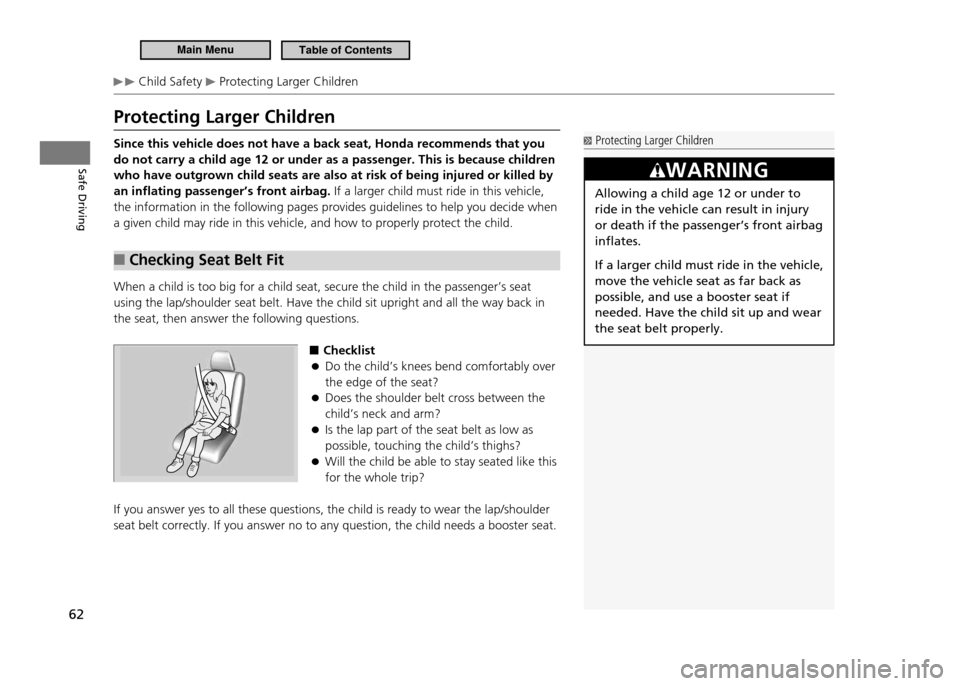
When a child is too big for a child seat, secure the child in the passenger’s seat using the lap/shoulder seat belt. Have the child sit upright and all the way back in the seat, then answer the following questions.
■Checklist
Do the child’s knees bend comfortably over
●
the edge of the seat?Does the shoulder belt cross between the
●
child’s neck and arm?Is the lap part of the seat belt as low as
●
possible, touching the child’s thighs?Will the child be able to stay seated like this
●
for the whole trip?
If you answer yes to all these questions, the child is ready to wear the lap/shoulder seat belt correctly. If you answer no to any question, the child needs a booster seat.
Protecting Larger Children
WARNING
Allowing a child age 12 or under to ride in the vehicle can result in injury or death if the passenger’s front airbag inflates.
If a larger child must ride in the vehicle, move the vehicle seat as far back as possible, and use a booster seat if needed. Have the child sit up and wear the seat belt properly.
Main MenuTable of Contents
Page 64 of 333
Safe Driving
63
Child Safety Safety of Larger Children
Booster Seats
■
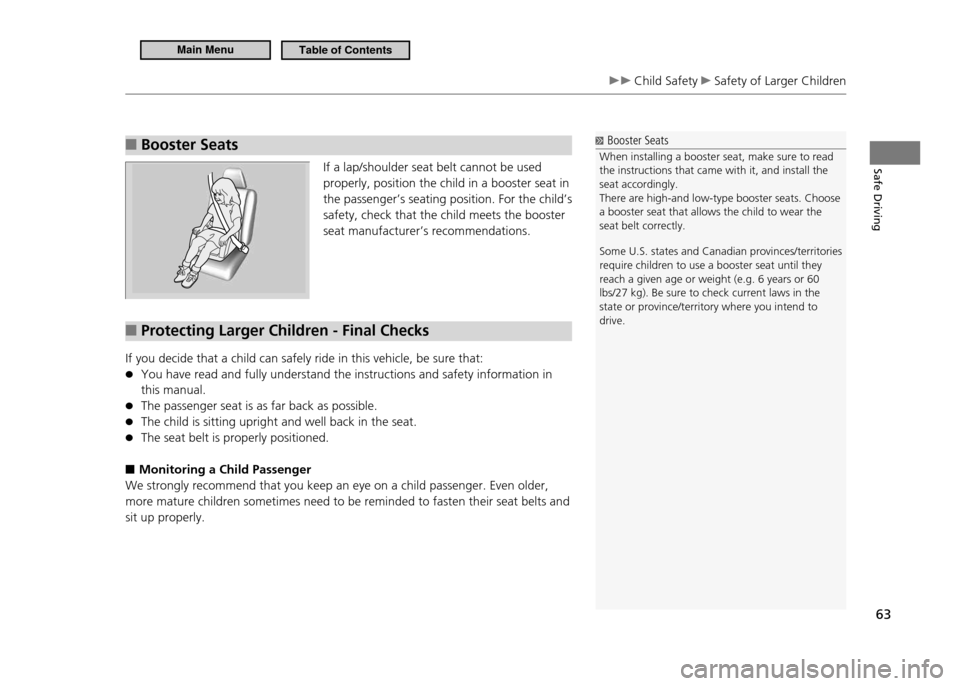
If a lap/shoulder seat belt cannot be used properly, position the child in a booster seat in
the passenger’s seating position. For the child’s safety, check that the child meets the booster seat manufacturer’s recommendations.
Protecting Larger Children - Final Checks
■
If you decide that a child can safely ride in this vehicle, be sure that:
You have read and fully understand the instructions and safety information in
●
this manual. The passenger seat is as far back as possible.
●
The child is sitting upright and well back in the seat.
●
The seat belt is properly positioned.
●
Monitoring a Child Passenger
■
We strongly recommend that you keep an eye on a child passenger. Even older, more mature children sometimes need to be reminded to fasten their seat belts and sit up properly.
Booster Seats
When installing a booster seat, make sure to read the instructions that came with it, and install the seat accordingly.There are high-and low-type booster seats. Choose a booster seat that allows the child to wear the seat belt correctly. Some U.S. states and Canadian provinces/territories require children to use a booster seat until they reach a given age or weight (e.g. 6 years or 60 lbs/27 kg). Be sure to check current laws in the state or province/territory where you intend to drive.
Main MenuTable of Contents
Page 98 of 333
Controls
This chapter explains how to operate the various controls necessary for driving.
97
Setting the Clock
....................................... 98
Locking and Unlocking the Doors Key Types and Functions .......................... 99 Locking/Unlocking the Doors from
the Outside ........................................... 100Locking/Unlocking the Doors from
the Inside .............................................. 102
Auto Door Lock/Unlock .......................... 103
Opening and Closing the Hatch ............. 104
Security System ....................................... 105
Immobilizer System ................................ 105
Security Alarm System ............................ 105
Opening and Closing the Windows ....... 107Operating the Switches Around the Steering Wheel
Ignition Switch ....................................... 109
Turn Signals ........................................... 110
Light Switches ........................................ 110Fog Lights * ............................................ 112
Daytime Running Lights .......................... 112
Wipers and Washers ............................... 113
Brightness Control .................................. 115Rear Defogger/Heated Door Mirror *
Button ................................................... 116
Adjusting the Steering Wheel ................. 117 Adjusting the Mirror
Interior Rearview Mirror .......................... 118
Door Mirrors .......................................... 118
Adjusting the Seats Adjusting the Seat Position ..................... 119
Interior Lights/Interior Convenience Items Interior Lights ......................................... 123
Interior Convenience Items ..................... 125
Climate Control System Using Automatic Climate Control ........... 131
Automatic Climate Control Sensors ........ 133
* Not available on all models
Main Menu
Page 120 of 333
119
Controls
Adjusting the Seats
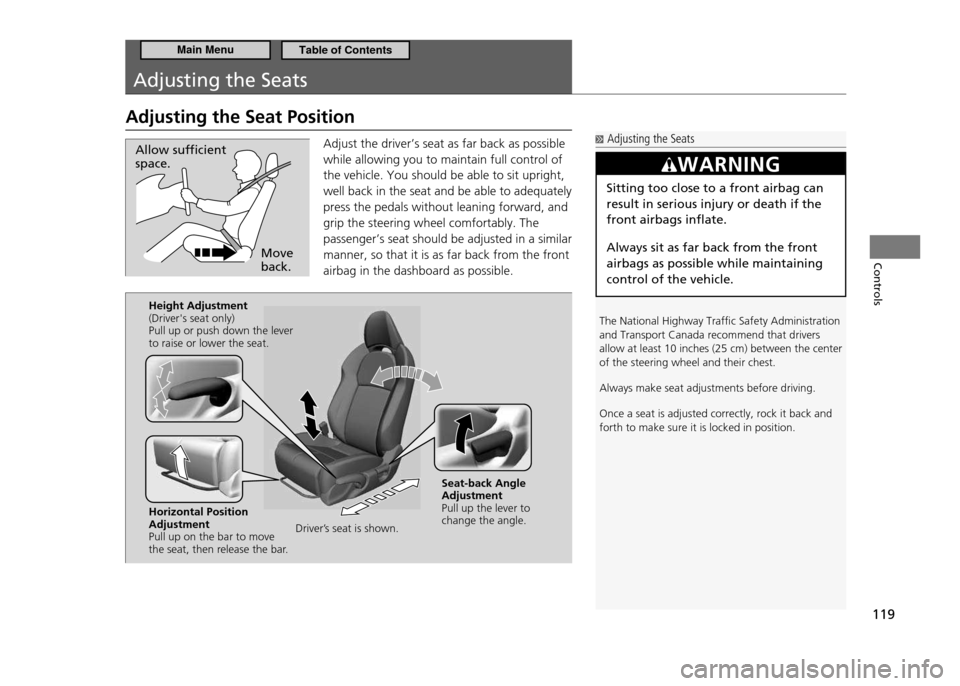
Adjusting the Seat PositionAdjust the driver’s seat as far back as possible while allowing you to maintain full control of the vehicle. You should be able to sit upright,
well back in the seat and be able to adequately press the pedals without leaning forward, and grip the steering wheel comfortably. The
passenger’s seat should be adjusted in a similar manner, so that it is as far back from the front airbag in the dashboard as possible.
Move back.
Allow suficient space.
Adjusting the Seats
The National Highway Trafic Safety Administration and Transport Canada recommend that drivers
allow at least 10 inches (25 cm) between the center of the steering wheel and their chest. Always make seat adjustments before driving.Once a seat is adjusted correctly, rock it back and forth to make sure it is locked in position.
WARNING
Sitting too close to a front airbag can result in serious injury or death if the front airbags inflate. Always sit as far back from the front airbags as possible while maintaining control of the vehicle.
Driver’s seat is shown.
Height Adjustment (Driver's seat only)Pull up or push down the lever to raise or lower the seat. Horizontal Position AdjustmentPull up on the bar to move
the seat, then release the bar.
Seat-back Angle AdjustmentPull up the lever to change the angle.
Main MenuTable of Contents
Page 121 of 333
120
Controls
Adjusting the Seats Adjusting the Seat Position
Adjusting the Seat-Backs
■
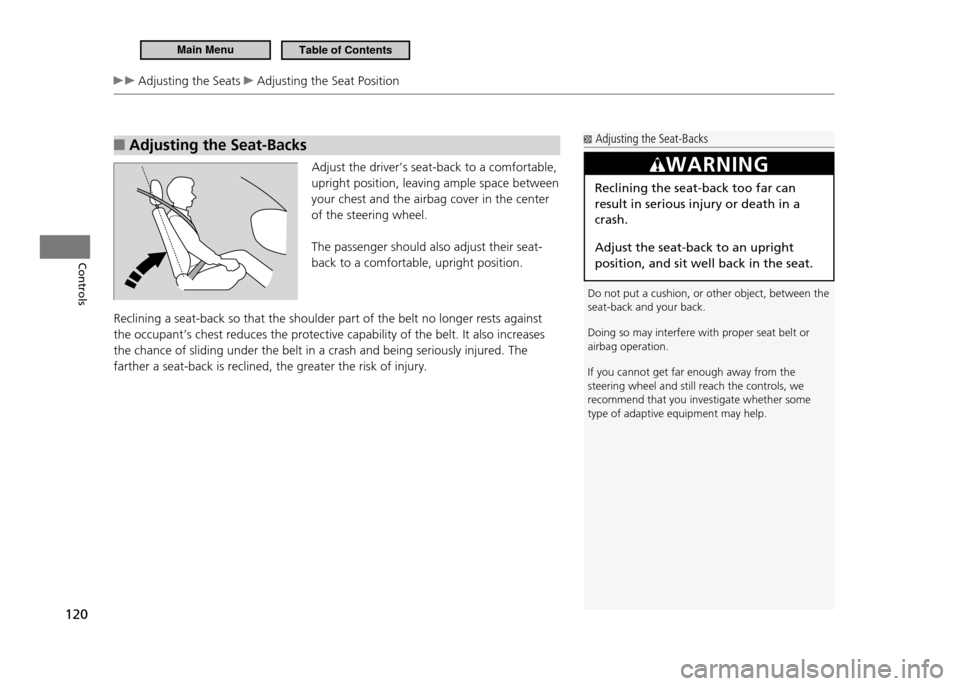
Adjust the driver’s seat-back to a comfortable, upright position, leaving ample space between your chest and the airbag cover in the center of the steering wheel. The passenger should also adjust their seat- back to a comfortable, upright position.
Reclining a seat-back so that the shoulder part of the belt no longer rests against the occupant’s chest reduces the protective capability of the belt. It also increases the chance of sliding under the belt in a crash and being seriously injured. The farther a seat-back is reclined, the greater the risk of injury.
Adjusting the Seat-Backs
Do not put a cushion, or other object, between the seat-back and your back. Doing so may interfere with proper seat belt or airbag operation. If you cannot get far enough away from the steering wheel and still reach the controls, we recommend that you investigate whether some type of adaptive equipment may help.
WARNING
Reclining the seat-back too far can result in serious injury or death in a crash. Adjust the seat-back to an upright position, and sit well back in the seat.
Main MenuTable of Contents
Page 122 of 333
121
Controls
Adjusting the Seats Adjusting the Seat Position
Head Restraints
■
Your vehicle is equipped with head restraints in both seating positions. However, they are non-adjustable.Head restraints are effective for protection against whiplash and other rear-impact crash injuries.
Removing and Installing the Head Restraint for Cleaning
■
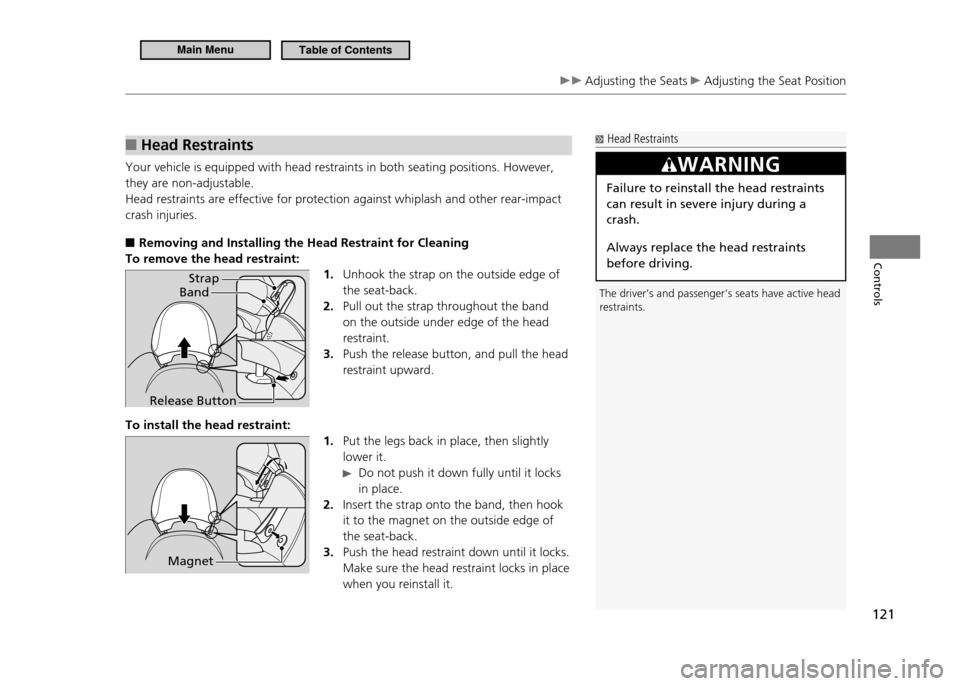
To remove the head restraint:
1. Unhook the strap on the outside edge of the seat-back.Pull out the strap throughout the band
2.
on the outside under edge of the head restraint.Push the release button, and pull the head
3.
restraint upward.
To install the head restraint: 1. Put the legs back in place, then slightly lower it.
Do not push it down fully until it locks
in place.
Insert the strap onto the band, then hook
2.
it to the magnet on the outside edge of the seat-back.Push the head restraint down until it locks.
3.
Make sure the head restraint locks in place when you reinstall it.
Head Restraints
The driver’s and passenger’s seats have active head restraints.
WARNING
Failure to reinstall the head restraints can result in severe injury during a crash. Always replace the head restraints before driving.
Band Strap
Release Button
Magnet
Main MenuTable of Contents
Page 123 of 333
122
Controls
Adjusting the Seats Adjusting the Seat Position
Maintain a Proper Sitting Position
■
After all occupants have adjusted their seats, and put on their seat belts, it is very important that they continue to sit upright, well back in their seats, with their feet on the floor, until the vehicle is safely parked and the engine is off. Sitting improperly can increase the chance of injury during a crash. For example, if an occupant slouches, lies down, turns sideways, sits forward, leans forward or sideways, or puts one or both feet up, the chance of injury during a crash is greatly increased. In addition, an occupant who is out of position in the seat can be seriously or fatally injured in a crash by striking interior parts of the vehicle or being struck by an inflating front airbag.
Active Head Restraints
■
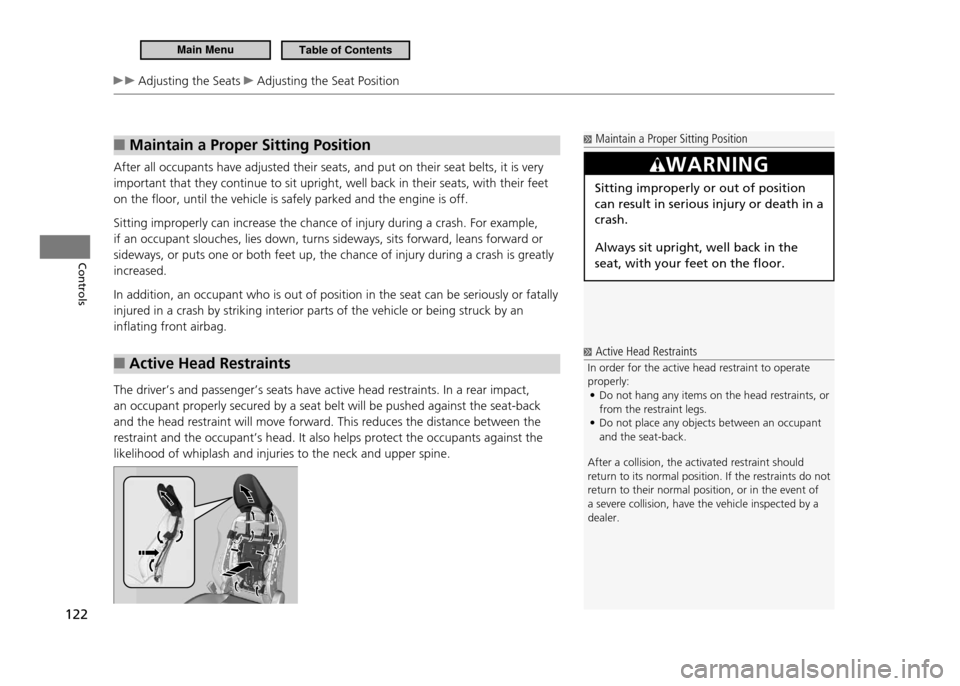
The driver’s and passenger’s seats have active head restraints. In a rear impact, an occupant properly secured by a seat belt will be pushed against the seat-back and the head restraint will move forward. This reduces the distance between the restraint and the occupant’s head. It also helps protect the occupants against the likelihood of whiplash and injuries to the neck and upper spine.
Maintain a Proper Sitting Position
WARNING
Sitting improperly or out of position can result in serious injury or death in a crash. Always sit upright, well back in the seat, with your feet on the floor.
Active Head Restraints
In order for the active head restraint to operate properly: Do not hang any items on the head restraints, or
•
from the restraint legs.Do not place any objects between an occupant
•
and the seat-back.
After a collision, the activated restraint should
return to its normal position. If the restraints do not
return to their normal position, or in the event of a severe collision, have the vehicle inspected by a dealer.
Main MenuTable of Contents
Page 129 of 333
128
Controls
Interior Lights/Interior Convenience Items Interior Convenience Items
Rear Cargo Console
■
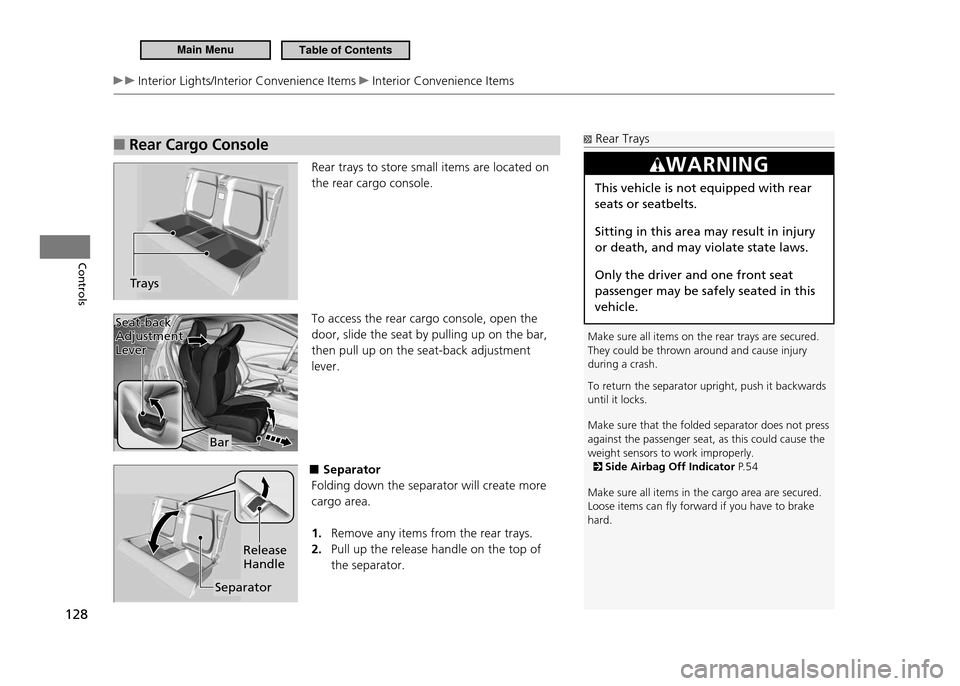
Rear trays to store small items are located on the rear cargo console. To access the rear cargo console, open the door, slide the seat by pulling up on the bar, then pull up on the seat-back adjustment lever.
■Separator
Folding down the separator will create more cargo area.
Remove any items from the rear trays.
1.
Pull up the release handle on the top of
2.
the separator.
Trays
Rear Trays
Make sure all items on the rear trays are secured. They could be thrown around and cause injury during a crash. To return the separator upright, push it backwards until it locks. Make sure that the folded separator does not press against the passenger seat, as this could cause the weight sensors to work improperly.
Side Airbag Off Indicator P. 5 4
Make sure all items in the cargo area are secured. Loose items can ly forward if you have to brake hard.
WARNING
This vehicle is not equipped with rear seats or seatbelts. Sitting in this area may result in injury or death, and may violate state laws. Only the driver and one front seat passenger may be safely seated in this vehicle.
Bar
Seat-back
Adjustment Lever
Seat-back Adjustment Lever
Separator Release Handle
Main MenuTable of Contents
Page 194 of 333
193
Driving
Before Driving Driving Preparation
Do not place anything in the seat footwells. Make sure to secure the floor mats.
•
An object or unsecured floor mat can interfere with your brake and
accelerator pedal operation while driving.
If you have any animals on board, do not let them move around in the vehicle.
•
They may interfere with driving and a crash could occur.
Securely close and lock both doors and the hatch.
•
Locking and Unlocking the Doors from Inside P.102
Adjust your seating position properly.
•
Adjusting the Seats P.119
Adjust the mirrors and steering wheel properly for your driving.
•
Adjust them while sitting in the proper driving position.
Adjusting the Mirrors P.118
Steering Wheel Adjustments P.117
Be sure items placed on the floor behind the driver’s and passenger’s seats
•
cannot roll under the seats.
They can interfere with the driver’s ability to operate the pedals, the operation
of the seats, or the operation of the sensors under the seats.
Everyone in the vehicle must fasten their seat belt.
•
Fastening a Seat Belt P.37
Make sure that the indicators in the instrument panel come on when you start
•
the vehicle, and go off soon after.
Always have a dealer check the vehicle if any of the indicators indicate a
problem.
Indicators P.68
Main MenuTable of Contents
Page 229 of 333
228
Driving
Parking Your Vehicle Auto Idle Stop (Manual Transmission)
Auto Idle Stop Activates When:
■
Stopping with the brake, the clutch pedal is fully depressed, and the shift lever is in
N.
To restart the engine automatically, depress the clutch pedal.
Auto Idle Stop Does Not Activate When:
■
The low temperature indicator is on.
•
The IMA battery charge is low.
•
The bars of the ASST/CHRG indicators do not move when accelerating or
•
decelerating. The vehicle comes to a stop again before the vehicle speed reaches 9 mph
•
(15km/h) after the engine starts.The shift lever is in
•
R.
Airflow from the climate control system increases.
•
If you have selected the fan speed manually:
The display shows more than five vertical bars.
• is on (the indicator is on).
Auto Idle Stop May Not Activate When:
■
The climate control system is in use, and there is a significant difference between
•
the set temperature and the actual interior temperature. (Except when in ECON mode).When humidity in the interior is high.
•
The vehicle is stopped by braking suddenly
•
Auto Idle Stop Activates When:
The brake pedal is depressed, the vehicle slows down to a speed below 19 mph (30 km/h), and the clutch pedal is fully pressed. The engine may not stop or restart automatically if you fail to fully depress the clutch pedal.
Keeping the proper driving positions makes it easie r
for you to depress the clutch pedal fully.
Adjusting the Seats P.11 9
Main MenuTable of Contents