buttons HONDA CR-Z 2011 1.G Owners Manual
[x] Cancel search | Manufacturer: HONDA, Model Year: 2011, Model line: CR-Z, Model: HONDA CR-Z 2011 1.GPages: 333, PDF Size: 9.97 MB
Page 4 of 333
3
Quick Reference Guide
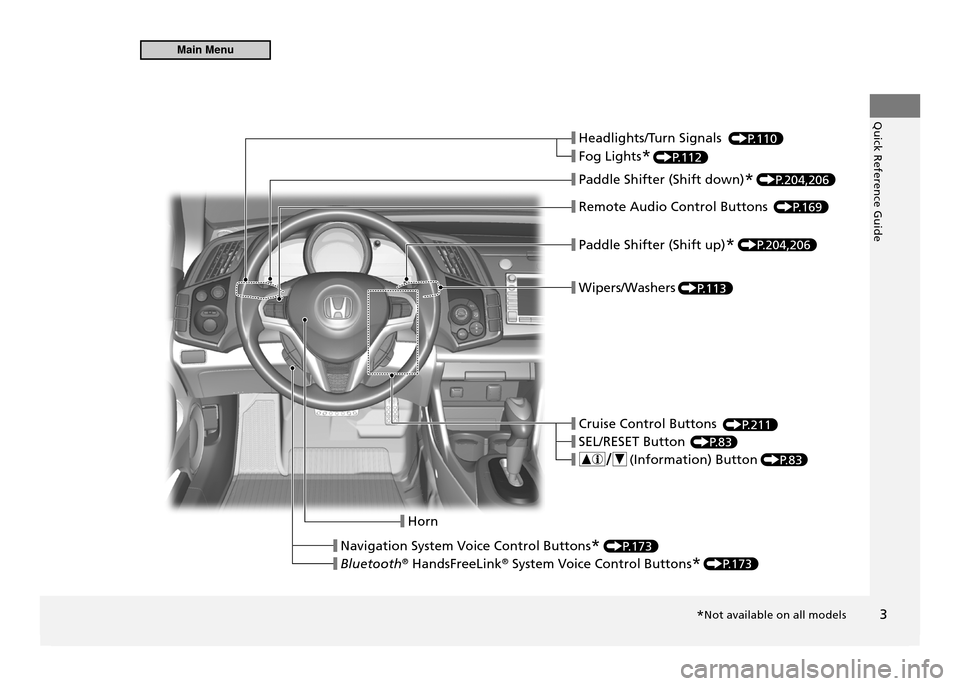
❙ Headlights/Turn Signals
❙ Fog Lights
*
❙ Paddle Shifter (Shift down)
*
❙ Remote Audio Control Buttons
❙ Paddle Shifter (Shift up)
*
❙ Wipers/Washers
❙ Cruise Control Buttons
❙ SEL/RESET Button
❙ ( Information) Button
❙ Horn
❙ Navigation System Voice Control Buttons
*
❙ Bluetooth ®
HandsFreeLink ®
System Voice Control Buttons *
P.110
P.112
P.204,206
P.204,206
P.169
P.113
P.211
P.83
P.83
P.173
P.173
*Not available on all models
Main Menu
Page 8 of 333
Quick Reference Guide
7
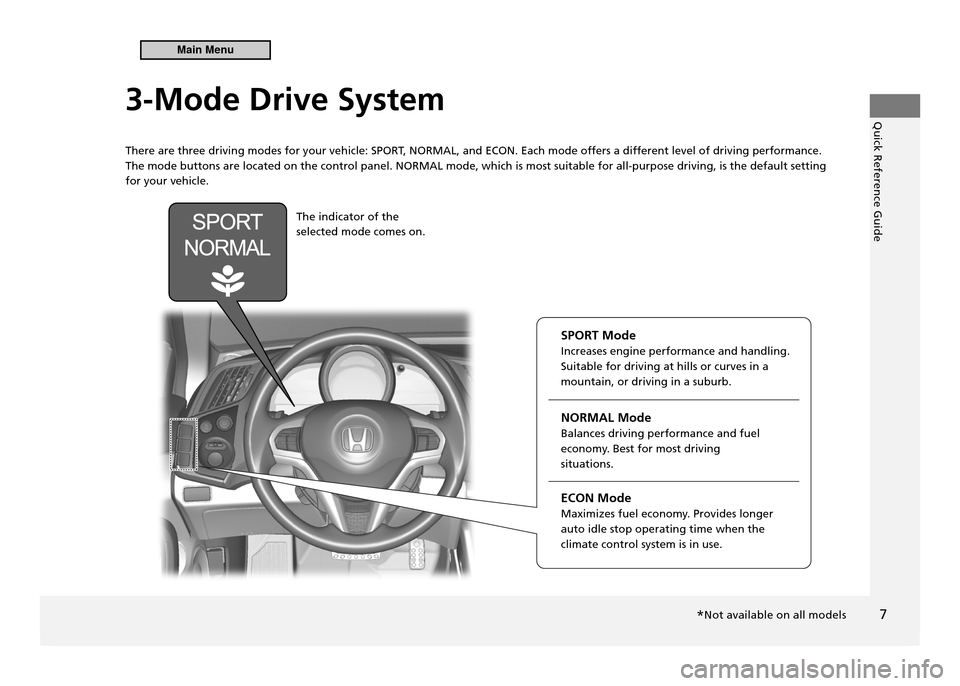
3-Mode Drive System
There are three driving modes for your vehicle: SPOR
T, NORMAL, and ECON. Each mode offers a different level of driving performance.
The mode buttons are located on the control panel. NORMAL mode, which is most suitable for all-purpose driving, is the default setting for your vehicle.
The indicator of the selected mode comes on.
SPORT ModeIncreases engine performance and handling. Suitable for driving at hills or curves in a mountain, or driving in a suburb. NORMAL Mode Balances driving performance and fuel
economy. Best for most driving situations. ECON Mode
Maximizes fuel economy. Provides longer auto idle stop operating time when the climate control system is in use.
*Not available on all models
Main Menu
Page 19 of 333
Quick Reference Guide
18
Features P.13 5
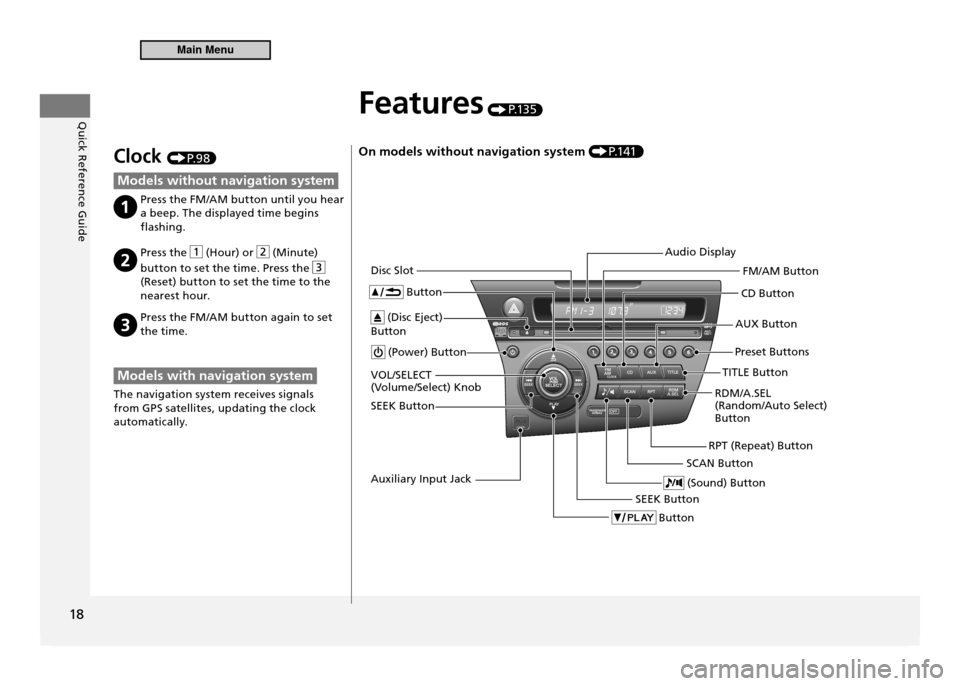
On models without navigation system P.1 41
(Power) Button CD Button
AUX Button
Disc Slot
(Disc Eject)
Button Button
Preset Buttons
SEEK Button Button
SEEK Button
(Sound) ButtonRDM/A.SEL (Random/Auto Select) Button
VOL/SELECT
(Volume/Select) Knob
RPT (Repeat) Button
Audio Display
FM/AM Button
TITLE Button
SCAN Button
Auxiliary Input Jack
Clock P. 9 8
Models without navigation system
Press the FM/AM button until you hear a beep. The displayed time begins
flashing.
Press the (Hour) or (Minute)
button to set the time. Press the
(Reset) button to set the time to the
nearest hour.
Press the FM/AM button again to set the time.
Models with navigation system
The navigation system receives signals
from GPS satellites, updating the clock
automatically.
Main Menu
Page 20 of 333
Quick Reference Guide
19
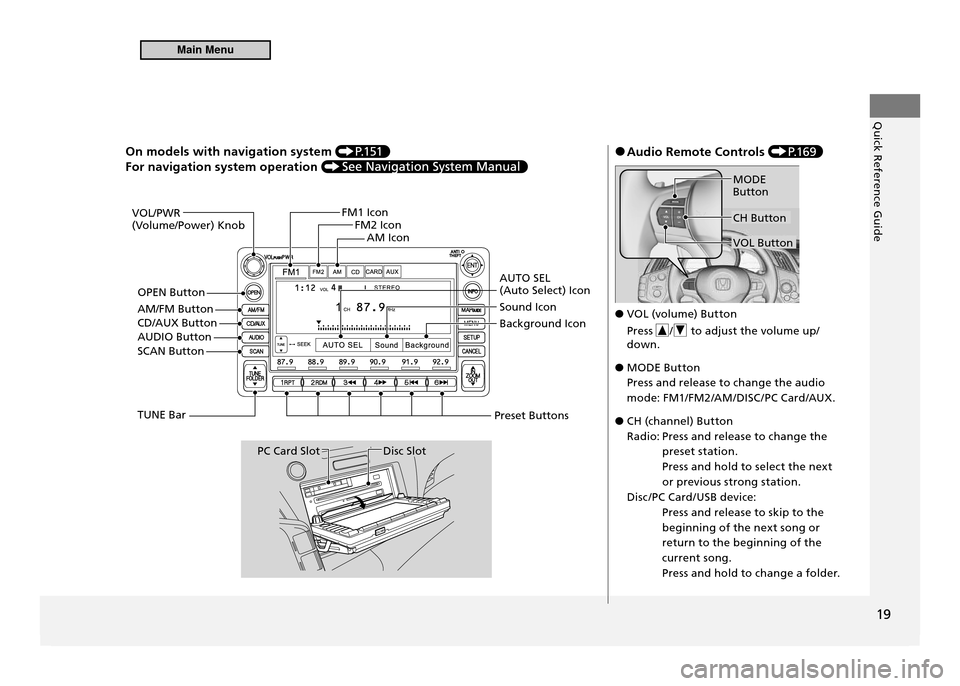
On models with navigation system P.1 51
For navigation system operation
VOL/PWR
(Volume/Power) KnobFM1 Icon
FM2 Icon
AM Icon
AUTO SEL (Auto Select) Icon Sound Icon Background Icon
Preset Buttons
Disc SlotPC Card Slot
TUNE Bar
SCAN Button
AUDIO Button OPEN Button
AM/FM Button CD/AUX Button
Audio Remote Controls
●
P.1 6 9
VOL (volume) Button
●
Press
/ to adjust the volume up/
down.
MODE Button
●
Press and release to change the audio
mode: FM1/FM2/AM/DISC /PC Card/AUX.
CH (channel) Button
●
Radio: Press and release to change the preset station.
Press and hold to select the next
or previous strong station.
Disc /PC Card/USB device: Press and release to skip to the
beginning of the next song or
return to the beginning of the
current song.
Press and hold to change a folder.
CH Button
MODE Button
VOL Button
Main Menu
Page 68 of 333
Instrument Panel
This chapter describes the buttons, indicators, and gauges that are used during driving.
67
Indicators
................................................... 68
Multi-Information Display Warning and
Information Messages .............................. 78
Gauges and Multi-Information Display Gauges .................................................... 81
Multi-Information Display ......................... 83
Main Menu
Page 132 of 333

131
Controls
Climate Control System
Using Automatic Climate Control The automatic climate control system maintains the interior temperature you select. The system also selects the proper mix of heated or cooled air that will as quickly as possible, raise or lower the interior temperature to your preference. Use the system when the engine is running.Press the AUTO button.
1.
Adjust the interior temperature using the temperature control dial.
2.
Press the
3.
button to cancel.
Switching Between the Recirculation and Fresh Air Modes
■
Press the
button and switch the mode depending on environmental
conditions.
Recirculation Mode (indicator on): Recirculates air from the v ehicle’s interior through
the system.Fresh Air Mode (indicator off): Maintains outside ventilation. Keep the system in fresh air mode in normal situations.
Using Automatic Climate Control
If any buttons are pressed while using the climate control system in AUTO, the function of the button that was pressed will take priority.The AUTO indicator will go off, but functions unrelated to the button that was pressed will be controlled automatically. During the auto idle stop, the air conditioning system will be turned off.If the ECON mode is selected, the fan may also be turned off. To prevent cold air from blowing in from outside, the fan may not start immediately when the AUTO button is pressed. Once you have set the desired temperature, do not use the temperature control dial more than necessary.Doing so may delay the time it takes to reach the set temperature. If the interior is very warm, you can cool it down more rapidly by partially opening the windows, turning the system on AUTO, and setting the temperature to low. When you set the temperature to the lower or upper limit, Lo or Hi is displayed. Pressing the
button switches the climate
control system between on and off. The system selects your last selection.
Temperature Control Dial MODE Button
A/C (Air Conditioning) Button AUTO Button
Dashboard ventsFloor and defroster vents
Floor vents
Dashboard and loor vents
(Windshield Defroster) Button
(Fan Control) Button
(On/Off) Button
(Recirculation) Button
Main MenuTable of Contents
Page 137 of 333
136
Features
Audio System
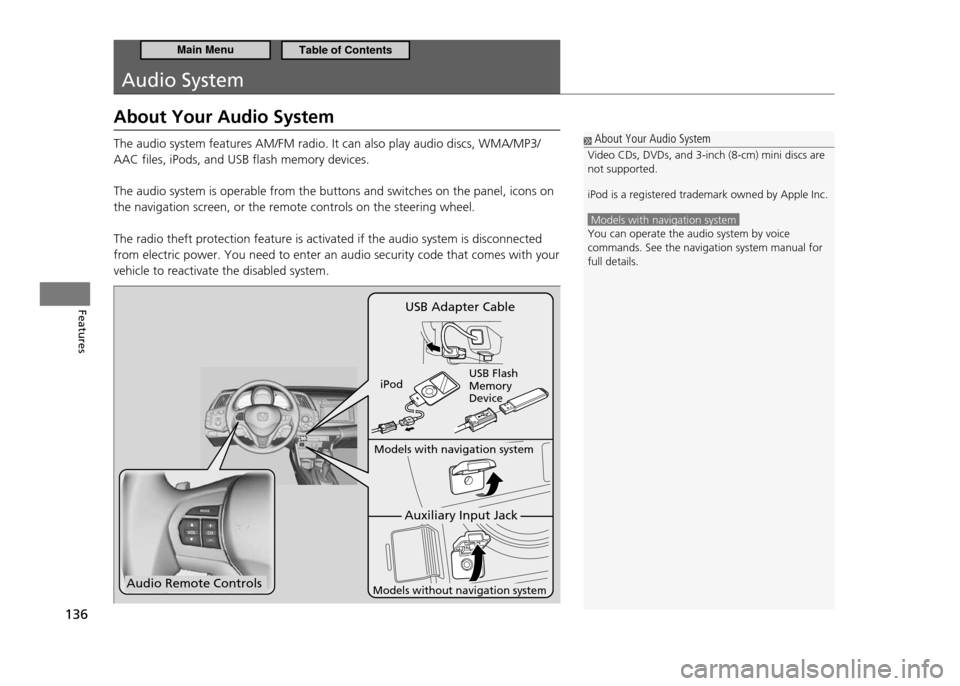
About Your Audio System The audio system features AM/FM radio. It can also play audio discs, WMA/MP3/ AAC files, iPods, and USB flash memory devices. The audio system is operable from the buttons and switches on the panel, icons on the navigation screen, or the remote controls on the steering wheel. The radio theft protection feature is activated if the audio system is disconnected from electric power. You need to enter an audio security code that comes with your vehicle to reactivate the disabled system.
About Your Audio System
Video CDs, DVDs, and 3-inch (8-cm) mini discs are not supported. iPod is a registered trademark owned by Apple Inc.
Models with navigation system You can operate the audio system by voice commands. See the navigation system manual for full details.
Audio Remote Controls
Auxiliary Input Jack
Models with navigation system
Models without navigation system
USB Adapter Cable
iPod USB Flash Memory Device
Main MenuTable of Contents
Page 141 of 333
140
Features
Audio System Audio System Theft Protection
Audio System Theft Protection
The audio system is disabled when it is disconnected from the power source, such as when the 12 volt battery is disconnected or goes dead.Entering the Audio Security Code
■
“ENTER CODE” appears on the display when the power is reconnected.
Turn on the audio system.
1.
Enter the security code using the preset buttons.
2.
Models with navigation system
Touch the icon to enter the code, then touch the Done icon to set it. If you enter an incorrect digit, continue to the last digit, then try again. If you do not enter the code correctly after 10 tries, you need to visit a dealer to have the system reset.
Audio System Theft Protection
Find the audio system's security code and serial number on the radio code card.
Do not store the card in your vehicle. If you lose the
radio code card, you must obtain the information from a dealer.
Main MenuTable of Contents
Page 144 of 333
143
Features
Audio without Navigation System Playing the AM/FM Radio
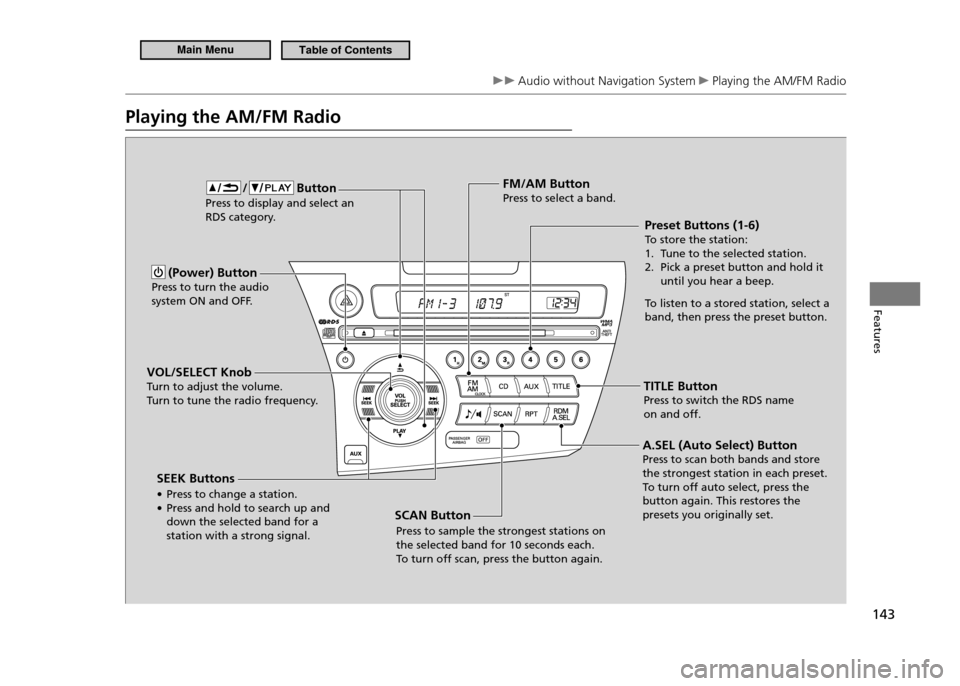
Playing the AM/FM Radio
(Power) Button
Press to turn the audio
system ON and OFF.
VOL/SELECT Knob
Turn to adjust the volume.
Turn to tune the radio frequency. Preset Buttons (1-6)To
store the station:
1. Tune to the selected station.
2. Pick a preset button and hold it until you hear a beep.
To listen to a stored station, select a
band, then press the preset button.
FM/AM ButtonPress to select a band.
TITLE ButtonPress to switch the RDS name
on and off.
/ Button Press to display and select an
RDS category.
SCAN ButtonPress to sample the strongest stations on the selected band for 10 seconds each. To turn off scan, press the button again.
SEEK Buttons •
Press to change a station.
• Press and hold to search up and down the selected band for a station with a strong signal. A.SEL (Auto Select) ButtonPress to scan both bands and store the strongest station in each preset.To
turn off auto select, press the
button again. This restores the presets you originally set.
Main MenuTable of Contents
Page 145 of 333
144
Features
Audio without Navigation System Playing the AM/FM Radio
Radio Data System (RDS)
■
Provides text data information related to your selected RDS capable FM station.
RDS INFO ON
■
Press the TITLE button while listening to an RDS capable station. “RDS INFO ON” appears, and the station name is displayed.
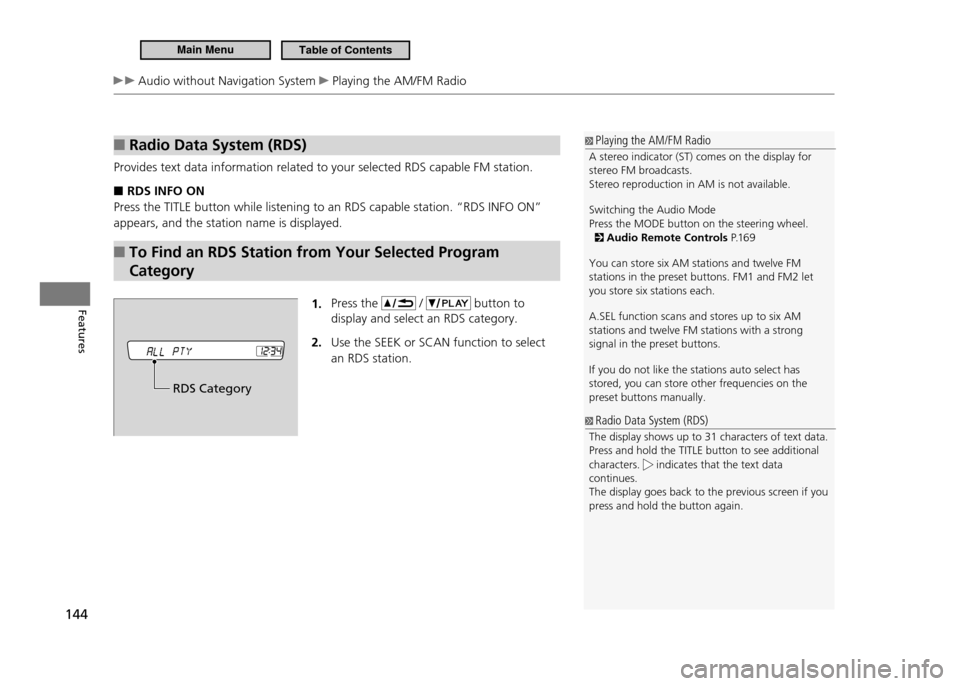
To Find an RDS Station from Your Selected Program
■
Category
1. Press the
/ button to
display and select an RDS category. Use the SEEK
2. or SCAN function to select
an RDS station.
Playing the AM/FM Radio
A stereo indicator (ST) comes on the display for stereo FM broadcasts. Stereo reproduction in AM is not available. Switching the Audio Mode Press the MODE button on the steering wheel.
Audio Remote Controls P.1 6 9
You can store six AM stations and twelve FM stations in the preset buttons. FM1 and FM2 let you store six stations each. A.SEL function scans and stores up to six AM stations and twelve FM stations with a strong signal in the preset buttons. If you do not like the stations auto select has stored, you can store other frequencies on the preset buttons manually.
Radio Data System (RDS)
The display shows up to 31 characters of text data. Press and hold the TITLE button to see additional characters.
indicates that the text data
continues. The display goes back to the previous screen if you press and hold the button again.
RDS Category
Main MenuTable of Contents