open hood HONDA CR-Z 2011 1.G Owners Manual
[x] Cancel search | Manufacturer: HONDA, Model Year: 2011, Model line: CR-Z, Model: HONDA CR-Z 2011 1.GPages: 333, PDF Size: 9.97 MB
Page 2 of 333
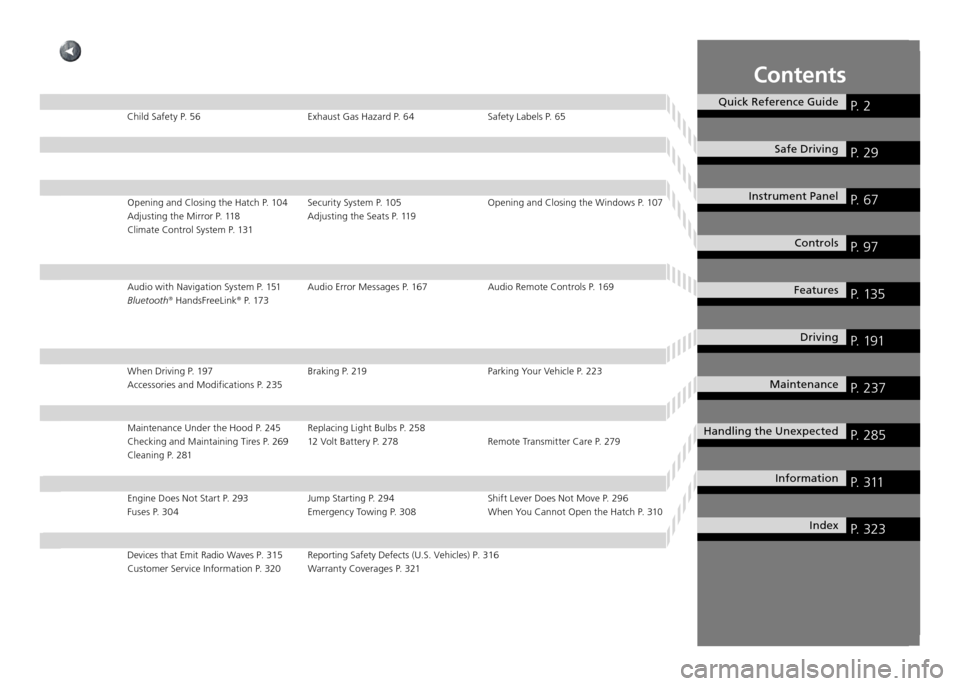
Contents
Quick Reference GuideP. 2
Safe DrivingP. 29
Instrument Panel P. 67
ControlsP. 97
FeaturesP. 135
DrivingP. 191
MaintenanceP. 237
Handling the UnexpectedP. 285
InformationP. 311
IndexP. 323
Child Safety P. 56 Exhaust Gas Hazard P. 64 Safety Labels P. 65Opening and Closing the Hatch P. 104 Security System P. 105 Opening and Clos ing the Windows P. 107
Adjusting the Mirror P. 118 Adjusting the Seats P. 119
Climate Control System P. 131
Audio with Navigation System P. 151 Audio Error Messages P. 167 Audio Rem ote Controls P. 169
Bluetooth ®
HandsFreeLink ®
P. 173
When Driving P. 197 Braking P. 219 Parking Your Vehicle P. 223 Accessories and Modifications P. 235
Maintenance Under the Hood P. 245 Replacing Light Bulbs P. 258
Checking and Maintaining Tires P. 269 12 Volt Battery P. 278 Remote Trans mitter Care P. 279
Cleaning P. 281
Engine Does Not Start P. 293 Jump Starting P. 294 Shift Lever Does Not Move P. 296 Fuses P. 304 Emergency Towing P. 308 When You Cannot Open the Hatch P. 310
Devices that Emit Radio Waves P. 315 Reporting Safety Defects (U.S. Vehicles) P. 316
Customer Service Information P. 320 Warranty Coverages P. 321
Page 24 of 333
Quick Reference Guide
23
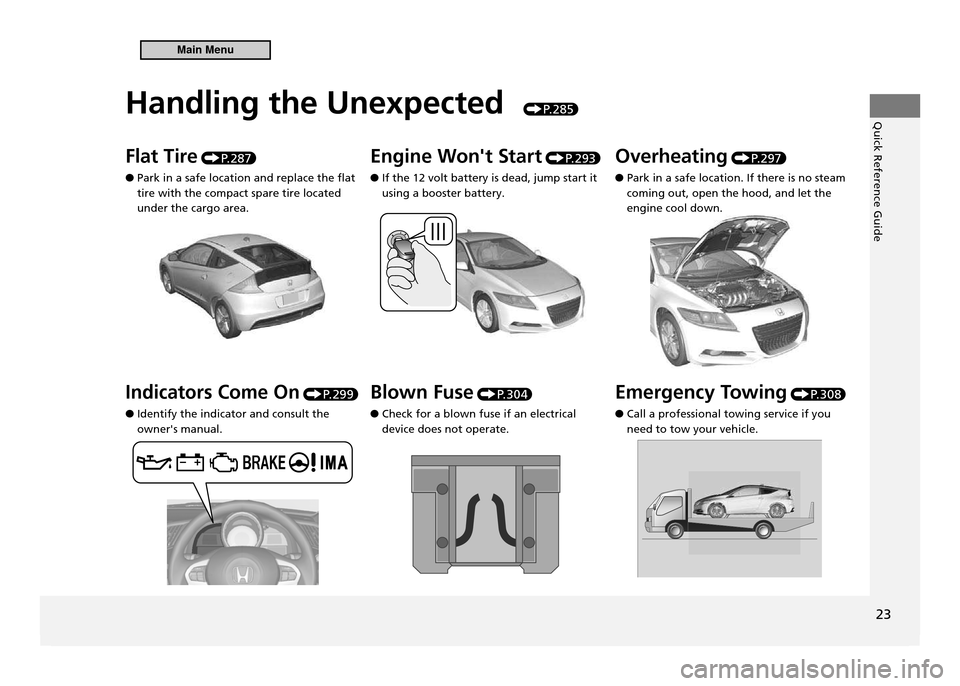
Handling the Unexpected
P. 2 8 5
Flat Tire P. 2 8 7
Park in a safe location and replace the flat
●
tire with the compact spare tire located under the cargo area. Engine Won't Start
P. 2 9 3
If the 12 volt battery is dead, jump start it
●
using a booster battery. Overheating
P. 2 9 7
Park in a safe location. If there is no steam
●
coming out, open the hood, and let the engine cool down.
Indicators Come On P. 2 9 9
Identify the indicator and consult the
●
owner's manual. Blown Fuse
P. 3 0 4
Check for a blown fuse if an electrical
●
device does not operate. Emergency Towing
P. 3 0 8
Call a professional towing service if you
●
need to tow your vehicle.
Main Menu
Page 106 of 333
105
Controls
Security System
Immobilizer System
Immobilizer System
NOTICE Leaving the ignition key in the vehicle can result in theft or accidental movement of the vehicle.Always take the ignition key with you whenever you leave the vehicle unattended. Do not alter the system or add other devices to it. Doing so may damage the system and make your vehicle inoperable.
The immobilizer system prevents a key that has not been pre-registered from starting the engine. Each key contains electronic transmitters that use electronic signals to verify the key. Pay attention to the following when inserting the key to the ignition switch.Do not allow objects that emit strong radio waves near the ignition switch.
•
Make sure the key is not covered by or touching a metal object.
•
Do not bring a key from another vehicle’s immobilizer system near the ignition
•
switch.
Security Alarm System The security alarm system activates when the doors, hatch, or hood are opened without the key, or remote transmitter. It also activates if you turn the ignition switch to ON
II after locking the doors and the hatch with the remote transmitter.
When the Security Alarm System Activates
■
The horn beeps intermittently, and all of the exterior lights flash.
To Deactivate the Security Alarm System
■
Unlock the vehicle using the key, or remote transmitter. The system, along with the horn and flashing lights, are deactivated.
Security Alarm System
The security alarm continues for a maximum of two minutes until the security alarm system deactivates.
continued
Main MenuTable of Contents
Page 107 of 333
106
Controls
Security System Security Alarm System
Setting the Security Alarm System
■
The security alarm system automatically sets when the following conditions have been met:
The ignition switch is in LOCK
•
0, and the key has been removed from the
ignition switch. The hood is closed.
•
Both doors and the hatch are locked.
•
When the Security Alarm System Sets
■
The security system indicator in the instrument panel blinks. When the blinking interval changes after about 15 seconds, the security alarm system is set.
To Cancel the Security Alarm System
■
The security alarm system is canceled when the vehicle is unlocked using the key or remote transmitter. The security system indicator goes off at the same time.
Security Alarm System
Do not set the security alarm system when someone is in the vehicle or a window is open. The system can accidentally activate when unlocking the door with the lock tab or the master door lock switch. If the 12 volt battery goes dead after you have set the security alarm system, the security alarm may go off once the battery is recharged or replaced.If this occurs, deactivate the security alarm system by unlocking a door using the key or remote transmitter. Do not attempt to alter this system or add another device to it.
Main MenuTable of Contents
Page 193 of 333
192
Driving
Before Driving
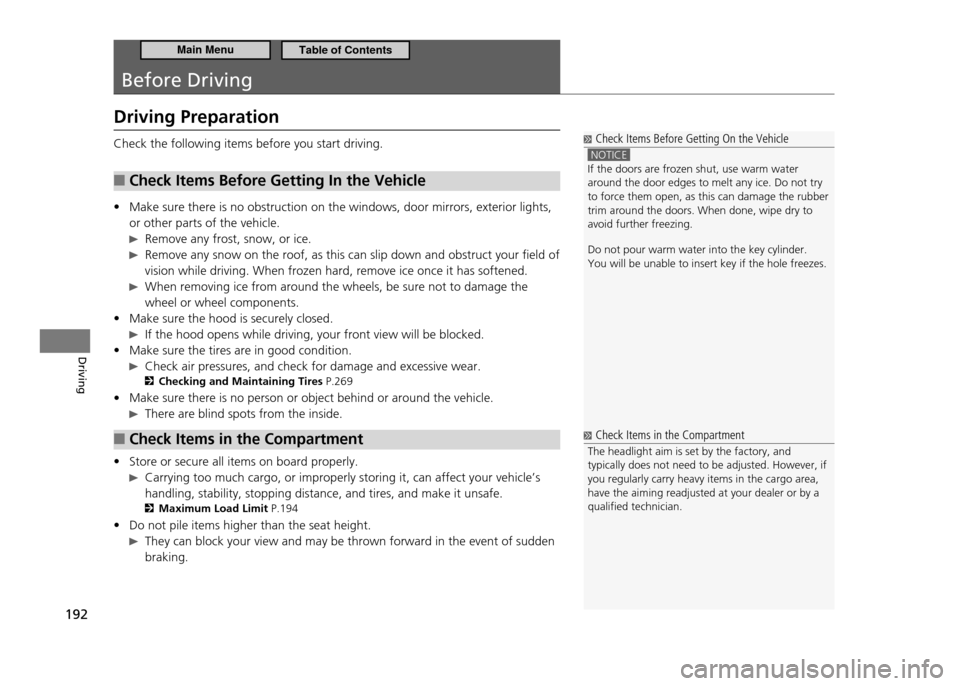
Driving Preparation
Check the following items before you start driving.Check Items Before Getting In the Vehicle
■
Make sure there is no obstruction on the windows, door mirrors, exterior lights,
•
or other parts of the vehicle.
Remove any frost, snow, or ice.
Remove any snow on the roof, as this can slip down and obstruct your field of
vision while driving. When frozen hard, remove ice once it has softened.
When removing ice from around the wheels, be sure not to damage the wheel or wheel components.
Make sure the hood is securely closed.
•
If the hood opens while driving, your front view will be blocked.
Make sure the tires are in good condition.
•
Check air pressures, and check for damage and excessive wear.
Checking and Maintaining Tires P.269
Make sure there is no person or object behind or around the vehicle.
•
There are blind spots from the inside.
Check Items in the Compartment
■
Store or secure all items on board properly.
•
Carrying too much cargo, or improperly storing it, can affect your vehicle’s
handling, stability, stopping distance, and tires, and make it unsafe.
Maximum Load Limit P.194
Do not pile items higher than the seat height.
•
They can block your view and may be thrown forward in the event of sudden
braking.
Check Items Before Getting On the Vehicle
NOTICE If the doors are frozen shut, use warm water around the door edges to melt any ice. Do not try to force them open, as this can damage the rubber trim around the doors. When done, wipe dry to avoid further freezing. Do not pour warm water into the key cylinder. You will be unable to insert key if the hole freezes.
Check Items in the Compartment
The headlight aim is set by the factory, and typically does not need to be adjusted. However, if you regularly carry heavy items in the cargo area, have the aiming readjusted at your dealer or by a qualiied technician.
Main MenuTable of Contents
Page 238 of 333
Maintenance
This chapter discusses basic maintenance.
237
Before Performing Maintenance
Inspection and Maintenance ................... 238
Safety When Performing Maintenance ... 239Parts and Fluids Used in Maintenance
Service .................................................. 240
Maintenance Minder ™
............................ 241
Maintenance Under the Hood Maintenance Items Under the Hood ....... 245
Opening the Hood ................................. 246
Recommended Engine Oil ...................... 247
Oil Check ............................................... 248
Adding Engine Oil .................................. 249
Changing the Engine Oil and Oil Filter .... 250 Engine Coolant ...................................... 252
Transmission Fluid .................................. 254
Brake/Clutch Fluid .................................. 256
Refilling Window Washer Fluid ............... 257
Replacing Light Bulbs ............................. 258
Checking and Maintaining Wiper Blades Checking Wiper Blades ........................... 266
Changing the Front Wiper Blade Rubber 266
Changing the Rear Wiper Blade Rubber .. 268
Checking and Maintaining Tires Checking Tires ........................................ 269
Tire and Loading Information Label ........ 270
Tire Labeling ........................................... 270 DOT Tire Quality Grading (U.S. Vehicles)
.272
Wear Indicators ...................................... 274
Tire Service Life ...................................... 274
Tire and Wheel Replacement .................. 275
Tire Rotation .......................................... 276
Winter Tires ............................................ 277
12 Volt Battery ........................................ 278
Remote Transmitter Care ....................... 279
Replacing the Battery ............................. 279
Climate Control System Maintenance ... 280
Cleaning ................................................... 281
Interior Care ........................................... 281
Exterior Care .......................................... 283
Main Menu
Page 247 of 333
246
Maintenance
Maintenance Under the Hood Opening the Hood
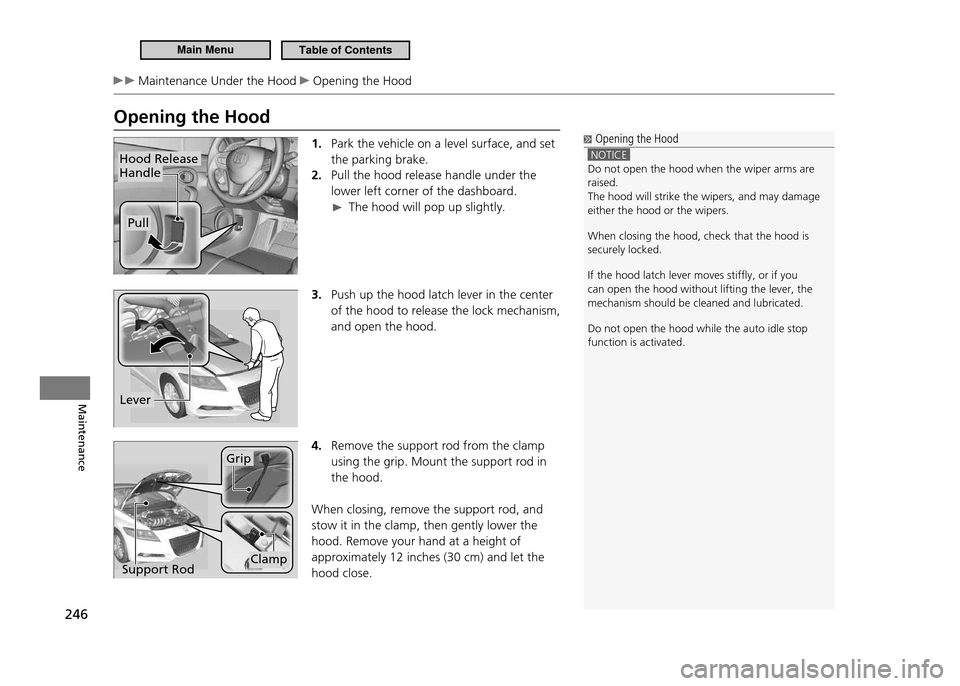
Opening the Hood1. Park the vehicle on a level surface, and set the parking brake.Pull the hood release handle under the
2.
lower left corner of the dashboard.
The hood will pop up slightly.
3. Push up the hood latch lever in the center
of the hood to release the lock mechanism, and open the hood.
4. Remove the support rod from the clamp using the grip. Mount the support rod in the hood.
When closing, remove the support rod, and stow it in the clamp, then gently lower the hood. Remove your hand at a height of approximately 12 inches (30 cm) and let the hood close.
Hood Release Handle
Pull
Opening the Hood
NOTICE Do not open the hood when the wiper arms are raised.The hood will strike the wipers, and may damage either the hood or the wipers. When closing the hood, check that the hood is securely locked. If the hood latch lever moves stifly, or if you can open the hood without lifting the lever, the mechanism should be cleaned and lubricated. Do not open the hood while the auto idle stop function is activated.
Lever
Support Rod
Grip
Clamp
Main MenuTable of Contents
Page 251 of 333
250
Maintenance
Maintenance Under the Hood Changing the Engine Oil and Oil Filter
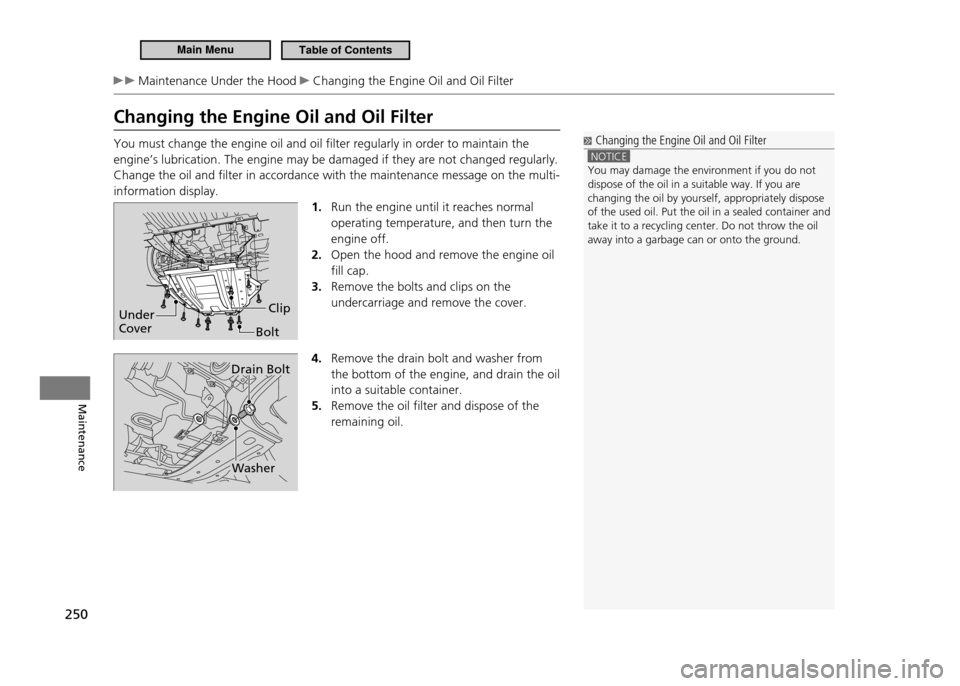
Changing the Engine Oil and Oil Filter You must change the engine oil and oil filter regularly in order to maintain the engine’s lubrication. The engine may be damaged if they are not changed regularly.Change the oil and filter in accordance with the maintenance message on the multi-information display.1. Run the engine until it reaches normal operating temperature, and then turn the engine off. Open the hood and remove the engine oil
2.
fill cap. Remove the bolts and clips on the
3.
undercarriage and remove the cover.
4. Remove the drain bolt and washer from the bottom of the engine, and drain the oil into a suitable container. Remove the oil filter and dispose of the
5.
remaining oil.
Changing the Engine Oil and Oil Filter
NOTICE You may damage the environment if you do not dispose of the oil in a suitable way. If you are changing the oil by yourself, appropriately dispose of the used oil. Put the oil in a sealed container and take it to a recycling center. Do not throw the oil away into a garbage can or onto the ground.
Under Cover
Bolt
Clip
Drain Bolt
Washer
Main MenuTable of Contents
Page 295 of 333
294
Handling the Unexpected
Jump Starting
Jump Starting Procedure
■
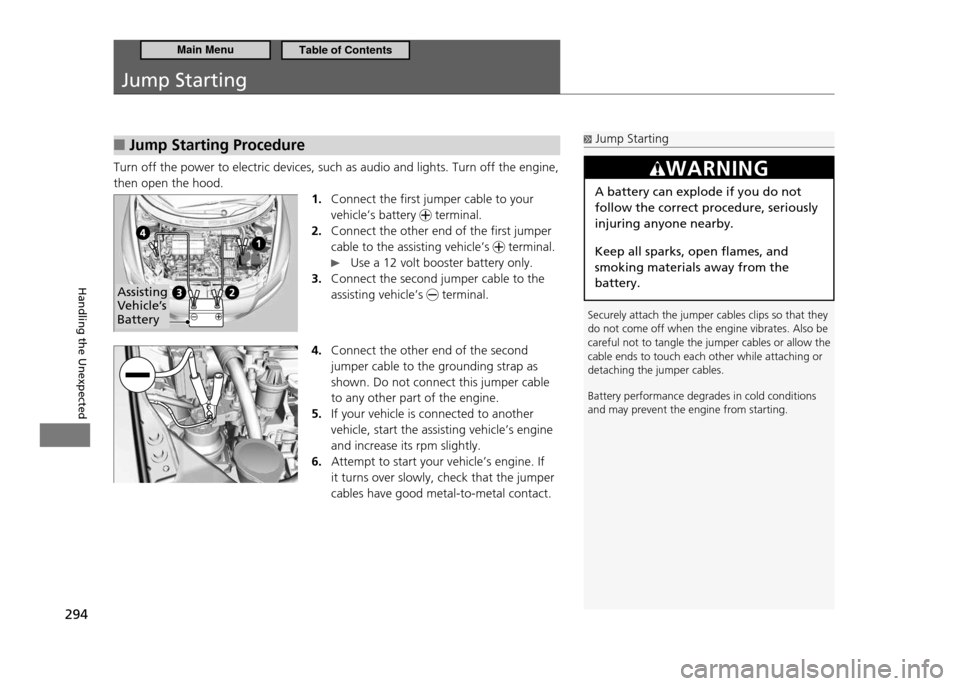
Turn off the power to electric devices, such as audio and lights. Turn off the engine, then open the hood.
1. Connect the first jumper cable to your vehicle’s battery
terminal.
Connect the other end of the first jumper
2.
cable to the assisting vehicle’s
terminal.
Use a 12 volt booster battery only.
Connect the second jumper cable to the
3.
assisting vehicle’s
terminal.
4. Connect the other end of the second jumper cable to the grounding strap as shown. Do not connect this jumper cable to any other part of the engine. If your vehicle is connected to another
5.
vehicle, start the assisting vehicle’s engine and increase its rpm slightly. Attempt to start your vehicle’s engine. If
6.
it turns over slowly, check that the jumper cables have good metal-to-metal contact.
Jump Starting
Securely attach the jumper cables clips so that they do not come off when the engine vibrates. Also be careful not to tangle the jumper cables or allow the cable ends to touch each other while attaching or detaching the jumper cables. Battery performance degrades in cold conditions and may prevent the engine from starting.
WARNING
A battery can explode if you do not follow the correct procedure, seriously injuring anyone nearby. Keep all sparks, open flames, and smoking materials away from the battery.
Assisting
Vehicle’s Battery
Main MenuTable of Contents
Page 298 of 333
297
Handling the Unexpected
Overheating
How to Handle Overheating Overheating symptoms are as follows:The high temperature indicator comes on or the engine suddenly loses power.
•
Steam is coming out of the engine compartment.
•
First Thing to Do
■
Immediately park the vehicle in a safe place.
1.
Put the shift lever to P (CVT) or N (manual transmission) and set the
parking brake. Turn off all accessories and turn on the hazard warning lights.
No steam coming out:
2. Keep the engine running and open the hood.
Steam coming out: Turn off the engine and wait until steam goes away.
Then, open the hood.
How to Handle Overheating
NOTICE Continuing to drive with the high temperature indicator on may damage the engine.
WARNING
Steam and spray from an overheated engine can seriously scald you. Do not open the hood if steam is coming out.
continued
Main MenuTable of Contents