bluetooth HONDA CR-Z 2012 1.G User Guide
[x] Cancel search | Manufacturer: HONDA, Model Year: 2012, Model line: CR-Z, Model: HONDA CR-Z 2012 1.GPages: 333, PDF Size: 10.43 MB
Page 180 of 333
Continued179
uuBluetooth® HandsFreeLink ®*uHFL Menus
Features
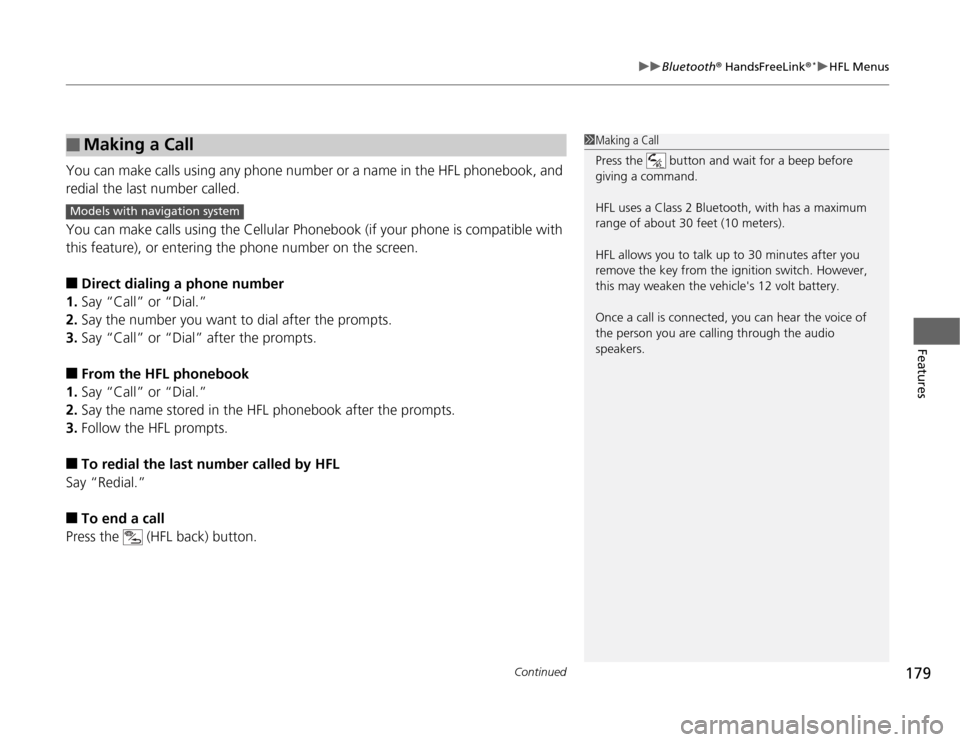
You can make calls using any phone number or a name in the HFL phonebook, and
redial the last number called.
You can make calls using the Cellular Phonebook (if your phone is compatible with
this feature), or entering the phone number on the screen. ■
Direct dialing a phone number
1. Say “Call” or “Dial.”
2. Say the number you want to dial after the prompts.
3. Say “Call” or “Dial” after the prompts.
■ From the HFL phonebook
1. Say “Call” or “Dial.”
2. Say the name stored in the HFL phonebook after the prompts.
3. Follow the HFL prompts.
■ To redial the last number called by HFL
Say “Redial.” ■ To end a call
Press the (HFL back) button.
■Making a Call1Making a Call
Press the button and wait for a beep before
giving a command.
HFL uses a Class 2 Bluetooth, with has a maximum range of about 30 feet (10 meters).
HFL allows you to talk up to 30 minutes after you
remove the key from the ignition switch. However,
this may weaken the vehicle's 12 volt battery.
Once a call is connected, you can hear the voice of
the person you are calling through the audio
speakers.
Models with navigation system
Page 181 of 333
uuBluetooth® HandsFreeLink ®*uHFL Menus
180
Features
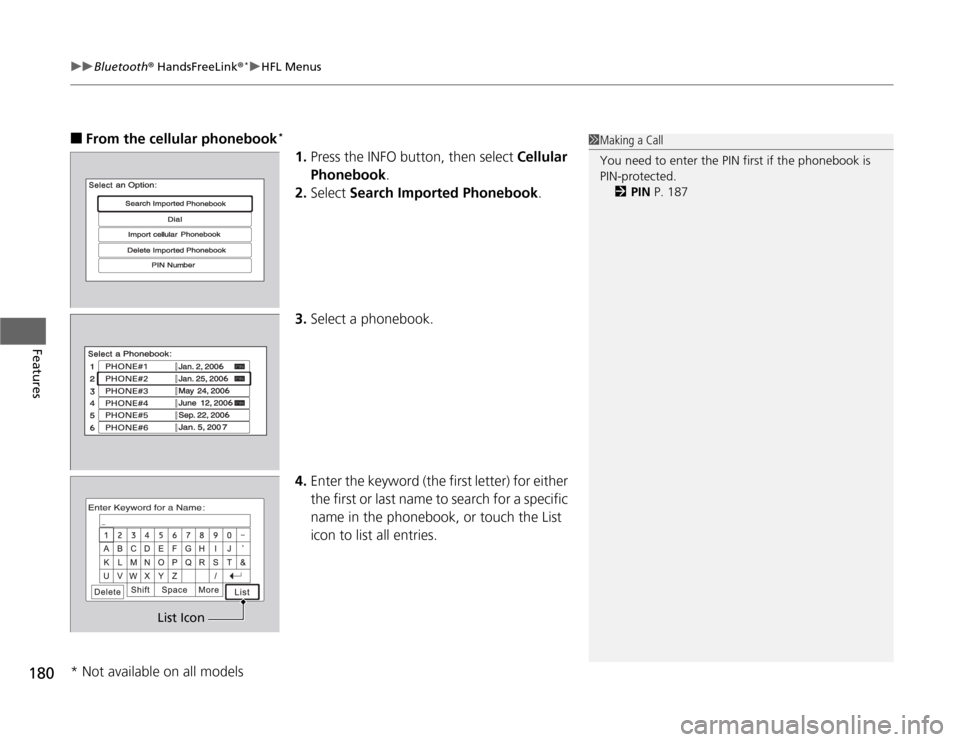
■ From the cellular phonebook *
1.Press the INFO button, then select Cellular
Phonebook .
2. Select Search Imported Phonebook .
3. Select a phonebook.
4. Enter the keyword (the first letter) for either
the first or last name to search for a specific
name in the phonebook, or touch the List
icon to list all entries.1Making a Call
You need to enter the PIN first if the phonebook is PIN-protected.
2 PIN P. 187
List Icon
* Not available on all models
Page 182 of 333
Continued181
uuBluetooth® HandsFreeLink ®*uHFL Menus
Features
5.
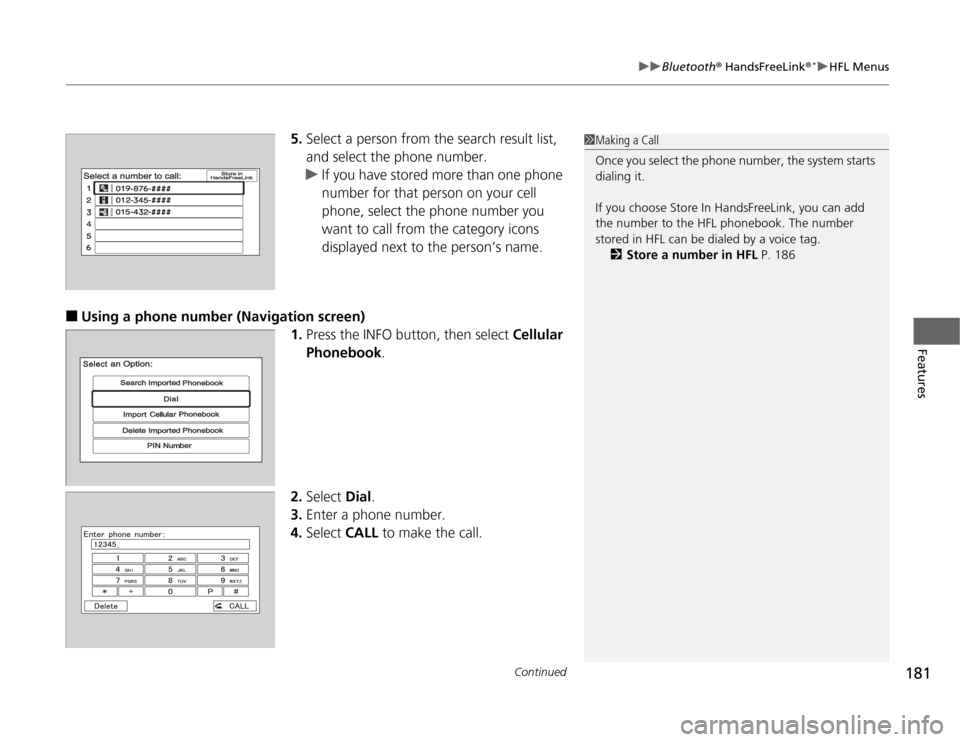
Select a person from the search result list,
and select the phone number.
uIf you have stored more than one phone
number for that person on your cell
phone, select the phone number you
want to call from the category icons
displayed next to the person’s name.
■ Using a phone number (Navigation screen)
1.Press the INFO button, then select Cellular
Phonebook .
2. Select Dial.
3. Enter a phone number.
4. Select CALL to make the call.
1Making a Call
Once you select the phone number, the system starts
dialing it.
If you choose Store In HandsFreeLink, you can add
the number to the HFL phonebook. The number
stored in HFL can be dialed by a voice tag.
2 Store a number in HFL P. 186
Page 183 of 333
uuBluetooth® HandsFreeLink ®*uHFL Menus
182
Features
Press the button to answer the call, or the button to hang up. When there is
an incoming call, a call notification (if activated) sounds and a message appears on the display.
You can transfer a call from HFL to your phone, or from your phone to HFL. Press the button and say “Transfer.”
To mute or unmute your voice during a call, press and release the button and say
“Mute.”
■Receiving a Call
■Transferring a Call
■Muting a Call
1Receiving a Call
Call Waiting
Press the button to put the current call on hold to
answer the incoming call.
Press the button again to return to the current call.
Ignore the incoming call if you do not want to answer
it.
Press the button if you want to hang up the
current and answer the incoming call.
Page 184 of 333
Continued183
uuBluetooth® HandsFreeLink ®*uHFL Menus
Features
You can send numbers and names during a call. This is useful when calling a menu- driven phone system. ■
To send a number or name during a call
1. Say “Send.”
2. Say the number or name you want to send after the prompts.
3. Follow the HFL prompts.
You can store up to 50 names with their associated numbers in HFL. The numbers
you store can be account numbers or passwords. These numbers can be sent to a
menu-driven call. ■ To store a phonebook entry
1. Say “Phonebook.”
2. Say “Store” after the prompts.
3. Say a name you want to list as your phonebook entry.
4. Say the number you want to store for the name entry.
5. Follow the HFL prompts and say “Enter” to store the entry.
■ To edit the number stored for a name
1. Say “Phonebook.”
2. Say “Edit” after the prompts.
3. Say a name you want to edit. When asked, say the new number for that name.
4. Follow the HFL prompts and say “Enter” to store the entry.
■Sending Numbers or Name During a Call
■HFL Phonebook
1Sending Numbers or Name During a Call
Press the button before a command.
To send a , say "Pound." To send a , say "Star."
1HFL Phonebook
• Avoid using duplicate name entries.
• Avoid using "home" as a name entry.
• It is easier for HFL to recognize a multisyllabic or
longer name. For example, use "Peter" instead of
"Pete," or "John Smith" instead of "John."
Page 185 of 333

184
uuBluetooth® HandsFreeLink ®*uHFL Menus
Features
■
To delete a name
1. Say “Phonebook.”
2. Say “Delete” after the prompts.
3. Say a name you want to delete.
4. Say “Yes,” and follow the HFL prompts.
■ To list all names in the phonebook
1. Say “Phonebook.”
2. Say “List” after the prompts.
3. HFL begins reading the names in the order they were stored.
4. When you hear a name you want to call, say “Call.”
■ To store a specific phone number from your ce ll phone directly to the HFL
phonebook *
1. Say “Phonebook.”
2. Say “Receive Contact” after the prompts.
3. Follow the HFL prompts, select a number from your cell phone, and send it to HFL.
uIf it is not the number you want to store, say “Discard.”
4. Say the name for that number.
5. Follow the HFL prompts to continue.
* Not available on all models
Page 186 of 333
Continued185
uuBluetooth® HandsFreeLink ®*uHFL Menus
Features
The cellular phonebook can store around 1,000 names and 10,000 phone numbers
imported from a paired cell phone’s
phonebook. The amount of names and
numbers that can be stored varies by data size.
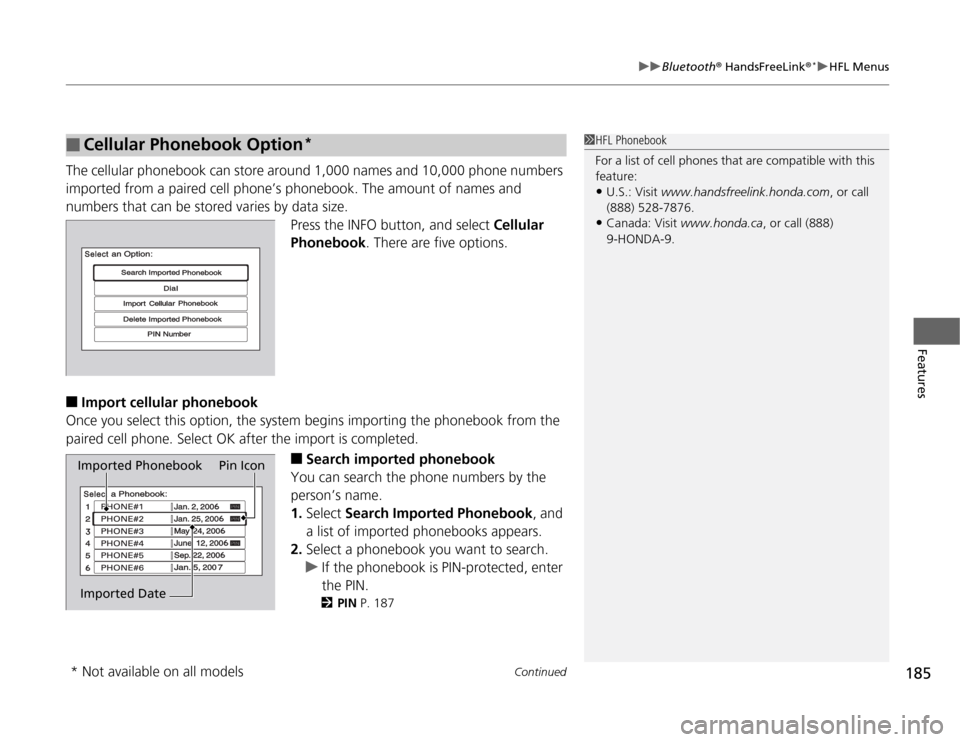
Press the INFO button, and select Cellular
Phonebook . There are five options.
■ Import cellular phonebook
Once you select this option, the system begins importing the phonebook from the
paired cell phone. Select OK after the import is completed.
■Search imported phonebook
You can search the phone numbers by the person’s name.1. Select Search Imported Phonebook , and
a list of imported phonebooks appears.
2. Select a phonebook you want to search.
uIf the phonebook is PIN-protected, enter
the PIN.
2 PIN P. 187
■Cellular Phonebook Option *1HFL Phonebook
For a list of cell phones that are compatible with this feature:
• U.S.: Visit www.handsfreelink.honda.com , or call
(888) 528-7876.
• Canada: Visit www.honda.ca , or call (888)
9-HONDA-9.
Imported Phonebook Pin Icon
Imported Date
* Not available on all models
Page 187 of 333
uuBluetooth® HandsFreeLink ®*uHFL Menus
186
Features
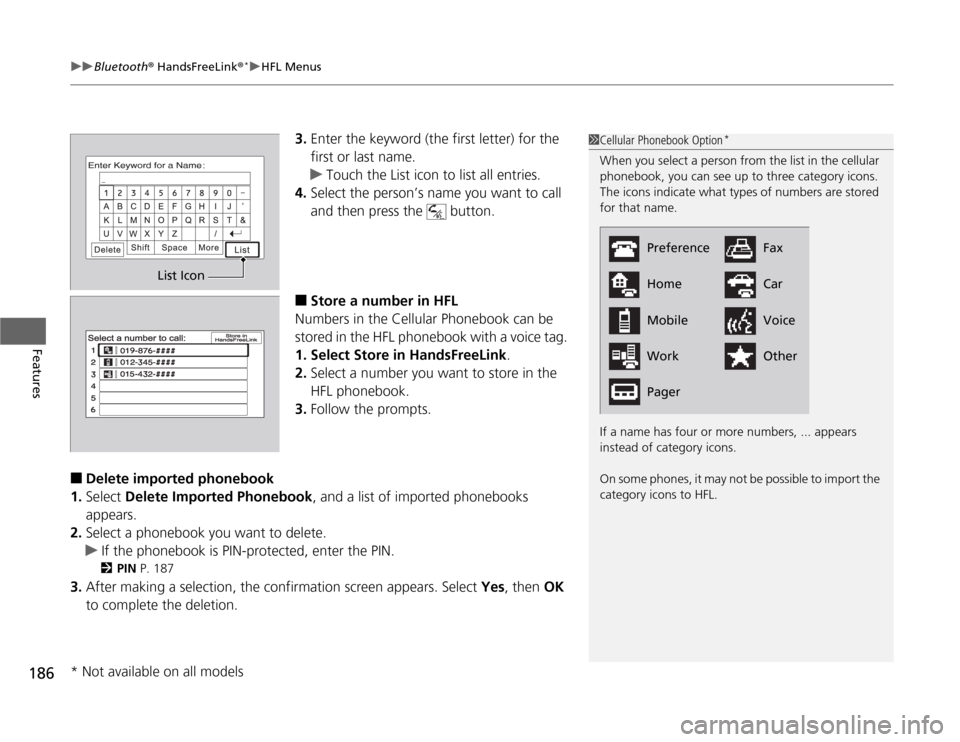
3. Enter the keyword (the first letter) for the
first or last name.
uTouch the List icon to list all entries.
4. Select the person’s name you want to call
and then press the button.
■ Store a number in HFL
Numbers in the Cellular Phonebook can be
stored in the HFL phonebook with a voice tag.
1. Select Store in HandsFreeLink .
2. Select a number you want to store in the
HFL phonebook.
3. Follow the prompts.
■ Delete imported phonebook
1. Select Delete Imported Phonebook , and a list of imported phonebooks
appears.
2. Select a phonebook you want to delete.
uIf the phonebook is PIN-protected, enter the PIN.
2 PIN P. 187
3. After making a selection, the confirmation screen appears. Select Yes, then OK
to complete the deletion.
1Cellular Phonebook Option *
When you select a person from the list in the cellular
phonebook, you can see up to three category icons.
The icons indicate what types of numbers are stored for that name.
If a name has four or more numbers, ... appears
instead of category icons.
On some phones, it may not be possible to import the category icons to HFL.
Preference
HomeMobile Work Pager Fax CarVoice Other
List Icon
* Not available on all models
Page 188 of 333
187
uuBluetooth® HandsFreeLink ®*uHFL Menus
Continued
Features
■
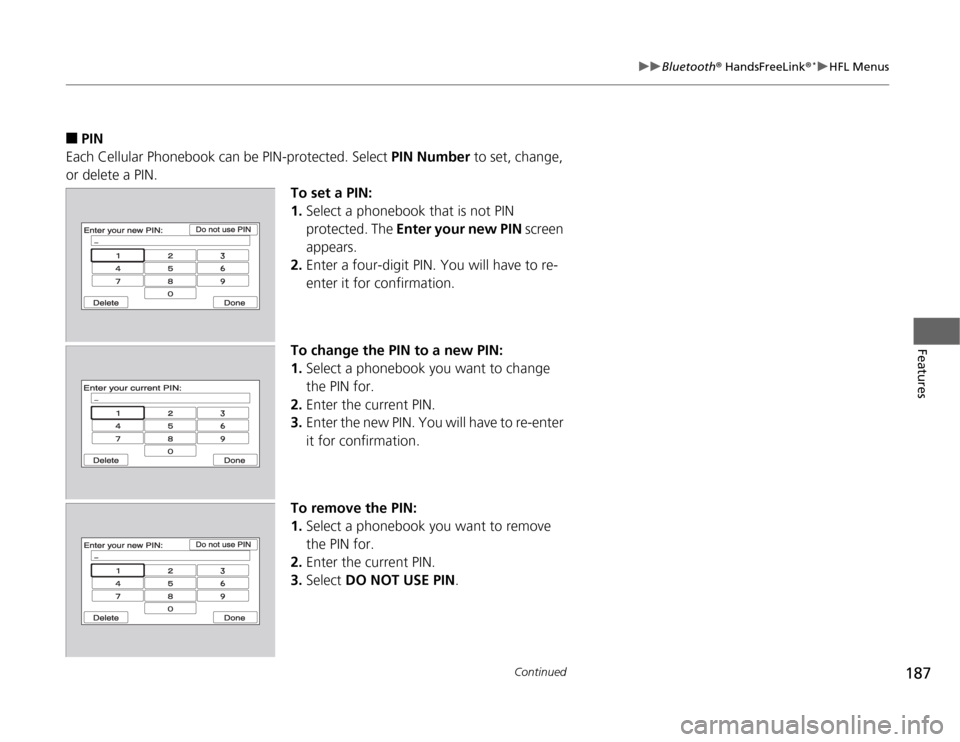
PIN
Each Cellular Phonebook can be PIN-protected. Select PIN Number to set, change,
or delete a PIN.
To set a PIN: 1.Select a phonebook that is not PIN protected. The Enter your new PIN screen
appears.
2. Enter a four-digit PIN. You will have to re-
enter it for confirmation.
To change the PIN to a new PIN:1. Select a phonebook you want to change
the PIN for.
2. Enter the current PIN.
3. Enter the new PIN. You will have to re-enter
it for confirmation.
To remove the PIN:1. Select a phonebook you want to remove
the PIN for.
2. Enter the current PIN.
3. Select DO NOT USE PIN .
Page 189 of 333
uuBluetooth® HandsFreeLink ®*uHFL Menus
188
Features
This command group allows you to change or customize HFL basic settings. ■ To set a four-digi t passcode to lock the HFL system for security
1. Say “System Setup.”
2. Say “Security.”
3. Follow the HFL prompts and say the four-digit number of your choice.
4. Follow the HFL prompts and confirm the number.
■ To change the security passcode
1. Say “System Setup.”
2. Say “Change Passcode” after the prompts.
3. Say the new four-digit passc ode after the HFL prompts.
4. Follow the HFL prompts.
■ To select a ring tone or a prompt as the incoming call notification
1. Say “System Setup.”
2. Say “Call Notification” after the prompts.
3. Say “Ring Tone” or “Prompt” after the prompts. For no audible notification, say
“Off.”
■System Setup1System Setup
Press the button before a command.
Once a passcode is set, you are required to enter the
passcode with every new key cycle to use HFL.
If you forget the code, go to your dealer to have the
passcode reset. You can also cancel the passcode by clearing all the data stored in the HFL system.
2 To clear the system P. 189
The default setting of the incoming notification is a
prompt.