navigation system HONDA CR-Z 2012 1.G Owner's Guide
[x] Cancel search | Manufacturer: HONDA, Model Year: 2012, Model line: CR-Z, Model: HONDA CR-Z 2012 1.GPages: 333, PDF Size: 10.43 MB
Page 157 of 333
156
uuAudio with Navigation System*uPlaying a CD
Features
Playing a CD
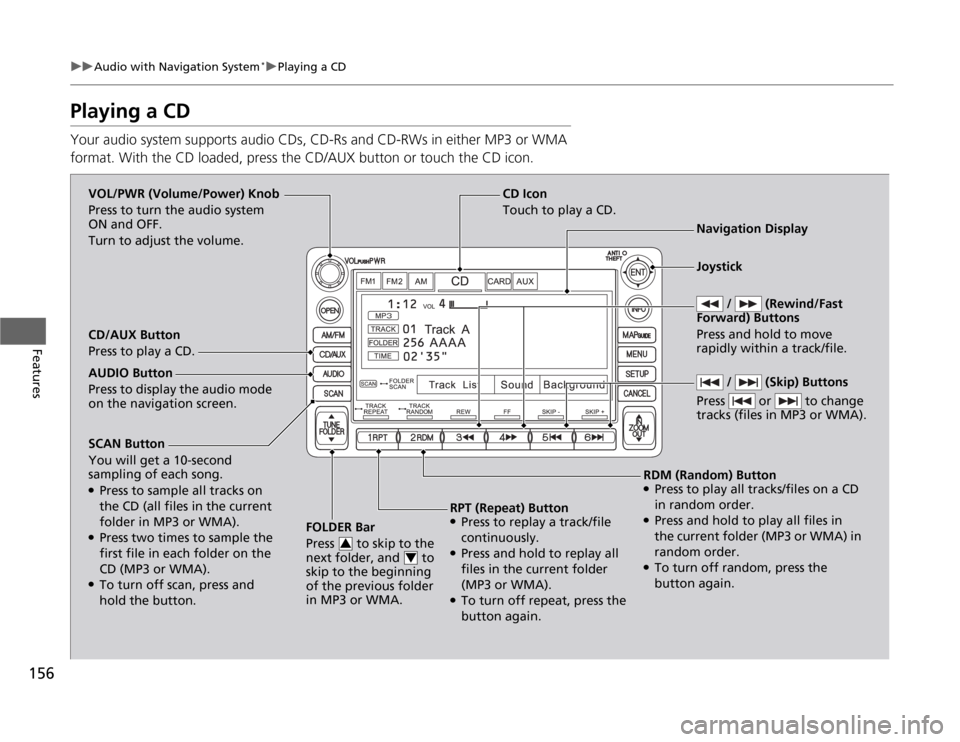
Your audio system supports audio CDs, CD-Rs and CD-RWs in either MP3 or WMA
format. With the CD loaded, press the CD/AUX button or touch the CD icon.
SCAN Button You will get a 10-second
sampling of each song. ●
Press to sample all tracks on
the CD (all files in the current
folder in MP3 or WMA).
● Press two times to sample the
first file in each folder on the
CD (MP3 or WMA).
● To turn off scan, press and
hold the button. FOLDER Bar
Press to skip to the
next folder, and to
skip to the beginning
of the previous folder in MP3 or WMA.
3
4
CD Icon
Touch to play a CD.
VOL/PWR (Volume/Power) Knob
Press to turn the audio system
ON and OFF.
Turn to adjust the volume.
Navigation Display
CD/AUX Button
Press to play a CD.
RDM (Random) Button● Press to play all tracks/files on a CD
in random order.
● Press and hold to play all files in
the current folder (MP3 or WMA) in
random order.
● To turn off random, press the
button again.
RPT (Repeat) Button
● Press to replay a track/file
continuously.
● Press and hold to replay all
files in the current folder (MP3 or WMA).
● To turn off repeat, press the
button again.
AUDIO Button
Press to display the audio mode on the navigation screen.
/ (Skip) Buttons
Press or to change
tracks (files in MP3 or WMA).
Joystick
/ (Rewind/Fast
Forward) Buttons Press and hold to move
rapidly within a track/file.
Page 158 of 333
157
uuAudio with Navigation System*uPlaying a CD
Features
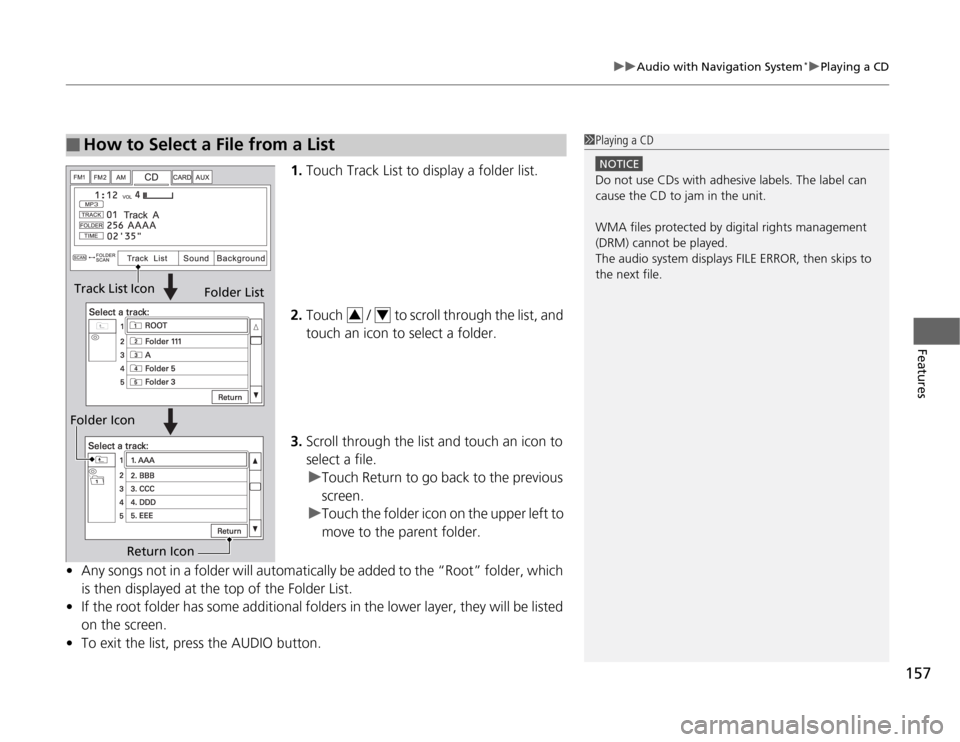
1.
Touch Track List to display a folder list.
2. Touch / to scroll through the list, and
touch an icon to select a folder.
3. Scroll through the list and touch an icon to
select a file.
uTouch Return to go back to the previous screen.
uTouch the folder icon on the upper left to
move to the parent folder.
• Any songs not in a folder will automatically be added to the “Root” folder, which
is then displayed at the top of the Folder List.
• If the root folder has some additional folders in the lower layer, they will be listed
on the screen.
• To exit the list, press the AUDIO button.
■How to Select a File from a List1Playing a CD
NOTICE
Do not use CDs with adhesive labels. The label can cause the CD to jam in the unit.
WMA files protected by digital rights management
(DRM) cannot be played.
The audio system displays FILE ERROR, then skips to
the next file.
Track List Icon
Folder List
Folder Icon
Return Icon
34
Page 159 of 333
158
uuAudio with Navigation System*uPlaying a PC Card
Features
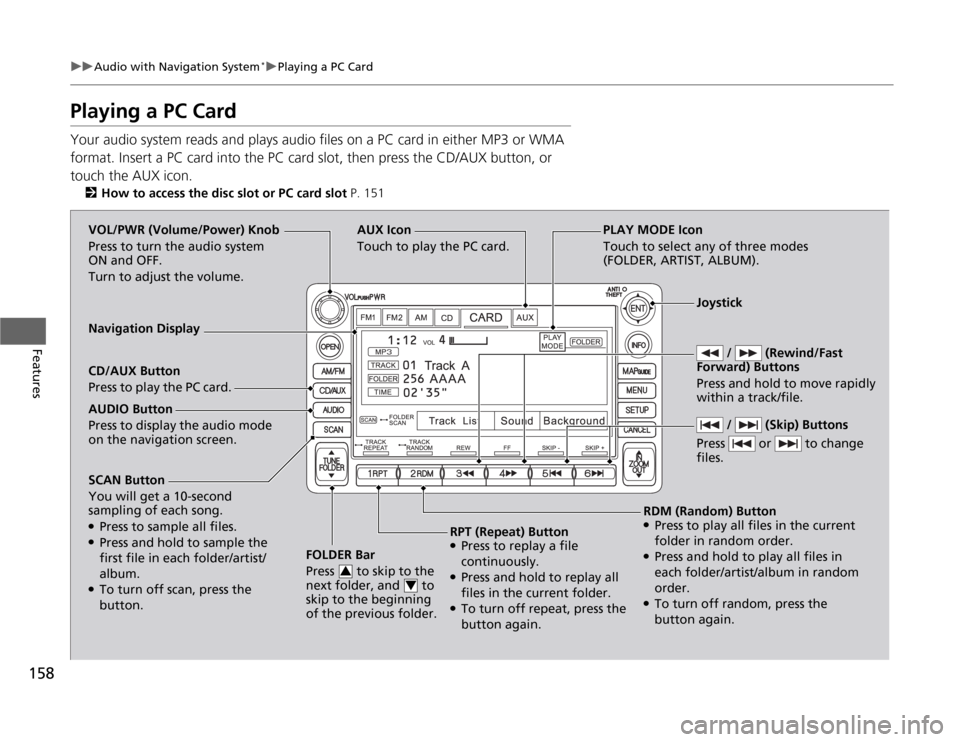
Playing a PC Card
Your audio system reads and plays audio files on a PC card in either MP3 or WMA
format. Insert a PC card into the PC card slot, then press the CD/AUX button, or touch the AUX icon.
2 How to access the disc slot or PC card slot P. 151
SCAN Button You will get a 10-second
sampling of each song. ●
Press to sample all files.
● Press and hold to sample the
first file in each folder/artist/ album.
● To turn off scan, press the
button. FOLDER Bar
Press to skip to the
next folder, and to
skip to the beginning
of the previous folder.
3
4
AUX Icon Touch to play the PC card.
/ (Rewind/Fast
Forward) Buttons
Press and hold to move rapidly within a track/file. VOL/PWR (Volume/Power) Knob
Press to turn the audio system
ON and OFF.
Turn to adjust the volume.
Navigation Display CD/AUX Button
Press to play the PC card.
RDM (Random) Button
● Press to play all files in the current
folder in random order.
● Press and hold to play all files in
each folder/artist/album in random order.
● To turn off random, press the
button again.
RPT (Repeat) Button
● Press to replay a file
continuously.
● Press and hold to replay all
files in the current folder.
● To turn off repeat, press the
button again.
AUDIO Button
Press to display the audio mode on the navigation screen.
/ (Skip) Buttons
Press or to change files.
Joystick
PLAY MODE Icon
Touch to select any of three modes
(FOLDER, ARTIST, ALBUM).
Page 160 of 333
Continued159
uuAudio with Navigation System*uPlaying a PC Card
Features
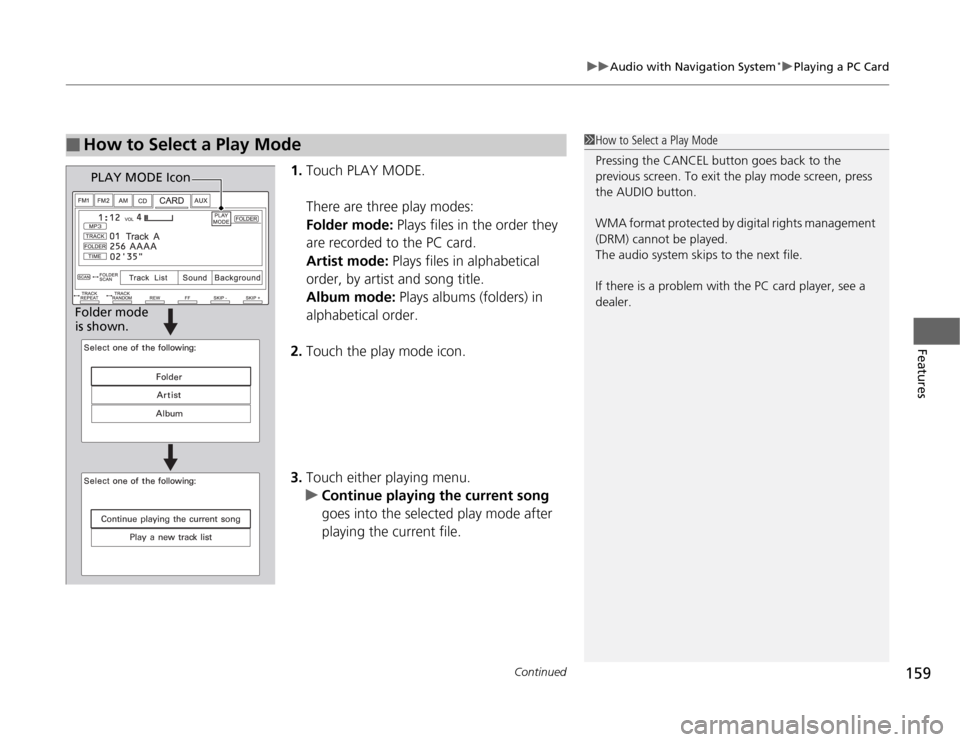
1.
Touch PLAY MODE.
There are three play modes: Folder mode: Plays files in the order they
are recorded to the PC card.Artist mode: Plays files in alphabetical
order, by artist and song title. Album mode: Plays albums (folders) in
alphabetical order.
2. Touch the play mode icon.
3. Touch either playing menu.
uContinue playing the current song
goes into the selected play mode after
playing the current file.
■How to Select a Play Mode1How to Select a Play Mode
Pressing the CANCEL button goes back to the
previous screen. To exit the play mode screen, press
the AUDIO button.
WMA format protected by digital rights management
(DRM) cannot be played.
The audio system skips to the next file.
If there is a problem with the PC card player, see a
dealer.
PLAY MODE Icon
Folder mode
is shown.
Page 161 of 333
uuAudio with Navigation System*uPlaying a PC Card
160
Features
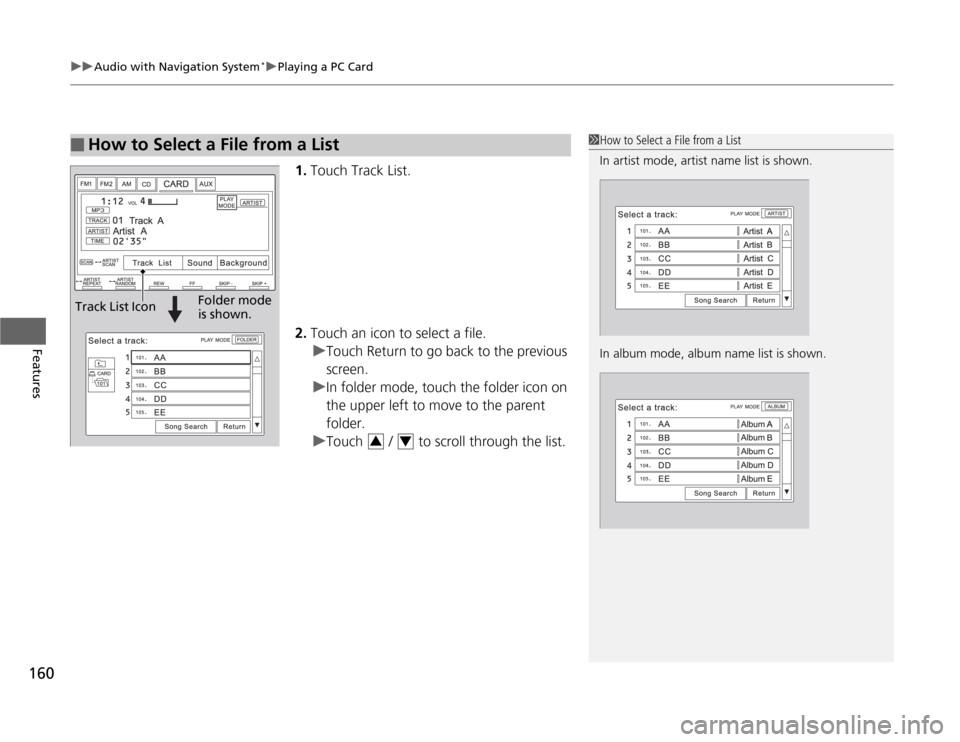
1. Touch Track List.
2. Touch an icon to select a file.
uTouch Return to go back to the previous screen.
uIn folder mode, touch the folder icon on
the upper left to move to the parent folder.
uTouch / to scroll through the list.
■How to Select a File from a List1How to Select a File from a List
In artist mode, artist name list is shown.
In album mode, album name list is shown.
Track List IconFolder mode is shown.
34
Page 162 of 333
161
uuAudio with Navigation System*uPlaying a PC Card
Features
■
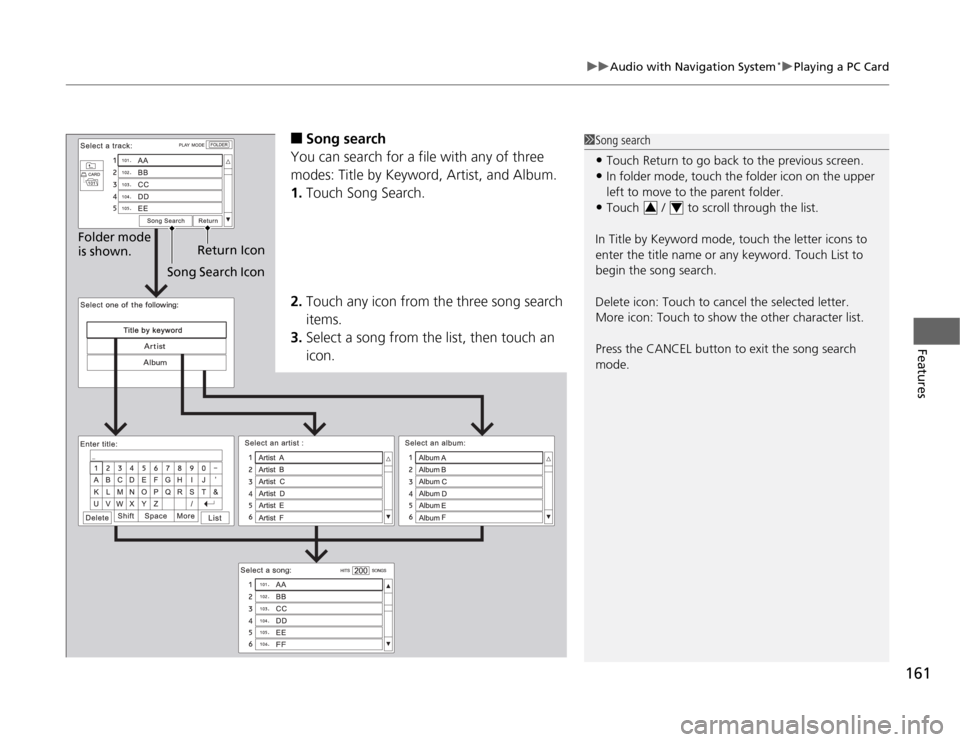
Song search
You can search for a file with any of three
modes: Title by Keyword, Artist, and Album. 1. Touch Song Search.
2. Touch any icon from the three song search items.
3. Select a song from the list, then touch an icon.1Song search
• Touch Return to go back to the previous screen.
• In folder mode, touch the folder icon on the upper
left to move to the parent folder.
• Touch / to scroll through the list.
In Title by Keyword mode, touch the letter icons to
enter the title name or any keyword. Touch List to
begin the song search.
Delete icon: Touch to cancel the selected letter.
More icon: Touch to show the other character list.
Press the CANCEL button to exit the song search mode.
34
Song Search Icon Return Icon
Folder mode is shown.
Page 163 of 333
162
uuAudio with Navigation System*uPlaying an iPod
®
Features
Playing an iPod ®
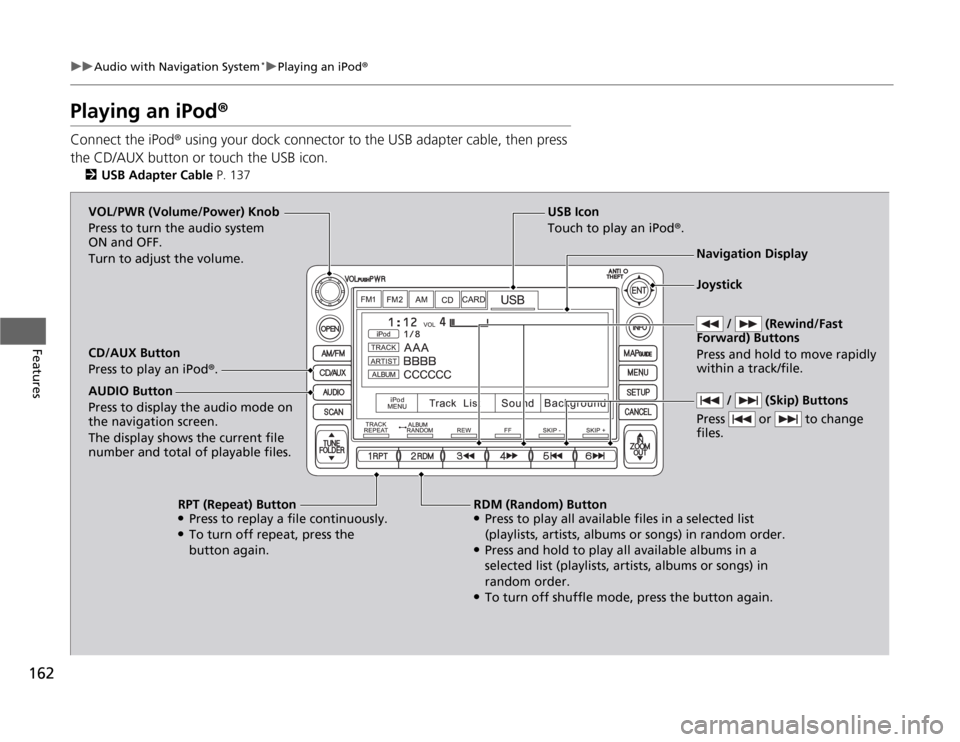
Connect the iPod ® using your dock connector to the USB adapter cable, then press
the CD/AUX button or touch the USB icon. 2 USB Adapter Cable P. 137
USB Icon
Touch to play an iPod ®.
/ (Rewind/Fast
Forward) Buttons
Press and hold to move rapidly within a track/file. VOL/PWR (Volume/Power) Knob
Press to turn the audio system
ON and OFF.
Turn to adjust the volume. Navigation Display
CD/AUX Button
Press to play an iPod ®.
RDM (Random) Button
● Press to play all available files in a selected list
(playlists, artists, albums or songs) in random order.
● Press and hold to play all available albums in a
selected list (playlists, artists, albums or songs) in
random order.
● To turn off shuffle mode, press the button again.
RPT (Repeat) Button
● Press to replay a file continuously.
● To turn off repeat, press the
button again.
AUDIO Button Press to display the audio mode on
the navigation screen.
The display shows the current file
number and total of playable files.
/ (Skip) Buttons
Press or to change files.
Joystick
Page 164 of 333
Continued163
uuAudio with Navigation System*uPlaying an iPod
®
Features
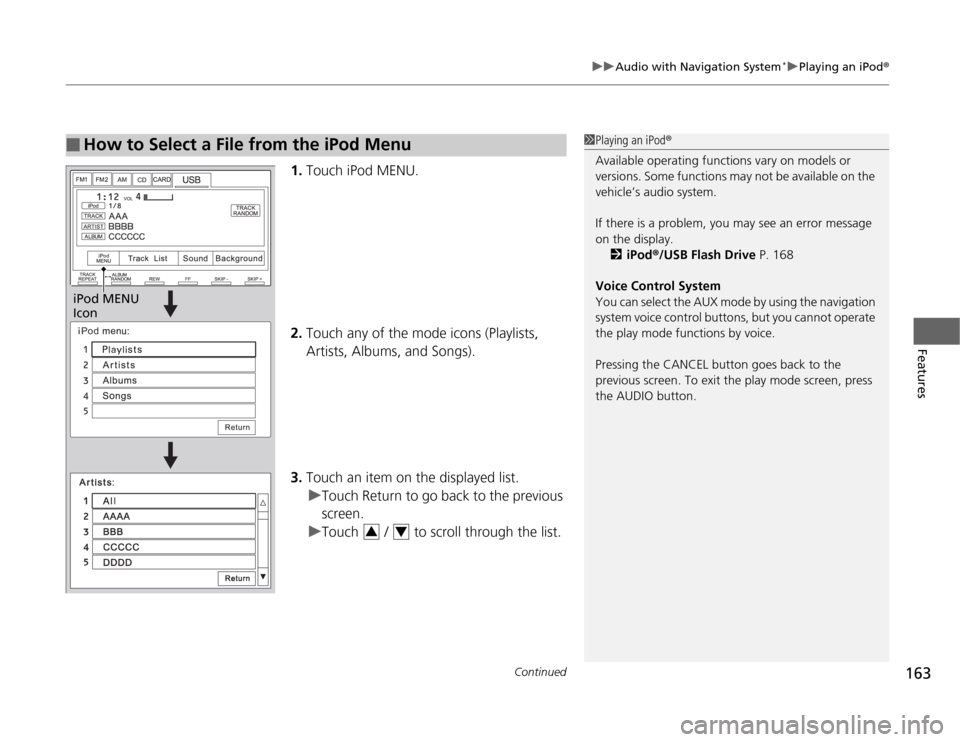
1.Touch iPod MENU.
2. Touch any of the mode icons (Playlists, Artists, Albums, and Songs).
3. Touch an item on the displayed list.
uTouch Return to go back to the previous screen.
uTouch / to scroll through the list.
■How to Select a File from the iPod Menu1Playing an iPod ®
Available operating functions vary on models or
versions. Some functions may not be available on the
vehicle’s audio system.
If there is a problem, you may see an error message
on the display. 2 iPod ®/USB Flash Drive P. 168
Voice Control System
You can select the AUX mode by using the navigation
system voice control buttons, but you cannot operate
the play mode functions by voice.
Pressing the CANCEL button goes back to the
previous screen. To exit the play mode screen, press
the AUDIO button.
iPod MENU
Icon
34
Page 165 of 333
164
uuAudio with Navigation System*uPlaying an iPod
®
Features
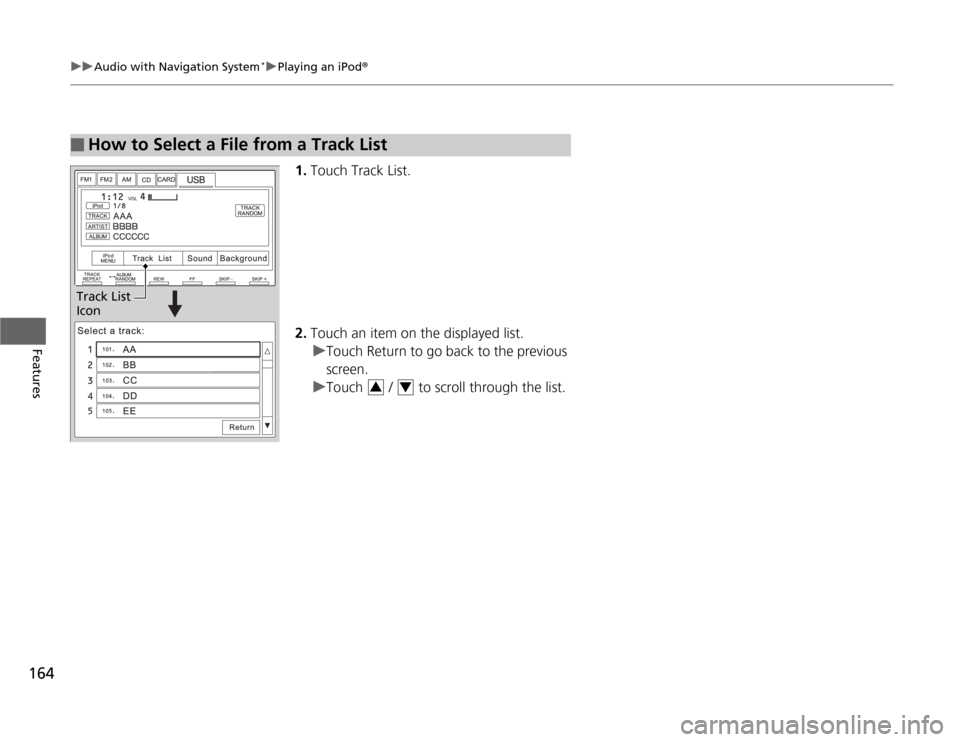
1.Touch Track List.
2. Touch an item on the displayed list.
uTouch Return to go back to the previous screen.
uTouch / to scroll through the list.
■How to Select a File from a Track List
Track List Icon
34
Page 166 of 333
165
uuAudio with Navigation System*uPlaying a USB Flash Drive
Continued
Features
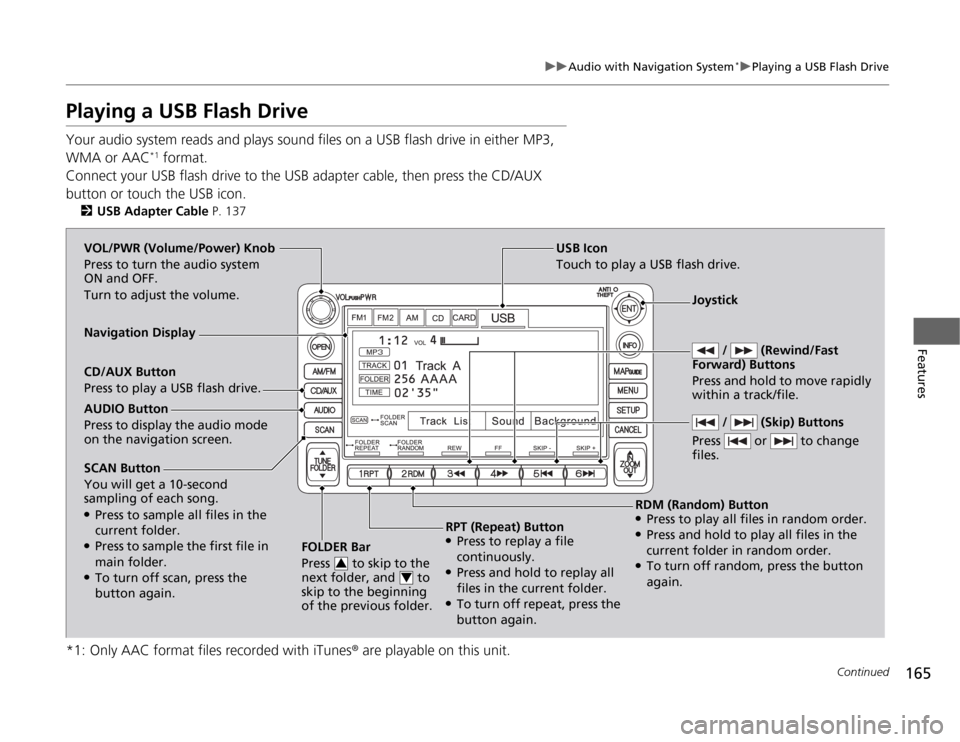
Playing a USB Flash Drive
Your audio system reads and plays sound files on a USB flash drive in either MP3,
WMA or AAC*1
format.
Connect your USB flash drive to the USB adapter cable, then press the CD/AUX
button or touch the USB icon. 2 USB Adapter Cable P. 137
*1: Only AAC format files recorded with iTunes ® are playable on this unit.
SCAN Button You will get a 10-second
sampling of each song. ●
Press to sample all files in the current folder.
● Press to sample the first file in main folder.
● To turn off scan, press the
button again. FOLDER Bar
Press to skip to the
next folder, and to
skip to the beginning
of the previous folder.
3
4
USB Icon
Touch to play a USB flash drive.
/ (Rewind/Fast
Forward) Buttons
Press and hold to move rapidly within a track/file. VOL/PWR (Volume/Power) Knob
Press to turn the audio system
ON and OFF.
Turn to adjust the volume.
Navigation Display CD/AUX Button
Press to play a USB flash drive.
RDM (Random) Button
● Press to play all files in random order.
● Press and hold to play all files in the
current folder in random order.
● To turn off random, press the button
again.
RPT (Repeat) Button
● Press to replay a file
continuously.
● Press and hold to replay all
files in the current folder.
● To turn off repeat, press the
button again.
AUDIO Button
Press to display the audio mode on the navigation screen.
/ (Skip) Buttons
Press or to change files.
Joystick