reset HONDA CR-Z 2013 1.G User Guide
[x] Cancel search | Manufacturer: HONDA, Model Year: 2013, Model line: CR-Z, Model: HONDA CR-Z 2013 1.GPages: 325, PDF Size: 11.73 MB
Page 96 of 325
95
uuGauges and Multi-Information DisplayuMulti-Information Display
Instrument Panel
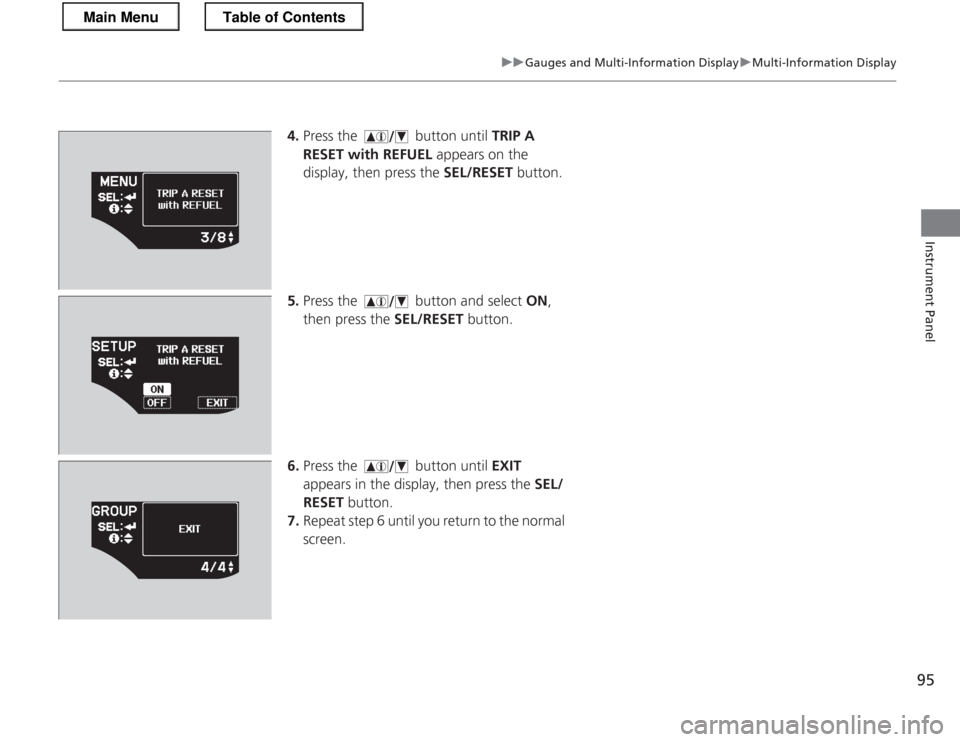
4.Press the button until TRIP A
RESET with REFUEL appears on the
display, then press the SEL/RESET button.
5. Press the button and select ON,
then press the SEL/RESET button.
6. Press the button until EXIT
appears in the display, then press the SEL/
RESET button.
7. Repeat step 6 until you return to the normal
screen.
Main MenuTable of Contents
Page 99 of 325

98
Controls
Setting the Clock
Clock
You can adjust the time in the clock display, using the CLOCK (AM /FM ) button with
the ignition switch in ON
(w .
1. Press and hold the CLOCK button until the clock dis play begins to blink.
2. Press the
(1 (Hour) button to change the hours.
3. Press the
(2 (Minute) button to change the minutes.
4. Press the CLOCK button to go back to the normal display.
■Adjusting the Time
1Clock
To set the time to the nearest hour:
Press and hold the CLOCK button until the clock
display begins to blink, then press the
(3 (Reset)
button.
Depending on the displayed time, the clock sets
forward or backward.
Example: 1:06 will reset to 1:001:53 will reset to 2:00
The clock is automatically updated through the navigation system, so the time does not need to be
adjusted.
Models with navigation system
Models without navigation system
(2 Button
(1 Button
(3 Button
CLOCK ButtonClock Display
Main MenuTable of Contents
Page 142 of 325
141
uuAudio SystemuAudio System Theft Protection
Features
Audio System Theft Protection
The audio system is disabled when it is disconnected from the power source, such as
when the 12 volt battery is disconnected or goes dead. ■Reactivating the audio system
1. Turn the ignition switch to ON
(w , and turn on the audio system.
uIf you turn the ignition switch to ACCESSORY (q, you will be requested to
enter the audio security code.
2. Enter the audio security code using the preset buttons.
If you enter an incorrect digit, continue to the last digit, then try again. If you do
not enter the code correctly after 10 tries, leave the system for one hour before
trying again, or visit a dealer to have the system reset.
1Audio System Theft Protection
Find the audio system's security code and serial
number label in your owner’s manual kit.
We recommend that you write down the serial
number in this owner’s manual.
Do not store the label in your vehicle. If you lose the
label, you must first retrieve the serial number, and
then obtain the code.
You can find out about your serial number and
security code from a dealer.
You can register the security code at Owner Link (owners.honda.com. ), and find information on how
to retrieve the serial number and obtain the code at
radio-navicode.honda.com .
U.S. models
Main MenuTable of Contents
Page 143 of 325
142
uuAudio SystemuAudio Remote Controls
Features
Audio Remote Controls
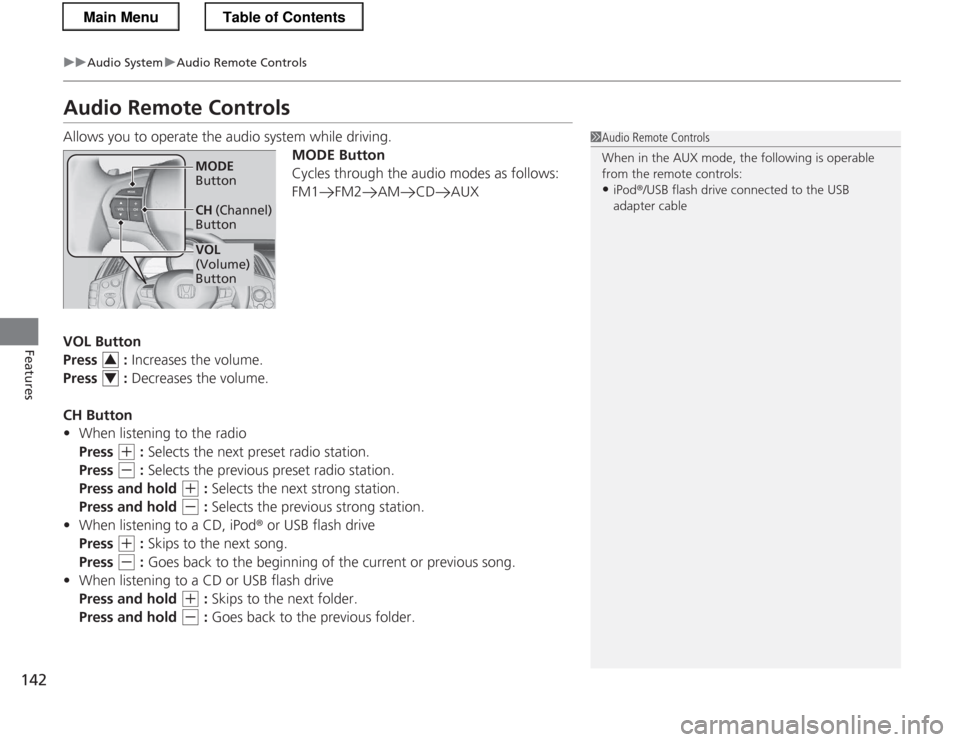
Allows you to operate the audio system while driving.MODE Button
Cycles through the audio modes as follows:
FM1 FM2 AM CD AUX
VOL Button
Press : Increases the volume.
Press : Decreases the volume.
CH Button • When listening to the radio
Press
(+ : Selects the next preset radio station.
Press
(- : Selects the previous preset radio station.
Press and hold
(+ : Selects the next strong station.
Press and hold
(- : Selects the previous strong station.
• When listening to a CD, iPod ® or USB flash drive
Press
(+ : Skips to the next song.
Press
(- : Goes back to the beginning of the current or previous song.
• When listening to a CD or USB flash drive
Press and hold
(+ : Skips to the next folder.
Press and hold
(- : Goes back to the previous folder.
1Audio Remote Controls
When in the AUX mode, the following is operable
from the remote controls:
• iPod ®/USB flash drive connected to the USB
adapter cable
VOL
(Volume) Button
MODE
Button
CH (Channel)
Button
3
4
Main MenuTable of Contents
Page 146 of 325
145
uuAudio SystemuPlaying the AM/FM Radio
Continued
Features
Playing the AM/FM Radio
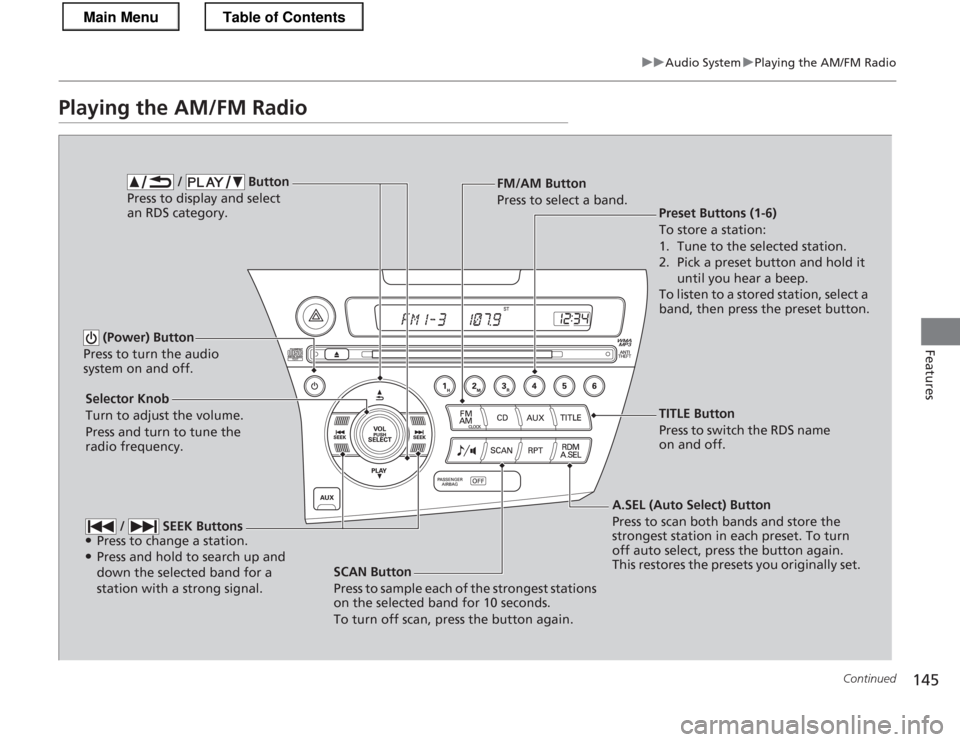
SCAN Button
Press to sample each of the strongest stations
on the selected band for 10 seconds.
To turn off scan, press the button again.
(Power) Button
Press to turn the audio
system on and off.
Preset Buttons (1-6)
To store a station:
1. Tune to the selected station.
2. Pick a preset button and hold it until you hear a beep.
To listen to a stored station, select a
band, then press the preset button.
Selector Knob
Turn to adjust the volume.
Press and turn to tune the radio frequency. FM/AM Button
Press to select a band.
A.SEL (Auto Select) Button
Press to scan both bands and store the
strongest station in each preset. To turn
off auto select, press the button again.
This restores the presets you originally set.
/ Button
Press to display and select an RDS category.
/ SEEK Buttons
● Press to change a station.
● Press and hold to search up and
down the selected band for a station with a strong signal.
TITLE Button
Press to switch the RDS name
on and off.
Main MenuTable of Contents
Page 147 of 325
uuAudio SystemuPlaying the AM/FM Radio
146
Features
Use the auto select feature to scan both band s and store the strongest station in
each preset. Press the A.SEL button to activate the feature.
To turn off auto select, press the A.SEL button again. This restores the presets you
originally set.
Provides text data information related to your selected RDS capable FM station. ■ RDS INFO ON
Press the TITLE button while listening to an RDS capable station. RDS INFO ON
appears, and the station name is displayed.
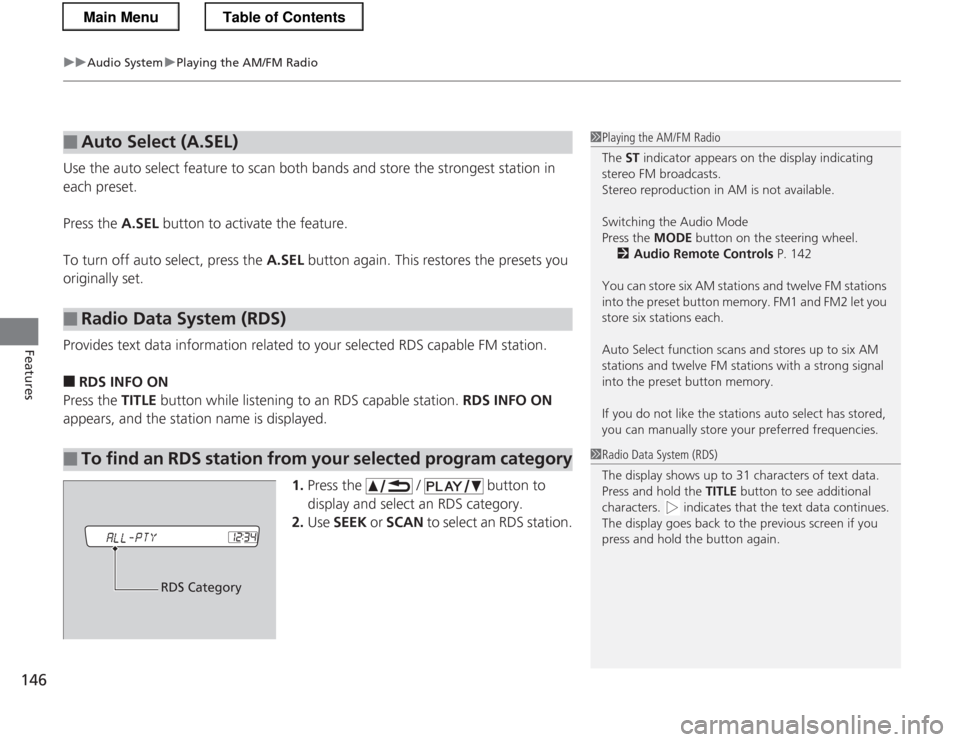
1.Press the / button to
display and select an RDS category.
2. Use SEEK or SCAN to select an RDS station.
■Auto Select (A.SEL)
■Radio Data System (RDS)
■To find an RDS station from your selected program category
1Playing the AM/FM Radio
The ST indicator appears on the display indicating
stereo FM broadcasts.
Stereo reproduction in AM is not available. Switching the Audio Mode
Press the MODE button on the steering wheel.
2 Audio Remote Controls P. 142
You can store six AM stations and twelve FM stations
into the preset button memory. FM1 and FM2 let you store six stations each.
Auto Select function scans and stores up to six AM
stations and twelve FM stations with a strong signal
into the preset button memory.
If you do not like the stations auto select has stored,
you can manually store your preferred frequencies.
1Radio Data System (RDS)
The display shows up to 31 characters of text data.
Press and hold the TITLE button to see additional
characters. indica tes that the text data continues.
The display goes back to the previous screen if you
press and hold the button again.
RDS Category
Main MenuTable of Contents
Page 169 of 325
uuBluetooth® HandsFreeLink ®uHFL Menus
168
Features
This command group allows you to change or customize HFL basic settings. ■ To set a four-digi t passcode to lock the HFL system for security
1. Say “System Setup.”
2. Say “Security.”
3. Follow the HFL prompts and say the four-digit number of your choice.
4. Follow the HFL prompts and confirm the number.
■ To change the security passcode
1. Say “System Setup.”
2. Say “Change Passcode” after the prompts.
3. Say the new four-digit passc ode after the HFL prompts.
4. Follow the HFL prompts.
■ To select a ring tone or a prompt as the incoming call notification
1. Say “System Setup.”
2. Say “Call Notification” after the prompts.
3. Say “Ring Tone” or “Prompt” after the prompts. For no audible notification, say
“Off.”
■System Setup1System Setup
Press the button before a command.
Once a passcode is set, you are required to enter the
passcode with every new key cycle to use HFL.
If you forget the code, go to your dealer to have the
passcode reset. You can also cancel the passcode by clearing all the data stored in the HFL system.
2 To clear the system P. 169
The default setting of the incoming notification is a
prompt.
Main MenuTable of Contents
Page 263 of 325

262
Maintenance
12 Volt Battery
Checking the 12 Volt BatteryCheck the battery condition monthly. Look at
the test indicator window and check the
terminals for corrosion.
If your vehicle's battery is disconnected or goes dead: • The audio system is disabled.
2 Reactivating the audio system P. 141
• The clock resets.
2 Setting the Clock P. 98
• The navigation system *
is disabled. A PIN code will be required.
2 Refer to the navigation system manual
Charging the 12 Volt Battery
Disconnect both battery cables to prevent damaging your vehicle's electrical system.
Always disconnect the negative (-) cable first, and reconnect it last.
112 Volt Battery
WARNING: Battery post, terminals,
and related accessori es contain lead
and lead compounds. Wash your hands after handling.
The test indicator's color information is on the
battery.
When you find corrosion, clean the battery terminals
by applying a baking powder and water solution. Clean terminals with a damp towel. Cloth/towel dry
the battery. Coat the termina ls with grease to help
prevent future corrosion.
3WARNING
The battery gives off explosive hydrogen
gas during normal operation.
A spark or flame can cause the battery to
explode with enough force to kill or seriously hurt you.
When conducting any battery
maintenance, wear protective clothing and
a face shield, or have a skilled technician do
it.
Test Indicator Window
* Not available on all models
Main MenuTable of Contents
Page 323 of 325
322
Index
Maximum Load Limit................................ 175
Meters, Gauges ........................................... 81
Mirrors ....................................................... 119
Adjusting ................................................. 119
Door ........................................................ 120
Exterior .................................................... 119
Interior Rearview...................................... 119
Modifications and Accessories ................. 220
MP3 .................................................... 147, 151
Multi-Information Display .......................... 83
Multi-View Rear Camera .......................... 213
N NORMAL Mode ................................... 76, 197
Numbers (Identification) .......................... 308
OOdometer .................................................... 84
Oil (Engine) ............................................... 231
Adding .................................................... 233
Checking ................................................. 232
Displaying Oil Life .................................... 225
Low Oil Pressure Indicator .................. 66, 292
Recommended Engine Oil ........................ 231
Viscosity .................................................. 231
Opening/Closing
Hood ....................................................... 230
Power Windows ...................................... 108
Outside Temperature ................................. 85 Overheating
.............................................. 290
P
Panic Mode ............................................... 107
Parking ...................................................... 212
Parking Brake ........................................... 208
Parking Brake and Brake System Indicator ............................................ 66, 295
Passenger Airbag Off Indicator ................. 51
Plus Sport System ............................... 77, 198
Plus Sport System Indicator ....................... 77
Power Door Mirror ................................... 120
Power Flow Monitor .................................. 89
Power Windows ....................................... 108
Precautions While Driving ....................... 181
Rain ........................................................ 181
Pregnant Women ....................................... 37
Puncture (Tire) .......................................... 271
R
Radiator .................................................... 237
Radio (AM/FM) ......................................... 145
Radio Data System (RDS) ......................... 146
Range .......................................................... 85
Readiness Code (Emissions Testing) ........ 311
Rear Defogger/Heated Door Mirror Button ..................................................... 117
Rear Luggage Console ............................. 130
Rear Side Marker Light ............................ 247 Rear Turn Signal Light
............................. 247
Rearview Mirror ....................................... 119
Rearview Mirror with Rearview Camera Display .................................................... 214
Refueling .................................................. 216
Fuel Gauge ............................................... 81
Gasoline ......................................... 216, 306
Low Fuel Indicator ..................................... 68
Regulations .............................. 206, 255, 309
Remote Transmitter ................................. 100
Replacement
Battery .................................................... 262
Bulbs ...................................................... 242
Button Battery, Remote Transmitter ........ 263
Fuses .............................................. 297, 298
Tires........................................................ 259
Wiper Blade Rubber ........................ 250, 252
Reporting Safety Defects ......................... 310
Resetting a Trip Meter ............................... 84
S Safe Driving ................................................ 27
Safety Check ............................................... 31
Safety Labels .............................................. 63
Safety Message .......................................... 26
Seat ........................................................... 121
Adjusting ................................................ 121
Seat Heaters ........................................... 133
Seat Belts .................................................... 32
Automatic Seat Belt Tensioners ................. 34
Main Menu
Page 324 of 325
323
Index
Checking .................................................. 38
Fastening .................................................. 35
Installing a Child Seat................................ 58
Pregnant Women...................................... 37
Reminder .................................................. 33
Warning Indicator ............................... 33, 68
Seat Heaters ............................................. 133
Security System
Immobilizer System Indicator..................... 75
Security System Alarm Indicator ................ 75
SEL/RESET Button ....................................... 90
Selecting a Child Seat ................................ 57
Selector Knob (Audio) ............................. 143
Setting the Clock ........................................ 98
Shift Lever .................................................. 19
Automatic Transmission (CVT)................. 183
Operation ................................................. 19
Operation (Automatic Transmission)........ 184
Operation (Manual Transmission) ............ 188
Releasing ................................................ 289
Won’t Move ........................................... 289
Shift Lever Position Indicator .................. 184
Shifting Automatic Transmission (CVT)................. 183
Manual Transmission .............................. 188
Side Airbags ............................................... 46
Cutoff System ........................................... 48
Off Indicator ............................................. 48
Side Curtain Airbags .................................. 49
Snow Tires ................................................ 261
Spare Tire ......................................... 271, 307 Spark Plugs
................................................ 306
Specifications ............................................ 306
Specified Fuel .................................... 216, 306
Speedometer .............................................. 81
SPORT Mode ....................................... 76, 197
SRS Airbags (Airbags) ................................. 39
Starting the Engine .................................. 178
Does Not Start ......................................... 286
Engine Switch Buzzer .............................. 110
Jump Starting .......................................... 287
Steering Wheel ......................................... 118
Adjusting ................................................. 118
Stopping .................................................... 212
Supplemental Restraint System (SRS) ........ 42
Switches (Around the Steering Wheel) ........ 2, 3, 110
System Message Indicator .......................... 72
T
Tachometer ................................................. 81
Tailgate Release Button ........................................ 105
Tailgate Release Button ........................... 105
Temperature High Temperature Indicator ....................... 72
Low Temperature Indicator ........................ 73
Temperature Sensor ................................. 136
Temporarily Repairing a Flat Tire ............ 277
Time (Setting) ............................................. 98 Tire Pressure Monitoring System
(TPMS) ..................................................... 205
Indicator............................................ 71, 296
Tires ........................................................... 253
Air Pressure ..................................... 254, 307
Checking and Maintaining ...................... 253
Compact Spare Tire ......................... 271, 307
Inspection ............................................... 253
Labeling .................................................. 254
Puncture (Flat Tire) .................................. 271
Regulations ............................................. 256
Rotation .................................................. 260
Tire Chains .............................................. 261
Wear Indicators ....................................... 258
Winter..................................................... 261
Tools .......................................................... 270
Towing a Trailer ....................................... 177
Towing Hook ............................................ 302
Towing Your Vehicle ................................ 177
Emergency .............................................. 301
TPMS
(Tire Pressure Monitoring System) ........ 205
Indicator............................................ 71, 296
Transmission
Automatic (CVT)...................................... 183
Fluid ................................................ 238, 239
Manual ................................................... 188
Number................................................... 308
Shift Lever Position Indicator.................... 184
Trip Meter ................................................... 84
Main Menu