air condition HONDA CR-Z 2013 1.G Owners Manual
[x] Cancel search | Manufacturer: HONDA, Model Year: 2013, Model line: CR-Z, Model: HONDA CR-Z 2013 1.GPages: 325, PDF Size: 11.73 MB
Page 13 of 325
12
Quick Reference Guide
To Keep the IMA Battery in Good Condition
Drive your vehicle at least once a month, and drive for more than 30 minutes at a time. Parking your vehicle for an extended period can
cause the IMA battery to weaken or decrease the IMA battery life. Safety Precautions
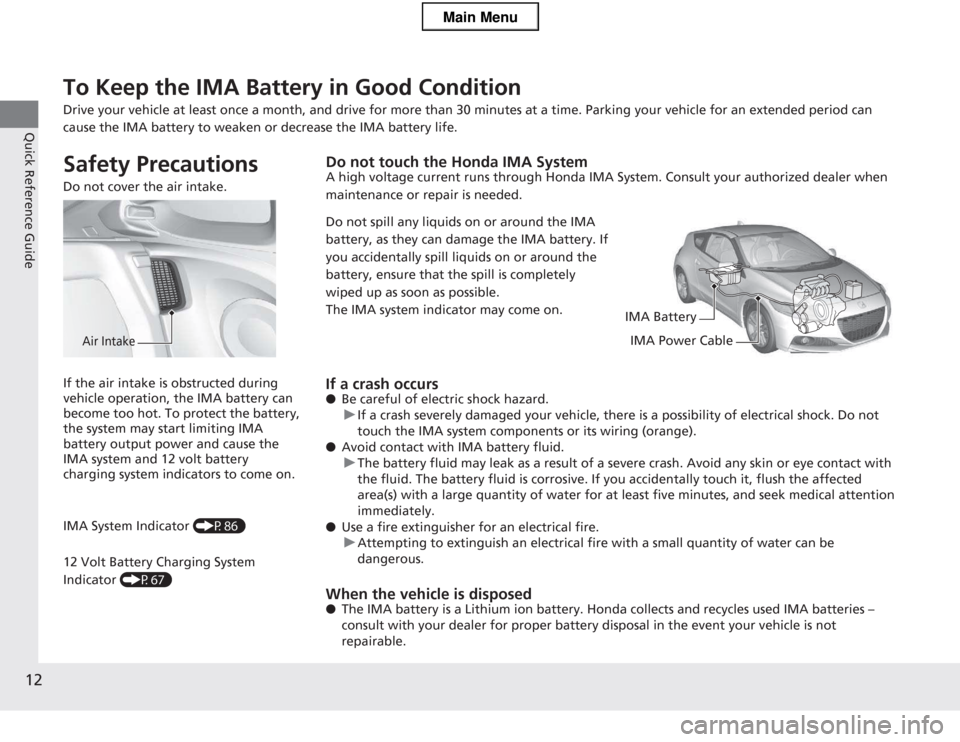
Do not cover the air intake.
Air Intake
Do not touch the Honda IMA System
A high voltage current runs through Honda IMA System. Consult your authorized dealer when
maintenance or repair is needed.
Do not spill any liquids on or around the IMA
battery, as they can damage the IMA battery. If
you accidentally spill liquids on or around the
battery, ensure that the spill is completely
wiped up as soon as possible.
The IMA system indicator may come on.
IMA Battery
IMA Power Cable
If a crash occurs ● Be careful of electric shock hazard.
uIf a crash severely damaged your vehicle, there is a possibility of electrical shock. Do not
touch the IMA system components or its wiring (orange).
● Avoid contact with IMA battery fluid.
uThe battery fluid may leak as a result of a severe crash. Avoid any skin or eye contact with
the fluid. The battery fluid is corrosive. If you accidentally touch it, flush the affected
area(s) with a large quantity of water for at least five minutes, and seek medical attention immediately.
● Use a fire extinguisher for an electrical fire.
uAttempting to extinguish an electrical fire with a small quantity of water can be dangerous.
When the vehicle is disposed ● The IMA battery is a Lithium ion battery. Hon da collects and recycles used IMA batteries
Page 18 of 325
17
Quick Reference Guide
Climate Control System (P134)
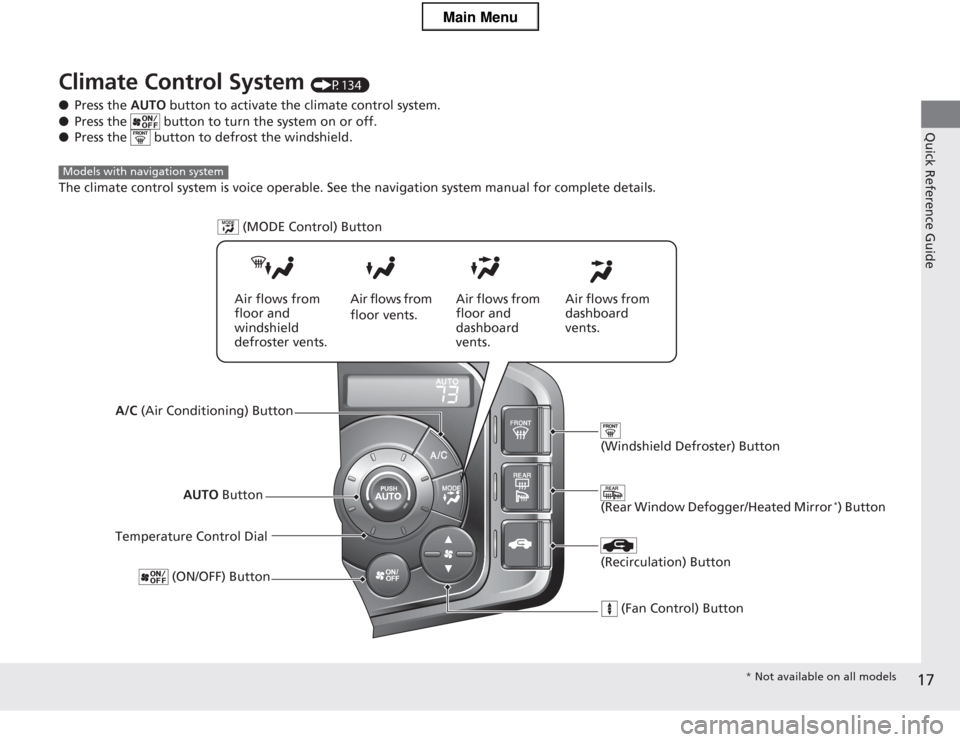
● Press the AUTO button to activate the climate control system.
● Press the button to turn the system on or off.
● Press the button to defrost the windshield.
The climate control system is voice operable. See the navigation system manual for complete details.
Models with navigation system
AUTO Button
Temperature Control Dial (ON/OFF) Button
(Recirculation) Button
(Fan Control) Button
(Rear Window Defogger/Heated Mirror *
) Button
(Windshield Defroster) Button
A/C (Air Conditioning) Button (MODE Control) Button
Air flows from floor and
windshield
defroster vents.
Air flows from floor vents.
Air flows from
floor and
dashboard
vents. Air flows from
dashboard
vents.
*
Not available on all models
Main Menu
Page 26 of 325
25
Quick Reference Guide
California Proposition 65 Warning Event Data Recorders
This vehicle is equipped with an event data recorder (EDR).
The main purpose of an EDR is to record, in certain crash or near
crash-like situations, such as an air bag deployment or hitting a
road obstacle, data that will assist in understanding how a vehicle’s
systems performed. The EDR is designed to record data related
to vehicle dynamics and safety systems for a short period of
time, typically 30 seconds or less. The EDR in this vehicle is
designed to record such data as: • How various systems in your vehicle were operating;
• Whether or not the driver and passenger safety belts were buckled/fastened;
• How far (if at all) the driver was depressing the accelerator
and/or brake pedal; and,
• How fast the vehicle was traveling.
These data can help provide a better understanding of the
circumstances in which crashes and injuries occur. NOTE: EDR data
are recorded by your vehicle only if a non-trivial crash situation
occurs; no data are recorded by the EDR under normal driving
conditions and no personal data (e.g., name, gender, age, and
crash location) are recorded. However, other parties, such as law
enforcement, could combine the EDR data with the type of
personally identifying data routinely acquired during a crash investigation.
WARNING: This product contains or emits
chemicals known to the st ate of California to cause
cancer and birth defects or other reproductive
harm.
To read data recorded by an EDR, special equipment is required,
and access to the vehicle or the EDR is needed. In addition to the
vehicle manufacturer, other parties, such as law enforcement, that
have the special equipment, can read the information if they have
access to the vehicle or the EDR.
The data belongs to the vehicle owner and may not be accessed by
anyone else except as legally required or with the permission of the
vehicle owner.
Service Diagnostic Recorders
This vehicle is equipped with service-related devices that record information ab out powertrain performance. The data can be used
to verify emissions law requirements and/or help technicians
diagnose and solve service problems. It may also be combined with
data from other sources for research purposes, but it remains
confidential.
California Perchlorate C ontamination Prevention Act
The airbags, seat belt tensioners, and CR type batteries in this vehicle may contain perchlor ate materials - special handling may
apply. See www.dtsc.ca.gov/hazardouswaste/p erchlorate/
As you read this manual, you will find information that is preceded
by a symbol. This information is intended to help you avoid
damage to your vehicle, oth er property, or the environment.
NOTICE
Main Menu
Page 29 of 325
28
Safe Driving
For Safe Driving
The following pages explain your vehicle's safety features and how to use them
properly. The safety precautions below are ones that we consider to be among the most important.
Important Safety Precautions ■Always wear your seat belt
A seat belt is your best protection in all types of collisions. Airbags are designed to
supplement seat belts, not replace them. So even though your vehicle is equipped
with airbags, make sure you and your passenger always wear your seat belts, and
wear them properly. ■ Your vehicle is not recom mended for child passengers
The National Highway Traffic Safety Administration and Transport Canada
recommend that all children age 12 and under be properly restrained in a back seat.
Since this vehicle does not have a back seat, we strongly recommend that you do
not carry any child who is not large enough and mature enough to ride in front. ■ Be aware of airbag hazards
While airbags can save lives, they can cause serious or fatal injuries to occupants
who sit too close to them, or are not properly restrained. Infants, young children,
and short adults are at the greatest risk. Be sure to follow all instructions and
warnings in this manual.
■ Don't drink and drive
Alcohol and driving don't mix. Even one drin k can reduce your ability to respond to
changing conditions, and your reaction time gets worse with every additional drink.
So don't drink and drive, and don't let your friends drink and drive, either.1Important Safety Precautions
Some states, provinces and territories prohibit the use
of cell phones other than hands-free devices by the
driver while driving.
Never carry an infant in a rear-facing child seat in this
vehicle.
If an older child must ride in this vehicle, follow all
child safety instructions and warnings in this manual. 2 Child Safety P. 54
Main MenuTable of Contents
Page 52 of 325
Continued51
uuAirbagsuAirbag System Indicators
Safe Driving
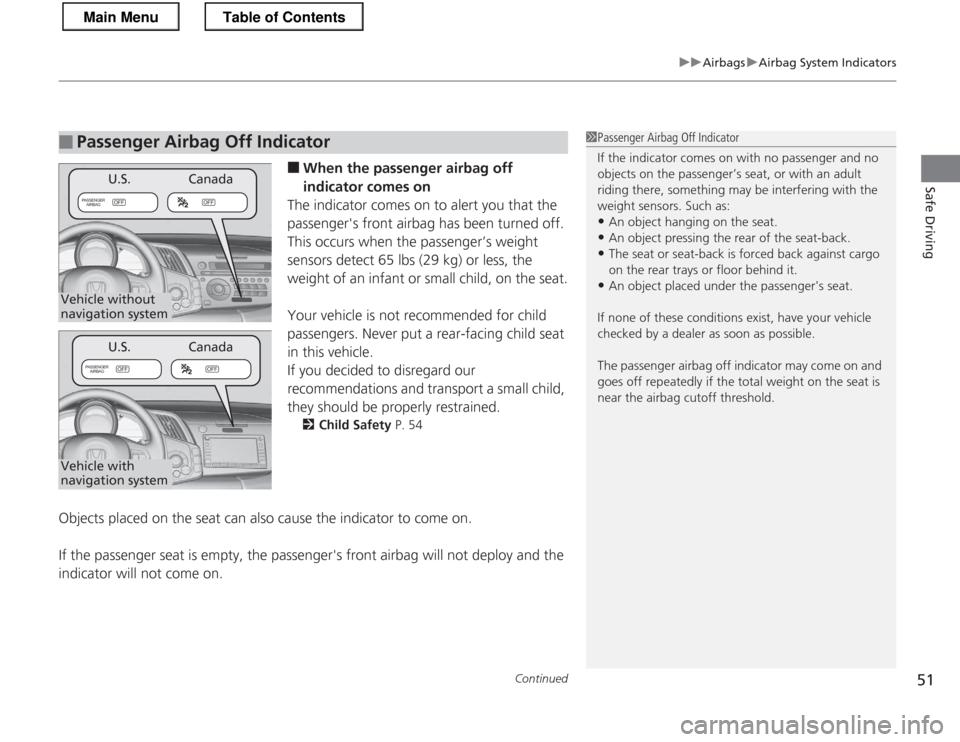
■When the passenger airbag off
indicator comes on
The indicator comes on to alert you that the
passenger's front airbag has been turned off.
This occurs when the passenger’s weight
sensors detect 65 lbs (29 kg) or less, the
weight of an infant or small child, on the seat.
Your vehicle is not recommended for child
passengers. Never put a rear-facing child seat
in this vehicle.
If you decided to disregard our
recommendations and transport a small child,
they should be properly restrained. 2 Child Safety P. 54
Objects placed on the seat can also cause the indicator to come on.
If the passenger seat is empty, the passenger's front airbag will not deploy and the
indicator will not come on.
■Passenger Airbag Off Indicator1Passenger Airbag Off Indicator
If the indicator comes on with no passenger and no objects on the passenger’s seat, or with an adult
riding there, something may be interfering with the weight sensors. Such as: • An object hanging on the seat.
• An object pressing the rear of the seat-back.
• The seat or seat-back is forced back against cargo
on the rear trays or floor behind it.
• An object placed under the passenger's seat.
If none of these conditions exist, have your vehicle
checked by a dealer as soon as possible.
The passenger airba g off indicator may come on and
goes off repeatedly if the total weight on the seat is
near the airbag cutoff threshold.
OFFOFF
PASSENGER
AIRBAG
OFFOFF
PASSENGER
AIRBAG
Canada
U.S.
Canada
Vehicle without
navigation system
Vehicle with
navigation systemU.S.
Main MenuTable of Contents
Page 63 of 325
62
Safe Driving
Exhaust Gas Hazard
Carbon Monoxide Gas
The engine exhaust from this vehicle contains carbon monoxide, a colorless,
odorless, and highly toxic gas. As long as you properly maintain your vehicle, carbon
monoxide gas will not get into the interior. ■ Have the exhaust system inspected for leaks whenever
• The exhaust system is making an unusual noise.
• The exhaust system may have been damaged.
• The vehicle is raised for an oil change.
When you operate a vehicle with the hatch open, airflow can pull exhaust gas into
the interior and create a hazardous condition. If yo u must drive with the hatch open,
open both windows and set the climate control system as shown below. 1. Select the fresh air mode.
2. Select the mode.
3. Set the fan speed to high.
4. Set the temperature control to a comfortable setting.
Adjust the climate control system in the same manner if you sit in your parked
vehicle with the engine running.
1Carbon Monoxide Gas
An enclosed area such as a garage can quickly fill up
with carbon monoxide gas.
Do not run the engine with the garage door closed.
Even when the garage door is open, drive out of the
garage immediately after starting the engine.
3WARNING
Carbon monoxide gas is toxic.
Breathing it can cause unconsciousness and even kill you.
Avoid any enclosed areas or activities that
expose you to carbon monoxide.
Main MenuTable of Contents
Page 128 of 325
127
uuInterior Lights/Interior Convenience ItemsuInterior Convenience Items
Continued
Controls
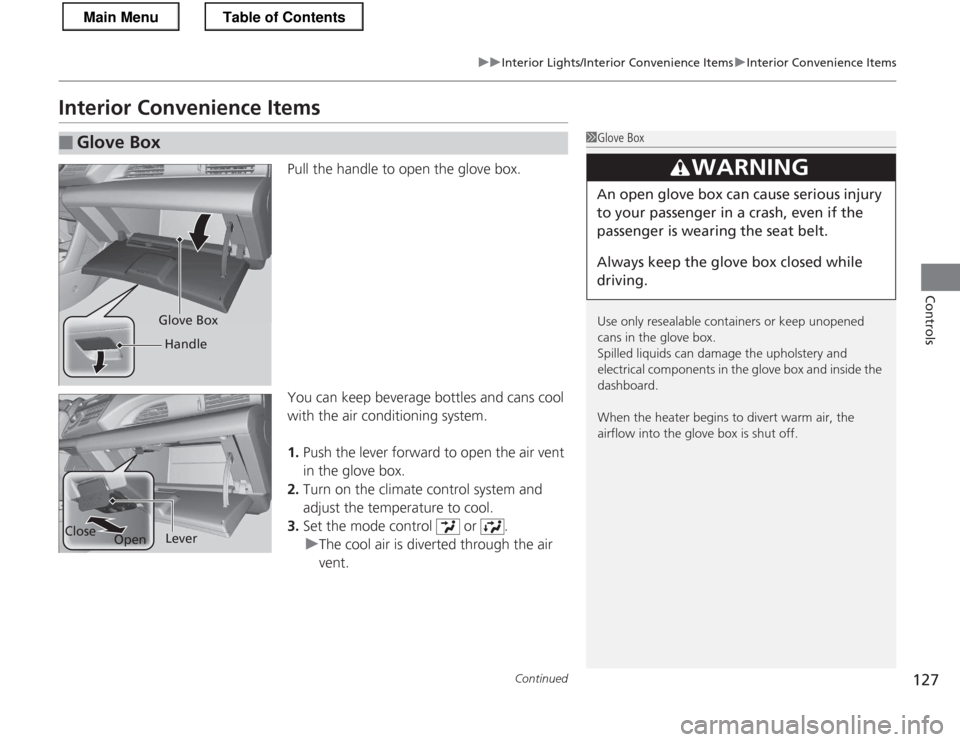
Interior Convenience ItemsPull the handle to open the glove box.
You can keep beverage bottles and cans cool
with the air conditioning system. 1.Push the lever forward to open the air vent
in the glove box.
2. Turn on the climate control system and
adjust the temperature to cool.
3. Set the mode control or .
uThe cool air is diverted through the air vent.
■Glove Box1Glove Box
Use only resealable containers or keep unopened
cans in the glove box.
Spilled liquids can damage the upholstery and
electrical components in the glove box and inside the
dashboard.
When the heater begins to divert warm air, the
airflow into the glove box is shut off.
3WARNING
An open glove box can cause serious injury
to your passenger in a crash, even if the
passenger is wearing the seat belt.
Always keep the glove box closed while
driving.
Glove Box
Handle
Close OpenLever
Main MenuTable of Contents
Page 134 of 325
133
uuInterior Lights/Interior Convenience ItemsuInterior Convenience Items
Controls
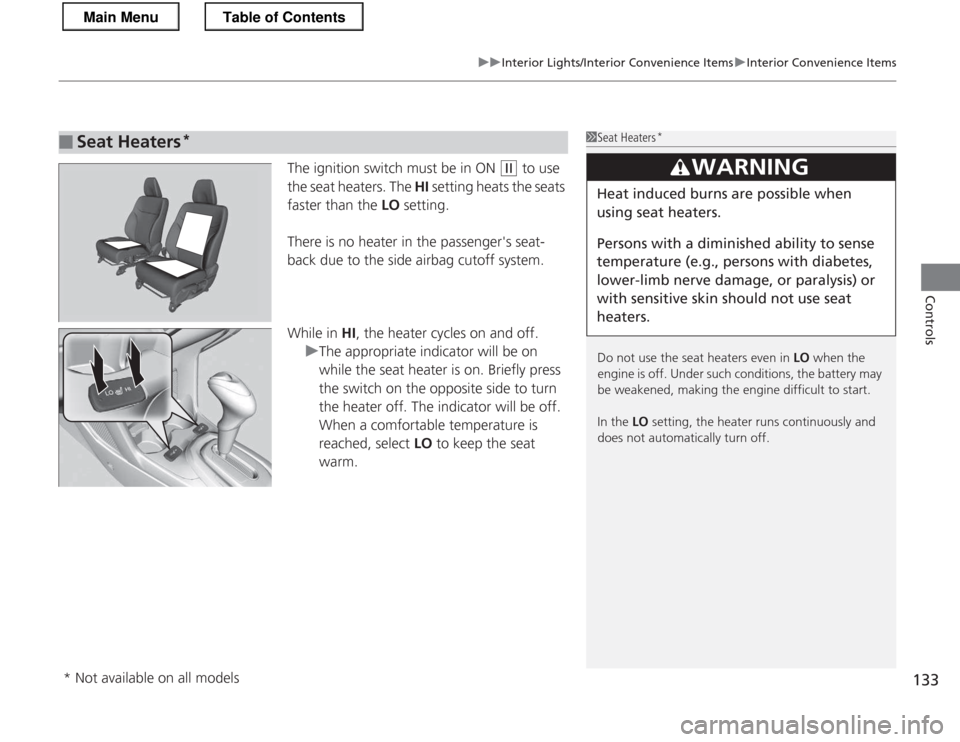
The ignition switch must be in ON (w to use
the seat heaters. The HI setting heats the seats
faster than the LO setting.
There is no heater in the passenger's seat-
back due to the side airbag cutoff system.
While in HI, the heater cycles on and off.
uThe appropriate indicator will be on
while the seat heater is on. Briefly press
the switch on the opposite side to turn
the heater off. The indicator will be off.
When a comfortable temperature is
reached, select LO to keep the seat
warm.
■Seat Heaters *1Seat Heaters
*
Do not use the seat heaters even in LO when the
engine is off. Under such conditions, the battery may
be weakened, making the engine difficult to start.
In the LO setting, the heater runs continuously and
does not automatically turn off.
3WARNING
Heat induced burns are possible when
using seat heaters.
Persons with a diminished ability to sense
temperature (e.g., persons with diabetes,
lower-limb nerve damage, or paralysis) or
with sensitive skin sho uld not use seat
heaters.
* Not available on all models
Main MenuTable of Contents
Page 135 of 325
134
Controls
Climate Control System
Using Automatic Climate Control
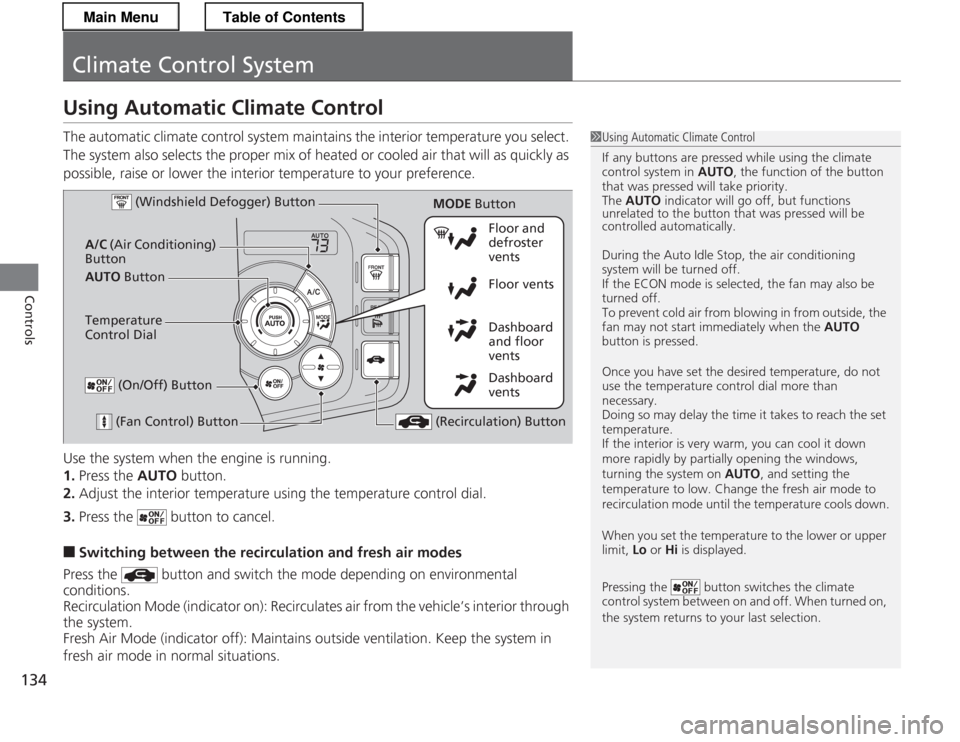
The automatic climate control system maintains the interior temperature you select.
The system also selects the proper mix of heated or cooled air that will as quickly as
possible, raise or lower the interior temperature to your preference.
Use the system when the engine is running. 1.Press the AUTO button.
2. Adjust the interior temperature using the temperature control dial.
3. Press the button to cancel.
■ Switching between the recirculation and fresh air modes
Press the button and switch the mode depending on environmental
conditions.
Recirculation Mode (indicator on): Recirculates air from the vehicle’s interior through
the system.
Fresh Air Mode (indicator off): Maintains outside ventilation. Keep the system in
fresh air mode in normal situations.
1Using Automatic Climate Control
If any buttons are pressed while using the climate control system in AUTO, the function of the button
that was pressed will take priority.
The AUTO indicator will go off, but functions
unrelated to the button that was pressed will be
controlled automatically.
During the Auto Idle Stop, the air conditioning
system will be turned off.
If the ECON mode is selected, the fan may also be
turned off.
To prevent cold air from blowing in from outside, the
fan may not start immediately when the AUTO
button is pressed.
Once you have set the desired temperature, do not use the temperature control dial more than necessary.
Doing so may delay the time it takes to reach the set temperature.
If the interior is very warm, you can cool it down
more rapidly by partially opening the windows,
turning the system on AUTO, and setting the
temperature to low. Change the fresh air mode to
recirculation mode until the temperature cools down.
When you set the temperature to the lower or upper
limit, Lo or Hi is displayed.
Pressing the button switches the climate
control system between on and off. When turned on,
the system returns to your last selection.
Dashboard
vents
Dashboard
and floor
vents
Floor vents
Floor and defroster
vents
AUTO Button
A/C
(Air Conditioning)
Button
(Fan Control) Button
(Recirculation) Button
Temperature
Control Dial (Windshield Defogger) Button
(On/Off) Button
MODE
Button
Main MenuTable of Contents
Page 136 of 325
135
uuClimate Control SystemuUsing Automatic Climate Control
Controls
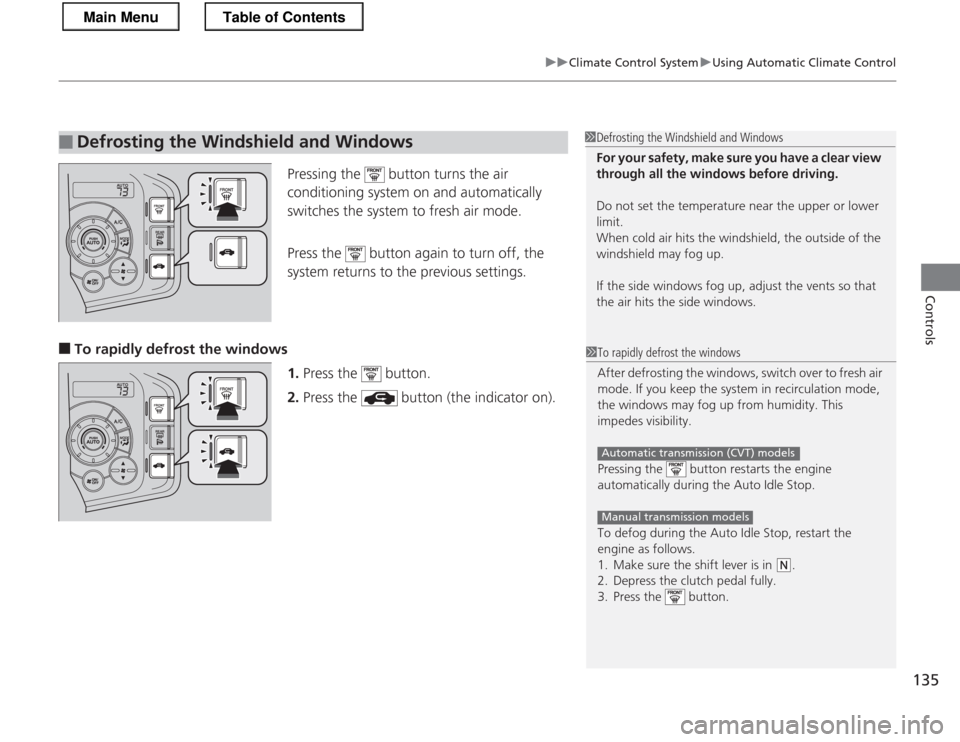
Pressing the button turns the air
conditioning system on and automatically
switches the system to fresh air mode.
Press the button again to turn off, the
system returns to the previous settings.
■ To rapidly defrost the windows
1.Press the button.
2. Press the button (the indicator on).
■Defrosting the Windshield and Windows1Defrosting the Windshield and Windows
For your safety, make sure you have a clear view
through all the windows before driving.
Do not set the temperature near the upper or lower
limit.
When cold air hits the windshield, the outside of the
windshield may fog up.
If the side windows fog up, adjust the vents so that
the air hits the side windows.
1To rapidly defrost the windows
After defrosting the windows, switch over to fresh air
mode. If you keep the system in recirculation mode,
the windows may fog up from humidity. This
impedes visibility.
Pressing the button restarts the engine
automatically during the Auto Idle Stop.
To defog during the Auto Idle Stop, restart the
engine as follows.
1. Make sure the shift lever is in
(N.
2. Depress the clutch pedal fully.
3. Press the button.
Automatic transmission (CVT) models
Manual transmission models
Main MenuTable of Contents