brake HONDA CR-Z 2013 1.G Owner's Manual
[x] Cancel search | Manufacturer: HONDA, Model Year: 2013, Model line: CR-Z, Model: HONDA CR-Z 2013 1.GPages: 325, PDF Size: 11.73 MB
Page 132 of 325
Continued131
uuInterior Lights/Interior Convenience ItemsuInterior Convenience Items
Controls
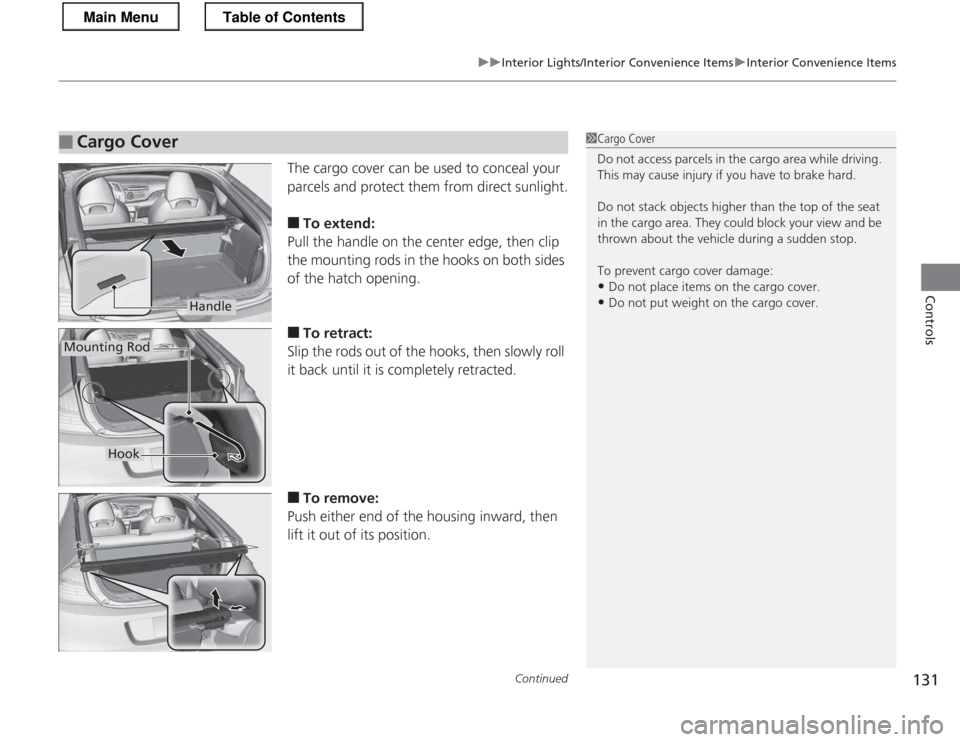
The cargo cover can be used to conceal your
parcels and protect them from direct sunlight. ■To extend:
Pull the handle on the center edge, then clip
the mounting rods in the hooks on both sides
of the hatch opening. ■ To retract:
Slip the rods out of the hooks, then slowly roll
it back until it is completely retracted. ■ To remove:
Push either end of the housing inward, then
lift it out of its position.
■Cargo Cover1Cargo Cover
Do not access parcels in the cargo area while driving.
This may cause injury if you have to brake hard.
Do not stack objects higher than the top of the seat
in the cargo area. They could block your view and be
thrown about the vehicle during a sudden stop.
To prevent cargo cover damage: • Do not place items on the cargo cover.
• Do not put weight on the cargo cover.
Handle
Mounting Rod
Hook
Main MenuTable of Contents
Page 172 of 325
171
Driving
This chapter discusses driving, refueling, and information on items such as accessories.
Before Driving Driving Preparation .............................. 172
Maximum Load Limit............................ 175
Towing a Trailer Towing Your Vehicle ............................ 177
When Driving Starting the Engine .............................. 178
Precautions While Driving..................... 181
Automatic Transmission (CVT) .............. 182
Shifting ................................................ 183
Shifting ................................................ 188
Automatic transmission (CVT) models
Manual transmission models
Auto Idle Stop ..................................... 191
Auto Idle Stop ..................................... 194
3-Mode Drive System........................... 197
Plus Sport System ................................ 198
Cruise Control ..................................... 200
VSA ® (Vehicle Stability Assist), aka ESC
(Electronic Stability Control), System .. 203
TPMS (Tire Pressure Monitoring System) ........ 205
Tire Pressure Monitoring System (TPMS) -
Required Federal Explanation ............. 206
Braking
Brake System ....................................... 208
Automatic transmission (CVT) models
Manual transmission models
ABS (Anti-lock Brake System) ................ 210
Brake Assist System .............................. 211
Parking Your Vehicle When Stopped ..................................... 212
Multi-View Rear Camera .................. 213
Rearview Camera ............................. 214
Refueling Fuel Information ................................... 216
How to Refuel ...................................... 217
Fuel Economy
Improving Fuel Economy....................... 219
Accessories and Modifications
Accessories ........................................... 220
Modifications ....................................... 220
Main Menu
Page 174 of 325
Continued173
uuBefore DrivinguDriving Preparation
Driving
•Store or secure all items on board properly.
uCarrying too much cargo, or improperly storing it, can affect your vehicle's
handling, stability, stopping distance, and tires, and make it unsafe.
2 Maximum Load Limit P. 175
• Do not pile items higher than the seat height.
uThey can block your view and may be thrown forward in the event of sudden
braking.
• Do not place anything in the seat footwells. Make sure to secure the floor mats.
uAn object or unsecured floor mat can interfere with your brake and accelerator
pedal operation while driving.
• If you have any animals on board, do not let them move around in the vehicle.
uThey may interfere with driving and a crash could occur.
• Securely close and lock both doors and the hatch.
2 Locking/Unlocking the Doors from the Inside P. 102
• Adjust your seating position properly.
2 Adjusting the Seats P. 121
• Adjust the mirrors and steering wheel properly for your driving.
uAdjust them while sitting in the proper driving position.
2 Adjusting the Mirrors P. 119
2 Adjusting the Steering Wheel P. 118
■Interior Checks1Interior Checks
The headlight aim is set by the factory, and does not
need to be adjusted. However, if you regularly carry
heavy items in the cargo area, have the aiming
readjusted at a dealer or by a qualified technician.
Main MenuTable of Contents
Page 179 of 325
178
Driving
When Driving
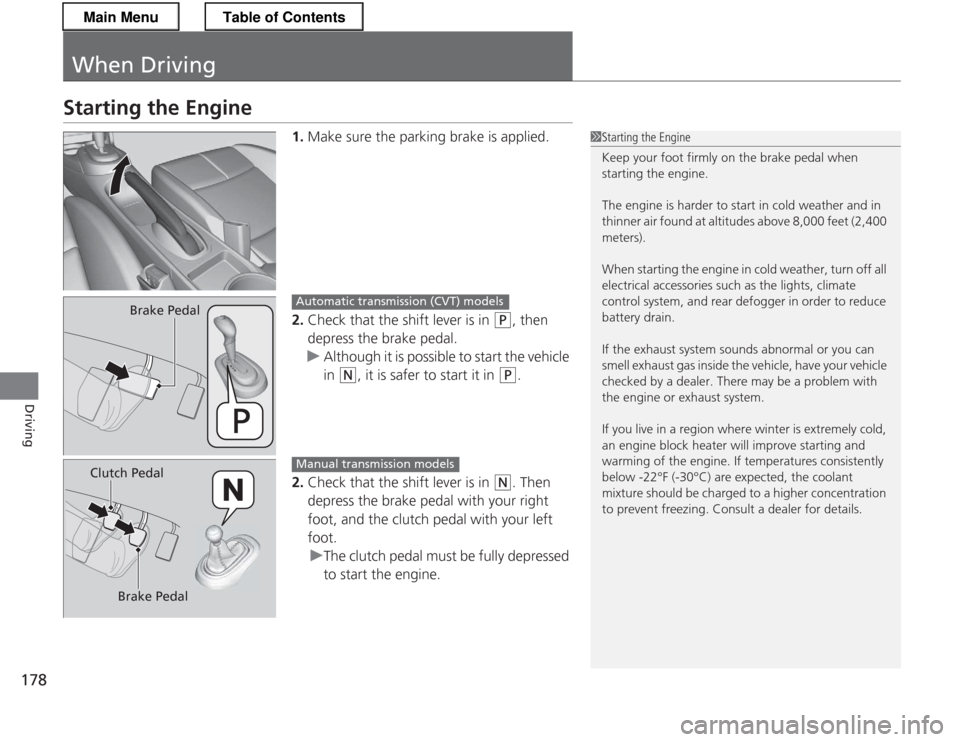
Starting the Engine1.Make sure the parking brake is applied.
2. Check that the shift lever is in
(P , then
depress the brake pedal.
uAlthough it is possible to start the vehicle in
(N , it is safer to start it in (P.
2. Check that the shift lever is in
(N . Then
depress the brake pedal with your right
foot, and the clutch pedal with your left foot.
uThe clutch pedal must be fully depressed
to start the engine.
1Starting the Engine
Keep your foot firmly on the brake pedal when starting the engine.
The engine is harder to start in cold weather and in
thinner air found at altitudes above 8,000 feet (2,400 meters).
When starting the engine in cold weather, turn off all
electrical accessories such as the lights, climate
control system, and rear defogger in order to reduce
battery drain.
If the exhaust system sounds abnormal or you can
smell exhaust gas inside the vehicle, have your vehicle
checked by a dealer. There may be a problem with
the engine or exhaust system.
If you live in a region where winter is extremely cold,
an engine block heater will improve starting and
warming of the engine. If temperatures consistently
below -22°F (-30°C) are expected, the coolant
mixture should be charged to a higher concentration
to prevent freezing. Consult a dealer for details.
Brake PedalAutomatic transmiss ion (CVT) models
Clutch Pedal
Brake PedalManual transmission models
Main MenuTable of Contents
Page 180 of 325
Continued179
uuWhen DrivinguStarting the Engine
Driving
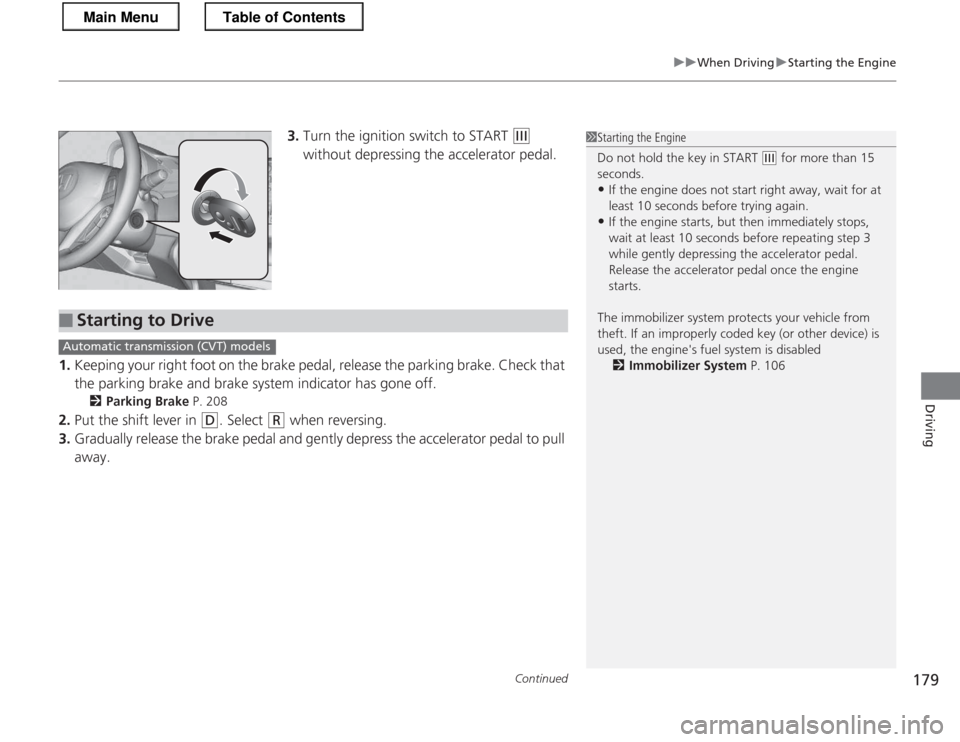
3.Turn the ignition switch to START (e
without depressing the accelerator pedal.
1. Keeping your right foot on the brake pedal, release the parking brake. Check that
the parking brake and brake system indicator has gone off.
2 Parking Brake P. 208
2. Put the shift lever in
(D . Select (R when reversing.
3. Gradually release the brake pedal and gently depress the accelerator pedal to pull
away.
1Starting the Engine
Do not hold the key in START
(e for more than 15
seconds.
• If the engine does not start right away, wait for at least 10 seconds before trying again.
• If the engine starts, but then immediately stops,
wait at least 10 seconds before repeating step 3
while gently depressing the acce lerator pedal.
Release the accelerator pedal once the engine
starts.
The immobilizer system protects your vehicle from
theft. If an improperly coded key (or other device) is
used, the engine's fuel system is disabled 2 Immobilizer System P. 106
■Starting to Drive
Automatic transmission (CVT) models
Main MenuTable of Contents
Page 181 of 325
uuWhen DrivinguStarting the Engine
180
Driving
■ Creep aid system
With the shift lever in
(D or (N , this feature applies brake pressure briefly as you
release the brake pedal to prevent the vehicle from moving unexpectedly.
■ Hill start assist system
Hill start assist keeps the brake engaged briefly to help prevent the vehicle from
rolling on inclines as you move your foot from the brake pedal to the accelerator.
Depress the clutch pedal, and shift to
(1 when facing uphill, or (R when facing
downhill, then release the brake pedal. Move the shift lever to
(D or select the L mode when facing uphill, or (R when
facing downhill, then release the brake pedal.
Automatic transmiss ion (CVT) models
Manual transmission models
Automatic transmission (CVT) models
1Hill start assist system
Hill start assist may not prevent the vehicle from
rolling downhill on a very steep or slippery slope, and
does not operate on small inclines.
Hill start assist is not a replacement for the parking
brake.
Hill start assist will still operate even when VSA ® is
switched off.
Main MenuTable of Contents
Page 182 of 325
181
uuWhen DrivinguPrecautions While Driving
Driving
Precautions While Driving
Avoid driving in deep water and on flooded roads. This can damage the engine and
driveline, and cause electrical component failure.
If there is a strong impact with something under the vehicle, stop in a safe location.
Check the underside of the vehicle for damage or any fluid leaks.
■In Rain
■Other Precautions
1Precautions While Driving
NOTICE
Do not operate the shift lever while pressing the
accelerator pedal. You could damage the
transmission.
If the ignition switch is turned to ACCESSORY
(q or
LOCK
(0 while driving, the engine will shut down
and all steering and brake power assist functions will
stop, making it difficult to control the vehicle.
Do not put the shift lever in
(N , as you will lose
engine braking (and acceleration) performance.
During the first 600 miles (1,000 km) of operation,
avoid sudden acceleration or full throttle operation so
as to not damage the engine or powertrain.
Avoid hard braking for the first 200 miles (300 km).
You should also follow this when the brake pads are replaced.
NOTICE
Following can damage the under spoiler: • Parking the vehicle by a parking block
• Parallel parking along the road shoulder
• Driving towards the bottom of a hill
• Driving up or down to a different surface level
(such as a road shoulder)
• Driving on a rutted or bumpy road
• Driving on a road with potholes
Main MenuTable of Contents
Page 183 of 325
182
uuWhen DrivinguAutomatic Transmission (CVT)
Driving
Automatic Transmission (CVT)
The engine runs at higher idle speed and creeping increases.
Keep the brake pedal firmly depressed when stopped.
Quickly depressing the accelerator pedal while driving uphill may cause the
transmission to drop to a lower ratio, unexpectedly increasing vehicle speed.
Depress the accelerator pedal carefully, especially on slippery roads and curves.
■Creeping
■Kickdown
Main MenuTable of Contents
Page 184 of 325
183
uuWhen DrivinguShifting
Continued
Driving
Shifting
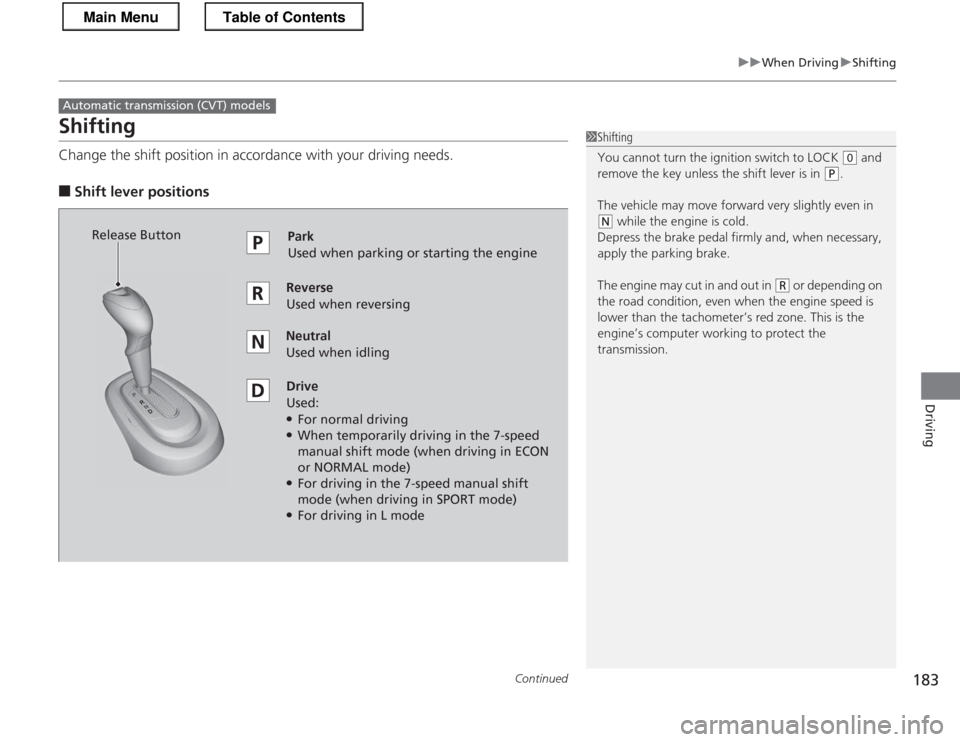
Change the shift position in accordance with your driving needs.
■ Shift lever positions
Automatic transmiss ion (CVT) models
1Shifting
You cannot turn the ignition switch to LOCK
(0 and
remove the key unless the shift lever is in
(P.
The vehicle may move forward very slightly even in
(N while the engine is cold.
Depress the brake pedal firmly and, when necessary,
apply the parking brake.
The engine may cut in and out in
(R or depending on
the road condition, even when the engine speed is
lower than the ta chometer’s red zone. This is the
engine’s computer working to protect the
transmission.
Park
Used when parking or starting the engine
ReverseUsed when reversing
Neutral Used when idling
Drive Used:● For normal driving
● When temporarily driving in the 7-speed
manual shift mode (when driving in ECON
or NORMAL mode)
● For driving in the 7-speed manual shift
mode (when driving in SPORT mode)
● For driving in L mode
Release Button
Main MenuTable of Contents
Page 185 of 325
uuWhen DrivinguShifting
184
Driving
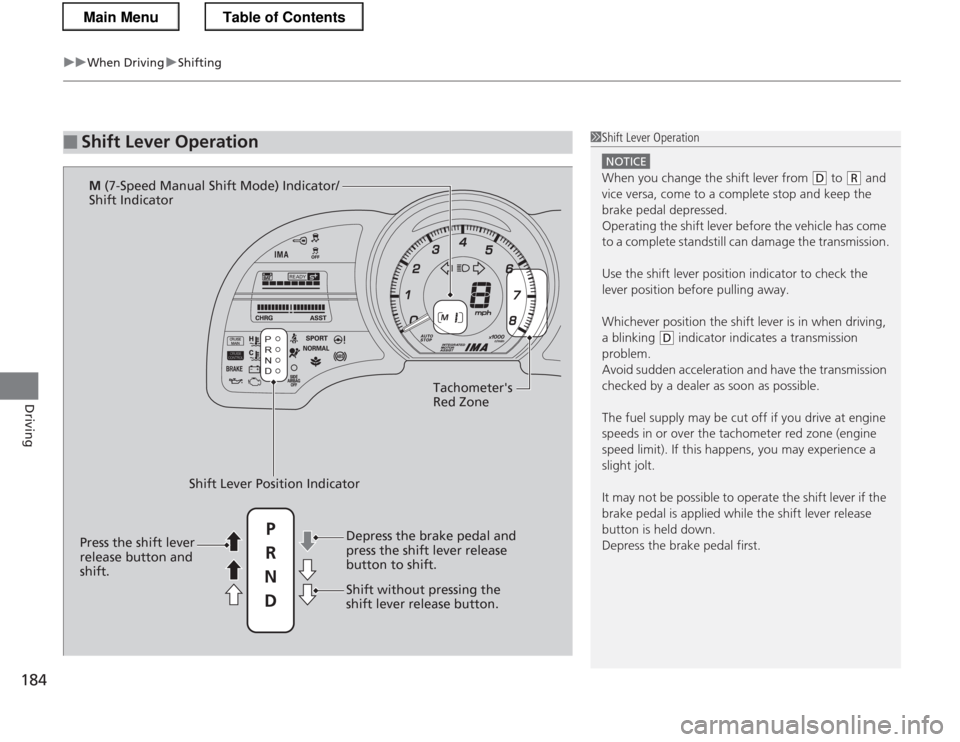
■Shift Lever Operation1Shift Lever Operation
NOTICE
When you change the shift lever from (D to (R and
vice versa, come to a complete stop and keep the brake pedal depressed.
Operating the shift lever before the vehicle has come
to a complete standstill can damage the transmission.
Use the shift lever position indicator to check the
lever position before pulling away.
Whichever position the shift lever is in when driving,
a blinking
(D indicator indicates a transmission
problem.
Avoid sudden acceleration and have the transmission
checked by a dealer as soon as possible.
The fuel supply may be cut off if you drive at engine
speeds in or over the tachometer red zone (engine
speed limit). If this happens, you may experience a
slight jolt.
It may not be possible to operate the shift lever if the
brake pedal is applied while the shift lever release
button is held down. Depress the brake pedal first.
READY
Tachometer's
Red Zone
Shift Lever Position Indicator Depress the brake pedal and
press the shift lever release
button to shift.
Shift without pressing the
shift lever release button.
Press the shift lever
release button and
shift. M
(7-Speed Manual Shift Mode) Indicator/
Shift Indicator
P
R
N D
Main MenuTable of Contents